


A public-network PTT dispatch system uses the internet and mobile operator networks to deliver push-to-talk communication, voice dispatch, positioning, video interaction, and integrated command functions. It is often called PoC, or Push-to-Talk over Cellular. Compared with traditional private trunked radio systems, PoC is easier to deploy, less expensive to operate, and more suitable for organizations that need wide-area communication without building their own radio base stations.
For many industry users, the value is not limited to “talking like a walkie-talkie.” Because public-network PTT runs over 4G, 5G, broadband, or cloud networks, it can also support location services, visual intercom, audio and video dispatch, SIP calling, GIS-based management, and integration with other communication systems. When the platform is deployed independently, the organization can control users, groups, servers, data, gateways, and expansion strategy more flexibly.
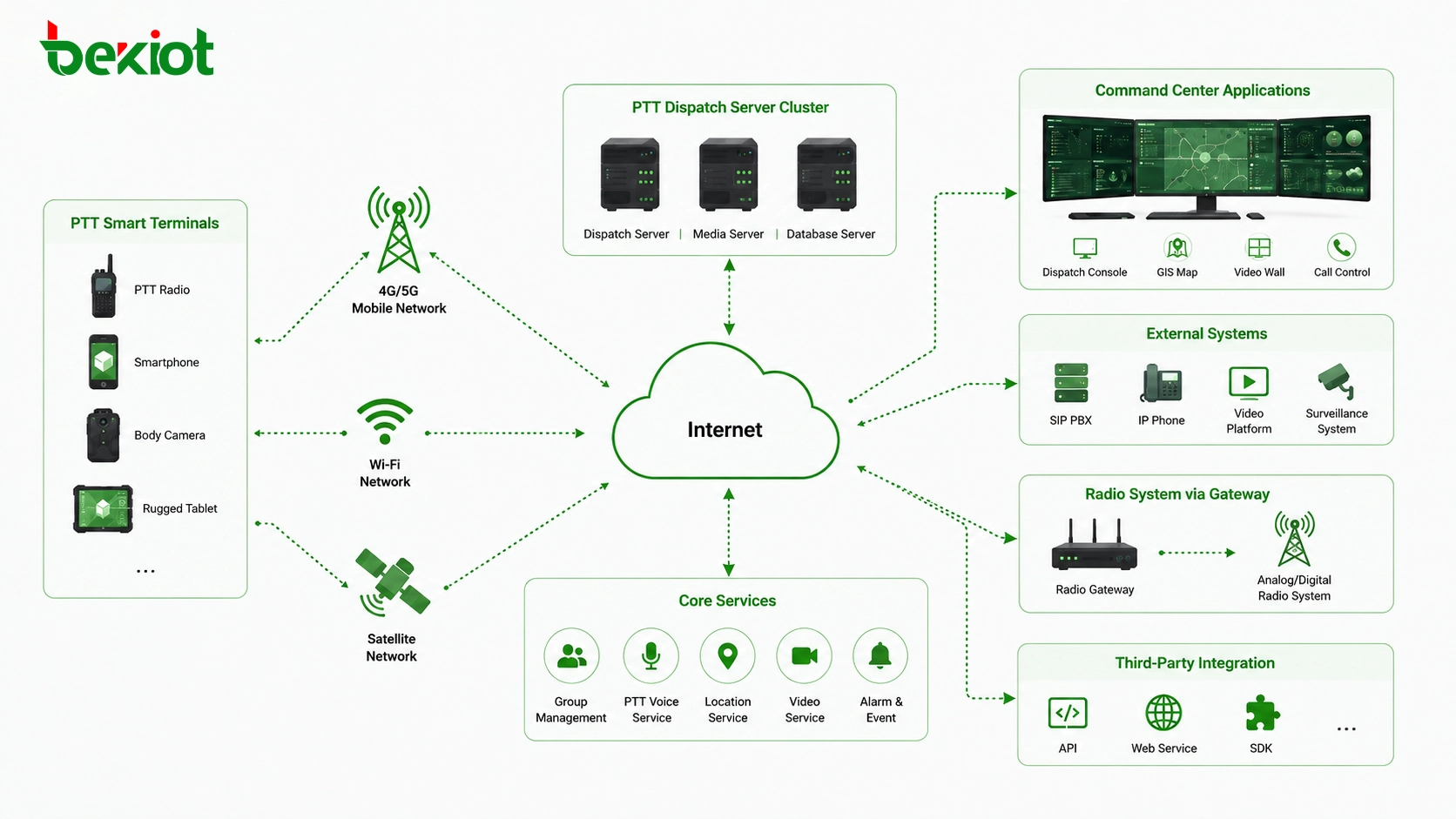
Start with the Deployment Model
Before choosing hardware or software, the first decision is whether the system should use an operator-hosted service or a self-hosted deployment. These two models look similar from the user side, but they are very different in system control, integration depth, customization, and long-term operation.
An operator-hosted model is usually provided by a telecom operator or service provider. Users do not need to build their own server environment. They pay a service fee, register terminals, and use the platform according to the provider’s service package. This model is simple, fast, and suitable for users who only need standard group communication functions.
However, operator-hosted services are often limited in customization. If a project needs deep integration with video surveillance, drones, telephone systems, private radio networks, emergency platforms, or internal business systems, a self-hosted model is usually more practical.
When a Self-Built Platform Makes More Sense
A self-hosted public-network PTT dispatch system is more suitable for command and dispatch scenarios. In this model, PoC is not only a communication function. It becomes part of a broader dispatch platform that may include voice command, video dispatch, GIS positioning, SIP interconnection, alarm linkage, and multi-system integration.
This approach gives the user more control over terminals, server deployment, feature definition, network integration, and data management. It is especially useful for emergency response, industrial parks, transportation, utilities, property management, security operations, large campuses, logistics fleets, and field service teams.
The key advantage is flexibility. The project owner can define how groups are organized, how dispatch permissions are assigned, how third-party systems are connected, and how future expansion should be planned. For example, a system can begin with simple PTT voice communication, then gradually add GIS positioning, video calls, voice recording, SIP trunk interconnection, radio gateway integration, and emergency broadcast linkage.
Evaluate Real Communication Requirements First
A successful deployment should begin with actual workflow analysis rather than equipment selection. The project team should identify how many users will join the system, how many teams or departments need separate groups, whether dispatchers need to monitor multiple groups at the same time, and whether field users need private calls, emergency calls, location reporting, or video upload.
Coverage conditions should also be checked early. Since PoC depends on mobile network or broadband access, poor signal areas, underground spaces, remote routes, tunnels, factories with metal structures, and temporary construction sites may need additional planning. In some projects, public mobile networks can be combined with Wi-Fi, private 5G, satellite links, or local broadband to improve availability.
The final solution should be based on communication risk. Routine property management may only need basic voice and location functions. A transportation command center, emergency rescue team, or industrial safety project may require redundant servers, recording, priority calling, video dispatch, gateway interconnection, and stronger security control.
Step One: Prepare the Network Environment
A public-network PTT system depends on internet connectivity. Before deployment, the network environment must be planned clearly. The dispatch server needs stable broadband access, sufficient bandwidth, and a reliable network connection so that terminals can communicate with the platform.
For a local server deployment, a public IP address is usually required. This allows external PoC terminals, smart devices, and dispatch clients to connect back to the server through the public network. If the site does not have suitable broadband or a public IP address, cloud deployment can be considered.
In cloud deployment, the dispatch server software can be installed on a cloud server provided by platforms such as Alibaba Cloud, Tencent Cloud, or other infrastructure providers. The final choice depends on user scale, bandwidth demand, data security requirements, remote access needs, and maintenance capability.
Network security should not be ignored. Firewall rules, access control policies, server ports, domain name resolution, administrator accounts, and remote maintenance permissions should be configured carefully. If the system is used for public safety, industrial command, or emergency response, backup network access and server monitoring should also be considered.
Step Two: Deploy the Dispatch Server
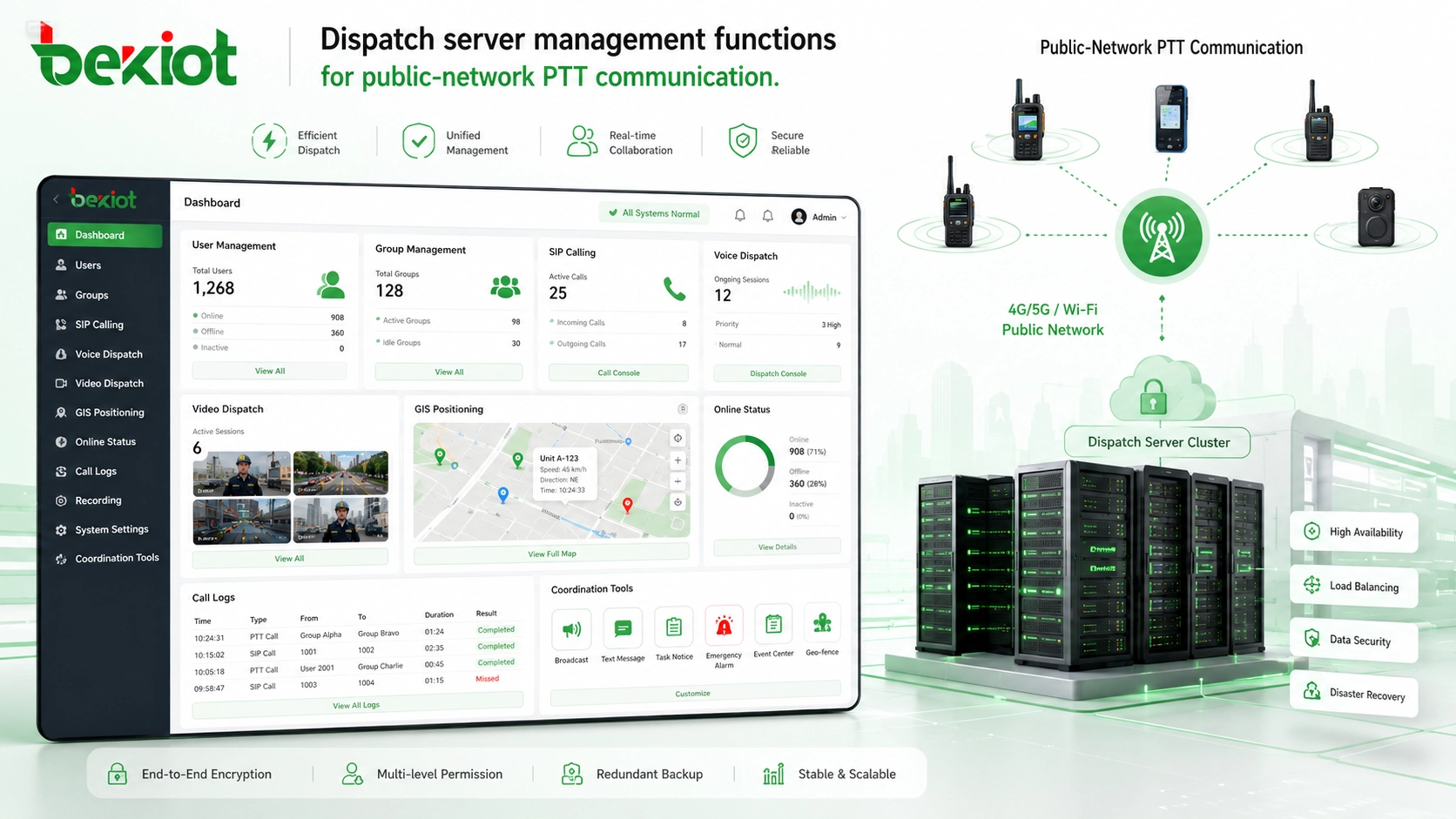
The dispatch server is the core of the public-network PTT system. It provides the main service capabilities for group communication, user management, dispatch control, SIP calling, voice dispatch, video dispatch, GIS positioning, and system integration.
A complete dispatch server should support user accounts, group management, call permissions, terminal registration, voice channels, location reporting, dispatch console access, and system configuration. For professional projects, open SIP protocol support is also important because it allows the platform to connect with IP PBX systems, SIP phones, broadcast gateways, telephone gateways, and other communication equipment.
The server can be deployed in a local equipment room or on a cloud server. Local deployment gives the organization more control over infrastructure and data. Cloud deployment is easier to expand and can reduce the need for physical server rooms. The right option should be selected according to project budget, IT capability, security policy, and expected user volume.
For medium and large projects, server performance and redundancy should be planned in advance. CPU, memory, storage, bandwidth, database capacity, recording storage, and concurrent user capacity all affect long-term stability. If the system needs 24/7 operation, administrators should also prepare backup, log review, fault alarm, and recovery procedures.
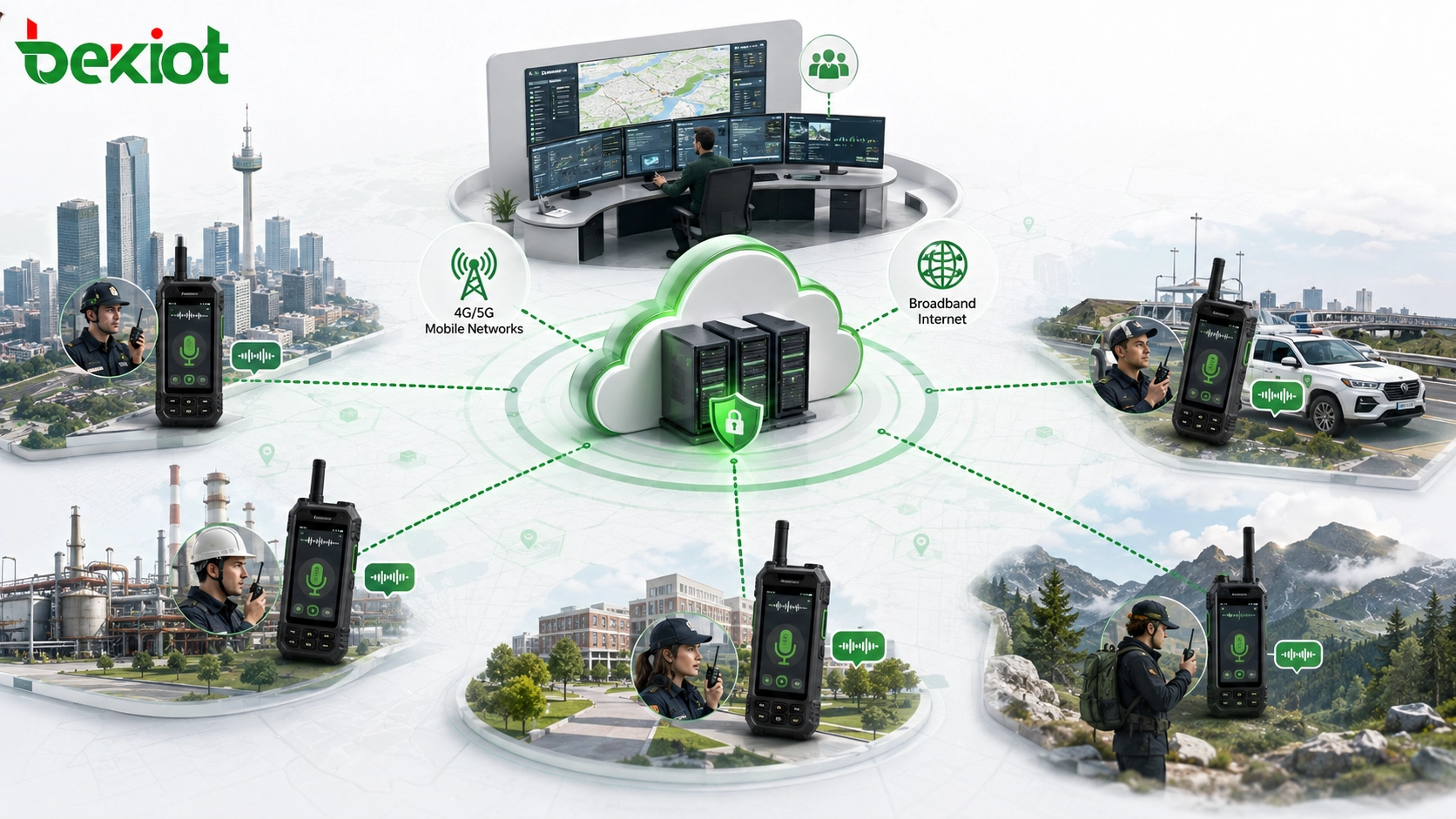
Step Three: Choose Suitable Field Terminals
Public-network PTT systems are commonly used with rugged smart terminals. These devices run a PoC application and usually include a dedicated PTT button, making the user experience similar to a traditional walkie-talkie while still supporting broadband network services.
Different projects can choose different terminal levels. Basic terminals are suitable for voice-only communication. Mid-range terminals can support positioning, group management, and routine dispatch. Higher-end smart terminals may include a larger touchscreen, camera, video call support, and richer field operation functions.
Terminal selection should be based on the actual working environment. Outdoor security teams, construction workers, utility patrol staff, and industrial users may need rugged devices with stronger protection. Office or command users may prefer dispatch clients, tablets, desktop consoles, or software-based terminals.
In addition to hardware durability, the user experience should be tested. The PTT button must be easy to operate with gloves, the speaker should be loud enough for noisy environments, the battery should support the expected shift length, and the device should be easy for non-technical users to learn. A good terminal strategy reduces training pressure and improves system adoption.
Step Four: Plan SIM Cards and Data Usage
Because public-network PTT depends on mobile internet access, field terminals need data connectivity. In many projects, IoT SIM cards or operator data cards are used to provide network access for PoC terminals.
One important cost advantage is that voice-based PoC communication usually consumes much less data than video services. If a project mainly uses audio PTT, the annual data cost per terminal can be very low. In some basic voice-only use cases, a small traffic package may be enough for long-term operation.
If the system also uses video calls, video dispatch, image upload, or real-time monitoring, a larger data plan should be selected. The project team should estimate monthly traffic according to the number of users, communication frequency, video resolution, location reporting interval, and expected emergency usage.
For organizations with many users, SIM card management also matters. Cards should be registered, grouped, monitored, and replaced according to clear rules. If one operator has weak coverage in certain areas, dual-operator or multi-operator card strategies may be considered to improve field reliability.
Step Five: Use Gateways for System Integration
Gateways are important when a self-hosted PTT dispatch system needs to connect with other communication systems. Instead of forcing every function into the dispatch platform itself, gateways can provide cleaner and more stable integration between different networks and devices.
For example, if the public-network PTT system needs to connect with a telephone system, a telephone gateway can be used to bridge the dispatch platform with IP PBX, SIP trunk, PSTN, or analog phone resources. This allows dispatchers and field users to communicate with office extensions or external phone numbers when required.
If the system needs to connect with existing private radio networks, a RoIP gateway or trunking gateway can help bridge public-network PTT users with traditional two-way radios. This is useful for organizations that want to keep existing radio assets while extending communication to mobile broadband users.
Video access gateways, drone video gateways, and video conference gateways can also be used when the project needs to connect surveillance cameras, UAV video, meeting systems, or third-party platforms. This makes the dispatch system more suitable for command centers and emergency coordination environments.
For projects that require SIP interconnection, radio integration, paging linkage, or dispatch platform compatibility, Becke Telcom can be considered as a solution reference for gateways, dispatch communication, SIP endpoints, and converged communication deployment.
What the Complete System Usually Includes
A complete self-hosted public-network PTT dispatch system normally includes several layers. The network layer provides broadband, public IP access, mobile data, or cloud infrastructure. The platform layer provides dispatch server software, user management, voice services, GIS services, and integration interfaces.
The terminal layer includes rugged smart PoC terminals, mobile applications, desktop dispatch clients, tablets, SIP phones, or command-center consoles. The integration layer may include telephone gateways, RoIP gateways, broadcast gateways, video gateways, drone gateways, and API interfaces.
This layered design is important because it makes the system easier to expand. A project can begin with basic PTT communication and later add SIP calling, video dispatch, GIS positioning, private radio interconnection, emergency broadcasting, or command platform integration.
For complex sites, the system can also be connected with alarms, access control, CCTV platforms, public address systems, and emergency notification devices. In this way, the dispatch platform becomes more than a voice tool. It becomes part of the organization’s daily operation and emergency response workflow.
Budget Should Follow the Real Workflow
The cost of a self-hosted public-network PTT dispatch system depends on user scale, server type, terminal quantity, data traffic, gateway requirements, and integration depth. A small team may only need a cloud server, PoC terminals, SIM cards, and basic dispatch software. A larger project may need redundant servers, multiple gateways, dispatch seats, video resources, GIS functions, and custom integration.
Before purchasing equipment, the project team should first define who needs to communicate, where the users are located, what networks are available, which systems must be integrated, and what emergency workflows must be supported.
This approach prevents overbuilding the system at the beginning and also avoids choosing a platform that cannot expand later. A well-planned system should support current needs while leaving room for future terminals, gateways, groups, dispatch seats, and integration modules.
Operation and Maintenance Should Be Planned Early
A self-hosted system gives the organization more control, but it also requires clearer maintenance responsibility. Administrators should know how to add users, create groups, change permissions, check online status, review logs, update terminals, and handle abnormal connections.
For long-term use, the system should have a maintenance process for server backup, database cleanup, software updates, terminal replacement, SIM card renewal, and fault reporting. If recording, location history, or video files are stored on the server, storage capacity and retention policy should be reviewed regularly.
Training is also important. Dispatchers should understand group calling, emergency calling, monitoring, location viewing, gateway calling, and basic troubleshooting. Field users should know how to use the PTT button, switch groups, report emergencies, charge devices, and confirm network status.
Common Deployment Mistakes to Avoid
One common mistake is focusing only on terminal price while ignoring server performance, data traffic, and long-term platform operation. In a self-hosted model, the dispatch server is the center of the system, so its stability and maintenance plan are just as important as terminal selection.
Another mistake is ignoring public network access conditions. If the server cannot be reached reliably by field terminals, the system will not work smoothly even if the application functions are complete. Public IP planning, domain name resolution, firewall policy, bandwidth, and cloud security settings should be checked early.
A third mistake is treating integration as an afterthought. If telephone, radio, video, drone, or alarm integration is required, gateways and interfaces should be planned at the beginning. Otherwise, later expansion may become more complicated and more expensive.
Why Self-Hosting Is Better for Dispatch-Oriented Users
For users who only need standard PTT communication, an operator-hosted model may be enough. But for users who care about command, dispatch, integration, security, and long-term expansion, a self-hosted public-network PTT system provides more autonomy.
It allows the organization to decide its own system architecture, user permissions, terminal strategy, gateway configuration, data policy, and integration roadmap. This is especially important when PoC is only one part of a wider command and communication system.
In practical terms, self-hosting is not difficult if the deployment steps are clear. The project needs a suitable network environment, dispatch server, field terminals, data access, and gateway integration plan. Once these elements are planned correctly, the system can provide flexible and scalable communication for daily operation and emergency response.
FAQ
Does every self-hosted PTT system need a public IP address?
A public IP address is usually required for local server deployment so that remote terminals can connect back to the platform. If a public IP is not available, cloud deployment or suitable network traversal methods should be considered.
Can a public-network PTT system work without 5G?
Yes. Many PoC systems can run over 4G, Wi-Fi, or wired broadband. 5G can improve bandwidth and latency for video and high-density scenarios, but basic voice PTT does not always require 5G.
How should user permissions be designed?
Permissions should follow the organization’s real command structure. Administrators, dispatchers, supervisors, team leaders, and field users may need different access levels for groups, calling rights, location viewing, recording, and emergency functions.
Is recording necessary for a dispatch system?
Recording is not mandatory for every project, but it is useful for incident review, operation auditing, dispute handling, training, and emergency response analysis. If recording is required, storage capacity and retention policy should be planned in advance.
What should be tested before the system goes live?
The project team should test terminal registration, group calling, private calling, dispatch console operation, location reporting, server reachability, SIM data stability, gateway interconnection, emergency call handling, and recovery after network interruption.







