


Power utilities require highly reliable communication for emergency response, production coordination, dispatch command, maintenance collaboration, anti-accident drills, and daily office meetings. In this environment, audio conferencing is not just a meeting tool. It is a critical communication channel that must remain available when networks, sites, or operational conditions become complex.
Many existing conferencing systems in the power sector were deployed more than ten years ago. Some still rely on early CPCI industrial computer architecture, have limited functions, are expensive to maintain, and are difficult to expand. A modern upgrade should preserve familiar user habits while improving capacity, reliability, integration, and emergency response capability.
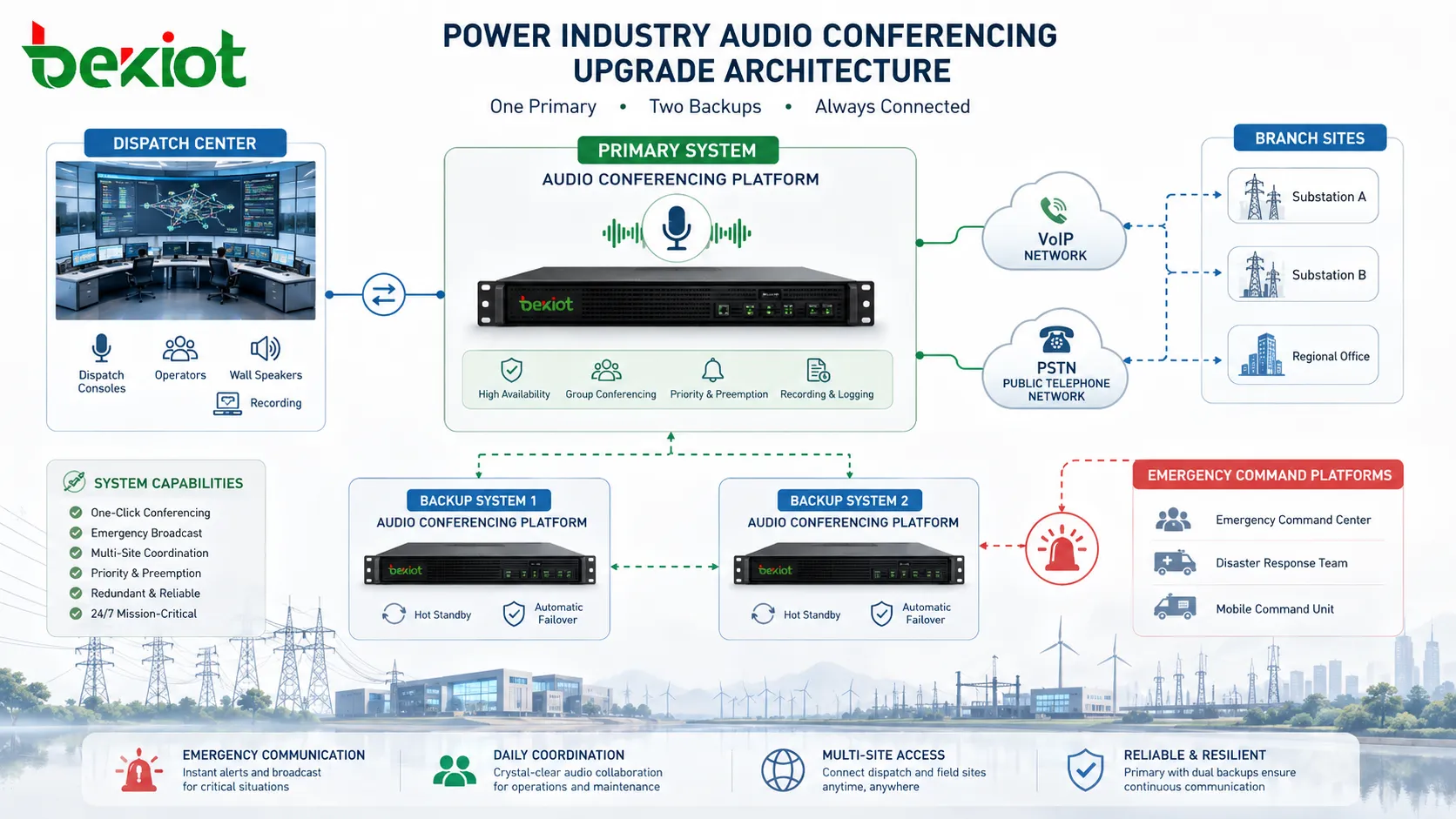
The power industry has strict requirements for emergency communication. In many projects, system planning must consider a one-primary and two-backup design to ensure that communication services can continue during faults, network interruptions, or unexpected emergencies. Audio conferencing and video conferencing are often used together so that voice communication can remain available even when visual collaboration is affected.
Traditional systems may still support basic meetings, but they often lack flexible access, unified control, high-capacity expansion, and integration with modern command platforms. When a system depends on aging hardware and manual maintenance, the risk increases during emergency dispatch or large-scale coordination.
A modern power industry conferencing solution should support daily office meetings, emergency command meetings, video conferencing backup, anti-accident drills, and cross-department coordination. It should also connect with existing softswitch platforms, telecom operator networks, gateway devices, and enterprise management systems without forcing users to change their familiar meeting habits.
The most practical upgrade strategy is not to replace every part of the old communication environment at once. Instead, the conferencing system should be modernized through smooth reconstruction. Existing meeting access numbers, dialing behavior, network topology, and operation logic can be retained as much as possible.
This approach reduces training pressure and helps dispatchers, operators, office staff, and emergency teams continue using the system in a familiar way. At the same time, the new platform can improve system capacity, call processing performance, reliability, and integration capability.
For power utilities with multiple substations, operation centers, administrative offices, and emergency command rooms, this smooth migration model is especially important. It allows the organization to upgrade the communication backbone while reducing service interruption risk.
A power industry audio conferencing platform should support standard server deployment, virtualized deployment, and cloud-based deployment. This allows the system to match different project environments, including local data centers, private cloud resources, disaster recovery sites, and hybrid networks.
In high-capacity scenarios, a single system should be able to support more than 1,000 concurrent conference participants. This scale is suitable for large dispatch meetings, regional emergency response, group-wide coordination, production safety meetings, and multi-level command communication.
Protocol compatibility is also essential. Support for SIP and H.323 helps the conferencing platform connect with existing softswitch systems, video conferencing platforms, IP phones, conference terminals, and unified communication systems. Where traditional telecom resources remain in use, the solution should also support interconnection through gateway devices, SS7 signaling, ISDN-PRI, and operator networks.
| Upgrade Area | Legacy Challenge | Recommended Capability |
|---|---|---|
| System Architecture | Aging CPCI hardware and limited expansion | Standard server, virtualization, or cloud deployment |
| Capacity | Limited conference scale during emergency coordination | More than 1,000 concurrent participants per system |
| Network Access | Separated VoIP, PSTN, and legacy network resources | Mixed VoIP and PSTN conferencing with SIP, H.323, SS7, and ISDN-PRI support |
| Reliability | Single-point risk and slow recovery | High availability, dual-server backup, and real-time data synchronization |
| Integration | Manual operation and isolated conferencing functions | API integration with emergency command centers, OA systems, and dispatch platforms |
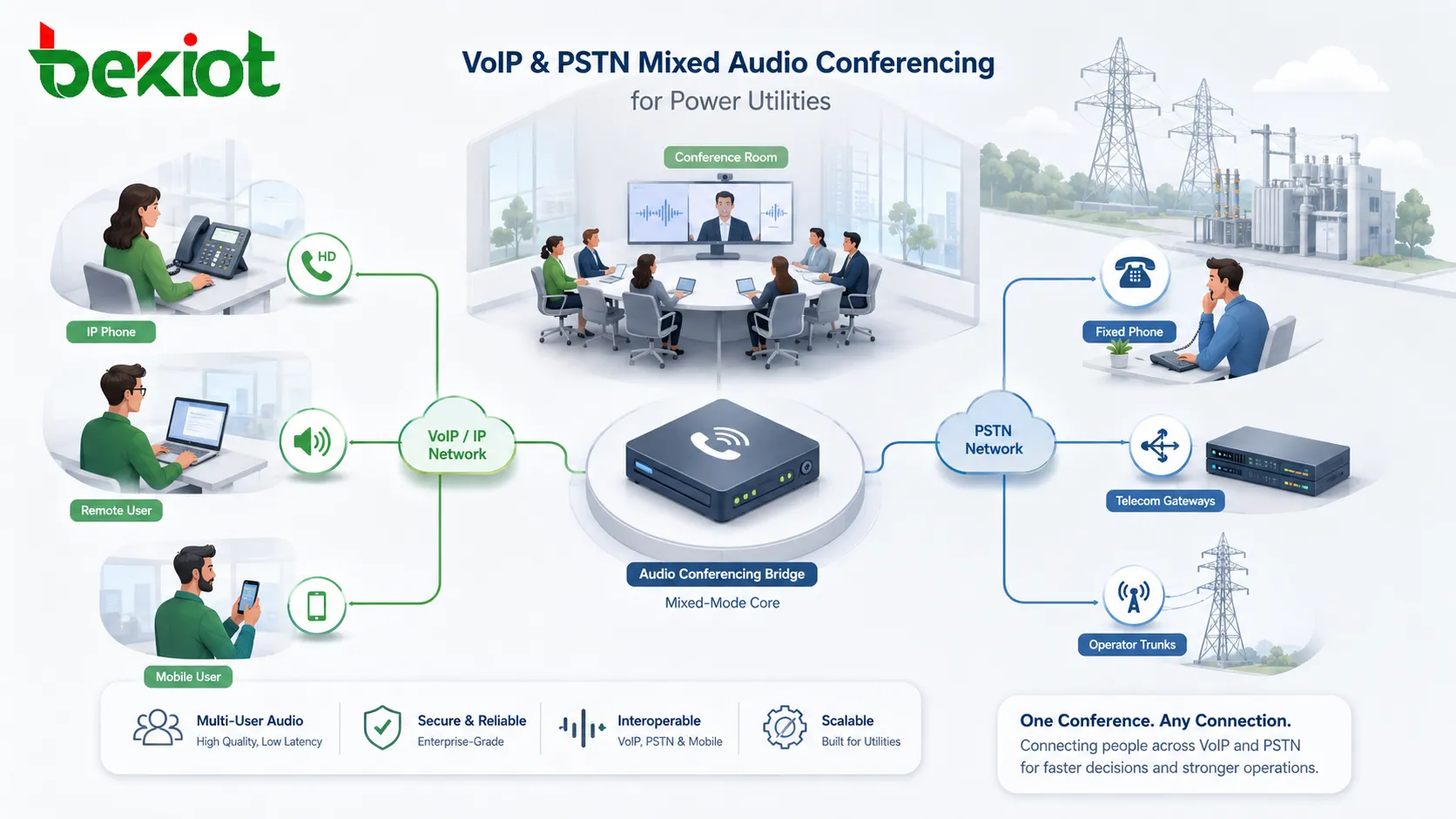
Power communication environments usually contain both modern IP systems and traditional telecom resources. Some sites use VoIP terminals and IP networks, while others still depend on PSTN lines, operator trunks, or legacy gateways. A practical conferencing upgrade must support mixed-network access rather than forcing all endpoints onto one network immediately.
With VoIP and PSTN mixed conferencing, users can join meetings through IP phones, softswitch extensions, mobile phones, fixed phones, conference terminals, and operator lines. This maximizes the value of existing network resources and improves accessibility across office, production, field, and emergency response environments.
For high-quality meeting rooms, support for high-definition VoIP conference phones and professional audio access can improve voice clarity. In large command halls or conference rooms, audio gateways can connect existing sound reinforcement systems into the conferencing platform, allowing the meeting audio to be distributed through professional speakers and room audio equipment.
Different meeting types require different behavior. A daily office meeting may need simple dial-in access, while an emergency command meeting may require strict control, muted entry, operator assistance, waiting music, no-password access for urgent users, or pre-configured participant groups.
A modern conferencing platform should support scenario-based meeting configuration. Administrators should be able to define whether participants join muted by default, whether waiting music is played, whether a password is required, which users can control the meeting, and how external participants are connected.
Meeting secretary functions are also valuable in power industry scenarios. Operators can organize participants, control dialing, manage large meetings, assist with emergency command sessions, and support anti-accident drills. Pre-dial and pre-answer functions are especially useful for large conference rooms and emergency meetings where participants must be connected quickly.
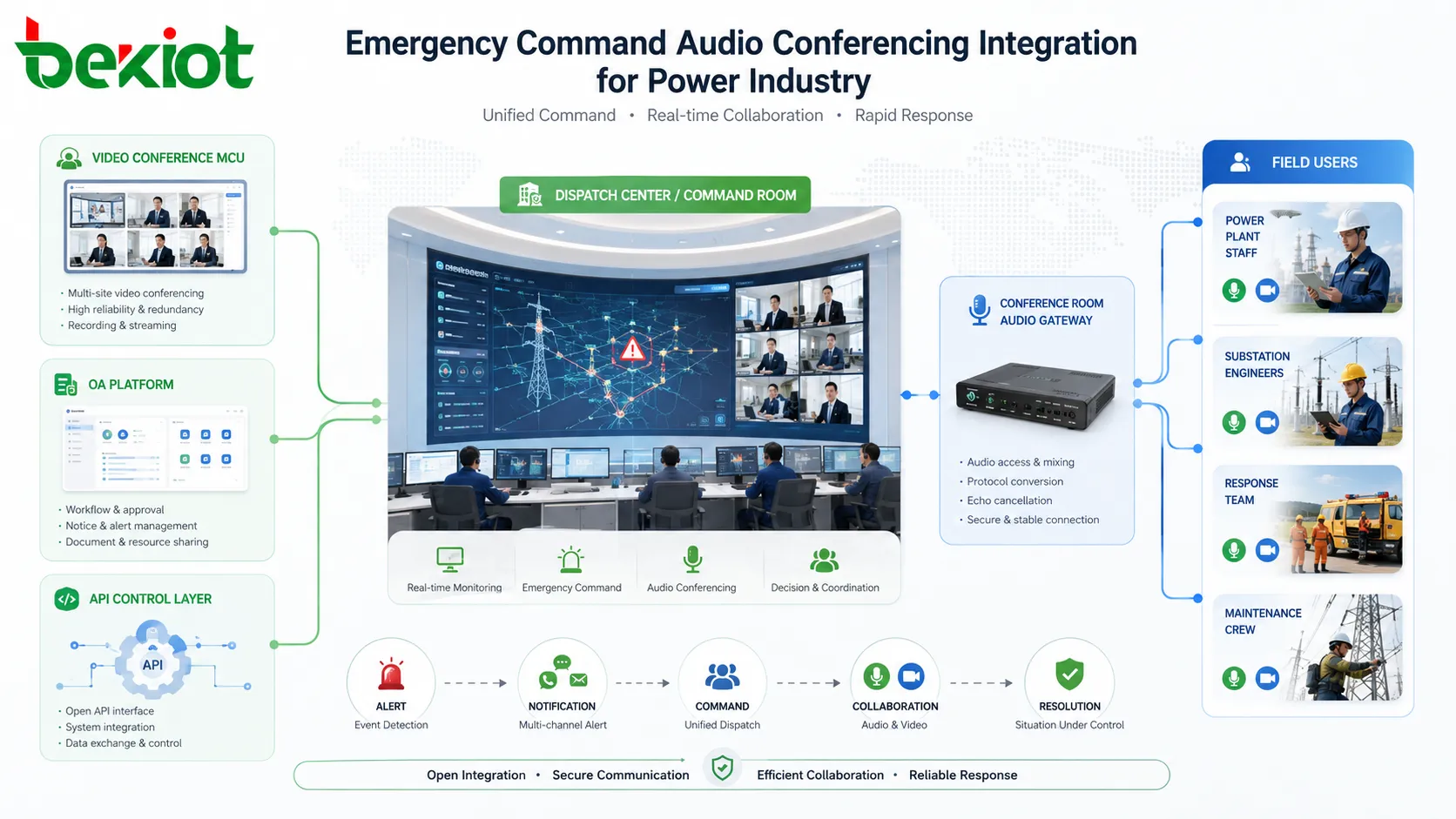
Video conferencing is widely used in power industry command and management. However, video communication may be affected by bandwidth, device status, network congestion, or endpoint availability. Audio conferencing should therefore act as an independent and reliable backup channel.
By connecting the audio conferencing platform with video conferencing MCU resources, the system can support interconnection between audio meeting rooms and video meeting rooms. When required, voice participants can join video meetings through telephones, and video conference rooms can be bridged into audio conferences.
This design makes audio conferencing a practical backup for video conferencing. It also improves flexibility in emergency command scenarios, where some participants may be in offices, some may be in field locations, and others may only have telephone access.
Emergency communication systems must be designed for failure recovery. A conferencing upgrade for the power industry should support high-availability deployment with dual-server backup and real-time data synchronization. When one node fails, the service should recover quickly to reduce meeting interruption and communication risk.
This reliability layer is especially important for dispatch centers, emergency command rooms, production safety departments, and regional operation teams. During storms, grid faults, equipment accidents, or emergency repair operations, communication continuity can directly affect coordination speed and response efficiency.
For organizations that follow one-primary and two-backup planning principles, conferencing should be treated as part of the wider emergency communication system. It should work together with video conferencing, dispatch telephony, office communication, and command center platforms.
A modern conferencing system should not operate as an isolated meeting tool. Through API interfaces, it can be integrated with emergency command centers, office automation platforms, dispatch systems, incident management tools, and business workflow systems.
This enables unified meeting initiation, centralized control, automatic participant calling, meeting status monitoring, meeting record association, and cross-platform operation. For example, an emergency event in a command platform can trigger a predefined audio conference, call key personnel, connect a meeting room, and record the communication process for later review.
For Becke Telcom projects involving industrial communication endpoints, SIP dispatch, gateway interconnection, or emergency voice systems, this type of conferencing integration can be planned as part of a broader command communication architecture rather than a standalone meeting function.
The project should begin with a review of existing conferencing equipment, access numbers, meeting workflows, trunk resources, gateway devices, room audio systems, video conferencing connections, and emergency communication rules. This assessment helps determine which parts should be retained, upgraded, integrated, or replaced.
User habits should also be documented. In the power industry, many operators and dispatch users rely on familiar dialing procedures during urgent situations. Preserving key habits can reduce operational risk after migration.
The system should be planned around actual meeting scale, emergency response level, regional structure, and backup requirements. If the organization requires one-primary and two-backup communication assurance, the conferencing platform should be deployed with clear redundancy logic, failover planning, and data synchronization design.
Capacity planning should also consider normal office meetings, emergency meetings, anti-accident drills, and large regional coordination. For large utilities, support for more than 1,000 concurrent participants can provide sufficient headroom for peak scenarios.
Before adding advanced functions, the platform should first connect existing softswitch systems, SIP resources, H.323 devices, PSTN trunks, SS7 or ISDN-PRI gateways, and conference room audio systems. This ensures that the upgraded solution works with the current communication environment.
After the base connection is stable, the organization can gradually add API integration, emergency command linkage, video conferencing backup, meeting secretary workflows, and automated participant calling.
Testing should include normal meetings, emergency meeting initiation, large participant access, video-audio interconnection, PSTN dial-in, VoIP access, dual-server failover, room audio gateway connection, operator control, muted entry, password-free access, and API-triggered conference creation.
Only after these scenarios are verified should the upgraded platform be used for mission-critical emergency communication.
A properly designed conferencing upgrade helps power enterprises improve emergency communication reliability, reduce dependence on aging hardware, support large-scale voice coordination, and connect multiple communication networks into one manageable platform.
It also protects existing investment. Instead of discarding current softswitch systems, telecom access resources, PSTN lines, room audio systems, and user habits, the new platform can integrate them into a scalable architecture.
For daily work, the system improves meeting efficiency and cross-department communication. For emergency response, it provides a reliable backup channel, fast meeting organization, flexible participant access, and stronger communication continuity.
Yes. Audio conferencing should be able to work independently even when video systems, bandwidth, or visual endpoints are unavailable. At the same time, interconnection with video conferencing MCU resources can improve flexibility.
The decision should be based on security policy, disaster recovery design, internal data center resources, maintenance capability, and emergency communication requirements. Critical dispatch environments may prefer local or private-cloud deployment with redundant nodes.
Audio level matching, echo control, microphone pickup, speaker coverage, gateway compatibility, line isolation, and operator control should be tested. Large rooms may also require pre-dial and pre-answer workflows for fast emergency meeting setup.
Yes. If PSTN and mobile network access are included in the design, field staff can join through mobile phones or fixed lines, while office users may join through IP extensions or conference terminals.
The biggest risk is changing the operation process too aggressively. Emergency users need predictable behavior. The upgrade should retain familiar access methods while improving reliability, capacity, interoperability, and management functions.







