Hyper-converged communications refer to an integrated communication architecture that brings voice, video, dispatching, paging, alarms, data services, collaboration tools, and system management into one coordinated platform instead of operating them as isolated systems.
In many organizations, communication systems are built over time. A phone system may be installed first, then a paging system, then video monitoring, then access control, then emergency notification, and later a dispatch platform. Each system may work independently, but when an incident happens, operators often need to switch between different screens, devices, numbers, logs, and workflows.
A hyper-converged communication model reduces this separation. It connects multiple communication resources into a unified operating environment so that people, devices, alarms, media streams, and response actions can be coordinated more efficiently.
What the Concept Means
Hyper-converged communications are not limited to one device or one software module. The concept describes a system-level approach where different communication capabilities are integrated around a shared control layer, shared user interface, shared event logic, and shared operational workflow.
The goal is to make communication easier to manage during both daily work and urgent situations. Instead of treating voice calls, intercom calls, radio communication, public address, video confirmation, and incident records as separate tools, the platform connects them into a practical response process.
Hyper-converged communications are valuable because they connect communication channels with operational decisions, not just because they combine more devices.
Core Architecture
Unified communication layer
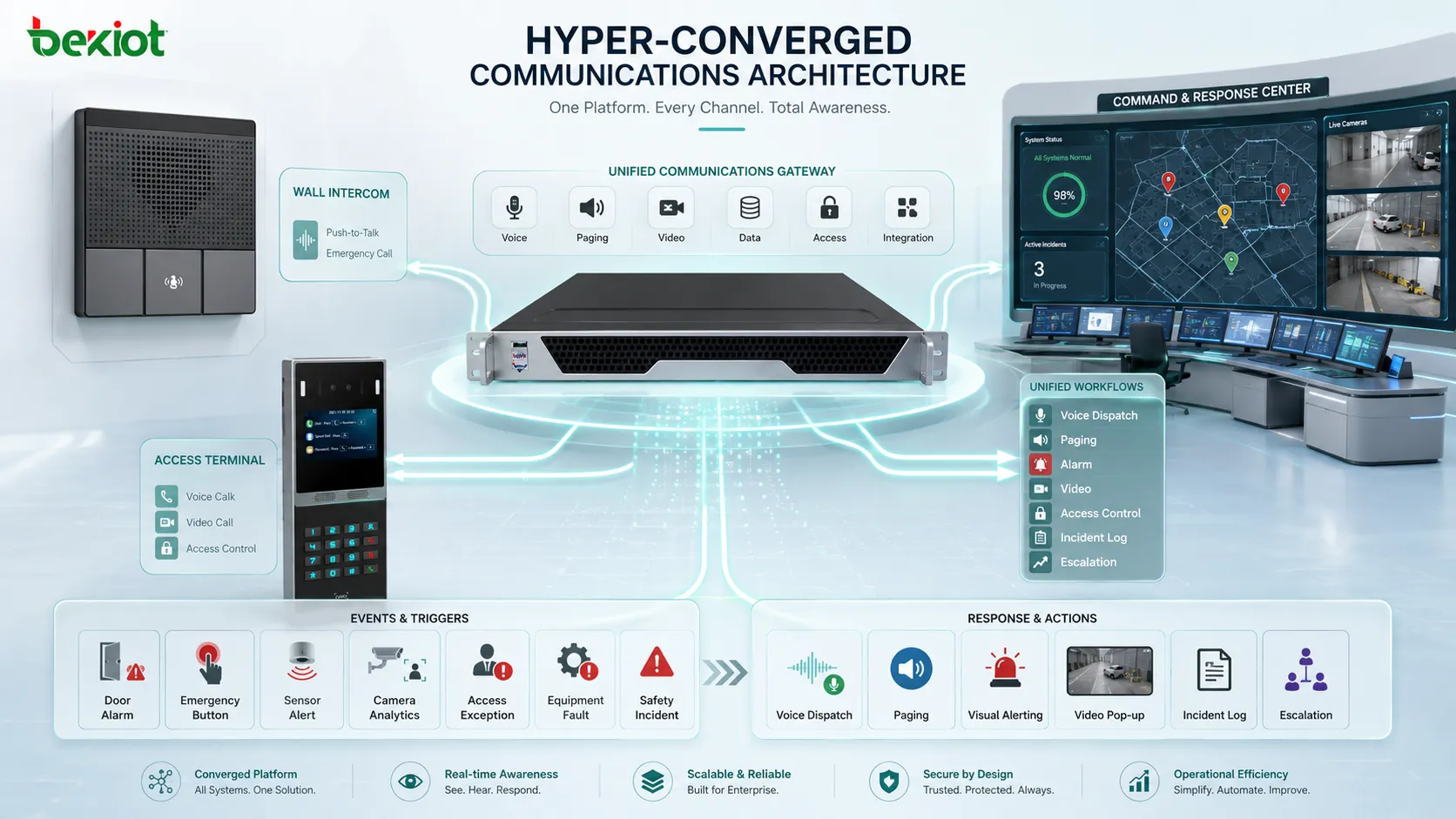
The unified communication layer connects SIP phones, IP PBX systems, intercoms, emergency phones, paging speakers, radio gateways, operator consoles, softphones, mobile clients, and external lines. It allows users to communicate across different endpoint types without manually changing systems.
This layer may support extension dialing, group calling, call recording, call transfer, conference calling, paging zones, emergency call routing, and voice dispatch. In a converged environment, these functions are designed to work together instead of being configured as isolated services.
Event and alarm coordination
Modern communication workflows are often triggered by events. A door alarm, emergency button, sensor alert, camera analytics event, access control exception, equipment fault, or safety incident may need immediate communication action.
Hyper-converged communications can connect those events with voice calls, visual alerts, paging messages, video pop-up, dispatch tasks, incident logs, and escalation rules. This reduces the delay between detection and response.
Centralized command interface
A centralized interface gives operators one place to view communication status, call activity, alarm information, device availability, user groups, maps, recordings, and response tasks. This is especially useful in control rooms and dispatch centers where operators must act quickly.
The interface should not only show information. It should also allow operators to make calls, launch paging, open video, trigger announcements, create incident records, transfer tasks, and escalate response steps without leaving the workflow.
Calls, intercoms, SIP endpoints, gateways, and dispatch consoles can be managed through a shared communication environment.
Alarms, sensors, access events, and emergency buttons can trigger calls, broadcasts, visual alerts, or operator tasks.
Operators can view devices, users, incidents, recordings, and response status from a more unified command interface.
Key Features
Multi-channel communication
A strong system should support more than ordinary telephone calls. It may include voice dispatch, SIP trunking, intercom communication, video calls, paging, public address, radio interconnection, conference calls, emergency calls, and mobile access.
This multi-channel capability is important because different scenarios require different communication methods. A private office call may need one-to-one voice. A factory emergency may need zone paging. A security event may need voice, video, and alarm linkage at the same time.
Device and endpoint integration
Hyper-converged communication systems often connect many endpoint types, such as IP phones, industrial telephones, SOS terminals, SIP speakers, dispatch microphones, softphone clients, gateways, cameras, access devices, and control panels.
The value comes from interoperability. When endpoints can communicate through a shared platform, organizations can build practical workflows without forcing every department to use the same device type.
Dispatch and response workflow
Dispatch functions help operators coordinate people and resources. These functions may include group selection, one-click calling, forced release, monitor, whisper, barge-in, broadcast, conference creation, emergency priority, recording search, and event notes.
In emergency or industrial environments, dispatch is not simply a call function. It is a response workflow that connects information, personnel, devices, and escalation rules.
Related Solution: Becke Telcom BK-RCS Converged Communication System
For projects that require integrated voice dispatch, emergency communication, paging, recording, multi-device access, and command center coordination, Becke Telcom’s BK-RCS converged communication system can be used as a practical platform reference. It is suitable for scenarios where communication must connect people, devices, alarms, and response actions in one operating environment.
What It Improves
Faster incident response
When systems are separated, operators may lose time identifying the alert source, finding the right contact, opening video, calling the responsible person, and recording the event. A converged system can reduce these manual steps by linking the alert with the communication response.
For example, an emergency call can automatically display location information, open a related camera view, notify a duty group, start recording, and create a response record. This helps operators act faster and with more context.
Lower management complexity
Separate systems require separate configuration, separate maintenance, separate user accounts, separate logs, and separate troubleshooting processes. Hyper-converged communications reduce this complexity by centralizing many management tasks.
This does not mean every technical layer disappears. Network, security, endpoint, and application management still matter. However, a unified platform can reduce daily administrative friction and improve consistency across departments or sites.
Better continuity across locations
Multi-site organizations need communication workflows that work across offices, plants, campuses, transportation hubs, stations, warehouses, and remote facilities. Hyper-converged systems can support centralized management while still allowing local communication groups and site-level response rules.
This structure is useful when an organization wants one command center view but still needs different local teams, paging zones, device groups, and escalation paths at each site.
| Capability area | Traditional separated approach | Hyper-converged approach | Operational value |
|---|---|---|---|
| Voice and dispatch | PBX, intercom, and dispatch tools are managed separately. | Calling, grouping, recording, and dispatch actions are coordinated. | Operators can reach people faster with fewer system switches. |
| Paging and notification | Broadcast equipment may work independently from alarms. | Events can trigger paging zones, announcements, or visual alerts. | Emergency messages can be delivered more consistently. |
| Video and situational awareness | Operators open video systems manually after receiving a report. | Relevant camera views can be linked to calls, alarms, or locations. | Response decisions are based on stronger real-time context. |
| Logs and review | Call records, alarm logs, and operation notes are stored in different places. | Events, calls, recordings, and response notes can be associated. | Post-incident review becomes easier and more complete. |
Typical Use Cases
Emergency command centers
Emergency command centers need to receive calls, identify locations, notify responders, coordinate departments, monitor live conditions, broadcast instructions, and document incident handling. A hyper-converged communication platform helps connect those actions into one workflow.
This is valuable for public facilities, industrial parks, campuses, transport hubs, energy sites, and large buildings where response speed and information accuracy are both important.
Industrial production sites
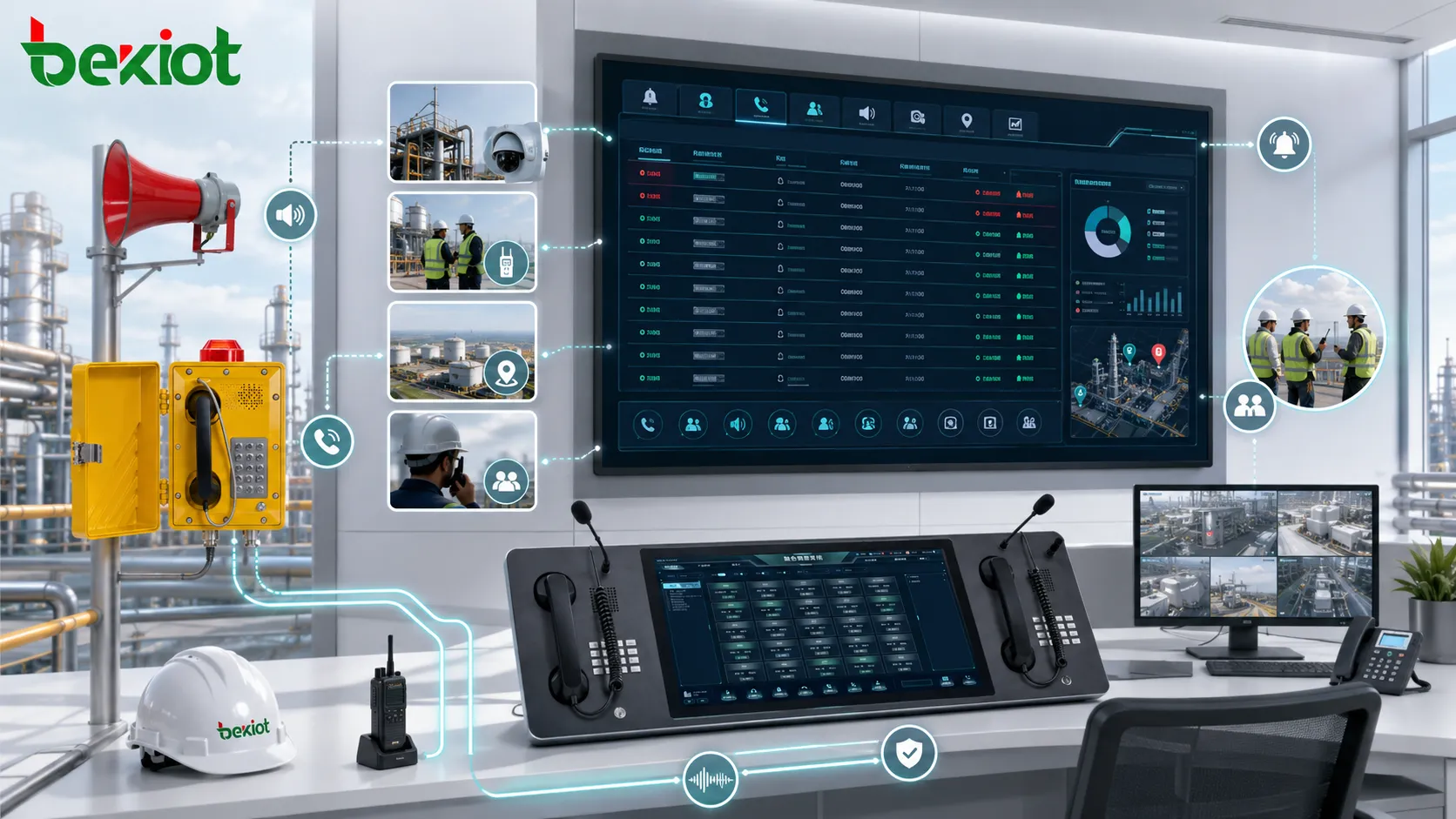
Industrial environments often include noisy areas, rugged devices, alarm systems, access points, control rooms, and maintenance teams. A converged system can connect industrial telephones, paging speakers, emergency stations, dispatch consoles, and alarm inputs.
When an equipment fault or safety event appears, the system can help notify the correct zone, call the responsible group, record the communication process, and support follow-up review.
Transportation and logistics
Transportation systems need reliable communication between stations, vehicles, terminals, control rooms, maintenance teams, and security staff. Hyper-converged communications can support dispatch calling, emergency notification, paging, video verification, and multi-site coordination.
For logistics facilities, the same model can improve communication between warehouse teams, gate control, dispatch offices, drivers, maintenance personnel, and safety supervisors.
Healthcare and campus operations
Hospitals, schools, and large campuses often need daily announcements, emergency alerts, help points, security calls, maintenance communication, and internal coordination. A converged platform can reduce fragmentation between call systems, intercoms, paging, and alarm handling.
The main benefit is not only faster communication. It also gives administrators a more structured way to manage endpoints, service areas, priority calls, and incident records.
Deployment Considerations
Start with workflow mapping
Before choosing devices or software, organizations should map daily communication scenarios and emergency scenarios. The map should show who receives alerts, which teams respond, which devices are used, which messages are broadcast, and what records must be kept.
This prevents the system from becoming a collection of features without a clear operational purpose. Hyper-convergence is most effective when the platform reflects real response logic.
Plan integration boundaries
Not every system needs deep integration at the first stage. Some projects begin with voice, paging, and emergency calls, then add video, access control, GIS, radio gateways, or IoT alarms later.
A phased integration plan reduces risk and allows teams to validate each workflow before expanding. It also helps avoid overcomplicated projects where too many systems are connected before roles and responsibilities are clear.
Protect priority services
Critical communication functions should be designed with redundancy, backup power, network segmentation, secure access, recording reliability, and failover planning. If the system supports emergency response, priority routing and service continuity are especially important.
Administrators should also define what happens when a server, network link, endpoint, or remote site fails. A good design considers degraded operation before failure occurs.
Practical planning reminder
A hyper-converged communication project should be evaluated by workflow value, not only by the number of integrated systems. The best design reduces operator steps, improves response confidence, and keeps critical communication available when pressure is highest.
Application Value
For operators
Operators benefit from fewer screens, clearer event context, faster calling actions, visible device status, and more connected response records. During busy periods, this can reduce confusion and help operators make decisions with better information.
In urgent situations, the difference between separate tools and a connected workflow can affect how quickly the right person receives the right message.
For administrators
Administrators benefit from centralized configuration, unified user management, device monitoring, log review, permission control, and simplified maintenance. This helps reduce system drift when multiple departments or locations use the same communication platform.
Central management also supports future expansion. New endpoints, groups, zones, or sites can be added with more consistent rules and fewer isolated configuration islands.
For organizations
At the organizational level, hyper-converged communications can improve safety response, service continuity, operational transparency, cross-department collaboration, and long-term system scalability.
It also supports modernization. Organizations can migrate from legacy voice, analog paging, isolated intercom, or fragmented alarm workflows toward a more integrated digital communication environment.
FAQ
Does hyper-converged communication require replacing all existing systems?
Not always. Many projects can start by integrating existing PBX, SIP endpoints, paging devices, gateways, cameras, or alarm systems. The replacement scope depends on protocol compatibility, system age, reliability, and the required workflow depth.
How should a project team decide the first integration phase?
The first phase should focus on the highest-value workflow, such as emergency calls, dispatch communication, paging notification, or incident response. Starting with a clear operational problem is safer than connecting many systems at once.
What network conditions are important for this type of platform?
Stable LAN/WAN connectivity, VLAN planning, QoS for voice traffic, multicast or paging support, firewall rules, SIP compatibility, bandwidth planning, and redundancy design are all important. Poor network design can weaken even a well-planned platform.
Can user permissions be separated by department or site?
Yes, a well-designed platform should support role-based access control. Operators, supervisors, administrators, maintenance teams, and site managers may need different permissions for calls, recordings, paging zones, device control, and event review.
What should be checked during acceptance testing?
Acceptance testing should include call routing, emergency priority, paging zones, endpoint status, alarm linkage, recording playback, failover behavior, permission control, log accuracy, network interruption handling, and real operator workflow drills.