Call hunting systems help organizations distribute incoming calls across multiple users, phones, extensions, departments, or devices instead of relying on a single answering point. When the first destination is unavailable, the system automatically searches for another suitable destination according to a predefined rule.
For companies that handle customer service, reception, field coordination, security response, hotel service, healthcare communication, or internal operations, call hunting is not just a convenience feature. It shapes how quickly people answer, how fairly workload is distributed, and how reliably urgent calls reach the right team.
A Practical View of Call Hunting
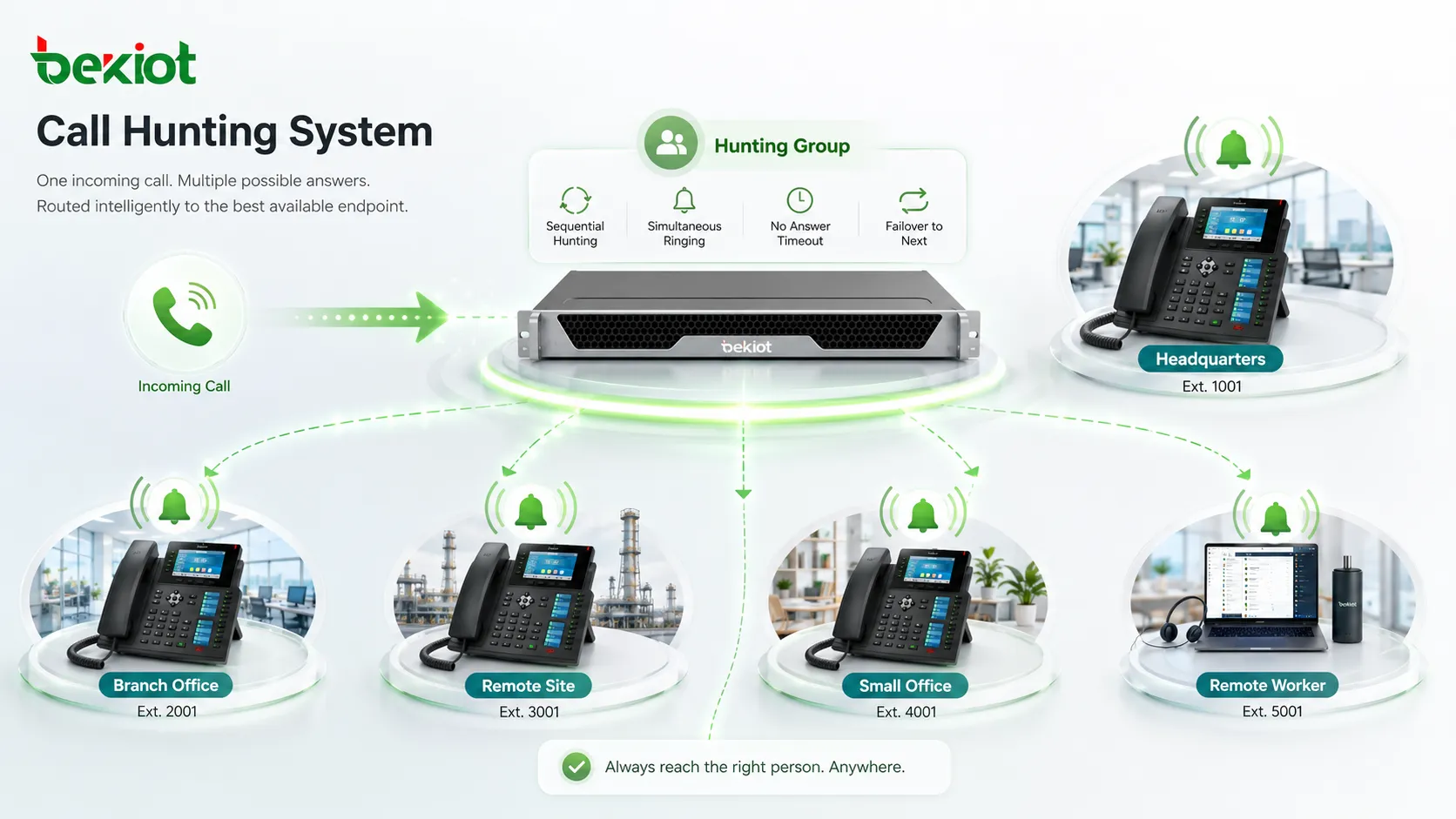
A call hunting system is a call routing mechanism that sends one incoming call to a group of possible answering points. These answering points may be desk phones, SIP phones, mobile apps, softphones, cordless handsets, operator consoles, or voicemail destinations. The system follows a hunting strategy until someone answers, the call reaches a timeout, or the call is redirected to another fallback path.
The key idea is simple: callers should not need to know which individual is available. The system should locate an available person or team member automatically. In a small office, this may mean ringing reception first and then sales. In a control room, it may mean escalating from an operator phone to a supervisor group. In a service desk, it may mean balancing call load across several agents.
How the Routing Logic Works
Sequential distribution
Sequential hunting sends the call to one destination first, then moves to the next if there is no answer. This is useful when a business has a preferred answering order, such as receptionist first, department assistant second, and manager last.
The advantage is control. The organization can decide who should handle the call before escalation occurs. The disadvantage is that callers may wait longer if the first few users are unavailable and timeout values are set too high.
Simultaneous ringing
Simultaneous hunting rings several destinations at the same time. The first person to answer takes the call, and the remaining devices stop ringing. This approach is often used for urgent service lines, small support teams, security desks, and operational response groups.
It improves speed, but it can also create noise if too many devices ring at once. For this reason, many systems combine simultaneous ringing with presence status, business hours, or device availability rules.
Rotary and load-based patterns
Rotary hunting sends each new call to the next member in the group, helping distribute opportunities more evenly. More advanced systems may use least-recently-answered, fewest-calls, skill-based routing, or queue position to decide where the next call should go.
These patterns matter when call volume is high or when fairness affects service quality. A sales team may want balanced lead distribution, while a support team may want to reduce overload on the most responsive agent.
Call hunting works best when the routing rule reflects the real operating process, not just the phone list.
What These Systems Improve
Fewer missed calls
The most visible improvement is a lower missed-call rate. Instead of failing when one extension is busy or unanswered, the system continues searching for another destination. This reduces lost inquiries, abandoned customer calls, delayed service requests, and unanswered internal coordination calls.
For reception and service teams, this can improve the first contact experience. For operations and safety teams, it can reduce the risk that an important message depends on one unavailable person.
Faster response across departments
Call hunting can shorten the time between call arrival and human response. This is especially important in environments where calls are time-sensitive, such as healthcare stations, logistics desks, building management offices, manufacturing control rooms, campus security centers, and hotel front desks.
When routing is aligned with work shifts and responsibility areas, the caller reaches a relevant person faster. The team also avoids manual transfers that waste time and increase frustration.
Better continuity during busy periods
Busy hours reveal whether a phone system is resilient. If only one person receives all inbound calls, service quality drops quickly when that person is occupied. A call hunting design spreads the demand and can include overflow groups, backup teams, voicemail, external numbers, or auto-attendant return paths.
This continuity is valuable for seasonal demand, lunch breaks, shift changes, maintenance windows, and unexpected incidents. The organization does not need to rebuild the process each time availability changes.
| Hunting method | Typical use | Main improvement | Planning note |
|---|---|---|---|
| Sequential | Reception, executive assistant, small department lines | Clear priority order | Keep timeout values short enough to avoid caller frustration. |
| Simultaneous | Security desk, maintenance hotline, urgent service team | Fastest answer opportunity | Limit the group size or use presence rules to reduce unnecessary ringing. |
| Rotary | Sales teams, shared support lines, back-office groups | More even distribution | Review reports to confirm that calls are actually balanced. |
| Overflow | Call queues, multi-site service, after-hours fallback | Service continuity | Define what happens after the final timeout, not just the first ring group. |
Core Features in a Call Hunting Setup
Ring groups and member rules
A ring group defines who can answer a specific incoming call. Members may be fixed, shift-based, department-based, or dynamically changed by administrators. Some systems allow users to log in and out of groups, which is helpful for teams with rotating shifts or temporary duties.
Member rules should consider not only job title, but also physical location, language ability, operating hours, and responsibility level. A poorly designed group can ring the wrong people or create unnecessary transfers.
Timeouts and escalation paths
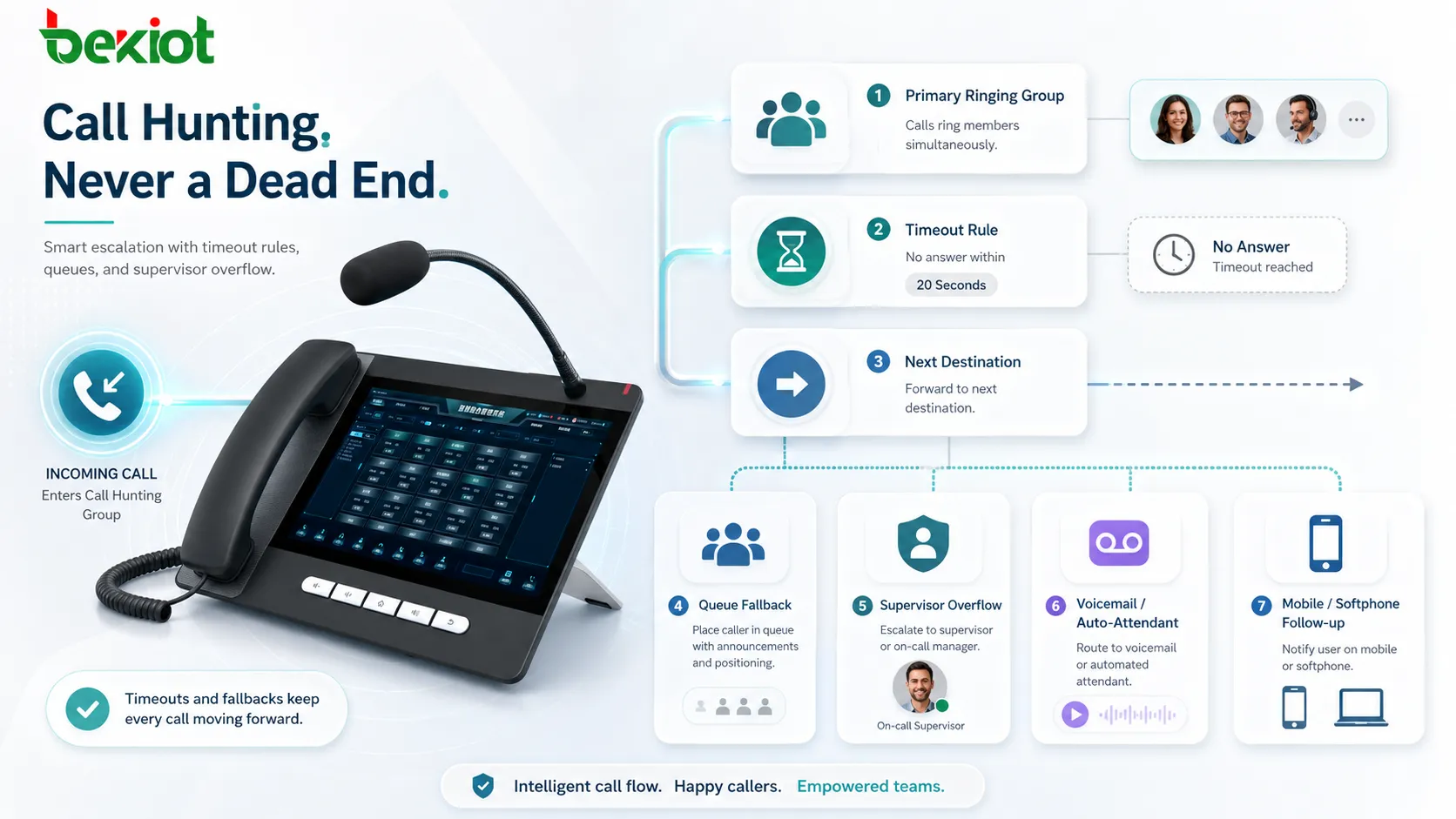
Timeouts determine how long the system waits before trying the next destination. A timeout that is too short may interrupt a person before they can answer. A timeout that is too long may make callers abandon the call before the system reaches the correct person.
Escalation paths define the next action when nobody answers. The call may move to another group, a supervisor, voicemail, an auto-attendant, a mobile number, or a contact center queue. This is where call hunting becomes part of a wider communication workflow.
Business hours and availability control
Many organizations need different routing behavior during office hours, after hours, weekends, holidays, and emergency conditions. Business-hour rules make the same published phone number behave differently depending on time and availability.
Availability control may also include do-not-disturb status, device registration, presence information, agent login state, or mobile forwarding rules. These controls help the system avoid ringing destinations that cannot answer.
System Value for Business Communication
More professional caller experience
A caller usually does not judge the phone system by its routing logic. They judge it by whether someone answers quickly and whether the call reaches the right place. Call hunting improves this experience by hiding internal complexity from the caller.
For customer-facing teams, this can make a small organization appear more responsive and structured. For large organizations, it helps prevent department lines from becoming personal bottlenecks.
Operational visibility
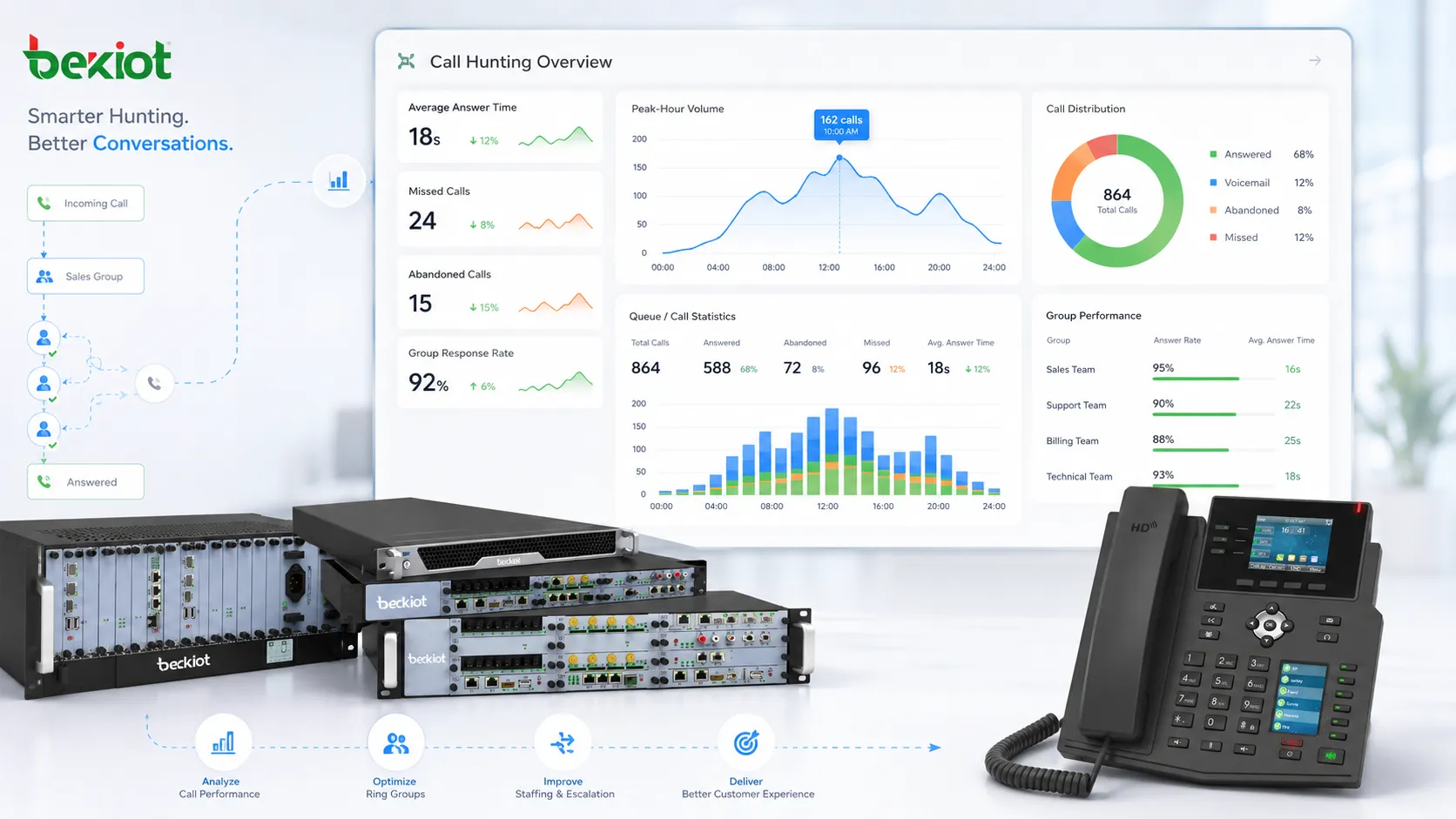
Call hunting becomes more valuable when combined with reporting. Missed calls, average answer time, abandoned attempts, group response patterns, and peak-hour volume can reveal where staffing or routing changes are needed.
Without these reports, organizations may rely on complaints or assumptions. With reports, managers can identify whether the issue is group size, timeout design, shift coverage, user behavior, or call volume.
Scalability across sites and teams
Call hunting can support multi-site organizations when groups are designed around function rather than only location. For example, calls may ring a local office first, then overflow to a regional service desk, and finally move to an after-hours team.
This structure helps organizations maintain one external contact number while still using distributed staff. It also supports hybrid work models where some users answer from office phones and others from softphones or mobile clients.
Typical Applications
Customer service and sales lines
Customer-facing teams use call hunting to prevent inbound inquiries from depending on one person. A sales line may rotate calls across available sales representatives, while a support line may ring a primary support group before escalating to a specialist.
This improves the chance of live answer and helps reduce internal disputes about who received the most calls. With reporting, managers can verify both responsiveness and workload balance.
Reception and front desk operations
Reception desks often handle visitors, delivery calls, appointment questions, internal transfers, and general inquiries. If the main receptionist is away from the desk, call hunting can send the call to a backup phone or another administrative user.
This is useful in offices, schools, clinics, hotels, residential buildings, and service centers where a missed front desk call can affect daily operations.
Security, maintenance, and emergency support
Operational teams use call hunting to make response lines more reliable. A building maintenance number may ring the duty technician first, then the engineering room, and then a supervisor. A security hotline may ring several guards or control room phones at the same time.
The design should match the severity of the call. Routine maintenance may use sequential hunting, while urgent assistance may need simultaneous ringing and a clear escalation process.
Deployment Considerations
Match routing to real responsibility
Before configuring the system, organizations should map who should answer each type of call, during which time period, and under which conditions. The best call hunting design is usually based on workflow interviews, not only the company directory.
It is also important to define ownership. Someone should be responsible for maintaining group members, holiday schedules, timeout values, and after-hours paths.
Avoid overcomplicated call paths
Too many hunting stages can create long waits and unclear accountability. A clean design usually has a primary answering group, one or two sensible fallback options, and a final destination such as voicemail, a queue, or a recorded instruction.
Complexity should only be added when it solves a real problem. If a caller is passed through many silent ring stages, the system may look sophisticated to administrators but feel broken to the caller.
Test with real calling scenarios
Testing should include unanswered calls, busy users, offline devices, after-hours calls, public holidays, mobile forwarding, simultaneous ring behavior, and voicemail fallback. This prevents hidden failures that only appear during busy periods.
After launch, reports should be reviewed regularly. Call hunting is not a one-time configuration; it is a communication process that should improve as the organization learns from real call patterns.
FAQ
How many users should be placed in one hunting group?
The group should include enough users to answer reliably, but not so many that ringing becomes disruptive. Small teams may work well with three to six members, while larger teams often need queues, login states, or reporting controls instead of one oversized ring group.
Can mobile phones be part of a call hunting system?
Yes, many systems can forward calls to mobile numbers or mobile softphone apps. The best option depends on cost, call recording requirements, caller ID behavior, network quality, and whether the user must appear as part of the company phone system.
Does call hunting replace an IVR menu?
No. An IVR helps callers choose the correct department or service path, while call hunting decides which people or devices should ring after that choice is made. In many deployments, the two functions are used together.
What timeout value is usually reasonable?
Many organizations start with 15 to 25 seconds per stage, then adjust based on answer behavior and caller patience. Urgent lines may need shorter escalation, while general inquiry lines may allow a slightly longer first stage.
Should hunted calls be recorded?
Recording may be useful for service quality, dispute review, and training, but it must follow local laws, consent requirements, retention rules, and internal privacy policies. Organizations should confirm compliance before enabling recording across hunting groups.