


IP PBX is widely used as an enterprise communication platform. In its early stage, most IP PBX systems focused mainly on voice calling. By using VoIP networking, companies could connect extensions across different offices, reduce wiring complexity, simplify deployment, and improve internal communication efficiency.
As video communication technology becomes more mature, IP PBX systems are no longer limited to voice. Many IP phones now include built-in cameras, larger screens, and even Android-based smart operating systems. These changes make video calling, video conferencing, SIP video intercom, surveillance viewing, and video linkage possible within the same enterprise communication architecture.
Why Video Is Becoming Part of Enterprise Calling
Traditional telephone systems were designed for voice. They helped employees call each other, contact customers, and manage internal extensions. However, many business and industrial communication scenarios now require more than audio. Users may need to see a visitor, verify an emergency location, join a video meeting, check a camera view, or coordinate with a control room while observing live footage.
This is where IP PBX becomes more valuable. Because IP PBX already manages SIP extensions, call routing, user permissions, and internal communication numbers, it can also become a practical entry point for video-enabled communication. Instead of building a completely separate video system, engineers can integrate video phones, SIP intercom terminals, video gateways, cameras, and conferencing platforms into the existing IP communication network.
The result is not only a richer calling experience. It also creates a more useful communication workflow. A front desk can answer a visitor call with video. A duty room can receive a help-point call from a public area. A security team can view a camera through a video phone. A command center can connect voice, video, and event handling in one response process.
Basic Video Calls Between Extensions
Video calling is the most direct video application under an IP PBX system. If two video-capable IP phones are registered as SIP extensions, users can dial each other in a way that is similar to normal voice calling. Once the call is established, both sides can communicate with audio and video.
The operation is simple. Users only need to know the extension number or contact entry. For office users, this makes video calling easy to understand because the calling habit is almost the same as a voice call. No complex meeting room device or special conference platform is required for a basic one-to-one video conversation.
However, in many office environments, the actual use frequency of desk-to-desk video calling may not be very high. Many users still prefer voice calls for daily communication because voice is faster, less intrusive, and more suitable for short internal conversations. Therefore, video calling should be treated as a useful extension capability rather than the only reason to deploy video phones.
Desk Phones as SIP Video Conference Terminals
Video conferencing is a more practical and popular application in many IP PBX environments. Modern SIP video phones can join video meetings directly, especially when the conferencing system or MCU supports SIP access. In this case, the desk phone becomes a small video conference terminal.
This is useful for managers, duty desks, branch offices, engineering teams, and temporary command points. Instead of moving to a dedicated conference room, users can join a video meeting from their own desk phone. For distributed teams, this improves meeting convenience and helps reduce communication delay.
In project deployment, engineers should confirm codec compatibility, resolution capability, SIP registration method, network bandwidth, echo cancellation, microphone pickup, and screen size. A video conference experience depends not only on the IP PBX but also on the video endpoint, conferencing platform, LAN quality, and audio environment.
Video Intercom for Access Control and Help Points
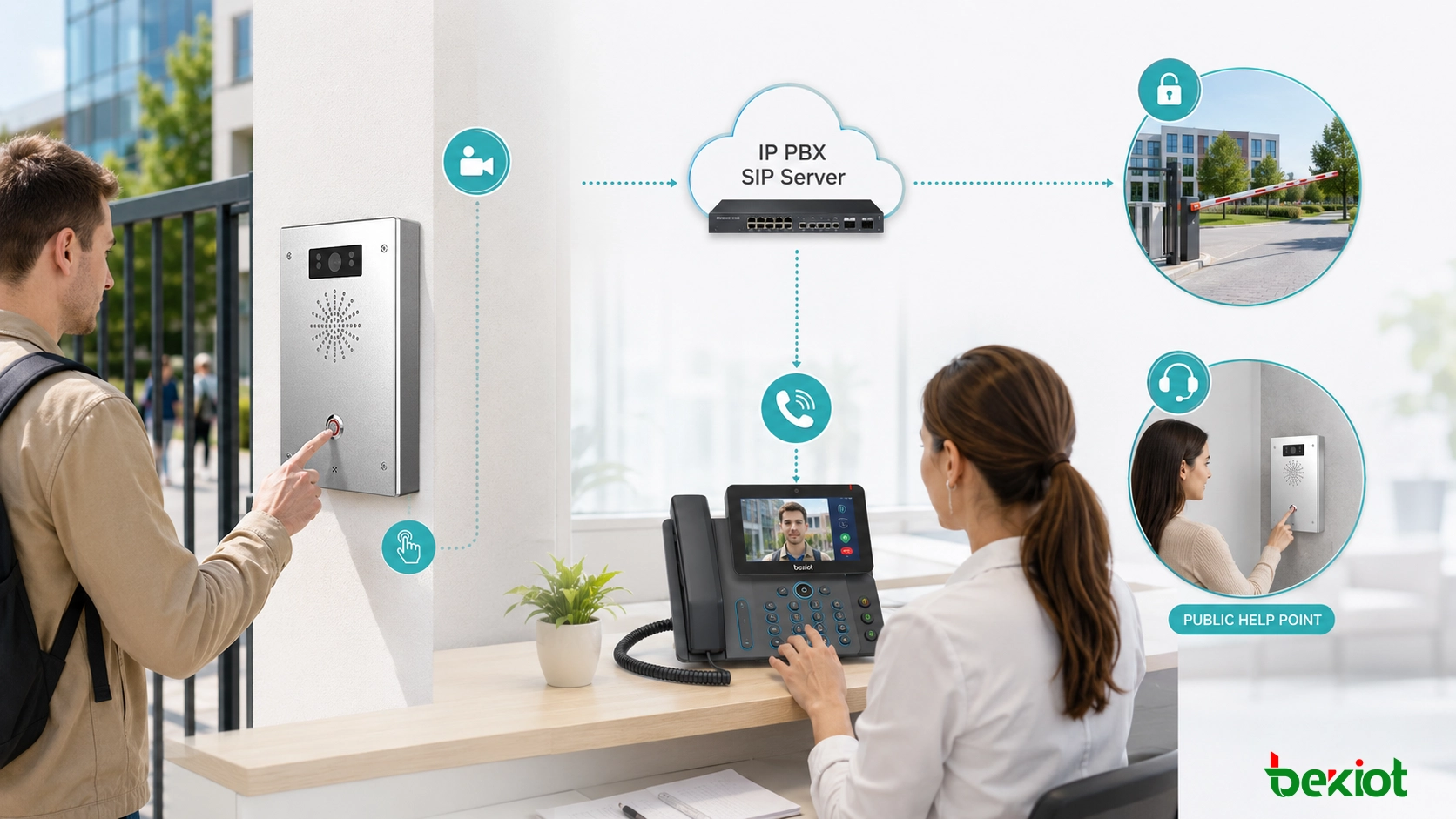
The integration of video phones and SIP video intercom is one of the most practical IP PBX video applications. A SIP video intercom terminal can be installed at a company entrance, gate, equipment room, parking area, factory entrance, campus building, station platform, park, square, or public help point. After being registered as an IP PBX extension, the intercom can call a front desk, duty phone, dispatch console, or control room.
A typical access control scenario is easy to understand. A visitor presses the call button on the video intercom terminal. The intercom calls the front desk video phone. At the same time, the visitor’s live video is displayed on the phone screen. After confirming the visitor identity, the operator can press a key on the phone to remotely open the door.
This same model can also be used for emergency help. For example, a SIP help terminal can be deployed in a park, transport hub, industrial site, public square, or service area. When a person presses the help button, the system connects them to a duty seat and sends live video to support faster judgment. For projects that require industrial SIP endpoints, dispatch integration, and unified communication design, Becke Telcom can be considered as a practical option during solution planning.
Calling Cameras from Video Phones
Another useful application is surveillance viewing through video phones. In many projects, the IP PBX itself does not directly manage surveillance cameras. Instead, a video gateway is added to connect the phone system with an existing NVR, VMS, or video surveillance platform.
A common technical method is to convert GB/T28181 video resources into SIP-based access. After conversion, a video phone can call a camera as if it were calling a SIP endpoint. The user dials the assigned number, and the video phone displays the live surveillance image.
This application is valuable for duty rooms, security posts, industrial control rooms, property management centers, campus offices, and transport facilities. Staff do not need to open a separate monitoring workstation for every quick check. They can use a video phone to view a specific camera when needed.
Remote Audio and Camera Control
If the surveillance camera supports audio, the video phone may also be used for remote voice interaction or public addressing. For example, a security operator can call a camera position and speak through the camera’s audio output or connected speaker. This is useful for warning, guidance, visitor communication, or remote site coordination.
Some camera systems also support PTZ and lens control. In this case, users may adjust pan, tilt, zoom, or focus from the phone interface or through integrated control commands. This gives the phone user a lightweight way to observe a scene without switching to a full monitoring console.
For this function to work well, engineers need to verify video gateway capability, SIP signaling compatibility, codec support, camera protocol support, control command mapping, and user permission settings. In real projects, camera calling should be planned carefully to avoid exposing sensitive video resources to unauthorized extensions.
Video Linkage During Voice Calls
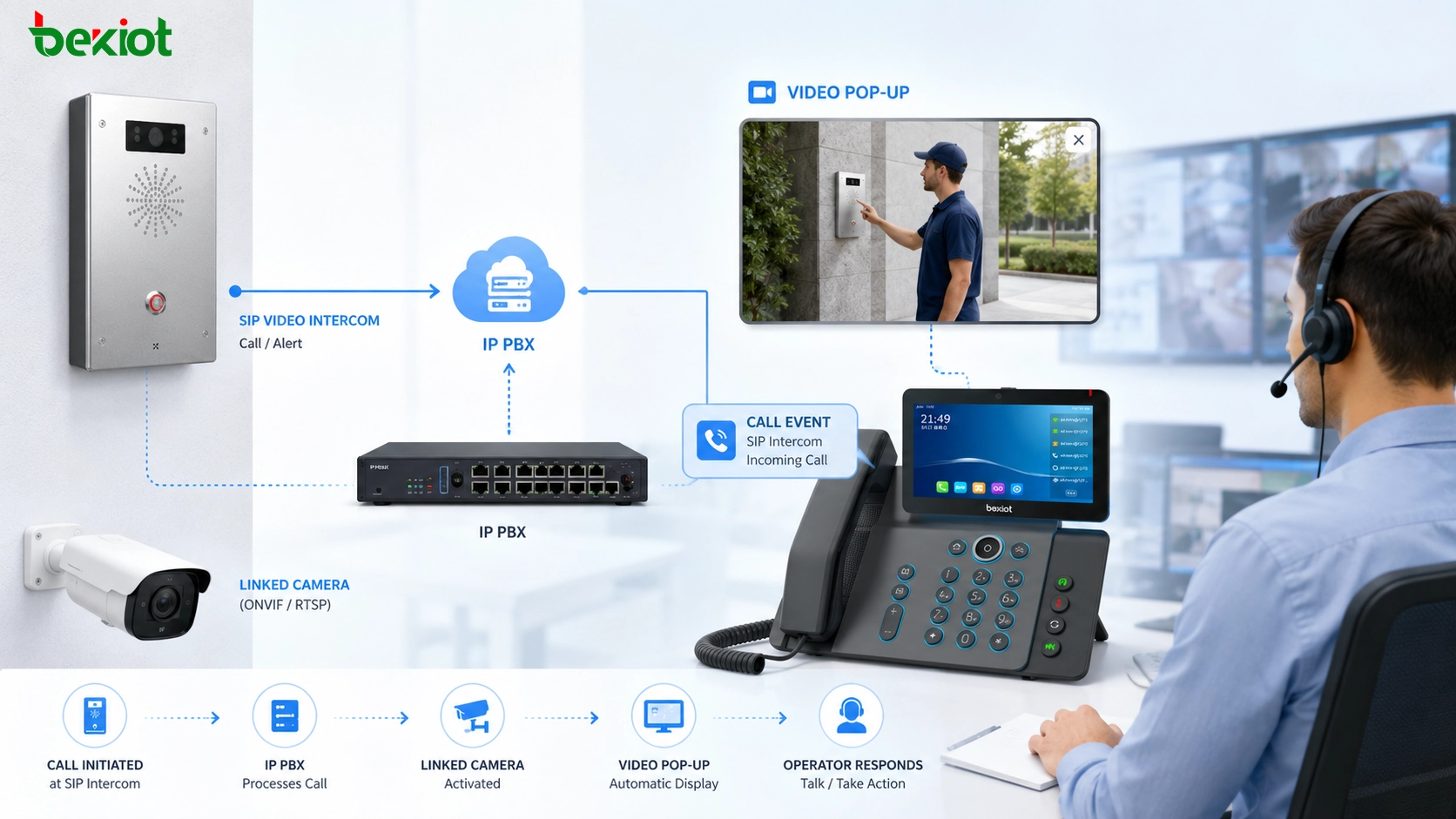
Video linkage is especially useful in visualized communication scenarios. The idea is to bind a normal IP phone or non-video terminal with a nearby surveillance camera. When a call occurs, the system automatically pushes the associated camera view to a video phone, dispatch screen, or monitoring interface.
This function allows the answering person to talk and observe at the same time. For example, when an outdoor help phone calls the control room, the operator can hear the caller and immediately see the surrounding area through the linked camera. This improves situational awareness and helps the operator decide whether to dispatch personnel, open an incident record, broadcast a warning, or escalate the event.
Video linkage can be used in factories, campuses, transport hubs, parking areas, emergency help points, property management sites, and command center systems. It turns a simple call event into a richer response workflow by connecting voice communication with visual confirmation.
Common System Architecture
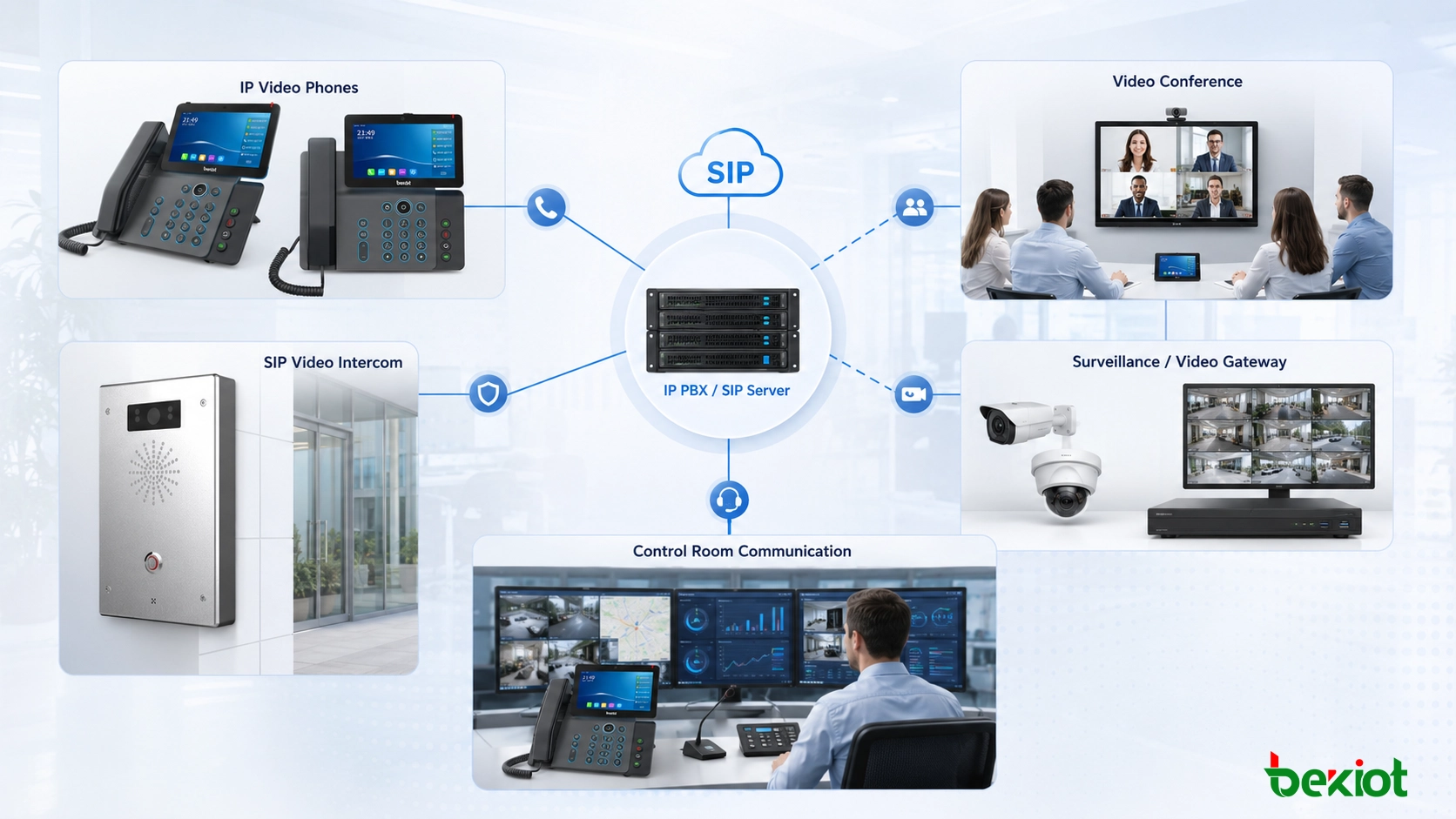
A practical IP PBX video application system usually includes an IP PBX or SIP server, video-capable IP phones, SIP video intercom terminals, IP network switches, surveillance cameras, NVR or VMS platforms, a video gateway, and sometimes a dispatch or management platform.
The IP PBX manages extensions and call routing. Video phones provide user-side video communication. SIP intercom terminals handle fixed call points such as gates and help stations. The video gateway connects surveillance resources to SIP communication. The dispatch or management platform can add event handling, recording, linkage rules, and operation records.
| Application | Main Devices | Typical Value |
|---|---|---|
| Video calling | Video IP phones, IP PBX, SIP extensions | Enables one-to-one audio and video communication between users |
| Video conferencing | SIP video phones, MCU or conference platform | Allows desk phones to join meetings as video endpoints |
| SIP video intercom | Video intercom terminal, IP PBX, front desk phone | Supports visitor calling, remote opening, and emergency help |
| Surveillance viewing | Video gateway, cameras, NVR/VMS, video phone | Allows users to call camera channels from a phone |
| Video linkage | IP phone, linked camera, platform, video display endpoint | Pushes camera video automatically during a call event |
Planning Considerations for Deployment
Before deploying video applications under IP PBX, engineers should confirm whether the existing network can carry video traffic reliably. Video calls and surveillance streams require more bandwidth than voice calls. If the LAN is congested or poorly segmented, users may experience video delay, frame loss, frozen images, or unstable call quality.
Codec compatibility is also important. SIP endpoints, video gateways, and conferencing systems should support compatible audio and video codecs. Resolution, frame rate, bit rate, and transcoding requirements should be evaluated in advance, especially when connecting older surveillance systems or third-party platforms.
Security should not be ignored. Video resources may include sensitive areas such as entrances, production areas, control rooms, warehouses, or public service locations. Engineers should configure extension permissions, access rules, account security, network isolation, and recording policies according to project requirements.
Where These Applications Are Most Useful
IP PBX video applications are suitable for enterprise offices, industrial parks, transportation hubs, schools, hospitals, property management centers, factories, security control rooms, emergency help points, and multi-branch organizations. These places often need both communication and visual verification.
For office scenarios, video conferencing and video calling may be more important. For security and access control, SIP video intercom and remote door opening may bring more value. For industrial and public safety scenarios, surveillance viewing and video linkage can help operators understand site conditions more quickly.
The best deployment does not need to enable every function at once. A project can start with the most valuable scenario, such as front desk video intercom or control room camera calling, and then expand to conferencing, linkage, dispatch integration, or emergency response workflows.
Conclusion
Video applications under IP PBX are becoming more practical as video phones, SIP intercom terminals, video gateways, and surveillance systems become easier to integrate. Basic video calls are simple to use, but their daily frequency may be limited. Video conferencing, SIP video intercom, surveillance viewing, and video linkage often provide stronger project value because they solve real operational problems.
A well-planned IP PBX video solution should connect people, terminals, cameras, doors, duty desks, and control rooms in a logical workflow. When the system is designed around actual use cases, IP PBX can become more than an internal voice platform. It can become a unified communication entry point for video collaboration, access communication, monitoring interaction, and event response.
FAQ
Can an existing IP PBX support video applications without replacement?
It depends on the platform. If the IP PBX supports SIP video signaling, compatible codecs, extension routing, and endpoint registration, it may support video phones or video intercom terminals. If not, a gateway or platform upgrade may be required.
Does camera calling require every camera to support SIP directly?
No. Many cameras do not need to support SIP by themselves. A video gateway can convert surveillance resources from a video platform or NVR into SIP-accessible channels, allowing video phones to call camera views.
What is the main risk when adding video to a voice network?
The main risk is network load. Video traffic consumes more bandwidth and may affect voice quality if QoS, VLAN planning, switching capacity, and uplink bandwidth are not properly designed.
Can video intercom be used outdoors?
Yes, but the terminal should match the installation environment. Outdoor projects should consider waterproof rating, vandal resistance, temperature range, microphone pickup, speaker volume, PoE power, surge protection, and mounting structure.
Is video linkage suitable for emergency response?
Yes. Video linkage is useful when operators need visual confirmation during a call event. It helps duty staff understand the on-site situation faster and decide whether to dispatch personnel, trigger an alarm, start recording, or escalate the incident.







