


When deploying a telephone system, IP PBX, or command dispatch platform, one common requirement is external calling. Users may need to call mobile phones, fixed-line numbers, customer service numbers, emergency contacts, or public telephone users outside the internal communication network. To do this, the internal telephone system must be connected to the public telephone network provided by a telecom operator.
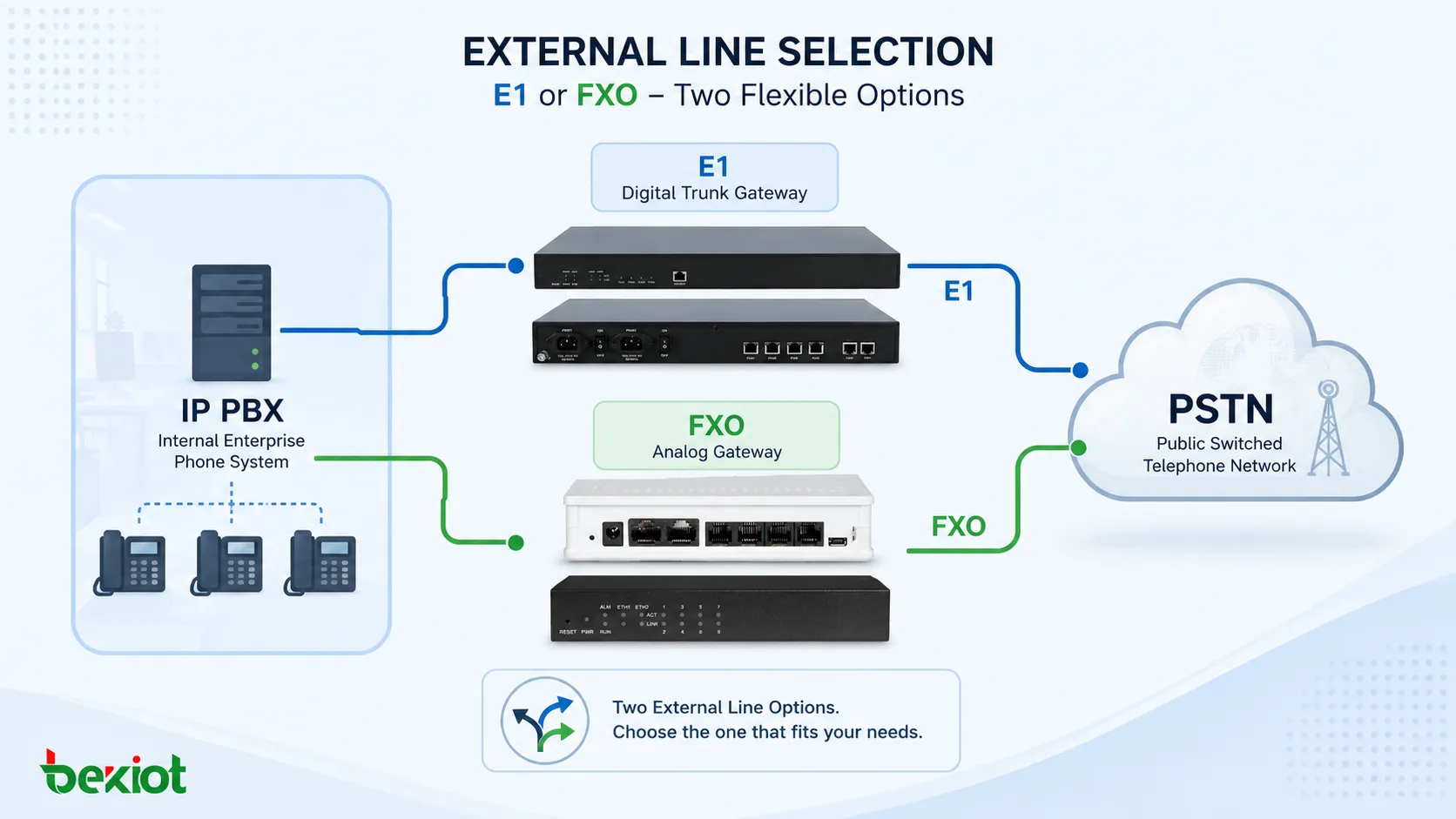
In practical projects, there are three common methods for connecting an internal telephone system to the public telephone network: FXO analog trunk, E1 digital trunk, and IMS IP trunk. FXO and E1 both use physical line access, while IMS uses IP-based network access and is usually subject to stricter operator-side management. This article focuses on the most common physical-line options: FXO and E1.
Why External Line Planning Matters
An internal phone system can manage extensions, internal calls, call groups, recording, dispatch seats, and business workflows. However, internal communication alone is not enough for most organizations. Offices, command centers, factories, service desks, and emergency duty rooms often need to communicate with external mobile phones and fixed-line users.
The choice of external line directly affects call concurrency, number management, installation complexity, monthly service cost, and future scalability. If the selected line type is too small, users may experience busy lines and failed outbound calls. If the selected line type is too large, the project may pay unnecessary access and maintenance costs.
For this reason, the key question is not simply “Can the system make external calls?” A more accurate question is: how many external calls need to happen at the same time, what number presentation is required, and whether the project is closer to a small office scenario or a high-traffic call center scenario.
FXO Access for Small and Medium Deployments
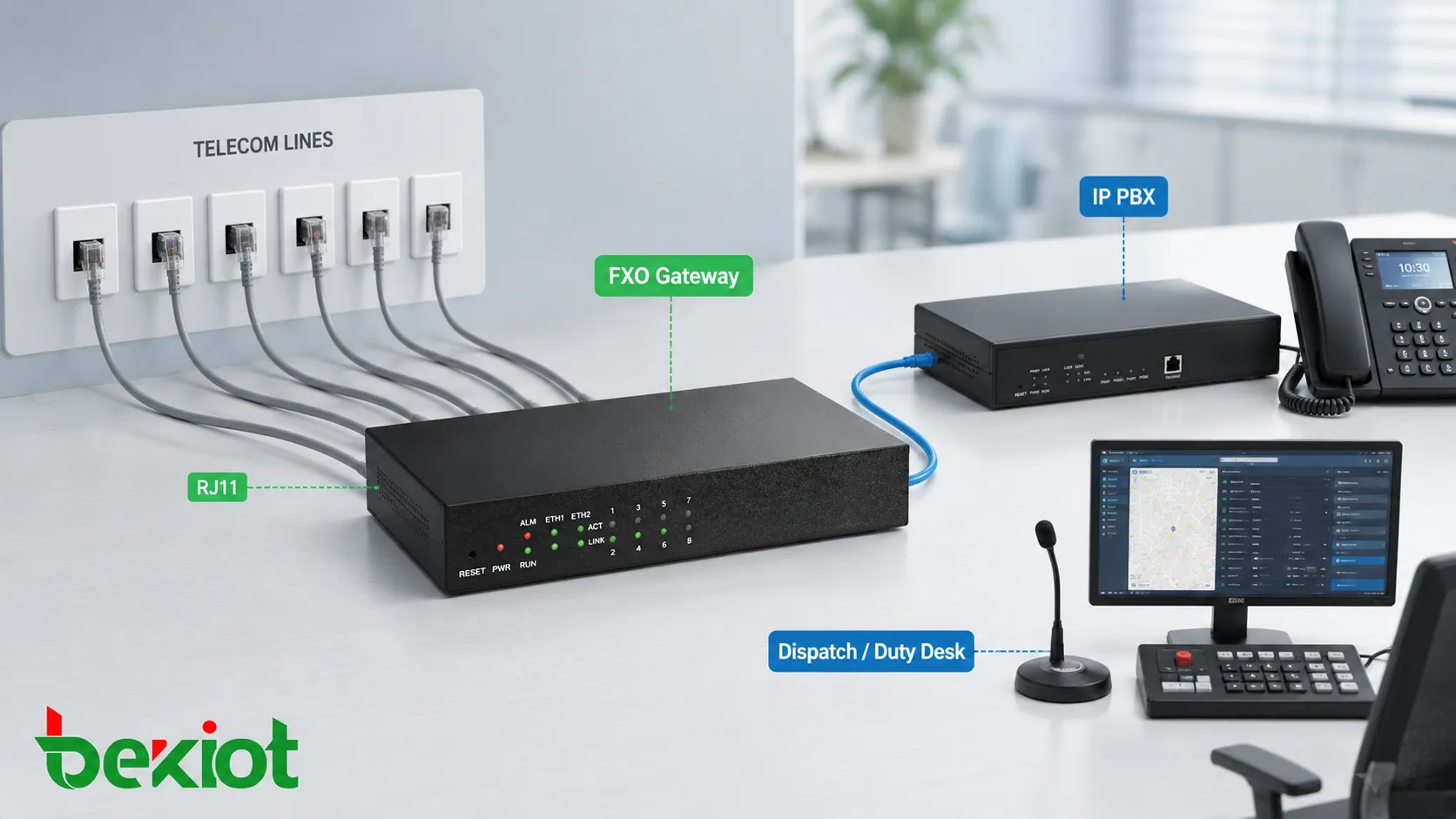
FXO stands for Foreign Exchange Office. In telephone gateway projects, an FXO port is used to connect a standard analog telephone line provided by the telecom operator. Each analog line is usually a two-wire telephone line and is commonly connected through an RJ11 interface.
The most important feature of FXO is simple one-line-one-call operation. One physical analog line supports one concurrent call. If a project has only one FXO line connected to the public network, only one external call can be active at the same time. When that line is already in use, other users cannot use the same line for another inbound or outbound call.
This means the number of FXO lines should be planned according to call concurrency. If an office requires eight simultaneous external calls, it usually needs eight analog telephone lines from the operator and an FXO gateway with enough FXO ports. The operator provides the physical lines to the equipment room, and the installer connects them to the FXO gateway.
Related solution: becke analog-gateway
Number Management and Analog Trunk Service
FXO is easy to understand and easy to wire, but it has one common business limitation. If a company applies for eight analog telephone lines, the operator may provide eight separate phone numbers. For ordinary extension use, this may be acceptable. For a unified company switchboard or customer service entrance, it may not be ideal.
In this situation, the organization may need to apply for an analog trunk service from the telecom operator. This service can bind multiple analog lines to one main number, allowing users to call a unified external number while the operator distributes calls across the available analog lines.
However, this service may increase monthly cost and may depend on local operator policies. Project teams should confirm number binding, caller ID display, inbound call distribution, and service fees before choosing FXO as the final access method.
E1 Digital Trunk for High-Concurrency Calling
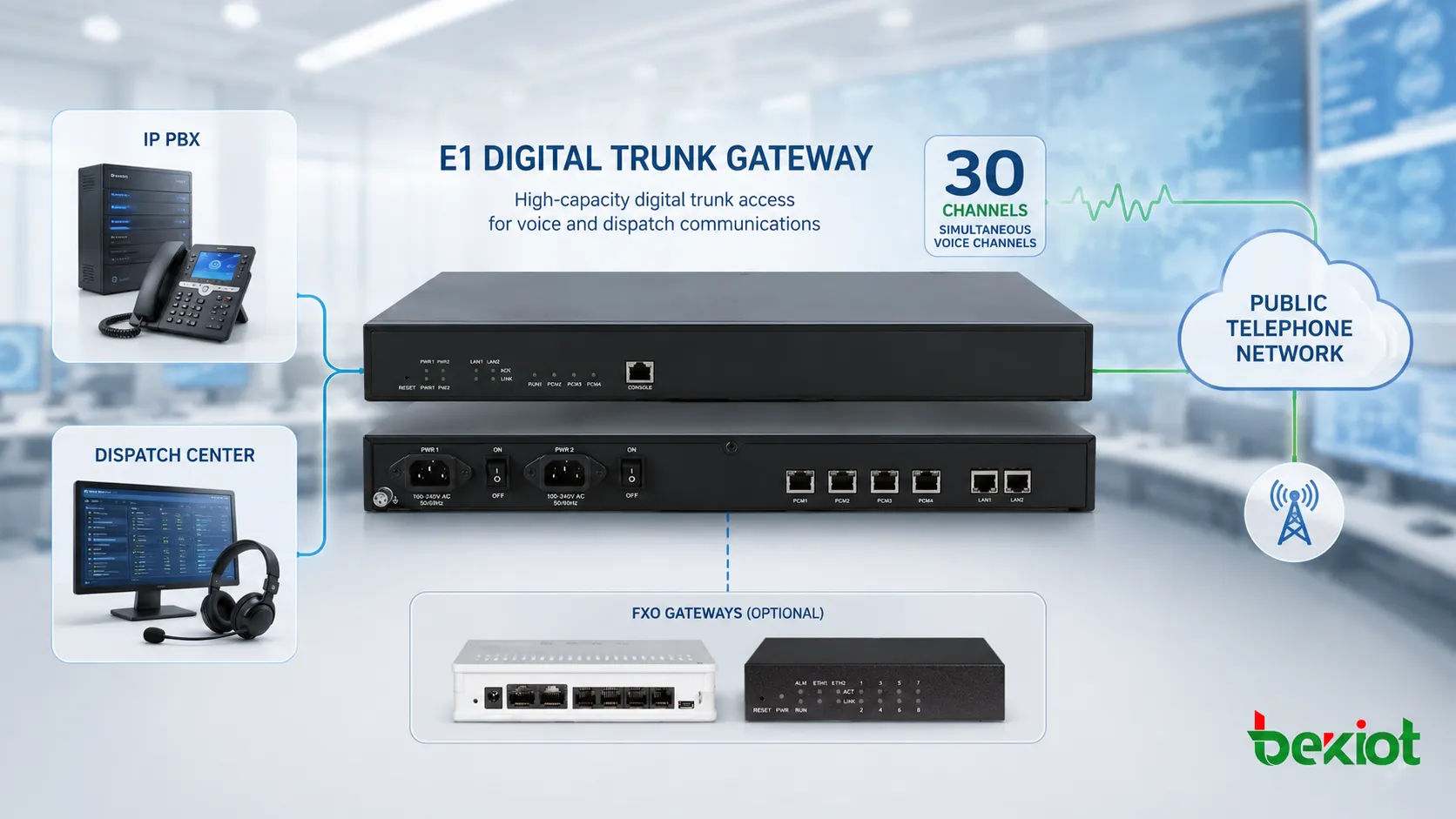
E1 is a digital trunk access method widely used in enterprise telephone systems and operator interconnection. In telephone system projects, E1 is commonly used with ISDN PRI signaling, although SS7 signaling may also be used in some telecom environments. For most enterprise and dispatch applications, ISDN PRI is the more common option.
The biggest advantage of E1 is high call capacity over a single physical link. One E1 line can usually carry 30 voice channels. In practical terms, this means one E1 trunk can support up to 30 simultaneous external calls through one digital trunk connection.
This makes E1 suitable for scenarios with heavy call traffic, such as emergency call-taking centers, customer service centers, outbound call centers, command dispatch centers, transportation operation centers, and large organizations with frequent external communication.
Business Advantages of E1 Trunk Access
Compared with many separate FXO lines, E1 is usually better for unified number management. A single main number can support multiple concurrent calls. Inbound calls can share the same published number, and outbound calls can display a unified caller number according to operator configuration and project policy.
This is important for organizations that need a professional external communication identity. Customers, citizens, partners, or field teams can call one number instead of remembering many separate analog numbers. For high-traffic departments, this improves business continuity and simplifies number management.
E1 access usually requires an E1 trunk gateway or a telephone system with an E1 interface card. Its application, installation, and parameter configuration may be more complex than FXO. Signal parameters, clocking, framing, PRI settings, number format, and operator-side configuration should be verified during commissioning.
Related solution: becke trunk-gateway
Key Differences Between FXO and E1
FXO and E1 can both provide stable physical-line access to the public telephone network. Both are widely used in IP PBX and dispatch communication projects. The difference lies in capacity, number handling, cost structure, installation complexity, and target scenario.
| Comparison Item | FXO Analog Line | E1 Digital Trunk |
|---|---|---|
| Line Type | Analog telephone line | Digital trunk line |
| Typical Interface | RJ11 two-wire connection | E1 interface, commonly with ISDN PRI signaling |
| Call Capacity | One line supports one concurrent call | One E1 link usually supports 30 voice channels |
| Number Management | Multiple lines may mean multiple numbers unless trunk service is applied | Better suited to one main number with multi-channel concurrency |
| Deployment Complexity | Simple wiring and easy access | Requires signaling parameter coordination and gateway configuration |
| Best Fit | Small offices, small dispatch systems, low-concurrency external calling | Call centers, emergency centers, large offices, high-traffic dispatch platforms |
When FXO Is the Better Choice
FXO is suitable when the system needs only a limited number of external lines. For small offices, property duty rooms, small factories, community service desks, and lightweight command dispatch applications, FXO can be a practical and cost-controlled option.
It is also suitable when installation needs to be simple. Analog lines are easy to understand, RJ11 wiring is familiar to many installers, and troubleshooting is relatively straightforward. When external call concurrency is below about 20 lines, FXO may still be convenient depending on local operator service conditions.
However, FXO should be selected carefully if the organization needs one unified number, frequent inbound calls, or future expansion. Applying many analog lines may make wiring messy, and number binding may increase service cost.
When E1 Makes More Sense
E1 is the stronger option when the project requires high concurrent call capacity. A single E1 trunk provides much more call capacity than one analog line, which makes it suitable for organizations with frequent external communication.
It is also better for centralized number presentation. If the organization needs one published number, multiple simultaneous inbound calls, and unified outbound caller ID, E1 usually provides a cleaner business structure than many separate analog lines.
The trade-off is that E1 usually has higher application cost, higher service cost, and more technical requirements during installation. It should be planned together with the operator, gateway supplier, PBX engineer, and project integrator to avoid signaling mismatch or numbering issues.
External Line Design for IP PBX and Dispatch Systems
In an IP PBX project, the external line gateway acts as the bridge between the internal SIP system and the public telephone network. Internal users call through SIP extensions, while the gateway converts the call to FXO analog lines or E1 digital trunk channels.
In a command dispatch system, the design may be more complex. The platform may need to support duty seats, emergency call routing, call recording, paging linkage, radio integration, hotline access, and multi-party coordination. In this case, external line planning should consider not only call quantity, but also operational workflow.
Becke Telcom can be considered as a light solution reference for projects that need IP PBX integration, gateway access, dispatch communication, and external line planning. The key is to match gateway type and trunk capacity to actual service needs rather than choosing equipment only by port quantity.
Planning Checklist Before Ordering Lines
Before applying for FXO or E1 service, the project team should first estimate concurrent external calls. This includes inbound calls, outbound calls, emergency calls, customer service calls, and possible peak-hour traffic. The system should not be designed only for average call volume.
The team should also confirm number requirements. Some organizations need one main number. Others need department-level numbers, hotline numbers, or caller ID display rules. These details affect whether analog trunk service or digital trunk access is more suitable.
Finally, engineers should confirm equipment compatibility. FXO requires enough analog gateway ports. E1 requires a compatible trunk gateway or PBX interface card. SIP registration, routing rules, dial plans, caller ID, recording, and failover behavior should be tested before handover.
Practical Selection Summary
| Project Requirement | Recommended Option | Reason |
|---|---|---|
| Only a few external calls are needed | FXO | Simple wiring and lower entry complexity |
| External lines are fewer than about 20 | FXO may be suitable | Analog line deployment remains manageable |
| One main number with many concurrent calls is required | E1 | Better multi-channel trunk capability and number presentation |
| Call center or emergency center deployment | E1 | High concurrency and stronger business capability |
| Lowest possible technical complexity is required | FXO | Configuration is generally easier than digital trunk signaling |
| Long-term expansion is expected | E1 or planned trunk migration | Digital trunk access is more scalable for large systems |
Conclusion
FXO and E1 are both stable and practical ways to connect internal telephone systems, IP PBX platforms, and command dispatch systems to the public telephone network. FXO is simple, convenient, and suitable for small-scale external line access. Each analog line usually supports one concurrent call, so the number of lines must match the expected call concurrency.
E1 is more suitable for large-scale and high-traffic scenarios. One E1 line can usually support 30 simultaneous voice channels, making it a better choice for call centers, emergency centers, command dispatch rooms, and organizations that need one main number with multi-channel calling capability.
The right choice depends on call volume, number strategy, operator service conditions, budget, gateway compatibility, and future expansion. For small projects, FXO may be easier and more economical. For larger systems with heavy traffic and stronger business requirements, E1 is usually the more professional trunk access method.
FAQ
Can FXO and E1 be used in the same telephone system?
Yes. Some systems can use both access types at the same time. For example, E1 may be used as the main trunk for high-volume calls, while FXO lines may be used for backup, special numbers, or local analog access.
Does E1 require operator-side configuration?
Yes. E1 trunk access normally requires coordination with the telecom operator. Signaling type, clock source, number format, inbound rules, outbound caller ID, and channel availability should be confirmed before commissioning.
What happens if all FXO lines are busy?
If all analog lines are already in use, additional inbound or outbound calls may fail or receive a busy tone. This is why FXO line quantity must be planned according to peak-hour concurrency rather than only the number of employees.
Is IMS better than FXO and E1?
IMS can be useful because it uses IP-based access, but it depends heavily on operator policy, access permission, security requirements, and platform compatibility. Some projects still choose FXO or E1 because physical-line access is clear, stable, and easier to define in traditional telephony projects.
What should be tested before project handover?
Engineers should test inbound calls, outbound calls, simultaneous call capacity, caller ID display, call recording, emergency call routing, failover behavior, echo quality, disconnect detection, and recovery after network or power interruption.







