A telephone gateway is an important access device in a VoIP, softswitch, IP PBX, or unified communication system. It allows IP-based communication platforms to connect with traditional telephone lines, analog extensions, E1 trunks, conference audio equipment, radio systems, and other legacy or field-side communication resources.
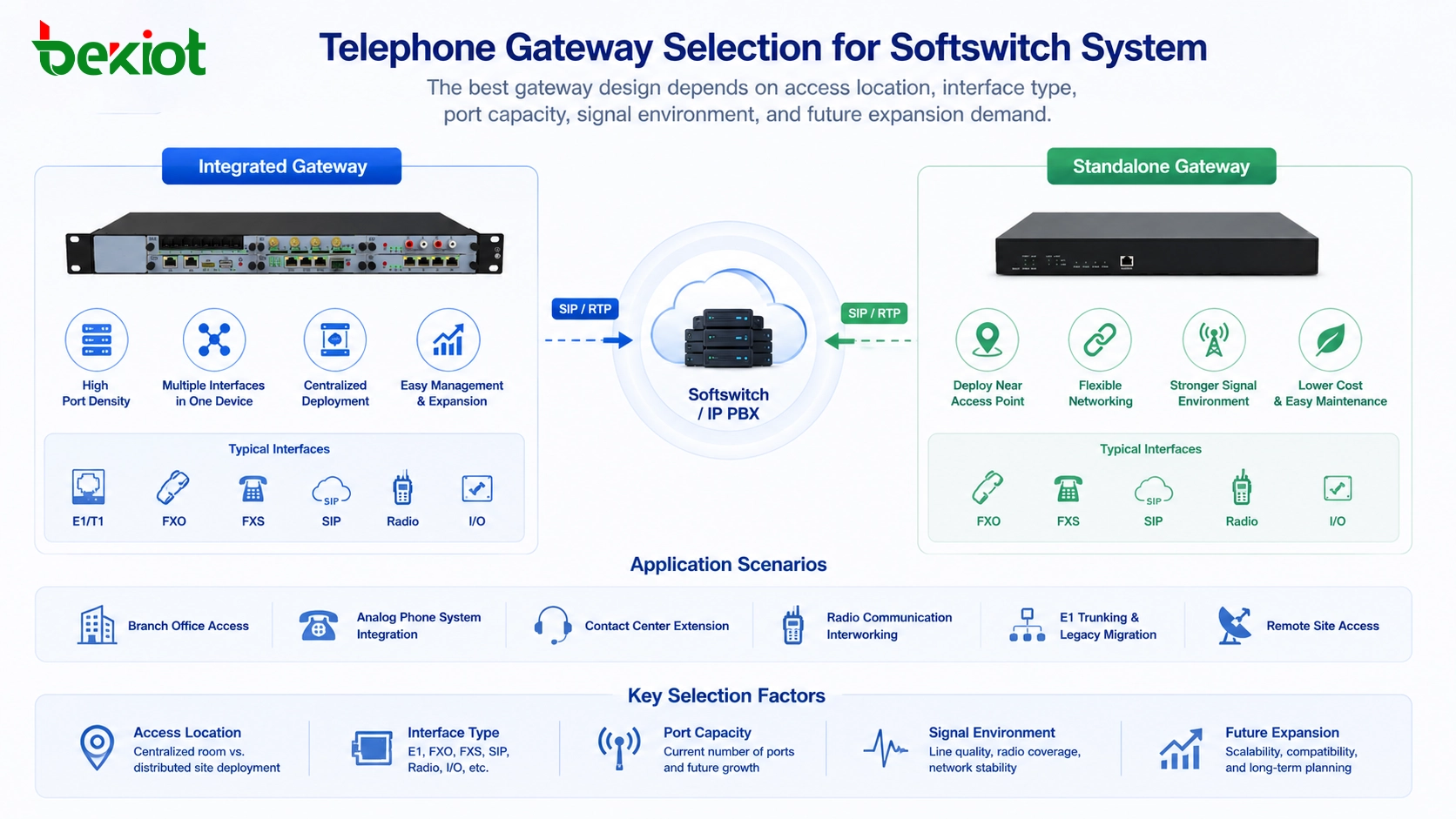
In many projects, the gateway is selected too quickly. Some users only compare port quantity, device size, or hardware price. However, a better gateway design should consider access location, interface type, wiring conditions, signal environment, expansion demand, maintenance model, and whether the system will be centralized or distributed. This is why telephone gateways are often divided into two practical forms: integrated gateways and standalone gateways.
Two common forms in voice access projects
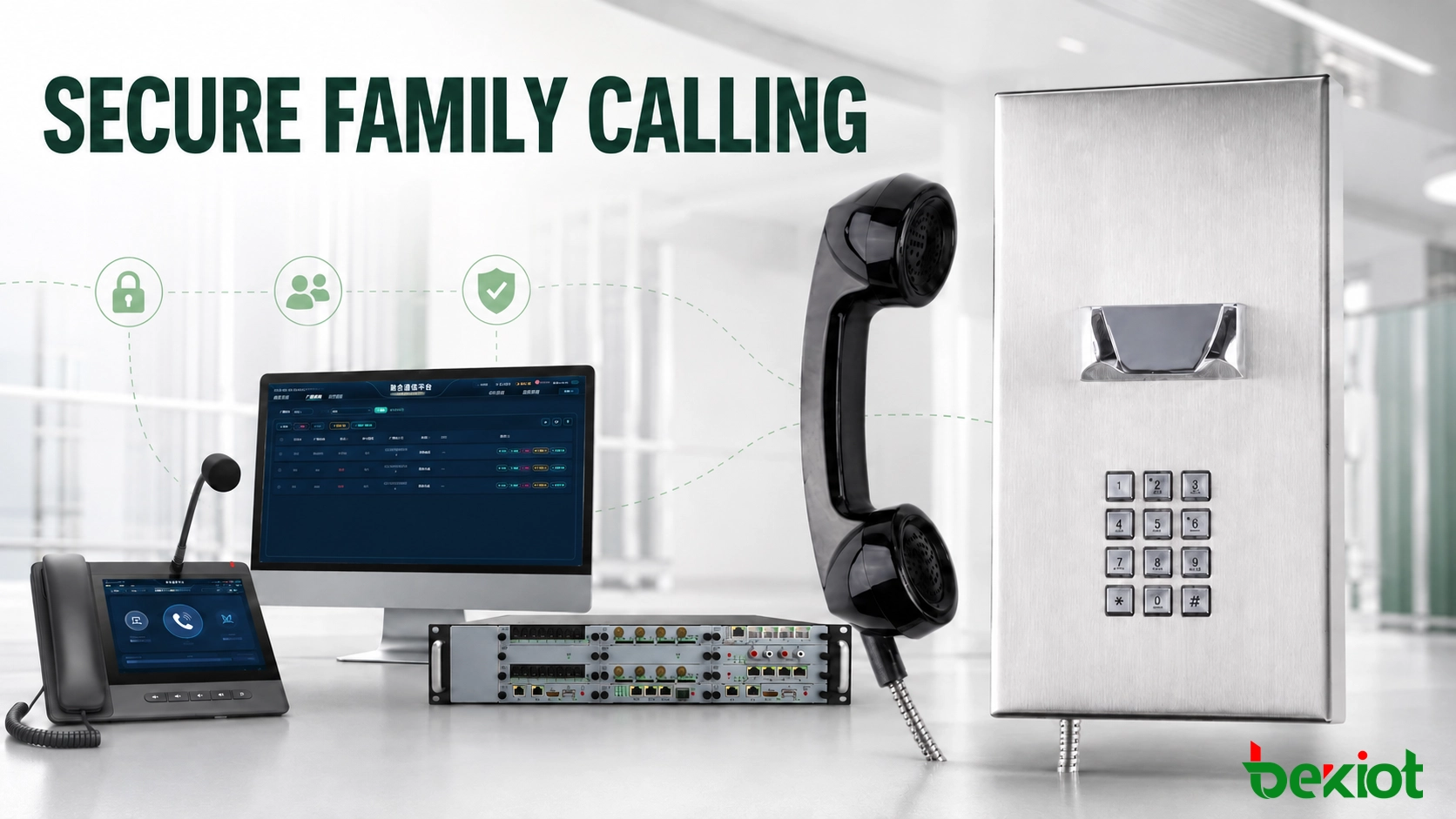
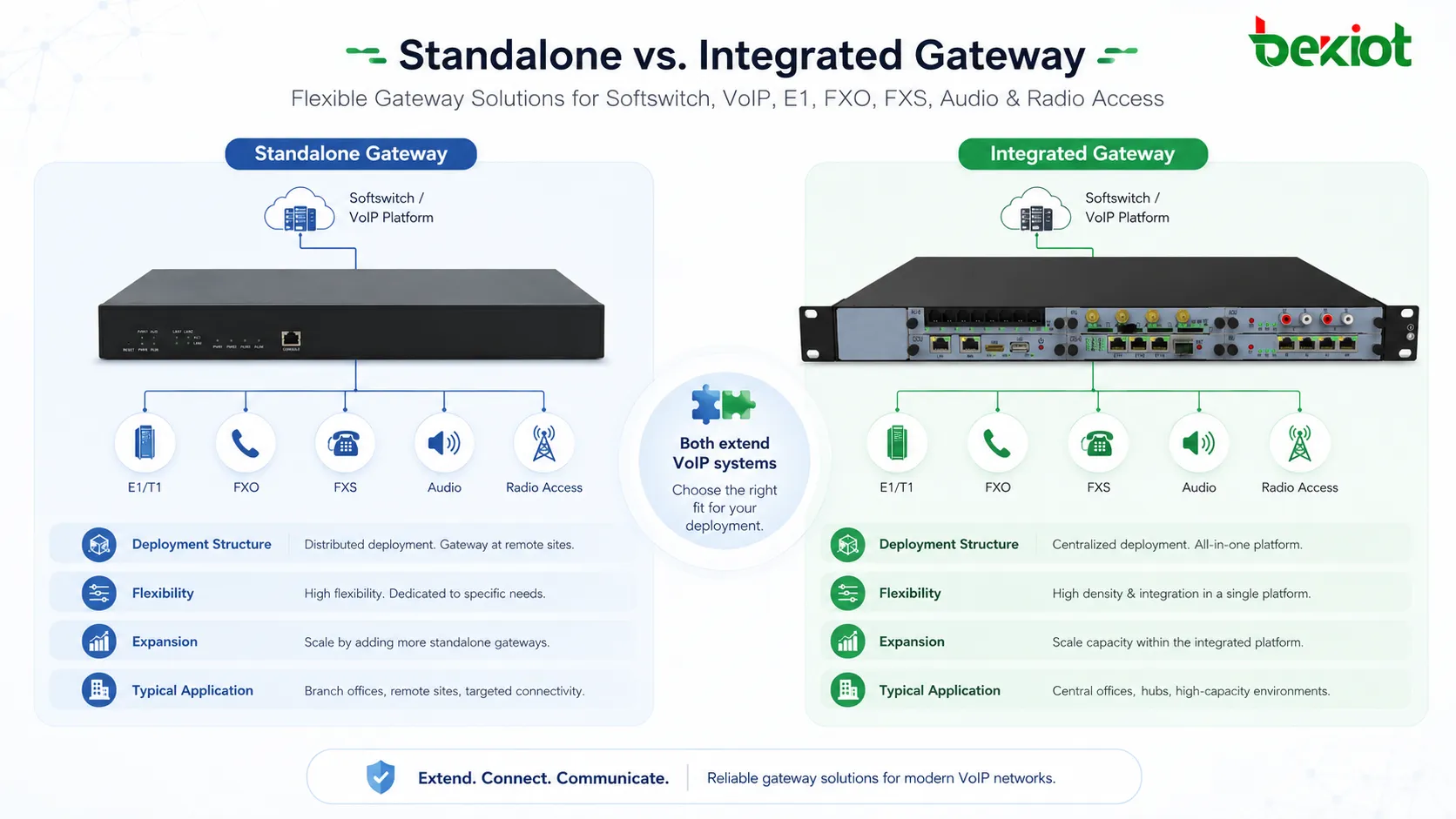
An integrated gateway usually adopts a chassis, frame, or modular board design. Different service functions are provided through interface boards or function cards. For example, an E1 board can be used for digital trunk access, an FXO board can connect analog outside lines, and an FXS board can connect analog phones, fax machines, or legacy extensions.
This structure is close to traditional large telephone exchange equipment. It is suitable when many interfaces are concentrated in one communication room. The project team can install the required boards in the same chassis and manage the ports from one central location.
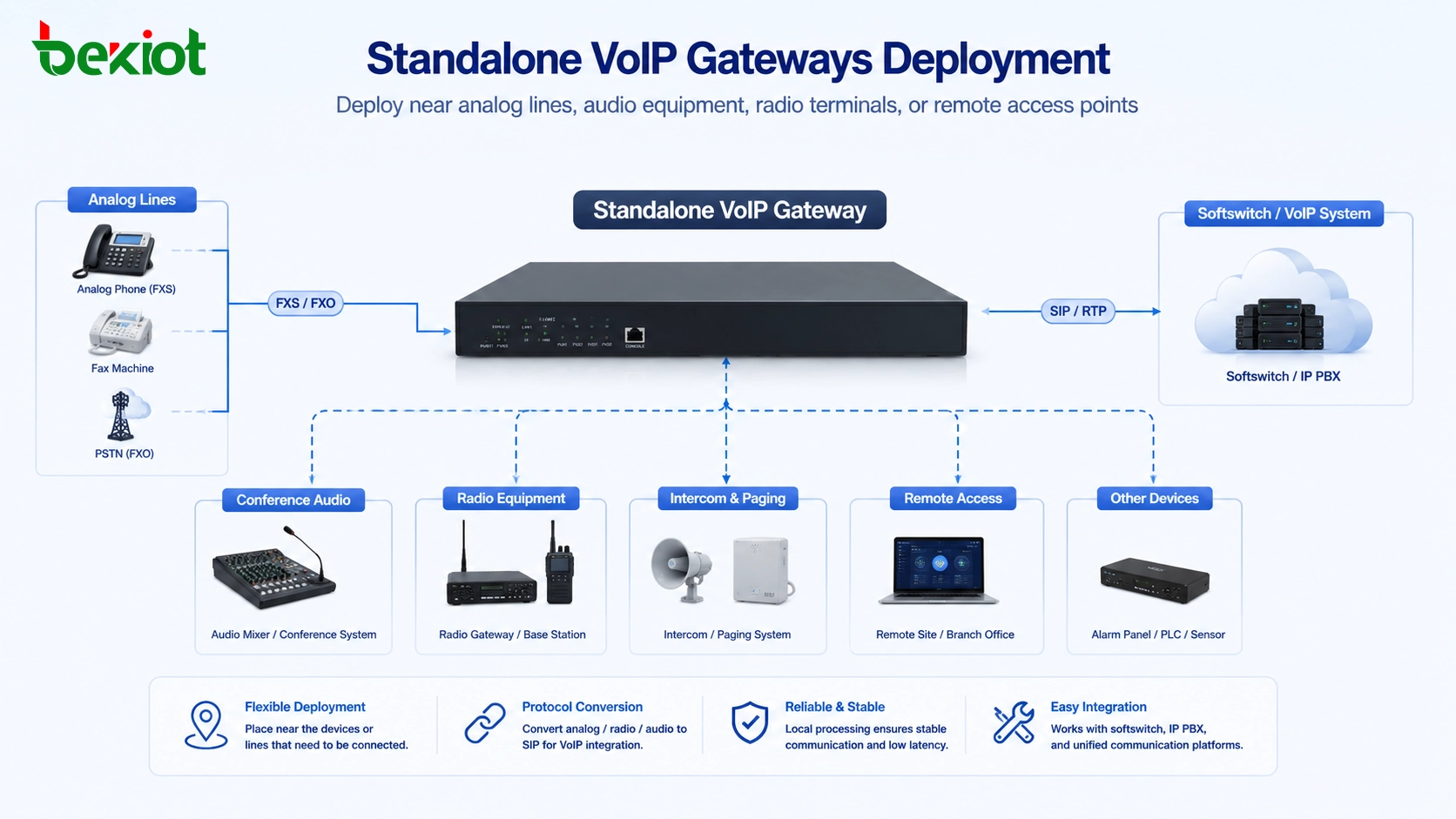
A standalone gateway usually focuses on one access function or a smaller number of ports. An E1 gateway is used for digital trunk access. An FXO gateway connects analog PSTN lines or legacy PBX trunk ports. An FXS gateway connects analog endpoints. Some small devices may combine FXO and FXS ports for small offices or basic telephone migration projects.
There is no absolute winner between the two structures. The correct choice depends on the actual project layout. If the access resources are centralized, an integrated gateway may be efficient. If the resources are distributed across different rooms, branches, radio locations, or field sites, standalone gateways are usually easier to deploy.
Where a modular chassis is more efficient
An integrated gateway is suitable for centralized and high-density telephone access. If a project has many E1 trunks, analog outside lines, or analog extensions located in the same equipment room, a chassis-based design can reduce the number of independent devices in the cabinet.
For large organizations, this can make the system structure cleaner. All gateway boards are installed in one frame, power supply and cabinet space are planned together, and the maintenance team can manage many ports from one equipment location. This is useful in headquarters communication rooms, campus communication centers, large enterprise PBX migration projects, and centralized carrier trunk access projects.
Another advantage is expansion. If the chassis has enough slots and power capacity, new boards can be added later when more ports are required. This is useful for projects that may gradually migrate from traditional telephony to IP-based communication while still keeping some PSTN, E1, or analog resources.
When centralized equipment becomes a limitation
The disadvantage of an integrated gateway appears when the access resource is not located in the same place as the main equipment room. For example, a branch building may only need two analog outside lines. If the gateway is centralized in another building, the project may need additional cabling, line extension, or extra transmission equipment. This increases cost and fault points.
The same issue can happen in conference audio integration. An audio gateway should often be placed near the mixer, audio processor, or conference system. If the gateway must stay inside a central chassis far away from the meeting room, cabling and signal adaptation may become inconvenient.
Radio integration is even more location-sensitive. A radio gateway may need to be installed where radio signal quality is better, where antennas can be placed correctly, or where interference is lower. If the gateway is forced into a central cabinet, the actual radio communication effect may not meet expectations.
Why smaller gateways fit distributed sites
Standalone gateways are more flexible because they can be deployed near the actual access point. If analog lines are located in a branch office, the FXO gateway can be installed there. If analog phones are used in a workshop, an FXS gateway can be placed closer to the phones. If a radio terminal needs to be connected, a radio gateway can be installed near the radio equipment and antenna system.
This distributed structure is useful for branch offices, temporary command rooms, factory areas, remote stations, industrial sites, meeting rooms, and radio access points. As long as the gateway can reach the SIP server, IP PBX, or softswitch through the network, it does not need to be physically close to the main platform.
Standalone gateways also make troubleshooting clearer. If a telephone line problem occurs, engineers can check the specific FXO gateway at that site. If analog extension registration fails, they can check the FXS gateway. If radio voice is unstable, they can check radio signal, antenna, audio cable, and gateway registration separately. The fault boundary is usually easier to locate.
Interface planning should come first
Before deciding whether to use an integrated or standalone gateway, the project team should first identify the required interfaces. E1 gateways are commonly used for digital trunk connection. FXO gateways are used for analog outside lines or legacy PBX trunk ports. FXS gateways are used for analog phones, fax machines, emergency phones, elevator phones, or old analog extensions.
Audio gateways may be used to connect conference mixers, public address systems, analog audio equipment, or command room audio processors. Radio gateways may connect handheld radios, vehicle radios, base station radios, or trunked radio terminals, converting radio voice into SIP communication.
After the interface type is clear, the next step is to check the physical location of each access resource. If all trunks, lines, and extensions are in one equipment room, a centralized integrated gateway may be reasonable. If different access resources are spread across multiple buildings or field areas, standalone gateways usually provide a more practical deployment path.
Related product introduction: Becke Telcom VoIP Gateway
Cost should include installation and maintenance
Gateway cost is not only the purchase price of the device. A project should also calculate cabinet space, cabling distance, power supply, installation labor, spare parts, maintenance access, and future expansion. A chassis gateway may look more expensive at the beginning, but it can be cost-effective when many ports are centralized.
On the other hand, a small standalone gateway may be more economical when only a few ports are needed at a remote point. It avoids long analog cable runs and allows the system to use the existing IP network for communication. In distributed sites, this can reduce construction complexity and improve maintenance efficiency.
Long-term operation should also be considered. If a project uses many independent gateways, the system should support centralized monitoring, configuration backup, firmware management, and log checking. If a project uses an integrated chassis, spare board availability, power redundancy, and chassis capacity should be reviewed in advance.
A mixed design is often the best answer
Many real projects do not use only one type of gateway. A softswitch or unified communication platform may use an integrated gateway for centralized E1 trunks and high-density analog access, while using standalone gateways for branch offices, conference audio, remote analog lines, radio systems, and temporary command points.
This hybrid design combines the advantages of both models. Centralized resources stay in the main equipment room, while distributed access points use smaller gateways placed closer to the real signal source. The SIP platform or softswitch then manages all gateways as part of the same communication network.
For example, a campus communication system may use an integrated gateway in the central communication room for main trunk access. At the same time, standalone FXO or FXS gateways can be installed in security rooms, workshops, utility buildings, or emergency duty rooms. A radio gateway can be deployed near the radio base station, while an audio gateway can be installed in the meeting room or command hall.
Becke Telcom can be lightly considered in this type of project when users need VoIP gateway access, SIP interconnection, legacy telephone migration, and practical integration with dispatch or unified communication platforms.
Selection guide for common scenarios
| Project Requirement | Recommended Choice | Reason |
|---|---|---|
| Many telephone trunks in one equipment room | Integrated gateway | Higher port density and cleaner centralized deployment |
| Small number of analog lines at branch sites | Standalone gateway | Gateway can be installed close to the actual line access point |
| Meeting room or command hall audio integration | Standalone audio gateway | Device can be placed near the mixer or audio processor |
| Radio or trunked radio interconnection | Standalone radio gateway | Placement can follow radio signal, antenna, and interference conditions |
| Future high-capacity centralized expansion | Integrated gateway | Board-based expansion is more suitable for large-scale port growth |
| Temporary command or mobile deployment | Standalone gateway | Small devices are easier to move, install, and replace |
Technical details that affect stability
Gateway stability depends on more than SIP registration. For E1 trunks, the project must confirm signaling type, clock synchronization, framing, line coding, carrier-side parameters, and number allocation. If these parameters are wrong, calls may fail even when the physical cable is connected correctly.
For FXO ports, engineers should check line voltage, caller ID format, disconnect detection, impedance, echo control, ringing behavior, and whether the line comes directly from a carrier or from an old PBX system. For FXS ports, the project should verify ringing voltage, analog phone compatibility, fax requirement, emergency phone behavior, and line distance.
For SIP integration, dial plan design is also important. The gateway should match the numbering plan of the softswitch or IP PBX. Outbound route, inbound route, prefix rule, caller ID rule, codec selection, DTMF mode, and failover route should be tested before final acceptance.
Reliability and operation planning
In enterprise and industrial communication projects, gateways often support important voice channels. The system should therefore consider backup and recovery. For centralized gateways, redundant power supply, spare boards, backup trunks, and equipment room reliability are important. For distributed gateways, network stability, remote access, local power protection, and device health monitoring are more important.
The maintenance team should also prepare configuration backups. If a gateway fails, engineers should be able to replace it and restore configuration quickly. Log export, call status display, port status monitoring, packet capture, and remote upgrade functions can greatly reduce troubleshooting time.
A practical acceptance test should include inbound calls, outbound calls, internal extension calls, emergency call routing, caller ID display, call transfer, DTMF transmission, fax if required, trunk failover, power recovery, network reconnection, and long-duration call stability. These tests help avoid problems after the system is already in operation.
A telephone gateway is not only an interface converter. It is part of the access architecture, routing plan, maintenance model, and long-term expansion strategy of a VoIP system.
Conclusion
Integrated gateways and standalone gateways serve different needs. Integrated gateways are better for centralized, high-density, and cabinet-based access. Standalone gateways are better for distributed, flexible, and scenario-based access where the gateway should be close to the actual line, audio device, or radio equipment.
A good VoIP or softswitch project should not select a gateway only by appearance, port count, or initial price. It should evaluate interface type, access location, wiring distance, signal environment, expansion demand, maintenance method, and acceptance requirements. In many cases, a mixed design can provide the best balance between centralized management and flexible deployment.
FAQ
Can a standalone gateway be managed by the same softswitch as an integrated gateway?
Yes. As long as both devices support compatible SIP registration or trunk connection, they can usually work under the same softswitch, IP PBX, or unified communication platform.
Does an integrated gateway reduce all maintenance work?
Not completely. It can simplify centralized cabinet management, but the project still needs proper port labeling, spare board planning, configuration backup, power protection, and clear troubleshooting procedures.
Should analog phones always be replaced during VoIP migration?
Not always. If existing analog phones are still reliable and meet user needs, FXS gateways can keep them connected to the new VoIP system during a phased migration.
Why should DTMF mode be tested during gateway acceptance?
DTMF is often used for IVR menus, door access, conference control, and dispatch operations. If the DTMF mode does not match the platform, keypad commands may not be recognized correctly.
What is a common mistake when selecting gateway capacity?
A common mistake is only calculating current port demand. Projects should also consider spare capacity for future trunks, temporary lines, emergency phones, branch expansion, and maintenance replacement.