


In many video integration projects, traditional video processing still relies on HDMI cabling, HDMI matrix switches, local displays, and dedicated point-to-point wiring. This method can work in small and fixed environments, but it becomes increasingly difficult to manage when a project needs to connect surveillance cameras, body-worn cameras, drones, video phones, mobile command vehicles, emergency sites, and multiple display or platform destinations.
IP-based video processing changes this model. Instead of pulling every signal into an HDMI matrix and sending every output through physical video cables, video sources can be received, converted, managed, distributed, and viewed through network-based media protocols. For command centers, emergency communication vehicles, industrial parks, enterprise fire stations, and dispatch rooms, this provides a more flexible way to build a compact, scalable, and software-managed video system.
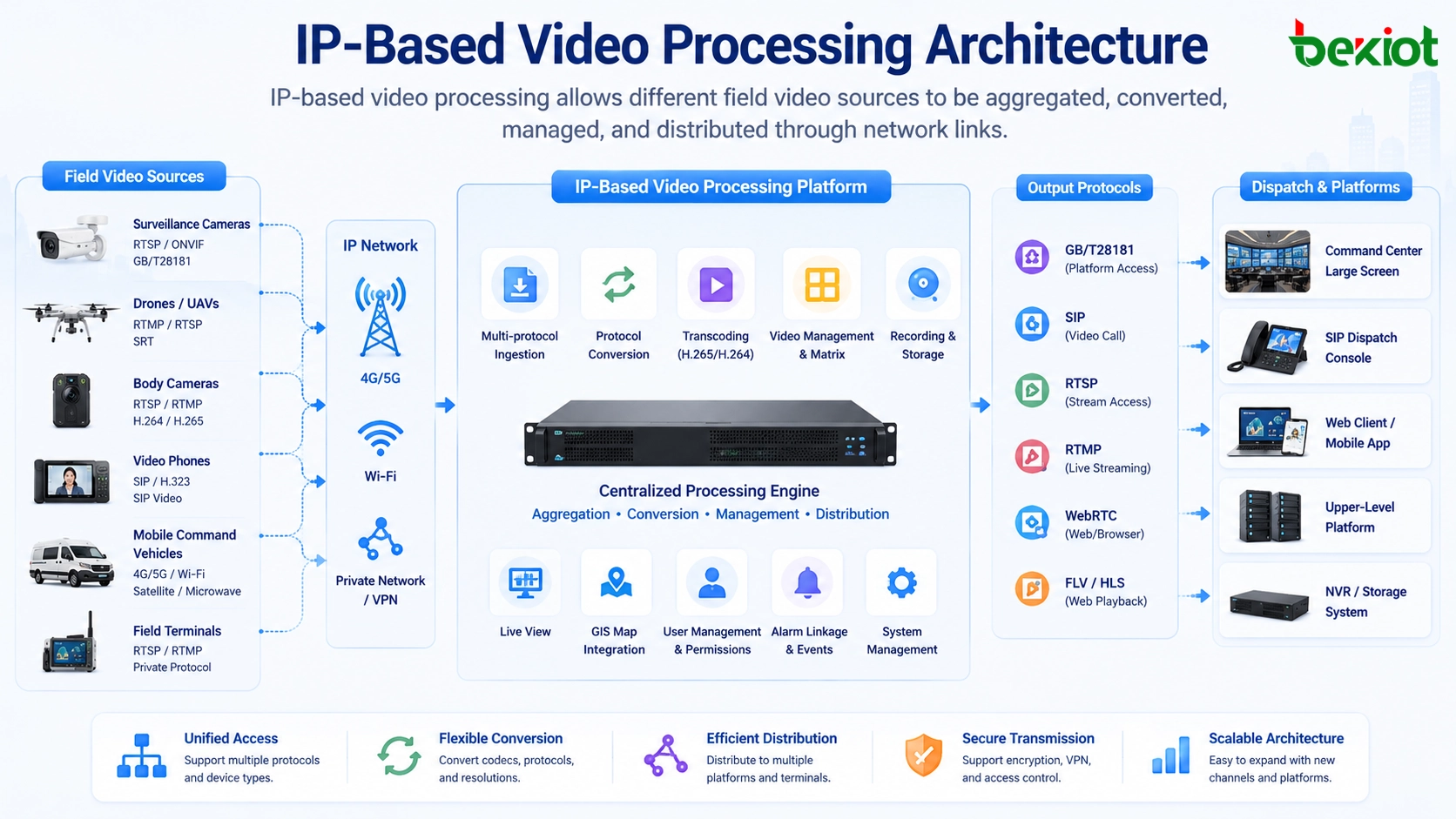
Why traditional HDMI structures become difficult to expand
HDMI-based video integration usually depends on direct cabling between the video source, matrix equipment, decoder, display screen, and control system. When the number of inputs and outputs is limited, this structure is easy to understand. However, once the project requires more sources, more destinations, more control functions, or more mobile deployment scenarios, the wiring structure becomes much more complicated.
This problem is especially obvious in emergency command vehicles and compact command rooms. These environments have limited space, strict installation requirements, and frequent changes in business needs. If many HDMI devices and cables are installed inside a small vehicle cabinet, later maintenance, replacement, troubleshooting, and function expansion become difficult.
Another limitation is that HDMI is mainly designed for local signal transmission. It is not naturally suitable for remote platform sharing, cloud viewing, cross-network forwarding, multi-party collaboration, or integration with command and dispatch software. When a video needs to be sent to several systems at the same time, a purely HDMI-based structure often needs extra encoders, splitters, converters, and manual wiring changes.
Moving video sources directly onto the network
Most modern video devices already support IP transmission in some form. Surveillance cameras, portable monitoring balls, body-worn cameras, UAV video gateways, video phones, vehicle-mounted cameras, and mobile video terminals often provide standard or semi-standard streaming protocols. Instead of converting everything into HDMI first, an IP-based aggregation device can receive these streams directly over the network.
Common access methods include GB/T28181, RTSP, RTMP, SIP, and other streaming or communication protocols. These protocols allow different types of video equipment to enter the same media processing environment. Once the signals are received as IP streams, the system can perform unified management, protocol conversion, transcoding, recording, preview, dispatch, and distribution.
Compared with traditional physical video routing, this model reduces the dependence on point-to-point cabling. A network switch, gigabit interface, or fiber link can carry multiple video channels at the same time. In suitable system designs, one compact audio and video aggregation device can support hundreds of video inputs while occupying only a small amount of rack space, such as a 1U installation position.
The value of IP-based video processing is not only fewer cables. Its deeper value is that video becomes a manageable network resource that can be routed, converted, shared, viewed, recorded, and integrated with dispatch workflows.
More flexible input from field devices
In emergency response, industrial safety, transportation command, and mobile inspection projects, video sources are rarely limited to one device type. A command platform may need to receive fixed surveillance video, temporary deployment cameras, drone footage, vehicle video, body-worn camera streams, video intercom calls, and remote mobile terminals at the same time.
A network-based video processing solution can aggregate these sources through software-defined access. Different devices can be connected through the most suitable protocol, rather than being forced into the same HDMI format. For example, a surveillance camera may use RTSP, a government video platform may use GB/T28181, a video communication terminal may use SIP, and a live streaming device may use RTMP.
This flexibility is important because field equipment often comes from different manufacturers, uses different codecs, and outputs different resolutions, bitrates, and frame rates. If the central platform cannot handle these differences, video integration becomes unstable. A proper IP-based processing system should therefore support multi-protocol access, automatic stream adaptation, and media conversion.
Output is no longer limited to local screens
In older systems, video output usually meant sending HDMI signals to a monitor, large screen, or video wall. In modern command and communication projects, video output is much broader. A single video stream may need to be sent to an upper-level platform, a local dispatch console, a web browser, a mobile client, a recording server, a remote expert system, or an emergency coordination center.
IP-based output makes this distribution much easier. The same input stream can be converted and forwarded to different destinations through different protocols. For example, a system may output video through SIP for video communication, through GB/T28181 for public security or government video platforms, through WebRTC for low-latency browser viewing, and through FLV or other formats for local preview and web-based monitoring.
When a display device still requires HDMI, a decoder can be placed near the display. The long-distance transmission can remain IP-based, and HDMI only appears at the final display point. This reduces long HDMI cable runs, improves deployment flexibility, and allows video to be transmitted over longer network or fiber links.
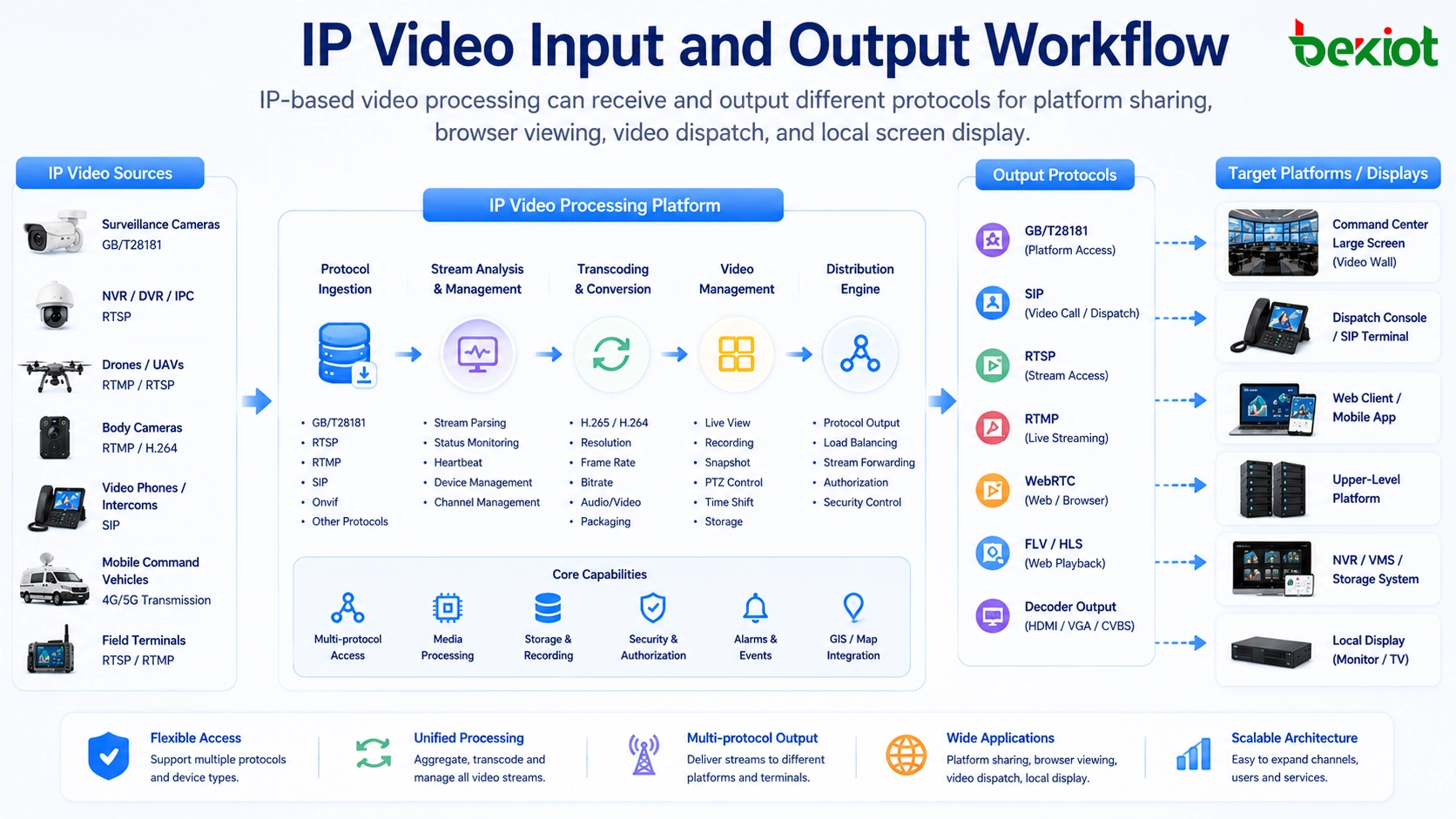
Software control makes video easier to manage
Once video signals are processed as IP streams, management can move from physical cable switching to software-based control. Operators can view video sources, select channels, switch layouts, create split-screen views, push streams to platforms, start conference sessions, and manage remote terminals through a unified interface.
This is much more practical than relying only on HDMI matrix switching. A traditional matrix can switch signals, but it usually cannot provide complete video communication, multi-party conferencing, protocol forwarding, remote control, or platform-level coordination. IP-based processing allows video management to become part of the communication workflow rather than a separate display-only function.
For command centers, this means the operator can quickly pull a field video source into a dispatch screen, share it with a remote expert, send it to an upper-level platform, or combine it with voice communication. For emergency vehicles, it means the vehicle can receive multiple field sources and forward selected video to the command center without rebuilding the physical wiring structure.
Protocol conversion is the real technical challenge
The biggest difficulty in video IP transformation is not simply network transmission. The real challenge is protocol diversity. Different video devices may use different media protocols, authentication methods, codecs, resolutions, bitrates, frame rates, audio formats, and transport mechanisms. Even when two devices both claim to support IP video, they may not be directly compatible.
A practical video aggregation and processing platform must therefore solve several problems at the same time. It needs to receive different stream formats, identify the media parameters, convert incompatible formats, adjust video resolution when necessary, adapt bitrate for network conditions, synchronize audio and video, and output the required format to each destination platform.
For example, a drone video stream may need high compression for remote backhaul, a body-worn camera may need stable uplink in weak network conditions, a surveillance platform may require GB/T28181 registration, and a browser-based command screen may require WebRTC or web-compatible preview. These requirements cannot be solved by a simple HDMI matrix or a basic encoder alone.
Smaller deployment with higher integration
A major advantage of IP-based video processing is system miniaturization. In a traditional structure, different functions may require separate HDMI matrix equipment, encoders, decoders, audio processors, video conference terminals, stream forwarding servers, and control devices. This increases rack space, power consumption, cabling, and maintenance workload.
With an integrated audio and video aggregation device, many of these functions can be combined into one compact platform. The system can receive IP video, process video streams, convert protocols, support video communication, output to multiple platforms, and provide unified control from one software interface.
This is valuable for small command posts, emergency command vehicles, enterprise fire stations, park dispatch rooms, temporary emergency sites, and mobile operations. These scenarios often need strong video integration capability, but they cannot accept large cabinets, complex wiring, high power consumption, or heavy maintenance processes.
Better support for command and dispatch workflows
Video integration is no longer only about seeing images. In modern command scenarios, video must work together with voice, maps, alarms, field reports, emergency contacts, and dispatch procedures. A video stream may become part of an incident record, a command decision, a remote consultation, a multi-party conference, or a cross-department coordination process.
When video is IP-based, it is easier to connect it with dispatch platforms and communication systems. A field video source can be associated with a location, a vehicle, a person, an alarm event, or a task. Operators can use video as part of the full communication chain instead of treating it as an isolated screen signal.
For example, in an emergency command vehicle, the system may receive drone footage, body camera video, vehicle camera feeds, and video calls from field staff. The dispatcher can select key sources, create a split-screen layout, open a video conference, and push important streams to the command center. This workflow is difficult to achieve with only HDMI switching.
Becke Telcom can be lightly integrated in this type of architecture through its converged communication and dispatch solutions. In projects that combine SIP communication, field terminals, video access, paging, alarms, and command center coordination, an IP-based video processing layer can help the dispatch platform receive and distribute visual information more efficiently.
Comparison with a traditional matrix-based design
| Item | HDMI Matrix-Based Structure | IP-Based Video Processing Structure |
|---|---|---|
| Signal access | Mainly depends on physical HDMI input and output ports | Receives network streams from cameras, drones, recorders, platforms, and terminals |
| Transmission distance | Limited by HDMI cable length or extra extension equipment | Can use Ethernet, optical fiber, VPN, private network, or cellular backhaul |
| Expansion | Often requires more ports, cables, converters, and hardware changes | Can add streams through network configuration and platform capacity planning |
| Output method | Mainly local monitor, video wall, or display endpoint | Supports platform forwarding, web viewing, remote dispatch, decoding, and local display |
| Management | Focused on physical signal switching | Supports software control, split-screen display, stream routing, conferencing, and integration |
| Typical limitation | Wiring complexity and weak platform integration | Requires good protocol adaptation, network planning, and codec processing capability |
Network planning still matters
Although IP-based video processing reduces physical wiring complexity, it does not mean that any network can carry video smoothly. Video traffic requires careful planning, especially when many high-definition streams are transmitted at the same time. Bandwidth, latency, packet loss, jitter, switch capacity, uplink design, firewall policy, and QoS configuration can all affect the final viewing experience.
For local command rooms, gigabit or higher-speed network infrastructure is usually recommended. For mobile command vehicles, the system may combine onboard LAN, 4G/5G links, satellite links, private wireless bridges, and fiber access when available. For remote sites, the design should consider uplink bandwidth, compression strategy, reconnect behavior, and local buffering.
When video needs to be sent to an upper-level platform, the project team should also confirm the receiving protocol, codec requirement, authentication method, channel registration logic, stream naming rule, and platform concurrency. These details determine whether the video can be smoothly connected after the physical network is ready.
A successful IP video system depends on both media processing capability and network design. Protocol support alone is not enough if bandwidth, routing, security, and platform integration are not planned correctly.
Where this architecture is most valuable
IP-based video processing is especially valuable in projects that need many video sources, flexible distribution, remote viewing, compact deployment, and integration with communication systems. Typical environments include emergency command vehicles, temporary command posts, public safety dispatch rooms, industrial park control centers, enterprise fire stations, traffic management centers, energy operation sites, and large facility security rooms.
In an emergency response project, the system can receive mobile field video and forward it to the command center in real time. In an industrial park, it can aggregate fixed cameras, inspection terminals, and alarm-related video sources. In a transportation project, it can connect vehicle video, roadside cameras, and control room displays. In a large enterprise campus, it can combine video, voice, intercom, paging, and incident response workflows.
The common requirement behind these scenarios is not just video display. The real requirement is faster decision-making, better situational awareness, simpler system expansion, and more efficient coordination between field staff and the command center.
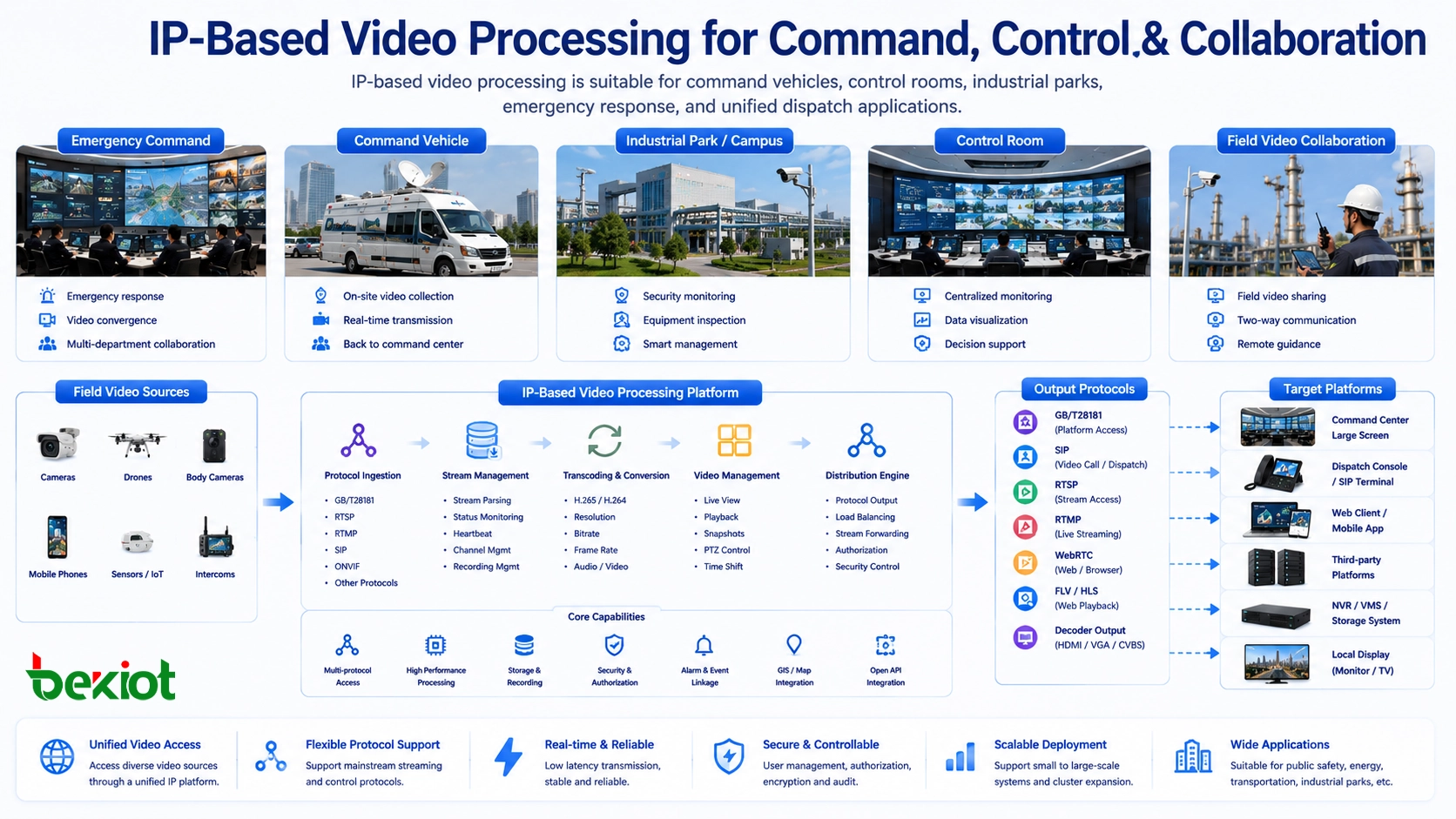
Implementation checklist for project design
Before deploying an IP-based video processing solution, the project team should first list all required video sources. This includes camera types, device brands, access protocols, resolution, bitrate, frame rate, audio requirement, control requirement, and whether two-way communication is needed.
The second step is to define output destinations. Some streams may need to go to a video wall, some to a browser interface, some to an upper-level GB/T28181 platform, some to a SIP video communication system, and some to a recording or storage server. Each destination may require different encoding and transport parameters.
The third step is network and capacity planning. The project should estimate the number of concurrent streams, total bandwidth, uplink requirement, storage demand, decoding load, CPU or hardware transcoding capacity, and failover method. If the system is used in emergency or industrial safety scenarios, redundancy and backup links should be considered from the beginning.
The final step is operational design. The system should be easy for dispatchers to use. Operators should be able to preview sources, switch layouts, push streams, start conferences, control terminals, and check system status without dealing with complex engineering parameters during an emergency.
Long-term benefits for system owners
For system owners, the long-term value of IP-based video processing is not only lower cabling complexity. It also improves system adaptability. When new cameras, drones, mobile devices, or platforms are added, the system can often be expanded through network configuration, protocol adaptation, or software upgrade instead of rebuilding the whole video wiring structure.
It also improves maintainability. Engineers can monitor stream status, check device online state, diagnose protocol problems, and adjust video parameters from the platform side. This is more efficient than tracing large numbers of HDMI cables, converters, splitters, and matrix ports in a crowded rack or vehicle cabinet.
For command applications, it improves collaboration. Video can be shared across departments, sent to remote experts, combined with voice meetings, linked with dispatch events, and displayed on different terminals according to the workflow. This makes video a practical part of the command system rather than a separate visual island.
FAQ
Does IP-based video processing completely replace HDMI?
Not always. HDMI is still useful for final display output, local screens, and some dedicated equipment. In many projects, the better approach is to use IP for long-distance transmission, stream management, protocol conversion, and platform sharing, while using HDMI decoders only near the final display device.
Why are protocols such as GB/T28181, RTSP, RTMP, SIP, WebRTC, and FLV important?
Different devices and platforms use different media protocols. GB/T28181 is common in security and government video platforms, RTSP is widely used by IP cameras, RTMP is often used for live streaming workflows, SIP supports video communication, WebRTC supports browser-based low-latency viewing, and FLV can be used for web preview in some systems.
Can one device really handle many video channels?
It depends on hardware performance, network capacity, codec type, resolution, bitrate, and whether transcoding is required. In suitable designs, a compact aggregation device with gigabit networking can receive a large number of IP streams, but the actual capacity must be calculated according to project requirements.
What is the biggest risk in IP video integration?
The biggest risk is assuming that all IP video streams are automatically compatible. In reality, different codecs, resolutions, bitrates, frame rates, transport methods, and authentication rules can create integration problems. A project should verify protocol compatibility and transcoding requirements before deployment.
Which projects benefit most from this architecture?
Projects with many video sources, limited installation space, remote viewing needs, mobile deployment, upper-level platform connection, or command-and-dispatch workflows benefit the most. Examples include emergency command vehicles, enterprise fire stations, industrial park control rooms, public safety dispatch centers, and transportation command systems.







