


In communication system integration projects, the term “network intercom” is often used very broadly. A customer may say that they need a network intercom system, but this description is not always specific enough. If the working mode, terminal type, communication architecture, and application scenario are not clearly defined, the wrong product may be selected at the beginning of the project.
In today’s communication market, two different systems are commonly described as network intercom. One is PoC, or Push to Talk over Cellular, which extends the traditional walkie-talkie model through mobile networks. The other is SIP-based IP intercom, which is closer to a simplified VoIP calling system designed for help points, access control, industrial sites, transport facilities, buildings, and emergency communication scenarios.
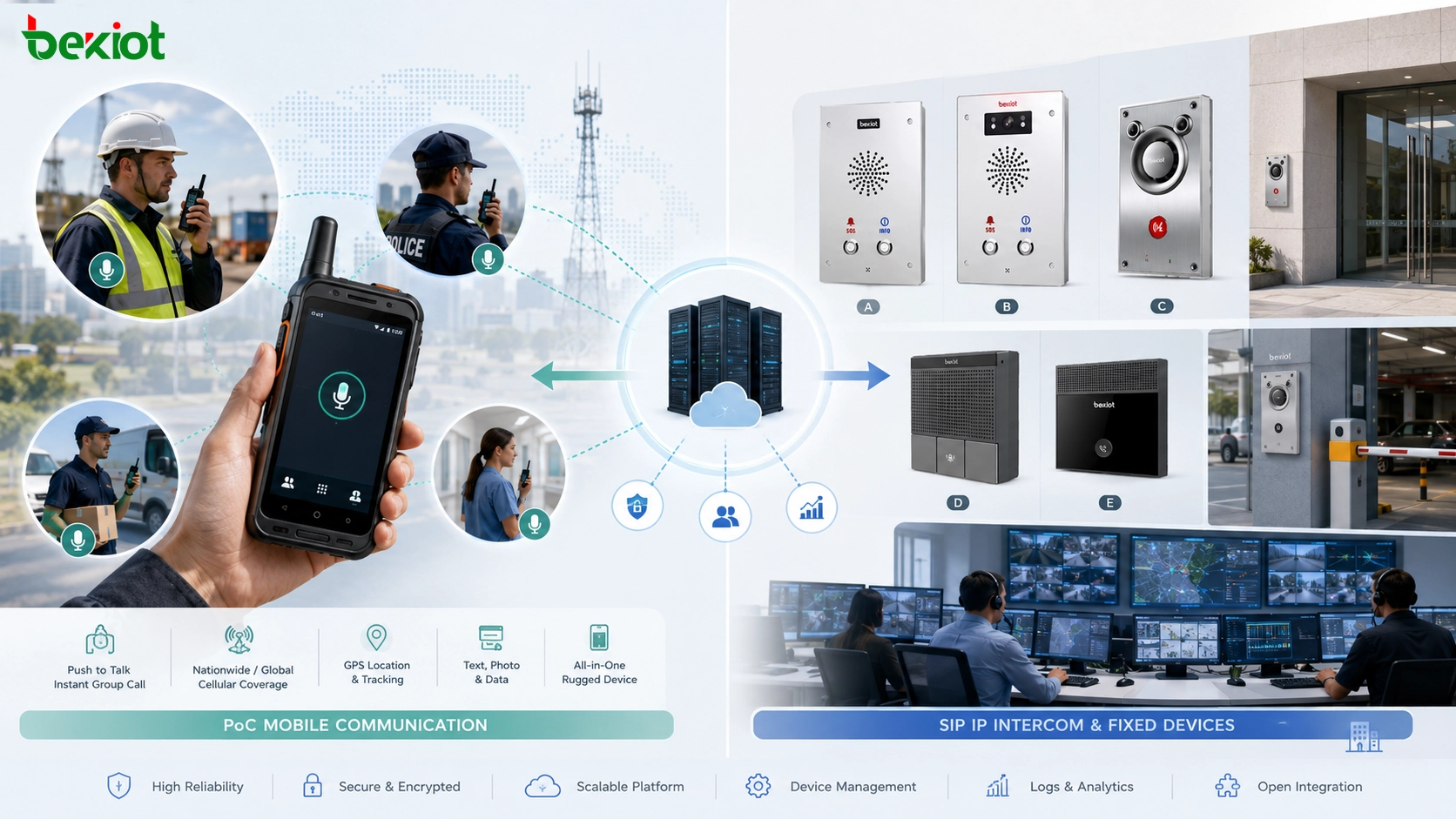
Why the Same Name Can Cause Project Confusion
The phrase “network intercom” sounds simple, but it can point to two different technical routes. In one project, it may mean mobile push-to-talk communication for workers using handheld smart terminals. In another project, it may mean fixed IP intercom terminals installed at gates, workshops, help points, elevators, platforms, tunnels, parking areas, or control-room entrances.
This difference matters because the system design is different from the first step. PoC focuses on group-based mobile communication. SIP intercom focuses on point-to-point or point-to-center voice and video calling. PoC usually follows the radio communication habit of pressing a PTT key before speaking. SIP intercom usually follows the phone communication logic, where a user presses a call button and establishes a full-duplex conversation with a control room, duty desk, or dispatch center.
For project communication, the key question is not only “Do you need network intercom?” A more accurate question is: “Do you need mobile group push-to-talk communication, or fixed SIP intercom calling?” Once this is clarified, product selection, platform configuration, network planning, and installation work become much easier.
PoC: Mobile Push-to-Talk over Cellular
PoC stands for Push to Talk over Cellular. It is a mobile-network-based intercom system that uses public mobile data networks to provide a walkie-talkie-like communication experience. Users press and hold the PTT button to speak, and other devices in the same group receive the voice message immediately.
The main idea of PoC is to reproduce the traditional two-way radio working habit through cellular networks and smart terminals. As long as the terminal has mobile operator coverage or usable internet access, it can join group communication. This makes PoC suitable for mobile teams, field staff, logistics users, security patrols, public service teams, construction workers, and temporary emergency coordination.
Unlike a phone call, PoC does not usually require the called party to answer manually. When one user presses PTT, other users in the same communication group must listen. This is why PoC remains useful for work scenarios where quick command delivery, group notification, and field coordination are more important than private phone-style conversations.
How PoC Works in Real Projects
A PoC system normally includes a PoC server platform, mobile network connectivity, dedicated smart PTT terminals, and sometimes a PoC application installed on smartphones. The platform handles user accounts, groups, permissions, voice sessions, location data, and dispatch functions.
Because PoC is based on IP data transmission, it can support more than simple voice intercom. Depending on the platform and terminal capability, it may also support audio calls, video calls, GPS positioning, group management, dispatch control, track playback, and multimedia command functions. In many projects, PoC is used as a supplement to private radio systems, especially when wide-area communication is required but a dedicated radio network is not available.
The working mode of PoC is usually half-duplex. In the same group, only one terminal speaks at one time, while other terminals listen. This is similar to traditional walkie-talkie communication. The purpose is to avoid voice collision and maintain order in multi-user field coordination.
SIP-Based IP Intercom: Fixed Voice and Video Calling
The second type of network intercom is SIP-based IP intercom, also called IP intercom or SIP intercom. This system is built on VoIP communication principles and uses dedicated IP intercom terminals, a SIP server, and sometimes a dispatch or management platform.
Compared with PoC, SIP intercom is less like a walkie-talkie and more like a simplified telephone. The terminal may have only one call button, several speed-dial buttons, or an integrated camera and speaker. When the user presses the button, the terminal calls a preconfigured SIP extension, control room, duty phone, IP phone, softphone, or dispatch console.
This design is very useful when users may not know how to dial a number or may be under stress during an emergency. Instead of operating a complex keypad, they only need to press one help button. The system then connects them to the correct answering position according to the preset call strategy.
Related solution: /sip-intercom/
Where SIP Intercom Is Commonly Used
SIP intercom terminals are widely used in help points, factories, transport stations, parking areas, building entrances, campuses, industrial plants, security checkpoints, elevators, outdoor service points, and emergency call locations. The terminal is often fixed on a wall, column, equipment cabinet, control panel, or outdoor enclosure.
A basic SIP intercom terminal may support audio calling only. A more advanced model may include video, access control relay output, dry contact input, alarm integration, noise suppression, echo cancellation, recording support, and linkage with monitoring platforms. For example, a video intercom can help the control room see the caller and the surrounding environment before making a response decision.
Unlike PoC, SIP intercom is usually full-duplex. Both parties can speak and listen at the same time, similar to a normal phone call. This is important for emergency assistance, visitor communication, industrial operation support, and command-center response because both sides can exchange information naturally without waiting for a PTT turn.
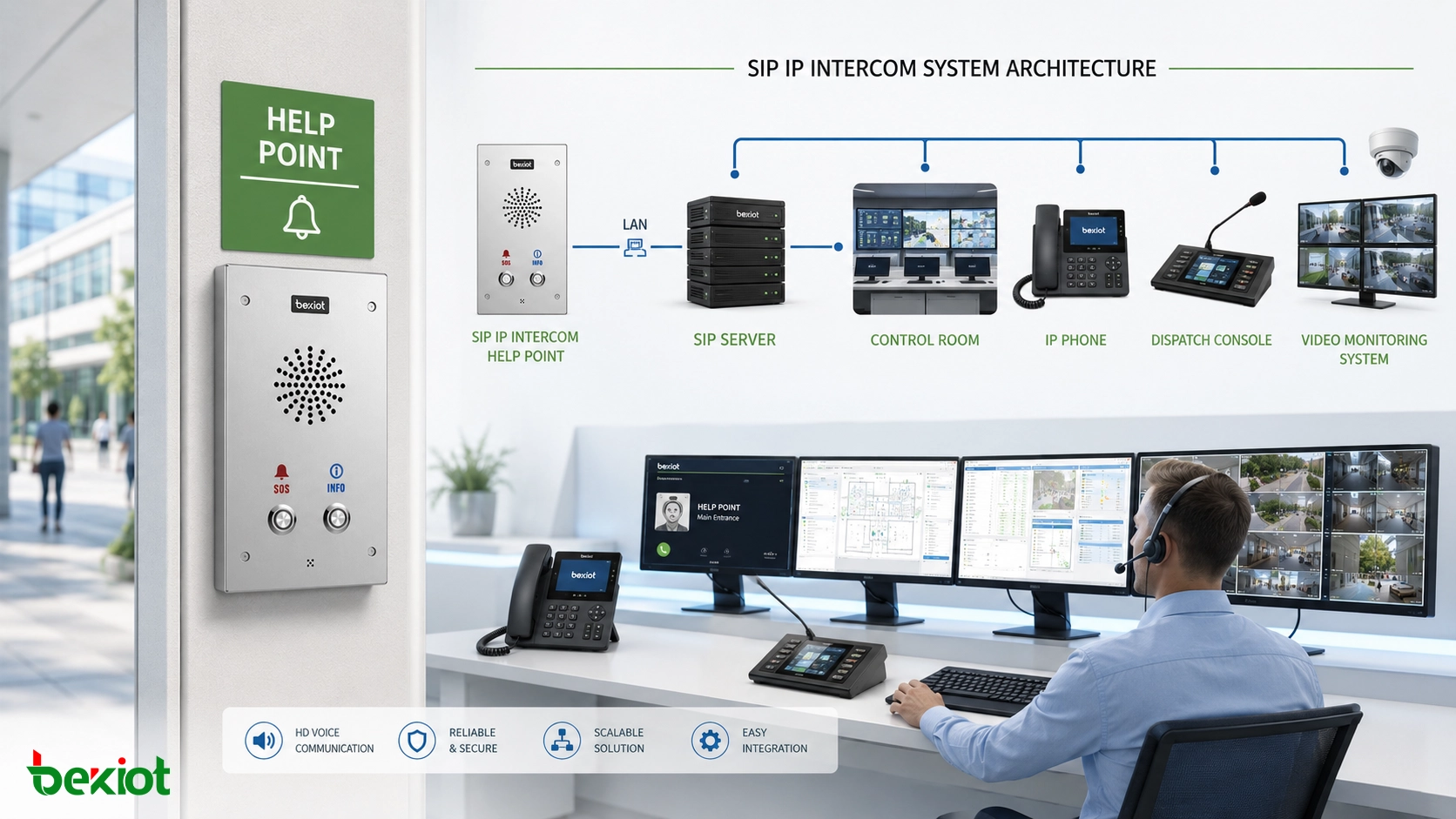
Deployment Logic: Server, Terminal, and Call Strategy
A SIP intercom project is usually straightforward to deploy. The system requires a SIP server or IP PBX, IP intercom terminals, network connectivity, SIP extension numbers, and call routing rules. After each terminal is registered to the SIP server, the engineer configures which number or group should be called when the button is pressed.
For a simple site, one intercom button may call one duty phone. For a larger facility, the call may ring multiple phones, forward to a dispatch console, trigger video pop-up, start recording, open an alarm event, or escalate to another team if no one answers. This flexibility makes SIP intercom suitable for structured projects where communication needs to be integrated with security, emergency response, access control, monitoring, and operation management.
Becke Telcom can be lightly considered in projects that require SIP endpoints, industrial intercom terminals, dispatch integration, and unified communication design. The key is to choose terminals and platforms according to the real application workflow, not only according to the general phrase “network intercom.”
Core Differences at a Glance
| Comparison Item | PoC System | SIP-Based IP Intercom |
|---|---|---|
| Full Name | Push to Talk over Cellular | Session Initiation Protocol based IP intercom |
| Main Working Logic | Mobile group push-to-talk communication | Fixed or semi-fixed VoIP calling |
| Typical Communication Mode | Half-duplex, one speaker at a time in the same group | Full-duplex, both parties can speak naturally |
| Terminal Type | Smart PTT terminals, rugged handhelds, mobile apps | Wall-mounted intercoms, help points, video door phones, industrial call stations |
| Network Requirement | Mobile internet or public data network | IP network, LAN/WAN, SIP server or IP PBX |
| Best Fit | Mobile teams, patrols, field coordination, wide-area work communication | Emergency help, access communication, fixed service points, control-room calling |
Choosing the Right System for the Project
The selection should start from the user’s communication behavior. If users need to move across a large area and communicate with a group by pressing PTT, PoC is usually more suitable. It provides a familiar walkie-talkie experience, and it can be expanded with dispatch, positioning, and multimedia functions.
If users need to press a fixed button and call a duty center, SIP intercom is usually the better choice. It is easier to connect with IP phones, SIP servers, dispatch consoles, video systems, access control equipment, and emergency response workflows. It also provides more natural two-way conversation because of its full-duplex calling mode.
In some large projects, both systems may appear together. Mobile personnel may use PoC terminals, while fixed locations may use SIP intercom devices. The project may also need gateways, dispatch platforms, or integration interfaces to coordinate different communication endpoints. In this case, the network architecture should be planned from the beginning instead of selecting isolated devices one by one.
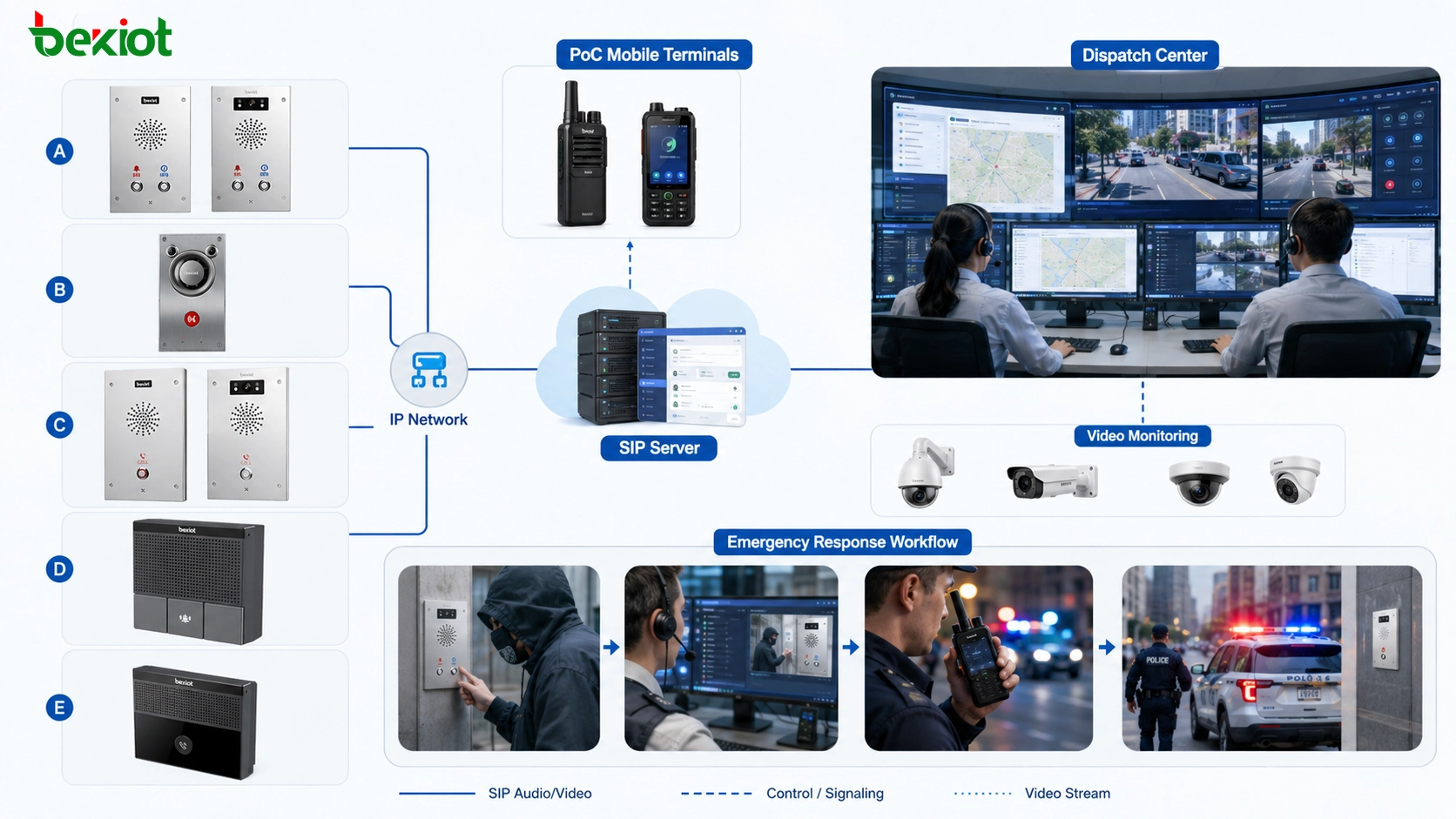
Typical Architecture for Mixed Communication Sites
A mixed communication site may include PoC users, SIP intercom terminals, IP phones, video cameras, alarm systems, and a dispatch center. PoC handles mobile group communication, while SIP intercom handles fixed help points and structured call flows. Video monitoring provides visual confirmation, and dispatch software coordinates response records, call handling, and escalation.
For example, in a transport hub, staff may use PoC terminals during patrol. At the same time, passengers may use SIP help points installed on platforms or corridors. When a help button is pressed, the SIP intercom calls the station duty desk or command center. If the event requires field response, the dispatcher can then notify mobile staff through the PoC group.
This type of architecture shows why the two systems should not be confused. They solve different problems, but they can complement each other when a project needs both mobile coordination and fixed emergency communication.
Implementation Notes for Engineers
Before selecting products, engineers should confirm the communication distance, user mobility, answering location, call workflow, network environment, power supply condition, installation method, and integration requirement. These details are more important than the generic name of the system.
For PoC projects, attention should be given to mobile network coverage, data traffic, terminal ruggedness, group management, dispatch permissions, positioning accuracy, and platform capacity. If the site has weak mobile signal, the user experience may be affected even if the PoC platform itself is well configured.
For SIP intercom projects, attention should be given to SIP registration stability, echo cancellation, speaker volume, microphone pickup, waterproof and vandal-resistant design, PoE power supply, call routing, video compatibility, and emergency escalation. In industrial and outdoor environments, enclosure protection and installation reliability are also critical.
Conclusion
PoC and SIP-based IP intercom may both be called network intercom, but they are not the same type of system. PoC is a mobile push-to-talk communication model based on public mobile data networks. It is suitable for group communication, field teams, patrols, and mobile dispatch. SIP intercom is a VoIP-based calling model using fixed IP terminals, SIP servers, and preset call strategies. It is suitable for help points, industrial sites, buildings, transport facilities, and emergency communication points.
The most practical way to avoid project misunderstanding is to describe the use case clearly. If the requirement is mobile group PTT, choose PoC. If the requirement is fixed one-button calling, voice/video help, or SIP integration, choose SIP intercom. Once the working mode is clear, the right terminal, server, network, and dispatch design can be selected with much higher accuracy.
FAQ
Can PoC replace a private radio system completely?
Not always. PoC is useful when mobile network coverage is available, but private radio may still be preferred in areas requiring independent radio infrastructure, very low latency, or communication continuity during public network failure.
Can a SIP intercom call a normal IP phone?
Yes. If both devices are registered to the same SIP server or routed through compatible SIP infrastructure, a SIP intercom can call an IP phone, softphone, dispatch console, or other SIP endpoint.
Is video necessary for every IP intercom project?
No. Audio-only intercom is enough for many help points and industrial communication locations. Video becomes more valuable when the control room needs visual confirmation, visitor identification, scene verification, or security linkage.
What network should be prepared for SIP intercom terminals?
A stable IP network is required. PoE switches are often used because they provide both power and data through one cable. For outdoor or industrial sites, surge protection, waterproof cabling, and network isolation should also be considered.
How can a project avoid choosing the wrong network intercom product?
The project team should define whether users need mobile group PTT or fixed SIP calling. Then they should confirm terminal type, duplex mode, server platform, answering workflow, installation location, and integration requirements before product selection.







