Enterprise communication systems have long depended on IP-PBX, softswitch platforms, telephone gateways, and IP phones. This architecture is stable and practical for office voice communication because it reduces call costs, improves internal collaboration, and connects employees through extensions and routing rules.
However, many organizations now need more than fixed desk communication. Industrial plants, mines, logistics parks, security teams, utilities, construction sites, and multi-site enterprises often require wireless push-to-talk, mobile extensions, video calling, and flexible communication between office users and field workers. A modern phone system can support this requirement by integrating public-network intercom servers, smart mobile terminals, SIP trunks, and existing radio systems.
Why Traditional Office Telephony Is No Longer Enough
The fixed phone network is still useful
Most enterprise phone systems are built around IP-PBX or softswitch platforms. A telephone gateway connects the organization to the carrier network, while desktop IP phones support internal extension calling, external calls, transfer, conference, and daily office communication.
This architecture has been used for many years, from the analog telephone era to today’s IP communication environment. It remains valuable because it is reliable, familiar to users, and easy to manage in office buildings, control rooms, branch offices, and service departments.
Field teams need wireless communication
The limitation appears when communication moves outside the desk. Many industrial and field environments need mobile voice access. Workers may move across workshops, warehouses, production lines, tunnels, outdoor yards, substations, patrol routes, and remote operation areas.
In these environments, a desk phone cannot meet real-time coordination needs. Teams need push-to-talk group communication, mobile office calling, audio and video calls, and the ability to reach internal extensions or external phone numbers from mobile terminals.
Wireless Communication Has Changed Over Time
Earlier technologies became difficult to maintain
Enterprise wireless communication has gone through several stages. Earlier solutions included DECT systems and PHS systems. These technologies once supported certain wireless office scenarios, but they are now difficult to deploy or maintain in many markets due to product availability, industry ecosystem decline, and changing communication infrastructure.
For many organizations, continuing to depend on outdated wireless office technologies is no longer practical. The device supply chain is limited, technical support is harder to obtain, and expansion flexibility is weak compared with modern IP-based and public-network communication solutions.
Dedicated trunking systems are powerful but costly
Large enterprises and government-related organizations may build private trunked radio systems based on technologies such as DMR or TETRA. These systems are useful for professional dispatch and group communication, especially where dedicated radio coverage and controlled channels are required.
However, this type of system often requires higher investment and specialized planning. It mainly serves push-to-talk communication. Although full-duplex phone calling may also be possible in some trunking systems, radio channel resources are limited. Long-duration telephone calls may occupy valuable channels and affect group dispatch efficiency.
For many enterprises, the better direction is not to replace the phone system or abandon radio-style communication. The practical goal is to connect office phones, mobile terminals, and wireless PTT into one manageable communication workflow.
A More Flexible Architecture for Mobile Voice
Public-network intercom server as the service core
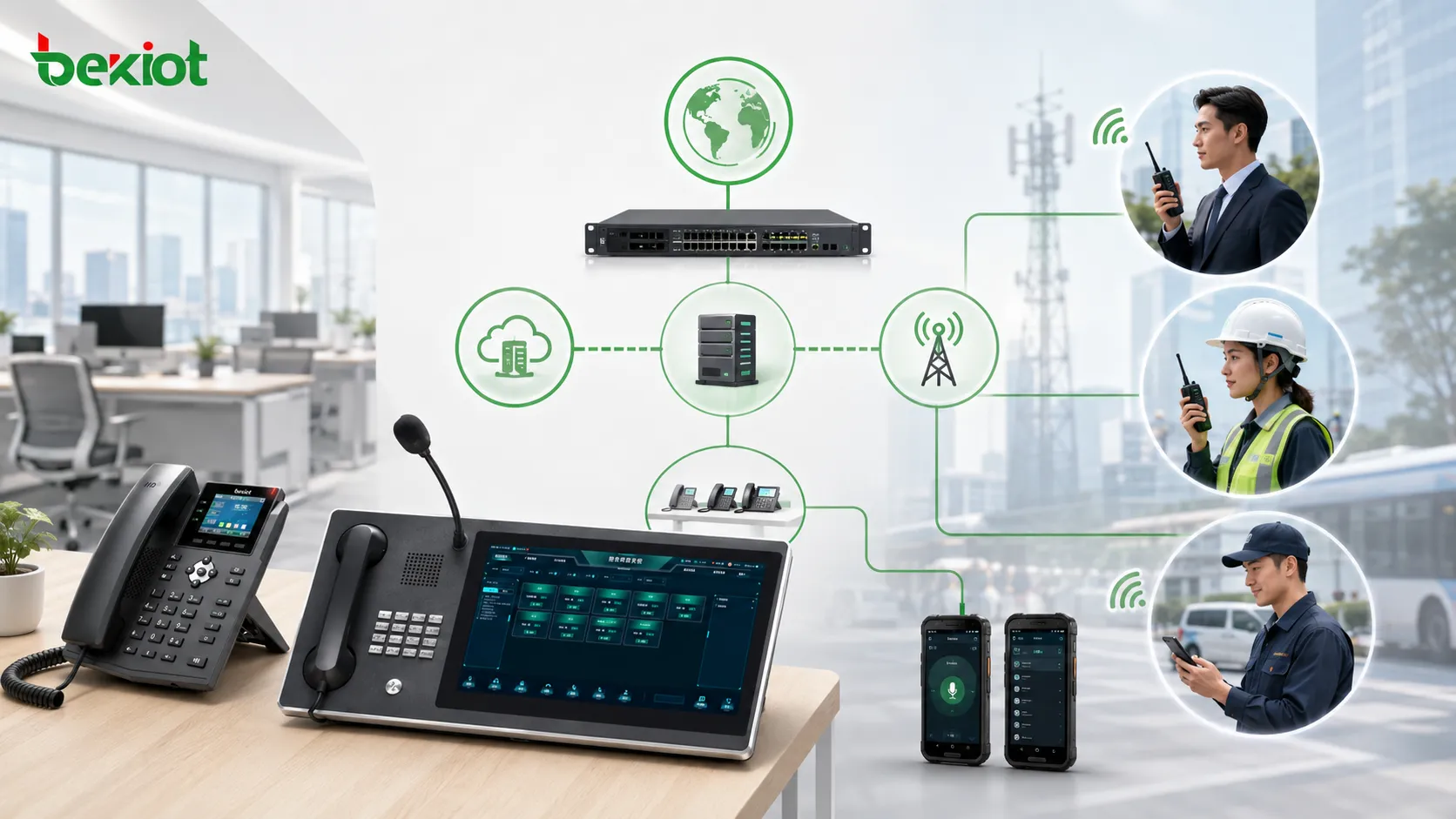
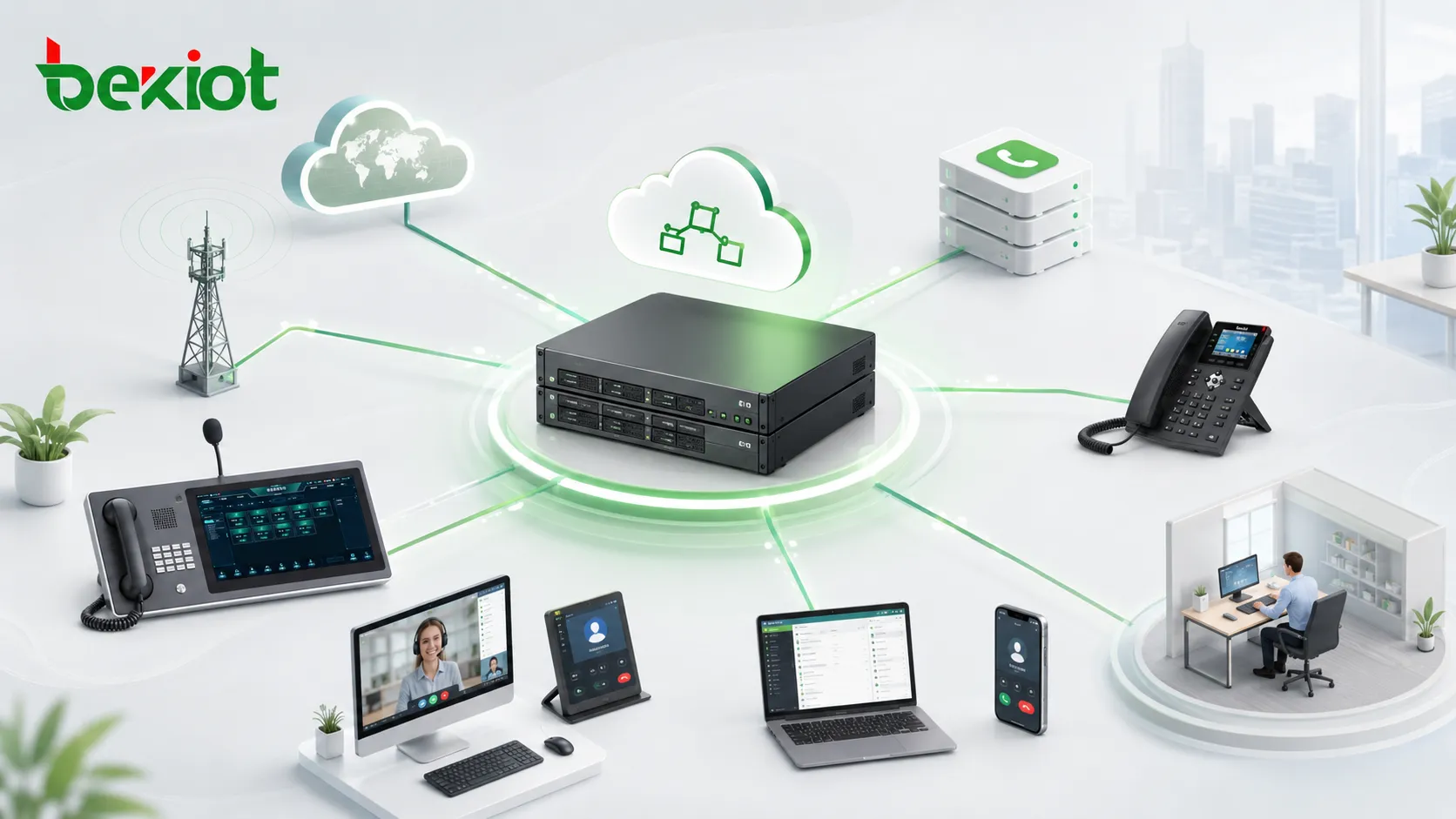
An intelligent public-network intercom server can extend enterprise communication without building a complete dedicated trunking network. The server manages smart terminals, user groups, numbers, voice services, and intercom permissions. It can also support SIP trunk networking so it can connect with the existing IP-PBX or softswitch platform.
During deployment, the enterprise can assign a dedicated number range to the public-network intercom server and configure call routing between the server and the IP-PBX. This allows office extensions and mobile smart terminals to communicate through a unified numbering and routing plan.
Smart terminals replace single-purpose devices
Smart mobile terminals can be configured with IoT data cards or mobile network access. They are managed by the public-network intercom server and can be divided into departments, teams, or operation groups. Users can press to talk, join group communication, and coordinate field work in a familiar radio-like way.
At the same time, each smart terminal can have an internal number. This means it can support more than push-to-talk. It can also make or receive voice calls, video calls, internal extension calls, and in some deployment models, external mobile or landline calls through the enterprise phone system.
How Office Phones and Mobile Terminals Communicate
Calling from an IP phone to a smart terminal
When an office employee needs to contact a field worker, the process can be as simple as dialing an internal number from an IP phone. The call is routed through the IP-PBX to the public-network intercom server, and then delivered to the smart terminal.
This allows the office user to reach a mobile worker without changing communication habits. The office user still uses the existing IP phone, while the field worker answers through a mobile smart terminal. Depending on system capability and terminal type, the call may support voice or video communication.
Calling from a terminal to office and external users
The communication path can also work in the opposite direction. A smart terminal user can call an office extension, contact another mobile terminal, or dial an external mobile phone number if routing and permissions are configured.
This is important for mobile office scenarios. Field workers are no longer isolated from the internal phone system. They can participate in enterprise communication while remaining mobile, whether they are in a plant area, warehouse, outdoor project site, or remote service location.
Group PTT and one-to-one calling can coexist
Public-network intercom does not only copy traditional phone calling. It also keeps the group communication advantage of radio-style operation. Teams can be divided into groups, and users can communicate instantly through push-to-talk.
This dual capability is valuable. Group PTT supports fast team coordination, while number-based calling supports private communication, office contact, customer-related work, maintenance coordination, and cross-department communication.
Connecting Existing Radio Systems
Many enterprises already have radio networks
Some organizations already use analog two-way radios, digital radio systems, or dedicated trunking networks. These systems may still be important for security, patrol, production, emergency response, and high-reliability field communication.
Instead of discarding existing radio assets, the enterprise can integrate them into the new communication architecture. With suitable gateways and interface design, public-network PTT, private radio, and the enterprise phone system can be connected into one broader communication environment.
Interconnection reduces communication islands
When private radio systems, public-network intercom terminals, and office phones operate separately, dispatchers and managers often need to repeat information manually across different platforms. This creates delays, incomplete records, and higher operation risk.
Interconnection helps reduce these communication islands. A control room can reach radio users, mobile terminal users, and office users more efficiently. Field teams can also communicate across different device types when the project requires coordinated operation.
Network Design and Numbering Strategy
SIP trunking connects the communication platforms
SIP trunking is the key interface between the existing phone system and the public-network intercom server. Through SIP trunks, the IP-PBX can route calls to smart terminals, and the intercom server can route calls back to office extensions or external phone networks.
The project team should define extension ranges, route prefixes, call permissions, emergency numbers, and whether some terminals are allowed to make external calls. A clear numbering plan makes the system easier to operate and maintain.
Public IP, private network, and hybrid access
The public-network intercom server may use a public IP address, private network mapping, VPN, dedicated line, or cloud deployment depending on project requirements. Smart terminals usually connect through mobile data networks, Wi-Fi, or other IP access methods.
For organizations with strict security requirements, network access should be planned carefully. Authentication, permission control, encrypted transmission, firewall rules, and server availability should be considered before deployment.
Business Value for Enterprise Communication
Lower cost than building a dedicated trunking network
Compared with building a complete private trunking system, public-network intercom and SIP integration can often reduce deployment cost and shorten implementation time. Enterprises can reuse existing IP-PBX platforms, IP phones, internal numbers, and part of the current network infrastructure.
This makes the solution suitable for organizations that need wireless PTT and mobile office capability but do not want to invest in a full dedicated radio trunking system.
Better mobility for field and office teams
The solution extends the office phone system to mobile workers. Field staff can join push-to-talk groups, make internal calls, receive calls from office users, and communicate with other terminals. Office users can also reach mobile personnel directly through familiar extension dialing.
This improves collaboration between production sites, control rooms, service teams, warehouses, patrol teams, security posts, and branch offices.
Unified management and easier integration
A server-based architecture helps centralize user management, group settings, numbering, routing, and permission control. It also makes integration easier with dispatch platforms, recording systems, emergency notification systems, and enterprise communication platforms.
For projects that require SIP telephony, radio gateway access, mobile intercom, and dispatch coordination, Becke Telcom can be considered as a lightweight integration option for connecting voice endpoints, gateways, and command communication workflows.
Where This Solution Fits Best
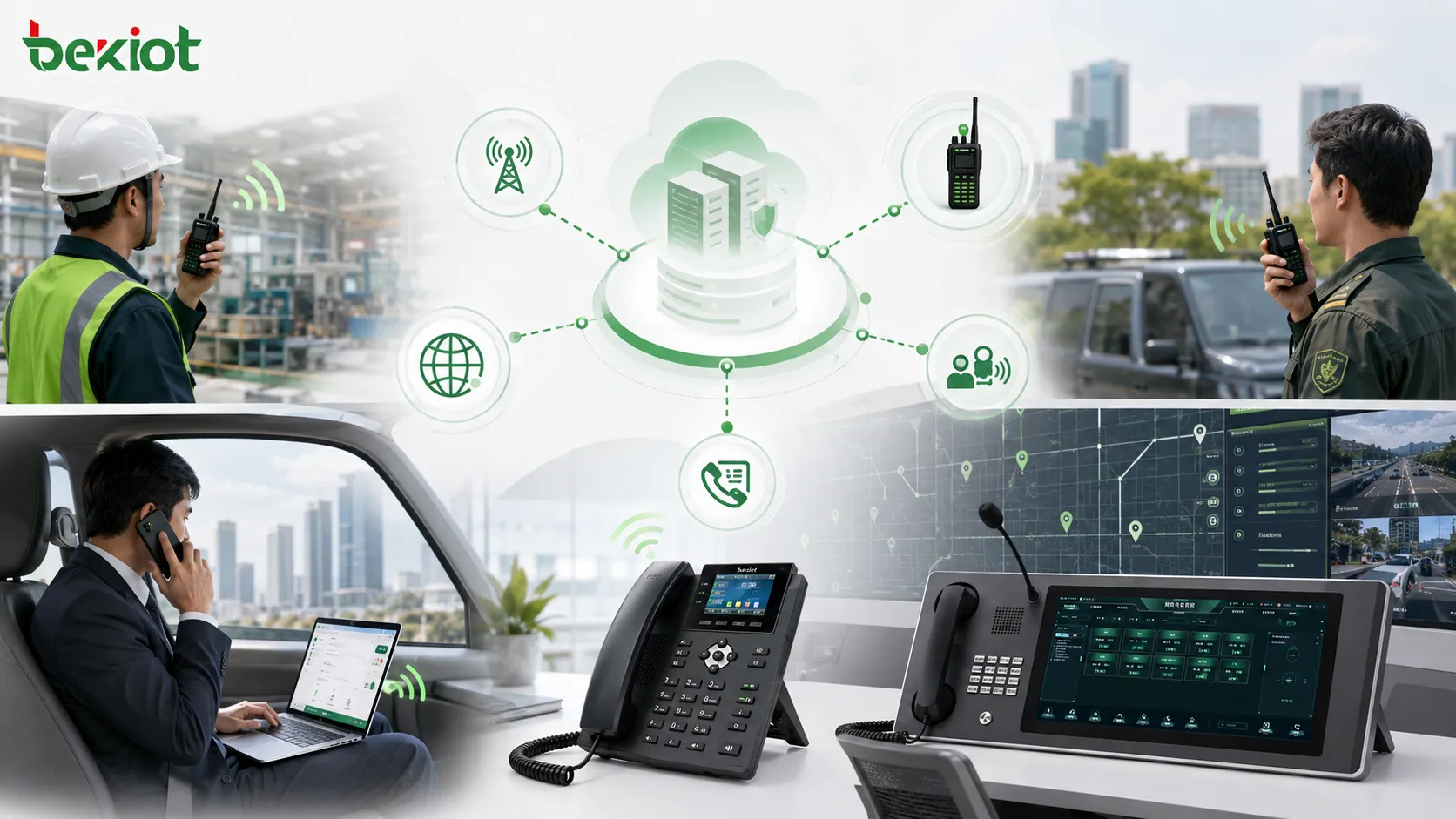
Industrial and mining enterprises
Industrial and mining environments often have strong mobile communication requirements. Workers may move across production areas, underground spaces, storage yards, inspection routes, and equipment rooms. Group intercom helps coordinate teams quickly, while SIP integration keeps field users connected with office phones and control rooms.
Logistics, parks, and property operations
Logistics parks, industrial parks, campuses, large buildings, and property management teams often need wireless communication for patrol, maintenance, security, delivery coordination, and emergency response. Smart terminals can provide push-to-talk groups and internal extension calling without requiring every worker to stay near a desk phone.
Utilities and distributed service teams
Power, water, gas, transportation, and field service teams often operate across multiple sites. Public-network intercom can help connect mobile staff over wide areas, while the phone system keeps communication linked to office dispatch, customer service, and technical support teams.
Deployment Notes Before Implementation
Confirm the existing phone system capability
Before deployment, the organization should check whether the current IP-PBX or softswitch supports SIP trunking, extension routing, codec negotiation, call permission control, and external line access. These functions affect how smoothly the public-network intercom server can be integrated.
Plan terminal types and user groups
The project should define who needs a smart terminal, which departments require group PTT, which users need video calling, and which users only need voice calling. Group design should match real work processes instead of simply copying the organization chart.
Test coverage and call quality
Because mobile terminals depend on wireless IP access, coverage quality is important. The system should be tested in real work areas, including workshops, basements, outdoor yards, tunnels, warehouses, machine rooms, and other weak-signal locations.
Call quality, delay, group call response, video performance, battery life, and handover experience should be verified before large-scale rollout.
Implementation Checklist
Define the communication workflow
The project team should clarify whether the main goal is wireless PTT, mobile office calling, video communication, dispatch integration, private radio interconnection, or multi-site collaboration. Different goals require different network, terminal, and routing designs.
Build a clear numbering plan
Smart terminals should be assigned internal numbers that are easy to recognize and manage. Number ranges can be separated by department, site, team, or user role. This helps office users dial field users more easily and helps administrators maintain the system.
Keep daily operation simple
Users should not need to understand SIP routing, server configuration, or network architecture. A practical system should present simple actions such as group talk, call, answer, video call, transfer, and emergency contact.
Conclusion
Enterprise phone systems can extend far beyond desktop IP phones. By connecting an IP-PBX or softswitch with a public-network intercom server and smart mobile terminals, organizations can add wireless push-to-talk, mobile office calling, video communication, and flexible routing to existing communication infrastructure.
This approach is especially valuable for enterprises that need mobility but do not want to build a costly dedicated trunking system. It keeps the strengths of the phone system, adds group intercom capability, supports mobile terminals, and can also interconnect with existing private radio systems when needed.
The result is a more flexible communication architecture that connects office users, field workers, mobile teams, radio users, and dispatch centers into one coordinated workflow.
FAQ
Can mobile smart terminals still work when employees leave the company network?
Yes, if the system is designed for public-network or cloud access and the terminal has authorized mobile data connectivity. However, authentication, account control, and permission management should be enforced to protect the enterprise communication system.
Should every employee receive a smart intercom terminal?
Not necessarily. Terminals should be assigned according to job role, mobility needs, emergency responsibility, and group communication requirements. Office-only users may continue using IP phones or softphones.
How should companies manage external calling permissions?
External call permission should be role-based. For example, supervisors and maintenance leaders may need external calling, while ordinary group users may only need internal calls and push-to-talk. This avoids unnecessary telecom cost and security risks.
Can video calling be used in noisy industrial environments?
Yes, but the device, network, and operating process should be tested. In very noisy areas, a headset, noise reduction microphone, or visual confirmation workflow may be needed to make video communication more effective.
What is the most common deployment mistake?
The most common mistake is treating mobile intercom as a separate tool instead of integrating it with the existing phone system, numbering plan, user permissions, and dispatch workflow. Without integration planning, the system may create another communication island.