


A softswitch is a software-based call control system used to manage voice, video, messaging, and multimedia communication services over IP networks. Unlike traditional circuit-switched exchanges that tightly combine switching hardware and call control, a softswitch separates signaling control, service logic, media handling, gateway interconnection, routing policy, and management functions into a more flexible architecture.
In practical deployments, a softswitch may serve telecom operators, enterprise VoIP systems, hosted communication platforms, wholesale voice networks, call centers, emergency communication systems, and multi-site communication networks. Its network architecture determines how endpoints register, how calls are routed, how PSTN gateways are connected, how media flows are established, how services are controlled, and how the system scales.
From Hardware Switching to Software-Controlled Communication
Traditional telephone networks relied heavily on dedicated switching equipment. Call setup, circuit allocation, signaling, and service control were often bound to specialized hardware. This model was stable, but it was not flexible enough for fast service expansion, IP integration, cloud deployment, and multi-protocol communication.
The software-based switching model changes the design logic. Call control can run on servers, virtual machines, or cloud infrastructure. Media can be handled by separate gateways or media servers. Service features can be added through application servers. Network boundaries can be protected by SBCs. This separation makes the system easier to expand and integrate.
The key architectural idea is decoupling. The control plane decides what should happen to a call, while the media plane carries the actual voice or video stream. This makes the platform more modular than a monolithic exchange.
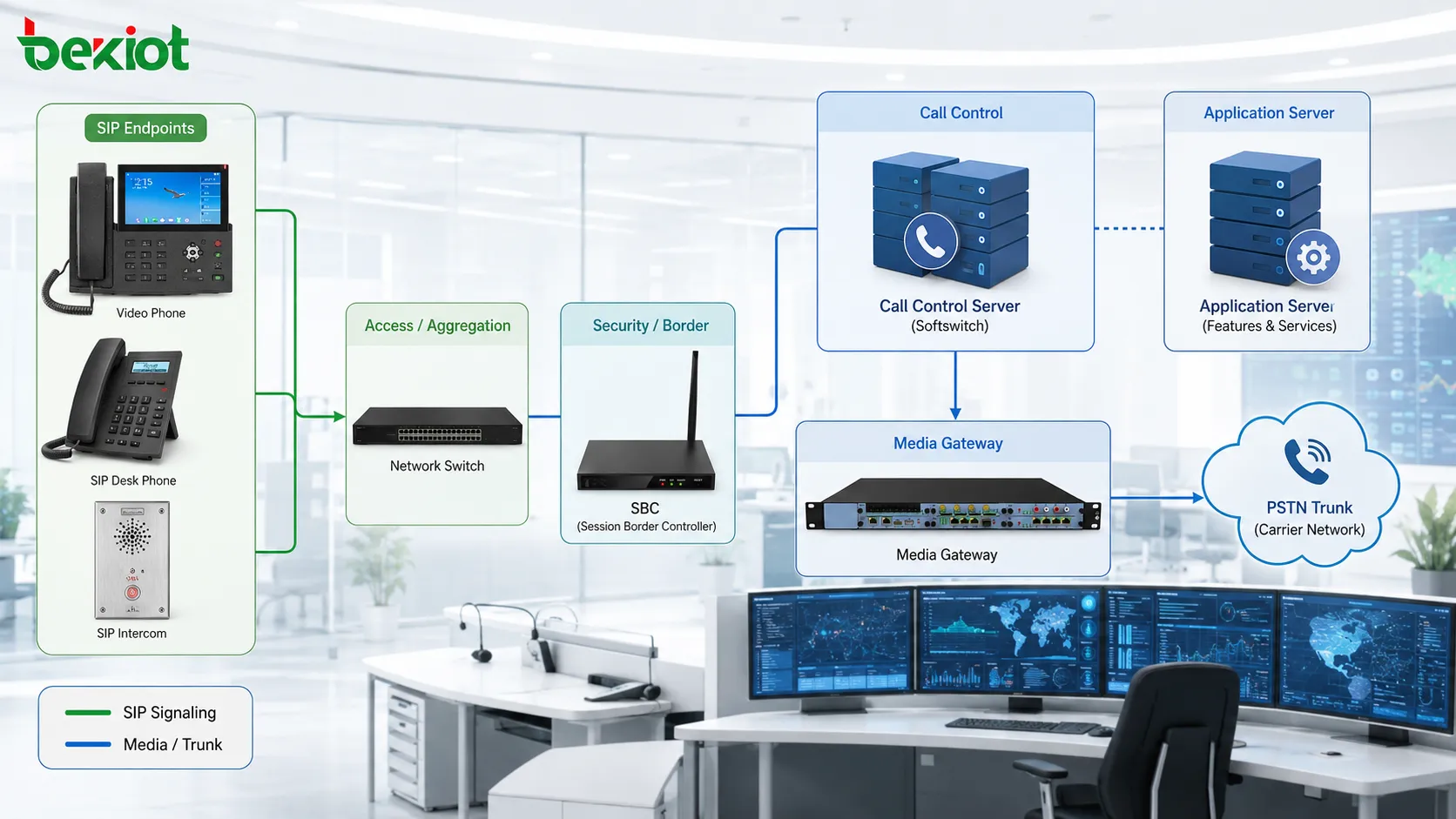
Control Plane and Media Plane Separation
The control plane handles signaling. It processes registration, call setup, call teardown, routing decisions, authentication, numbering rules, call state, and service invocation. In SIP-based systems, this means processing messages such as REGISTER, INVITE, ACK, BYE, CANCEL, REFER, and related responses.
The media plane handles the actual audio or video streams. Voice media is commonly transported using RTP or SRTP. In many architectures, media does not need to pass through the call control server after the session is established, unless recording, transcoding, NAT traversal, lawful interception, conferencing, or media anchoring is required.
This separation improves scalability. A busy platform may need more signaling capacity in one case and more media processing capacity in another. By separating functions, operators can scale the required part instead of replacing the entire system.
Main Components in the Architecture
| Component | Main Role | Typical Design Focus |
|---|---|---|
| Call Control Server | Handles signaling, routing, session control, and call state. | Reliability, routing flexibility, registration capacity, and redundancy. |
| Media Gateway | Connects IP voice networks with PSTN, analog lines, E1/T1, or legacy systems. | Codec support, signaling interworking, echo control, and trunk capacity. |
| Application Server | Provides services such as voicemail, IVR, conferencing, recording, and prepaid logic. | Feature integration, service scalability, and user experience. |
| Session Border Controller | Protects network borders and controls SIP/RTP traffic between domains. | Security, NAT traversal, topology hiding, interoperability, and media anchoring. |
| Management System | Monitors devices, users, alarms, routes, billing records, and system health. | Visibility, reporting, provisioning, backup, and operational control. |
Signaling Flow in a Typical Call
Registration Stage
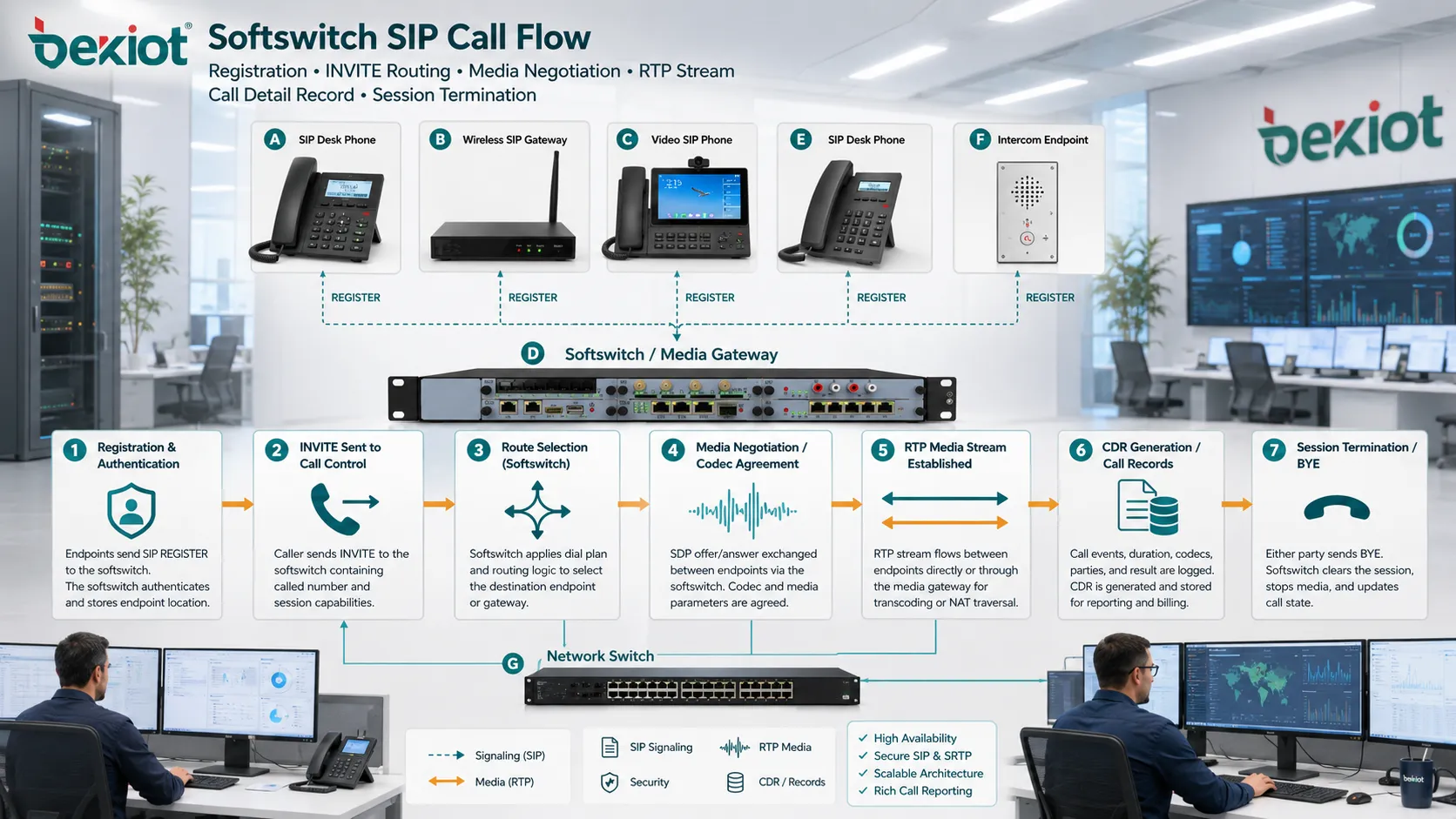
Before a user can receive calls, the endpoint usually registers with the platform. The endpoint may be an IP phone, softphone, SIP intercom, analog device behind a gateway, mobile client, or trunk peer. Registration tells the system where the user can be reached.
The registration process normally includes authentication. The platform verifies credentials, stores contact information, and updates user availability. If registration fails, inbound calls may not reach the endpoint even if the device is physically online.
Call Setup Stage
When a user places a call, the endpoint sends a signaling request to the call control server. The server checks the number, user permissions, routing table, caller identity, service rules, and destination availability.
The platform may route the call to another local extension, a SIP trunk, a media gateway, a call queue, an IVR system, a voicemail server, or an external carrier. The route is selected based on policy rather than fixed physical wiring.
Media Negotiation Stage
During call setup, endpoints negotiate media details. These may include codec, RTP address, media direction, encryption, DTMF method, video capability, and packetization time.
If both endpoints support compatible codecs and can reach each other directly, media may flow endpoint to endpoint. If not, the platform may insert a media server, transcoder, gateway, or SBC into the path.
Session Termination Stage
When either side hangs up, signaling messages close the session. The system releases call resources, writes call detail records, updates user status, and triggers any post-call service such as recording storage or billing calculation.
Gateway Interconnection and Legacy Network Access
One major architectural function is interconnection with legacy networks. Many systems still need to connect IP users with PSTN numbers, analog phones, E1/T1 trunks, SS7 networks, PBX systems, fax devices, or emergency lines.
Media gateways perform this interworking. They convert signaling and media between different network types. For example, a SIP call may be converted to ISUP signaling on an SS7 trunk, or an IP call may be connected to an analog FXS port.
Gateway planning should consider trunk capacity, codec support, echo cancellation, DTMF handling, fax support, emergency call routing, number translation, and failover behavior. Poor gateway design can create call failures even when the softswitch itself is stable.
Routing Logic and Number Translation
Routing is one of the most important parts of the architecture. The platform must decide where each call should go. This decision may depend on dialed number, caller type, trunk group, time schedule, destination cost, service priority, region, customer account, or failover rule.
Number translation is often required. Internal extensions, national numbers, international numbers, trunk prefixes, emergency codes, and carrier-required formats may all be different. The system must normalize and rewrite numbers correctly before sending calls to the next network.
In carrier and multi-tenant environments, routing logic may also include least-cost routing, quality-based routing, blacklists, whitelists, fraud control, and capacity limits.
Service Layer and Feature Expansion
Voice Services
The platform can provide voicemail, call forwarding, call waiting, call transfer, caller ID, call hold, three-way calling, hunt groups, ring groups, and conferencing. These services are controlled by software rules rather than hardwired exchange features.
This makes service expansion easier. New features can often be added through software updates, configuration changes, or integration with external application servers.
IVR and Automation
Interactive voice response systems can answer calls, play prompts, collect digits, route users, query databases, and connect callers to the right destination. In a softswitch environment, IVR may be integrated as a media application or separate service node.
IVR design should be aligned with routing logic, caller identity, language options, business hours, and fallback paths.
Recording and Monitoring
Recording may be required for compliance, training, dispute review, or quality control. The architecture must decide whether media is forked, anchored, mirrored, or processed by a recording server.
Monitoring functions may include call success rate, registration status, trunk availability, media quality, packet loss, jitter, latency, and alarm events.
Media Handling and Codec Strategy
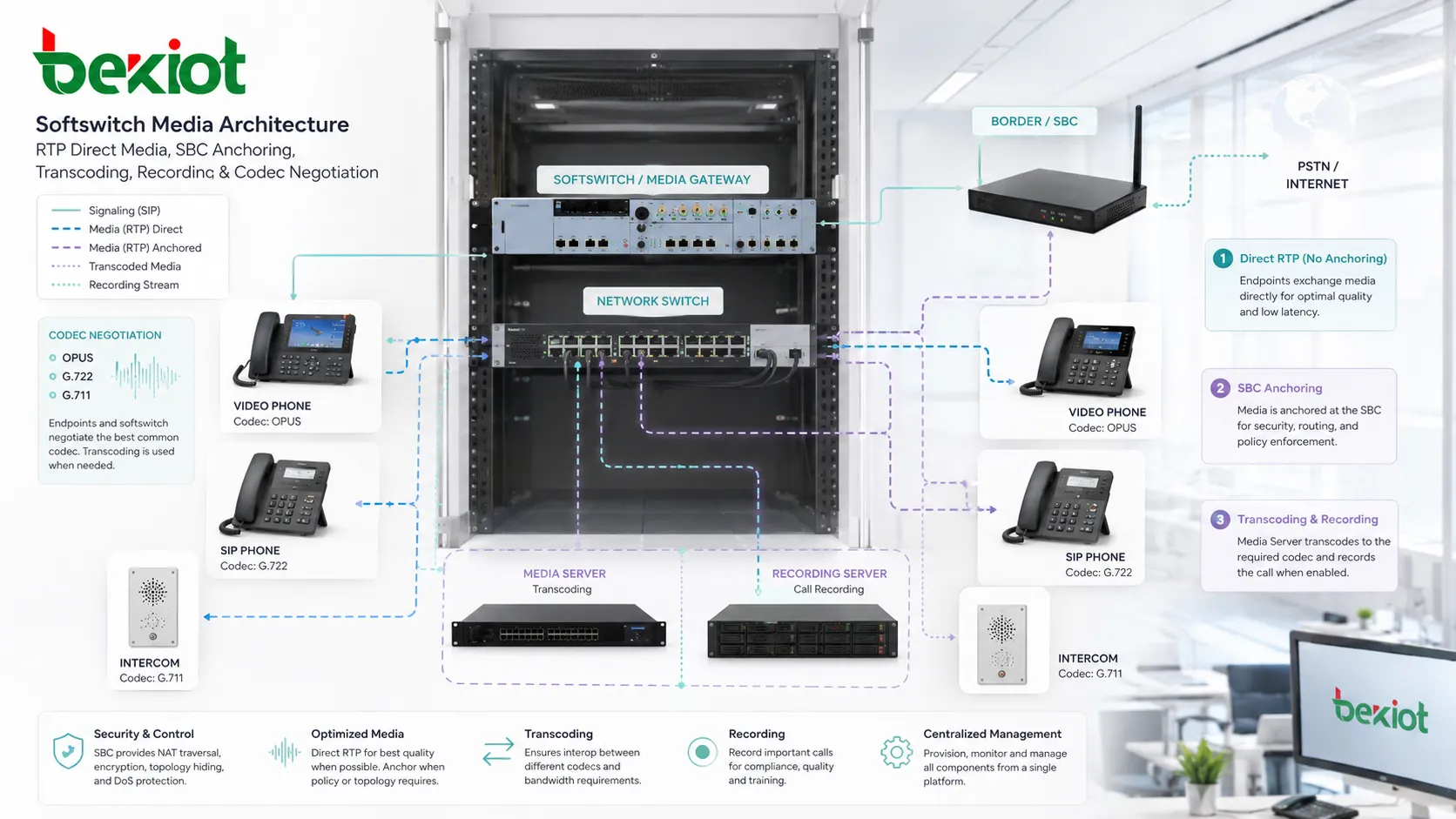
Voice quality depends on codec selection, bandwidth, network stability, jitter buffers, packet loss, echo control, and endpoint capability. Common codecs may include G.711, G.729, G.722, Opus, or other formats depending on the system.
Transcoding is needed when two sides cannot use the same codec. However, transcoding consumes CPU resources and may reduce quality. A well-designed network minimizes unnecessary transcoding by standardizing codec policy where possible.
Media anchoring is another design choice. Allowing direct media reduces platform load and latency, but anchoring media through an SBC or media server can improve NAT traversal, recording, security control, and traffic visibility.
Border Security and Interoperability
When the system connects to external carriers, hosted platforms, remote branches, internet users, or partner networks, border protection becomes essential. The SBC is often deployed at this boundary.
An SBC can hide internal topology, prevent malformed SIP traffic, control media ports, assist NAT traversal, enforce TLS and SRTP, limit call rates, normalize SIP headers, and protect against certain denial-of-service attempts.
Interoperability is also important. Different carriers and devices may implement SIP behavior differently. Header rewriting, codec negotiation, DTMF conversion, session timer adjustment, and early media handling may be needed to make calls work reliably across networks.
High Availability and Redundancy
Communication platforms often need high availability. Failure of the call control server, database, gateway, SBC, power system, or network link can affect many users. Redundant architecture reduces this risk.
Common methods include active-standby servers, clustered call control nodes, redundant databases, dual network interfaces, multiple SBCs, alternate SIP trunks, backup media gateways, and geographic disaster recovery.
Redundancy must be tested. A system that has backup nodes on paper may still fail if database replication is delayed, DNS failover is slow, licenses are not synchronized, or gateways are not configured for alternate routing.
Provisioning and Subscriber Management
Large deployments require structured provisioning. Users, extensions, trunks, devices, call permissions, service packages, voicemail boxes, caller ID rules, and emergency locations must be managed consistently.
Provisioning may use web portals, APIs, templates, bulk import, auto-provisioning servers, or integration with CRM and billing platforms. In hosted and carrier environments, tenant separation is also critical.
A strong provisioning system reduces manual errors. Wrong account mapping, duplicate extension numbers, incorrect caller ID, and missing emergency location data can all create operational risk.
Billing and Call Detail Records
Call detail records provide information about call source, destination, start time, answer time, duration, route, trunk, termination reason, and sometimes quality metrics. These records support billing, reporting, fraud detection, dispute handling, and traffic analysis.
In carrier networks, billing accuracy is essential. The system must collect CDRs reliably, handle time synchronization, rate calls correctly, and protect records from tampering.
For enterprise systems, CDRs help managers understand call volume, missed calls, trunk usage, department activity, and service performance.
Deployment Models
Carrier Core Network
Telecom operators may deploy a softswitch as part of a next-generation voice core. It can handle subscriber registration, routing, PSTN interconnection, number portability, trunk management, and wholesale voice traffic.
This model requires high capacity, strong redundancy, regulatory support, billing integration, and strict operational monitoring.
Enterprise Communication Platform
Enterprises may use this architecture to connect offices, remote users, SIP phones, gateways, contact centers, and PSTN trunks. The goal is unified communication, lower trunk cost, flexible routing, and easier management.
Enterprise designs often emphasize directory integration, user provisioning, call features, branch survivability, and security.
Hosted and Multi-Tenant Services
Hosted providers use softswitch platforms to serve many customers from shared infrastructure. Each tenant may have separate users, numbers, trunks, routing rules, feature settings, and billing records.
Strong tenant isolation, role control, service templates, and scalable provisioning are important in this model.
Hybrid Migration
Some organizations keep legacy PBX systems while gradually moving to SIP-based services. The architecture may include gateways, SIP trunks, softswitch routing, and interworking rules to support a phased transition.
This reduces migration risk because old and new systems can coexist during the transition period.
Operational Challenges
One-Way Audio
One-way audio is often caused by NAT, firewall rules, RTP port blocking, wrong SDP addresses, or media anchoring problems. Signaling may succeed while voice fails.
Registration Instability
Frequent registration loss may be caused by endpoint timers, network interruption, NAT timeout, authentication errors, DNS problems, or overloaded registrar nodes.
Codec Mismatch
If endpoints or trunks do not share a compatible codec, calls may fail or require transcoding. Codec policy should be tested across common call paths.
Routing Loops
Incorrect route design can send calls back and forth between systems. Loop detection, prefix planning, and route testing are essential.
Security Exposure
Open SIP interfaces, weak passwords, public registration exposure, and uncontrolled international dialing can create fraud risk. Rate limits, access lists, SBC policy, and monitoring are necessary.
Design Recommendations
Start with a clear separation between signaling, media, management, and external interconnection zones. This makes security policy and troubleshooting easier.
Define numbering and routing rules before deployment. Inconsistent extension plans, trunk prefixes, and emergency codes can create confusion later.
Use redundancy for critical nodes, but test failover regularly. High availability is only valuable if it works under real conditions.
Keep media strategy intentional. Decide where direct media is allowed, where media must be anchored, and where recording or transcoding is required.
Monitor both signaling and media quality. A platform can show successful call setup while users still experience poor audio if RTP quality is weak.
The strength of a softswitch architecture lies in separating call intelligence from physical transport, allowing signaling, media, services, security, and management to scale as independent layers.
FAQ
Is a softswitch the same as an IP PBX?
Not exactly. An IP PBX is often an enterprise call platform, while a softswitch can also serve carrier, wholesale, hosted, and large-scale service provider environments. Their functions may overlap, but scale and architecture differ.
Can calls work if the media gateway fails?
Calls that need PSTN or legacy network access may fail if the gateway is unavailable. Pure IP-to-IP calls may continue if they do not depend on that gateway.
Why is an SBC often deployed with this architecture?
An SBC protects network borders, assists NAT traversal, normalizes SIP behavior, controls media paths, hides topology, and improves interconnection with carriers or external networks.
What causes successful call setup but no voice?
This is usually related to RTP path problems, NAT, firewall rules, wrong SDP information, codec negotiation, or media anchoring configuration.
How should routing changes be tested?
Test internal calls, external calls, emergency numbers, failover routes, number translation, blocked destinations, billing records, and trunk behavior before applying changes widely.







