


Super One Number is a communication concept that allows users to be reached through one primary number across multiple devices, locations, and call scenarios. Instead of asking callers to remember a desk number, mobile number, branch number, softphone ID, and backup contact separately, the system presents one consistent contact identity and routes calls intelligently behind the scenes.
In enterprise communication, this idea is closely related to single number reach, unified mobility, fixed-mobile convergence, and one-number business communication. It is useful for hybrid work, mobile employees, customer-facing teams, field service, executives, support desks, branch offices, and organizations that need a professional calling identity across different work modes.
Industry Background: Why One Contact Identity Is Becoming Important
Business communication has moved beyond the fixed desk. Employees may answer calls from office phones, mobile phones, laptops, web clients, tablets, call center consoles, or remote work locations. Customers, partners, and colleagues do not want to guess which device is available at a given moment.
One-number communication responds to this change. It separates the caller-facing identity from the physical device. The caller dials one number, while the system decides whether to ring the desk phone, mobile phone, softphone, team member, voicemail, or backup destination according to rules.
This reflects a wider industry shift from device-based communication to user-based communication. The user becomes the communication identity, while devices become access points.
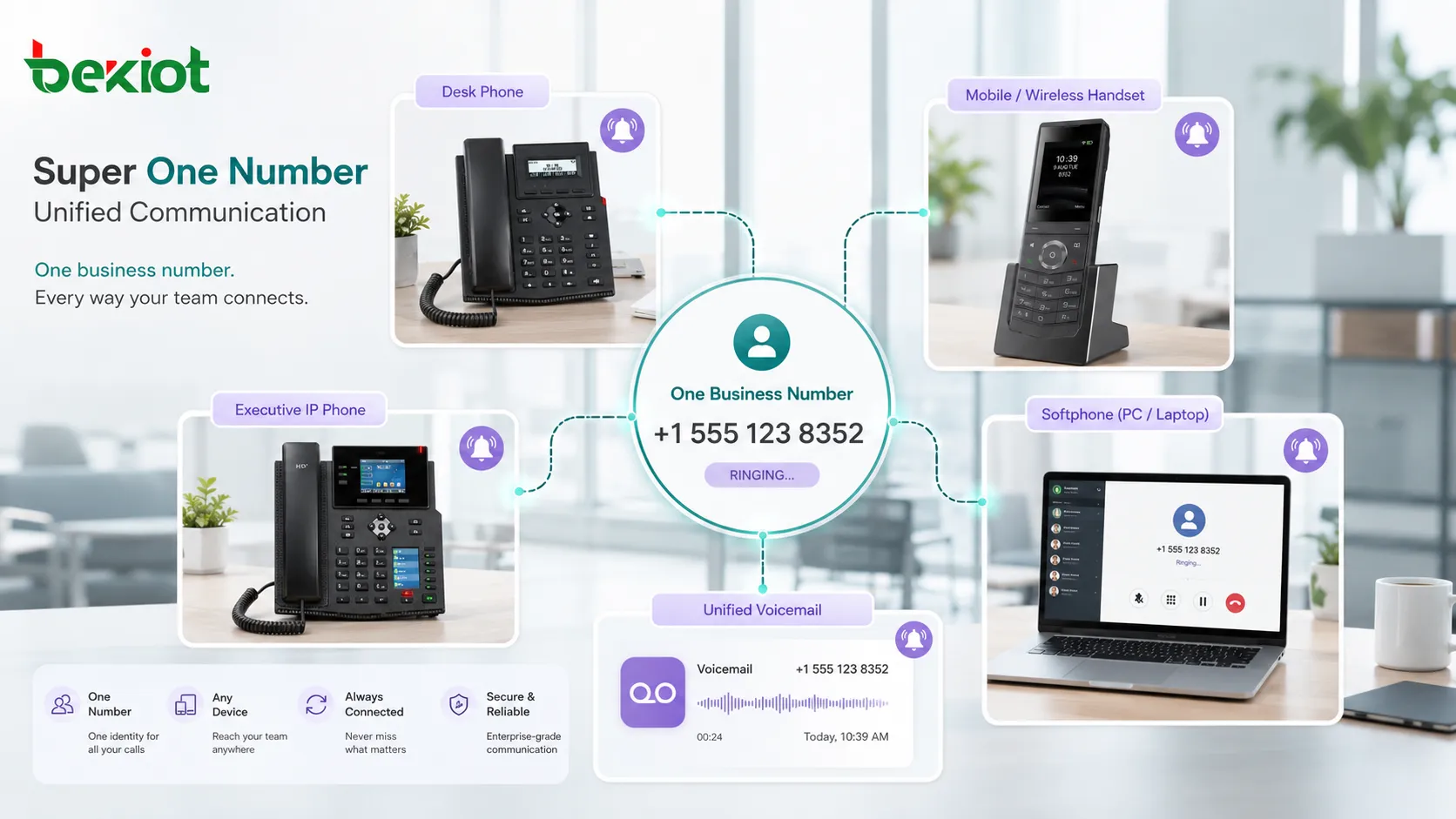
Core Working Logic
One Public Number
The user or department presents one number to callers. This number may be a direct business number, internal extension, DID number, service hotline, or virtual number assigned by the communication platform.
The visible number stays consistent even when the user changes device, moves between locations, or works remotely. This reduces confusion and keeps business communication more professional.
Multiple Reachable Endpoints
Behind the primary number, the system can bind several endpoints. These may include an IP desk phone, mobile phone, softphone, web client, tablet app, branch extension, or remote destination.
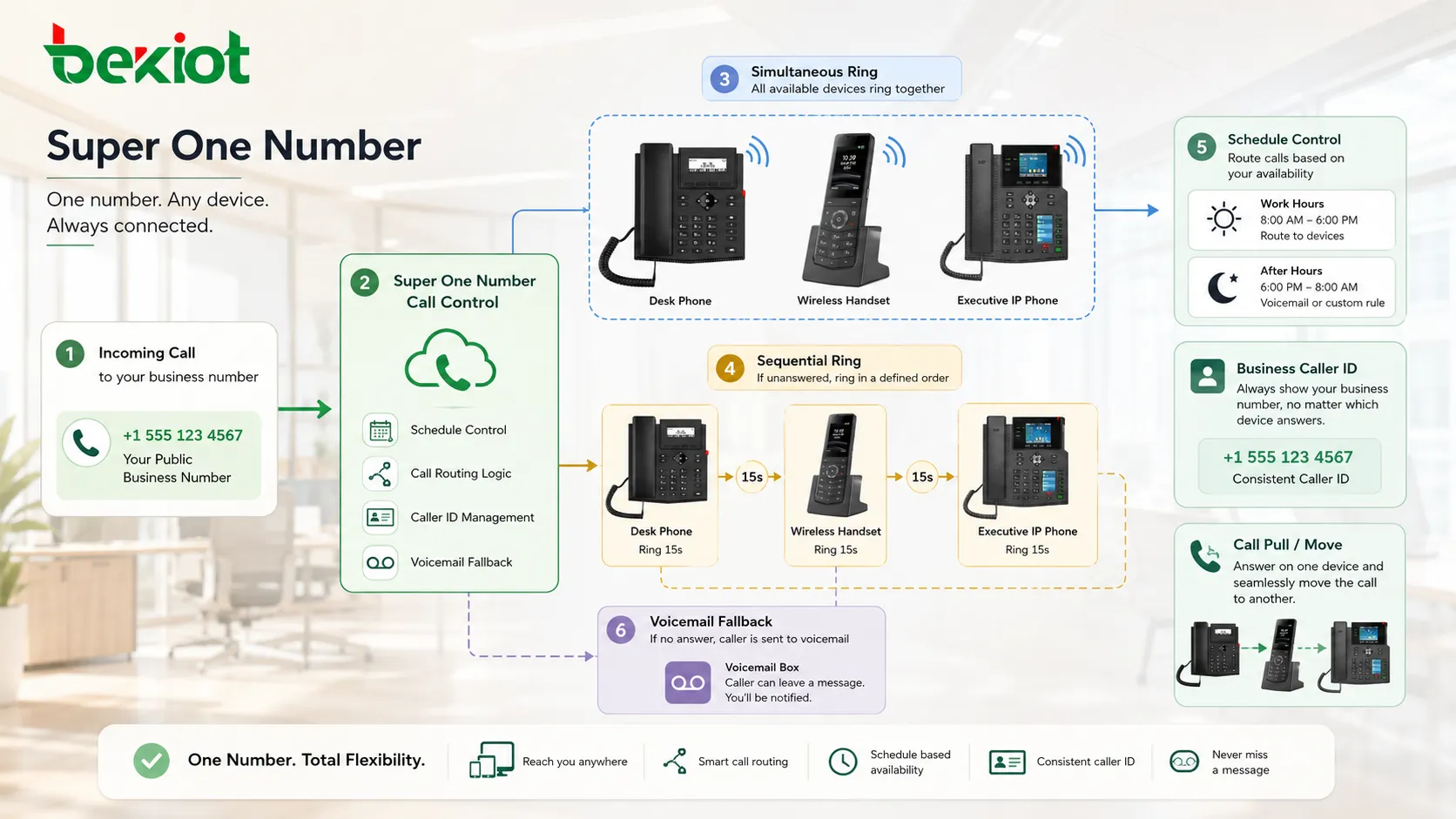
When a call arrives, the platform follows the configured strategy. It may ring devices simultaneously, ring them in sequence, delay the mobile ring, or forward the call only during selected schedules.
Central Call Control
The platform controls routing, voicemail, call logs, caller ID, call recording, time schedules, and user availability. This is what makes the function different from simple manual call forwarding.
Central control allows the organization to keep business calls visible and manageable, even when employees answer from mobile devices or remote locations.
Unified Missed Call Handling
If no device answers, the call can return to a unified voicemail, team queue, receptionist, assistant, or fallback destination. This avoids the problem of business calls ending in a personal mobile voicemail or disappearing into unrelated call logs.
For service teams, unified missed call handling helps maintain accountability and follow-up discipline.
Key Functions
Simultaneous Ringing
Simultaneous ringing allows multiple devices to ring at the same time. A user may receive the call on a desk phone and mobile phone together. The first device to answer takes the call.
This is useful for users who move frequently between office, meeting room, remote work, and travel environments. Callers do not need to redial another number when the user leaves the desk.
Sequential Ringing
Sequential ringing follows a defined order. For example, the desk phone may ring first, then the mobile phone after a few seconds, then voicemail or a team backup if there is no answer.
This method is useful when organizations want to keep office phones as the preferred answering point while still offering mobility fallback.
Schedule-Based Availability
Users may define when certain devices should ring. A mobile phone may receive business calls only during work hours. A home office softphone may ring only on remote work days. After-hours calls may go to voicemail or an on-call team.
Schedule control prevents one-number communication from becoming constant interruption. It supports work-life boundaries while keeping business reachability organized.
Caller ID Consistency
Outbound calls can present the business number instead of a personal mobile number. This helps preserve company identity, protects personal privacy, and makes callbacks easier for customers.
For customer-facing teams, caller ID consistency is one of the most practical benefits because it keeps communication professional across devices.
Call Pull and Move Function
Some systems allow users to move an active call between devices. A call started on a desk phone may be pulled to a mobile phone when the user leaves the office, or a mobile call may be moved back to a desk phone for better audio quality.
This supports continuity during movement without forcing the caller to hang up and reconnect.
How to Use It in Daily Communication
Step 1: Define the Primary Number
Start by deciding which number should represent the user or team. For an individual employee, this may be a direct extension or business DID. For a department, it may be a service number or hotline.
The number should be easy to publish on business cards, websites, email signatures, customer portals, and internal directories.
Step 2: Add Reachable Devices
Next, bind the devices that should receive calls. These may include a desk phone, mobile number, desktop softphone, mobile app, web phone, or backup extension.
Each endpoint should be tested individually before being added to the routing rule. A destination that cannot answer reliably will reduce the value of the feature.
Step 3: Choose Ringing Behavior
Decide whether devices should ring at the same time or in a sequence. Simultaneous ringing is faster, while sequential ringing gives more control over preferred answering order.
For executives or sales users, simultaneous ringing may be practical. For support teams or office staff, sequential routing may be easier to manage.
Step 4: Set Time Rules
Configure work-hour, after-hour, holiday, and travel-mode rules. This helps prevent calls from reaching the wrong device at the wrong time.
Time rules are especially important when mobile numbers are included. Without schedule control, users may receive business calls during personal time or outside service coverage hours.
Step 5: Define No-Answer Handling
Set the final destination if none of the devices answer. Options may include voicemail, assistant, team queue, receptionist, auto attendant, or callback request flow.
No-answer handling should match the service expectation. A sales inquiry, support issue, emergency call, or internal request may need different fallback logic.
Business Value in Real Scenarios
Hybrid Work
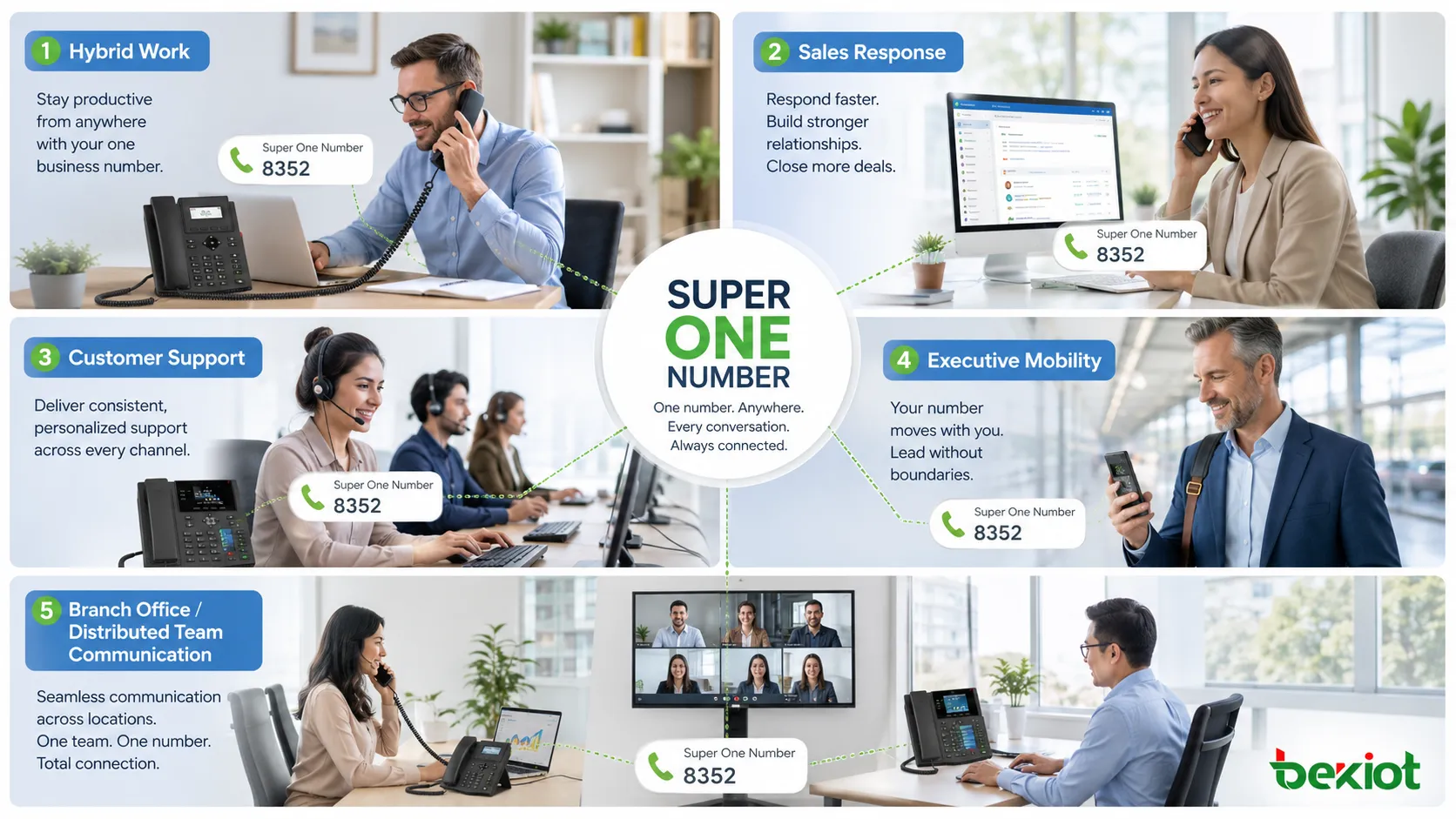
Hybrid work requires communication to follow people rather than desks. A user may work from the office on Monday, from home on Tuesday, and travel on Wednesday. One-number routing keeps the caller experience consistent.
This reduces missed calls and avoids the need to publish multiple temporary contact numbers.
Sales and Account Management
Sales teams benefit from fast response. If customers can reach the salesperson through one number regardless of location, opportunities are less likely to be missed.
At the same time, business caller ID helps keep personal mobile numbers private and maintains a professional company image.
Customer Service and Support
Support teams can use one-number logic to route calls to available agents, backup users, or voicemail when the primary person is unavailable.
For small teams, this can improve responsiveness without requiring a full contact center platform.
Executives and Mobile Managers
Managers often move between meetings, branches, and travel locations. One-number communication allows important calls to follow them while still preserving control over schedules and fallback routing.
Assistant routing can also be added so unanswered calls do not go directly to personal voicemail.
Branch Offices and Distributed Teams
Distributed teams can use unified number rules to keep contact identity stable across sites. Calls can route to local staff during business hours and to central teams after hours.
This is useful for organizations with regional offices, mobile service teams, or multi-location customer support.
Why the Market Is Moving Toward Unified Numbers
Several industry trends make one-number communication more valuable. Remote work has increased device diversity. Cloud PBX and UC platforms have made number routing easier to manage. Mobile-first work styles have made desk-only communication less practical. Customers now expect faster response across channels and locations.
At the same time, organizations want better control over business calls. If employees use personal mobile numbers for customer communication, call records may be fragmented, privacy may be weakened, and customer ownership may become unclear.
Unified number functions help solve this by keeping business identity, routing, call records, and voicemail under organizational control while still allowing users to work flexibly.
Technical Requirements
Unified Communication Platform
The feature normally requires a PBX, hosted voice platform, UC system, or mobility server that can control multiple destinations under one user identity.
The platform should support call routing rules, device binding, schedule control, voicemail integration, and call logs.
Stable Endpoint Registration
IP phones and softphones should register reliably. Mobile destinations should be reachable through the public network or mobile app service. If endpoint status is unstable, calls may fail or ring inconsistently.
Number and Caller ID Policy
Outbound caller ID should be configured correctly. The business number shown to the called party should match company policy and carrier requirements.
If caller ID is not planned, users may accidentally expose personal numbers or present confusing return-call numbers.
Voicemail Integration
Unified voicemail is important. If every device has separate voicemail, callers may leave messages in different places. The user may miss follow-ups or lose call context.
The system should decide whether unanswered calls return to business voicemail, team voicemail, or a service queue.
Security and Privacy Controls
Because mobile numbers and remote destinations may be involved, privacy and access control should be considered. Administrators should define who can add destinations, change schedules, view call logs, and modify forwarding behavior.
Configuration Risks
Ringing Too Many Devices
If too many endpoints ring at once, users may feel disturbed and callers may experience confusing answer behavior. Only useful devices should be included.
Personal Voicemail Leakage
If mobile forwarding is not controlled, business callers may reach a personal voicemail greeting. This weakens the professional experience and may create privacy concerns.
Delayed Answer
Long sequential routing chains can make callers wait too long. The number of steps should be limited, and fallback should be clear.
Incorrect Time Schedule
Wrong time zone, holiday, or work-hour settings can route calls to the wrong device. Schedules should be reviewed after changes in work policy or staff location.
Weak Call Record Visibility
If calls answered on mobile devices are not logged centrally, managers may lose visibility into business communication. Reporting should be tested before large-scale rollout.
Best Practices for Deployment
Start with a pilot group. Choose users who genuinely need mobility, such as sales staff, managers, field service coordinators, or support leads. Test real call scenarios before expanding to all users.
Keep routing rules simple. A clear rule that rings a desk phone and then a mobile phone is often better than a complex chain with many possible destinations.
Use business voicemail as the final fallback. This keeps missed calls inside the organization and avoids fragmented message handling.
Review logs after deployment. Check whether calls are answered faster, whether callers reach the wrong voicemail, whether mobile destinations answer reliably, and whether users are receiving calls outside expected hours.
Train users. They should know how to enable or disable mobility, update schedules, move calls between devices, and protect personal numbers.
How to Measure Success
Success should be measured by business outcome, not only by feature activation. Useful indicators include fewer missed calls, faster response time, more consistent caller ID, lower repeat-call volume, better mobile workforce reachability, and improved follow-up discipline.
User satisfaction is also important. If the feature creates constant interruptions, the configuration may need refinement. One-number communication should improve reachability without removing user control.
For customer-facing teams, call records and callback rates can show whether the feature improves real service performance.
Super One Number works best when it combines one public identity, multiple reachable endpoints, controlled schedules, unified voicemail, and clear business routing rules.
FAQ
Can one number ring both a desk phone and a mobile phone?
Yes. Many communication platforms support simultaneous or sequential ringing across desk phones, mobile numbers, and softphones.
Will customers see the user’s personal mobile number?
Not if outbound caller ID is configured correctly. The system can present the business number instead of the personal number.
Can users turn off mobile ringing after work?
Yes, if schedule controls or user mobility settings are available. Work-hour rules should be configured to avoid unnecessary after-hours interruption.
What happens if none of the devices answer?
The call should follow a defined fallback rule, such as business voicemail, assistant, team queue, receptionist, or callback flow.
Is this feature suitable for every employee?
Not necessarily. It is most useful for users who need mobility, customer-facing availability, backup routing, or consistent business identity across devices.







