


Dispatch monitoring is a communication management function used to observe, track, record, and analyze dispatch-related activities in real time. It allows supervisors and command center operators to understand what is happening across calls, users, devices, groups, channels, alarms, work orders, emergency events, and field resources.
In industries where voice communication, emergency coordination, public address, intercom, radio, video, and alarm systems work together, monitoring is not only a visual dashboard. It is a control method that helps teams detect abnormal conditions, evaluate response progress, reduce blind spots, and make faster decisions during routine operations and critical incidents.
From Passive Calling to Visible Command Operations
Traditional communication systems often focus on whether a call can be connected. Once the call starts, managers may have limited visibility into who is speaking, which group is active, whether a field device is online, whether an emergency call has been answered, or whether a dispatch instruction has been completed.
Modern command environments require more than simple call connection. Operators need to see live communication state, event priority, resource location, call progress, device health, queue pressure, and alarm linkage. This changes dispatching from a passive communication process into an observable operating system.
The main value is awareness. When supervisors can see communication events clearly, they can identify delays, overloaded channels, missed calls, device faults, and unhandled alarms before they create larger operational risks.
Core Concept and Technical Scope
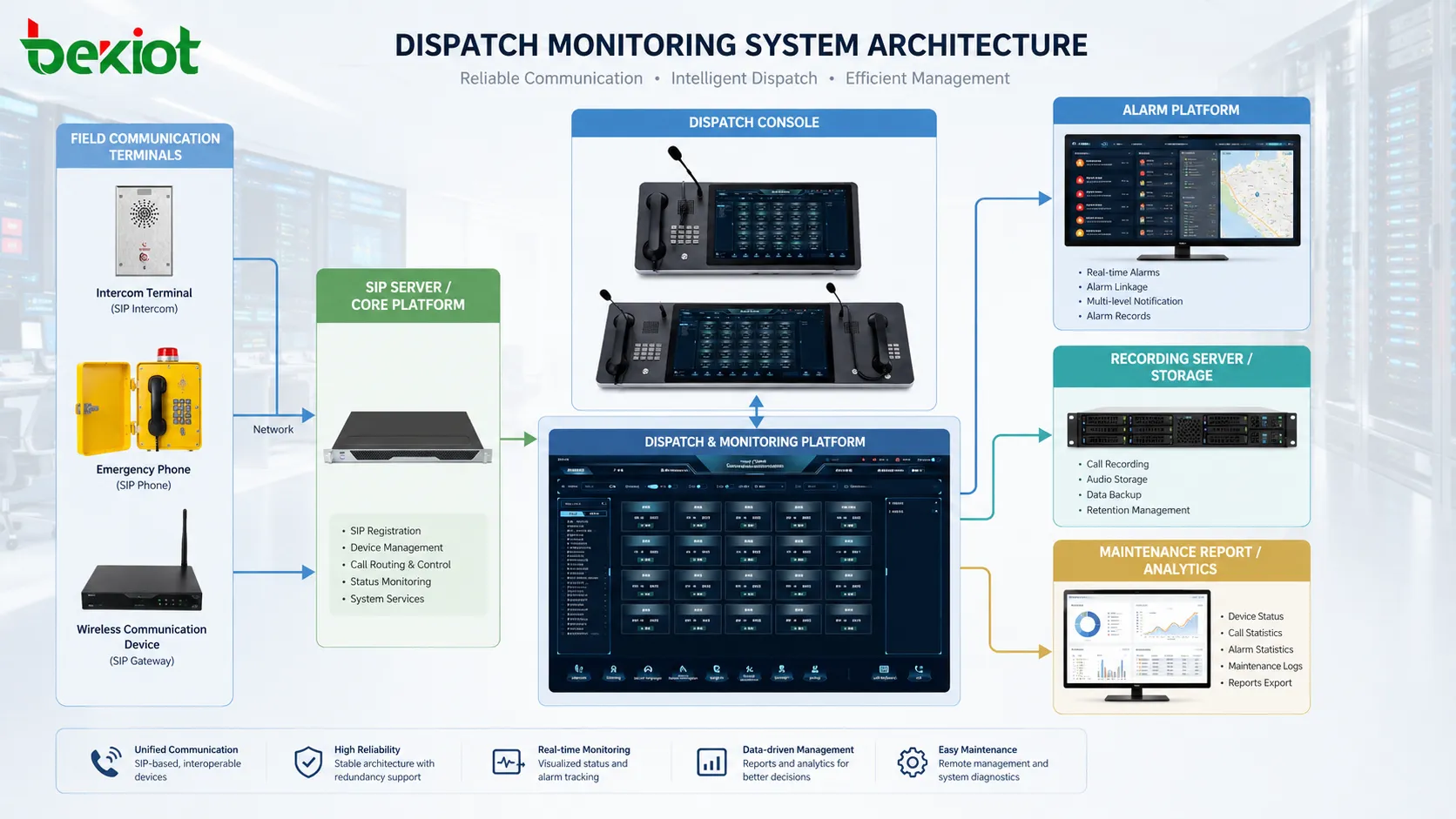
The function usually collects information from multiple subsystems. These may include IP PBX platforms, SIP servers, dispatch consoles, intercom terminals, emergency phones, radio gateways, public address systems, video systems, access control platforms, alarm inputs, and network devices.
The collected data is converted into readable status indicators, event lists, maps, call logs, alarm panels, audio records, and reports. Some systems also support operator actions such as listen-in, forced release, group call, priority call, call takeover, broadcast initiation, recording playback, and emergency escalation.
The monitoring scope depends on system architecture. A basic platform may show only call status and device registration. A more advanced platform may integrate GIS maps, video linkage, alarm pop-ups, radio channels, emergency plans, maintenance records, and historical analytics.
Data Sources Behind the Screen
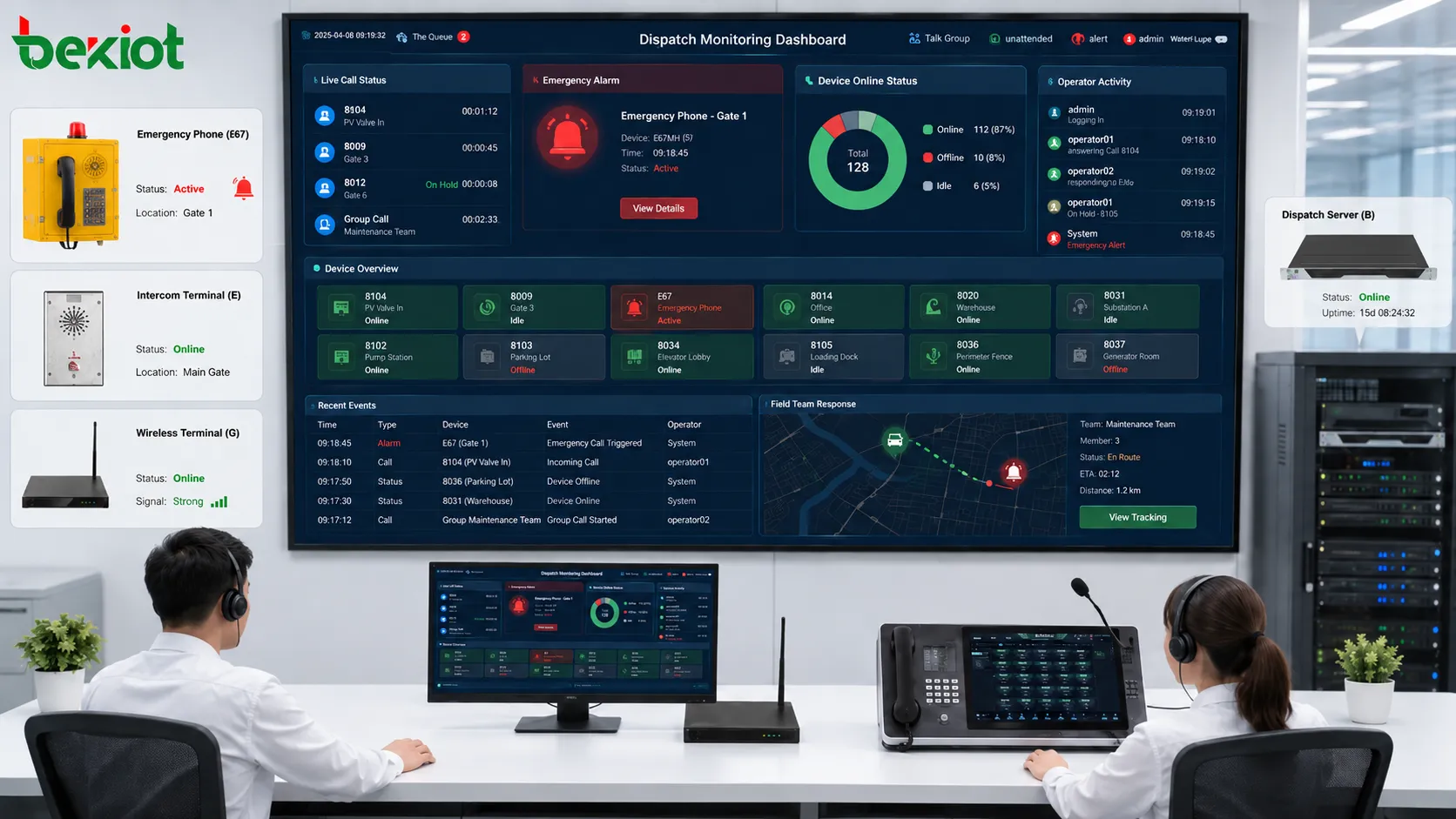
Communication Status
Call state is one of the most important data sources. The platform may track idle, ringing, answered, held, transferred, busy, failed, disconnected, and recording states. This helps supervisors understand whether important calls are being handled correctly.
For emergency calls, status visibility is especially important. Operators need to know whether a call has been answered, which console handled it, whether recording is active, and whether escalation is required.
Device Availability
The system may monitor whether terminals, phones, gateways, speakers, intercoms, dispatch consoles, and servers are online. Device availability can be measured through registration state, heartbeat, ping, SNMP, SIP response, platform polling, or gateway status.
A device that appears physically installed but is offline may create a hidden safety risk. Monitoring helps reveal these problems before a real emergency occurs.
Operator Activity
Supervisor views may show which operator is logged in, which console is active, which call is being handled, and whether the operator is available. In busy control rooms, this helps distribute tasks and avoid repeated handling.
Operator activity records can also support audit review. They show who answered a call, who initiated a broadcast, who acknowledged an alarm, and who performed dispatch actions.
Alarm and Event Inputs
Emergency buttons, access control alarms, fire signals, intrusion alerts, equipment faults, environmental sensors, and system warnings can all become event inputs. Once the platform receives an event, it can display priority, location, time, source, and response status.
When communication monitoring and alarm handling are combined, the control room can move from observation to immediate action.
Real-Time Visualization
Real-time visualization turns complex communication data into intuitive operational information. Instead of reading scattered logs, operators can view device icons, color-coded states, event timelines, live call panels, alarm windows, queue counters, and map-based resources.
For example, a green device icon may indicate normal online status, yellow may indicate warning, red may indicate alarm, and gray may indicate offline. A live call panel may show caller number, target extension, call duration, recording status, and dispatch group.
Good visualization should not overload the operator. A crowded screen with too many flashing indicators may reduce efficiency. The interface should highlight critical events while keeping routine status available but not distracting.
Event Prioritization and Response Control
Not all communication events have the same importance. A routine internal call, a service request, a maintenance report, and an emergency help call should not be displayed with the same priority.
Monitoring systems often assign event levels such as normal, warning, urgent, and critical. Priority can be based on call source, device type, location, alarm type, caller identity, time, and business rules.
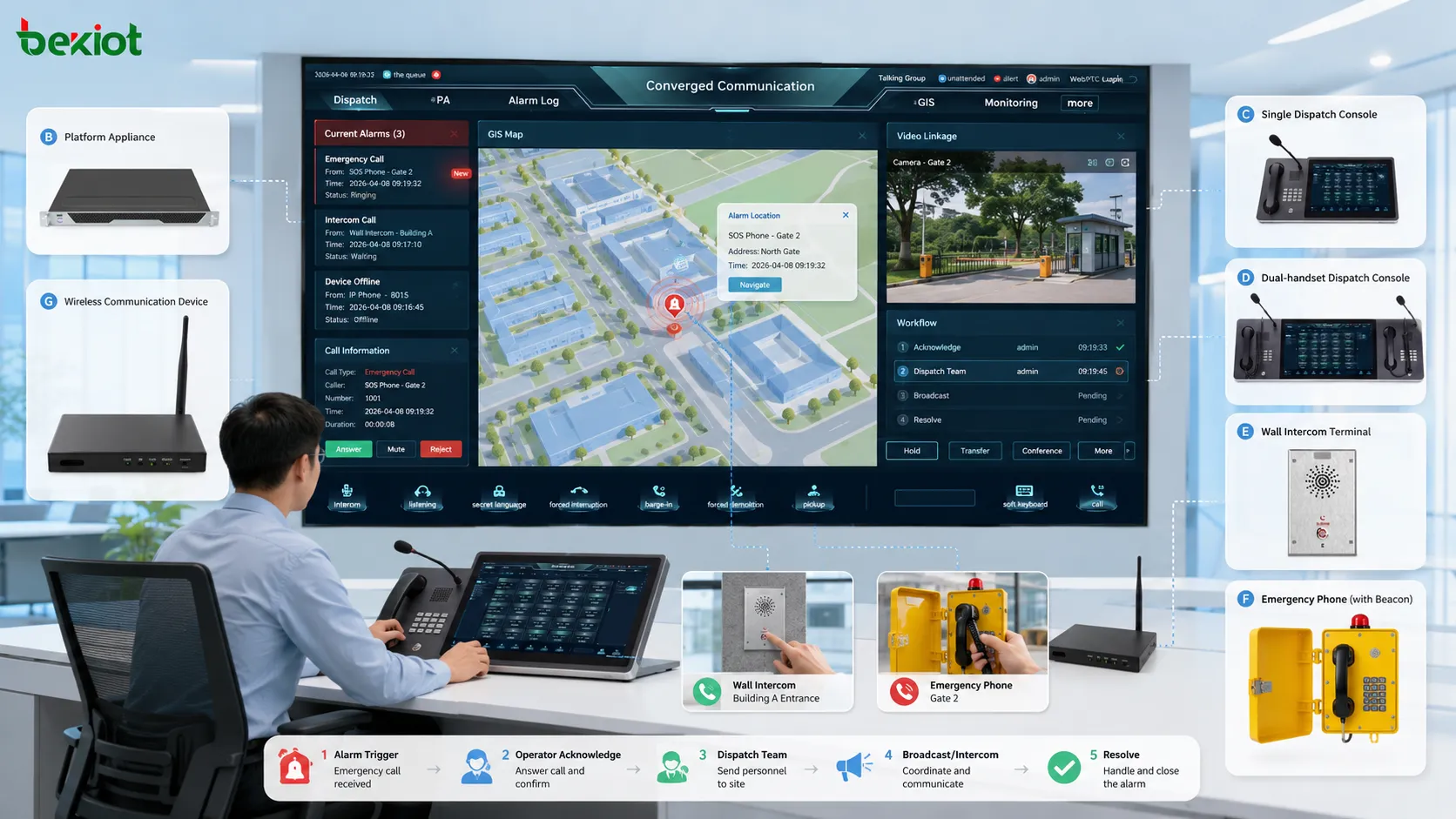
Once priority is assigned, the platform can trigger different response actions. A normal event may only be logged. A warning may notify a supervisor. A critical event may pop up on the console, start recording, display video, open a map, and activate a pre-defined dispatch plan.
Linkage with Audio, Video, and Maps
A powerful monitoring design connects voice events with visual and location information. When an emergency call arrives from a help point, the platform may display the device location, nearby camera, caller information, and available field team.
Video linkage helps operators verify the scene. Map linkage helps locate the event and guide response teams. Audio recording preserves the communication process. Together, these functions improve situational awareness.
This type of linkage is valuable in tunnels, factories, mines, rail transit, airports, ports, campuses, industrial parks, utility facilities, hospitals, and public security environments.
Recording, Playback, and Evidence Review
Recording is an important part of dispatch monitoring. It helps preserve communication details, verify instructions, support incident review, and improve training. In many command environments, audio records are also useful for accountability.
Playback should be searchable by time, caller, operator, device, group, alarm type, or incident number. If recordings are difficult to find, their operational value decreases.
Recording policy should also consider privacy and compliance. Not every conversation should be recorded without rules. Retention time, access permission, export control, and audit logs should be clearly defined.
Performance Indicators for Management
Monitoring data can be converted into management indicators. These may include call volume, answered calls, missed calls, average response time, emergency call handling time, device offline duration, operator workload, alarm closure rate, and recording completeness.
These indicators help managers see whether the communication system is supporting operations effectively. A high missed-call rate may indicate staffing shortage. Frequent offline alarms may indicate network or power problems. Long response times may indicate unclear responsibility or poor workflow design.
Performance analysis should not only focus on individual operators. It should also evaluate system design, device placement, route logic, escalation rules, and maintenance quality.
Applications in Industrial and Public Operations
Manufacturing and Process Plants
Factories and process plants use dispatch monitoring to coordinate production lines, maintenance teams, safety personnel, warehouse staff, and control rooms. It helps operators notice equipment alarms, emergency calls, and communication failures quickly.
In noisy or hazardous areas, visibility into field communication status is important because workers may not be able to use ordinary mobile phones reliably.
Transportation and Rail Systems
Rail, metro, airport, port, and tunnel operations rely on fast communication between dispatch centers, field staff, stations, security teams, emergency points, and maintenance crews. Monitoring helps supervisors track calls, alarms, help points, and response actions.
For transport environments, location awareness and event priority are especially valuable.
Energy and Utility Facilities
Power plants, substations, water treatment facilities, pipelines, and utility sites may be widely distributed. Monitoring functions help central teams observe communication device status, alarm events, maintenance calls, and emergency response progress across remote locations.
This reduces dependence on manual inspection and improves fault response efficiency.
Mining and Heavy Industry
Mines, steel plants, chemical plants, and heavy industrial sites often have harsh environments and strict safety requirements. Monitoring allows command centers to view emergency communications, device status, group calls, and alarm linkage.
In these environments, a missed call or offline terminal may represent more than an inconvenience. It may affect safety response.
Campus and Public Facility Management
Large campuses, hospitals, commercial complexes, government buildings, and public venues can use monitoring to manage service desks, security posts, emergency phones, intercoms, broadcast systems, and control room communication.
The system helps operators quickly distinguish routine service calls from urgent events.
Product-Oriented System Value
In practical deployments, organizations often need a platform that can unify voice dispatch, alarm linkage, device visibility, recording, and multi-terminal communication in one command environment. Becke Telcom’s BK-RCS unified dispatch communication system can be lightly considered for industrial sites that need centralized dispatch control, emergency communication coordination, and visualized communication management.
The product value should not be understood only as a console interface. The real value lies in connecting field terminals, dispatch roles, alarm processes, communication records, and response workflows into a manageable system.
A good platform should help users reduce fragmented tools, shorten response paths, improve command visibility, and support long-term maintenance.
Technical Design Considerations
Network Reliability
Monitoring depends on stable network connectivity. If devices frequently lose connection, the dashboard may become unreliable. Industrial switches, redundant links, VLAN planning, QoS, and power backup should be considered for critical deployments.
Protocol Compatibility
Communication systems may include SIP devices, analog gateways, radio systems, PA systems, video platforms, and alarm interfaces. Integration design should confirm protocol compatibility and interface availability before deployment.
Permission Control
Not every operator should have the same authority. Listening, broadcasting, call intervention, recording export, alarm closure, and configuration changes should be controlled by roles.
Permission design protects both security and operational discipline.
Time Synchronization
Accurate time is essential for logs, recordings, alarms, and reports. All servers, consoles, terminals, and connected systems should use reliable time synchronization.
Without consistent timestamps, incident review becomes difficult.
Data Storage
Monitoring platforms generate logs, recordings, screenshots, reports, and event records. Storage capacity, retention rules, backup policy, and access control should be planned in advance.
Common Deployment Mistakes
One common mistake is focusing only on the screen interface while ignoring data quality. If devices are not named correctly, locations are missing, or alarms are not classified, the dashboard may look complete but provide little real value.
Another mistake is enabling too many alarms. Excessive low-level alerts can cause alarm fatigue. Operators may start ignoring notifications, which increases the risk of missing critical events.
Some projects also fail to define ownership. If nobody is responsible for offline devices, unresolved alarms, recording review, or report analysis, monitoring becomes a passive display rather than an operating tool.
A further mistake is not testing emergency scenarios. Routine calls may work well, but emergency call pop-ups, recording, video linkage, escalation, and broadcast actions must be tested under realistic conditions.
Maintenance and Optimization Method
Monitoring systems should be reviewed regularly. Daily checks may include device online status, server health, alarm backlog, failed calls, and recording status. Weekly checks may review offline trends, missed events, operator workload, and abnormal call patterns.
Monthly optimization may include updating device labels, refining alarm levels, adjusting dashboard layout, testing backup routes, reviewing permissions, and checking storage capacity.
For mission-critical environments, periodic emergency drills should include communication monitoring. Operators should practice receiving alarms, opening linked video, initiating dispatch calls, broadcasting instructions, recording actions, and closing events.
Future Development Trends
Dispatch monitoring is moving toward more integrated, intelligent, and data-driven operation. Systems are increasingly expected to connect voice, video, GIS, IoT alarms, access control, radio, mobile terminals, and workflow platforms.
AI-assisted event classification, abnormal behavior detection, speech-to-text records, automatic incident summaries, predictive maintenance, and digital twin visualization may become more common in advanced deployments.
However, the foundation remains the same: reliable device data, clear event rules, secure control permissions, stable communication links, and practical operator workflows.
Selection Criteria for Projects
When selecting a monitoring solution, teams should evaluate whether the system supports the required devices, protocols, dispatch functions, alarm linkage, recording, reporting, and permission control.
They should also review scalability. A platform that works for one site may not support multiple plants, branches, departments, or thousands of endpoints without careful design.
Usability matters as well. Operators should be able to understand the interface quickly during stressful events. A technically powerful system can still fail operationally if the interface is confusing.
Finally, maintenance support should be considered. Configuration backup, remote upgrade, log export, health inspection, and fault diagnosis are important for long-term reliability.
Summary
Dispatch monitoring is valuable because it transforms communication activity into visible, traceable, and actionable operational information. It helps command centers manage calls, devices, alarms, operators, recordings, and response workflows with greater clarity.
FAQ
Can dispatch monitoring work without video integration?
Yes. Video integration is useful, but not mandatory. A system can still monitor calls, alarms, devices, operators, recordings, and reports without camera linkage.
How should device names be designed?
Device names should include location, function, and number or zone information. Clear names help operators identify events quickly during emergencies.
Why do dashboards sometimes show too many alarms?
This usually happens when alarm levels are not classified properly. Low-value warnings should be separated from urgent events to avoid operator fatigue.
Is recording always required?
Not always. Recording depends on industry policy, legal requirements, privacy rules, and operational needs. Critical dispatch and emergency calls are more likely to require recording.
What should be tested before system acceptance?
Test online status, call display, emergency pop-up, alarm linkage, recording playback, role permissions, failover behavior, report export, and operator workflow under realistic scenarios.







