


Beacon integration refers to the process of connecting beacon signals with software platforms, mobile applications, gateways, maps, databases, automation engines, and business systems. A beacon by itself usually sends a simple signal, but integration turns that signal into useful actions such as location awareness, asset tracking, indoor navigation, event triggering, visitor engagement, safety notification, or workflow confirmation.
In modern digital environments, beacons are increasingly used as part of IoT, smart building, retail, healthcare, logistics, industrial safety, public facility, and location-based service solutions. Their value is no longer limited to broadcasting an identifier. The real value appears when the signal is interpreted, matched with context, and connected with operational systems.
From Isolated Signal to Connected Workflow
A standalone transmitter can tell nearby receivers that something is present. However, it cannot decide what business action should happen next. Integration solves this limitation by linking the detected signal with rules, data, location maps, user profiles, device records, and application logic.
For example, when a mobile app detects a signal near a museum exhibit, it may display related content. When a warehouse gateway detects a tag attached to equipment, the inventory system may update its location. When a safety platform receives a signal from an emergency point, it may open an alarm workflow and show the event location.
This means the signal becomes a trigger for digital response. The connected system decides whether the event is informational, operational, commercial, safety-related, or maintenance-related.
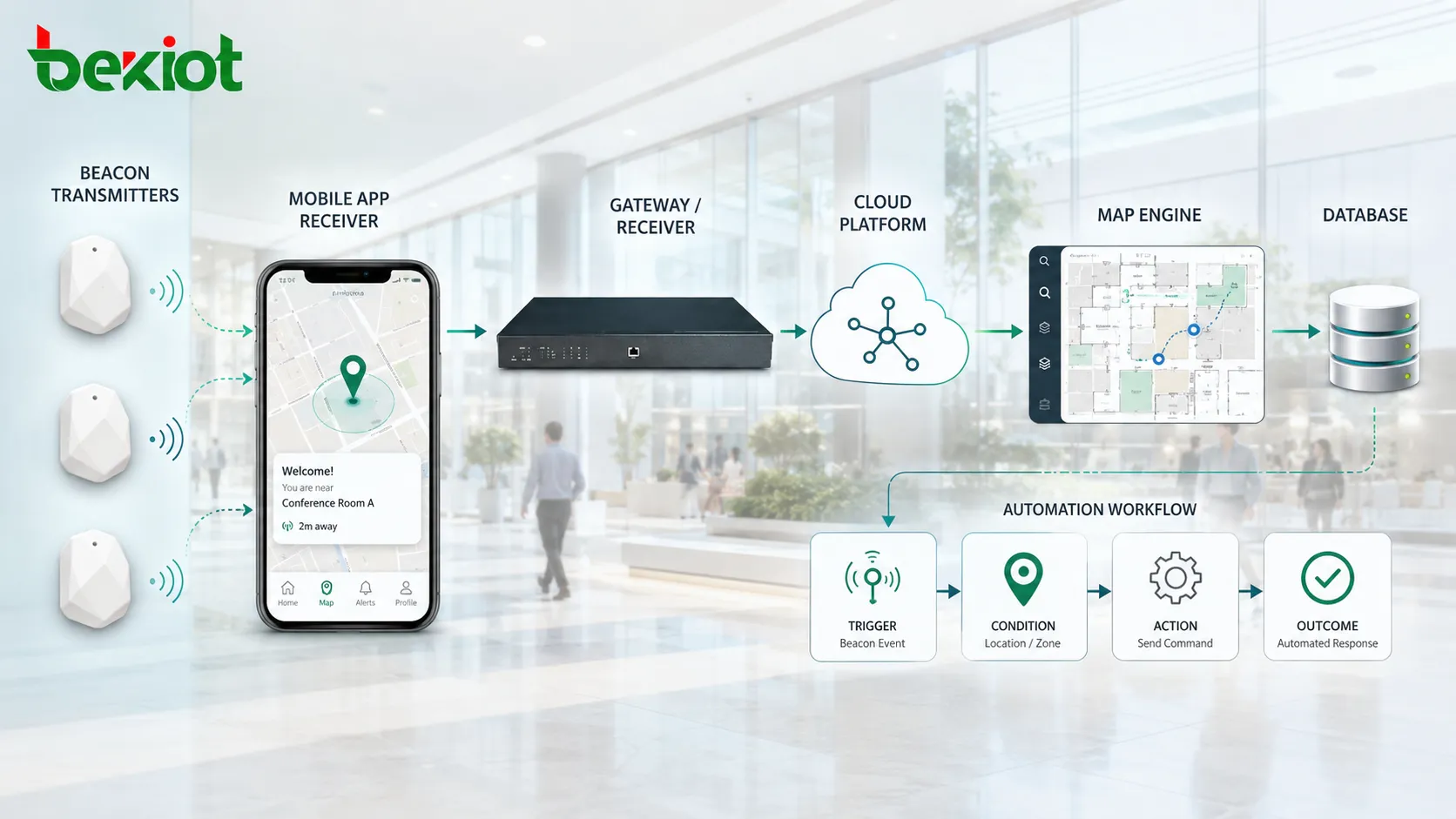
Core Architecture
Signal Layer
The signal layer includes the physical beacon devices or beacon-like transmitters installed in buildings, vehicles, assets, shelves, entrances, machines, rooms, or outdoor points. These devices may use Bluetooth Low Energy, Wi-Fi-based signals, RFID-related systems, ultrasonic signals, infrared, or other proximity technologies depending on the application.
At this layer, the most important parameters include identifier, broadcast interval, signal power, battery level, installation location, mounting method, and environmental suitability.
Detection Layer
The detection layer includes mobile phones, handheld terminals, gateways, access points, readers, or dedicated receivers that can detect nearby signals. The receiver reads the transmitted identifier and may also estimate proximity based on signal strength or known placement.
Detection quality depends on receiver sensitivity, antenna direction, building layout, interference, signal reflection, device density, and software filtering logic.
Platform Layer
The platform layer stores device identities, location mappings, user permissions, asset records, trigger rules, event history, and analytics data. It may be deployed as a cloud service, local server, edge platform, or hybrid architecture.
This layer is where raw signal data becomes meaningful. A detected ID can be translated into “meeting room entrance,” “medical cart,” “loading bay,” “restricted area,” or “exhibit zone.”
Application Layer
The application layer delivers practical functions to users. It may be a mobile app, dashboard, indoor map, maintenance platform, visitor system, warehouse system, security platform, or smart building interface.
Good application design should hide technical complexity and present clear actions. Users should not need to understand signal IDs or radio behavior to benefit from the system.
Important Integration Functions
Location Identification
One major function is identifying where a user, asset, or device is located. In indoor spaces where GPS may be weak or unavailable, beacons can mark zones, rooms, corridors, entrances, or equipment areas.
The system may use proximity detection, signal strength comparison, gateway reception, or map rules to estimate location. Accuracy can vary, so deployment design must match the required precision.
Event Triggering
When a receiver detects a specific signal, the system can trigger an event. This may include opening a page, sending a notification, logging attendance, starting a maintenance checklist, unlocking a workflow, displaying safety information, or reporting asset presence.
Event triggering is useful because it connects physical movement with digital action. The system reacts to where something is, not only to what a user manually enters.
Asset Visibility
Beacon tags can be attached to movable assets. Gateways or mobile devices detect their signals and send location updates to the platform. This helps organizations locate tools, carts, containers, medical devices, vehicles, pallets, and equipment.
Asset visibility reduces search time and improves utilization. It also supports audit records and loss prevention.
Indoor Navigation
In complex buildings, integrated signals can support indoor wayfinding. A mobile app may use nearby transmitters to determine approximate position and guide users to rooms, departments, gates, shelves, or service points.
Navigation accuracy depends on installation density, map quality, calibration, signal stability, and mobile device behavior.
Contextual Notification
A system can send location-based messages when users enter or approach a defined zone. This may be used for visitor guidance, retail promotion, safety reminders, maintenance instructions, or operational alerts.
Notification design must be controlled carefully. Too many messages may annoy users and reduce trust in the application.
Industry Trend: From Proximity Marketing to Operational Intelligence
Early adoption often focused on proximity marketing, where stores or venues used nearby signals to send offers, product information, or visitor content. This remains useful, but the broader trend is moving toward operational intelligence.
Organizations now use beacon integration to improve asset management, staff workflow, indoor positioning, emergency response, facility automation, patient flow, maintenance inspection, and logistics visibility.
This shift is important because operational use cases usually provide measurable value. They can reduce time spent searching for assets, improve response speed, increase process traceability, and support real-time decision-making.
Applications in Smart Buildings
Smart buildings use integrated signals for indoor navigation, space utilization, access support, visitor guidance, room-level services, equipment identification, and facility maintenance.
For example, when a maintenance worker enters a machine room, the mobile app can show the equipment checklist. When a visitor approaches a meeting area, the app can show directions. When a gateway detects facility equipment, the platform can update its last-known position.
The system value comes from connecting location with building services. Instead of treating rooms, users, and equipment as separate data points, the platform can understand their relationship in real time.
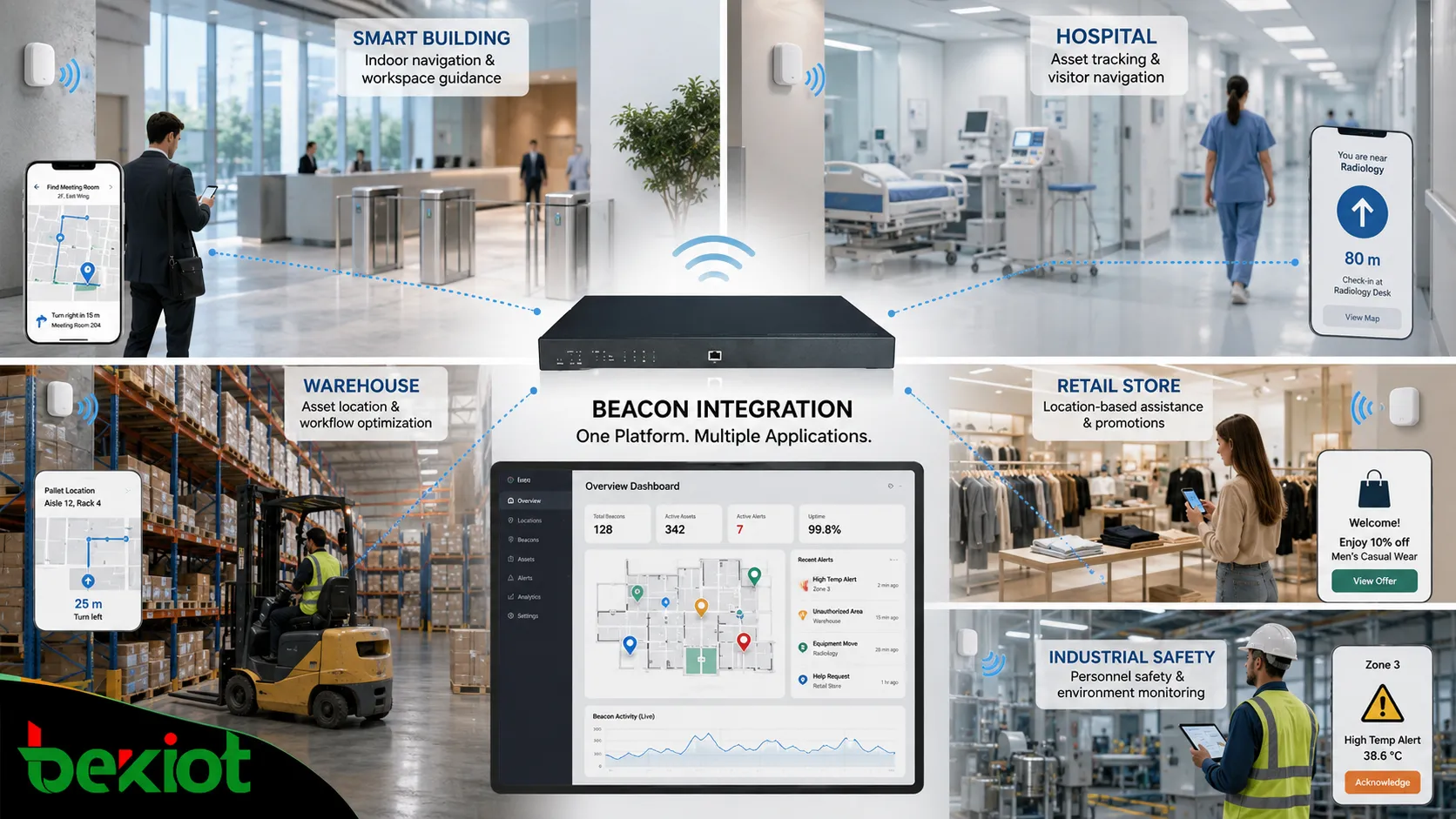
Applications in Healthcare
Healthcare environments often need to locate movable equipment, guide patients and visitors, support staff workflow, and improve service response. Integrated beacon systems can help locate wheelchairs, infusion pumps, mobile carts, beds, and other assets.
They can also support indoor navigation in large hospitals. Patients and visitors may use mobile guidance to find departments, pharmacies, testing areas, or exits.
Because healthcare data may be sensitive, privacy and permission control are important. Location records should be managed carefully and only used for approved purposes.
Applications in Warehousing and Logistics
Warehouses and logistics sites can use beacon integration to track equipment, guide workers, confirm zone entry, improve picking routes, and monitor the movement of pallets, carts, forklifts, or containers.
When combined with barcode, RFID, handheld terminals, and warehouse management systems, beacon data can provide extra context. It can show where an asset was last detected or whether a worker entered the correct zone.
This helps reduce manual searching and improves workflow traceability.
Applications in Retail and Visitor Services
Retail stores, museums, exhibitions, airports, stations, and public venues can use integrated signals to deliver location-based content. This may include product details, exhibit explanations, gate guidance, queue information, coupons, or visitor route assistance.
Successful use depends on relevance. A notification should help the user at that specific location. If messages feel random or excessive, users may disable the app or ignore the service.
Retail and visitor scenarios should also consider user consent, data minimization, and opt-out options.
Applications in Industrial Safety
Industrial sites can use integrated signals for worker presence detection, restricted-zone alerts, asset location, inspection confirmation, evacuation assistance, and equipment identification.
For example, a system may warn a worker approaching a restricted area, confirm that a patrol route has been completed, or identify tools near a maintenance zone.
In industrial environments, deployment must consider metal structures, vibration, dust, moisture, protective clothing, signal reflection, and device durability.
Data Processing and Event Rules
Raw detection events are often noisy. A receiver may detect the same signal many times, and signal strength may fluctuate. The platform must filter, group, and interpret the data before creating business events.
Common rules include minimum signal strength, dwell time, zone boundary, repeated detection threshold, gateway priority, time schedule, user role, and asset category.
Without proper filtering, the system may generate false location updates, repeated notifications, or inaccurate reports. Data processing is therefore a core part of integration quality.
Security and Privacy Requirements
Beacon integration may involve device IDs, user proximity, asset location, visitor movement, or operational records. Security and privacy controls are necessary, especially when people or sensitive assets are involved.
Important measures include encrypted communication, authenticated APIs, rotating identifiers where applicable, role-based access, data retention rules, consent management, and audit logs.
The system should avoid collecting more data than necessary. It should also clearly define who can view location records, who can export reports, and how long data is stored.
Deployment Planning
Planning should start with the business goal. The system design for indoor navigation is different from asset tracking, safety alerting, retail engagement, or maintenance workflow confirmation.
Next, the site should be surveyed. Walls, metal shelves, machinery, elevators, glass partitions, outdoor exposure, user movement paths, and power availability all affect placement.
Then a pilot zone should be tested. The pilot should verify signal coverage, detection accuracy, app behavior, gateway placement, battery performance, and integration with the target platform.
After testing, the deployment can be expanded gradually with standardized naming, mapping, maintenance records, and monitoring procedures.
Common Integration Problems
One common problem is inaccurate location due to poor placement. A transmitter mounted too close to another zone may cause false detection. A signal blocked by metal or concrete may create blind spots.
Another problem is weak application logic. If the system detects a signal but does not connect it with a meaningful action, users may see little value.
Battery maintenance is also a frequent issue. Large deployments require battery status tracking and replacement planning.
Privacy concerns can become a barrier if users do not understand what is being collected. Clear policy and transparent design help improve acceptance.
Selection Criteria
Choose the technology according to the use case. BLE may be suitable for many proximity and indoor positioning scenarios. RFID may be better for certain asset tracking workflows. Visual or audible devices may be better for warning. Multi-technology designs may be needed in complex environments.
Evaluate platform compatibility. A transmitter is only useful if the receiving app, gateway, API, map system, and management platform can process the signal correctly.
Check lifecycle support. Battery life, firmware update, management tools, replacement cost, and mounting method all affect long-term success.
Future Development Direction
The industry is moving toward more intelligent location-aware systems. Beacon integration is becoming part of broader IoT and digital operation platforms rather than a standalone feature.
Future systems may combine beacon signals with Wi-Fi positioning, UWB, RFID, computer vision, sensors, digital twins, AI analytics, and automation engines.
The strongest value will come from systems that connect location, identity, status, workflow, and response action into one operational model.
Beacon integration is valuable because it turns simple proximity or status signals into business actions, location intelligence, workflow automation, and operational visibility.
FAQ
Can beacon integration work without a mobile app?
Yes. Gateways, readers, access points, or fixed receivers can detect signals and send data to a platform without relying on a user’s phone.
Why does detection accuracy vary between sites?
Accuracy is affected by walls, metal objects, receiver placement, signal strength, antenna direction, device density, interference, and software filtering rules.
Is beacon data always personal data?
Not always. A signal attached to a tool may be asset data. But if it is linked to a person, visitor, patient, or employee, privacy controls may be required.
How should large deployments handle battery replacement?
Use battery status reporting, scheduled inspection, location records, replacement batches, and maintenance alerts to avoid large numbers of silent failures.
What is the first step before deployment?
Define the exact business objective. Asset tracking, navigation, safety alerting, visitor engagement, and workflow confirmation require different placement and integration strategies.







