


In many network deployment projects, especially audio-video communication systems, security monitoring platforms, remote device access, IP gateways, and enterprise intranet environments, NAT is one of the most common technologies behind successful connectivity. NAT, short for Network Address Translation, allows devices using private IP addresses inside a local network to communicate with external networks through one or more public IP addresses.
For system planners, NAT is not only a router function. It is a practical network design method for solving IPv4 address shortage, protecting internal network structures, and enabling external access to selected internal services. When used correctly, NAT helps cameras, video gateways, voice platforms, servers, and management systems communicate across private and public networks without exposing every internal device directly to the internet.
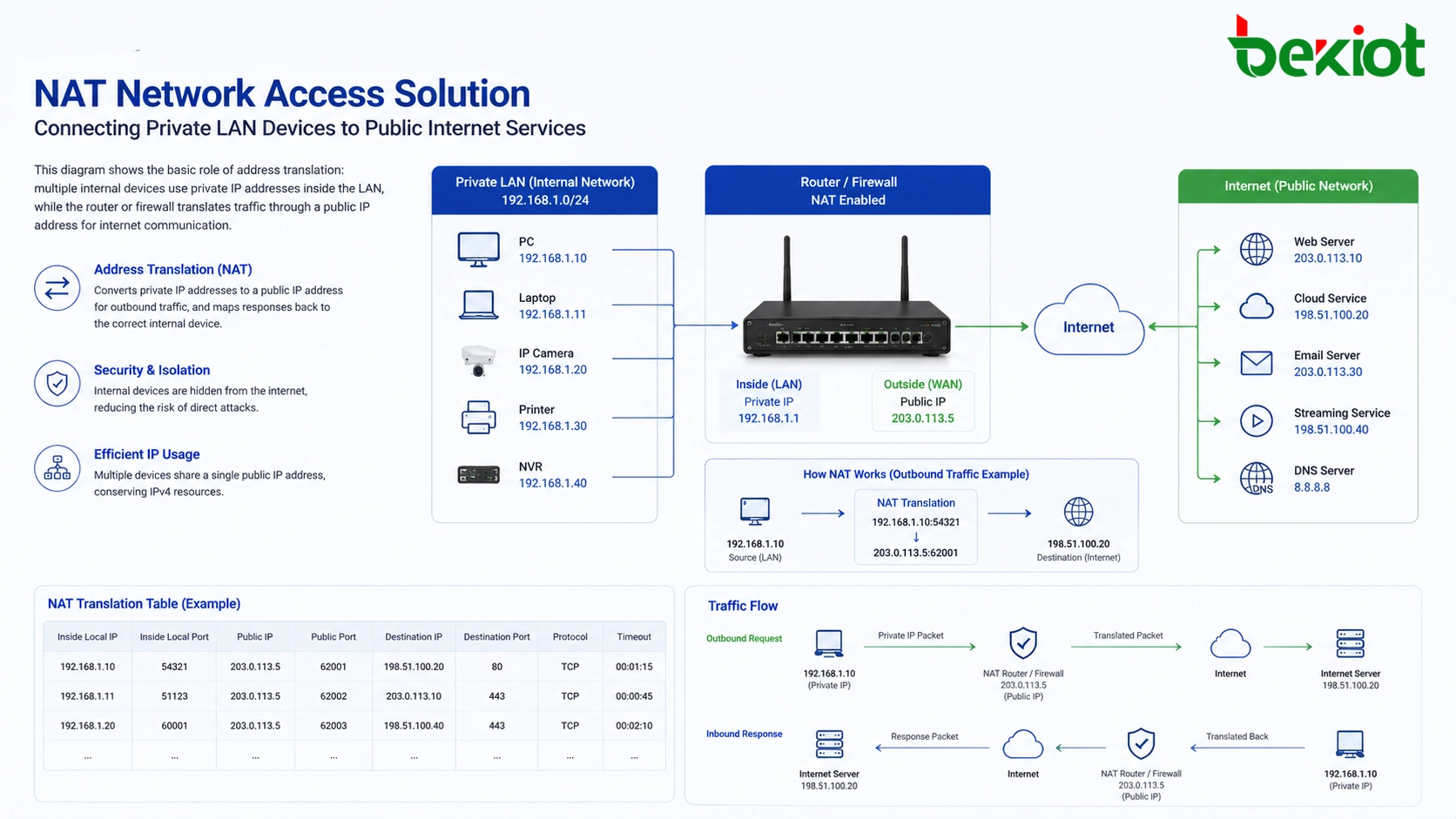
Why Address Translation Is Needed in Real Projects
Most enterprise, industrial, campus, and small business networks use private IP addresses internally. These addresses are suitable for LAN communication but cannot be directly routed on the public internet. Common private address ranges include 10.0.0.0/8, 172.16.0.0/12, and 192.168.0.0/16. Devices in these ranges can communicate inside the local network, but external users cannot directly reach them unless additional routing or translation rules are configured.
This is where NAT becomes important. It translates private IP addresses into public IP addresses, or translates public-facing requests back to internal private addresses. In simple terms, when an internal device needs to access the internet, the NAT device replaces the source private IP address with a public IP address. When the response returns, the NAT device checks its translation record and forwards the packet back to the correct internal device.
In audio-video communication projects, this is especially useful. A video gateway may be deployed inside a private LAN, while cameras, encoders, intercom terminals, or management clients also stay on the internal network. If a remote platform or user needs to access these services over the internet, NAT rules can map the required service ports from the public IP address to the internal device.
How Packet Translation Works
NAT usually runs on a router, firewall, security gateway, or broadband access device. Its main job is to modify the IP address and, in many cases, the port number inside the network packet header. This allows internal and external networks to exchange traffic even when their address spaces are different.
When a device inside the LAN sends traffic to the internet, the NAT device replaces the original private source IP address with its public IP address. It may also replace the source port number with a new port number. Then it records the relationship in a NAT table. This table is essential because it tells the NAT device which external session belongs to which internal device.
When return traffic reaches the public IP address, the NAT device checks the NAT table. If a matching record exists, it rewrites the destination address and destination port back to the original internal device and forwards the packet into the LAN. Without this translation record, the NAT device would not know where the returning packet should go.
| Traffic Direction | Before Translation | After Translation | Main Purpose |
|---|---|---|---|
| LAN to Internet | Private IP and private port | Public IP and translated port | Allow internal devices to access external networks |
| Internet to LAN | Public IP and public service port | Private IP and internal service port | Allow selected internal services to be accessed remotely |
| Return Traffic | External server response | Mapped back through NAT table | Deliver packets to the correct internal device |
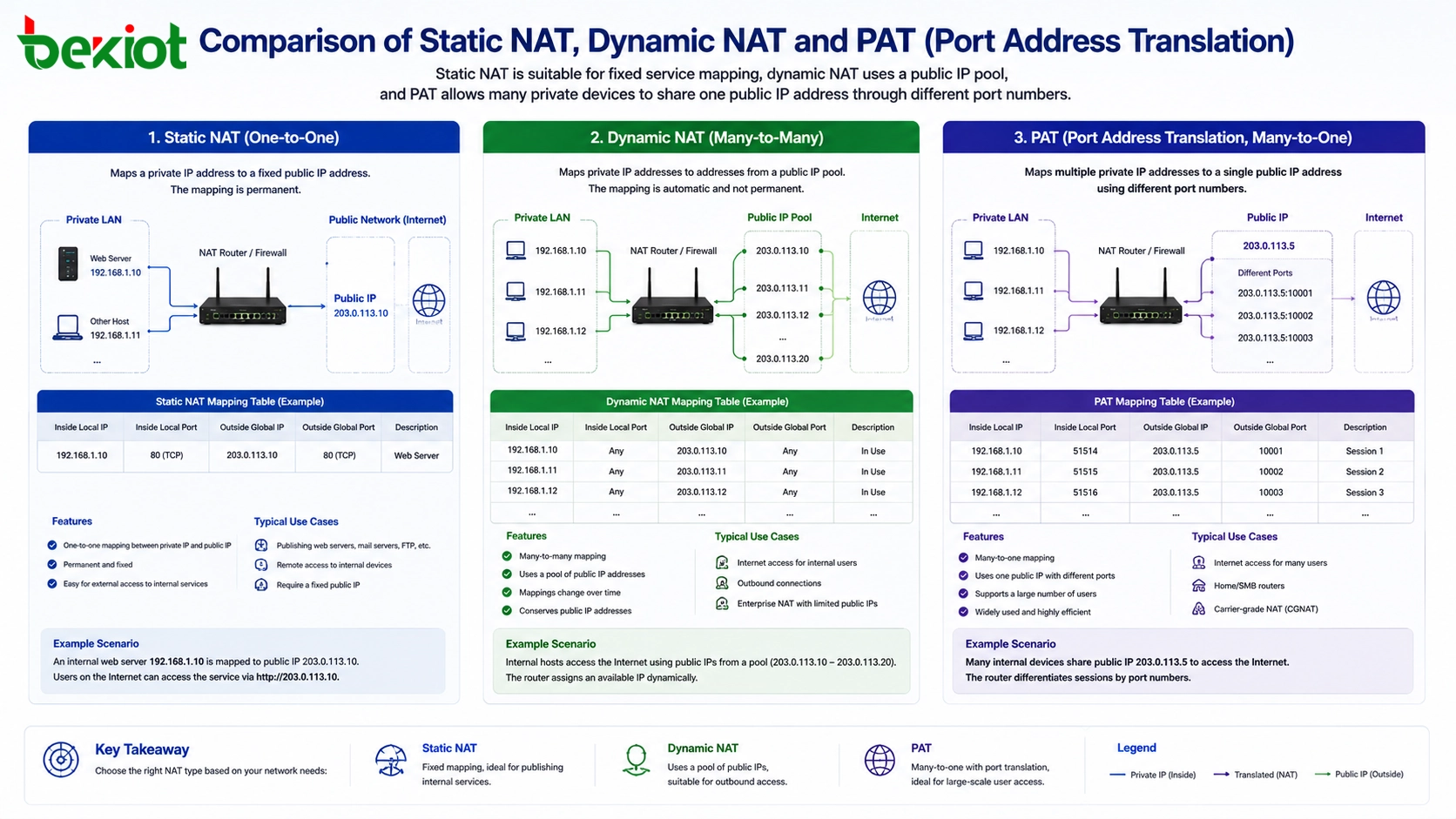
Common Translation Modes Used in Deployment
NAT has several common forms. Each form is suitable for different network requirements, device quantities, and service access models. Understanding these modes helps project teams choose the right design instead of using a single rule for every situation.
Static NAT
Static NAT creates a fixed one-to-one mapping between a private IP address and a public IP address. This method is useful when an internal device must be accessed from the outside in a predictable way, such as a server, gateway, video platform, or communication service node.
The advantage of static mapping is clarity. The external address always points to the same internal device. The disadvantage is that it consumes more public IP resources, because each mapped internal device usually needs a corresponding public address.
Dynamic NAT
Dynamic NAT maps private IP addresses to a pool of public IP addresses. When an internal device needs to communicate with the external network, the NAT device assigns an available public IP address from the pool. When the session ends, the public address can be released and used by another device.
This method is more flexible than static NAT, but it still depends on the size of the available public IP pool. It is suitable for environments where many devices require outbound access but not every device needs a permanent public-facing address.
Port Address Translation
Port Address Translation, also called PAT, NAPT, or NAT overload, maps multiple private IP addresses to a single public IP address by using different port numbers. This is the most common NAT method in home networks, small offices, and many enterprise access networks.
With PAT, many internal devices can share one public IP address for internet access. The NAT device distinguishes different sessions by using different translated port numbers. This design greatly reduces the need for public IPv4 addresses and is one of the main reasons NAT became widely used.
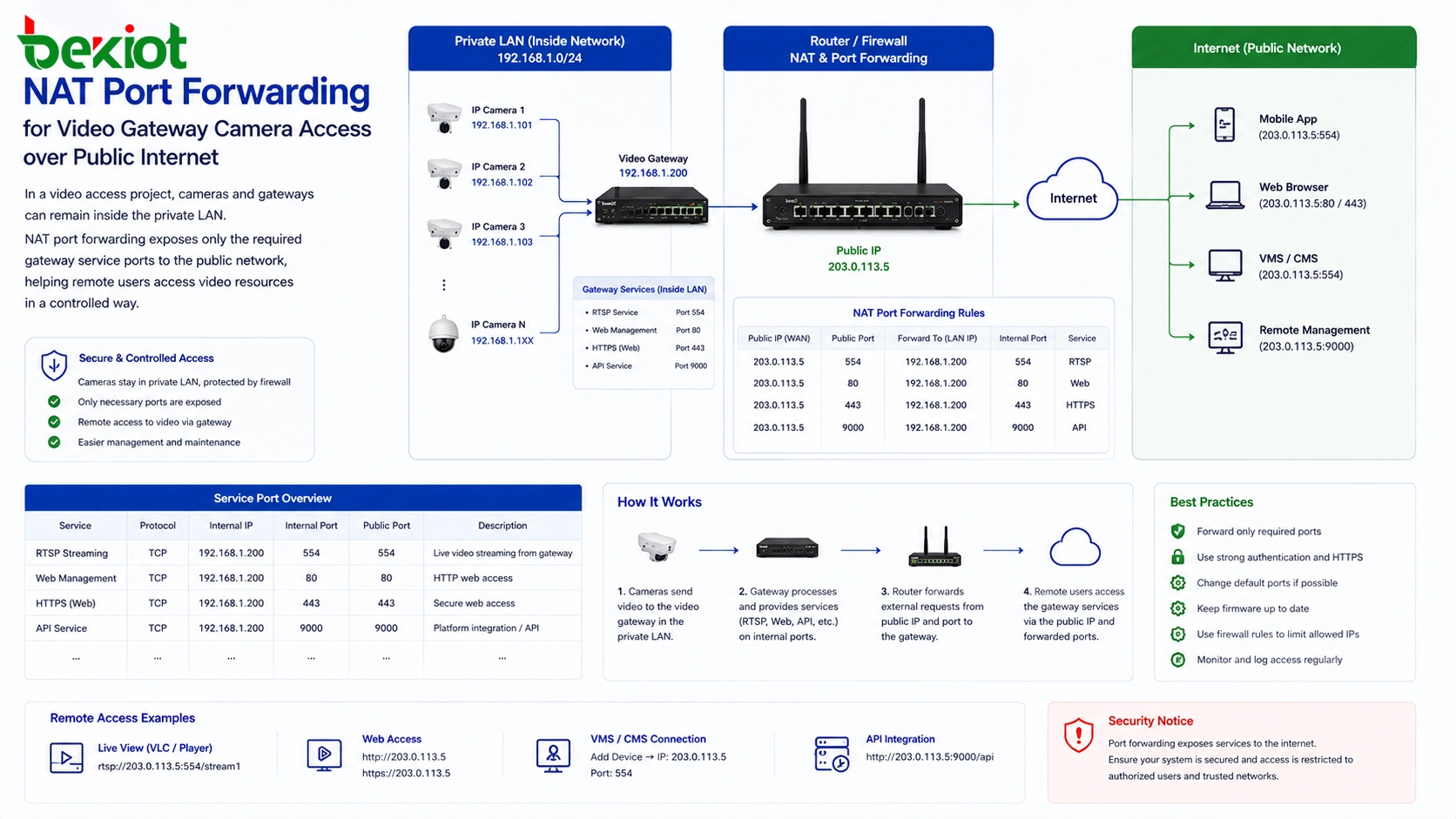
How Port Forwarding Helps Remote Access
Port forwarding is one of the most practical NAT applications in engineering projects. It allows external users to access a service inside the private network by connecting to a public IP address and a specified port. The router or firewall then forwards that request to the correct internal device and internal service port.
For example, a video gateway may be installed inside the LAN with an address such as 192.168.1.100. Cameras are connected to the same internal network, and the gateway collects or manages video streams locally. If users need to view these video resources from the internet, the router can map a public IP address and required service ports to the video gateway.
In this design, external users do not directly access each camera one by one. Instead, the video gateway becomes the controlled entry point. This makes the network easier to manage and reduces unnecessary exposure of internal devices. The project team only needs to open and forward the ports required by the actual service.
Where It Fits in Audio-Video Systems
Audio-video communication systems often involve multiple devices, protocols, streams, and service ports. A typical system may include cameras, video gateways, SIP servers, intercom terminals, recording platforms, management software, and mobile clients. Many of these devices are deployed inside private networks for security and management reasons.
NAT makes it possible to keep the equipment inside the LAN while still allowing controlled external communication. This is useful for remote monitoring, video platform access, SIP signaling traversal, mobile client login, remote maintenance, cloud platform connection, and cross-site system integration.
However, audio and video traffic can be more sensitive than ordinary web browsing. Voice and video systems often require stable packet delivery, low latency, correct port mapping, and predictable routing. If NAT rules are incomplete or inconsistent, users may experience one-way audio, failed registration, unreachable video streams, or unstable remote access.
Benefits for Network Planning
The first major advantage of NAT is public IP address conservation. Multiple internal devices can share one public IP address, which helps reduce pressure caused by IPv4 address shortage. This is valuable for small sites, branch offices, temporary projects, industrial parks, and large device deployments.
The second advantage is basic network protection. Because internal private addresses are hidden behind the NAT device, external networks cannot directly see every internal host. This does not replace a firewall or security policy, but it does reduce unnecessary direct exposure.
The third advantage is flexible network management. Internal devices can be added, removed, or renumbered without requiring all external networks to change their routes. For many project teams, this flexibility makes deployment and later maintenance easier.
Limitations That Should Not Be Ignored
NAT also has limitations. Since the NAT device must maintain session records, it needs to track each connection. In high-concurrency environments, this may create a performance bottleneck if the router or firewall does not have enough processing capacity or session table size.
Some applications are also NAT-sensitive. VoIP, SIP, peer-to-peer communication, remote video streams, and certain real-time protocols may not work correctly if addresses and ports are changed unexpectedly. These applications may require additional configuration such as port forwarding, SIP-aware settings, STUN, TURN, ICE, UPnP, or application-layer gateway features.
NAT is mainly associated with IPv4 networks. IPv6 has a much larger address space, so traditional NAT is generally less necessary for address conservation. However, transition technologies such as NAT64 may still be used when IPv6 networks need to communicate with IPv4 services.
Deployment Checklist for Stable Operation
Before configuring NAT in a real project, the team should identify which internal devices need outbound internet access and which services need inbound access from the public network. Not every internal device should be exposed. Only necessary services should be mapped.
The project team should also list the required service ports. For video systems, these may include management ports, streaming ports, platform access ports, or protocol-specific ports. For voice systems, signaling and media ports may need separate planning. If the port range is incomplete, registration may succeed while media transmission still fails.
Security rules should be planned together with NAT rules. Port forwarding opens a path from the public network to an internal service, so access control, strong passwords, VPN access, firewall filtering, and service hardening should be considered. NAT is useful, but it should not be treated as a complete security system by itself.
Recommended Architecture for Remote Device Access
A practical architecture is to place cameras, terminals, and local equipment inside the private LAN, then use a gateway, platform server, or controlled service node as the external access point. NAT rules should be applied to this service node instead of exposing every endpoint device separately.
This architecture simplifies maintenance. The gateway can aggregate internal resources, manage protocol conversion, provide user authentication, and reduce the number of public-facing ports. If the system grows later, new internal devices can be added to the LAN while external access rules remain relatively stable.
For projects with higher security requirements, NAT can be combined with VPN, firewall policies, private APN, cloud relay services, or dedicated leased lines. The right design depends on whether the project prioritizes cost, security, latency, remote maintenance, or multi-site interconnection.
FAQ
Does NAT replace a firewall?
No. NAT can hide internal addresses and limit direct exposure, but it does not replace a complete firewall policy. Security filtering, access control, authentication, and monitoring are still necessary.
Why does remote video sometimes fail after port mapping?
Video systems may use multiple ports or dynamic media channels. If only the login or management port is mapped, the control page may open while the video stream still fails. The full service port list should be confirmed.
Can two internal devices use the same public port?
Not on the same public IP address and same protocol at the same time. Different external ports should be assigned and mapped to different internal devices or services.
Why does VoIP often need special NAT handling?
VoIP may carry IP address and port information inside signaling messages, while media streams use separate ports. If translation is not handled correctly, problems such as one-way audio or failed media negotiation may occur.
Is port forwarding safe for long-term remote access?
It can be used, but it should be limited to necessary services and protected by firewall rules, strong authentication, updated firmware, and preferably VPN or other secure access methods for sensitive systems.
Is NAT still useful when IPv6 is available?
Yes, in many mixed networks. IPv6 reduces the need for address-saving NAT, but IPv4 systems, legacy devices, NAT64, and hybrid environments still make address translation relevant in many deployments.







