Hot swap refers to the ability to replace, insert, or remove a supported component while the system remains powered on and continues operating. In office environments, this capability is valuable because many business systems are expected to stay available during working hours, including servers, network switches, storage devices, security systems, communication platforms, access control equipment, and power backup units.
In a multi-domain office setting, hot swap is not limited to one product category. It may appear in IT infrastructure, telephony, surveillance, power systems, meeting room equipment, edge computing, building automation, and service desk operations. The purpose is the same across these areas: reduce downtime, avoid unnecessary shutdowns, simplify maintenance, and keep essential services running while hardware is replaced.
Why Replaceable Components Matter in Office Operations
Modern offices depend on many interconnected systems. A storage drive failure may affect shared files. A power supply failure may affect servers. A network module failure may affect phones, Wi-Fi access points, cameras, printers, or cloud access. A failed UPS battery may reduce backup power readiness. If every repair required a full shutdown, even a small hardware issue could interrupt many users.
Hot-swappable design changes the maintenance model. Instead of planning a long outage for every component replacement, authorized staff can remove a failed module and insert a replacement while the system keeps running. This is especially useful in offices where service windows are limited, users work across time zones, or systems support customer-facing operations.
However, the feature must be understood correctly. Not every removable part is safe to replace under power. A component should only be treated as hot-swappable when the manufacturer, system design, connectors, firmware, and operating procedure support live replacement.

How Live Replacement Works
Mechanical Guidance
Hot-swappable components usually include physical guides, trays, rails, latches, handles, or keyed connectors. These mechanical features help the part enter and leave the slot in the correct position.
Mechanical design matters because misalignment during live insertion can damage connectors, short pins, bend contacts, or interrupt neighboring modules. In office environments, tool-less trays and clearly labeled slots make maintenance safer and faster.
Electrical Protection
A live system must protect itself when a module is inserted or removed. This may involve staged connector pins, inrush current control, current limiting, isolation circuits, power sequencing, fuses, and transient protection.
Without electrical protection, inserting a part under power could create voltage dips, sparks, arcing, data corruption, or circuit damage. Good hot swap design controls how power is applied to the new component.
System Detection
The host system must detect that a component has been removed or inserted. It may identify the new module, read its status, check firmware compatibility, assign resources, rebuild redundancy, and update management software.
For example, a server may detect a new drive and rebuild a RAID array. A switch may detect a new transceiver module. A UPS may detect a replacement battery pack. This detection process is essential for controlled maintenance.
Redundant Operation
Hot swap is often supported by redundancy. A dual power supply system can keep running when one supply is removed. A RAID storage system can keep data available when one drive fails. A modular network chassis can continue forwarding traffic through other active modules.
The live replacement action itself is only part of the story. The system must have enough remaining capacity to continue operating while one component is missing.
Where It Appears in Office Domains
Servers and Storage
Office servers, NAS systems, and storage arrays often support hot-swappable drives. When a disk fails, administrators can remove the failed drive and insert a replacement without powering down the system.
This capability is most useful when combined with RAID, backups, monitoring, and clear drive status indicators. Replacing the wrong drive can create serious data risk, so slot labeling and management alerts are important.
Network Infrastructure
Switches, routers, firewalls, and modular network chassis may support live replacement of power supplies, fans, transceivers, interface cards, or line modules. This helps maintain office connectivity during hardware service.
In a connected office, network downtime can affect internet access, VoIP phones, video conferencing, printers, cloud applications, cameras, Wi-Fi, and building systems. Replaceable network modules reduce the risk of a single failed part stopping multiple services.
Power Backup Systems
Many UPS systems support replaceable battery modules. Some rack-mounted or enterprise UPS units allow battery replacement while the load remains protected, depending on the model and configuration.
Battery replacement should be planned carefully. Staff should verify load level, bypass status, battery health, runtime requirements, and manufacturer instructions before performing live maintenance.
Communication and Collaboration Equipment
Office communication systems may include gateways, media servers, conferencing devices, intercom controllers, call recording servers, and PBX platforms. Some of these devices support replaceable storage, power supplies, fans, or interface modules.
For communication platforms, the main concern is service continuity. Replacing a component should not interrupt active calls, voicemail, recording, emergency lines, reception calls, or customer service workflows unless the system design explicitly allows it.
Security and Building Systems
Access control panels, surveillance storage, video management servers, alarm controllers, and monitoring workstations may use replaceable drives, power supplies, or communication modules. In security operations, downtime can create blind spots or delay incident response.
Hot-swappable design supports maintenance without completely disabling monitoring or entry control, but live replacement should still be coordinated with security staff.
Benefits for Office Deployment
The first benefit is reduced downtime. A failed drive, power module, fan, or interface card can often be replaced without stopping the entire system. This helps protect daily business operations and reduces user disruption.
The second benefit is easier maintenance. Technicians can respond to component failures more quickly, especially when devices provide clear status LEDs, management alerts, event logs, and slot-level identification.
The third benefit is better service continuity. Offices increasingly rely on digital services for communication, file access, collaboration, security, and building management. Keeping these services online during repair improves operational resilience.
The fourth benefit is lifecycle flexibility. Modular and replaceable components can simplify future upgrades, capacity expansion, and hardware refresh planning. A system may allow additional storage, network ports, or power modules to be installed without a full platform replacement.
Hot swap is most valuable when it is paired with redundancy, monitoring, clear labeling, spare parts planning, and trained maintenance procedures.
Planning a Safe Replacement Process
Confirm Support Before Action
Before removing any part from a powered system, confirm that the component is designed for live replacement. Check product documentation, labels, management interface warnings, and vendor guidance.
Never assume that a component is hot-swappable simply because it can be physically removed. Some internal cards, cables, memory modules, processors, and power connectors may require full shutdown before service.
Check System Health
Live replacement should not begin until the system health is reviewed. If redundancy is already degraded, removing another component may cause outage or data loss.
For storage systems, check RAID state and backup status. For power systems, check remaining supply capacity. For network devices, check traffic load and alternate paths. For security systems, check monitoring coverage.
Identify the Correct Slot
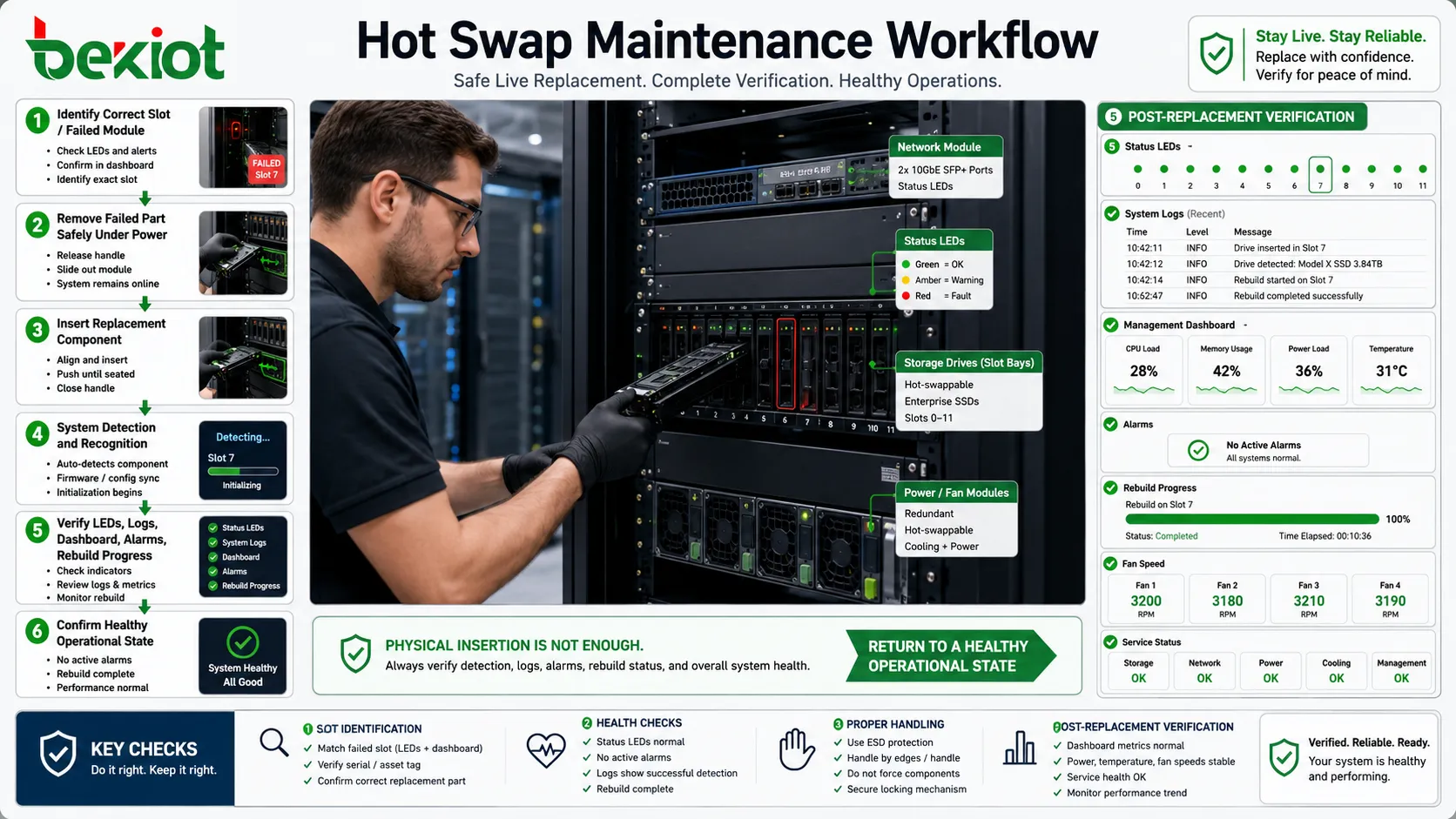
Slot identification is critical. Removing the wrong drive, power supply, or module can turn a minor failure into a major outage. Use the management interface, indicator LEDs, serial numbers, asset labels, and maintenance records to confirm the target component.
In shared office racks, clear labeling prevents mistakes when many devices look similar.
Use Proper Handling
Hot-swappable parts can still be damaged by static discharge, rough handling, wrong insertion angle, dust, moisture, or incorrect force. Technicians should use antistatic precautions and follow the insertion/removal procedure.
For battery modules, additional safety precautions may apply because of stored energy, weight, connector type, and disposal requirements.
Verify Recovery
After replacement, confirm that the system recognizes the new component. Check status LEDs, logs, management dashboards, alarms, rebuild progress, fan speed, power load, temperature, and service status.
The replacement is not complete just because the part is physically inserted. The system must return to a healthy operational state.
Risks That Need Control
Accidental Removal
One of the most common risks is removing the wrong component. This may happen when equipment is poorly labeled, rack space is crowded, or alarms are not mapped to physical slots clearly.
Locking mechanisms, confirmation procedures, color labels, and management software indicators can reduce this risk.
Temporary Performance Degradation
During replacement, the system may run in a degraded state. A storage array may rebuild data. A dual power supply device may operate on one supply. A network chassis may reroute traffic. This can reduce performance or resilience until recovery completes.
Maintenance teams should monitor the system during this period rather than leaving immediately after inserting the replacement part.
Firmware or Compatibility Problems
A replacement module may be physically compatible but not fully supported by the system firmware. This can cause warning messages, limited performance, or failure to initialize.
Approved spare parts and firmware compatibility records help prevent this issue.
Human Error During Busy Hours
Live maintenance is attractive because it avoids shutdowns, but it may be riskier during peak office hours if the technician is rushed or the system is heavily loaded.
For important systems, live replacement should still be scheduled and communicated even if a full outage is not expected.
Hidden Dependency Failure
A component may appear redundant, but another dependency may not be. For example, two power supplies may connect to the same PDU, or a redundant network path may depend on the same switch.
Architecture review is needed to ensure that hot swap capability is supported by real system redundancy, not only by removable hardware.
Multi-Domain Office Applications
IT Server Rooms
In server rooms, hot-swappable drives, power supplies, fans, and network adapters help keep business applications online. File servers, identity systems, mail servers, databases, backup platforms, and virtualization hosts all benefit from reduced maintenance downtime.
For best results, live replacement should be supported by monitoring software, spare drive policies, RAID planning, backup verification, and documented escalation procedures.
Small Business Network Cabinets
Smaller offices may not have a full data center, but they still rely on switches, routers, firewalls, NAS devices, Wi-Fi controllers, and UPS systems. Replaceable modules and batteries can reduce disruption when a component fails.
Even in small environments, spare parts should be selected carefully. A wrong power adapter, unsupported transceiver, or mismatched drive can delay recovery.
Meeting and Collaboration Spaces
Conference rooms may include AV processors, wireless presentation systems, video bars, control panels, microphones, room PCs, and networked displays. While not all of these devices support hot swap, modular cables, replaceable compute units, and spare room controllers can reduce room downtime.
Office teams should treat meeting rooms as operational spaces. A failed video component can affect sales calls, management meetings, remote training, and customer presentations.
Security Operations
Video surveillance storage, access control servers, door controllers, and monitoring workstations may require live maintenance to avoid security blind spots. Replaceable drives and redundant power supplies are especially useful in video recording systems.
Security teams should be informed before maintenance starts so they understand whether recording, alarms, or door control functions are temporarily degraded.
Shared Service Desks
Service desks may support user devices, phones, badge systems, printers, network ports, and application access. Hot-swappable equipment reduces repair time and helps service teams restore office functions faster.
A structured spare-parts cabinet, asset records, and clear replacement procedures can make live maintenance safer and more repeatable.
Maintenance Documentation
Documentation should identify which components are truly hot-swappable, which require shutdown, and which require special conditions. This should be written in plain language for technicians and facilities staff.
Useful records include device model, serial number, slot number, spare part number, firmware version, replacement date, fault reason, technician name, and post-replacement status. These records help track recurring failures and plan future upgrades.
For office sites with multiple domains, documentation should also show service impact. For example, a storage drive replacement may affect file services, while a UPS battery issue may affect all connected equipment during a power outage.
Operational Checklist
Before replacement, confirm that the component is supported for live removal and that the correct spare is available. Check system alerts, redundancy status, backup condition, current load, and service impact.
During replacement, follow the removal sequence, wait for status indicators where required, handle the part safely, insert the replacement firmly, and avoid disturbing neighboring cables or modules.
After replacement, verify that alarms clear, redundancy is restored, logs show normal status, performance returns to expected levels, and users or operators do not report service problems.
For critical equipment, keep a record of the replacement and schedule a follow-up check after rebuild, charging, synchronization, or automatic recovery has completed.
Live replacement should be treated as controlled maintenance, not casual hardware swapping. The safer the procedure, the more useful the feature becomes.
FAQ
Can hot-swappable parts be replaced by non-technical office staff?
Only if the organization has approved the procedure and trained the staff. Some parts may look simple to replace but still require ESD precautions, correct slot identification, and post-replacement checks.
Does hot swap mean there will be no performance impact?
Not always. The system may continue running, but performance or redundancy may be reduced during replacement, rebuild, charging, or synchronization.
What spare parts should an office keep onsite?
Common choices include approved drives, power supplies, fan modules, UPS batteries, transceivers, patch cables, and labeled replacement trays. The list should match the installed equipment and service priority.
Can software licenses affect hardware replacement?
Yes. Some systems bind features to hardware IDs, serial numbers, modules, or licenses. Replacement may require reactivation, license transfer, or vendor support.
What should be reviewed after repeated component failures?
Check temperature, dust, power quality, vibration, firmware version, incompatible parts, overload conditions, grounding, rack airflow, and whether the system is operating beyond its intended capacity.