


A hunt group is a call distribution arrangement that sends an incoming call to a defined group of extensions, agents, departments, SIP endpoints, or devices according to a selected routing rule. Instead of calling one phone only, the system searches through a group until the call is answered, forwarded, timed out, or moved to another destination.
From a network architecture perspective, a hunt group is not only a PBX feature. It involves call signaling, endpoint registration, trunk access, routing logic, failover behavior, user status, timer settings, voicemail rules, monitoring, and sometimes integration with contact center or unified communication platforms. A good design improves answer rates, reduces missed calls, and keeps business communication organized during busy periods.
Why Group-Based Routing Exists
Many business calls should not depend on one individual phone. A sales inquiry, support request, reception call, service desk line, maintenance hotline, nurse station number, security desk, or dispatch extension may need to reach whoever is available first. Group-based routing solves this by turning several users or devices into one reachable service point.
The caller usually dials one public number, internal extension, DID number, or service code. Behind that single number, the PBX or SIP platform applies a routing plan and tries multiple destinations. This keeps the caller experience simple while giving the organization more flexibility in how calls are answered.
Architecture matters because poor routing design can create delays, call loops, ringing chaos, missed calls, or unfair workload distribution. The feature should be planned according to team size, call volume, working hours, escalation rules, and the real behavior of users.
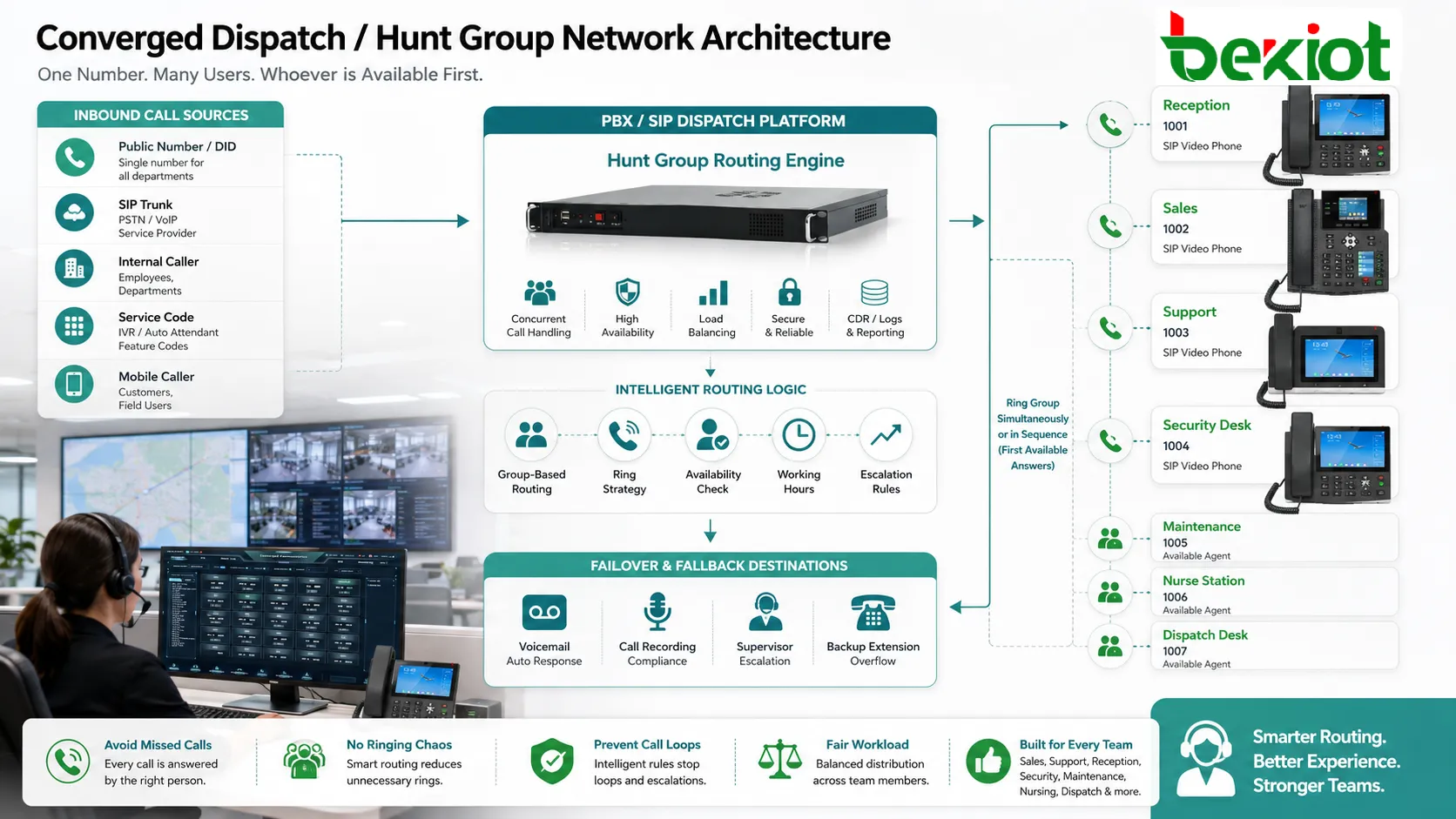
Where the Routing Logic Sits
In a traditional PBX, the routing logic is usually handled by the PBX call control system. In an IP PBX environment, it may be handled by the SIP server, call manager, unified communications platform, or hosted VoIP service. In larger deployments, the logic may also interact with SBCs, SIP trunks, contact center software, directory services, presence engines, and reporting systems.
The routing engine receives the incoming call, checks the dialed number, matches it to a group, reads the group policy, and starts ringing the selected members. It also controls timers, retry behavior, call forwarding, overflow routes, and what happens if no one answers.
For a reliable design, the routing engine must have accurate information about endpoint registration, user availability, busy status, call permissions, and trunk capacity. If this information is outdated or incomplete, calls may be sent to unreachable phones or overloaded agents.
Basic Building Blocks
Inbound Access Point
The first element is the access point where the call enters the system. This may be a SIP trunk, analog line, PRI/E1 trunk, internal extension, IVR menu, auto attendant, queue, emergency line, or direct inward dialing number.
The access point determines how the call is identified. Caller ID, dialed number, trunk group, time condition, language selection, and IVR choice can all influence which group receives the call.
Call Control Layer
The call control layer is responsible for interpreting the call and applying the routing policy. It decides which members should ring, in what order, for how long, and what should happen if the first path fails.
This layer may also enforce business rules such as office hours, holiday schedules, priority calls, internal-only groups, emergency bypass, caller ID-based routing, and overflow to another team.
Member Endpoints
Members can be desk phones, softphones, mobile clients, analog phones, SIP intercoms, wireless handsets, operator consoles, or external numbers. In modern systems, a user may have several registered devices under one extension.
Endpoint behavior is important. A phone that is powered off, unregistered, set to do-not-disturb, or forwarded to another destination can change the result of the group call. The system should handle these states predictably.
Fallback Destination
Every group needs a clear fallback destination. If no member answers, the call may go to voicemail, another department, an operator, an external number, a call queue, an announcement, or a busy message.
Without fallback planning, callers may experience endless ringing or sudden disconnects. The fallback path is part of the architecture, not an afterthought.
Common Distribution Patterns
Sequential Routing
Sequential routing rings members one by one in a fixed order. For example, the system may ring reception first, then assistant, then supervisor, then voicemail. This method is easy to understand and works well when there is a clear priority order.
The weakness is that the first members may receive most calls, while later members are used only when the earlier ones are unavailable. It may also increase caller waiting time if each step has a long ring duration.
Simultaneous Ringing
Simultaneous ringing alerts all members at the same time. The first person to answer gets the call. This can reduce wait time and improve answer rates for small teams.
However, it can also create noise and interruption. If too many phones ring together, users may become annoyed, and multiple people may reach for the same call. This method should be used carefully in open offices and busy departments.
Round-Robin Distribution
Round-robin routing rotates calls among members. After one member receives a call, the next call starts with another member. This can distribute workload more evenly than a fixed sequence.
It is useful for teams where each member has similar responsibilities. However, it may not consider real-time workload unless the system also checks availability, call duration, or busy state.
Longest Idle Selection
Some systems route the next call to the member who has been idle the longest. This is closer to contact center behavior and can help balance work in service teams.
This method requires accurate state tracking. If agents forget to change status or if the system cannot see mobile or external call activity, the distribution may become inaccurate.
Skill or Role-Based Routing
In more advanced designs, calls can be routed according to skills, language, department, priority, or customer type. A technical support call may go to engineers, while a billing call goes to finance staff.
This approach improves service quality but requires more configuration, better data, and clear operational rules.
A hunt group is simple from the caller’s point of view, but its architecture must define access, selection, timers, endpoint state, overflow, and reporting as one complete call path.
Topology in SIP and IP PBX Environments
In a SIP-based system, each endpoint registers to the IP PBX or SIP server. The server keeps track of contact addresses, registration status, and sometimes device capabilities. When a call reaches the group number, the server generates new SIP signaling toward selected members according to the group policy.
If simultaneous ringing is used, the server may send parallel INVITE requests to multiple endpoints. When one endpoint answers, the server connects the media path and cancels ringing on the others. If sequential ringing is used, the server tries one endpoint first, waits for a timer, and then moves to the next endpoint.
Media may flow directly between endpoints, through the PBX, through an SBC, or through a media server depending on NAT traversal, recording, transcoding, security, and topology design. In multi-site networks, WAN latency, firewall policy, and QoS can affect the user experience.
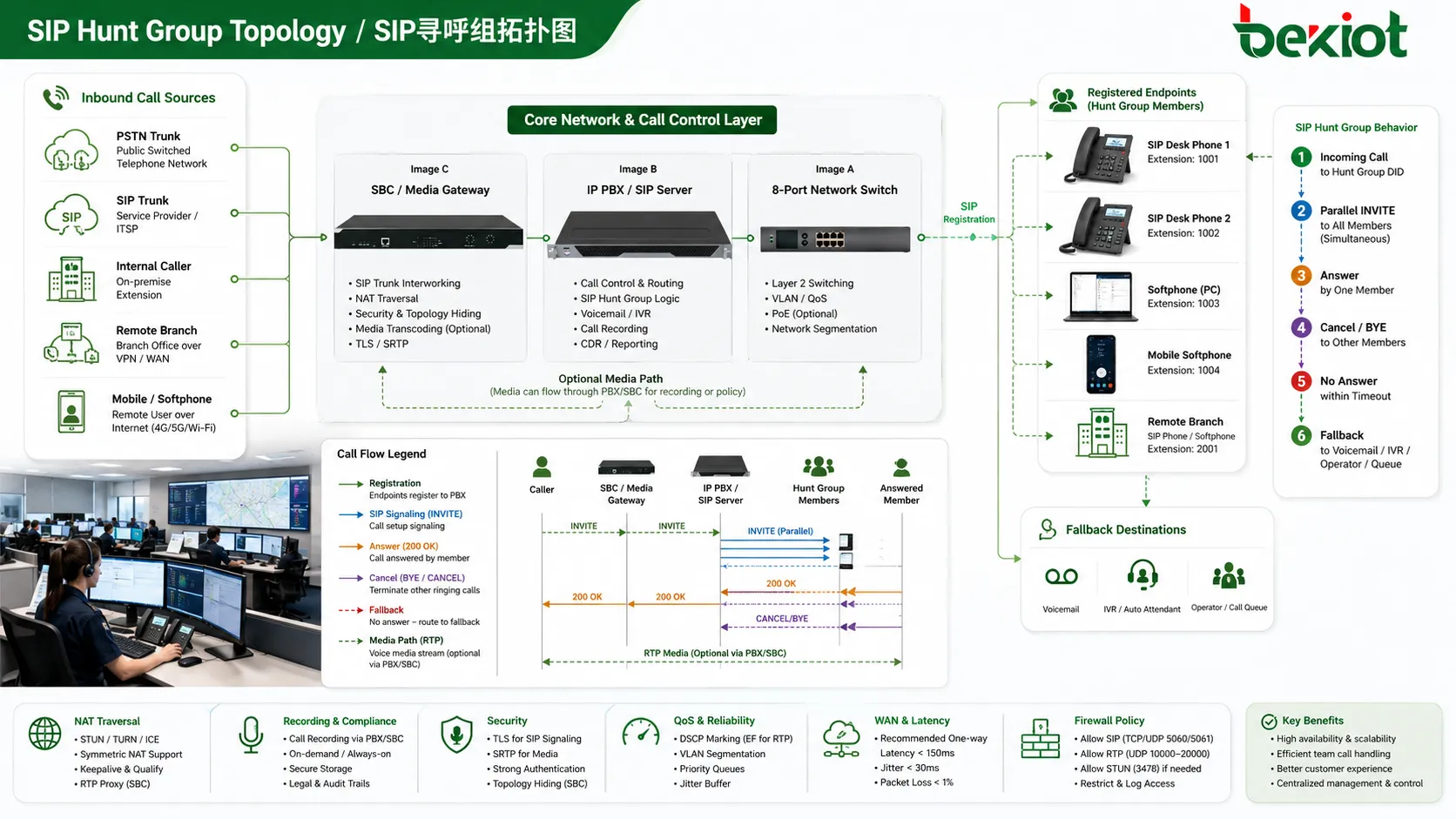
Design Parameters That Shape Call Behavior
Ring Duration
Ring duration defines how long each member or group stage rings before the system tries another destination. If the timer is too short, users may not have enough time to answer. If it is too long, callers may wait too much before reaching the next available person.
Different teams may need different values. Reception calls may require fast answering, while technical escalation may allow a longer ring time.
Member Order
Member order matters in sequential and priority-based designs. The order should reflect real business responsibility, not just the order in which extensions were created.
When staff roles change, the order should be reviewed. An outdated member list can send calls to people who no longer handle that function.
Busy Handling
The system should define what happens when a member is already on a call. It may skip the member, offer call waiting, ring another device, or still present the call depending on configuration.
For teams handling urgent calls, skipping busy users may improve response time. For small teams, call waiting may be acceptable if users can decide whether to switch calls.
Unavailable Devices
Endpoints may be offline, unregistered, powered down, or unreachable across the network. The routing system should detect this and avoid wasting time on dead endpoints where possible.
In hosted and remote working scenarios, device status becomes especially important because users may move between softphones, mobile apps, and desk phones.
Overflow Rules
Overflow rules define where calls go when the primary group cannot answer. The destination may be another group, call queue, operator, voicemail, external number, IVR menu, or announcement.
Good overflow design prevents abandoned calls and gives callers a clear next step. It also helps organizations handle peak traffic without losing important inquiries.
Benefits for Business Communication
The main benefit is higher answer probability. When several people or devices can receive one incoming call, the chance of quick response improves. This is useful for service desks, reception teams, clinics, hotels, maintenance groups, sales teams, and security offices.
Another benefit is continuity. If one employee is away, busy, or offline, the call can reach another member. This reduces dependence on a single person and supports smoother daily operation.
It also simplifies public contact design. Customers, suppliers, visitors, and employees can use one number for a service function, while the organization controls the internal routing behind it.
For managers, reporting can show missed calls, answered calls, ring time, peak periods, member performance, and overflow frequency. These records help adjust staffing and routing rules.
Applications Across Different Teams
Reception and Front Desk
A front desk number often needs to ring multiple phones or consoles so that incoming calls are answered quickly. If the receptionist is busy, another staff member can pick up the call.
This setup is common in offices, hotels, schools, residential buildings, clinics, public facilities, and service centers.
Sales and Inquiry Lines
Sales teams use group routing to distribute new inquiries across available representatives. Calls can be routed by region, product line, language, campaign, or availability.
For small teams, simultaneous ringing may work. For larger teams, round-robin or idle-based routing may provide better fairness and reporting.
Support and Maintenance
Technical support, facility maintenance, IT helpdesks, and field service teams often need a shared number. Calls may first reach a primary group and then escalate if no one answers.
Escalation rules are important. A maintenance emergency should not follow the same slow path as a routine request.
Healthcare and Nursing Areas
Clinics, wards, laboratories, and nursing stations may use group routing to reach available staff. Incoming calls can be distributed to desk phones, wireless handsets, or softphones.
Because healthcare workflows can be time-sensitive, group design should consider staff movement, shift changes, noise level, privacy, and fallback procedures.
Security and Operations Centers
Security desks, control rooms, dispatch centers, and operation teams may need group call handling for incident reporting, patrol coordination, access control, or emergency communication.
These deployments often require call recording, priority handling, supervision, and clear escalation paths.
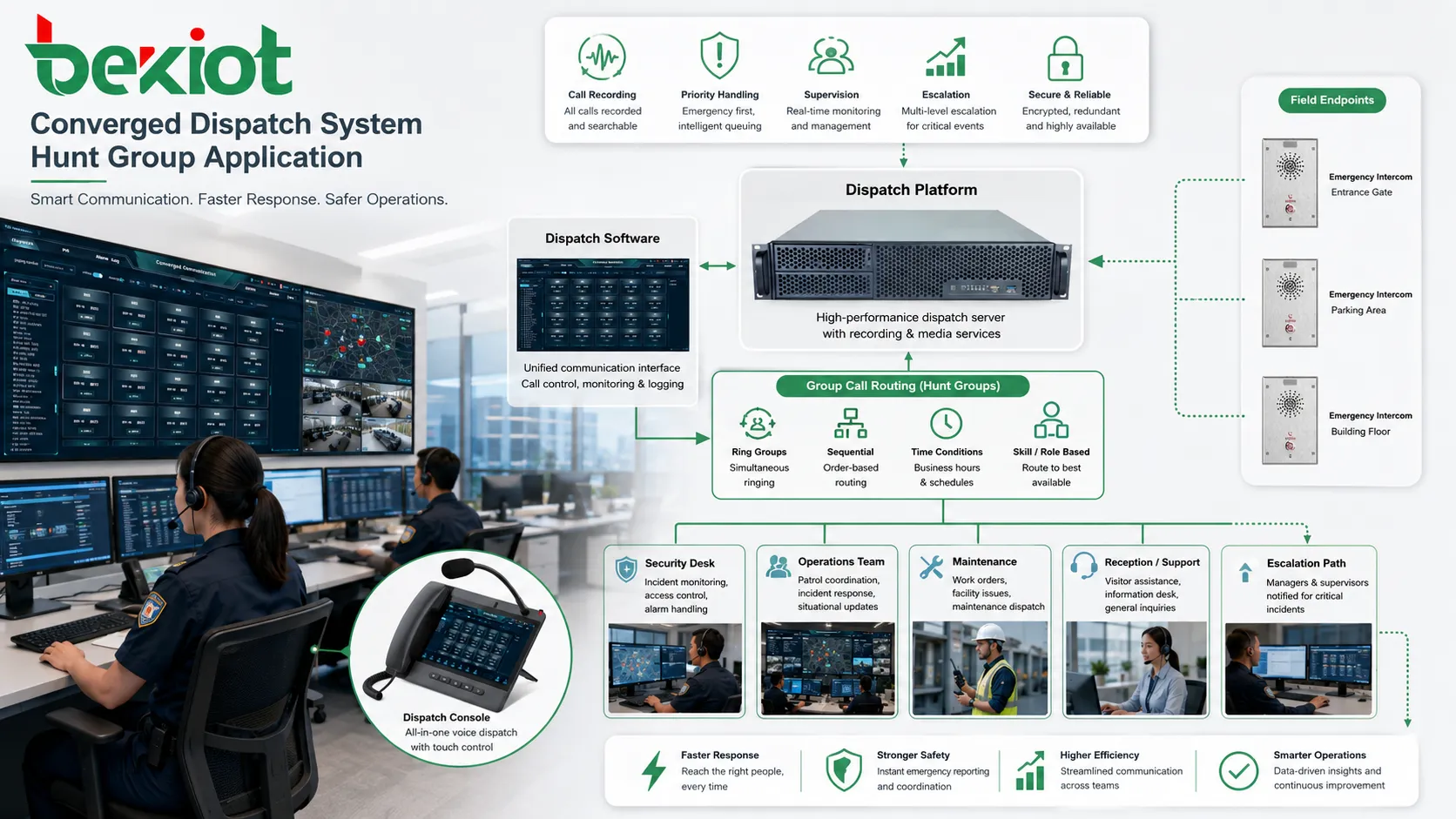
Network-Level Risks and Failure Points
Endpoint Registration Failure
If SIP endpoints are not registered, the PBX may be unable to deliver calls to them. This can happen because of network outages, expired credentials, DNS issues, firewall rules, power failure, or device misconfiguration.
Administrators should monitor registration status and avoid routing critical calls to endpoints that are frequently offline.
NAT and Firewall Issues
Remote phones and softphones often sit behind NAT or firewalls. Signaling may work while audio fails, or calls may ring but drop after answer. These problems can affect group members unevenly if some are local and others are remote.
SBCs, proper SIP settings, RTP port rules, keepalive behavior, and secure remote access design can reduce these problems.
Trunk Capacity Limits
If the group receives many external calls at once, trunk capacity may become a bottleneck. Even if many agents are available, callers may receive busy tone or fail to connect if inbound channels are exhausted.
Capacity planning should include peak traffic, call duration, simultaneous ringing behavior, forwarded calls, and overflow routes.
Ringing Storms
When too many devices ring at once, the system may create unnecessary signaling load, user distraction, and network traffic. This is more likely when large groups use simultaneous ringing.
Architects should limit group size or use staged ringing, queue logic, or skill-based distribution when call volume is high.
Looping and Misrouting
Improper fallback rules can create call loops. For example, group A overflows to group B, while group B later forwards back to group A. Callers may wait too long or hear repeated announcements.
Routing diagrams and test calls are essential to prevent these hidden design errors.
Monitoring and Optimization
After deployment, group performance should be monitored. Useful indicators include total inbound calls, answered calls, missed calls, average ring time, member answer rate, overflow count, voicemail count, abandoned calls, and peak traffic periods.
If missed calls are high, the issue may be insufficient staffing, poor ring order, long call duration, unavailable members, trunk limits, or too-short timers. If one member answers most calls, the distribution strategy may be unfair or the group order may need adjustment.
Optimization should be based on real data rather than assumptions. A design that works well during office hours may fail during lunch breaks, shift changes, holidays, or after-hours support periods.
Security and Access Control
Group numbers can expose internal teams to external callers, so access rules should be clear. Some groups should accept only internal calls, while others may be reachable from SIP trunks, IVR menus, or public numbers.
Administrative access should be protected. Unauthorized changes to routing rules can redirect calls, expose departments, bypass monitoring, or disrupt business communication.
For sensitive environments, call recording, caller ID handling, audit logs, and permission controls should be reviewed. Group routing should not accidentally send confidential calls to unauthorized users.
Maintenance Checklist
Review group membership regularly. Remove former employees, inactive extensions, retired devices, and temporary numbers that are no longer needed.
Test normal and overflow paths. A group may appear correct in configuration but fail when no one answers, when a member is busy, or when a remote endpoint is offline.
Check working-hour rules and holiday schedules. Calls should not ring empty desks after hours unless that behavior is intentional.
Verify voicemail and fallback greetings. If callers reach voicemail or announcement paths, the message should be current, clear, and matched to the department.
Audit routing after PBX upgrades, SIP trunk changes, phone replacement, office relocation, or team restructuring. Small changes can affect call distribution unexpectedly.
The best group routing design is not the one that rings the most phones. It is the one that reaches the right available person quickly, avoids dead paths, and gives callers a predictable outcome.
FAQ
How many members should be placed in one group?
There is no universal number. Small teams may work well with a few members, while larger teams may need queues or advanced distribution. Group size should match call volume, ringing method, and user tolerance for interruptions.
Can mobile phones be included as members?
Yes, many systems can route calls to mobile apps or external mobile numbers. However, this may affect caller ID, answer confirmation, voicemail behavior, cost, and call recording.
Why do some users receive more calls than others?
The cause may be fixed member order, different availability status, shorter answer time, device registration differences, or routing rules that favor certain extensions.
Should missed calls go to voicemail or another team?
It depends on business priority. Sales and support calls may benefit from overflow to another team, while low-urgency calls may go to voicemail with a clear callback process.
What should be tested after changing the group configuration?
Test inbound calls, internal calls, busy members, unavailable devices, no-answer timeout, overflow route, voicemail path, caller ID display, recording behavior, and reporting accuracy.







