


MQTT is a lightweight messaging protocol designed for efficient communication between devices, applications, sensors, gateways, cloud platforms, and control systems. It is widely used in IoT networks, telemetry systems, smart buildings, industrial monitoring, vehicle platforms, energy systems, home automation, remote equipment management, and mobile applications where bandwidth, power, or network stability may be limited.
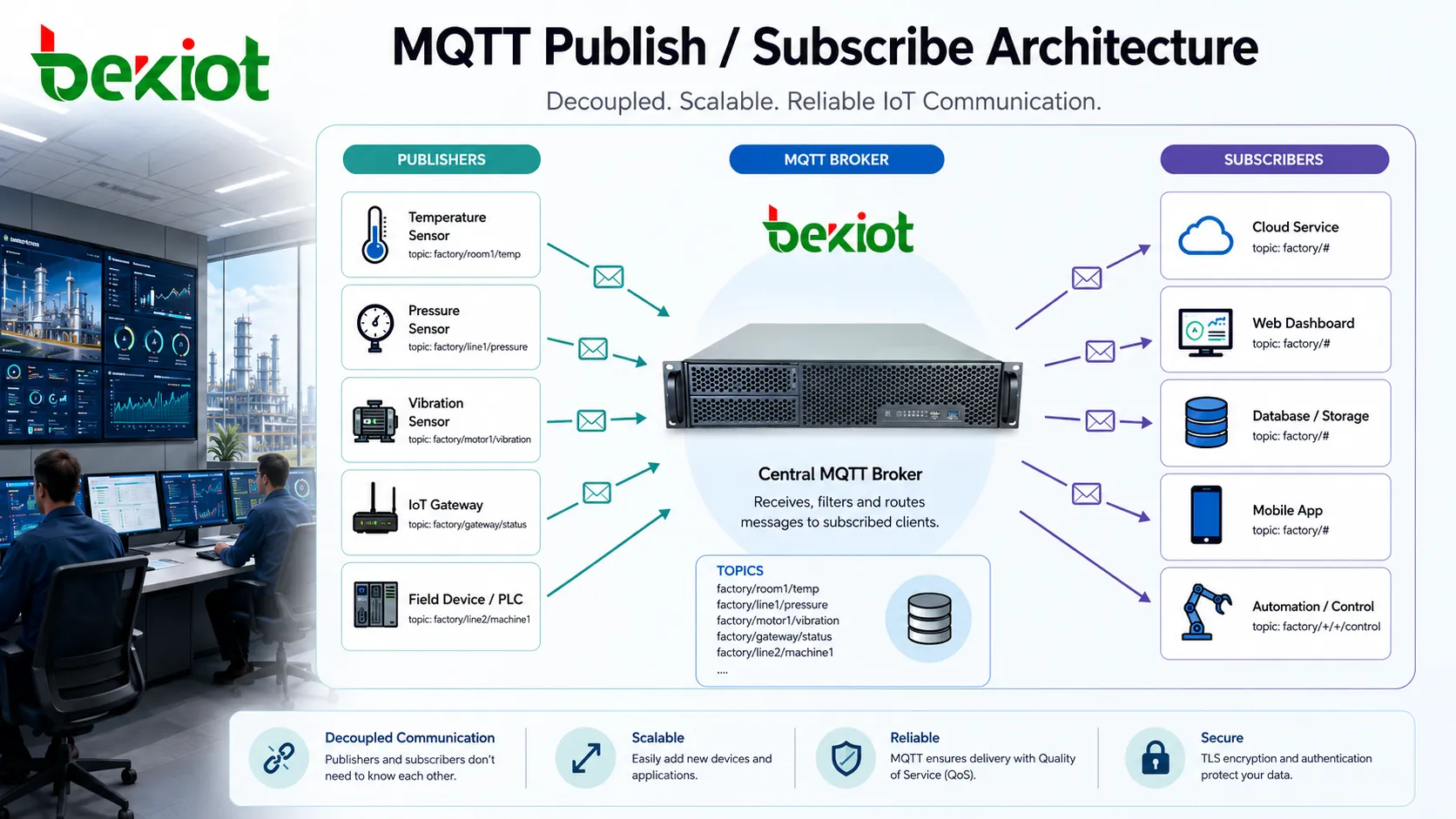
The protocol is based on a publish/subscribe model. Instead of one device sending data directly to another device, messages are sent to a broker. The broker then distributes those messages to clients that have subscribed to matching topics. This structure makes communication flexible, scalable, and well suited to systems with many devices that do not need to know each other’s network address.
A Different Way to Think About Device Messaging
Traditional client-server communication often works like a direct request and response. One client asks one server for information, and the server replies. MQTT follows a different idea. A device can publish a message without knowing who will receive it, while another device can subscribe to a topic without knowing who will publish to it.
This separation is useful in large distributed systems. A temperature sensor does not need to know which dashboard, database, mobile app, or automation rule will consume its data. It only needs to publish to a defined topic. The broker handles distribution.
The result is a communication pattern that reduces tight coupling between devices. Systems can add new subscribers without changing the sensor. They can add new publishers without rewriting every application. This is one reason the protocol is popular in IoT and telemetry design.
The Broker as the Message Hub
The broker is the central component in the architecture. It accepts client connections, authenticates clients where required, receives published messages, matches topics against subscriptions, and forwards messages to the correct subscribers.
A broker may run on a cloud platform, private server, edge gateway, industrial computer, embedded device, or managed messaging service. In small deployments, one broker may handle all traffic. In larger deployments, multiple brokers may be clustered, bridged, load-balanced, or distributed across regions.
The broker also controls many operational behaviors, such as session state, retained messages, access control, quality of service delivery, keepalive timeout, connection limits, topic authorization, and message persistence. Because of this, broker design has a direct impact on reliability, scalability, and security.
Connection Lifecycle
Client Establishes a Session
A client first opens a network connection to the broker. MQTT commonly runs over TCP, and secure deployments often use TLS encryption. After the transport connection is established, the client sends a CONNECT packet containing information such as client ID, authentication data, keepalive value, session behavior, and optional will message settings.
The broker checks the connection request and replies with a CONNACK packet. If the connection is accepted, the client can begin publishing, subscribing, unsubscribing, and receiving messages. If the connection is rejected, the broker provides a reason according to the protocol version and configuration.
Heartbeat Keeps the Link Alive
The keepalive mechanism helps both sides detect broken connections. If no data has been exchanged within the agreed time, the client sends a PINGREQ packet and the broker responds with PINGRESP.
This is important because IoT devices may operate on unstable networks, mobile links, Wi-Fi, cellular connections, satellite links, or remote WAN paths. A network may fail silently without closing the connection cleanly. Keepalive helps detect this condition.
Disconnection and Reconnect
A client may disconnect normally by sending a DISCONNECT packet. It may also disappear unexpectedly because of power loss, network failure, firmware crash, or signal loss. The broker then applies the session and will-message rules configured for that client.
Reconnect behavior is important in real deployments. Devices should handle network interruption gracefully, avoid excessive reconnect storms, and resume communication according to the required session policy.
Topic Names and Message Routing
Topics are text-based paths used to classify messages. A topic may look like a hierarchy, such as building/floor1/room102/temperature or factory/line3/motor7/status. Publishers send messages to topics, and subscribers receive messages from topics they subscribe to.
Good topic design is one of the most important parts of a successful deployment. Topic names should be predictable, readable, and aligned with real system structure. Poor topic design can make filtering, permissions, monitoring, and long-term maintenance difficult.
Subscribers can use exact topics or wildcard subscriptions. A single-level wildcard can match one topic level, while a multi-level wildcard can match many levels. Wildcards are useful for dashboards, analytics platforms, monitoring tools, and management applications that need to receive messages from many devices.
Publish and Subscribe Flow
Publishing Data
When a client publishes data, it sends a PUBLISH packet to the broker. The packet includes the topic name, payload, quality of service level, retained flag, and packet identifier when required by the selected QoS level.
The payload can contain many data formats. It may be plain text, JSON, binary data, sensor values, status messages, commands, alarms, telemetry records, or encoded application data. MQTT itself does not define the meaning of the payload. The application decides how to structure and interpret it.
Receiving Subscriptions
A client subscribes by sending a SUBSCRIBE packet with one or more topic filters. The broker responds with SUBACK and begins delivering matching messages to that client according to the requested and granted QoS level.
Subscribers can be dashboards, databases, automation engines, cloud services, mobile apps, device controllers, or other field devices. One published message may be delivered to many subscribers at the same time.
Removing Interest
When a client no longer wants certain messages, it sends an UNSUBSCRIBE packet. The broker stops forwarding matching topic messages after confirming the request.
This allows applications to change their data interest dynamically. For example, a dashboard may subscribe to one building while a user is viewing it, then unsubscribe when the user moves to another site.
The publish/subscribe model allows data producers and data consumers to evolve independently, while the broker manages routing, session behavior, and delivery control.
Quality of Service Levels
QoS 0: At Most Once
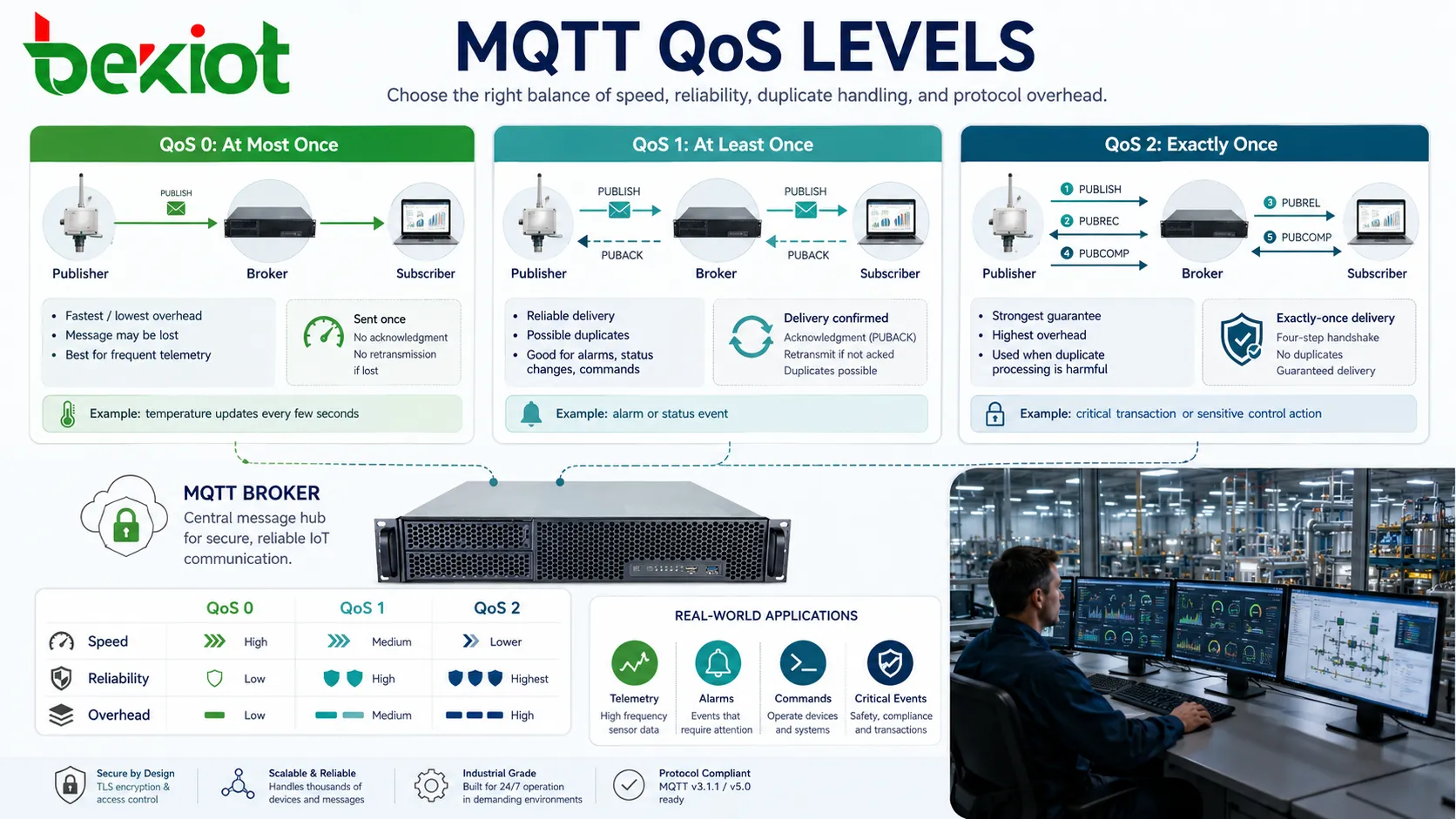
QoS 0 is the simplest delivery level. The message is sent once, and there is no acknowledgment from the receiver at the MQTT layer. If the message is lost, it is not retransmitted by the protocol.
This level is useful for frequent telemetry where losing an occasional update is acceptable. For example, a temperature sensor sending data every few seconds may not need every single reading to arrive.
QoS 1: At Least Once
QoS 1 requires acknowledgment. The sender retransmits the message if it does not receive confirmation. This improves delivery reliability, but the receiver may receive duplicate messages.
Applications using QoS 1 should be prepared to handle duplicates. This is common for alarms, status changes, commands, and important telemetry where delivery matters more than avoiding repetition.
QoS 2: Exactly Once
QoS 2 uses a more complex handshake to ensure that a message is delivered exactly once at the protocol level. It provides the strongest delivery guarantee but adds more overhead and latency.
This level may be used when duplicate processing would be harmful. However, many real-world deployments use QoS 0 or QoS 1 because they offer a better balance of performance and reliability.
Retained Messages and Last Known State
A retained message is stored by the broker as the latest message for a topic. When a new subscriber subscribes to that topic, the broker immediately sends the retained message so the subscriber can see the most recent known state.
This is useful for state information such as device online status, switch state, sensor value, configuration version, alarm state, or current operating mode. Without retained messages, a new subscriber might need to wait until the next update before it knows the current condition.
Retained messages should be used carefully. They are helpful for state, but not always appropriate for event streams. A retained “door opened” event may confuse a new subscriber if it is no longer true. State topics and event topics should be designed separately.
Session Behavior and Offline Delivery
MQTT supports session behavior that determines what happens when a client disconnects and later reconnects. Depending on protocol version and configuration, the broker may store subscriptions, queued messages, and session state for a client.
This is useful for devices that sleep, move between networks, or lose connectivity temporarily. When the device reconnects, it can continue receiving messages that were queued while it was offline, provided the session policy and QoS rules allow it.
Session persistence should match the device role. A battery-powered sensor may not need every command queued forever. A remote controller may require queued configuration updates. Too much offline queuing can consume broker resources, while too little may cause missed commands.
Will Messages for Unexpected Failure
A will message, often called Last Will and Testament, allows a client to define a message that the broker should publish if the client disconnects unexpectedly. This helps other systems detect device failure, network loss, or abnormal shutdown.
For example, a device may set a will message on a status topic such as device/123/status. If the device loses power without sending a normal disconnect, the broker publishes the configured offline message.
This feature is widely used in monitoring dashboards, device health systems, industrial telemetry, gateway supervision, and remote asset management. It provides a simple way to expose abnormal disconnection to other parts of the system.
Security and Access Control
Authentication
The broker should verify client identity before allowing access. Authentication may use username and password, client certificates, tokens, API credentials, or integration with an external identity system.
Weak authentication can allow unauthorized devices to publish false data, subscribe to sensitive topics, or disrupt the messaging environment.
Authorization
After identity is verified, the broker should decide which topics the client can publish to and subscribe to. A sensor should not be able to publish commands to unrelated devices. A tenant application should not receive another tenant’s data.
Topic-level permissions are essential in multi-device, multi-site, and multi-tenant deployments.
Encryption
TLS encryption protects data in transit between clients and the broker. This is important when messages travel over public networks, cellular networks, cloud connections, or untrusted infrastructure.
Encryption should be paired with certificate management, secure key storage, and careful client provisioning. A secure transport layer does not help if credentials are exposed in firmware or configuration files.
Deployment Patterns
Device to Cloud
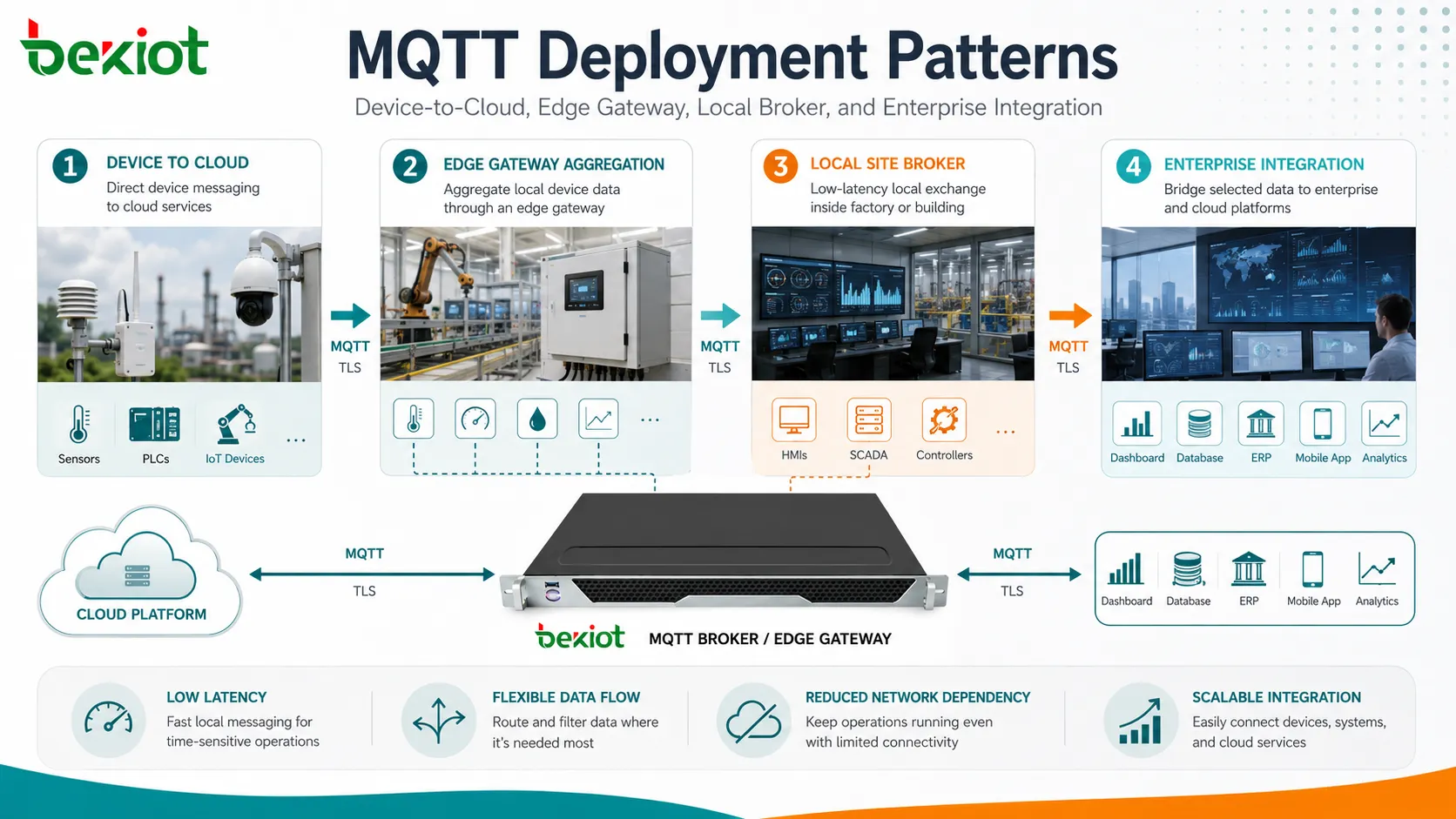
In many IoT systems, sensors and gateways publish data to a cloud broker. Cloud applications then store, visualize, analyze, and act on the data. This model is common in smart buildings, energy management, fleet monitoring, and remote equipment platforms.
The main design concerns are security, network resilience, device identity, message volume, and cloud-side scaling.
Edge Gateway Aggregation
An edge gateway can collect data from local devices and publish summarized or filtered data to a central broker. It may also subscribe to command topics and forward instructions to local equipment.
This reduces bandwidth, improves local control, and allows the site to continue some functions even when the cloud connection is unavailable.
Local Broker for Site Systems
Some deployments use a local broker inside a factory, building, lab, campus, or control room. Devices and applications exchange data locally with low latency and less dependence on external networks.
A local broker can later bridge selected data to a cloud or enterprise platform. This gives system designers more control over data flow and network dependency.
Applications Across Connected Systems
Industrial Monitoring
Factories and utility sites use MQTT to collect equipment status, sensor data, alarm messages, energy values, temperature readings, vibration data, and production metrics. The protocol fits environments where many devices send small messages to supervisory platforms.
Industrial deployments should consider network segmentation, broker redundancy, QoS selection, retained state, and secure device provisioning.
Smart Buildings
Building systems can use the protocol to connect lighting, HVAC, access control, occupancy sensors, meters, elevators, room panels, and dashboards. Topic structure can mirror building, floor, room, and device hierarchy.
This makes data easier to organize and helps automation rules subscribe only to relevant events or states.
Energy and Metering
Energy platforms may use MQTT to collect meter readings, inverter data, battery status, load information, and grid-related telemetry. Lightweight messaging is useful when many devices report small values periodically.
Because energy systems may affect billing, control, or safety, authentication and message integrity should be handled carefully.
Connected Vehicles and Mobility
Vehicle platforms, charging stations, fleet systems, and mobility services may use the protocol for telemetry, location updates, diagnostics, alerts, and remote control functions.
Mobile networks can be unstable, so session handling, reconnect logic, and efficient payload design are important.
Consumer and Home Automation
Home automation systems use MQTT to connect sensors, switches, lights, thermostats, cameras, hubs, and automation rules. The publish/subscribe model makes it easy for one sensor event to trigger multiple actions.
For home deployments, simple topic naming and secure local broker configuration are important to avoid confusion and unauthorized access.
Performance and Scalability Considerations
Message size should be kept reasonable. MQTT is efficient for small messages, but it is not ideal for very large files or heavy media streams. Large payloads can increase broker memory use, network congestion, and processing delay.
Topic design affects performance. Overuse of broad wildcard subscriptions can increase broker workload because many messages must be matched and delivered to many clients. Clear topic hierarchy helps systems scale more predictably.
Connection count is another factor. A broker serving thousands or millions of clients must handle keepalive traffic, authentication, session state, retained messages, queued messages, and network limits. Scaling may require clustering, load balancing, edge aggregation, or topic partitioning.
QoS level also affects performance. QoS 2 provides stronger delivery semantics but creates more packet exchange. For high-volume telemetry, using QoS 0 or QoS 1 with application-level logic may be more practical.
Common Design Mistakes
Unclear Topic Naming
Random or inconsistent topic names make it hard to manage permissions, dashboards, alerts, and analytics. A topic plan should be created before large-scale deployment.
Using Retained Messages for Events
Retained messages are best for current state. Using them for one-time events can mislead new subscribers because they may receive an old event as if it just happened.
No Duplicate Handling
QoS 1 can deliver duplicates. Applications should use timestamps, message IDs, sequence numbers, or idempotent processing when duplicate messages could cause problems.
Weak Credential Management
Hard-coded shared passwords, reused client IDs, and unprotected certificates can create serious security risks. Each device should have a manageable identity and revocation path.
Ignoring Broker Failure
The broker is central to the architecture. If it fails and there is no redundancy or recovery plan, communication may stop. Critical deployments should consider clustering, backup brokers, bridge design, or local fallback behavior.
MQTT works well when topics, sessions, QoS, retained state, security, and broker capacity are designed together instead of configured as isolated settings.
Maintenance and Monitoring
Operational teams should monitor broker CPU, memory, connection count, message rate, retained message count, subscription count, queued messages, authentication failures, dropped connections, and network latency.
Client health should also be visible. Repeated reconnects, expired sessions, duplicate client IDs, abnormal publish rates, and unexpected topic access can indicate device faults or security issues.
Configuration backups are important. Broker settings, access control lists, certificates, topic policies, bridge settings, and retained-state behavior should be documented and recoverable.
FAQ
Can MQTT work over WebSocket?
Yes. Many brokers support MQTT over WebSocket, allowing browser-based applications and web dashboards to communicate through web-friendly transport paths.
Is it suitable for sending large video or file content?
Usually not as the primary method. It is better for small messages, telemetry, events, commands, and state updates. Large files are often transferred through other protocols with a message carrying the file reference.
What happens if two clients use the same client ID?
Many brokers will disconnect the existing client when a new client connects with the same ID. Unique client IDs are important for stable session behavior.
Can one broker connect to another broker?
Yes. Broker bridging or clustering can be used to exchange selected topics between sites, regions, edge gateways, and cloud platforms, depending on broker capability.
How should topic names be planned?
Use a consistent hierarchy based on site, system, device, data type, and function. Avoid random names, sensitive information in topic paths, and overly broad wildcard dependency.







