


IoT platforms are widely used in smart fire protection, smart scenic areas, smart communities, water conservancy, power systems, smart cities, environmental monitoring, and industrial management. These projects rely on sensors to collect on-site data such as temperature, water level, smoke, access status, equipment status, intrusion alarms, and environmental changes.
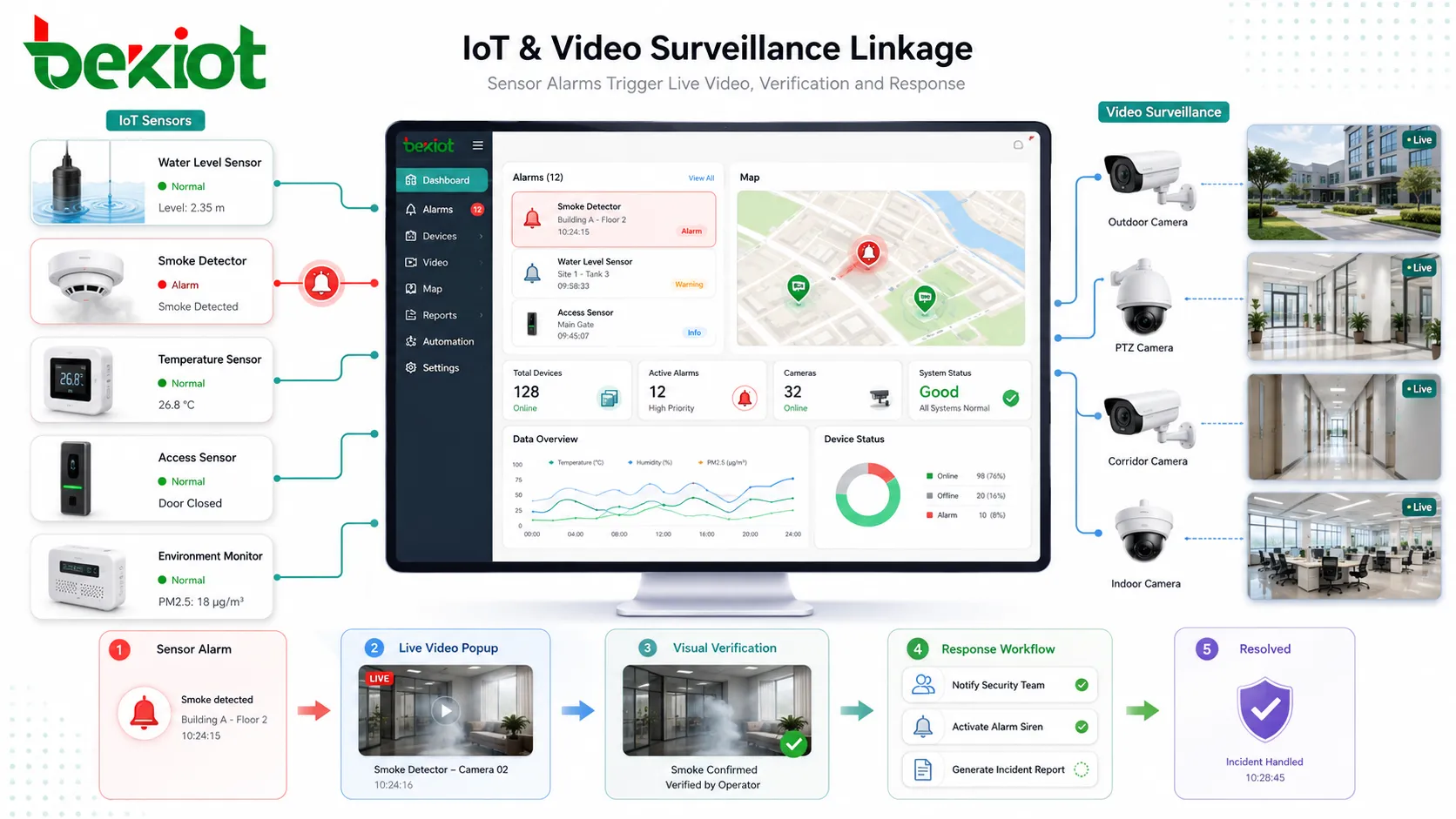
However, sensor data alone is often not enough for real operational decisions. When an alarm is triggered, operators usually want to see what is happening on site. This is why video surveillance integration has become an important part of IoT platform development. A practical solution should connect sensor alarms, live video, historical recordings, device control, and business workflows into one coordinated system.
Why Video Becomes Important in IoT Projects
In many smart projects, the IoT platform is responsible for data collection, status display, alarm notification, and workflow processing. Sensors can report abnormal conditions quickly, but they cannot always explain the real situation behind the alarm.
For example, a water level sensor may report an abnormal value, a smoke detector may generate an alarm, or an access sensor may detect unauthorized entry. If the platform can immediately open the related camera view, the operator can verify the situation more accurately and decide whether emergency action is required.
This type of linkage improves the value of both systems. IoT sensors provide structured data and real-time events, while video surveillance provides visual evidence. When combined properly, they help reduce false alarms, improve response speed, and support better decision-making.
Direct RTSP Pulling Is the Simplest Method
Many video surveillance cameras support RTSP streaming. During software integration, an IoT platform can pull an RTSP stream from a camera and display the live video inside the platform interface. This is a common method for simple integration.
In a basic scenario, the platform receives an alarm from a sensor, finds the related camera, pulls the RTSP stream, and opens a video window for the operator. This method can meet simple needs such as alarm pop-up video, live preview, or fixed camera display.
The advantage of RTSP direct pulling is that the logic is easy to understand. The camera provides a stream address, and the IoT platform uses a player or media component to decode and display the video. For small projects with a simple network environment, this can be a fast way to complete initial video linkage.
Where Direct Stream Pulling Becomes Difficult
RTSP pulling also has clear limitations. First, the IoT software platform usually needs to integrate a suitable video player. The platform must handle decoding, compatibility, browser support, delay, authentication, and stream stability.
Second, many IoT platforms are deployed on public networks or cloud servers, while most video surveillance cameras are located inside the customer’s private network. Pulling RTSP streams across public networks, NAT, firewalls, or isolated internal networks can become difficult.
Third, direct RTSP access provides limited control capability. It may only deliver live video, while many monitoring functions such as camera directory management, alarm information, PTZ control, recording playback, and voice intercom may not be available or may require additional development.
Because of these limitations, RTSP direct pulling is more suitable for small projects, simple linkage requirements, limited camera quantity, and straightforward network conditions. It is not always the best choice for larger smart platforms with many cameras and richer video functions.
A Gateway Layer Makes Integration Easier
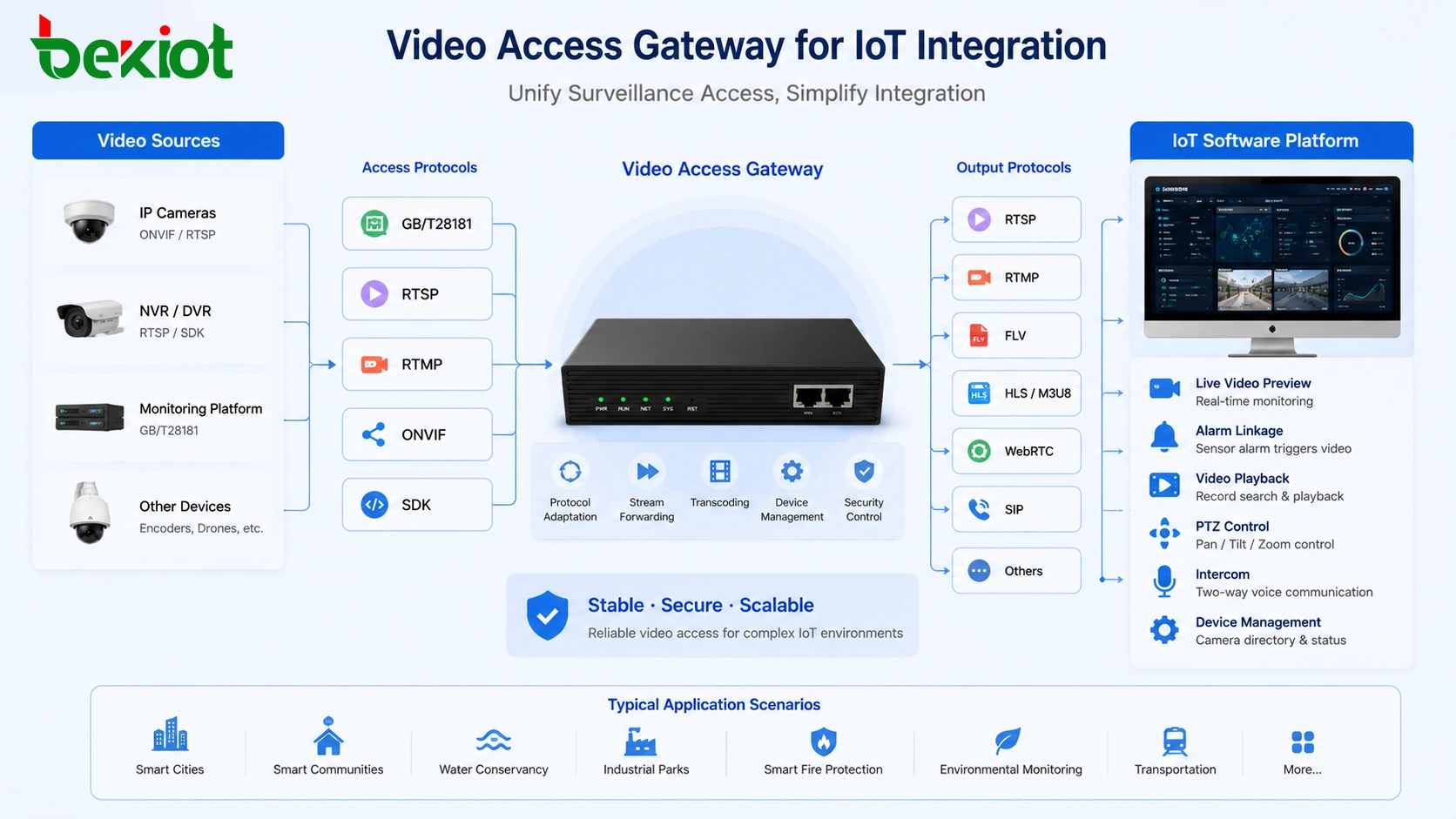
Another approach is to use a dedicated video access gateway. The gateway is responsible for unified video surveillance access, while the IoT platform receives standardized media streams and control interfaces from the gateway.
This method reduces the integration burden on the software platform. Instead of studying every camera, recorder, monitoring platform, and protocol separately, the project can use the gateway as a middle layer to handle video access, stream conversion, device control, and media output.
In a gateway-based architecture, cameras, NVRs, recording systems, and existing video management platforms can be connected through common surveillance protocols. The IoT platform then selects the output format that matches its own application environment.
Protocols Used on the Surveillance Side
A practical video access gateway should support different ways to connect surveillance resources. In real projects, video sources may include IP cameras, NVRs, video recorders, and existing monitoring platforms from different vendors.
Common access methods include GB/T28181, RTSP, RTMP, ONVIF, and SDK-based integration. These methods allow the gateway to obtain live video, request recordings, receive alarm events, manage camera resources, and communicate with existing video systems.
GB/T28181 is often useful in platform-level video interconnection, especially when the project needs device registration, catalog management, signaling control, and video resource sharing. ONVIF is common for IP camera discovery and control. RTSP is often used for live stream pulling. SDK access may be required when deeper device or platform functions are needed.
Stream Output for Smart Software Platforms
After video resources are connected to the gateway, the IoT platform does not need to handle all surveillance protocols directly. The gateway can output video streams in formats that are easier for software development and business integration.
Common output formats may include FLV, HLS or M3U8, WebRTC, RTSP, RTMP, and SIP. Different formats are suitable for different scenarios. WebRTC is useful for low-latency web preview, HLS is suitable for broad web and mobile compatibility, FLV can be used for web live preview, RTSP and RTMP are often used for media systems, and SIP may be used for communication or dispatch integration.
This makes development easier. The IoT platform can choose a suitable output protocol according to its own interface, browser environment, mobile application, command center screen, or third-party platform requirements.
Alarm Linkage and Visual Verification
The most important value of integration is linkage. When a sensor reports an abnormal event, the IoT platform can automatically match the alarm point with a related camera and open live video for verification.
For example, a smoke alarm can trigger nearby camera preview, a water level warning can open the video of a river or reservoir, and an intrusion event can bring up the camera covering the entrance or fence area. This helps operators move from data alarm to visual confirmation.
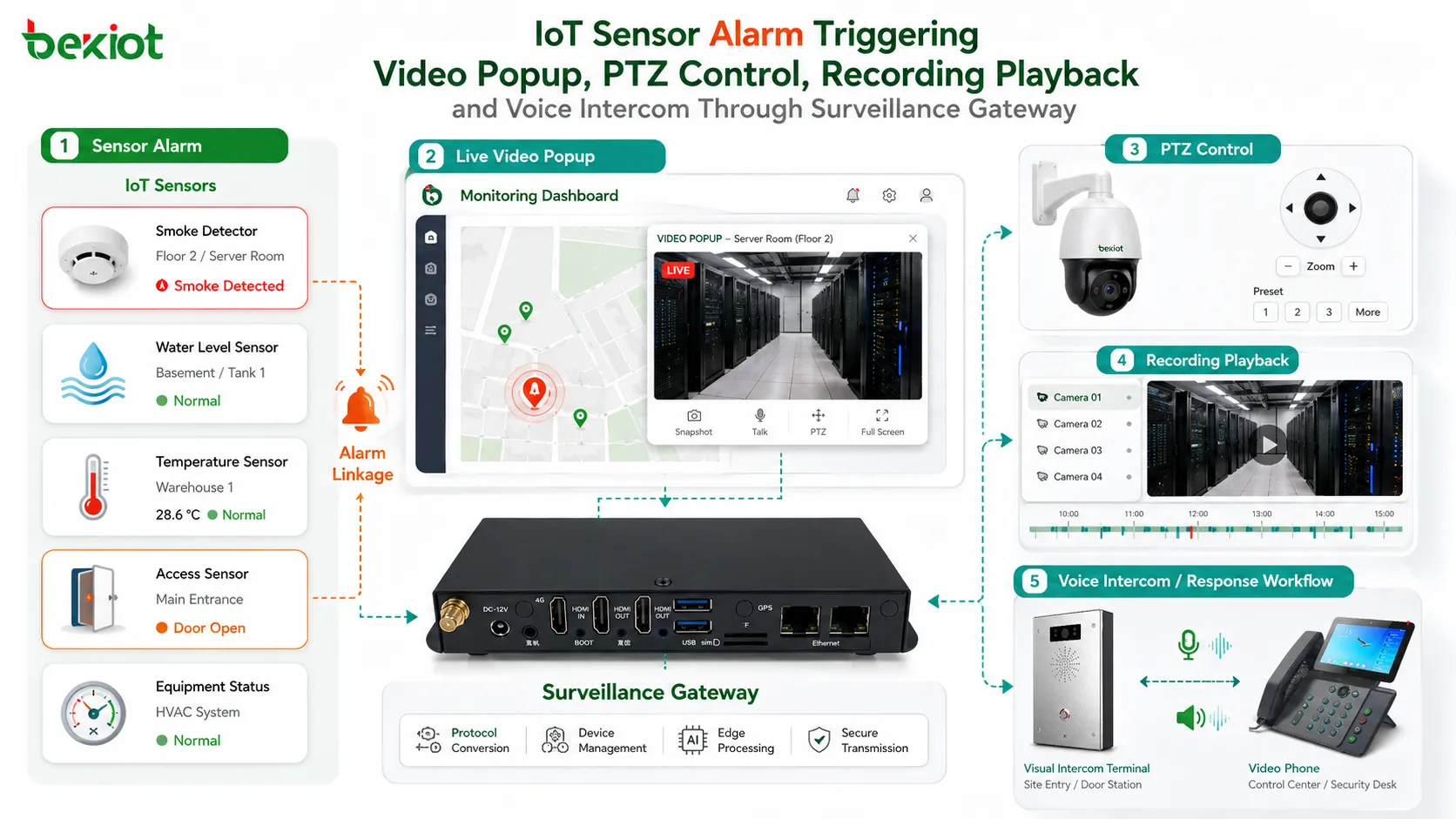
A gateway-based solution can also make the linkage richer. In addition to live preview, the platform may call recordings, control PTZ cameras, receive video-related alarms, manage camera directories, or activate voice intercom when supported by the surveillance system.
Functions Beyond Live Video Preview
Many projects begin with a simple requirement: display video when an alarm occurs. But as the project grows, operators usually need more than live preview.
Useful functions may include camera list synchronization, video directory management, PTZ control, recording query, recording playback, alarm event reception, video snapshot, voice intercom, stream forwarding, and multi-screen display. These functions are difficult to achieve through simple RTSP pulling alone.
This is why a video access gateway is often more suitable for large IoT projects. It keeps surveillance system capabilities available while providing a cleaner integration layer for the IoT software platform.
Solving Compatibility with Transcoding
Video compatibility is another common problem in IoT and surveillance integration. Different cameras may use different encoding formats, resolutions, frame rates, and bitrates. Different software platforms may also have different playback requirements.
A gateway with transcoding capability can adjust video codec, resolution, frame rate, and bitrate according to the application. This helps solve playback problems, reduce bandwidth pressure, and improve the stability of video delivery.
For example, a high-resolution camera stream may be suitable for recording, but a lower-bitrate stream may be better for web preview or mobile access. Transcoding allows the platform to receive a stream that better matches the business scenario.
Choosing the Right Integration Method
The integration method should match project scale and business requirements. If the project only has a few cameras, simple alarm pop-up video, and a clear internal network, direct RTSP pulling may be enough.
If the project has many cameras, multiple surveillance systems, cross-network access, public cloud deployment, recording playback, PTZ control, voice intercom, alarm linkage, or multiple output protocols, a video access gateway is usually a better choice.
The gateway approach reduces custom development workload and makes the platform easier to expand. It also helps protect the existing surveillance system by avoiding uncontrolled direct access from multiple software platforms.
Suitable Application Scenarios
This solution is suitable for smart fire protection, smart communities, smart scenic areas, smart water management, smart power systems, smart cities, industrial parks, construction sites, campuses, environmental monitoring, and transportation facilities.
These projects often have both IoT sensor data and video surveillance resources. By integrating them through a controlled access method, the platform can provide event detection, video verification, response coordination, and operation management in one system.
The more cameras and linkage requirements a project has, the more valuable a gateway-based architecture becomes. It helps the software platform focus on business logic, while the gateway handles video access and media adaptation.
Planning Points Before Deployment
Before implementation, the project team should confirm the number of cameras, surveillance platform type, camera protocols, sensor categories, alarm rules, network topology, public or private network access, and user permission requirements.
The team should also define which events need video linkage, which cameras correspond to each sensor, whether recording playback is required, whether PTZ control is needed, and which video formats should be output to the IoT platform.
Testing is also important. The project should verify stream stability, browser playback, latency, firewall access, alarm triggering, camera matching logic, recording query, and long-term system reliability before formal delivery.
Conclusion
IoT and video surveillance integration makes smart platforms more practical. Sensors provide structured data and alarm events, while video surveillance provides visual confirmation and operational context.
Direct RTSP pulling can meet simple requirements, but it has limitations in cross-network access, playback compatibility, control capability, and large-scale deployment. For more complex projects, a video access gateway provides a cleaner and more scalable solution.
By supporting GB/T28181, RTSP, RTMP, ONVIF, SDK access, FLV, HLS, WebRTC, SIP output, alarm linkage, PTZ control, recordings, intercom, and transcoding, the gateway approach helps IoT platforms integrate video resources more efficiently and deliver richer smart application value.
FAQ
Can IoT platforms integrate video without changing existing cameras?
Yes. If the existing cameras or monitoring platform support standard access protocols, they can often be integrated through RTSP or a video access gateway.
Is direct RTSP pulling enough for alarm linkage?
It can be enough for simple live preview. For recording playback, PTZ control, alarm information, intercom, and large-scale management, a gateway-based method is usually more suitable.
Which video format is better for web-based IoT platforms?
WebRTC is useful for low-latency web viewing, while HLS and FLV may be suitable for different browser or platform environments. The best option depends on latency, compatibility, and development requirements.
How does video linkage reduce false alarms?
When a sensor alarm occurs, operators can view the related camera immediately. This helps confirm whether the alarm is caused by a real event, a device fault, or an environmental factor.
What should be prepared before integration?
Prepare camera lists, sensor locations, alarm rules, network access conditions, required video functions, stream formats, user permissions, and the relationship between each sensor and camera.
Why is transcoding useful in IoT video integration?
Transcoding can adjust codec, resolution, frame rate, and bitrate so that video streams match web platforms, mobile apps, command screens, and bandwidth conditions more effectively.







