


IP phones are widely used in enterprise communication, dispatch systems, call centers, campuses, industrial sites, hotels, and public service networks. Most modern IP phones use the SIP protocol, which makes them easy to register with SIP servers, IP PBX platforms, softswitch systems, and unified communication platforms. However, during deployment, one common problem may appear: one-way audio.
One-way audio means that a call is connected, but only one side can hear the other side. The SIP signaling may look normal, the phone may ring, and the call may be answered successfully, but the voice stream does not travel correctly in both directions. This issue is usually related to NAT, RTP transmission, firewall policies, SIP ALG, codec negotiation, endpoint configuration, or server media settings.
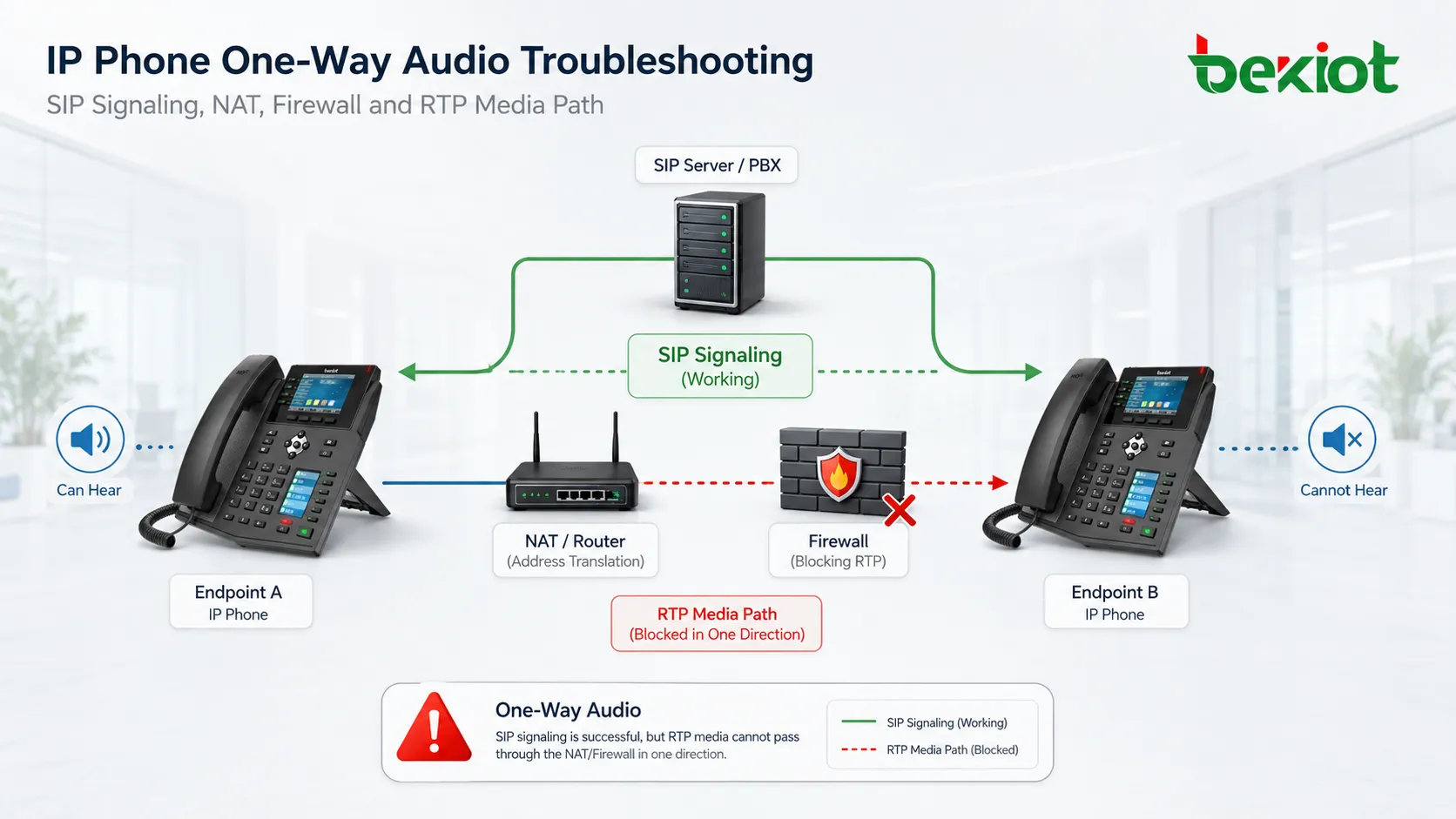
Start from the Signaling and Media Difference
A SIP phone call contains two important parts: signaling and media. SIP signaling is used for registration, dialing, ringing, call setup, and call teardown. RTP is used to transmit the actual voice stream after the call is established. This difference is the key to understanding why one-way audio can happen.
In many cases, the SIP part is successful because the default SIP port, often UDP or TCP 5060, is allowed by the network. The phone can register, dial, and answer calls normally. But the RTP ports used for voice are different from the SIP signaling port. If the RTP path is blocked, misrouted, translated incorrectly, or sent to the wrong IP address, the call can connect without normal two-way voice.
Therefore, troubleshooting should not stop at SIP registration status. A phone that is successfully registered may still have media problems. Engineers should check whether both sides can send and receive RTP packets during the call.
NAT Is a Common Source of Audio Direction Problems
NAT allows devices inside a local area network to access external networks through a public IP address. This is common in enterprise offices, branch sites, hotels, factories, and remote locations. When an IP phone or SIP server is behind NAT, the device may advertise a private IP address in SIP or SDP information. The remote side may then try to send RTP packets to an unreachable private address.
This is one of the most common causes of one-way audio, especially when the SIP server is deployed on the public network and IP phones are located in different LAN environments. The call may be established, but the media stream cannot return to the correct internal device.
To solve this, the deployment should use proper NAT traversal design. Common methods include STUN, TURN, symmetric RTP, public address mapping, port forwarding, SBC deployment, or media relay through the SIP server. The best choice depends on the network topology and whether the system is deployed inside a private network, across public networks, or between multiple branch sites.
Firewall Rules Must Include RTP Traffic
Firewall policy is another frequent reason for one-way audio. Many administrators only open the SIP signaling port and forget the RTP port range. As a result, phones can register and calls can be created, but voice packets cannot pass through the firewall.
RTP usually uses UDP ports. The port range depends on the phone, PBX, SIP server, SBC, or media platform configuration. In many SIP environments, RTP may use ranges such as UDP 16384-32768 or another custom range defined by the system administrator. The exact range should be checked in both the phone configuration and server configuration.
For reliable two-way audio, firewall rules should allow the required UDP media ports in both directions. If the deployment involves multiple VLANs, VPN tunnels, branch routers, cloud servers, or public IP mapping, each network segment should be checked. A single blocked segment can create one-way or no-audio symptoms.
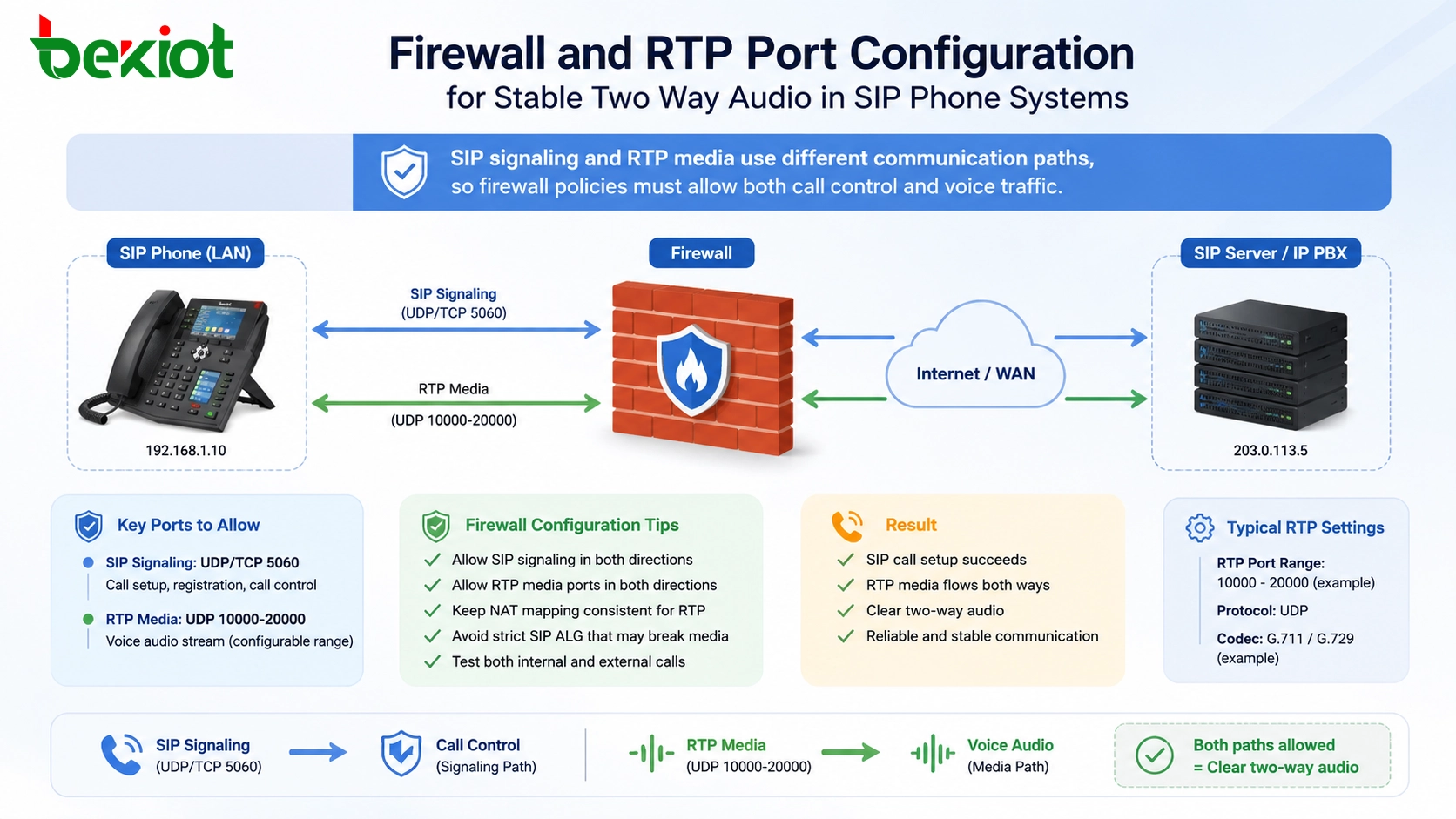
RTP Routing Needs a Clear Media Path
IP phone voice is carried by RTP streams. If the RTP destination address, source address, port, or routing path is incorrect, audio may only work in one direction. This can happen not only in public network scenarios but also inside a private LAN.
For example, the phone and server may use different RTP port ranges, or the server may expect media to pass through a media proxy while the endpoint tries to send media directly to another phone. Some systems support direct media between endpoints, while others require all RTP traffic to pass through the server or SBC. If this mode is configured incorrectly, one-way audio may appear.
During deployment, the project team should confirm whether the voice path is endpoint-to-endpoint, endpoint-to-server, or endpoint-to-SBC. All devices in the call flow should use reachable IP addresses and compatible RTP port settings.
SIP ALG Can Help or Break the Call
Many routers and firewalls include a SIP ALG function. It is designed to inspect and modify SIP packets so that SIP traffic can pass through NAT more easily. In theory, this sounds useful. In practice, SIP ALG can sometimes modify SIP or SDP information incorrectly and cause one-way audio, failed calls, or unstable registration.
If a network already uses a proper SBC, public address mapping, STUN, or media relay mechanism, SIP ALG may become unnecessary or even harmful. In many troubleshooting cases, disabling SIP ALG on routers or firewalls can resolve one-way audio issues.
The correct choice depends on the network design. If SIP ALG is used, it should be tested carefully. If the system already has a controlled NAT traversal method, disabling SIP ALG is often a better option.
Codec Negotiation Should Be Consistent
IP phones usually support multiple voice codecs, such as G.711, G.729, G.722, and other audio formats. These codecs are selected during SIP negotiation. If the two sides do not share a compatible codec, the call may have no audio, distorted audio, or unstable media behavior.
Codec mismatch is not always the first cause of one-way audio, but it should still be checked. This is especially important when phones from different vendors, softphones, gateways, PBX platforms, and recording systems are used together.
A practical solution is to prioritize common codecs across all devices. For example, G.711 is often used in LAN environments because of its simplicity and voice quality, while compressed codecs may be used when bandwidth is limited. The codec strategy should match the actual network condition.
Phone-Side Configuration Should Not Be Ignored
Some one-way audio problems are caused by endpoint settings. The IP phone may have incorrect RTP port configuration, NAT mode, SIP account settings, media relay options, local network interface settings, or codec priority. In some cases, the phone may also be muted, the handset cable may be loose, or the speaker and microphone settings may be incorrect.
When only one or several phones have the problem, endpoint comparison is useful. Engineers can compare a working phone with a problematic phone and check SIP account settings, network address, RTP port range, codec list, NAT traversal mode, firmware version, and audio device status.
This method is often faster than changing global server settings immediately. If the issue is limited to one endpoint, the root cause is usually closer to that endpoint or its local network.
Server and Media Proxy Settings Affect All Calls
SIP server configuration can also cause one-way audio. Media server address, RTP proxy mode, external IP address, internal IP address, port range, direct media policy, NAT handling, and relay settings can all affect the RTP path.
These settings should be adjusted carefully because global server changes may affect many users at the same time. If only some phones have one-way audio, it is better to analyze the network topology and endpoint configuration before changing core server parameters.
When the problem is complex, packet capture and server logs are useful. By checking SIP/SDP information and RTP packet flow, engineers can see which IP address and port are being advertised, where the RTP stream is sent, and whether the other side receives it.
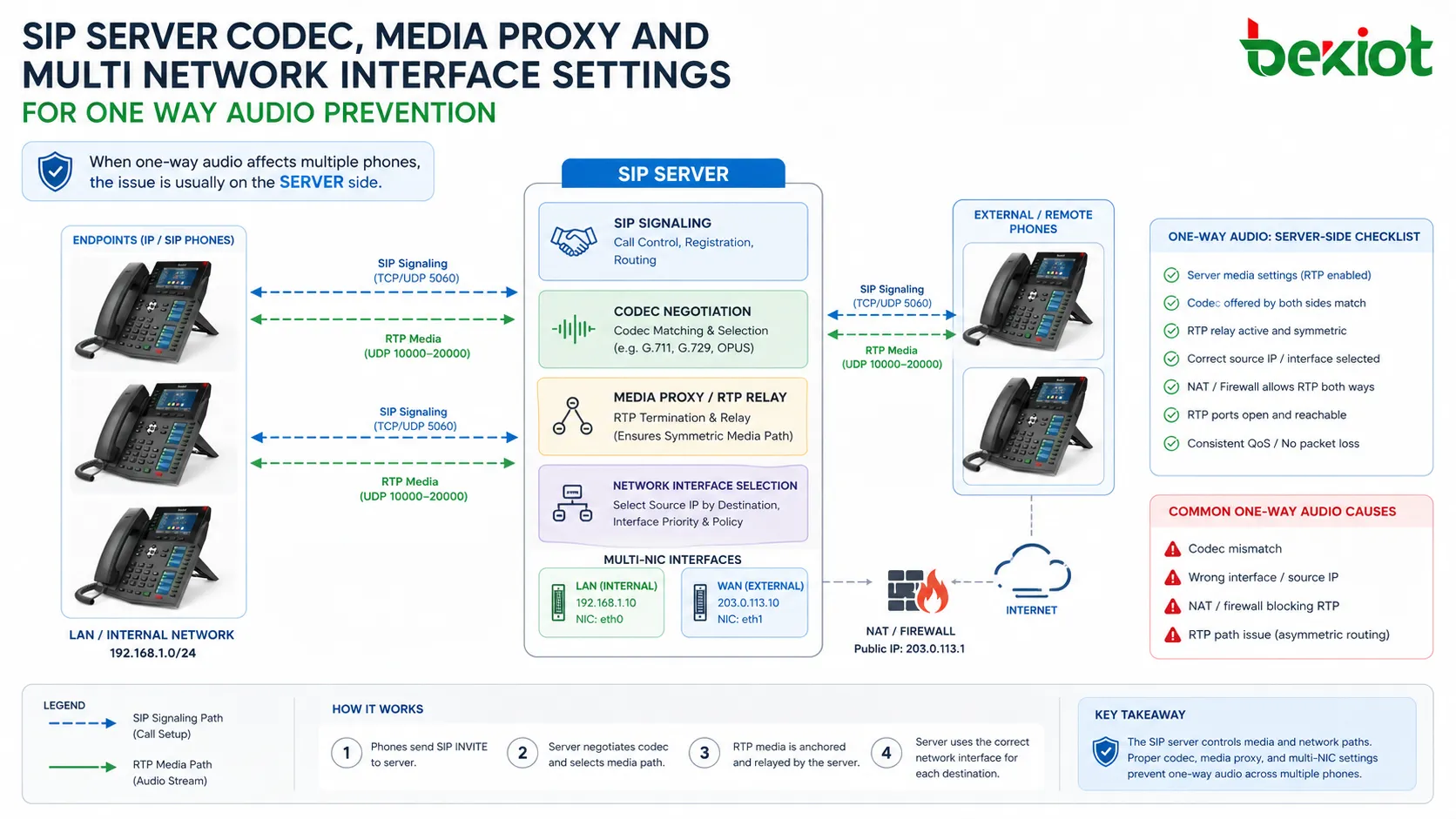
Multi-Network Interfaces Can Send Media the Wrong Way
Some IP phones, SIP servers, gateways, or communication platforms have multiple network interfaces. For example, a server may have one interface for the LAN, another for a public network, and another for a management network. If the media service selects the wrong interface, RTP packets may be sent to the wrong path.
This can create a situation where signaling appears normal but audio cannot return correctly. The device may advertise the wrong IP address in SDP, or it may send RTP packets from an unexpected network interface.
To prevent this, the project team should confirm the correct binding address, routing table, default gateway, media interface, and NAT mapping. Multi-NIC environments should be documented clearly during deployment.
A Practical Troubleshooting Workflow
A structured troubleshooting process is better than random parameter changes. First, confirm whether the problem happens on all calls or only certain phones. Second, check whether the affected calls are internal, external, cross-site, VPN-based, or public network calls. Third, verify whether SIP registration and call setup are normal.
After that, focus on RTP. Check firewall policies, RTP port ranges, NAT traversal settings, SIP ALG status, codec negotiation, media relay mode, and server external IP settings. If the issue remains unclear, use packet capture to confirm whether RTP packets are sent and received in both directions.
Good troubleshooting is based on the call path. Once the complete path is clear, the one-way audio problem becomes much easier to locate.
Planning for Stable Two-Way Audio
The best solution is to reduce the chance of one-way audio during the design stage. For small LAN deployments, keep the network simple and make sure phones, PBX, and gateways use consistent RTP settings. For multi-site deployments, plan NAT traversal, firewall rules, VPN routing, and SBC placement before phones are installed.
For public network or cloud PBX deployments, it is usually better to use a media relay or SBC to control the RTP path. This avoids many NAT-related problems and improves compatibility between different network environments.
Documentation is also important. SIP port, RTP port range, codec policy, NAT method, server IP address, media proxy setting, and firewall rules should be recorded for future maintenance.
Conclusion
One-way audio in IP phone systems is usually not caused by a single fixed problem. It may come from NAT translation, blocked RTP ports, incorrect firewall policy, SIP ALG interference, codec mismatch, endpoint configuration, server media settings, or multi-network interface routing.
A good solution begins with understanding the difference between SIP signaling and RTP media. Registration and dialing may work normally while voice transmission fails. By checking the media path step by step, project teams can locate the issue faster and build a more stable IP voice communication system.
FAQ
Why can an IP phone register successfully but still have no two-way audio?
Registration uses SIP signaling, while voice uses RTP media. If SIP is allowed but RTP ports or media routing are blocked, the phone can register but audio may fail.
Should SIP ALG always be disabled?
Not always, but it should be tested carefully. If the system already uses SBC, media relay, STUN, or proper NAT mapping, disabling SIP ALG often improves stability.
What is the fastest way to confirm an RTP problem?
Packet capture is the fastest technical method. It shows whether RTP packets are sent and received in both directions during the call.
Can codec mismatch cause one-way audio?
Yes. Codec mismatch may cause no audio, one-way audio, or abnormal voice behavior, especially in mixed-vendor SIP environments.
Is one-way audio usually a hardware failure?
Usually not. Most cases are caused by configuration, network routing, firewall rules, NAT handling, or media settings. Hardware failure should be checked after common configuration causes are excluded.
What should be recorded after solving the problem?
Record the SIP port, RTP port range, NAT method, codec policy, server media settings, firewall rules, and final working topology for future maintenance.







