


Enterprise voice systems often need to keep analog phones, fax machines, PSTN lines, and older PBX equipment while moving toward IP PBX, SIP trunks, cloud communication, or unified voice platforms. In this type of hybrid deployment, FXS and FXO ports are small interfaces, but they determine whether the system can make calls, receive calls, ring correctly, and maintain backup routes.
Although FXS and FXO ports may use the same RJ11-style physical connector, they are not the same. Their electrical roles are opposite. One side provides line power, dial tone, and ringing voltage; the other side receives these signals and behaves like a telephone terminal. If they are connected incorrectly, the result may be no dial tone, failed inbound calls, unavailable PSTN backup, unstable fax transmission, or even interface damage.
Why the Port Role Must Be Defined First
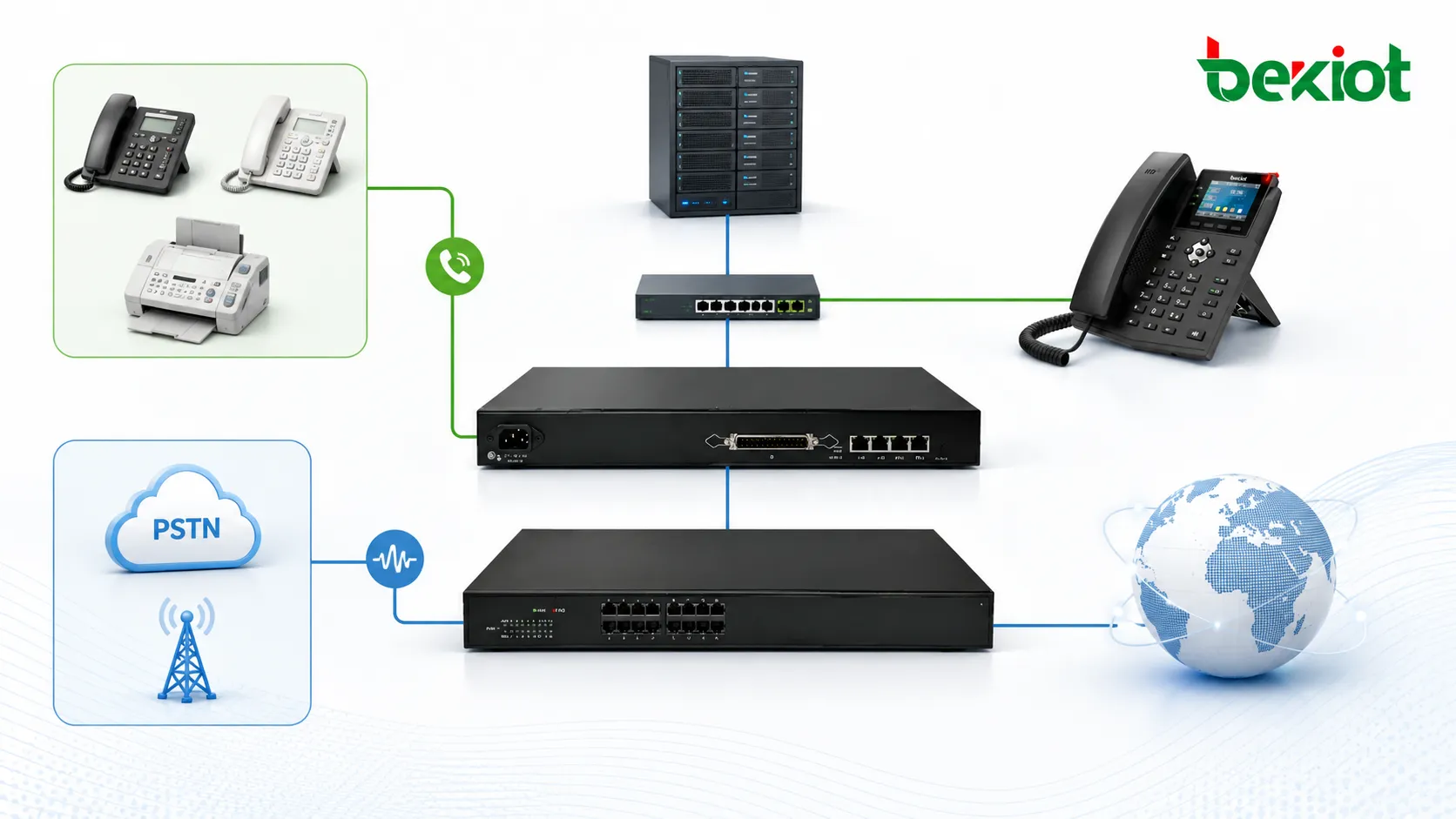
Many analog voice faults are not caused by SIP registration, codec settings, firewall rules, or PBX routing logic. They start from a simple wiring mistake: the wrong analog interface is connected to the wrong side of the circuit. Since FXS and FXO ports may look similar from the outside, installers must first identify whether the connected cable comes from a terminal device or from a line source.
The basic rule is clear. FXS is the service side that provides power and signaling. FXO is the terminal side that receives power and signaling. A correct deployment always connects a power-providing side to a power-receiving side. FXS-to-FXS and FXO-to-FXO connections are incorrect because both ends are trying to play the same role.
For project planning, this means every analog cable should be classified before installation. The team should know whether the cable leads to a telephone, fax machine, alarm panel, old PBX extension, carrier PSTN line, or another voice source. Clear identification at this stage can prevent repeated troubleshooting after cutover.
Understanding FXS in Real Deployment
FXS stands for Foreign Exchange Station. In practical engineering, an FXS port behaves like a telephone wall socket. It provides line current, dial tone, and ringing voltage to an analog terminal. When an analog phone is connected to an FXS port, the phone can hear dial tone, ring on incoming calls, and work as an extension through the analog gateway.
FXS ports are used to connect ordinary analog telephones, fax machines, modems, elevator phones, emergency phones, door phones, alarm panels, and other analog terminal equipment. The endpoint itself does not provide line power; it expects to receive the necessary electrical conditions from the gateway.
In many enterprise environments, FXS ports are important because they protect existing investment. A company may already have reliable analog devices installed across offices, warehouses, hotels, campuses, or industrial buildings. By using FXS gateways, these devices can remain in service while the organization upgrades the core voice platform to IP.
Understanding FXO in Real Deployment
FXO stands for Foreign Exchange Office. In actual projects, an FXO port behaves like an analog telephone. It receives line power, dial tone, and ringing signal from a PSTN line, a carrier copper line, or the extension port of an older PBX. The FXO port can detect ringing, go off-hook, hang up, and send dialing digits over the analog line.
FXO ports are used when the gateway needs to connect to an outside analog line or to an analog extension provided by another system. For example, if a company wants an IP PBX to use existing PSTN lines for inbound and outbound calls, those PSTN lines should connect to FXO ports.
FXO is also useful when the enterprise needs a conservative migration strategy. Some sites cannot remove all copper lines immediately because certain numbers are still published, emergency call rules depend on traditional lines, or local service availability is limited. FXO gateways allow these lines to be integrated into the new system without interrupting daily communication.
Related product: Analog Gateway — Becke Telcom analog gateways connect analog telephones, fax machines, PSTN trunks, and legacy PBX ports to an IP voice system with flexible FXS and FXO deployment options.
A Practical Architecture for IP Voice Migration
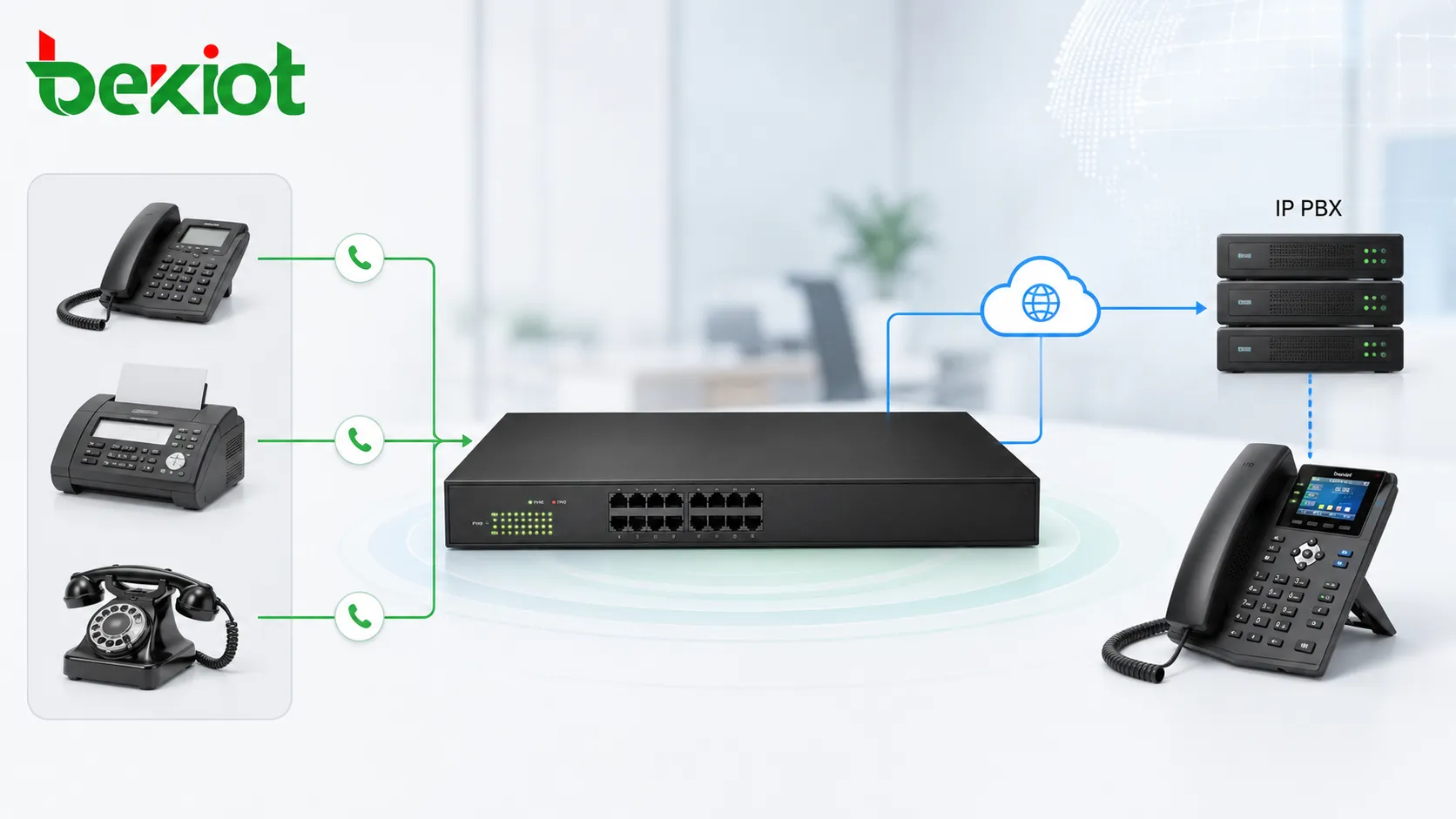
In a modern voice migration project, the analog gateway becomes the bridge between old analog resources and the new IP communication platform. FXS ports connect analog endpoints and convert them into IP extensions. FXO ports connect PSTN lines or old PBX ports and convert them into SIP-accessible call routes.
This architecture allows organizations to migrate step by step. Existing phones, fax machines, emergency lines, branch office wiring, and carrier analog lines can continue to work while the main call control moves to an IP PBX or SIP-based communication platform. This reduces replacement cost and avoids forcing every endpoint to be changed at the same time.
A recommended design is to separate analog endpoint access, outside line access, and PBX routing logic into clear layers. The analog gateway handles electrical conversion and SIP signaling. The IP PBX manages extension numbers, call permissions, routing plans, voicemail, recording, call queues, and trunk policies. Network switches, VLANs, QoS rules, and security policies provide the IP foundation that keeps voice traffic stable.
Common Application Scenarios
Keeping analog phones during PBX upgrade
When an organization upgrades from a traditional PBX to an IP PBX, it may still have many analog telephones in offices, warehouses, hotel rooms, security rooms, or production areas. Replacing all devices at once may not be necessary. An analog gateway with FXS ports can connect these analog phones to the IP PBX and allow them to continue working as extensions.
This is especially useful where existing cabling is difficult to replace or where analog phones are still reliable enough for daily use. The gateway provides the analog line interface, while the IP PBX manages extension numbers, call routing, permissions, and centralized voice services.
Connecting fax machines to an IP voice system
Many companies still use fax machines for contracts, invoices, medical documents, logistics forms, or government-related communication. These fax machines usually require an analog line interface. FXS ports can provide the required analog connection and allow the fax device to be integrated into the IP voice environment.
For fax applications, the project team should pay attention to line quality, codec settings, T.38 support, and actual transmission testing. Fax behavior can be more sensitive than ordinary voice calls, so it should be tested with real documents before final acceptance.
Using PSTN lines as call routes
If a site still has analog PSTN lines from a telecom operator, those lines should connect to FXO ports. The analog gateway then converts the PSTN lines into routes that can be used by the IP PBX. This allows the PBX to manage inbound calls, outbound dialing, call permissions, and fallback routing from one system.
This design is common in branch offices, small business sites, temporary offices, remote facilities, and locations where SIP trunk migration has not been completed. It also helps organizations keep existing public numbers during a phased migration.
Building a backup path for critical calls
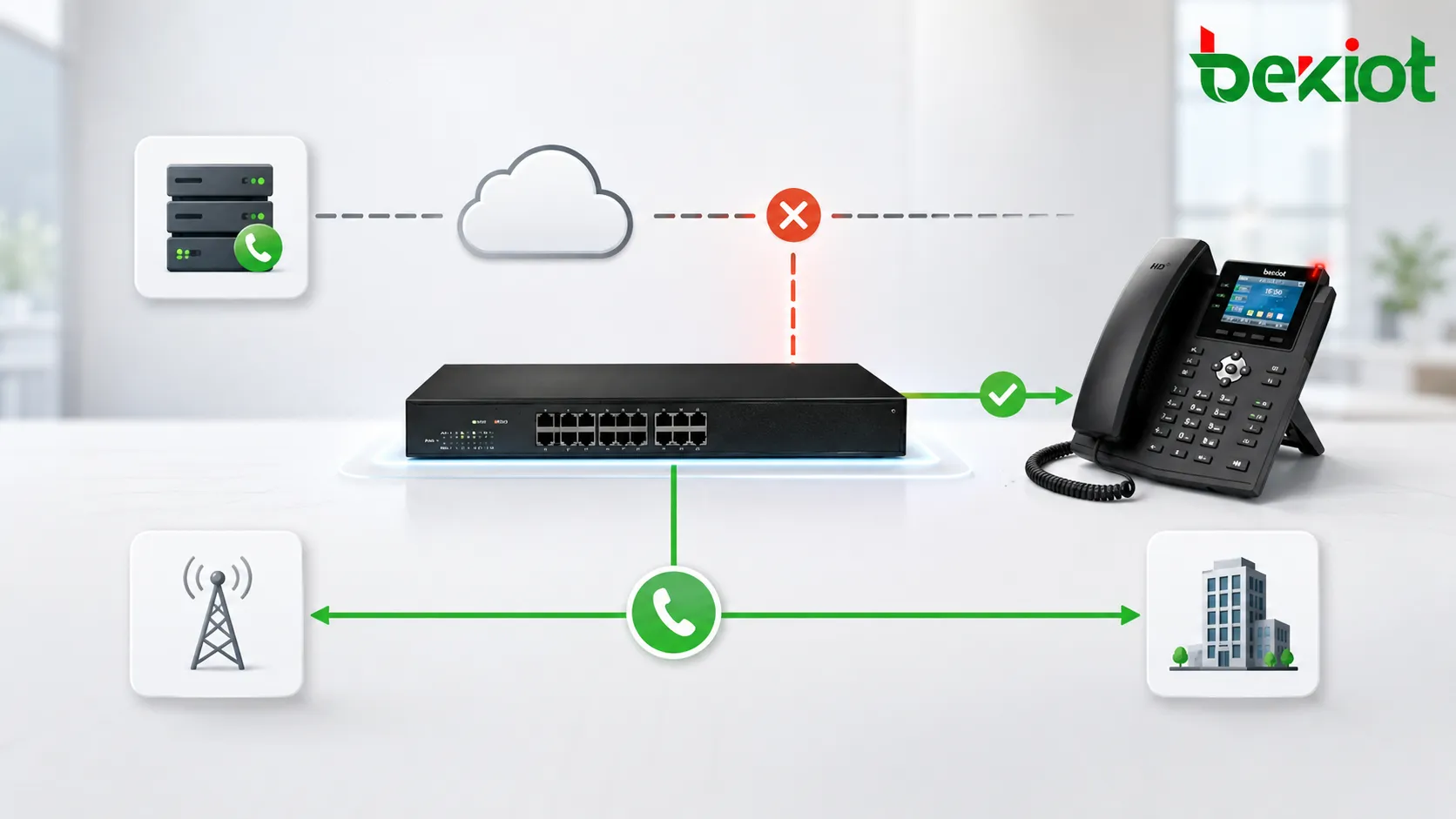
FXO ports can also be used as a backup route. Under normal conditions, calls may go through SIP trunks or the enterprise IP network. If the internet connection, SIP trunk, firewall, or data link fails, selected calls can be routed through an FXO-connected PSTN line.
This backup design is useful for hospitals, factories, campuses, public service sites, security centers, and other environments where voice availability is important. Even one traditional analog line can provide a valuable emergency path when IP connectivity is interrupted.
Interconnecting with an old PBX
During gradual migration, an old PBX may need to coexist with a new IP PBX. In many cases, the extension port of the old PBX behaves like an FXS source because it provides line power and dial tone to a telephone. To connect that old PBX extension into a new IP system, the gateway should use an FXO port.
This allows calls to be exchanged between the old and new systems during the transition period. Organizations can preserve existing extensions, cabling, user habits, and service continuity while moving selected departments or sites to the new platform.
Planning Port Capacity and Call Flow
Analog gateway planning should start with a real inventory. The project team should count how many analog phones, fax machines, alarm devices, elevator phones, door phones, PSTN lines, and old PBX ports need to be retained. Each analog endpoint normally requires one FXS port. Each analog outside line or old PBX extension source normally requires one FXO port.
Capacity planning should also consider call concurrency. For example, eight analog phones do not always mean eight simultaneous calls are required, but each phone still needs its own FXS interface. On the other hand, four PSTN lines connected through FXO ports normally allow up to four simultaneous outside calls. Understanding this difference helps avoid both under-provisioning and unnecessary hardware cost.
Call flow design is equally important. Inbound PSTN calls may need to ring an auto attendant, a reception extension, a call queue, or a group of phones. Outbound calls may need prefix rules, emergency call priority, least-cost routing, or backup route policies. These routing rules should be designed before installation so that the analog gateway works as part of the whole communication system instead of becoming an isolated converter.
Typical Wiring Mistakes to Avoid
Because FXS and FXO interfaces may look similar, they must be checked carefully before cables are inserted. The port label, gateway model, module type, and cable destination should all be confirmed during installation. A port marked as Phone, TEL, or with a handset icon usually indicates FXS. A port marked as Line, CO, or PSTN usually indicates FXO.
| Wrong Connection | Typical Result | Reason | Correct Method |
|---|---|---|---|
| FXS to FXS | No normal line behavior; possible interface stress | Both sides try to provide power and signaling | Connect FXS to an analog phone, fax machine, or terminal device |
| FXO to FXO | No dial tone and no usable call route | Both sides wait to receive line power | Connect FXO to a PSTN line, carrier analog line, or old PBX extension port |
| FXS to digital system phone | Device may not work | Digital proprietary phones do not use standard analog FXS signaling | Confirm whether the endpoint is analog before connecting it |
| PSTN line to FXS | Abnormal line condition or failure | Both sides may provide line voltage | Connect PSTN lines to FXO ports |
Port Selection Guide
The correct gateway is selected by counting what needs to be connected. A site with many analog phones needs enough FXS ports. A site with several PSTN lines needs enough FXO ports. A migration project may require a mixed gateway that provides both interface types.
| Project Requirement | Recommended Port | Connected Object | Purpose |
|---|---|---|---|
| Connect analog telephones | FXS | Analog phone, fax machine, modem, emergency phone | Convert analog endpoints into IP extensions |
| Connect telecom operator analog lines | FXO | PSTN wall socket or carrier copper line | Use analog outside lines through the IP PBX |
| Connect an old PBX extension | FXO | Legacy PBX analog extension port | Create a route between old and new systems |
| Provide emergency call backup | FXO | Traditional analog PSTN line | Maintain calling during IP network failure |
Commissioning Checklist
Before the system goes live, each analog port should be tested according to its real purpose. The project team should verify the port type, cable label, connected endpoint, line source, extension number, trunk route, caller ID behavior, ringing behavior, inbound routing, outbound routing, DTMF dialing, and call release status.
For sites that use FXO lines as backup routes, failover should be tested under simulated network failure conditions. The test should confirm that emergency or priority calls can still be placed when SIP trunks or internet connectivity are unavailable. For FXS endpoints, installers should check whether analog phones ring correctly and whether fax or special terminals behave as expected.
After commissioning, the final configuration should be documented clearly. This includes gateway IP address, SIP server address, authentication method, port mapping, number plan, routing table, failover policy, firmware version, and physical cable labels. Good records make future maintenance easier and reduce the risk of accidental changes during later expansion.
Operational Management After Deployment
Analog gateways should be monitored like other network voice devices. Administrators should check registration status, line status, call logs, abnormal disconnects, port usage, and alarm events. If a PSTN backup line is rarely used, it should still be tested regularly. A backup route that is never tested may fail exactly when it is needed most.
Firmware updates, configuration backups, password policies, and network access control should also be included in the maintenance plan. Since analog gateways often connect old physical lines to modern IP systems, they sit at an important boundary between legacy infrastructure and digital communication services. Stable operation depends on both correct wiring and disciplined management.
Business Value for Enterprise Communication
A well-planned FXS and FXO solution helps organizations protect existing investment while modernizing their voice system. Instead of replacing every analog device immediately, companies can reuse working phones, fax machines, PSTN lines, and old PBX connections through a controlled analog gateway architecture.
This approach is valuable for call centers, branch offices, hotels, factories, schools, hospitals, logistics sites, public service buildings, and industrial facilities. It reduces migration risk, keeps essential services online, and provides a practical bridge between legacy voice infrastructure and IP-based communication platforms.
For decision makers, the value is not only technical compatibility. A good analog gateway solution can reduce project cost, shorten migration time, protect existing numbers, support emergency fallback, and simplify staged upgrades. For IT and telecom teams, it also creates a manageable path from fragmented analog systems to centralized IP communication.
FAQ
Can an analog gateway solve all problems on old copper lines?
No. An analog gateway can convert and manage the connection, but it cannot fully repair poor carrier line quality, water-damaged cables, grounding problems, or unstable old wiring. Physical line testing is still necessary.
Why does a fax machine need special testing after migration?
Fax transmission is more sensitive than normal voice. Even if voice calls sound clear, fax may still fail because of codec settings, packet loss, delay, or lack of proper fax support. Real fax testing should be included before project acceptance.
Should every branch office use the same number of FXS and FXO ports?
No. Port quantity should be based on actual devices and lines. A branch with many analog phones may need more FXS ports, while a branch that mainly keeps PSTN backup lines may need more FXO ports.
How can maintenance teams avoid future confusion?
Each port should be documented with its interface type, gateway port number, connected device or line, extension or trunk number, cable route, and service purpose. Clear labeling reduces troubleshooting time.
When is a mixed FXS and FXO gateway suitable?
A mixed gateway is suitable when one site needs both analog endpoint access and PSTN line access. For larger systems, separate FXS and FXO gateways may be easier to expand, maintain, and isolate during troubleshooting.







