


In emergency response, public safety operations, utility inspection, disaster recovery, transportation rescue, and field command scenarios, the problem is rarely a lack of cameras. A response site may already include drones, portable surveillance units, vehicle-mounted cameras, body-worn video terminals, temporary command posts, intercom audio, and mobile network links. The real challenge is whether those video feeds can be collected, processed, displayed, transmitted, and used by the command center in time.
Field video access is not simply about “having a picture.” It is about turning scattered visual signals into usable command information. A video feed that cannot be routed, displayed, controlled, compressed, shared, or integrated with the command platform may look useful on-site, but it may not support real decision-making. This is why more emergency projects are moving part of the video access capability to the front end instead of relying entirely on the back-end command center.
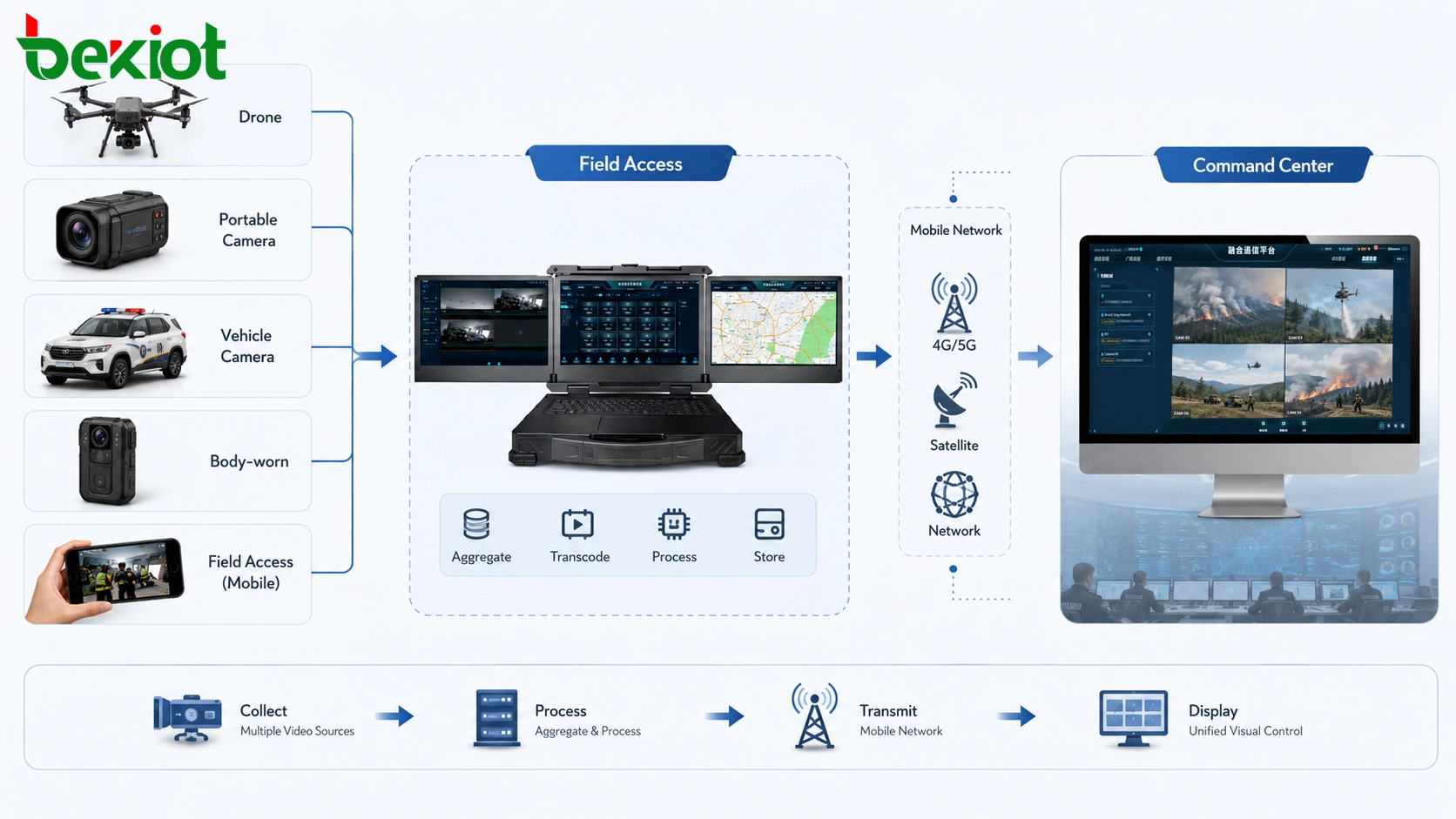
What field video is really expected to solve
Emergency video exists to support command decisions. During an incident, decision makers need to answer three practical questions: what is happening at the scene, how the situation is changing, and whether instructions can reach frontline personnel quickly enough. These questions sound simple, but real field environments are usually complex.
At the same site, several types of video and communication sources may appear at the same time. A drone may provide an aerial overview. A portable camera may monitor a fixed risk point. A body-worn video terminal may follow frontline responders. A vehicle-mounted camera may show road access, evacuation routes, or mobile command operations. Intercom audio, dispatch voice, and temporary communication links may also need to be included.
These devices often come from different manufacturers, use different transmission methods, and support different media protocols. Some may output HDMI. Some may provide IP streams. Some may use RTSP or RTMP. Some may connect through a public mobile network, private wireless network, satellite link, or ad hoc network. If these signals remain isolated, the command center receives fragmented images that are hard to view, schedule, and manage together.
Therefore, the first task of emergency field video is not only capturing the scene. It is gathering different video sources into a unified structure. Without this aggregation layer, the command center may face scattered windows, incompatible protocols, unstable feeds, and delayed operational awareness.
Why sending everything back to the command center is not always practical
A common assumption is that front-end equipment should stay as simple as possible. According to this view, all original video streams can be sent directly to the command center, and the back-end platform can handle decoding, transcoding, display, storage, distribution, and scheduling. This is the typical back-end access model.
This model is not wrong. In a stable network environment with enough bandwidth and standardized devices, centralized back-end processing can work well. It allows the command center to maintain unified platform control and avoids putting too much processing workload at the field site.
However, emergency environments often lack the two conditions that back-end access depends on. The first condition is a stable and wide return transmission link. The second condition is that field devices can directly connect to the command platform without compatibility barriers. In many real deployments, both conditions are difficult to guarantee.
The network may only have weak 4G or 5G coverage. In remote areas, disaster zones, tunnels, mountains, ports, temporary rescue points, or damaged infrastructure environments, responders may depend on satellite links or temporary self-organizing networks. Bandwidth may be limited, latency may fluctuate, and connection quality may change as vehicles, personnel, and devices move.
At the same time, field devices may not share the same standard. Different camera sources may have different bitrates, resolutions, encapsulation formats, control methods, and platform compatibility. If multiple high-bitrate streams are pushed directly into a narrow return link without processing, the result may be freezing, mosaic images, stream interruption, or total link overload.
This is where front-end video access becomes valuable. Instead of forcing all raw signals back to the command center, the field side can perform aggregation, format conversion, stream control, local display, and lightweight transmission before sending selected or optimized feeds upstream.
The front-end layer acts as the field hub
Front-end video access means placing media processing and dispatch capability closer to the incident site. This does not replace the command center. Instead, it creates a bridge between scattered field devices and the central command platform. The front-end layer receives different video inputs, normalizes them, and sends usable streams to the back end in a controlled way.
This hub role is important because emergency communication is not a single-direction workflow. The field side needs to send video to the command center, but it may also need to receive command instructions, remote video calls, platform images, GIS information, meeting content, or dispatch messages from the command center. A good front-end access design supports this two-way relationship.
In practical terms, the field access layer may support video source aggregation, protocol adaptation, transcoding, local preview, multi-screen display, low-bitrate uplink, conference collaboration, voice interconnection, and stream forwarding. These functions turn the field site from a passive video source into an active command node.
Unified aggregation reduces compatibility problems
Emergency scenes often involve mixed devices. A drone system may not use the same output method as a portable surveillance unit. A vehicle-mounted camera may not match the same protocol as a body-worn camera. Temporary video sources may be added as the situation develops. If each source is connected separately to the command center, the system becomes difficult to manage.
Front-end aggregation helps hide these differences. Video signals can be collected at the site first, then converted or repackaged into a format that the upper platform can recognize. This may include common access methods such as SIP, GB/T28181, RTMP, RTSP, HDMI capture, network stream input, and audio input, depending on the project architecture.
For the command center, the value is obvious. Instead of receiving disconnected streams from different devices and platforms, it receives cleaner and more structured video resources. These resources can be scheduled, displayed, recorded, forwarded, and shared more easily.
For field operators, aggregation also reduces complexity. They do not need to manually coordinate multiple software tools, platform windows, and protocol converters under emergency pressure. A well-designed front-end access unit can turn different incoming sources into manageable video channels.
Local display improves field command efficiency
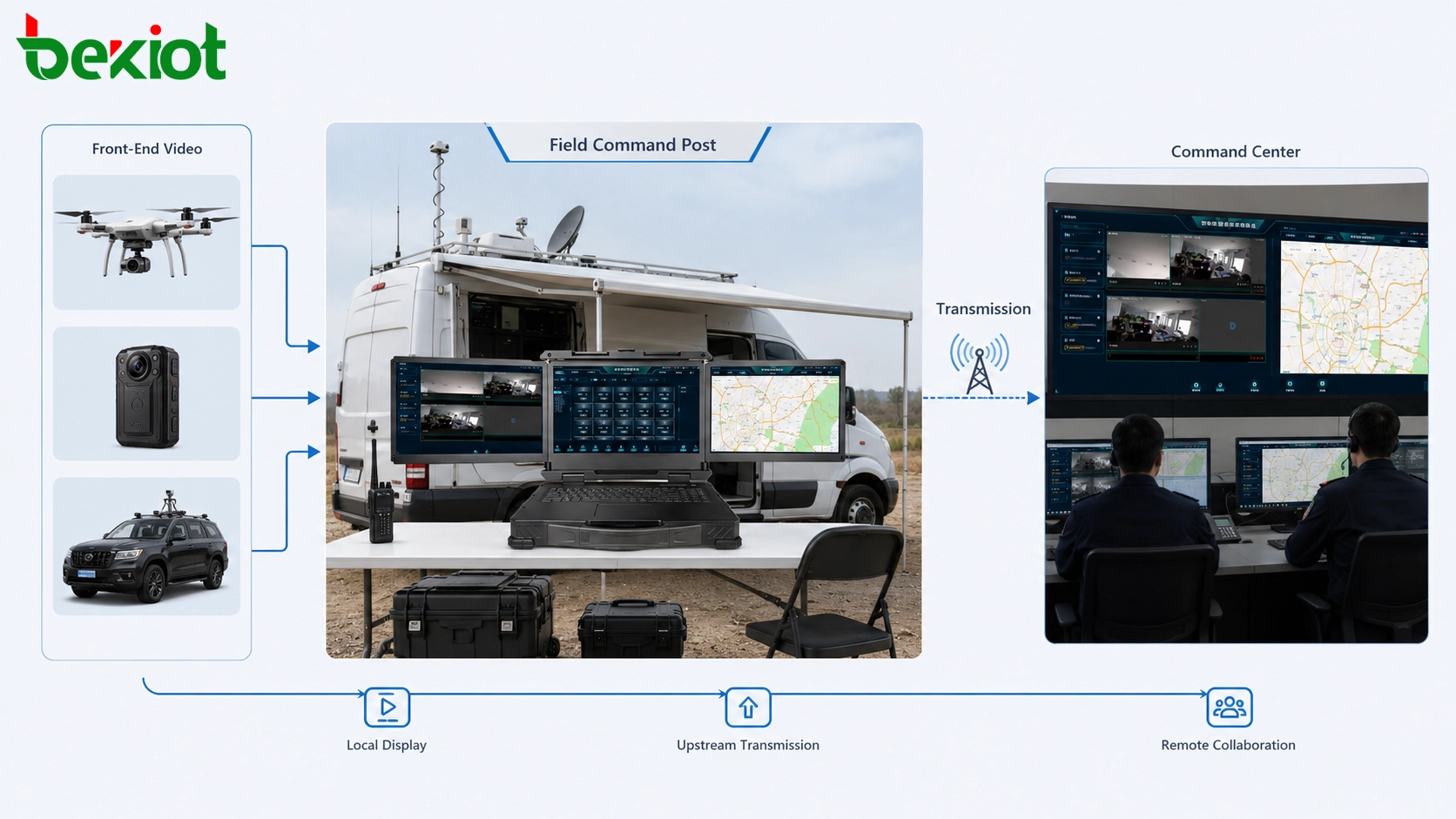
Not every video feed needs to travel to the command center before it becomes useful. In many cases, frontline commanders need to view video locally inside a temporary command post, emergency command vehicle, mobile tent, roadside control point, or incident response area.
If the video must travel to the command center first and then return to the field before local personnel can see it, response efficiency decreases. The field team may lose time waiting for remote processing, and decisions that should be made on-site may become dependent on back-end platform availability.
Front-end access allows local display and local command. Video can be shown on a portable display, command vehicle screen, field control panel, or multi-view monitoring wall. Multiple video sources can be arranged into layouts for quick situational understanding. The field team can compare aerial views, fixed camera views, vehicle views, and body-worn perspectives without waiting for back-end redistribution.
This local capability is especially valuable in time-sensitive scenarios. Fire rescue, flood control, road accidents, hazardous material response, infrastructure inspection, power grid repair, and public safety operations all require rapid visual judgment at the field level.
Low-bandwidth transmission keeps critical images available
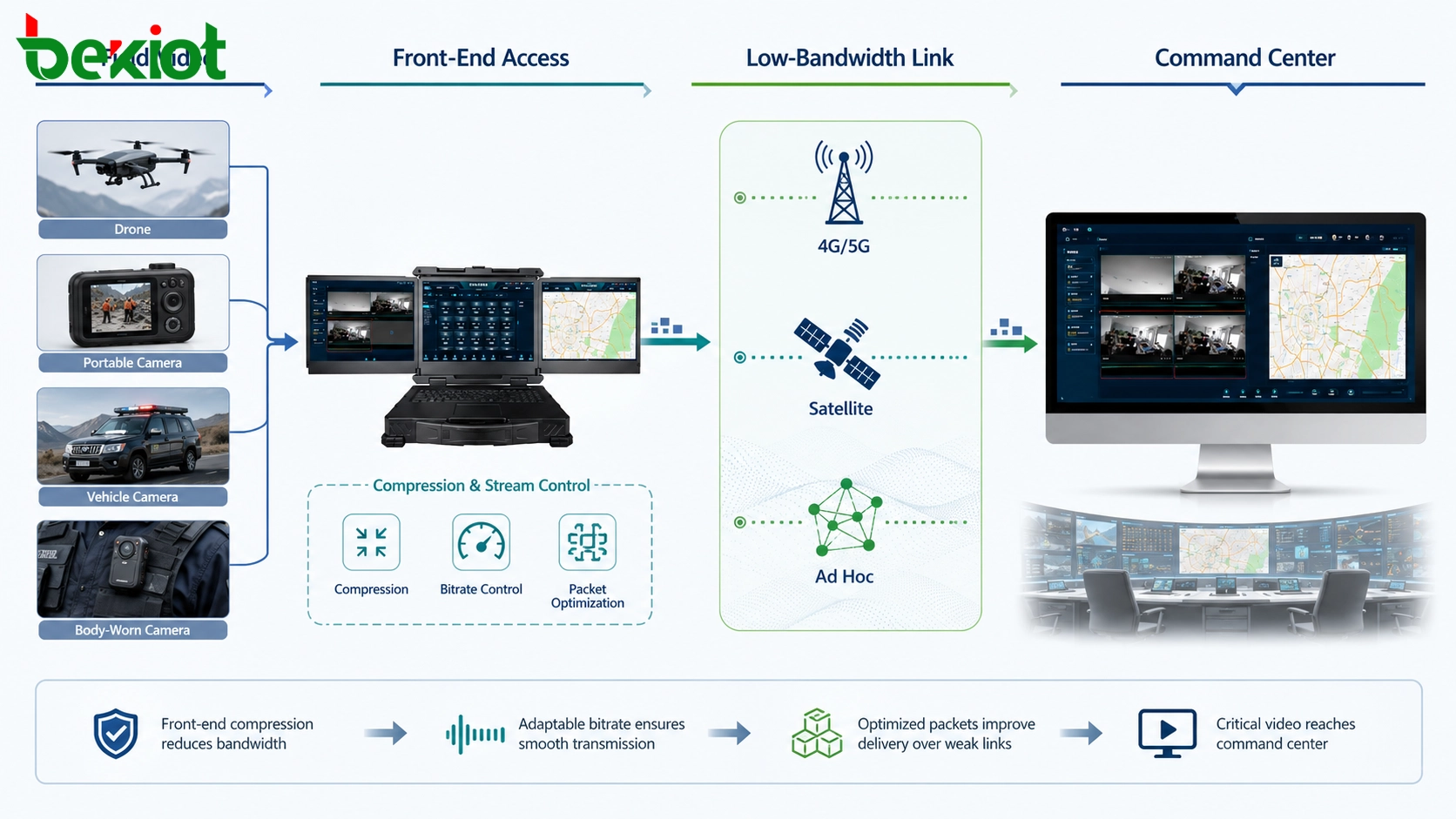
Emergency networks are often weak networks. A solution designed only for stable broadband may fail exactly when it is needed most. In a field response scenario, the available uplink may be unstable 4G, congested 5G, satellite transmission, temporary microwave, or an ad hoc network with limited capacity.
Front-end processing helps by controlling what is sent back and how it is sent. Instead of pushing every raw video stream upstream at full resolution and high bitrate, the system can compress, transcode, select, combine, or downgrade streams according to network conditions.
For example, the command center may not need every camera feed at full quality at all times. It may need one key video stream, a fused multi-view image, a low-bitrate preview, or a selected emergency channel. In weak-network environments, sending the right image at a controllable bitrate is often more important than trying to send every image at maximum quality.
This does not mean image quality is unimportant. It means the transmission strategy should match the actual network. A stable and usable low-bitrate feed is often more valuable than a high-definition feed that freezes, breaks, or never reaches the command center.
Two-way communication is more than video upload
A field video access system should not be designed as a one-way reporting channel. Emergency operations require collaboration between the frontline and the command center. The field side must upload video, but it may also need to receive instructions, remote video, meeting content, dispatch voice, and platform resources.
Two-way capability allows the command center to request specific views, guide field personnel, push back critical images, join remote consultations, or coordinate multiple teams. It also allows the field command post to pull platform resources when needed instead of waiting for manual redistribution.
This is why front-end access is often described as a connection point between the field and the back end. It carries video upward, brings command information downward, and allows both sides to work through the same visual context. In emergency response, this shared context is often more important than the camera itself.
Why a dedicated field device is often needed
Some projects may try to solve field video access by using a laptop, capture card, temporary software, multiple adapters, and manual configuration. For a short demonstration or a single controlled test, this may work. But emergency and inspection environments usually require more than “software that can run.”
Field equipment must be portable. It may need to be carried by one person, deployed from a vehicle, or moved between temporary command points. It should not rely on a fixed equipment room, stable power supply, or complex installation conditions.
It must also be durable and energy-efficient. Emergency sites may involve outdoor operation, vibration, dust, rain, heat, cold, unstable power, or long working hours. A device that works in an office may not be reliable enough for a field command environment.
Interface flexibility is another key requirement. A front-end video access unit may need to connect HDMI sources, IP cameras, network cables, audio devices, intercom systems, radio interfaces, and external displays. If the field team cannot connect the device that arrives at the scene, the system loses value.
Protocol compatibility is equally important. Emergency platforms may require SIP, GB/T28181, RTMP, RTSP, or other mainstream access methods. The field device should be able to adapt different video sources and connect upward through the protocols used by the command platform.
Finally, operation must be simple. Emergency personnel do not have time to study complicated software during a mission. Basic actions such as adding a video source, switching a layout, sending a stream upstream, displaying a feed locally, or joining a conference should be easy to complete.
Front-end and back-end roles should be clearly divided
The best design is not to ask whether all processing should happen at the front end or all processing should happen at the back end. A more practical approach is to divide responsibilities according to network conditions, site complexity, and command workflow.
The front-end side is better suited for immediate access, aggregation, format adaptation, local viewing, emergency stream control, and weak-network optimization. It handles the first layer of field complexity and makes the video usable before it enters the command platform.
The command center is better suited for overall command, cross-department coordination, long-term storage, platform-level recording, large-screen display, user permission management, event archiving, resource scheduling, and integration with wider emergency systems.
When these roles are clearly defined, the system becomes more stable. The field layer reduces chaos at the source. The command center receives standardized and manageable video resources. Operators on both sides can focus on command decisions instead of technical troubleshooting.
Typical deployment architecture
A practical emergency field video access solution usually includes four layers: video source layer, field access layer, transmission layer, and command platform layer.
Video source layer
This layer includes drones, portable cameras, body-worn video devices, vehicle-mounted cameras, temporary monitoring points, HDMI sources, mobile terminals, intercom audio, and other front-end resources. These devices provide the raw visual and audio information from the scene.
The main challenge at this layer is diversity. Devices may not have the same protocol, output interface, bitrate, resolution, or control method. Without a unified access point, the command workflow becomes fragmented.
Field access layer
This layer performs aggregation, transcoding, layout management, local display, upstream forwarding, and two-way communication. It may be deployed in a command vehicle, temporary command post, portable field box, or mobile response unit.
The purpose is to make field signals manageable before they enter the transmission link. The field access layer should reduce protocol differences, control bandwidth pressure, and provide local command visibility.
Transmission layer
This layer may include 4G, 5G, satellite, private wireless network, microwave, wired broadband, or ad hoc networking. In emergency response, the transmission layer is often the most unstable part of the system.
Because the link may be narrow or intermittent, the access system should support stream control and flexible bitrate strategies. The goal is not only high quality, but continuous availability of key visual information.
Command platform layer
The command platform receives video streams, schedules resources, records key events, supports large-screen display, and coordinates departments. It may also connect to GIS, dispatch communication, emergency alarm, video conference, and unified communication systems.
At this layer, standardization matters. If the field layer already delivers structured video streams, the command platform can focus on decision support rather than solving device compatibility problems.
Application scenarios
Emergency field video access can be used in many real-world environments. In fire and rescue operations, it helps commanders view building surroundings, evacuation routes, smoke conditions, and frontline progress. In flood control and disaster recovery, it supports aerial inspection, temporary monitoring, and remote command coordination.
In transportation incidents, the system can connect vehicle-mounted cameras, road cameras, drones, and command vehicles. In power, oil, gas, and utility inspection, it allows remote experts to view field conditions and guide maintenance teams. In public safety operations, it supports patrol, temporary control points, mobile command, and multi-team coordination.
In all these cases, the value is not only video capture. The value is making video useful under pressure, under weak networks, and across different teams and systems.
Design checklist for project planning
Before building an emergency field video access system, project teams should evaluate the real command workflow instead of only counting cameras. The following questions are useful during planning:
How many video sources may appear at the same field site?
What types of sources need to be connected, such as drones, HDMI sources, IP cameras, body-worn terminals, or vehicle cameras?
Which protocols must be supported by the command platform?
Will the field network rely on 4G, 5G, satellite, ad hoc networking, private wireless, or wired broadband?
Does the field team need local display and local command capability?
Does the command center need to send video, instructions, meetings, or platform resources back to the field?
Is low-bitrate transmission required for weak-network environments?
How quickly should the system be deployed after arriving at the site?
What level of portability, power supply independence, and environmental durability is required?
How will video streams be recorded, scheduled, stored, and managed after the incident?
Conclusion
Emergency field video access should not be treated as a minor accessory in the command chain. It directly determines whether the command center can see clearly, whether the field team can coordinate locally, and whether critical images can still be transmitted when the network is weak.
Back-end processing remains important, especially for platform-level command, recording, scheduling, and cross-department coordination. But relying only on the command center to process every raw field signal can create serious problems when the site has mixed devices, unstable links, and urgent decision-making pressure.
A front-end access layer provides the missing hub between field devices and the command platform. It gathers different video sources, converts protocols, supports local display, compresses streams for weak networks, and enables two-way collaboration. For emergency response, inspection, public safety, and mobile command scenarios, this front-end capability can make the difference between “having cameras” and “having usable visual command.”
FAQ
Should every emergency video system use front-end access?
Not every project needs the same level of front-end capability. If the site has stable bandwidth, standardized cameras, and simple monitoring needs, back-end access may be enough. Front-end access becomes more important when the site has mixed video sources, weak networks, local command needs, or temporary deployment requirements.
Can a laptop replace a dedicated field access device?
A laptop may work for testing or simple temporary use, but it is usually less suitable for real emergency operations. Field environments often require portable deployment, multiple physical interfaces, stable power options, rugged operation, simple controls, and reliable protocol adaptation.
What is the biggest risk of sending all raw video streams directly to the command center?
The biggest risk is transmission overload. Multiple high-bitrate streams can exceed available bandwidth, especially over weak 4G, 5G, satellite, or temporary networks. This may cause freezing, delay, video corruption, or stream loss during critical moments.
How does front-end access help the command center?
It gives the command center cleaner and more manageable video resources. Instead of handling many incompatible field sources directly, the command center receives standardized streams that are easier to display, schedule, record, and share.







