


Cloud computing has changed how enterprises deploy business systems, communication platforms, and collaboration tools. Cloud meetings, cloud contact centers, cloud video platforms, and other hosted services give companies a faster way to use communication applications without building everything from the ground up. However, many organizations eventually discover that a shared cloud service is not always the best long-term fit for their own business processes, security requirements, and cost-control strategy.
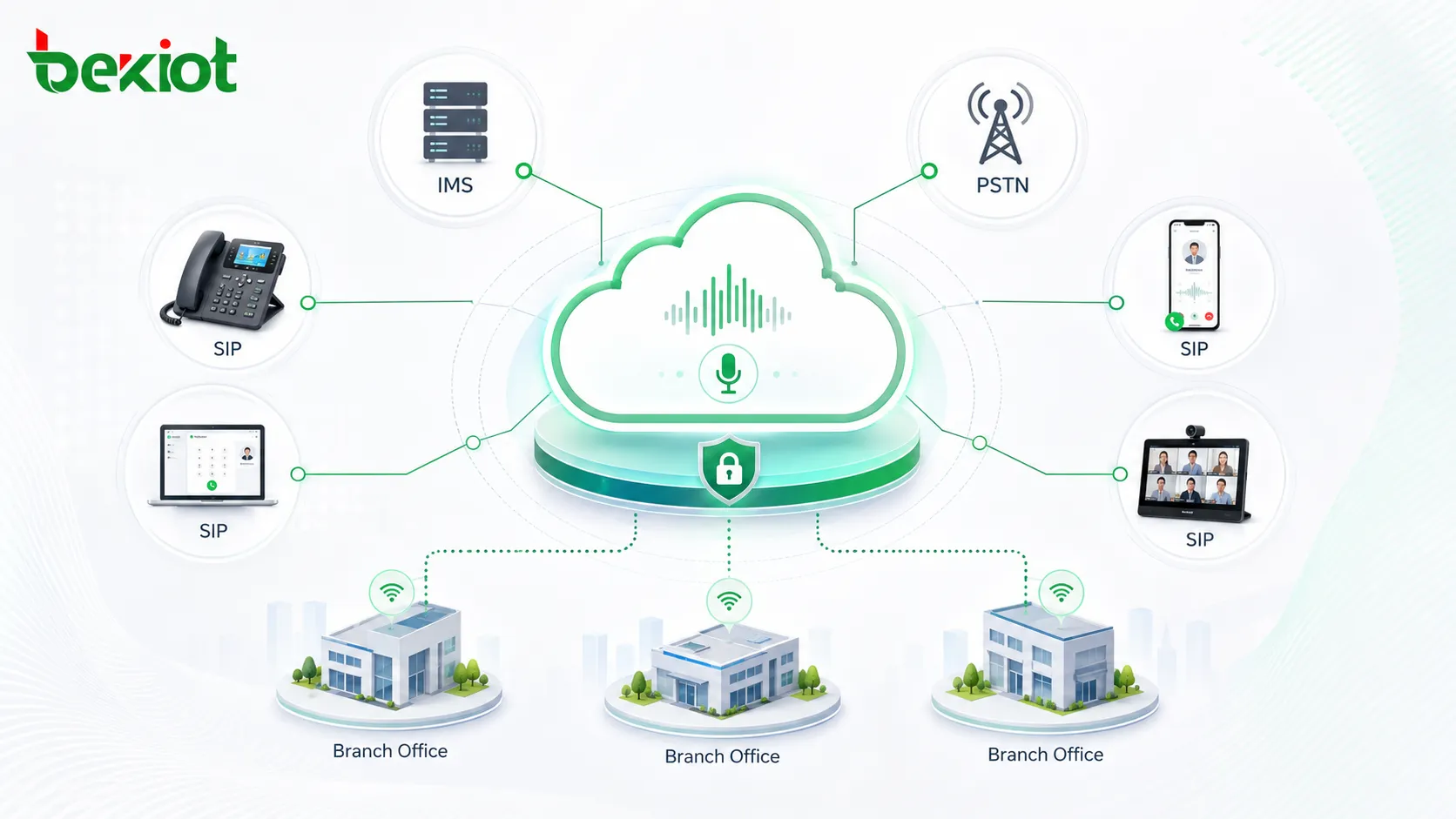
An independent cloud audio conferencing solution provides another option. Instead of renting a standard public conferencing service for every meeting, an enterprise can deploy its own audio conferencing platform on a cloud infrastructure, connect it with telecom access such as IMS and PSTN, and extend the service to offices, branches, meeting rooms, SIP endpoints, mobile users, and external participants. The company keeps more control over system ownership, service rules, expansion, cost structure, and integration with existing communication resources.
Why Enterprises Need More Than a Standard Hosted Service
Convenience can become a limitation
Hosted cloud communication services are convenient because they are ready to use, easy to subscribe to, and usually require less early-stage technical preparation. For small teams or temporary projects, this model can work well. The challenge appears when an enterprise needs deeper customization, fixed ownership, specific routing policies, integration with existing voice systems, or long-term cost predictability.
A shared service platform must serve many customers at the same time. It cannot fully adapt its core functions, management logic, access rules, and operating model for only one enterprise. Even if APIs or limited configuration options are available, the customer may still depend on the service provider’s product roadmap, pricing rules, upgrade schedule, and feature boundaries.
Long-term dependency may increase business risk
When a company relies entirely on a rented conferencing service, it may face unexpected risks during renewal, expansion, or function adjustment. Pricing may change, features may be added or removed, capacity packages may not match real usage, and key functions may remain outside the customer’s control.
For organizations that use conferencing as part of daily management, emergency communication, customer coordination, project delivery, or multi-branch collaboration, this dependency can become a hidden operational risk. A privately controlled platform helps the enterprise turn audio conferencing from a rented service into a communication asset.
A Better Deployment Model for Enterprise Control
Cloud infrastructure with private system ownership
The solution is to deploy an enterprise-owned audio conferencing system on a reliable cloud infrastructure. The cloud environment provides computing resources, network access, scalability, remote management, and flexible deployment. The conferencing platform provides meeting creation, participant access, audio mixing, meeting control, invitation, recording options, number management, and system administration.
This model is different from a traditional conferencing service rental. The enterprise owns or controls the platform logic, user rules, service configuration, access method, and integration path. It can adapt the system to its own business structure instead of changing business processes to fit a generic hosted service.
Integration with telecom voice networks
In a practical architecture, the cloud conferencing platform can connect with carrier voice resources through IMS lines, SIP trunks, PSTN gateways, or other approved voice access methods. This allows users to join conferences through traditional phone numbers, mobile phones, fixed phones, IP phones, and SIP terminals.
By combining cloud deployment with telecom-grade voice access, the enterprise can provide convenient meeting access for both internal and external participants. Internal users may join through SIP extensions or enterprise voice networks, while external participants can dial in through PSTN or authorized access numbers.
Branch offices and meeting rooms stay connected
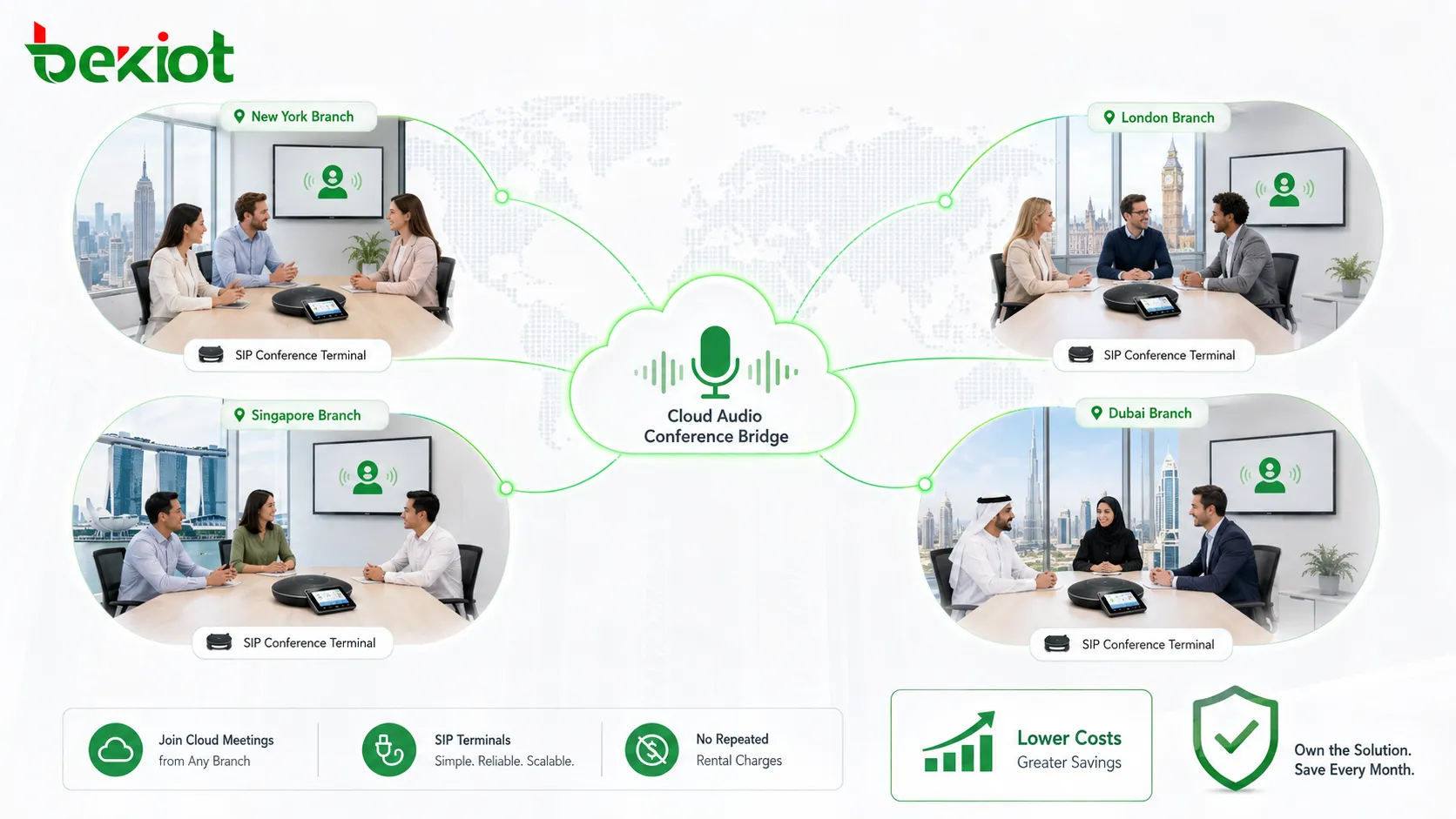
For companies with multiple offices, branches, subsidiaries, project sites, or regional teams, SIP-based conference terminals can be deployed in meeting rooms and offices. These terminals connect with the cloud conferencing platform and allow each branch to use the same meeting service.
The key value is that internal conferences between branches can be carried over the enterprise communication architecture instead of relying on repeated third-party meeting rental charges. This helps solve the long-term problem of high conferencing service fees while improving meeting availability across the organization.
Core Advantages of Independent Cloud Conferencing
Functions can follow business requirements
Every organization has its own meeting habits. Some need scheduled executive meetings, some need instant department conferences, some need external partner access, and some need emergency group calling or operator-assisted meetings. A self-controlled platform allows the enterprise to configure meeting functions according to real business requirements.
Typical capabilities may include fast meeting entry, meeting invitation, host control, participant management, password access, number management, group meeting templates, recording linkage, meeting room terminals, and integration with enterprise directories or office systems.
Existing communication resources can be reused
Many enterprises already have IP PBX systems, SIP phones, branch voice networks, PSTN access, mobile communication resources, and meeting room equipment. An independent cloud conferencing solution can be planned around these existing assets instead of forcing the company to replace them.
This improves return on investment. The solution can connect cloud conferencing, SIP endpoints, IMS/PSTN access, branch meeting terminals, and existing voice infrastructure into one practical communication workflow.
Expansion becomes more flexible
When meeting demand grows, the enterprise can expand capacity based on real usage. This may include increasing concurrent meeting rooms, participant capacity, SIP channels, PSTN access, storage resources, recording capacity, or branch endpoint coverage.
Compared with a fixed rental package, this model gives IT teams more flexibility. Capacity planning can follow actual meeting behavior, organizational growth, and seasonal business needs.
Cost structure becomes easier to control
One of the strongest arguments for independent deployment is cost control. If an enterprise frequently holds internal conferences between headquarters, branches, and departments, paying repeatedly for a rented conferencing service may become expensive over time.
With an enterprise-owned platform, internal meetings can be routed through the organization’s own voice resources where possible. Branch-to-branch communication can be designed as a low-cost or zero-call-charge internal meeting path, depending on network design and telecom access policy. This helps reduce unnecessary recurring conferencing expenses.
Security and data control are stronger
A self-controlled conferencing platform allows the enterprise to manage access rights, meeting records, administrator permissions, recording policies, participant rules, and system logs within its own governance framework. This is important for industries that handle confidential meetings, internal strategy, engineering projects, financial decisions, public service operations, or emergency coordination.
Security is not only about preventing unauthorized access. It is also about knowing who created a meeting, who joined it, how long it lasted, what access number was used, and how recordings or logs are managed after the meeting ends.
Recommended System Architecture
Cloud conferencing platform layer
The core system is deployed in a cloud environment and provides conference bridge functions, audio mixing, meeting management, user access, meeting room control, number mapping, service configuration, and system monitoring. It should support stable operation, scalable resources, and clear administrator controls.
For enterprise deployment, the platform should be planned with redundancy, monitoring, backup, and secure access policies. If meetings are business-critical, high availability should be considered from the beginning rather than added after the system becomes heavily used.
Carrier access and PSTN interconnection
To support ordinary telephone users, the platform can connect with carrier voice resources through IMS, SIP trunk, or gateway access. This makes it possible for users to dial a phone number and join a meeting through the PSTN network or mobile network.
This part of the architecture is important because not every participant will use an IP phone or softphone. External partners, mobile users, field teams, and temporary guests may still prefer standard dial-in access.
SIP endpoints for offices and meeting rooms
Office areas, conference rooms, headquarters, and branch sites can use SIP-based conference phones or IP audio terminals. These endpoints provide better meeting room audio experience than ordinary handsets and help improve voice clarity for multi-person discussions.
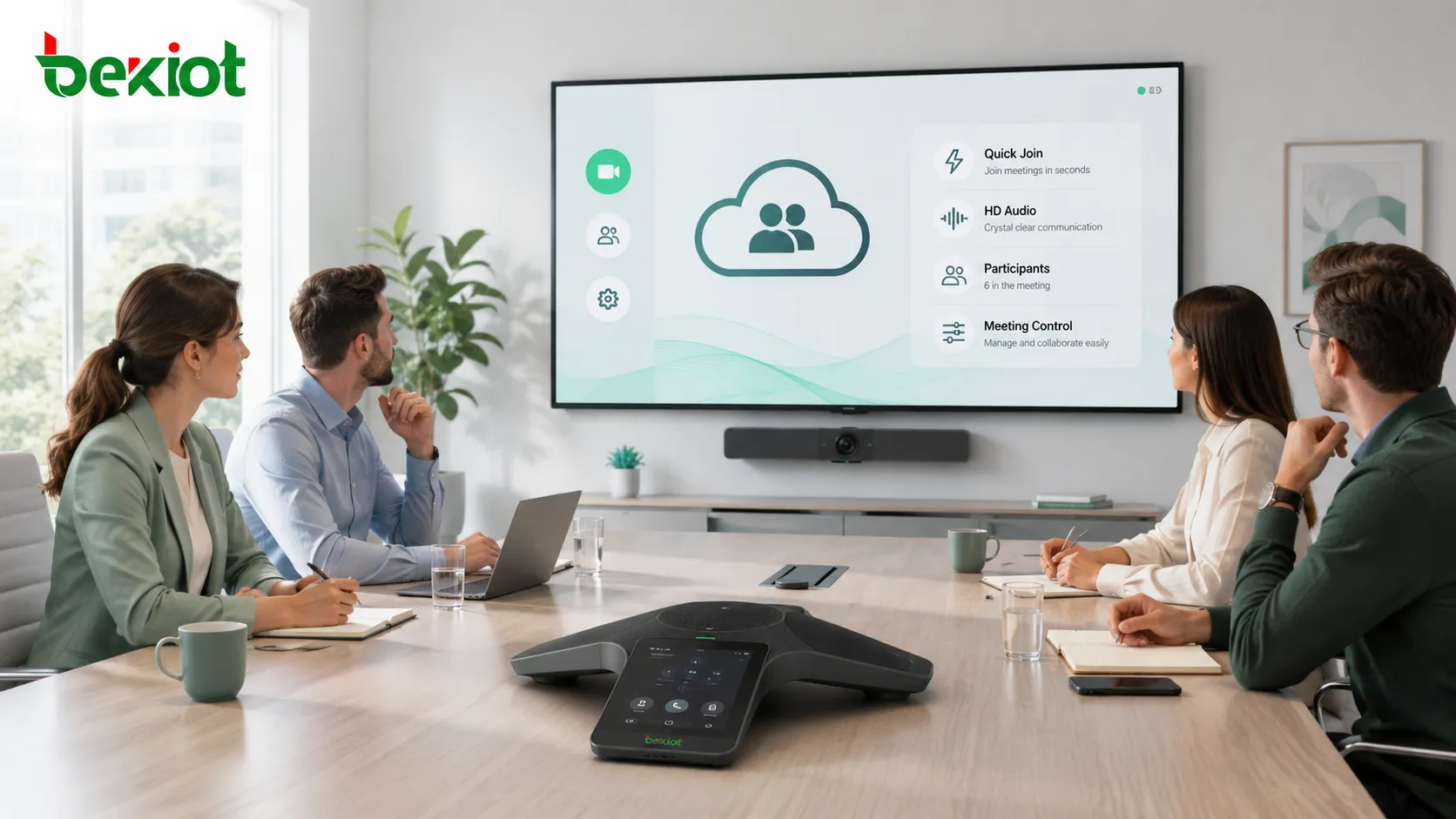
Professional conference terminals can support faster meeting entry, easier invitation, meeting control, and better compatibility with the conferencing platform. When combined with high-quality audio processing and proper network planning, the user experience can be very different from traditional low-quality telephone meetings.
Management and integration layer
For enterprise use, the conferencing system should not operate as an isolated tool. It can be connected with office automation systems, address books, scheduling platforms, identity management, CRM systems, dispatch platforms, or internal portals through APIs or integration interfaces.
This allows users to book meetings, invite participants, manage permissions, and view meeting information from a familiar business system. It also helps IT teams apply unified management policies across communication and collaboration services.
Use Cases Across the Organization
Headquarters and branch collaboration
Large enterprises often need daily communication between headquarters, regional offices, factories, warehouses, service centers, and project teams. Independent cloud conferencing gives these teams a shared voice meeting platform without depending entirely on external rental services.
This is suitable for management briefings, sales coordination, production scheduling, engineering updates, financial reporting, supplier communication, and cross-regional project meetings.
Meeting room modernization
Many meeting rooms still rely on ordinary speakerphones, mobile phones, or temporary conference services. By adding SIP conference terminals and connecting them to a cloud conferencing platform, the enterprise can improve room-based meeting quality and make meetings easier to start.
Users can enter meetings faster, invite other participants more conveniently, and benefit from clearer audio. This is especially useful for regular department meetings and multi-branch discussions where voice quality directly affects meeting efficiency.
External partner and customer communication
Enterprises often need to invite suppliers, customers, service partners, consultants, or external experts into audio meetings. PSTN dial-in access and controlled invitation rules make this possible without requiring every participant to install software or use the same collaboration platform.
The system can define temporary access codes, host permissions, meeting passwords, and external number policies to keep external communication convenient and manageable.
Emergency coordination and operational meetings
When urgent issues happen, a phone-based conference can be faster than organizing a video meeting or waiting for all users to log into a software platform. A cloud-based enterprise conference bridge can quickly connect leaders, dispatchers, technicians, field teams, and support departments.
For industrial sites, public service organizations, logistics networks, energy facilities, and distributed operation teams, this quick voice coordination capability can improve response speed and reduce communication delay.
Audio Experience and Meeting Control
Professional terminals improve voice quality
Audio quality is one of the most important differences between a basic phone call and a professional conferencing solution. Dedicated conference terminals can provide stronger pickup capability, clearer speaker output, better echo control, and a more suitable experience for meeting room participants.
When the cloud platform, SIP terminal, codec strategy, and network environment are properly matched, the system can support high-definition voice quality and make remote meetings easier to understand.
Meeting functions should be easy to operate
A good enterprise conferencing platform should make meeting organization simple. Users should be able to join quickly, invite participants, control the meeting, mute or unmute users, manage access, and end the meeting without complex steps.
For administrators, system management should include number planning, permission management, user grouping, meeting policy configuration, capacity monitoring, and log review. This ensures that the platform remains both user-friendly and controllable.
Audio mixing affects real meeting experience
The conferencing platform should provide reliable multi-party audio mixing. Poor mixing can lead to delay, unclear speech, interrupted conversation, or an unnatural meeting experience. Professional audio mixing helps participants speak and listen more naturally, especially when several meeting rooms and remote users are connected at the same time.
This is one of the reasons why an enterprise-grade platform can provide a different experience from traditional telephone conferencing. It is not only about connecting more people; it is about making the meeting sound clear, stable, and manageable.
Deployment Planning for IT and Communication Teams
Evaluate current voice infrastructure first
Before deployment, the enterprise should review existing IP PBX systems, SIP trunks, PSTN lines, IMS access, branch networks, conference rooms, endpoint models, firewall policies, and user groups. This helps determine how the cloud conferencing platform should connect to the current environment.
A clear assessment also helps identify which meetings can be kept inside the enterprise voice network, which users require PSTN access, and which branches need dedicated SIP conference terminals.
Design capacity around real meeting behavior
Capacity planning should consider simultaneous meetings, peak participant count, branch usage, dial-in traffic, SIP channel demand, recording needs, and expected future growth. A system designed only for average usage may become insufficient during management meetings, company-wide briefings, or urgent events.
Flexible expansion is one of the advantages of cloud deployment, but expansion should still follow a planned architecture. Server resources, bandwidth, telecom access, and security policies must grow together.
Protect access and administration
Security planning should include administrator accounts, user permissions, meeting passwords, external participant rules, recording access, management interface protection, log retention, and backup policy. For sensitive industries, the system may also need stricter authentication and audit controls.
The purpose is to make the platform convenient without making it uncontrolled. Users should be able to hold meetings easily, while IT teams should still know how the platform is used and how communication resources are protected.
Test the complete call path
Testing should cover internal SIP calls, PSTN dial-in, IMS/SIP trunk access, branch endpoint registration, conference room terminal operation, meeting invitation, audio quality, participant control, recording, failover, and abnormal hang-up scenarios.
Only end-to-end testing can confirm that the cloud platform, telecom access, SIP endpoints, and enterprise network work together correctly.
Product Fit and Solution Recommendation
For organizations that are modernizing SIP communication, IP PBX systems, branch voice networks, dispatch platforms, or enterprise meeting rooms, Becke Telcom can be considered as a lightweight solution partner for SIP endpoint access, gateway interconnection, voice integration, and enterprise communication deployment.
The best result comes from matching the cloud conferencing platform with the customer’s existing communication architecture. A well-planned solution can reduce conferencing service costs, improve meeting room audio quality, support flexible expansion, and give the enterprise stronger control over communication resources.
Conclusion
An independent cloud audio conferencing solution gives enterprises a practical balance between cloud flexibility and private system control. It keeps the convenience of cloud deployment while avoiding the limitations of relying entirely on a shared rented service.
By deploying a controlled conferencing platform in the cloud, connecting it with IMS/PSTN access, extending it to SIP meeting terminals, and integrating it with existing communication resources, enterprises can build a more flexible, lower-cost, secure, and high-quality meeting system. For organizations with frequent internal meetings, multiple branches, long-term conferencing needs, or strict communication management requirements, this model is a strong alternative to traditional conference service rental.
FAQ
Is an independent cloud conferencing platform suitable for small companies?
It is usually more valuable for medium and large organizations with frequent meetings, multiple branches, or recurring conferencing expenses. Small teams with limited usage may still prefer a standard hosted service until their meeting volume grows.
Can external users join without installing software?
Yes. If the platform is connected with PSTN or carrier voice access, external users can join by dialing a conference number. This is useful for customers, suppliers, consultants, and temporary participants who do not use the company’s internal communication system.
What is the difference between cloud deployment and a public conferencing rental service?
Cloud deployment means the conferencing system runs on cloud infrastructure, but the enterprise can control the platform, configuration, access rules, and integration. A public rental service is usually shared by many customers and offers less control over customization and ownership.
How can enterprises reduce meeting costs with this model?
Cost reduction mainly comes from routing internal meetings through enterprise voice resources, reusing existing SIP infrastructure, reducing recurring rental fees, and planning capacity according to actual usage instead of buying fixed service packages that may not match demand.
What should be prepared before starting deployment?
The enterprise should prepare network topology, voice access information, SIP trunk or IMS details, endpoint inventory, branch office requirements, security policies, expected meeting capacity, administrator roles, and integration requirements with office or business systems.







