


A modern command dispatch system is no longer limited to voice communication, radio dispatch, map positioning, or task coordination. In emergency response, public safety, transportation, industrial parks, smart campuses, utilities, and field command scenarios, video has become one of the most important sources of situational awareness.
To support faster decision-making, a dispatch platform needs to integrate many different video resources, including surveillance cameras, NVR systems, drones, mobile deployment cameras, body-worn cameras, SIP video phones, video conferencing systems, ad hoc network terminals, and HDMI encoder or decoder devices. The challenge is that these resources often use different protocols, different codecs, and different access methods.
Why Video Convergence Matters
In a real dispatch project, video resources are rarely generated by one system. A city command center may need access to public surveillance cameras, mobile enforcement devices, vehicle-mounted cameras, drone footage, conference room cameras, and temporary field video. An industrial site may need to combine CCTV, inspection terminals, security posts, emergency phones, and mobile rescue teams.
If each video source remains isolated, dispatchers must switch between many systems. This slows down response and increases the risk of missing important information. A video convergence gateway or video access platform solves this problem by receiving, converting, managing, and forwarding different video streams to the command dispatch system.
The goal is not only to display more video windows. The real value is to connect video with command workflows: incident verification, emergency dispatch, remote consultation, field coordination, evidence review, alarm confirmation, and cross-department collaboration.
Surveillance Platforms and Camera Systems
Video surveillance is usually the first resource that a command dispatch system needs to integrate. Existing monitoring platforms, NVRs, DVRs, IP cameras, and camera management systems often contain the most complete visual information for fixed locations.
A suitable video access gateway should be able to connect to different surveillance resources and obtain camera directory structures where supported. This allows the dispatch platform to browse camera lists, select channels, call up live video, and access related control functions more easily.
In professional projects, basic video display is not enough. The gateway should also support functions such as PTZ control, alarm information access, voice intercom, and stream format conversion. Without these capabilities, the dispatch system may only see a video image but cannot fully operate the monitoring resource.
Protocol Compatibility Is a Core Requirement
Different video systems may use different protocols, such as GB/T 28181, RTSP, RTMP, ONVIF, SIP, private platform SDKs, or API-based access. A command dispatch system usually cannot directly develop and maintain all these interfaces by itself.
This is why protocol adaptation is one of the most important roles of a video convergence gateway. The gateway receives video streams from different sources, converts them into the format required by the dispatch platform, and reduces the integration workload for the project team.
Codec compatibility is also important. Some surveillance systems use H.265 to reduce bandwidth and storage, while dispatch terminals, web clients, SIP phones, or video conferencing systems may require H.264 or another compatible stream format. The gateway should therefore support transcoding, format conversion, and stream parameter adjustment when needed.
Drones Are Now Essential Field Resources
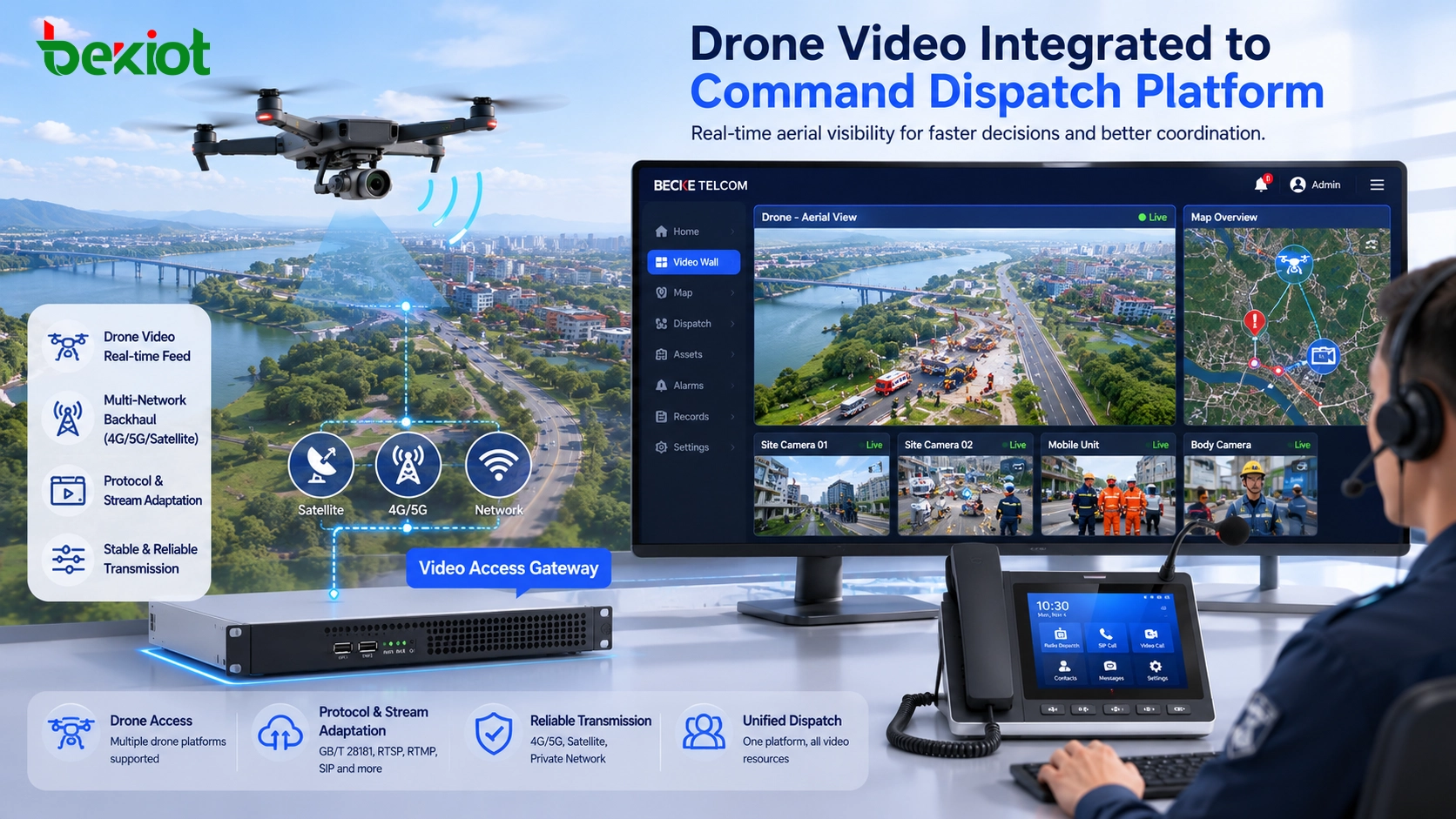
Drone video has become a necessary resource in emergency response and command dispatch projects. Drones can quickly provide aerial views of disaster sites, traffic incidents, fire scenes, flood areas, industrial parks, construction sites, and large public events.
However, drone integration is not simply a matter of receiving one live stream. Different drones may come from different manufacturers and may use different platforms, transmission links, control methods, and output formats. Some projects need to integrate enterprise drones, consumer drones, FPV drones, fixed-wing UAVs, hybrid-wing UAVs, and third-party drone management platforms.
A video access gateway used in dispatch projects should therefore support flexible drone video access. It should be able to receive drone feeds, convert video formats, forward streams to the dispatch platform, and support future expansion when new drone systems are introduced.
Mobile Deployment Cameras and Portable Video Units
Mobile deployment cameras are commonly used in temporary field operations. They may be placed at emergency sites, traffic control points, construction areas, temporary checkpoints, or public event locations. These devices can quickly provide video coverage where fixed cameras are not available.
In many projects, mobile deployment cameras can be connected through GB/T 28181, RTMP, or other streaming methods. The video access gateway should not only receive the stream, but also convert it for use by the command dispatch platform, video conferencing system, or other connected systems.
This capability is valuable because temporary events often require fast deployment. A field camera may need to send video back to the command center, share the image with a conference room, and provide evidence for later review. A flexible gateway can make these workflows easier to implement.
Body-Worn Cameras and Mobile Recorders
Body-worn cameras and mobile recorders are important in public safety, law enforcement, emergency rescue, security patrol, and field inspection scenarios. They provide first-person video from the scene and help dispatchers understand what is happening from the field user’s perspective.
Many body-worn camera systems use GB/T 28181 or platform-based access methods. After being connected to the video access gateway, their streams can be converted and delivered to the command dispatch system, video conference system, or other management platforms.
For deeper integration, API capability is also important. The dispatch system may need to query device status, user information, location, online status, video stream address, recording information, or event records. A gateway with rich API support can make body camera integration more useful than simple live viewing.
SIP Video Phones and Visual Communication Terminals
SIP video phones are also important video resources in dispatch environments. They can be used in command rooms, security posts, gate stations, duty rooms, emergency call points, nurse stations, and industrial communication areas.
A video convergence gateway should support SIP protocol so that it can connect with video phones directly or through a SIP-based communication system. This allows different systems to make video calls, access video images, and coordinate with other visual resources such as surveillance cameras or drone feeds.
For example, a dispatcher may need to call a SIP video phone at a site entrance while also viewing nearby camera footage. In another scenario, the system may need to push a drone image or monitoring image into a video communication workflow. SIP compatibility makes these use cases more practical.
Conference Cameras and Meeting Room Video
Video conferencing cameras are often used in meeting rooms, command rooms, mobile command vehicles, and emergency consultation spaces. These cameras can capture discussions, expert consultations, and command meetings that may need to be connected with the dispatch platform.
By connecting conference cameras through a video access gateway, their images can be converted into formats suitable for the dispatch system. This makes it possible to bring meeting room video into a command interface, share it with field units, or combine it with other video resources during an emergency response.
This is especially useful for command vehicles and emergency command centers. A meeting room camera can become part of the broader visual command system instead of remaining inside a separate video conference platform.
Video Conferencing Terminals and Cross-System Meetings
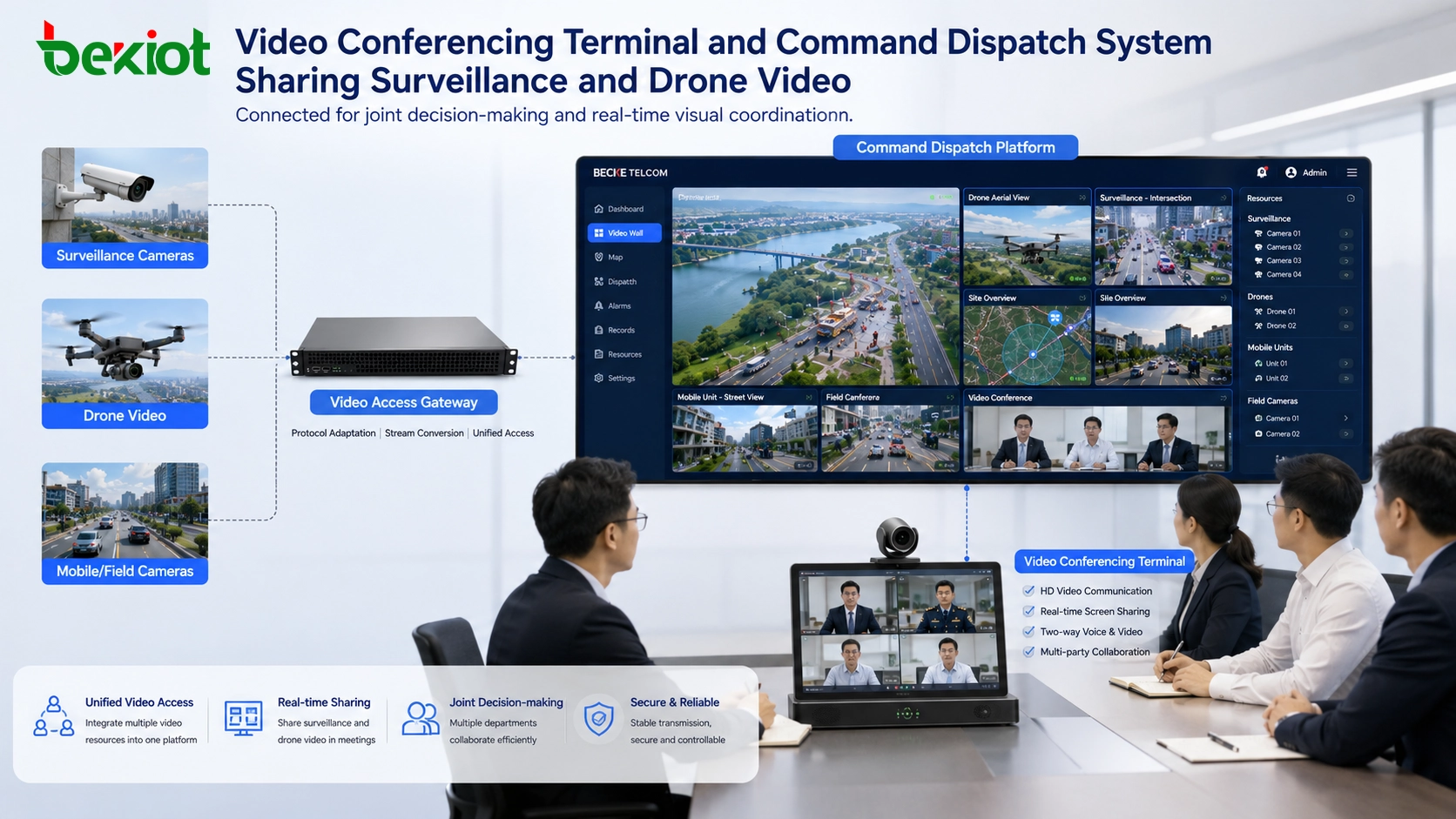
Video conferencing terminals are another resource that should be considered in video convergence projects. Many organizations already use SIP-based or platform-based video conferencing systems. These terminals may need to communicate with the command dispatch system during emergency meetings or joint operations.
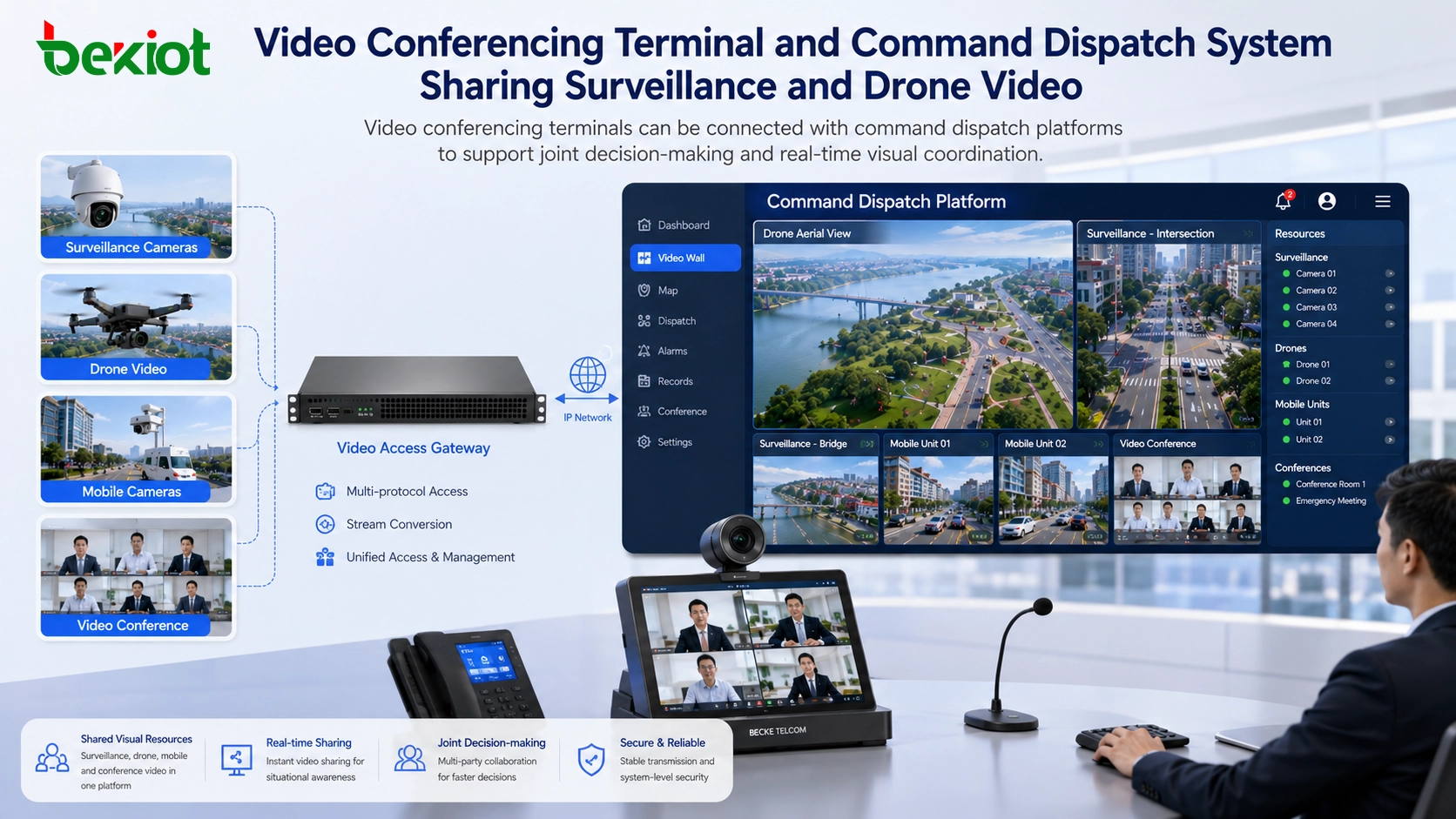
A suitable gateway can help connect video conferencing terminals with the dispatch platform and convert video parameters according to project requirements. It can also support cross-system communication, allowing monitoring images, drone video, and field video resources to be shared into a conference environment.
This turns the conference system from a simple meeting tool into part of the command workflow. During an incident, experts, leaders, dispatchers, and field operators can view the same video resources and coordinate more efficiently.
Ad Hoc Network and Individual Field Terminals
In emergency scenes where public networks are unavailable or unstable, broadband ad hoc networks and individual field terminals are often used for temporary audio and video communication. These terminals can provide mobile video, voice, and field information from rescue teams or inspection groups.
A video access gateway can help bring these terminal feeds into the dispatch system. This is important because field terminals often operate in a separate network environment. Without gateway integration, their video may remain inside a temporary field network and cannot be used by the command center.
When connected properly, individual terminals can become real-time visual sensors for the dispatch platform. This helps break information silos and supports faster coordination between command centers and field teams.
HDMI Encoders, Decoders, and Legacy Video Sources
Some video resources do not come from network cameras or standard platforms. They may come from HDMI output devices, legacy video systems, laptops, medical equipment, industrial control screens, display walls, or specialized field equipment.
In these cases, encoders and decoders can be used to convert HDMI input and output into network streams. The video access gateway can then process these streams and deliver them to the command dispatch platform.
This capability is useful in complex projects because not all valuable video information is produced by a standard IP camera. Sometimes the most important image may come from a drone controller, a conference computer, a vehicle terminal, a radar display, or a specialized industrial system.
API Integration Creates Deeper System Value
A video gateway should not only receive and forward streams. In many command dispatch projects, API integration is necessary for deeper system coordination. The dispatch platform may need to obtain device lists, status information, stream URLs, alarm messages, PTZ control commands, recording data, or user information.
With proper API support, video resources can be integrated into real workflows. For example, when an alarm occurs, the system can automatically call the nearest camera. When a drone arrives at the scene, its live stream can appear in the incident page. When a body camera user reports an event, the dispatch platform can open the related live video and location information.
For projects that involve SIP communication, emergency dispatch, video gateways, paging, and multi-system linkage, Becke Telcom can be considered as a light solution reference when planning converged communication and command-center integration.
How to Choose the Right Video Access Architecture
The right architecture depends on project scale, video source types, protocol diversity, bandwidth, storage requirements, and dispatch workflow. A small project may only need camera access and basic stream conversion. A larger emergency command platform may need surveillance, drones, body cameras, conferencing, ad hoc terminals, and API-based platform integration.
Before selecting a gateway or platform, the project team should list all current and future video resources. It should confirm which devices use GB/T 28181, which use RTSP or RTMP, which require SIP, which need transcoding, and which require API integration.
The system should also consider output requirements. Video may need to be delivered to a dispatch platform, large screen, video conference system, mobile app, SIP video phone, recording server, or third-party platform. A good video convergence design should support both input diversity and output flexibility.
Practical Value for Command Dispatch Projects
Video convergence is important because command work depends on reliable information. Voice reports are still useful, but visual confirmation can greatly improve judgment. A dispatcher who can see the incident site, drone view, mobile camera, body camera, and conference room image has a stronger basis for decision-making.
The real value is workflow integration. Video should support alarm verification, command discussion, field rescue, remote expert consultation, evidence review, resource coordination, and emergency response. It should not remain isolated in different platforms.
A well-designed video convergence solution allows a command dispatch system to integrate more video resources, reduce system switching, simplify project development, and improve emergency coordination. As visual communication becomes more important, video access capability will become a key part of command dispatch system design.
FAQ
Does every video source need to be connected in the same way?
No. Different devices may require different access methods, such as GB/T 28181, RTSP, RTMP, SIP, SDK, HDMI encoding, or API integration. The gateway should be selected according to the actual video source types.
Why is transcoding important in video convergence?
Transcoding is important because cameras, drones, conferencing terminals, and dispatch platforms may not use the same codec or stream format. Transcoding helps convert video into a format that the target system can display or forward.
Can drone video be shared into a video conference?
Yes. If the gateway can receive the drone feed and output a compatible stream, the drone image can be shared with a video conference system, dispatch platform, or command-center screen.
What should be tested before project acceptance?
The project team should test live viewing, stream delay, multi-channel access, PTZ control, alarm linkage, API calls, video forwarding, codec conversion, network recovery, and display compatibility across all target systems.
How should bandwidth be planned for video dispatch?
Bandwidth should be planned according to the number of simultaneous streams, resolution, frame rate, codec, viewing terminals, forwarding paths, and recording requirements. Emergency projects should also consider peak usage during major incidents.







