


A Command and Dispatch System is designed for situations where communication must be faster, clearer, and more coordinated than ordinary telephone calling. In industrial plants, transportation hubs, energy sites, campuses, emergency centers, tunnels, ports, and public facilities, operators often need to understand an event, contact the right people, issue instructions, activate broadcasts, check video, record the process, and track the result within a short time. If these actions are scattered across separate phones, radios, intercoms, video systems, alarm panels, and spreadsheets, response efficiency becomes limited.
The value of a command and dispatch platform is that it turns communication into an organized operational workflow. It connects operators, field terminals, paging zones, emergency phones, intercom points, mobile users, radio gateways, alarm inputs, video feeds, maps, and event records into one command environment. A platform such as the Becke Telcom BK-RCS Command and Dispatch System can be used as a centralized dispatch layer, helping users handle daily communication, emergency response, multi-party coordination, and cross-system linkage from one unified interface.
Related solution: Command and Dispatch Solution
How the system works
Event input and communication access
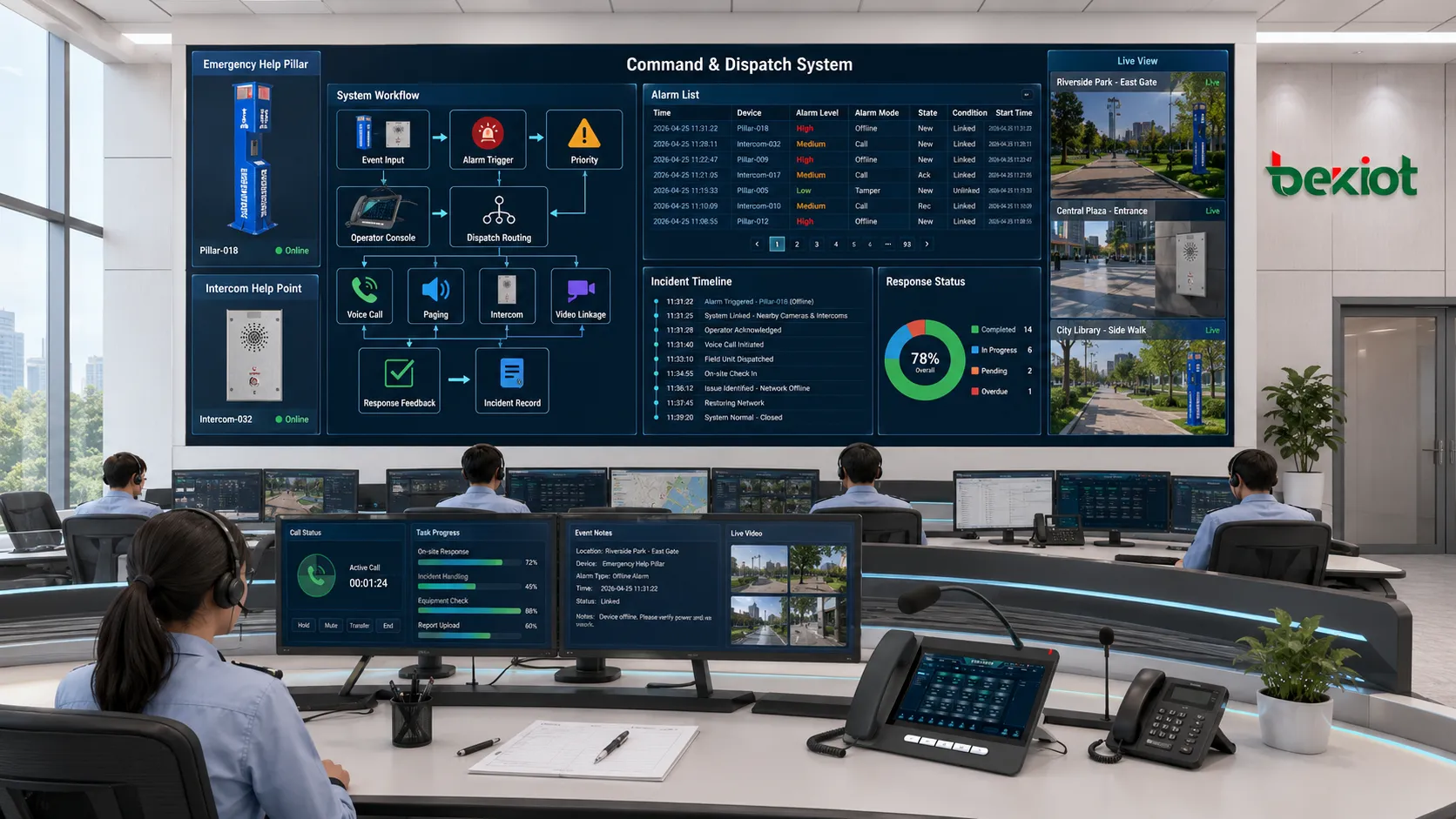
The working process begins when a communication request or operational event enters the system. This may be a voice call from an IP phone, an emergency call from a help point, an alarm trigger from a sensor, a paging request from a microphone, a video event from a surveillance platform, a radio call through a gateway, or a manual command from an operator console. The system receives these inputs and identifies their source, type, priority, and destination.
This access layer is important because real sites usually contain mixed communication resources. A control room may need to communicate with fixed telephones, rugged field phones, intercom terminals, paging speakers, radio users, mobile clients, SIP extensions, and external lines. The dispatch platform acts as the coordination point that brings these different resources into one controllable workflow.
Event classification and priority judgment
After the system receives an event, it classifies it according to configured rules. A routine call, emergency help request, alarm linkage, group dispatch, supervisor call, broadcast task, or maintenance notification should not be handled with the same priority. The platform needs to decide whether the event is ordinary, urgent, critical, or related to a predefined emergency plan.
Priority judgment affects what happens next. A high-priority alarm may interrupt lower-priority communication, trigger an emergency paging zone, display a pop-up on the dispatch screen, call duty personnel, and start recording. A routine maintenance call may simply enter the operator queue or be routed to a department. This priority mechanism keeps critical communication from being buried under daily traffic.
Dispatch routing and resource selection
Once the event is understood, the system routes it to the right resource. This may involve calling one extension, launching a group call, opening a conference, connecting to a radio channel, sending a paging broadcast, notifying a mobile team, or transferring the event to another command level. The operator may select the target manually, or the platform may follow preset routing rules.
Good dispatch routing depends on accurate resource organization. Users, groups, departments, stations, paging zones, intercom points, emergency phones, cameras, and field teams should be clearly named and mapped. When an operator sees an event, they should be able to quickly select the correct response object without searching through confusing device codes.
Command execution and feedback
After dispatch action is executed, the system should provide feedback. The operator needs to know whether the call was connected, whether the paging message played, whether the field team acknowledged the task, whether the alarm was handled, and whether the event has been closed. Without feedback, dispatch becomes uncertain.
A complete command and dispatch workflow should include status updates, communication records, event notes, recording files, task progress, escalation records, and closure information. This turns the platform from a calling tool into a command management system.
Core system architecture
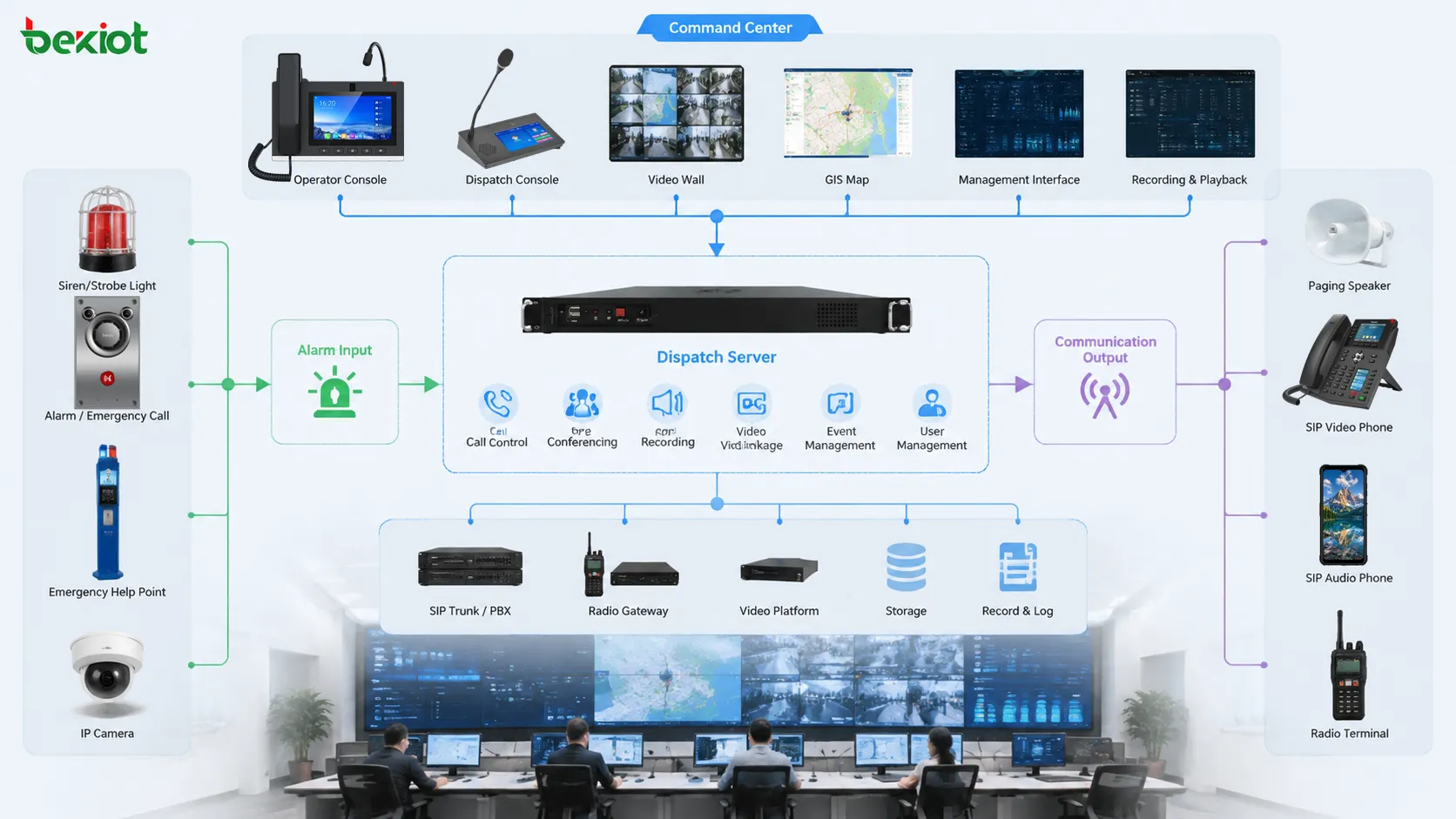
Dispatch server and platform core
The dispatch server is the central processing unit of the system. It manages user registration, call control, group communication, recording, routing rules, permissions, alarm linkage, event logs, and platform interfaces. In a BK-RCS-based deployment, this core layer can be used to organize communication resources and connect dispatch actions with operational workflows.
The platform core should be stable, scalable, and easy to manage. It needs to support daily communication as well as sudden event peaks. In emergency scenarios, several calls, alarms, broadcasts, and operator actions may occur at the same time. The server architecture should therefore consider capacity, redundancy, network reliability, storage, and maintenance access.
Operator console and visual interface
The operator console is where command work happens. It may include a touchscreen dispatch panel, desktop software, web console, physical keys, headset, microphone, video window, alarm list, contact directory, map view, and recording control. The interface should help operators find people, understand events, and act quickly.
A good console is not only a list of numbers. It should provide visualized groups, call status, online status, alarm location, related cameras, paging zones, task status, and historical records. Operators should be able to perform frequent actions such as call, transfer, group call, monitor, conference, broadcast, and record with minimal steps.
Field terminals and communication endpoints
Field endpoints are the devices used by people and locations outside the command center. They may include IP phones, industrial telephones, emergency call boxes, intercom terminals, SIP speakers, paging microphones, mobile clients, radio handsets, control posts, gate devices, and duty room phones. These endpoints allow the dispatch system to reach the actual operating site.
Endpoint selection should match the environment. A quiet office may use a normal IP phone. A factory workshop may need a rugged phone or paging terminal. A public help point may need one-button calling. A tunnel or outdoor yard may need waterproof and highly visible equipment. The dispatch platform becomes effective only when the field terminals are suitable for their locations.
Integration interfaces
Modern command and dispatch systems often need to integrate with other platforms. These may include alarm systems, video surveillance, access control, public address, GIS maps, building management, fire alarm, radio systems, maintenance platforms, and third-party emergency systems. Integration allows the dispatch platform to respond to events rather than only handle manual calls.
Interfaces may use SIP, APIs, relay input, webhooks, database exchange, serial protocols, or middleware. The integration method depends on the existing systems. The key requirement is that the dispatch platform receives useful event information and can trigger appropriate communication actions.
Technical characteristics
Unified communication access
A major characteristic of the Command and Dispatch System is unified access. It brings multiple communication methods into a single operating interface. Operators do not need to switch between separate phone systems, radio systems, paging systems, and intercom systems for every action. This reduces time loss and operational complexity.
Unified access is especially important in mixed environments. Many industrial and public facilities still use a combination of SIP phones, analog devices, radios, paging speakers, emergency phones, mobile users, and external lines. A dispatch platform should allow these resources to be organized into groups, roles, locations, and response workflows.
Real-time call control
Command and dispatch work requires real-time call control. Operators may need to call one person, call a group, transfer a call, hold a call, join a call, create a conference, interrupt lower-priority communication, or connect emergency channels quickly. These actions should be available from the dispatch console without complicated procedures.
Real-time control also requires visible status. Operators should know which users are online, which lines are busy, which calls are active, and which groups are available. Status visibility helps avoid blind calls and improves dispatch accuracy.
Priority and emergency override
Priority control is one of the most important technical characteristics. In daily operation, many communication tasks may occur at the same time. During an emergency, critical instructions must take precedence. The system should support priority levels for emergency calls, alarm-triggered dispatch, supervisor commands, public address, and group communication.
Emergency override can ensure that critical messages are delivered even when routine communication is active. For example, an emergency broadcast may need to interrupt background audio, or a command call may need to reach a duty group immediately. Priority design should follow the organization’s safety and response procedures.
Group communication and conference dispatch
Dispatch often involves multiple people. A single event may require security, maintenance, operation, management, and field staff to communicate together. Group calling and conference dispatch allow the operator to connect several users or departments quickly.
Group communication can be preset by department, location, role, emergency plan, or duty schedule. For example, a power fault group may include electrical maintenance, control room staff, and supervisors. A tunnel incident group may include traffic control, field patrol, fire safety, and public address operators. Preset groups reduce response time.
Recording and traceability
Recording is a key feature for dispatch systems. Calls, conferences, paging messages, emergency instructions, and event handling can be recorded and linked to the incident timeline. This supports later review, training, accountability, and compliance.
Traceability should include more than audio files. The system should record who initiated the action, who answered, when the call started, when it ended, what alarm was linked, which operator acknowledged it, and how the event was closed. This turns communication into a documented process.
Operational characteristics
Fast decision support
The system should help operators make decisions quickly. This requires clear event information, visible resource status, location data, communication shortcuts, and recommended response options. A dispatch interface that only shows many buttons without context may slow the operator during an incident.
Fast decision support depends on how well information is organized. Alarm location, related camera, responsible team, previous records, and available communication channels should be presented together where possible. The operator should not need to search multiple systems before acting.
Cross-department coordination
Many incidents are not limited to one department. A security event may require guards, access control, video review, and management notification. An equipment fault may require maintenance, production control, and safety supervision. An emergency evacuation may require public address, command staff, field responders, and external support.
The dispatch system supports coordination by bringing these departments into the same communication workflow. It can call groups, create conferences, notify supervisors, and record actions. This reduces fragmented communication and helps everyone work from the same event context.
Location-based command
In large sites, location is as important as the event itself. Operators need to know where the call comes from, which camera is nearby, which paging zone covers the area, which team is closest, and which route should be used. Location-based command improves response accuracy.
Maps, floor plans, zone structures, device naming, and resource grouping all support location-based dispatch. A field phone labeled only by a technical number is less useful than one clearly mapped to a gate, platform, workshop, tunnel section, or equipment room.
Scalable resource management
A command and dispatch platform should support future growth. New terminals, departments, sites, paging zones, radio channels, cameras, alarm inputs, and users may be added over time. The system should allow administrators to expand resources without rebuilding the entire architecture.
Scalability also includes management simplicity. Large systems require templates, user groups, permission levels, naming standards, backup settings, and monitoring tools. Without proper management, expansion can make the system difficult to operate.
Application scenarios
Industrial production and safety control
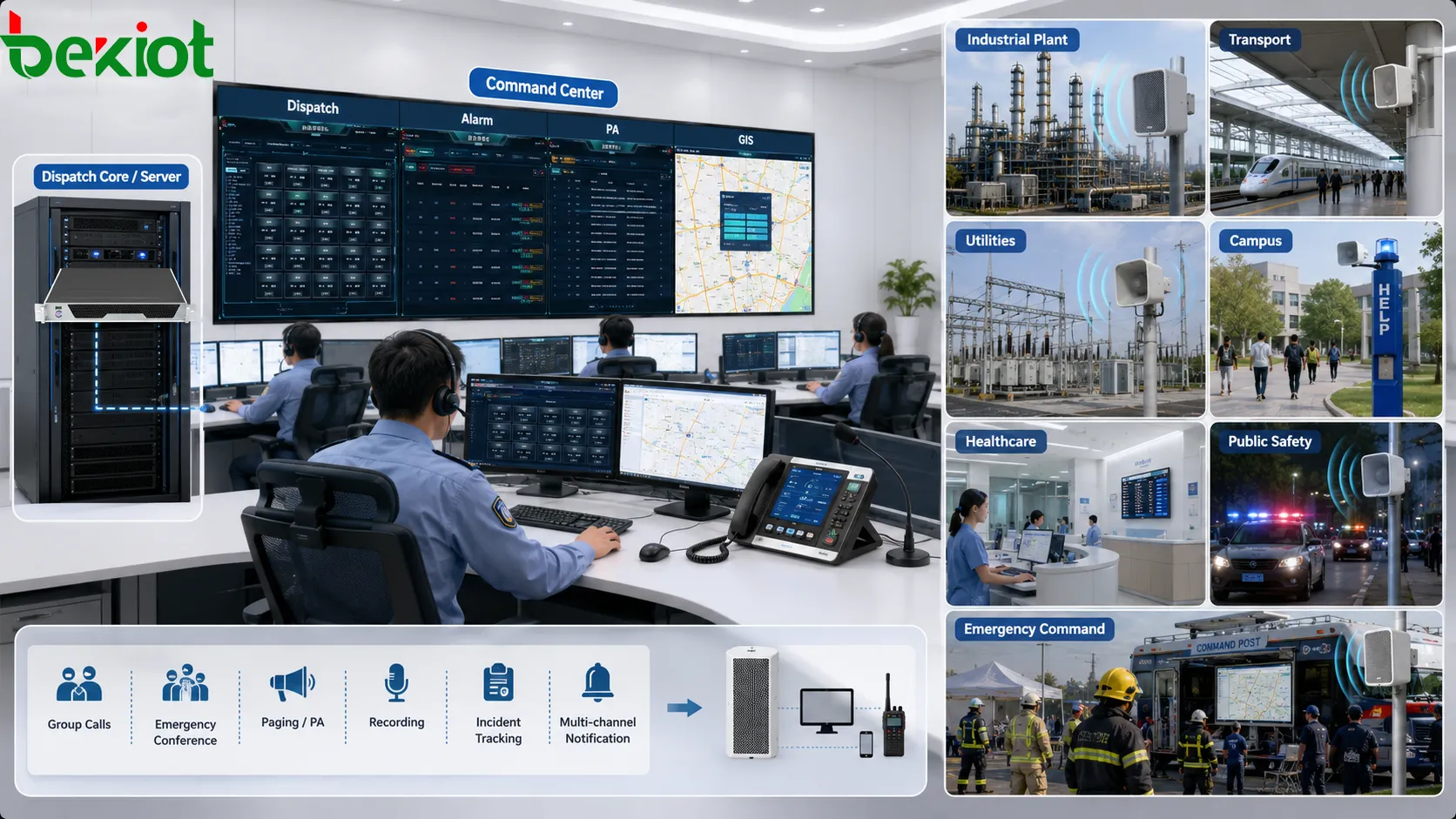
Industrial sites use command and dispatch systems to connect control rooms with workshops, warehouses, utility rooms, outdoor yards, loading areas, equipment rooms, and maintenance teams. Operators may need to handle production abnormalities, safety alarms, equipment faults, emergency calls, and routine coordination.
In these scenarios, the system can connect field phones, intercom terminals, paging speakers, alarm inputs, video feeds, and maintenance groups. When a fault occurs, the control room can verify the situation, contact the correct team, issue instructions, and keep a record. This helps reduce downtime and improve safety control.
Transportation and public facility operation
Railway stations, metro systems, airports, bus terminals, tunnels, ports, bridges, parking facilities, and highway operation centers use dispatch systems for passenger service, traffic coordination, emergency response, equipment faults, security incidents, and public announcements.
The dispatch platform helps operators communicate with field staff, service points, emergency phones, patrol teams, and public address zones. When an incident affects many people, the system can support rapid instruction, group coordination, and event tracking.
Energy and utility management
Power plants, substations, pipelines, water treatment facilities, pumping stations, renewable energy sites, and district heating systems often include remote or unmanned locations. A command and dispatch system allows the central office to communicate with field staff and coordinate maintenance or emergency response.
These environments require reliable communication because equipment faults may affect wide service areas. Dispatch systems can connect alarms, field terminals, duty groups, and maintenance teams so that response is organized and traceable.
Campus, healthcare, and commercial buildings
Campuses, hospitals, office parks, shopping centers, hotels, stadiums, and government buildings use command and dispatch systems for security, emergency calls, facility maintenance, fire response, visitor assistance, and public announcements. These sites often combine daily service and safety management.
The system can route emergency calls to the control room, link alarms with video, call security teams, broadcast instructions, and coordinate facility staff. For hospitals and campuses, clear communication is especially important because users may include patients, students, visitors, staff, and contractors.
Public safety and emergency command
Emergency command scenarios require fast communication between command staff, field responders, support teams, and related organizations. The dispatch system may support group calls, emergency conferences, paging, recording, incident tracking, and multi-channel notification.
In public safety environments, the system value lies in response coordination. Operators can see the event, contact responders, communicate instructions, escalate the incident, and preserve records. The dispatch platform becomes a communication backbone for command work.
Integration with related systems
Alarm system integration
Alarm integration allows events to trigger dispatch workflows automatically. A panic button, fire alarm, gas detector, equipment fault, access event, or emergency call can appear on the dispatch console with location and priority. The operator can then contact the right team or activate a predefined response.
This reduces manual delay. Instead of waiting for an operator to notice one alarm screen and then search for phone numbers, the dispatch system can present the event and related communication resources together. BK-RCS-style deployment can be used to connect alarm events with command communication and response records.
Video surveillance integration
Video integration helps operators verify events. When an alarm or emergency call occurs, the system can open the related camera or show nearby video feeds. This allows the operator to judge whether the event is real, what resources are needed, and how urgent the response should be.
Video should be linked by location. If operators must manually search through many cameras, the value is reduced. A dispatch system should connect event sources, cameras, and maps so that verification is fast and intuitive.
Public address and paging integration
Public address integration allows the dispatch center to send instructions to physical zones. This is useful for evacuation, safety reminders, staff calls, crowd guidance, and equipment-area warnings. The operator can choose a zone, group, or emergency plan according to the incident.
Paging integration should include priority control. Emergency messages may need to override background music or routine announcements. The system should also keep broadcast records so that important instructions can be reviewed later.
Radio and mobile communication integration
Many sites still use two-way radios or mobile field communication. A dispatch system may integrate radio channels through gateways and connect mobile users through apps or soft clients. This allows operators to communicate with both fixed and mobile teams.
Radio and mobile integration is valuable in outdoor, patrol, logistics, transportation, and emergency scenarios. Field personnel may not stay near a fixed phone. The dispatch platform should support communication across different endpoint types.
Deployment considerations
Define the dispatch workflow first
The first step is to define real workflows. What events must be handled? Who receives routine calls? Who responds to emergencies? Which groups need conference dispatch? Which alarms require paging? Which actions must be recorded? These questions should guide system design.
If deployment starts only from hardware lists, the result may not match actual operation. The platform should support the way people respond in the field, not force users into an impractical process.
Plan naming and grouping carefully
Device names, user names, department groups, emergency groups, paging zones, radio channels, and camera names should be clear. Operators should understand them immediately. Poor naming creates hesitation and wrong dispatch actions.
Grouping should reflect real responsibility. A maintenance group, security group, emergency group, tunnel section group, production line group, or duty team should include the correct users and terminals. These groups should be reviewed when staffing or site layout changes.
Design permissions and priorities
Not every user should have the same control authority. Operators, supervisors, administrators, maintenance staff, security personnel, and external responders may need different permissions. The system should protect critical functions such as emergency broadcast, priority call, rule configuration, and recording access.
Priority design should be tested carefully. Emergency calls, alarms, and command instructions should be able to take precedence over routine communication when needed. However, excessive priority settings can create disruption. The design should match operational risk.
Test under realistic conditions
Dispatch systems should be tested with real endpoints, real network paths, real operators, and realistic event scenarios. A simple call test is not enough. The project should test group call, alarm linkage, paging, recording, video pop-up, failover, busy lines, offline terminals, and multi-event handling.
Testing should include high-load or abnormal situations where relevant. Emergencies rarely occur under perfect conditions. A reliable dispatch system should continue to support operators when the site is busy, the network is under load, or several events happen at once.
Prepare maintenance and training
Long-term operation depends on maintenance and training. Administrators should know how to add users, update groups, review recordings, check device status, maintain rules, and troubleshoot communication problems. Operators should know how to handle routine calls, emergency dispatch, conference coordination, paging, and event closure.
Training should include scenarios, not only button explanations. Operators need to practice real workflows so that they can act quickly during incidents. The system becomes more valuable when people know how to use it under pressure.
Common problems and optimization points
Too many functions but unclear workflow
A dispatch platform may support many functions, but value depends on workflow clarity. If operators do not know when to use group calls, when to broadcast, when to escalate, or how to close an event, the system may become complicated rather than helpful.
Optimization should begin with procedure design. Frequent tasks should be simplified. Emergency actions should be easy to find. Less-used configuration functions should not distract operators during daily work.
Weak integration between alarm and communication
If alarms appear in one system and communication happens in another, operators may lose time switching tools. Alarm information should be linked with dispatch actions where possible. The operator should see the event and contact the response team from the same workflow.
Integration should include event context. A call triggered by an alarm should carry location and priority. A recording should link back to the alarm. A dispatch task should show whether the alarm has been acknowledged or cleared.
Poor endpoint suitability
Even a strong platform cannot compensate for unsuitable field terminals. A noisy workshop may need louder and more rugged devices. An outdoor gate may need weather-resistant communication equipment. A public help point may need simple one-button operation. Endpoint selection affects the actual usability of the dispatch system.
Optimization should check whether each endpoint fits its environment. Audio quality, installation height, visibility, power supply, network stability, and user operation should be reviewed during acceptance and maintenance.
No regular review after deployment
Dispatch systems change with the organization. Users leave, teams reorganize, new areas are added, phone numbers change, alarm rules are revised, and emergency procedures update. If the system is not reviewed regularly, it gradually becomes inaccurate.
Regular review should include user lists, permission settings, group membership, paging zones, camera links, alarm linkage, contact numbers, recording storage, and operator feedback. Continuous maintenance protects system value.
Evaluation standards
Response efficiency
The system should reduce the time needed to understand an event, contact the right people, issue instructions, and close the response. Evaluation should include real scenarios rather than only checking whether calls can connect.
Communication reliability
Calls, group communication, paging, intercom, mobile access, and radio integration should remain stable under expected operating conditions. Audio clarity, connection success, delay, and failover behavior should be verified.
Integration completeness
The platform should connect with the systems that matter to the workflow. Alarm, video, paging, access control, maps, recording, and mobile notification may all be necessary depending on the site. Integration should produce actionable context, not only data display.
Operator usability
The interface should support quick action. Operators should be able to find users, understand status, launch calls, start group dispatch, activate paging, view related events, and record actions without unnecessary steps.
Traceability and management value
The system should create useful records for review. Calls, conferences, alarms, paging, dispatch tasks, acknowledgements, and closure results should be traceable. Management can then evaluate response quality and improve procedures.
Closing Notes
The Command and Dispatch System works by collecting communication and event inputs, classifying their priority, routing them to the correct resources, supporting operator command actions, and recording the response process. It is not only a calling platform; it is an operational coordination system that connects people, devices, alarms, video, paging, and records.
Its main characteristics include unified access, real-time call control, priority management, group communication, conference dispatch, recording, visualized operation, location-based command, system integration, and scalable resource management. These characteristics help organizations improve response speed, communication clarity, cross-department coordination, and incident traceability.
In deployments based on platforms such as the Becke Telcom BK-RCS Command and Dispatch System, the practical focus should be workflow integration: how alarms become dispatch events, how operators contact field teams, how paging instructions are delivered, how video supports verification, and how records support later review. When platform capability, endpoint suitability, network reliability, and operator training are aligned, the dispatch system becomes a central communication backbone for daily operation and emergency command.
FAQ
What is a Command and Dispatch System?
It is a platform that integrates voice communication, group calling, paging, intercom, alarm linkage, video, recording, and task coordination so operators can manage events and dispatch resources from one command interface.
How does a dispatch system differ from an ordinary phone system?
An ordinary phone system focuses on calls between users. A dispatch system adds group command, priority control, emergency handling, event linkage, visual status, recording, and coordinated response workflows.
Why is priority control important?
Priority control ensures that emergency calls, alarms, and command instructions can take precedence over routine communication. This helps critical messages reach the right people quickly.
What systems can be integrated with command dispatch?
Common integrations include alarm systems, video surveillance, public address, intercom, access control, radio systems, mobile clients, GIS maps, recording platforms, and maintenance systems.
Where is a Command and Dispatch System commonly used?
It is commonly used in industrial plants, transportation hubs, energy utilities, campuses, hospitals, public safety centers, commercial buildings, tunnels, ports, and emergency operation centers.







