


A dispatch switch is not just a telephone exchange with more buttons. In command, production, transport, utility, and emergency environments, it is the switching core that decides how voice channels are connected, prioritized, monitored, recorded, and restored when communication pressure increases.
Its practical value appears when many users, terminals, departments, and field locations need to communicate through one controlled structure rather than isolated phone lines or scattered intercom devices.
The switching core behind command communication
A program-controlled dispatch switch is a communication switching system designed to manage voice connections through programmable control logic. Compared with ordinary office telephony equipment, it is usually built for faster operator control, stronger group communication capability, clearer priority rules, and closer integration with command center workflows. It may connect dispatch consoles, fixed telephones, hotline terminals, emergency phones, intercom stations, paging interfaces, radio gateways, public network trunks, and recording systems.
The key principle is centralized call control. Instead of allowing each endpoint to operate only as an independent telephone, the dispatch switch places calls, groups, permissions, trunks, and emergency routes under a unified control plan. This allows operators to create point-to-point calls, group calls, conferences, forced calls, priority calls, and monitored sessions according to operational needs.
In industrial and public infrastructure scenarios, the switch often serves as the voice control heart of the site. A control room may need to contact a tunnel phone, call a maintenance group, broadcast to a zone, connect to a public telephone line, and record the entire process. The dispatch switch coordinates these actions so that communication remains structured rather than improvised.
Because the system is programmable, its behavior can be adapted to the organization’s workflow. Numbering plans, routing rules, operator permissions, group structures, ring strategies, trunk selection, emergency priority, and recording policies can be configured according to real operating requirements. This is why program-controlled switching remains relevant even as many systems move toward IP-based platforms.
Call control functions that separate dispatch from ordinary telephony
The most visible difference between dispatch switching and standard telephony is the depth of call control. An office PBX usually focuses on extension dialing, transfer, voicemail, and external trunk access. A dispatch switch must support communication actions that are more direct and sometimes more authoritative. Operators may need to call a field point instantly, interrupt a lower-priority session, monitor a channel, establish a group call, or connect several departments into a temporary command conference.
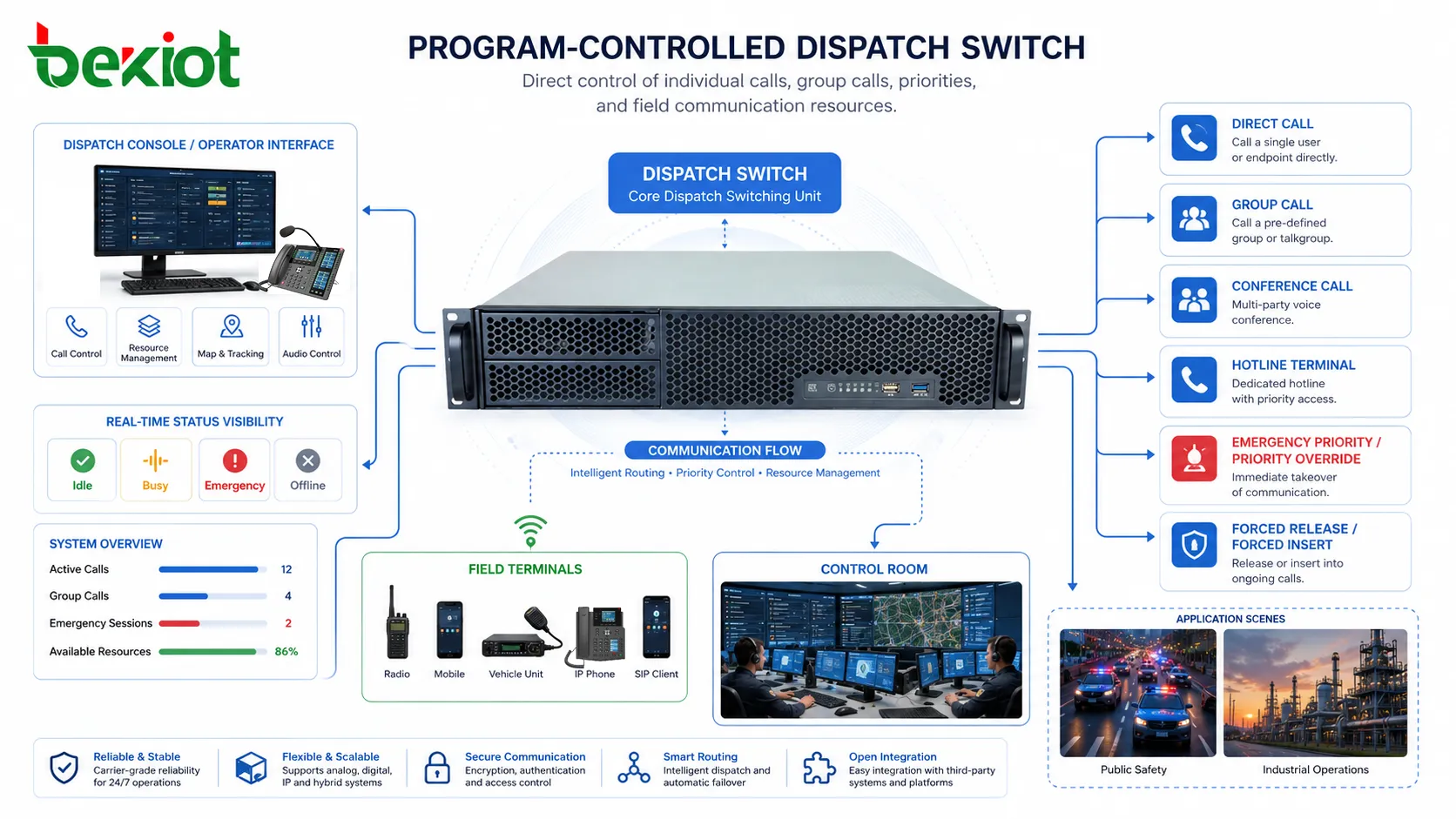
Common functions include direct call, group call, conference call, forced release, forced insertion, call transfer, call hold, call forwarding, hotline access, emergency call priority, and operator-assisted connection. These functions are not only feature names. Each one reflects a specific command requirement. A forced release may be needed when a channel is occupied during an emergency. A group call may be needed when multiple teams must receive the same instruction. A hotline may be used when a field terminal must reach the control room without dialing.
Dispatch switching also requires fast visual or button-based operation. In many systems, the dispatcher does not dial numbers manually for every action. Instead, terminals, groups, trunks, and zones are assigned to keys or screen controls. This reduces response time and helps prevent dialing mistakes during stressful conditions. The switch must therefore work closely with the console interface, not merely provide back-end call routing.
Another important function is call state visibility. Operators need to know whether a terminal is idle, ringing, busy, offline, in emergency state, or connected to another user. The switch collects and updates this information so that dispatchers can make decisions based on real-time status. In complex operations, this visibility can be as important as the call itself.
Grouping logic and operational hierarchy
Dispatch systems are rarely organized only by individual numbers. In real operations, people think in terms of teams, zones, departments, equipment areas, response levels, and duty roles. A program-controlled dispatch switch supports this by allowing endpoints to be grouped according to organizational and operational logic. This grouping capability is one of the reasons dispatch switching is widely used in command environments.
Groups may be created for maintenance teams, security posts, production lines, tunnel sections, substations, platform areas, emergency response units, or shift teams. A dispatcher can then contact the entire group without selecting each endpoint manually. In some systems, groups can also be configured with ring sequences, priority members, broadcast mode, conference mode, or fallback routing.
Operational hierarchy determines who can call whom, who can interrupt whom, and which communication has priority. For example, a central command console may have higher authority than a local station console. Emergency calls from field terminals may need to override routine conversations. Maintenance users may be allowed to call their own department but not access restricted command groups. These rules prevent communication disorder when many users share the same switching system.
Good hierarchy design requires more than technical configuration. It should reflect the actual management structure of the site. If the configured groups do not match real response workflows, operators will bypass the system or create informal workarounds. A well-planned grouping model makes the dispatch switch feel natural to use because it mirrors the way the organization already works.
Trunk access and interconnection with external networks
A dispatch switch often needs to communicate beyond its internal extensions. It may connect to public telephone lines, enterprise PBX systems, SIP trunks, radio gateways, analog circuits, or other dispatch centers. These connections are commonly handled through trunk interfaces or gateway modules. The purpose is to allow internal command communication to reach external networks while still remaining under dispatch control.
External trunk access is useful in many situations. A command center may need to call an outside emergency agency, a maintenance contractor, a public network number, or another facility. Field terminals may need restricted access to external numbers. Some sites may also need incoming public calls to be routed to specific dispatch positions. The switch manages these routes according to trunk availability, dialing rules, and permission settings.
In hybrid systems, trunk interconnection becomes more complex. A site may operate analog lines, digital trunks, and IP voice resources at the same time. The dispatch switch must either support those interfaces directly or work with gateways that convert signaling and media formats. This allows older equipment and newer IP systems to coexist during migration or expansion.
Trunk planning should consider capacity, failover, numbering, emergency routes, and security. If all outbound calls depend on one trunk group, a failure may isolate the command center from external contact. If permissions are too open, users may misuse external access. If numbering rules are unclear, emergency dialing can become unreliable. A dispatch switch should therefore be installed with a carefully designed trunk strategy rather than only a set of connected cables.
Priority handling in urgent communication
Priority handling is one of the most important principles in dispatch switching. In a normal office call system, most calls are treated with similar importance. In a dispatch environment, communication priority can affect safety, production continuity, and emergency response. The switch must know which calls can wait, which calls should ring immediately, and which calls may interrupt existing communication.
Emergency calls usually require the highest priority. If a field emergency phone or alarm terminal calls the control room, the system may need to display the call prominently, use a special ring tone, record the session automatically, or route it to multiple operators if the first position does not answer. Some systems can also give emergency calls the ability to override busy conditions or enter a protected queue.
Priority may also apply to operator actions. A senior dispatch position may be allowed to force connect a user, break into a call, release a channel, or establish an urgent group conference. These functions are powerful and should be controlled through permission levels. Without clear rules, priority functions can create confusion or even disrupt normal operations.
The practical advantage of priority handling is that the system supports decision-making under pressure. When routine communication and urgent communication occur at the same time, the dispatch switch helps ensure that critical messages are not buried behind ordinary calls. This is especially important in industrial plants, transportation systems, emergency command centers, and utility networks where delays may have serious consequences.
Priority design should be treated as part of the site’s emergency workflow, not as an optional switch feature.
Recording, logging, and traceability
Dispatch communication often needs to be reviewed after the event. A program-controlled dispatch switch may work with recording systems and management platforms to store call audio, call time, caller identity, destination, operator action, and call result. This creates a traceable communication record for incident review, training, compliance, and operational improvement.
Recording is especially useful in command environments where instructions must be verified later. If a production fault, transport incident, security event, or emergency response is reviewed, recorded communication can show what was reported, what the dispatcher instructed, which teams were contacted, and how the situation developed. This reduces reliance on memory and helps resolve disputes.
Logging also supports maintenance. If calls fail repeatedly on a specific port, trunk, or group, logs can help identify whether the issue is configuration, line status, user behavior, or external network failure. Without logs, engineers may have to reconstruct events from limited user reports, which is slower and less reliable.
Traceability should be planned with access control. Not every user should be allowed to listen to recordings or export logs. Retention time, storage capacity, search method, and permission levels should be defined before the system goes into operation. In many projects, recording and logging are not secondary functions; they are part of the value of the dispatch switching system.
Installation planning before equipment is mounted
Installation should begin before the switch is placed in a rack. Engineers need to confirm the communication scope, endpoint types, trunk requirements, console positions, cable routes, power conditions, grounding environment, numbering plan, and redundancy expectations. Skipping this planning stage often leads to messy wiring, unclear port usage, repeated reconfiguration, and difficult maintenance later.
The first step is to define what the system must connect. This includes dispatch consoles, analog extensions, IP terminals, emergency phones, radio interfaces, public network trunks, recording servers, paging systems, and management workstations. Each connection should be listed with interface type, location, quantity, role, and priority level. This prevents the installation team from treating every port as equal when some links are operationally critical.
Rack space and environmental conditions should also be reviewed. Dispatch switching equipment is usually installed in communication rooms, control centers, equipment cabinets, or central racks. The site should provide stable power, grounding, ventilation, cable management, and access for maintenance. If the environment has dust, humidity, vibration, or unstable power, additional protection may be required.
Installation planning should include future expansion. Many dispatch systems grow after the first phase because new zones, terminals, trunks, or operator positions are added. Leaving rack space, cable capacity, numbering ranges, and port planning margin can reduce future upgrade difficulty. A switch that is installed with no expansion room may become a bottleneck even if it works well at commissioning.
Physical wiring and port organization
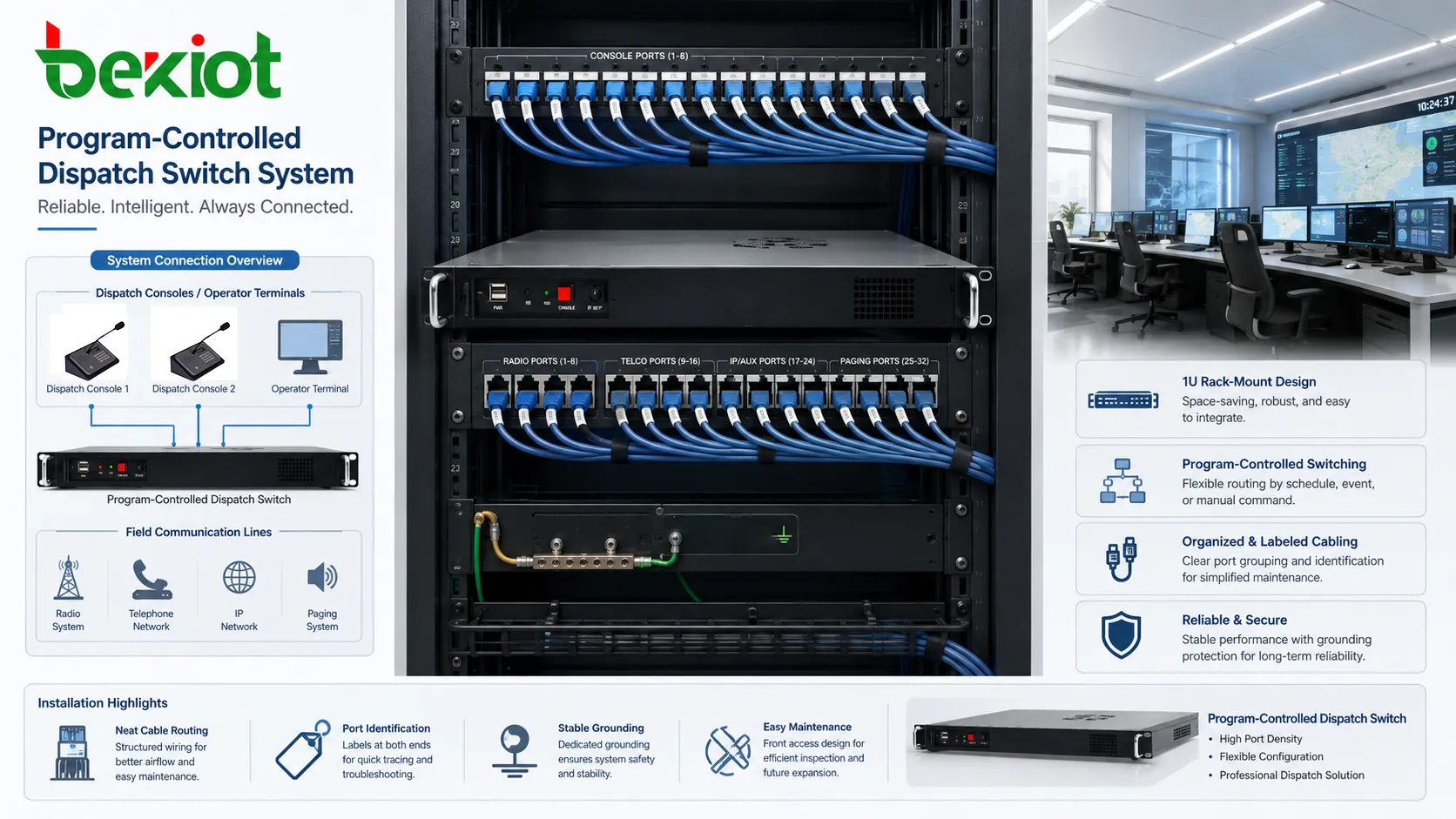
Physical wiring has a direct effect on long-term maintenance. A dispatch switch may contain many extension ports, trunk ports, network ports, console connections, recording interfaces, and management links. If these are not labeled and organized clearly, future troubleshooting becomes slow and risky. Clean wiring is not only about appearance; it is about operational reliability.
Each cable should be identified at both ends. Patch panels, terminal blocks, and switch ports should match documentation. Emergency lines, control room consoles, trunk lines, and important field terminals should be especially clear. During a fault, engineers should not have to guess which cable belongs to which device. Good labeling reduces the chance of disconnecting the wrong line during maintenance.
Different cable types may require different handling. Analog voice lines need stable termination and separation from strong electrical interference. Network links require proper category rating and switching design. Fiber links require clean connectors and bend-radius control. Trunk cables may need grounding and protection according to site standards. Mixing all cables without organization increases the risk of interference and service confusion.
Port organization should follow the logical structure of the system. For example, field phones may occupy one port range, consoles another, trunks another, and emergency devices another. This makes configuration and maintenance easier. When physical port layout matches the communication plan, engineers can understand the system more quickly and make fewer mistakes during expansion or repair.
Power, grounding, and environmental reliability
Dispatch switches are often used in systems where communication interruption is not acceptable. Power and grounding should therefore be treated as core installation issues. The system should be connected to stable power, protected from sudden outages, and supported by UPS or backup power when the application requires continuous operation.
Grounding helps reduce electrical noise, protect equipment, and improve system stability. Poor grounding can cause hum on analog circuits, communication instability, port damage, or increased vulnerability to surge events. In sites with large machinery, long cables, outdoor lines, or multiple buildings, grounding design becomes even more important because potential differences may appear between equipment locations.
Environmental conditions also affect reliability. High temperature can shorten equipment life, dust can block ventilation, humidity can damage connectors, and vibration can loosen cables or modules. Communication rooms should be kept clean, ventilated, and accessible. Equipment should not be installed in locations where maintenance staff cannot safely inspect or replace components.
Surge protection may be required for outdoor lines, long analog circuits, or cables entering from exposed areas. Lightning, power disturbances, and induced voltage can damage switching equipment if protection is ignored. For dispatch systems connected to field terminals across wide areas, line protection should be reviewed during installation rather than after the first failure.
Configuration, numbering, and commissioning workflow
After physical installation, configuration determines whether the switch behaves according to the operational plan. Numbering should be clear, predictable, and easy for operators to understand. Field terminals, groups, consoles, trunks, and emergency points should follow a consistent numbering structure. Random numbering may work technically but creates confusion during daily use.
Call routing rules should be tested with real scenarios. Engineers should verify internal calls, group calls, trunk calls, emergency calls, operator transfers, conference functions, priority behavior, and fallback routes. Testing only basic extension dialing is not enough for a dispatch system. The commissioning process should reflect actual operating conditions.
Console configuration should match the dispatcher’s workflow. Buttons, screen layouts, group names, terminal labels, and priority indicators should be arranged in a way that operators can use quickly. A technically correct configuration may still be poor if it forces dispatchers to search too much during urgent situations.
Commissioning should include both technical tests and user acceptance. Technicians can confirm signaling, media, ports, trunks, and logs. Operators can confirm whether the system is easy to use, whether labels are understandable, whether emergency calls are obvious, and whether group functions match the real command process. This combination reduces the chance that problems appear only after the system is put into service.
Maintenance methods after deployment
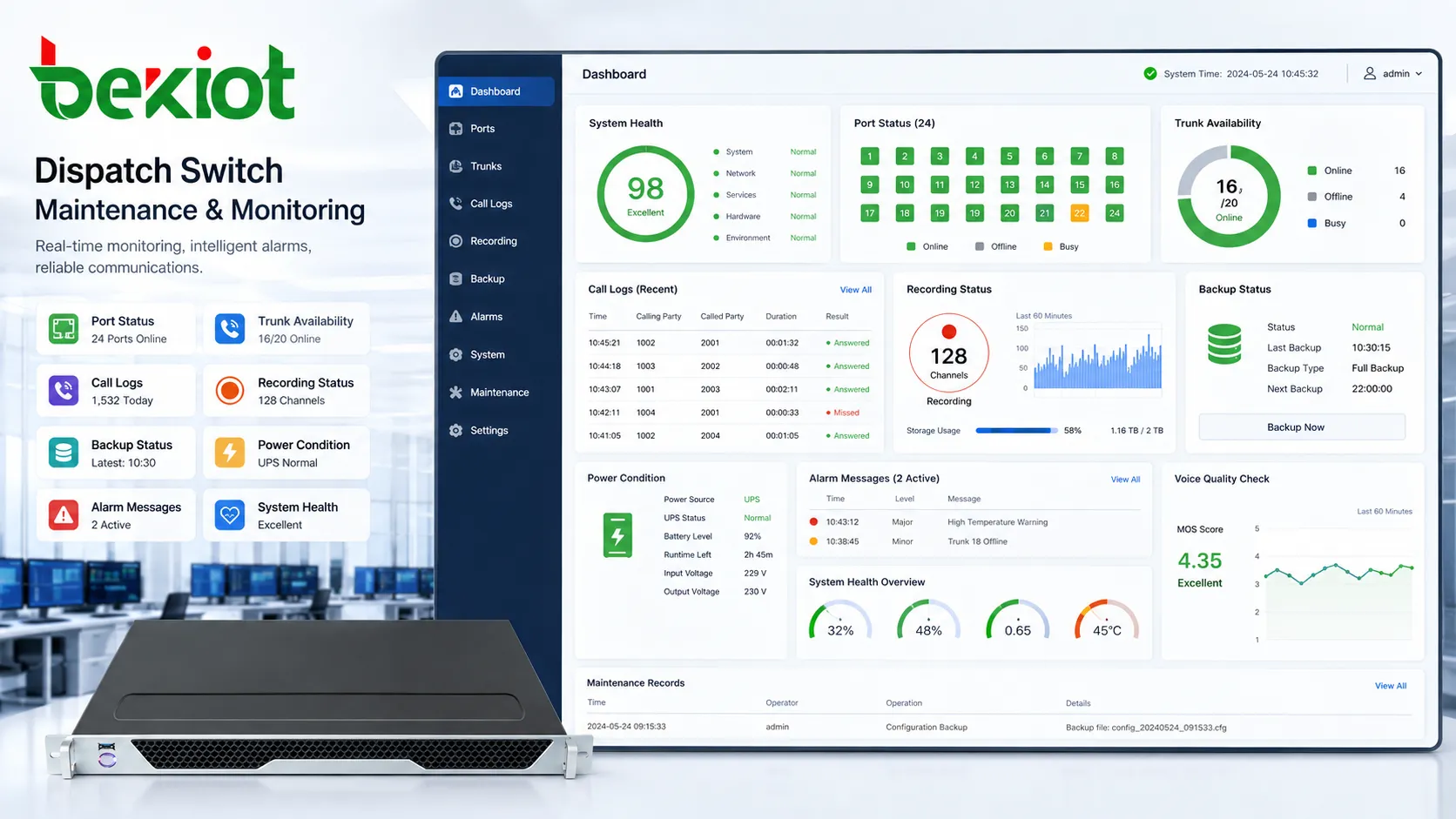
Daily maintenance should include checking port status, trunk availability, console operation, recording function, system logs, power condition, backup status, and alarm messages. A dispatch switch may appear normal from the outside while certain ports, trunks, or groups are already showing abnormal behavior. Regular checks help detect these issues early.
Voice quality should be tested periodically, especially for emergency terminals and important field phones. A line may still connect but have low volume, noise, echo, or intermittent audio. Operators may tolerate these problems in routine use, but during emergencies they can create serious communication difficulty. Maintenance should include actual listening tests, not only status inspection.
Configuration backup is also important. If equipment fails or settings are changed incorrectly, a recent backup can reduce recovery time. The backup should be stored securely and updated after approved configuration changes. Without backup, restoring a dispatch switch may require rebuilding numbering, groups, trunks, and permissions from memory.
Maintenance records should include faults, repairs, configuration changes, port replacements, line tests, software updates, and user feedback. Over time, these records help identify weak points. If one trunk group fails repeatedly, the issue may be upstream. If one field area reports frequent noise, the cabling route may need inspection. Good maintenance turns repeated problems into system improvement.
Choosing an architecture for different site sizes
The best dispatch switching architecture depends on site size, risk level, endpoint quantity, and communication workflow. A small facility may need one central switch with a few consoles and field extensions. A large industrial site may require multiple nodes, trunk gateways, recording servers, redundant links, and several operator positions. A transportation or utility network may need distributed switching across stations, substations, or regional centers.
Centralized architecture is easier to manage because all endpoints are controlled from one main system. It is suitable when the site is compact, the network is reliable, and local independence is not a major concern. However, if the central switch fails and no redundancy exists, the whole communication structure may be affected.
Distributed architecture places switching or access nodes closer to field areas. This can improve local survivability and reduce dependence on one location. It is useful for long tunnels, large campuses, mining areas, rail lines, ports, and multi-building industrial sites. The challenge is that configuration and monitoring must be coordinated carefully so that the system still behaves as one dispatch network.
Hybrid architecture is common in modernization projects. A main dispatch switch may remain at the command center, while gateways or remote access modules connect existing field devices. This approach allows gradual expansion and protects earlier investment. The right architecture should be chosen through workflow analysis rather than simply selecting the largest switch available.
FAQ
Is a program-controlled dispatch switch the same as a normal PBX?
No. A normal PBX mainly handles office calling, while a dispatch switch is designed for command control, group communication, priority handling, console operation, recording linkage, and field communication management. Some functions overlap, but the operating purpose is different.
What should be prepared before installation begins?
The project should prepare endpoint lists, port requirements, trunk information, numbering plans, console positions, cable routes, grounding conditions, power backup requirements, and dispatch workflows. Clear preparation reduces rework during commissioning.
Why is numbering design important in dispatch systems?
Numbering affects how quickly operators and users can reach the right resource. A clear numbering plan helps organize departments, zones, emergency terminals, trunks, and groups. Poor numbering can cause confusion even if the switch works technically.
Should emergency lines use separate priority rules?
Yes. Emergency lines should normally have higher priority, clearer ringing behavior, visible status indication, recording support, and defined escalation rules. Treating emergency calls like ordinary calls can delay response.
What maintenance checks are most important after commissioning?
Important checks include port status, trunk status, console function, emergency call behavior, recording playback, power backup, grounding condition, cable labeling, configuration backup, and regular voice quality testing on key lines.







