


In many network faults, the first visible problem is not a failed core switch or a broken server. It is often a single unstable network interface. Because network interfaces sit at the edge of every connection, their condition directly affects service stability, device reachability, and fault recovery speed. Daily maintenance of network interfaces is therefore not just a routine inspection task. It is a practical method for preventing small physical or logical problems from expanding into wider communication failures. In office networks, data centers, industrial control rooms, transportation systems, campus networks, and communication equipment rooms, the same principle applies: if the interface layer is not healthy, higher-level services cannot remain reliable for long.
Understanding what should be checked every day
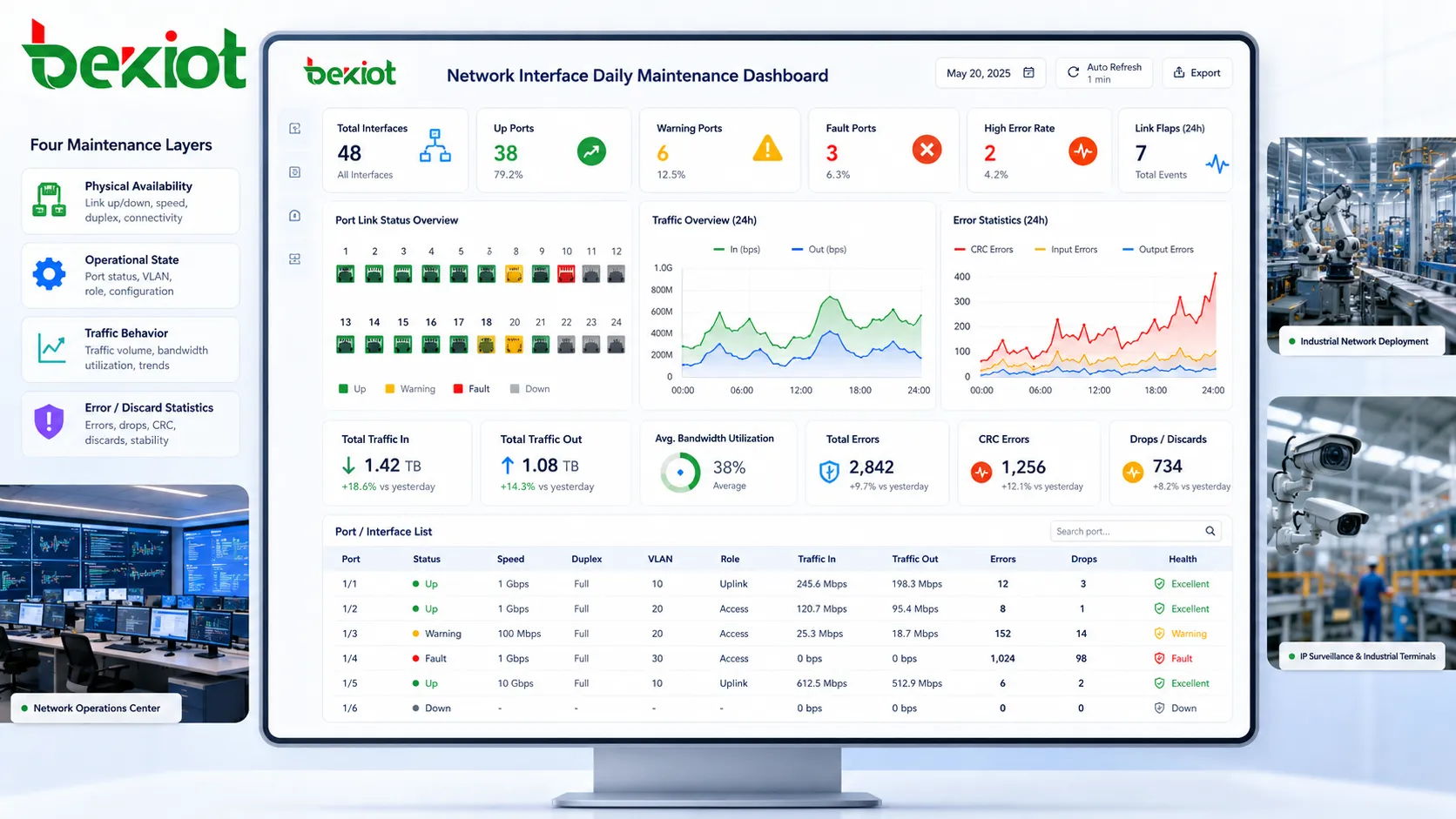
Daily maintenance begins with knowing what a network interface is expected to do under normal conditions. A port may look simple from the outside, but it carries multiple layers of information: physical connectivity, electrical signal quality, negotiated speed, duplex mode, VLAN membership, traffic volume, packet error statistics, security policy, and service role. Checking only whether the link light is on is not enough for a professional maintenance routine.
The first layer is physical availability. Engineers should verify whether the interface is up, whether the cable is seated properly, whether the indicator status is consistent with the management platform, and whether the connected device is expected to be online. A port that is physically connected but administratively disabled, or a port that is enabled but repeatedly dropping link, should be investigated before it affects production traffic.
The second layer is operational state. This includes negotiated speed, duplex mode, link stability, port description, VLAN assignment, and interface role. If a gigabit port unexpectedly negotiates at 100 Mbps, the problem may be cable quality, connector damage, endpoint configuration, or auto-negotiation failure. If a port belongs to the wrong VLAN, the device may be reachable at the physical layer but isolated at the service layer.
The third layer is traffic behavior. A healthy interface should show traffic patterns consistent with its role. A user access port, server port, uplink port, camera port, industrial terminal port, and wireless AP port will all have different normal patterns. Daily maintenance should compare current behavior with baseline behavior, not just with generic thresholds.
The fourth layer is error and discard information. CRC errors, input errors, output errors, alignment errors, late collisions, packet drops, and interface resets should be reviewed regularly. A small number of historical counters may not be urgent, but a steady increase during daily operation is a warning sign that deserves attention.
Physical inspection still matters more than many teams expect
Network management platforms can show link status and traffic statistics, but they cannot always reveal the physical condition of cables, patch panels, dust covers, rack pressure, cable bending, or connector oxidation. A port may pass traffic while already showing signs of future failure. This is why field inspection remains important, especially in sites with vibration, dust, humidity, high temperature, or frequent maintenance activity.
Cable condition is one of the most common causes of interface instability. Twisted-pair cables may suffer from broken clips, excessive bending, poor crimping, stretched pairs, incorrect category rating, or damage caused by repeated movement. Fiber links may suffer from dirty end faces, insufficient bend radius, poor patch cord quality, or connector mismatch. These issues may not cause complete failure immediately, but they can produce intermittent packet loss or link negotiation problems.
Patch panels and distribution frames should also be checked. Labels should be readable, cables should match documentation, and unused ports should be protected from dust where required. In a busy equipment room, undocumented cable changes can create future troubleshooting problems. A clean and clearly labeled interface environment reduces the time needed to isolate faults during emergencies.
For industrial sites, the physical environment deserves extra attention. Interfaces installed near machinery, outdoor cabinets, tunnels, substations, workshops, and production lines may face electrical noise, moisture, mechanical shock, and temperature swings. Maintenance staff should check whether cable glands, protective conduits, grounding points, and cabinet seals remain in good condition. A network interface in these environments is part of a field system, not only an IT port.
Good physical inspection does not need to be complicated, but it must be consistent. Look for loose connections, damaged jackets, sharp bends, mixed cable types, overheating equipment, dust buildup, missing labels, and unsupported hanging cables. These simple checks often prevent faults that software monitoring alone cannot predict.
Port status verification and baseline comparison
Daily port verification should not be limited to checking whether an interface is up or down. A useful maintenance routine compares the current state with the expected state. If a port should be connected to a server, it should remain up at the expected speed and VLAN. If it should be unused, it should not suddenly become active. If it should carry an uplink, its traffic and error behavior should remain within the expected range.
Baselines are important because different interfaces have different normal behavior. A core uplink may maintain continuous high traffic. A camera port may show steady upstream video flow. A printer port may remain mostly quiet. An industrial PLC interface may send small but regular packets. A backup port may stay idle until failover occurs. Without baselines, engineers may either ignore real problems or investigate normal behavior unnecessarily.
Speed and duplex status should be reviewed carefully. Auto-negotiation usually works well when cables and endpoints are healthy, but problems can still occur. A mismatch between expected and actual speed often indicates cabling issues, endpoint limitations, or configuration errors. Duplex mismatch is less common in modern networks but can still cause severe performance degradation when it happens.
Interface descriptions should also be maintained. A clear description such as “PLC Line 2 Cabinet A,” “CCTV North Gate,” “Core Uplink to Switch-B,” or “VoIP Gateway Port 1” helps engineers act quickly. Ports without descriptions slow down daily inspection and make emergency troubleshooting more risky. Documentation should match the actual port usage, not an outdated design drawing.
In larger networks, automated reports can help highlight changes from the baseline. A port that changed speed, changed status, exceeded error thresholds, or became active unexpectedly should be listed for review. The goal is not to create more alarms, but to make abnormal changes visible before they become user complaints.
Traffic counters reveal hidden pressure on links
Traffic counters are valuable because they show how an interface is actually being used. Daily maintenance should include checks for bandwidth utilization, traffic direction, peak load, broadcast traffic, multicast traffic, and unusual traffic growth. These indicators help identify congestion, misconfigured devices, loops, abnormal applications, or unexpected service changes.
High bandwidth usage is not always a fault. A backup job, video stream, file synchronization process, or monitoring system may legitimately consume traffic. The question is whether the traffic matches the interface role and time pattern. If an access port suddenly behaves like an uplink, or a quiet device begins sending heavy traffic, engineers should investigate the source before it affects nearby services.
Broadcast and multicast traffic should be watched in networks with many access devices. Excessive broadcast traffic can indicate loops, misconfigured discovery protocols, malware activity, or poorly designed segmentation. Multicast traffic may be normal in video, paging, or industrial control systems, but it should be controlled with proper switching and routing policies. Daily review helps keep these flows from spreading beyond their intended scope.
Packet drops are another important signal. Drops may occur because of congestion, buffer limitations, QoS policy, interface errors, or oversubscription. A small number of occasional drops may not be urgent, but continuous or increasing drops suggest that the link is under pressure or that traffic classification is not suitable. For voice, video, control, and emergency communication, even moderate packet loss can affect user experience.
When traffic counters are combined with time-based monitoring, engineers can identify recurring patterns. If a port becomes saturated every morning, the cause may be scheduled synchronization. If drops occur only during shift changes, the cause may be user behavior or authentication bursts. If traffic rises slowly over weeks, the site may need capacity planning rather than fault repair.
Error counters should be treated as early warning indicators
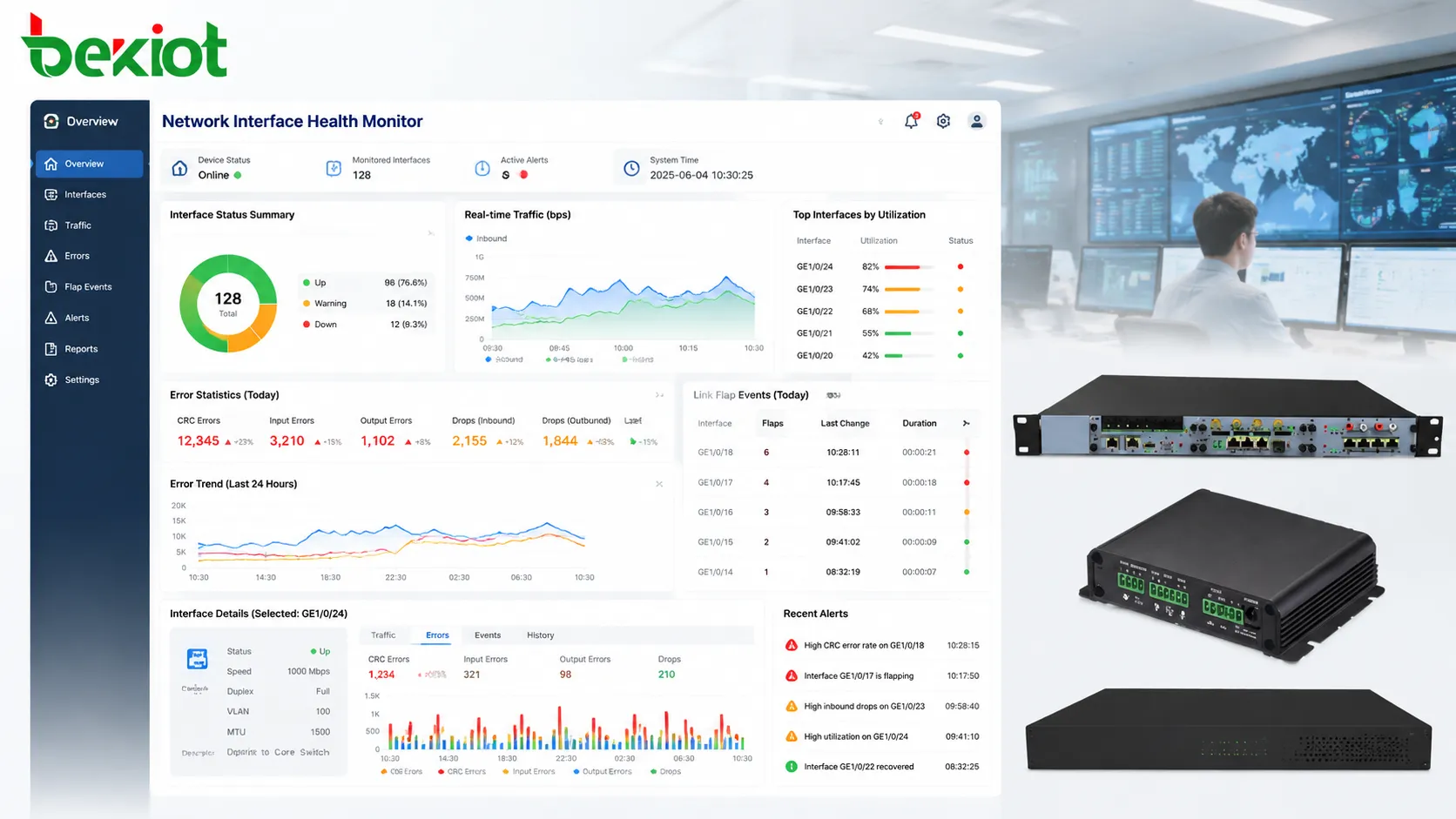
Error counters are often ignored until users complain, but they are among the best early warning indicators for interface health. CRC errors, frame errors, alignment errors, input errors, output errors, late collisions, and carrier transitions can point to cable problems, transceiver faults, electrical interference, hardware degradation, or configuration mismatch.
CRC errors usually suggest that frames are being corrupted before they are received correctly. Common causes include bad cables, dirty fiber connectors, faulty transceivers, electromagnetic interference, or physical layer instability. If CRC errors continue to increase, engineers should not simply clear the counter and move on. The physical path should be inspected, tested, or replaced as needed.
Input and output discards require careful interpretation. They may be caused by congestion, QoS behavior, buffer pressure, or hardware limitations. On access ports, increasing discards may indicate an endpoint generating abnormal bursts. On uplinks, discards may reveal oversubscription or insufficient capacity planning. The meaning depends on where the interface sits in the network.
Link flap events are especially important. A port that repeatedly goes up and down can disrupt voice calls, video streams, control sessions, and device registration. Link flapping may be caused by loose connectors, failing cables, power instability at the endpoint, faulty NICs, or switch port issues. Even if the link restores itself quickly, the repeated interruption can damage service reliability.
Daily review should focus on counter trends rather than isolated numbers. A counter that increased by thousands since yesterday deserves attention. A port that shows the same historical value for months may simply have old records. Maintenance teams should record when counters were cleared or when repairs were made, so future reviews can distinguish new faults from old data.
Cabling, transceivers, and optical links need separate handling
Different interface media require different maintenance methods. Copper Ethernet links, fiber optic links, and pluggable transceiver-based links may all appear as network interfaces in the management system, but their failure modes are not the same. Treating them with one generic checklist can miss important details.
For copper links, cable category, length, termination quality, grounding environment, and electromagnetic exposure are key factors. A Cat5e cable may be enough for gigabit Ethernet in many cases, but poor termination or excessive bending can still cause negotiation problems. Copper links near motors, power cables, or industrial equipment should be routed carefully to reduce interference risk.
For fiber links, cleanliness and optical power levels are central. Dust on a connector end face can cause loss, reflection, or intermittent errors. Maintenance teams should use proper cleaning tools instead of touching connectors by hand. Optical receive and transmit power should be compared with the acceptable range of the transceiver and link design. A link that is still up but near the lower power limit may fail under temperature changes or aging.
Transceivers should be checked for compatibility, temperature, error logs, and optical diagnostics where supported. Digital Diagnostic Monitoring information can reveal receive power, transmit power, temperature, voltage, and laser bias current. These values help identify aging modules or marginal links before the interface fails completely.
Spare parts management also matters. Replacement cables, SFP modules, patch cords, and adapters should match the site’s actual equipment. In emergency maintenance, using an unsuitable spare may restore the link temporarily but create long-term instability. Daily or weekly inventory checks help ensure that the right media components are available when needed.
Configuration hygiene prevents silent service problems
Not every interface fault is physical. Many service problems come from configuration drift: a VLAN changed during troubleshooting and never restored, a trunk port missing one allowed VLAN, an access port assigned to the wrong segment, a disabled security feature, or an outdated description that misleads maintenance staff. Configuration hygiene is the practice of keeping interface settings accurate, intentional, and documented.
Daily maintenance should include review of changes made recently. If a port configuration was modified, the reason should be recorded. If a temporary setting was applied to solve an urgent problem, it should be reviewed later and either formalized or removed. Temporary fixes are useful during emergencies, but they become risk points when forgotten.
VLAN settings deserve special attention. A port can show link up and still fail service if it is in the wrong VLAN. A trunk can pass some services while blocking others if allowed VLAN lists are incomplete. Voice VLANs, management VLANs, camera VLANs, industrial control VLANs, and guest VLANs should be checked against design documents. A small VLAN error can isolate devices or expose them to the wrong network.
Port security, storm control, loop protection, spanning tree settings, LLDP, PoE configuration, and QoS policies should also be reviewed according to port role. A camera port, wireless AP port, VoIP phone port, PLC port, server port, and uplink port should not necessarily use the same configuration template. Good maintenance confirms that each interface is configured for its actual job.
Configuration backup is part of hygiene. If a device fails or a configuration is accidentally overwritten, a recent backup reduces recovery time. For important switches and routers, daily or scheduled configuration backup should be considered part of interface maintenance because port settings are often the first details needed during restoration.
Security checks at the interface edge
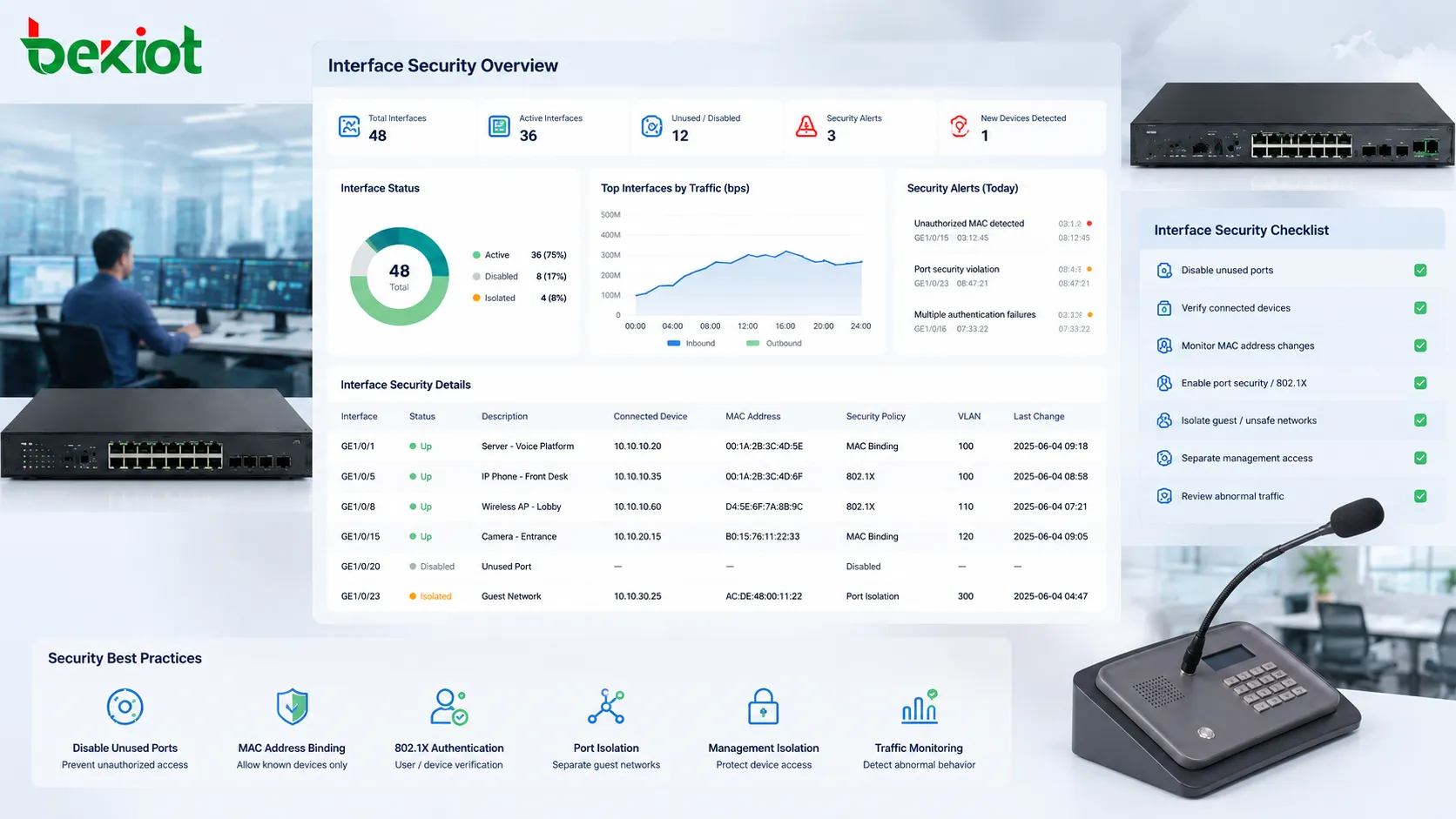
Network interfaces are not only traffic paths; they are also access points into the network. A forgotten open port, unauthorized device, unmanaged switch, rogue access point, or misused maintenance laptop can create security risks. Daily maintenance should therefore include basic interface security checks, especially in networks that support critical communication or industrial control.
Unused ports should be disabled or assigned to an isolated VLAN according to site policy. Active ports should have clear descriptions and known connected devices. If the management system shows a new MAC address on a sensitive port, engineers should verify whether it is expected. For sites with strict access control, MAC address binding, 802.1X authentication, port security, or network access control may be required.
Interface security also includes monitoring for abnormal traffic. Sudden scanning behavior, unexpected broadcast storms, ARP anomalies, or repeated authentication failures may indicate misconfiguration, malware, or unauthorized access attempts. Daily review does not replace a full security platform, but it helps operational teams notice suspicious changes at the physical edge of the network.
Management access should be separated from service access wherever possible. Switch management interfaces, out-of-band ports, console access, and administrative VLANs should be protected. A maintenance port left connected to the wrong network can become a weak point. Interface-level security is often practical, local, and easy to overlook.
Good security maintenance is not about making every port complex. It is about making every active interface intentional. If the port is used, the team should know what it connects to, what traffic it should carry, and what security controls apply. If it is not used, it should not quietly remain available to anyone who finds a cable.
PoE interfaces require power and data checks together
Power over Ethernet interfaces need special attention because they deliver both data and power through the same cable. Devices such as IP phones, wireless access points, cameras, intercom terminals, access control panels, and industrial sensors may depend entirely on PoE. If the port has a power problem, the device may reboot, drop registration, lose video, or disappear from monitoring even when the data configuration is correct.
Daily PoE checks should include power consumption, allocated power, available switch power budget, port status, device class, and abnormal power cycling. A switch may have enough ports but not enough power budget for all connected devices under peak load. If several high-power devices start at the same time, some ports may fail to provide stable power unless the budget is planned correctly.
Cable condition also affects PoE reliability. Poor copper quality, long cable runs, damaged conductors, or weak terminations can cause voltage drop or unstable power delivery. A device may work during low load but reboot when its power demand rises. This is common with PTZ cameras, wireless APs, or devices that activate heaters, speakers, or additional modules.
For critical devices, engineers should check whether the switch supports proper PoE logging and alarms. Unexpected power disconnect events should not be ignored. If a device repeatedly reboots, the cause may be power instability rather than network packet loss. Replacing the endpoint without checking PoE behavior may not solve the problem.
In emergency and communication systems, PoE planning should include backup power. If switches are not connected to UPS or redundant power systems, powered endpoints will fail during power interruption. Maintaining PoE interfaces therefore means checking both port-level condition and the larger power continuity design.
Documentation turns daily checks into real maintenance
Daily maintenance only creates long-term value when findings are recorded. Without documentation, the same problem may be investigated repeatedly by different engineers, temporary fixes may be forgotten, and interface changes may become difficult to trace. Good documentation connects the physical port, logical configuration, connected device, service role, and maintenance history.
A useful interface record should include switch name, port number, port description, connected device, location, VLAN, speed, duplex mode, PoE status if applicable, cable path, patch panel reference, and service owner. For important links, it should also include baseline traffic levels, expected error-free status, and spare cable or transceiver information.
Maintenance logs should record abnormal findings and actions taken. If a cable is replaced, note the date and reason. If a port counter is cleared, record it so future increases can be measured correctly. If a VLAN is changed, document the approval and intended purpose. This type of record is not paperwork for its own sake; it improves future troubleshooting and reduces operational guesswork.
Visual documentation can also help. Rack photos, patch panel diagrams, port maps, and topology screenshots are useful when engineers need to work quickly. In distributed sites, local maintenance staff may not know the full network design, so clear records help remote engineers guide troubleshooting more effectively.
The best documentation is practical and updated. A perfect diagram that is six months out of date is less useful than a simple port table that reflects reality. Daily interface maintenance should include small updates to documentation whenever the network changes.
Building a daily checklist without making it mechanical
A daily checklist is useful, but it should not become a blind form-filling exercise. The purpose is to help engineers notice changes, not to force the same answer every day. A good checklist combines fixed inspection items with room for judgment based on site conditions and recent events.
Typical daily checks include interface up/down status, unexpected link changes, speed and duplex status, major error counter increases, high utilization, abnormal broadcast or multicast traffic, PoE alarms, unauthorized active ports, and recent configuration changes. Critical uplinks, server links, gateway connections, industrial control ports, security camera ports, and voice communication ports should receive higher attention than ordinary low-risk access ports.
Priority should be based on business impact. A port connected to a visitor network printer does not carry the same risk as a port connected to a core uplink, emergency communication gateway, production controller, or surveillance aggregation switch. Daily maintenance should focus first on links that would affect safety, production, communication continuity, or many users.
Automation can help by collecting counters, comparing baselines, and generating exception reports. However, automation should not eliminate field awareness. A monitoring platform may show that a port is up, but a technician may see that the patch cord is stretched, poorly labeled, or exposed to damage. Combining data review with occasional visual inspection produces better results than either method alone.
The final goal is simple: make abnormal interfaces visible early, repair small issues before they become outages, and keep the network edge predictable. A daily checklist should support that goal without turning engineers into passive report readers.
FAQ
How often should interface counters be cleared?
Counters should not be cleared casually every day because historical values can help identify long-term patterns. Clear them after recording a baseline, completing a repair, or beginning a focused observation period. Always note the time of clearing so future increases can be interpreted correctly.
What is the first thing to check when a port keeps flapping?
Start with the physical path: cable seating, connector condition, patch panel, endpoint power, and cable quality. If the physical layer looks stable, then check speed negotiation, PoE behavior, endpoint NIC status, and switch logs for repeated link events.
Should unused switch ports always be disabled?
In most managed networks, yes. Disabling unused ports reduces unauthorized access risk and prevents accidental connections. If a site needs temporary maintenance ports, they should be clearly labeled, restricted, and reviewed regularly.
Why does an interface show up but the connected device cannot communicate?
A link-up state only confirms physical connectivity. The device may still be in the wrong VLAN, blocked by access policy, missing an IP address, affected by DHCP failure, connected to the wrong port profile, or unable to reach the required gateway.
What information should be included in an interface maintenance record?
At minimum, include device name, port number, connected endpoint, location, VLAN, speed, duplex mode, cable path, port role, recent changes, fault history, and any special settings such as PoE, trunk mode, port security, or QoS policy.







