


A dispatch console is the central operating position of a command and dispatch system. It allows operators to manage field terminals, coordinate voice calls, monitor communication status, transfer calls, join conversations, trigger emergency communication, and organize multi-party collaboration. In industries such as public safety, transportation, energy, industrial production, emergency response, and government operations, the console is not only a communication device, but also the main interface between the command center and the field.
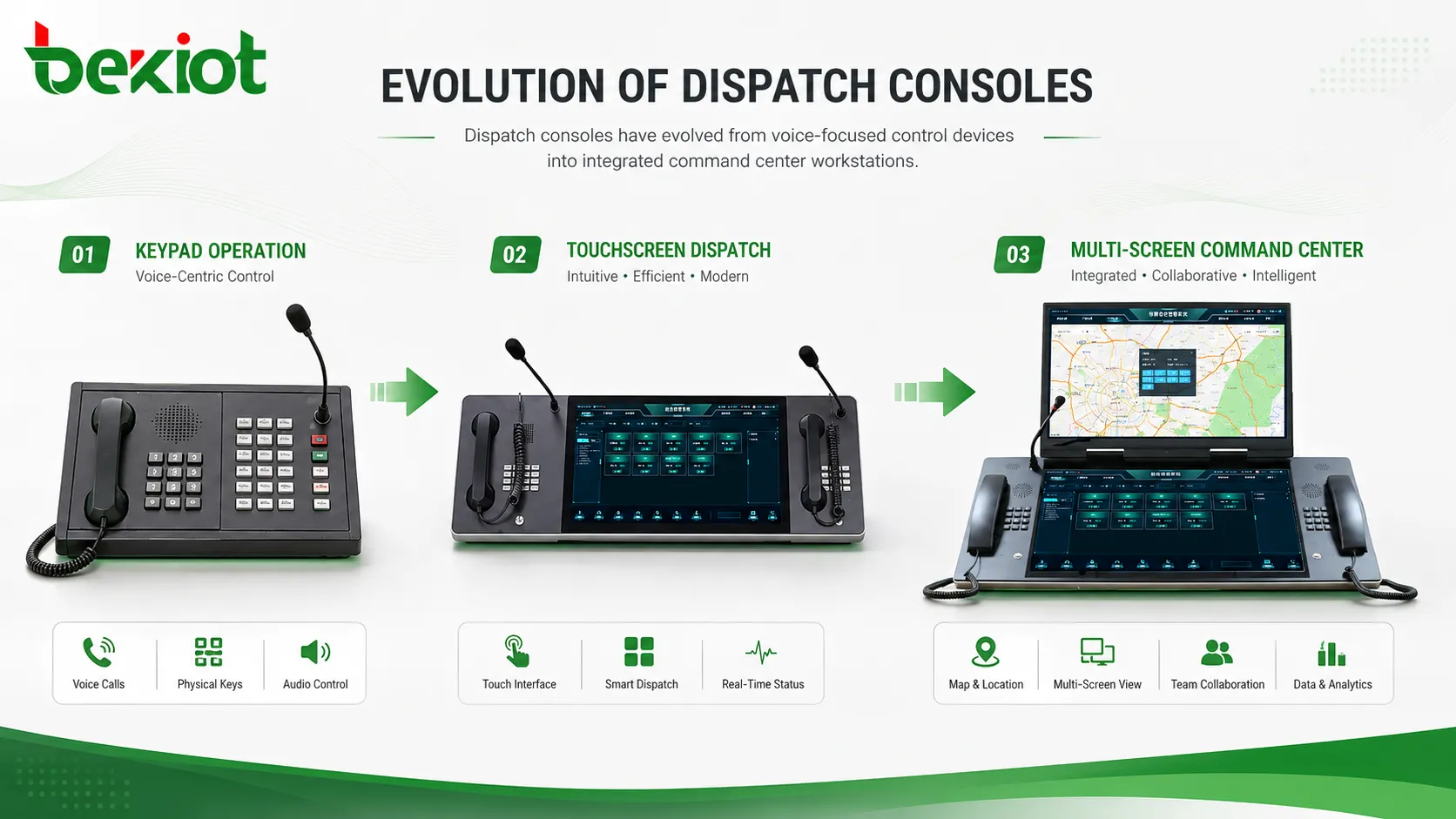
The development of dispatch consoles follows the evolution of communication technology itself. From telephone switching to VoIP, from hardware keys to touchscreen software, and from single voice operation to multi-screen command visualization, the console has moved through three important stages. Each stage still has practical value today, depending on the project scale, operating workflow, and integration requirements.
Why the Console Became Necessary
Early communication systems were built around telephone calls. In manual exchange systems, users had to tell an operator whom they wanted to call, and the operator manually connected the call. Later, program-controlled telephone exchanges allowed calls to be connected automatically by dialing numbers, reducing human intervention and improving call efficiency.
As enterprise telephone exchanges and industry communication systems developed, ordinary telephones could no longer satisfy dispatch requirements. A standard telephone keypad has only 12 main keys, which is enough for dialing but not enough for real-time dispatch operation. Operators needed faster ways to call key users, view line status, transfer calls, interrupt conversations, disconnect calls, and manage multiple terminals at the same time.
This demand led to the emergence of dedicated dispatch consoles. Instead of treating every communication as a normal phone call, the console gave dispatchers a centralized interface for control, supervision, and fast action.
The First Stage: Hardware Key-Based Voice Control
The first widely used form of dispatch console was the hardware key console, often represented by the Danish-style keypad console. It extended the function of a telephone by adding many programmable shortcut keys. Some systems had dozens of keys, while larger consoles could include more than one hundred keys.
Each key could be programmed for a specific user, group, line, or operation. A dispatcher could press one key to call a field terminal, check the current call status, transfer a call, force into an ongoing conversation, or disconnect a call. Compared with dialing numbers manually, this was much faster and more suitable for duty rooms, command posts, industrial control rooms, and public safety operation centers.
The strength of this stage was simplicity. The operator could see physical keys, remember frequently used positions, and perform actions quickly. The system was especially useful in voice-only environments where reliability and direct operation mattered more than multimedia capability.
However, the limitation was also clear. At that time, computing power and network systems were not developed enough to support rich multimedia dispatch. These consoles were mainly used for voice communication. They were not designed to handle video monitoring, GIS maps, instant messaging, IoT alarms, or multi-system data visualization.
The Second Stage: Touchscreen Operation and Multimedia Expansion
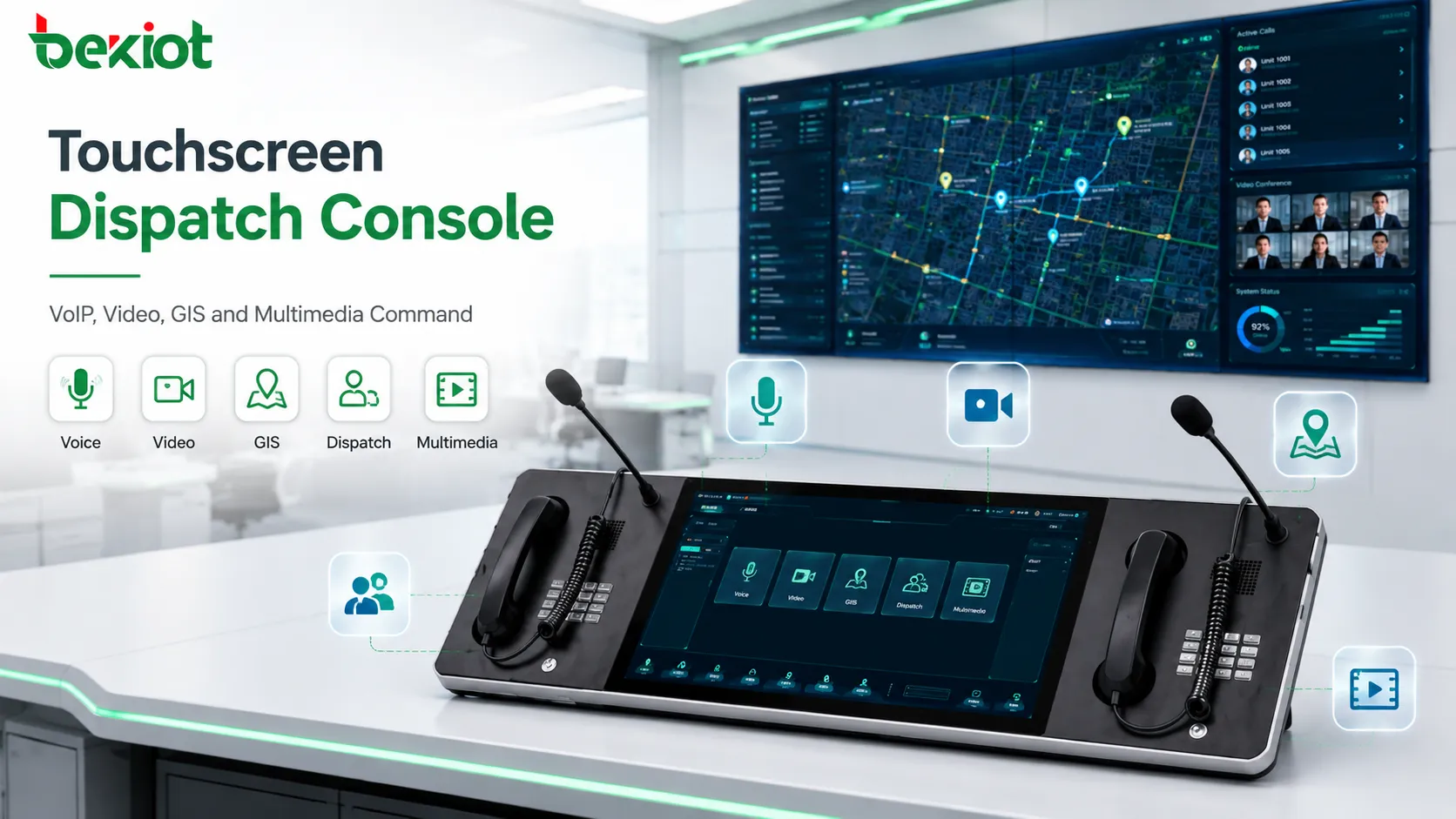
With the development of computers, software platforms, and internet communication, telephone systems gradually moved toward VoIP. Voice services were no longer limited to traditional telephone lines. Communication could be carried over IP networks, and the same platform could support voice, video, data, and multimedia coordination.
At this stage, hardware keys were increasingly replaced or supplemented by touchscreen interfaces. The original physical Danish-style keypad could be presented as a software panel on a touchscreen. Operators could still use quick keys, but the interface became more flexible, visual, and customizable.
Compared with a hardware console, a touchscreen console could display richer status information. It could show user presence, call status, group status, emergency events, video previews, message prompts, and operation menus. It could also support more custom buttons without being limited by the physical size of a hardware keyboard.
In practical deployment, the touchscreen dispatch console was essentially a computer-based workstation. With the development of softswitch technology and software-defined communication platforms, dispatch functions could be implemented through application software. This made it easier to integrate video conferencing, trunked radio, push-to-talk communication, instant messaging, GIS positioning, IoT alarms, and other business systems.
Related product: Becke Dispatch Console
The Third Stage: Multi-Screen Command Visibility
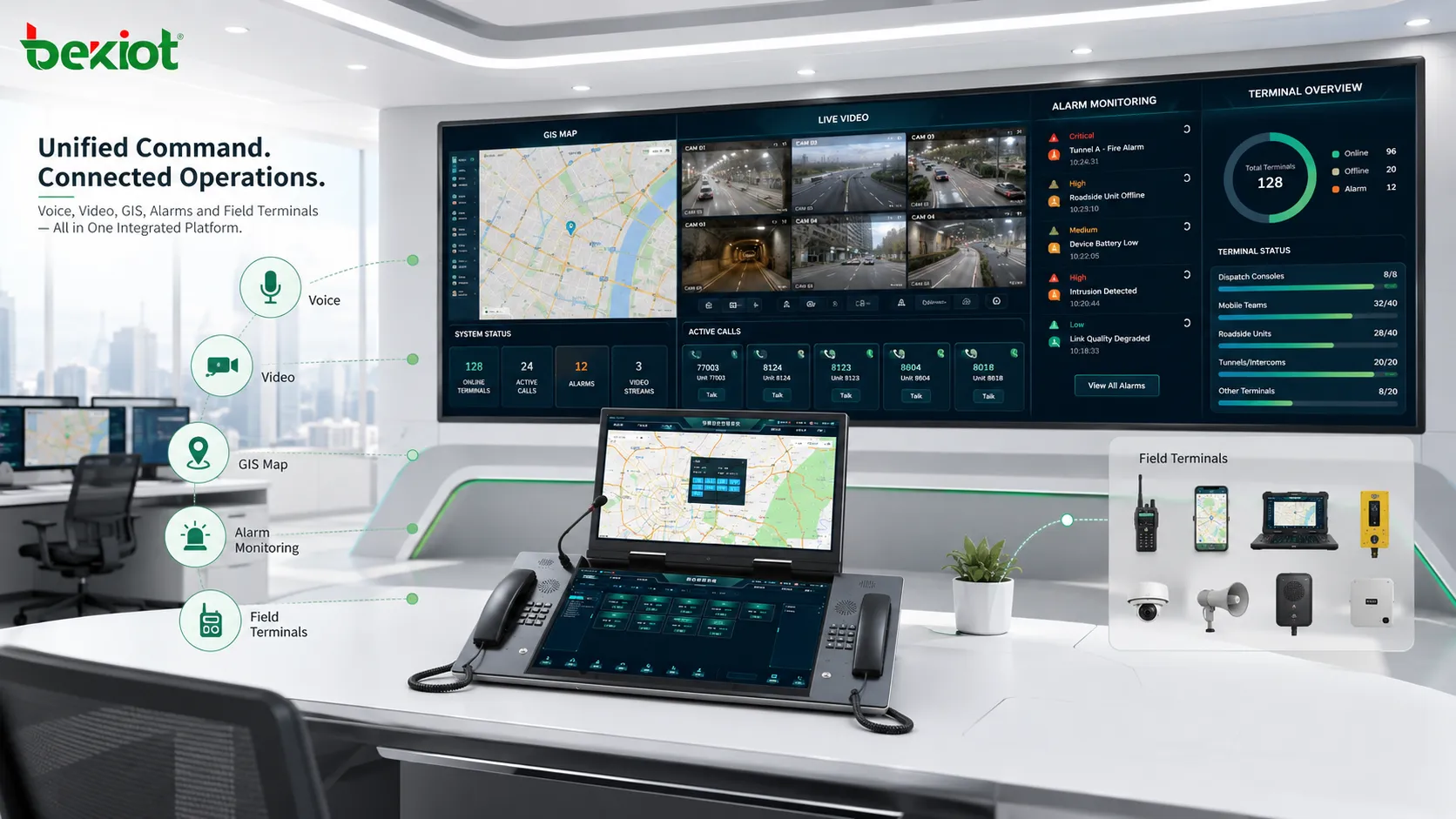
Modern command and dispatch systems have moved far beyond traditional telephone communication. Voice calling is still important, but it is now only one functional module within a larger converged command system. A professional command center may also need video surveillance, video conferencing, trunked radio, personnel positioning, drone video, IoT data, industrial control, intelligent building systems, emergency platforms, and situational awareness displays.
To manage this amount of information, a single small screen is often not enough. Many professional command centers use multi-screen computer workstations as dispatch consoles. Common layouts may include three-screen or six-screen configurations, combined with a large command center display wall and KVM systems for flexible visual control.
The purpose of multi-screen operation is not only to make the console look more advanced. It allows dispatchers to keep different types of information visible at the same time. One screen may show the communication panel, another may show GIS positioning, another may show video surveillance, while additional screens may display alarm lists, call records, emergency plans, or video conference windows.
In this architecture, voice communication can be handled through a desktop audio-video terminal or IP phone, while command operation is mainly performed on the multi-screen workstation. This separation makes the system more efficient: the voice device focuses on communication quality, while the workstation focuses on control, visualization, and cross-system coordination.
What Changed Behind the Three Stages
The three stages are not only changes in console appearance. They reflect deeper changes in communication architecture. The first stage depended on telephone exchange systems and hardware key operation. The second stage depended on VoIP, computer software, and network-based communication. The third stage depends on integrated platforms, data visualization, video resources, and cross-system linkage.
The operator’s role also changed. In the first stage, the dispatcher mainly managed calls. In the second stage, the dispatcher began to manage multimedia communication. In the third stage, the dispatcher manages communication, video, location, alerts, resources, and operational events from one command environment.
This is why modern console design must consider both communication and information presentation. A good console solution should not only make calls easier. It should help the operator understand the field situation, select the right communication method, coordinate different teams, and complete emergency handling faster.
Solution Architecture for Modern Deployment
A modern dispatch console solution usually includes several layers. The first layer is the communication access layer, which connects IP phones, SIP terminals, radio gateways, public network trunks, emergency telephones, mobile users, and field intercom devices.
The second layer is the platform control layer. This layer handles SIP registration, call routing, group calling, recording, permission control, dispatch groups, conference calling, emergency priority, and system management.
The third layer is the operator interface. Depending on the project, this may be a hardware key console, touchscreen console, desktop dispatch terminal, or multi-screen workstation. The interface should match the actual workflow of the operator rather than simply adding more buttons or more screens.
The fourth layer is business integration. For larger projects, the dispatch system may connect with CCTV, GIS, access control, alarms, IoT sensors, radio systems, video conferencing platforms, drones, and emergency management systems. This turns the console into a unified command entrance rather than a single-purpose voice device.
Choosing the Right Console Type
| Console Type | Main Strength | Typical Use Case |
|---|---|---|
| Hardware key console | Fast physical operation and simple voice dispatch | Duty rooms, voice-focused dispatch, traditional communication systems |
| Touchscreen console | Flexible software interface and multimedia operation | VoIP dispatch, video calling, GIS linkage, mixed communication environments |
| Multi-screen workstation | Large information display and cross-system command visibility | Command centers, emergency response centers, transportation, energy, public safety |
There is no single console type that is always best. A small voice dispatch room may prefer the direct feel of physical keys. A medium-sized multimedia command room may prefer a touchscreen console. A regional emergency center or industrial command center may require a multi-screen workstation with video, maps, alarms, and communication control displayed together.
The correct selection should be based on user workflow, number of terminals, communication types, integration depth, operator habits, redundancy requirements, and future expansion plans.
Practical Design Considerations
Match the interface to the operator workflow
A dispatch console should reduce decision time. Frequently used users, groups, emergency contacts, and call operations should be placed where the operator can access them quickly. The interface should not be overloaded with functions that are rarely used during real incidents.
For high-pressure environments, the layout must be clear. Operators should be able to recognize call status, user availability, emergency alarms, and active tasks without searching through multiple menus.
Keep voice reliable while adding multimedia
Modern systems often add video, maps, messages, and IoT information, but voice communication remains the most direct command method. The system should ensure stable SIP registration, clear audio, recording capability, priority calling, and emergency interruption when needed.
Multimedia functions should enhance dispatch efficiency rather than weaken voice reliability. In mission-critical environments, the voice path, network design, power supply, and terminal status should be tested carefully.
Plan for future integration
A console that only meets current voice needs may become difficult to expand later. Many projects start with IP voice dispatch and later add video surveillance, radio interconnection, emergency broadcasting, mobile apps, access control, alarm linkage, or GIS positioning.
For this reason, the platform should support open interfaces, scalable terminal management, flexible permission control, and cross-system linkage. The console should be treated as part of a long-term communication architecture rather than a single workstation purchase.
Recommended Implementation Process
The first step is to define the application scenario. A factory duty room, railway dispatch center, emergency command hall, airport operations center, and energy control room may all need dispatch consoles, but their workflows are different.
The second step is to confirm communication resources. The project team should list all terminals that need to be managed, such as IP phones, emergency telephones, SIP intercoms, radio gateways, mobile users, video terminals, public network trunks, and field devices.
The third step is to design the console layout. This includes shortcut keys, group call buttons, emergency call controls, video windows, map panels, alarm lists, recording access, and monitoring status. For multi-screen systems, each screen should have a clear role.
The fourth step is integration and testing. The system should be tested with real users, real terminals, real network conditions, and real dispatch workflows. Testing should include normal calls, emergency calls, forced insertion, call transfer, group calling, conference dispatch, video linkage, recording, and failure handling.
Long-Term Value
The value of a dispatch console is not limited to call control. It helps organizations build a more organized communication process. In daily operation, it improves coordination between departments, field teams, duty staff, and management personnel. In emergency situations, it helps the command center respond faster and maintain clearer control of field resources.
The historical development of dispatch consoles shows one important principle: the best console is not necessarily the newest or most complex one. The best console is the one that fits the operating scenario, supports the required communication methods, and gives the dispatcher the clearest control over people, devices, and events.
FAQ
Is a hardware key console still useful today?
Yes. Hardware key consoles are still useful in voice-focused dispatch rooms where operators need fast, direct, and familiar call control without complex multimedia operation.
Why did touchscreen consoles become popular?
Touchscreen consoles became popular because VoIP and software-based dispatch made it possible to display more status information, create flexible buttons, and integrate video, maps, messages, and other services.
When is a multi-screen workstation necessary?
A multi-screen workstation is suitable when the operator must monitor many types of information at the same time, such as voice calls, video surveillance, GIS maps, alarm lists, field resources, and emergency plans.
Can one system support different console types?
Yes. A well-designed platform can support hardware terminals, touchscreen consoles, desktop dispatch clients, and multi-screen command workstations in different roles within the same project.
What should be tested before delivery?
Testing should include call control, group dispatch, emergency priority, recording, user status display, video linkage, map linkage, alarm handling, operator permissions, and network reliability under real operating conditions.







