


A command and dispatch system should not make communication more complicated. Its real value is to simplify complex field operations, bring different communication resources into one platform, and help dispatchers make faster decisions during routine coordination, emergency response, security operations, industrial production, transportation management, and public safety events.
In many projects, the problem is not the lack of devices. The problem is that phones, radios, video systems, public address equipment, mobile apps, gateways, drones, control-room consoles, and field terminals often work separately. A practical dispatch solution must connect these resources, organize them visually, and allow operators to complete calling, monitoring, positioning, broadcasting, conferencing, and emergency command from one interface.
From Device Collection to Operational Coordination
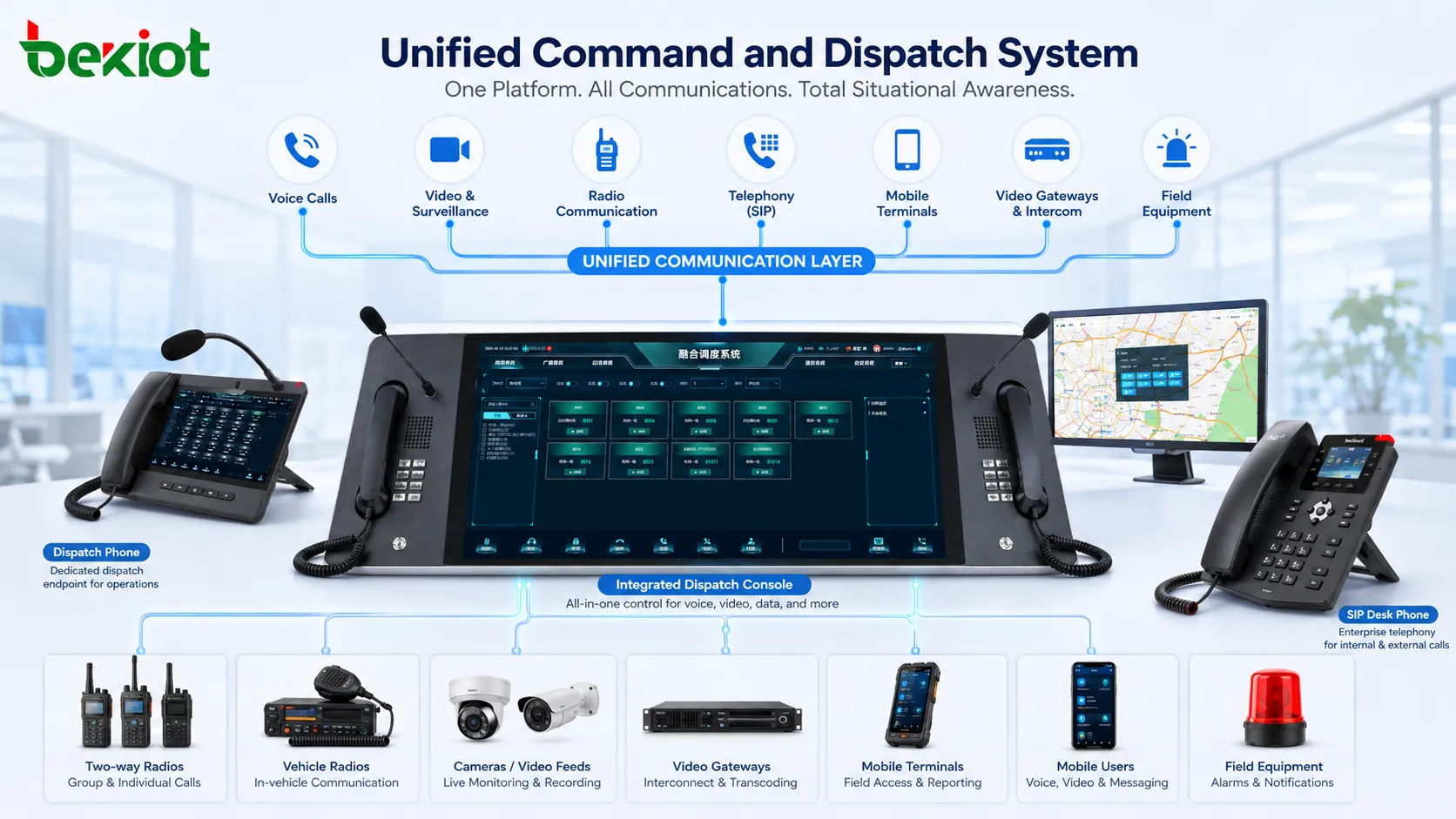
Traditional communication construction often focuses on adding more devices. A project may include IP phones, analog phones, radio stations, PoC terminals, surveillance cameras, video platforms, telephone gateways, audio gateways, broadcasting devices, and conference systems. Each device has its own value, but without unified coordination, operators still need to switch between different screens, systems, and operation habits.
The purpose of a modern command and dispatch solution is to reduce this operational fragmentation. Instead of asking users to remember which system controls which resource, the platform should present available people, devices, channels, locations, video feeds, and emergency functions in a clear structure. The dispatcher should be able to select, call, group, monitor, broadcast, or escalate actions without repeated manual switching.
This is the key difference between “making simple things complex” and “turning complexity into simplicity.” A dispatch system should not be judged only by how many functions it lists. It should be judged by whether frontline users can quickly complete the correct action when time is limited.
A Practical Architecture for Multi-System Integration
A complete dispatch system usually includes a central dispatch platform, operator console, map interface, communication server, media processing resources, and multiple types of access gateways. Around this core layer, it can connect IP phones, mobile push-to-talk terminals, radio networks, telephony systems, public address equipment, video surveillance platforms, video conferencing devices, and field transmission equipment.
In the original solution logic, several integration paths are especially important. SIP can be used for IP voice communication and platform interconnection. GB/T 28181 can be used for video platform access in compatible security and surveillance environments. RTMP can be used for media streaming scenarios. 4G networks can support remote field access, while HDMI, Wi-Fi, and wired interfaces can be used to bring live video from drones, cameras, portable equipment, or mobile command kits into the dispatch platform.
The system should support both fixed control-room deployment and mobile field coordination. In a control center, dispatchers may use map-based software and desktop dispatch terminals. In the field, users may rely on PoC terminals, handheld radios, emergency phones, mobile video equipment, or portable gateways. The platform must connect both sides so that command decisions and field information can flow in both directions.
Related System Solution: /Becke Telcom’s command and dispatch system
Voice Services as the Foundation of Dispatch
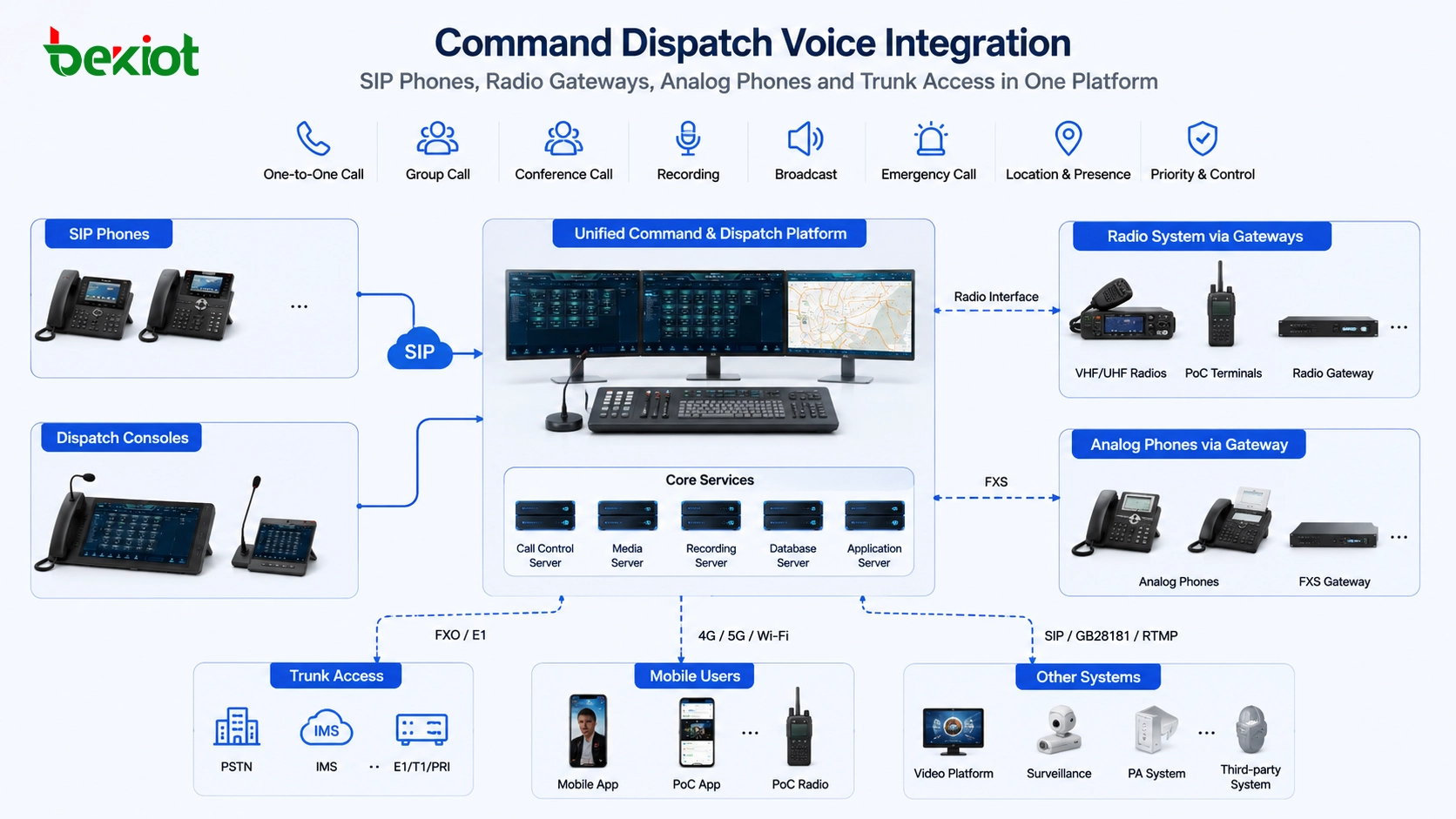
Voice communication remains the foundation of emergency command and daily dispatch. When an event occurs, the dispatcher must be able to contact field personnel, operators, duty rooms, external departments, and emergency teams immediately. A unified platform should support one-to-one calls, group calls, conference calls, forced insertion, priority calling, recording, and quick contact selection.
Different voice systems may use different access methods. IP phones usually connect through SIP. Analog phones may require FXS gateways. Connections to public telephone networks or legacy PBX systems may require FXO or E1 gateway access. Radio systems may require a dedicated radio or cluster intercom gateway to bridge VHF, UHF, private radio, or trunking communication into the dispatch environment.
The value of gateway integration is not only technical compatibility. It allows the command center to keep existing communication assets while extending them into a unified dispatch workflow. A dispatcher can call a phone, join a radio channel, initiate a group talk session, or connect an external line from the same command interface.
Video Access for Situational Awareness
Command and dispatch is no longer limited to voice. In many emergency, security, transportation, industrial, and public safety scenarios, visual information is essential. The dispatcher needs to see what is happening at the scene, not only hear a report from the field.
A dispatch platform can integrate fixed surveillance cameras, video access gateways, mobile video terminals, drone video, video conferencing systems, and portable field transmission equipment. Through protocol adaptation and media processing, live images can be sent to the command center, displayed on the dispatch interface, shared with conference participants, or used as a reference for emergency decision-making.
For example, a drone may send video through HDMI or wireless transmission to a field gateway. The gateway can forward the stream through a 4G network and use SIP, GB/T 28181, or RTMP according to the receiving platform. This allows the command center to view live aerial images during patrol, rescue, inspection, fire response, flood control, or large-event security operations.
Video transcoding may also be required when different platforms use different video formats, stream types, or access standards. A video processing layer can convert and distribute media streams so that dispatch systems, monitoring platforms, conference systems, and mobile users can receive usable video without rebuilding the entire system.
Map-Based Operation for Faster Resource Control
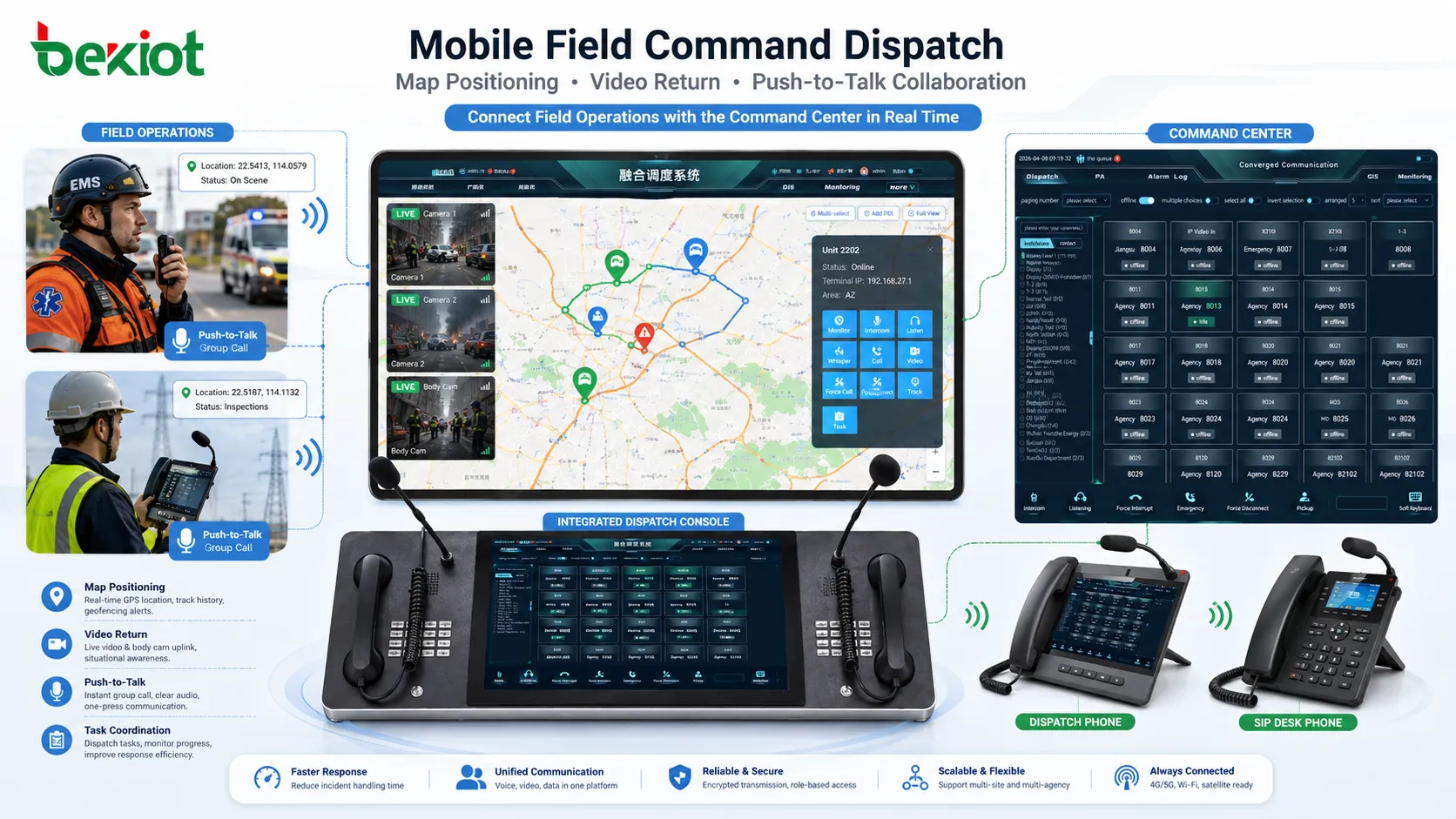
Location is one of the most useful elements in dispatch operations. A map-based command interface can show field personnel, vehicles, mobile terminals, emergency points, camera locations, buildings, roads, and incident areas. This helps operators understand not only who is available, but also where each resource is located.
For mobile users and PoC terminals, positioning functions can support real-time tracking, route awareness, and nearby resource selection. When an incident is reported, the dispatcher can quickly identify the closest available personnel or equipment. This reduces communication delay and avoids blind command decisions based only on verbal descriptions.
A practical map interface should not overload the operator with unnecessary information. It should allow filtering by team, role, device type, status, area, or task. The goal is to make resource distribution clear at a glance and make command actions easier to execute.
Mobile Terminals and Field Collaboration
Modern dispatch systems often extend beyond the control room. Field personnel may use PoC terminals, mobile apps, handheld devices, vehicle-mounted terminals, or rugged communication equipment. These terminals can support push-to-talk, location reporting, video return, contact lists, task communication, and emergency alerts.
In a well-designed solution, mobile terminals should not become isolated endpoints. Their voice, location, image, and status information should be connected to the command platform. The dispatcher can call them, organize them into groups, view their position, receive video from them, or include them in a conference or emergency response task.
This is especially useful in industrial parks, factories, mines, campuses, transportation hubs, power facilities, emergency rescue scenes, and large public events. Field teams need simple operation, while command centers need visibility and control. The dispatch system must serve both sides.
Broadcasting, Conferencing, and Emergency Notification
In many incidents, a phone call is not enough. The command center may need to broadcast instructions to a factory area, trigger public address messages, call a meeting room, connect a video conference, notify a patrol team, or coordinate with external departments. This requires the dispatch system to support more than one communication method.
Audio gateways can connect public address systems, conference broadcasting equipment, or external audio devices. Video conference gateways can help bring meeting participants and command resources into the same communication workflow. Telephone gateways can connect analog phones, PSTN lines, PBX systems, or carrier access. Radio gateways can bridge wireless channels with dispatch calls.
With these capabilities, the platform becomes a coordination hub rather than a single calling tool. During normal operation, it supports daily communication and resource management. During emergencies, it supports faster notification, wider communication coverage, and more structured escalation.
Simplification Does Not Mean Reducing Capability
A common misunderstanding is that simplification means removing functions. In command and dispatch systems, simplification means hiding unnecessary complexity behind a better workflow. The platform may support many protocols, gateways, media formats, and device types, but the user should not need to understand every technical detail during operation.
For example, the operator should not need to care whether a target device is reached through SIP, radio gateway, analog line, E1 trunk, mobile network, or video gateway. The system should present the resource as a contact, device, group, camera, channel, or task object. Once the operator selects the object, the platform applies the correct route and communication method in the background.
This is the practical meaning of turning complexity into simplicity. The engineering layer can remain powerful, but the operation layer should remain clear. The more complex the connected resources become, the more important the user experience and dispatch logic become.
Deployment Value Across Different Scenarios
Emergency Response Centers
Emergency response centers need to coordinate multiple teams, receive field information, view live video, issue instructions, and maintain communication records. A unified dispatch platform helps reduce fragmented communication and supports faster cross-department collaboration.
When voice, video, map positioning, broadcasting, and conferencing are integrated, the command center can move from passive reporting to active situational awareness and coordinated response.
Industrial and Energy Sites
Factories, chemical plants, power facilities, mines, ports, and industrial parks often contain different communication systems built at different times. The dispatch platform can integrate existing phones, radio networks, video systems, PA equipment, and mobile terminals without forcing every subsystem to be replaced at once.
This approach protects earlier investment while improving emergency communication capability, daily production coordination, maintenance communication, and safety management.
Transportation and Public Facilities
Rail transit, airports, tunnels, highways, campuses, hospitals, and municipal facilities need reliable communication between control rooms, field staff, security teams, maintenance teams, and service points. A dispatch system can provide centralized calling, event coordination, video support, and notification control.
In these environments, the main goal is to shorten response time and make resource coordination more visible, especially when multiple departments must work together.
Design Principles for a Reliable Solution
Plan the Communication Layers Clearly
Before deployment, the project team should identify which systems need to be connected: IP voice, analog phone, radio, video surveillance, mobile terminal, public address, video conference, and external network access. Each layer should have a defined access method, protocol, gateway, and security boundary.
Clear planning avoids later confusion. It also prevents the system from becoming a collection of disconnected functions that are difficult to operate and maintain.
Keep the Operator Interface Focused
The dispatch interface should support fast action. Common tasks such as calling, group calling, viewing video, locating users, starting a conference, selecting a broadcast zone, or handling an emergency alert should be available without deep menu navigation.
For emergency operations, the best interface is not the one with the most buttons. It is the one that allows the operator to find the right resource and complete the right action under pressure.
Support Expansion Without Rebuilding
A dispatch system should be designed for growth. New gateways, terminals, cameras, radio channels, branch sites, and public address zones may be added later. The platform should allow scalable access while keeping the original operation logic consistent.
This reduces long-term cost and makes the solution suitable for phased construction, multi-site deployment, and future system expansion.
FAQ
Can a command and dispatch system connect old analog phones?
Yes. Analog phones can usually be connected through suitable telephony gateways. This allows older telephone resources to be included in a modern dispatch workflow without immediate replacement.
Is video integration necessary for every dispatch project?
Not always. Small voice-only projects may not need video at the beginning. However, projects involving security, emergency response, industrial inspection, traffic management, or field command often benefit greatly from live video access.
How should a project decide which gateways are required?
The required gateways depend on the existing systems. Radio networks may need radio gateways, analog telephones may need FXS or FXO gateways, carrier lines may need trunk gateways, and video systems may need video access or transcoding equipment.
Does mobile dispatch require a private network?
Not necessarily. Mobile dispatch can work over private networks, Wi-Fi, 4G, 5G, or secure public-network access depending on the project design. The key is to plan authentication, media quality, coverage, and security policies properly.
What makes a dispatch system easier to maintain?
A maintainable system should have clear resource naming, structured groups, documented gateway access, stable numbering rules, monitoring tools, event logs, and a consistent operation interface for dispatchers and administrators.







