


Cloud-based video monitoring is becoming more common as internet access, cloud computing, mobile apps, and connected cameras continue to develop. Many surveillance projects now use cloud platforms to simplify remote access, device management, and mobile viewing. This makes deployment easier, especially for small sites, distributed stores, temporary monitoring points, and projects where users want to view cameras through a smartphone app.
However, cloud access and cloud storage are not the same thing. A camera can be connected to a cloud monitoring platform for remote viewing and management, but continuous recording may still be stored locally. In many projects, the most important design question is not whether the camera should be connected to the cloud, but where the video recordings should be stored: on the local site, in the cloud, or through a hybrid structure.
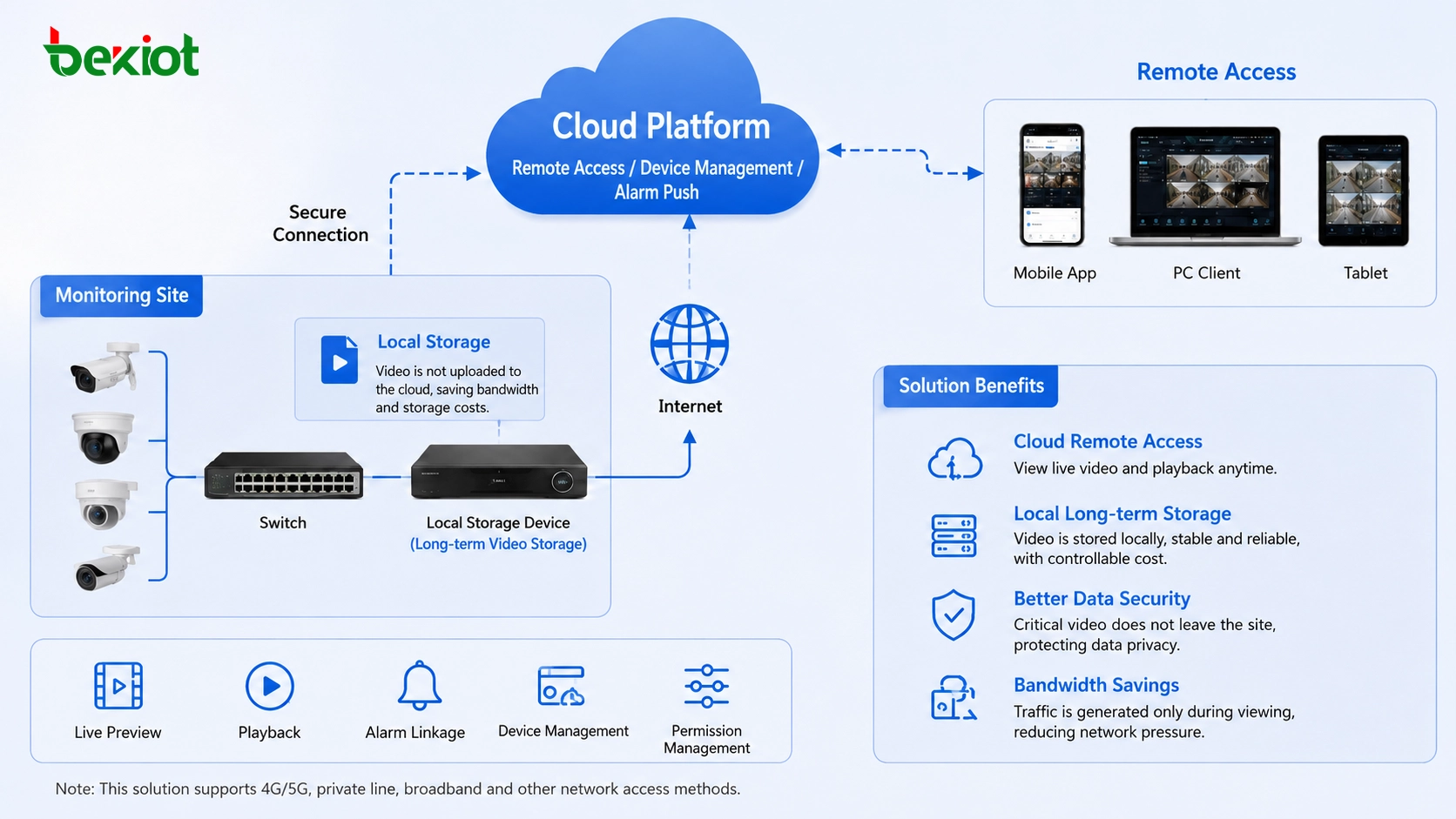
Why Cloud Access Is Attractive for Video Projects
Cloud-connected video monitoring has clear advantages. It is often easier to deploy, easier to manage, and more convenient for end users. Cameras can be added to a cloud platform, managed through a web interface or mobile app, and viewed remotely without building a complex private monitoring system from the beginning.
For small businesses, residential users, shops, offices, and simple monitoring scenarios, this type of deployment can reduce initial project difficulty. Users can quickly open a mobile app, check live video, manage devices, and receive basic monitoring services. The platform handles remote connectivity, user access, and device management, making the system more user-friendly.
Cloud monitoring also improves the connection between video surveillance and mobile software. Users no longer need to stay in front of a local monitoring screen. They can view selected cameras from phones, tablets, or computers, which is one of the main reasons cloud-based monitoring has become popular.
The Hidden Cost Behind Continuous Recording
Although cloud access is convenient, cloud recording creates a different set of requirements. Continuous video storage consumes bandwidth and storage space. Both are real resources, and in most cloud monitoring platforms, these resources are charged separately or included only under limited service plans.
Some users discover this issue only after cameras have already been purchased and connected to the cloud platform. Live viewing may work smoothly, but when they enable recording, long-term retention, or high-definition cloud storage, extra costs appear. This can cause the final project budget to exceed the original expectation.
Video data is much larger than normal text or device status data. If every camera uploads continuous recording to the cloud, the network must carry constant upstream traffic. The cloud platform must also reserve storage capacity for each camera and each retention period. The more cameras there are, the more obvious the bandwidth and storage pressure becomes.
Recommended Design: Use cloud platforms for convenient remote access and centralized management, but keep continuous recording on local storage when long retention, stable recording, or traffic-cost control is required.
Live Viewing Does Not Equal Full Cloud Recording
Many users only need to view live video occasionally. In this situation, the camera does not need to upload a full recording stream to the cloud all the time. Data traffic is generated mainly when someone opens the video for live viewing. If no one is watching and no cloud recording is enabled, the cloud platform does not need to store continuous video files.
Mobile viewing also usually uses a lower-bitrate stream. Because smartphone screens are limited in size, many cloud monitoring platforms display the camera’s sub-stream rather than the full high-definition main stream. A sub-stream can meet basic viewing needs with much lower bandwidth consumption.
This explains why cloud viewing may appear inexpensive while cloud recording becomes costly. Occasional live viewing sends limited traffic. Continuous cloud storage sends video data constantly and keeps it stored for later playback. The two usage patterns have very different network and storage requirements.
Why Local Recording Is Still the Better Choice in Many Sites
For many projects, local storage remains the more practical recording method. A local recorder, storage server, or video platform can save camera footage inside the site network. The camera sends video to local equipment first, reducing the need to push every recording stream to the cloud.
This structure is especially useful when cameras use 4G or other metered network connections. If a 4G camera uploads continuous recordings to the cloud, it may consume a large amount of mobile data. For long-term recording, this traffic cost can become much higher than expected. Local recording helps reduce this pressure because the video is stored near the camera or within the local monitoring network.
Local storage also improves control. The project owner can define recording schedules, storage capacity, retention periods, camera groups, and playback rules according to actual site needs. For security-sensitive sites, keeping recordings within the local network may also simplify data control and reduce unnecessary exposure.
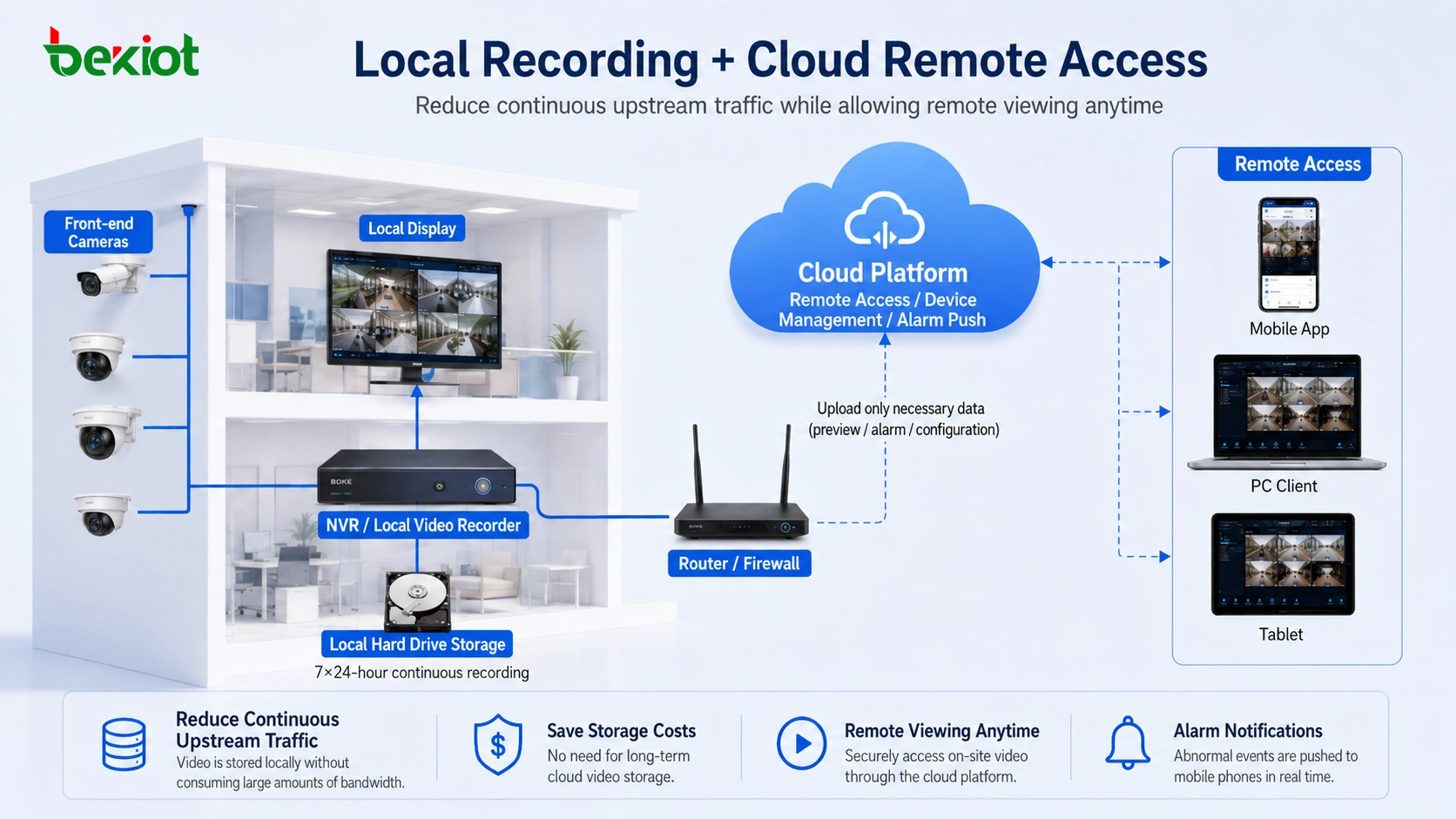
A Low-Cost Structure for Small Sites
For homes, small offices, shops, and small enterprises, a practical structure is to use a small local recorder together with several cameras. The cameras record locally, while cloud access is used for remote management and mobile viewing. This gives users a balance between cost, convenience, and recording reliability.
The local recorder handles continuous storage. The cloud platform provides easier access from outside the site. Users can still open an app to view cameras, but the full recording does not need to be stored in the cloud by default. This avoids unnecessary storage fees and reduces continuous bandwidth usage.
This structure is also easier to understand for non-technical users. Cameras, local recorder, mobile app, and cloud access work together. The user gets both local playback and remote viewing without turning every camera into a full-time cloud storage source.
When GB/T 28181 Projects Need Local Storage
In some projects, cameras are connected directly to an upper-level video platform through GB/T 28181 for easier networking and centralized access. This approach can help remote platforms view camera resources, but it may create a problem if no local recording plan is configured.
If cameras only connect upward and the local site does not store video, the project may lose an important layer of recording capability. When the upper platform has limited storage, unstable network access, or additional storage cost, the site may not have reliable playback records when they are needed.
A more complete structure is to deploy a local GB/T 28181 platform first. The local platform manages camera access, local recording, device directory synchronization, and internal video control. Then the local platform connects upward to the superior platform through cascading. This allows remote viewing while keeping recording closer to the site.
Hybrid Cascading for Local Control and Remote Access
A hybrid design can combine the strengths of both local and cloud-based monitoring. The local platform manages cameras, records video, and supports local playback. The upper-level platform receives device directories, selected streams, and remote viewing access through GB/T 28181 cascading or other compatible methods.
This structure is useful for government projects, industrial parks, campuses, transportation sites, construction areas, energy facilities, and distributed enterprise monitoring. Local teams can keep stable recording and faster internal access, while remote supervisors can still view important camera feeds when needed.
Local platforms can also provide richer video control functions. Depending on device support, operators may control pan-tilt movement, adjust zoom or focus, start two-way audio, call up live video, and output different streams for different applications. This gives the project more flexibility than a simple direct-to-cloud camera connection.
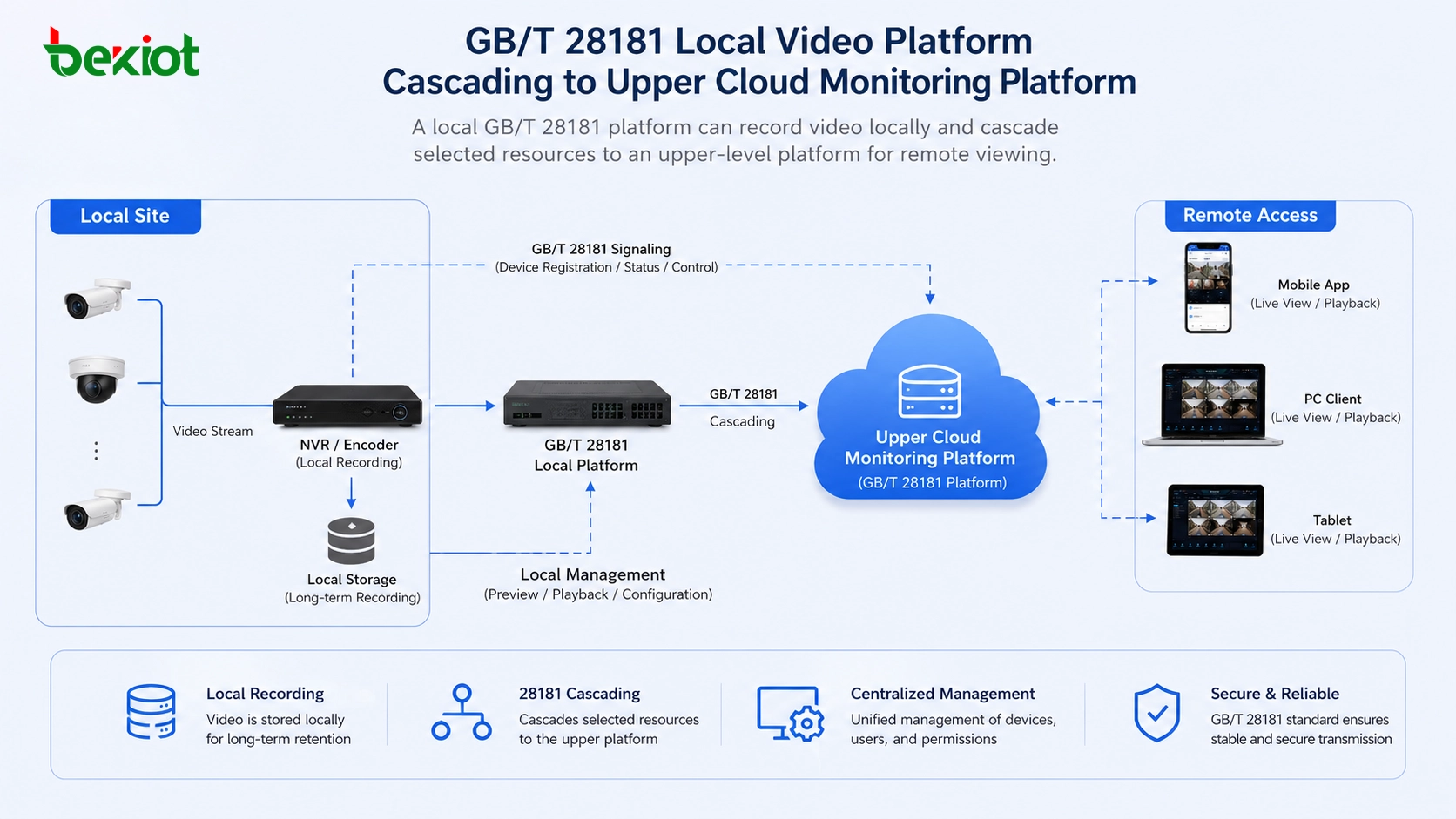
How to Choose the Right Storage Plan
The choice between local storage and cloud storage should be based on camera quantity, recording duration, bandwidth cost, network type, management requirements, and data security needs. A small site with only occasional video playback may use cloud storage for convenience. A larger site with many cameras and long retention requirements usually benefits from local recording.
If the site uses 4G cameras or other traffic-limited connections, cloud recording should be evaluated carefully. Continuous upload may create high data costs. In this situation, local recording or event-triggered upload may be more reasonable than full-time cloud storage.
If the project needs centralized remote supervision across many sites, a hybrid structure is often better. Each site records locally, while the upper platform receives directory information and selected video streams for remote viewing, inspection, or command use. This reduces unnecessary cloud storage pressure while keeping remote management capability.
Deployment Value for Cloud Video Monitoring Projects
Cost Control for Long-Term Recording
Local recording helps reduce continuous cloud storage fees and upstream bandwidth consumption. This is especially important for projects with many cameras, high-definition video, long retention periods, or metered network access.
Instead of uploading all video all the time, the system can store full recordings locally and only transmit live or selected streams when remote users need access.
Better Use of Existing Monitoring Resources
Many sites already have cameras, local recorders, video platforms, and internal monitoring networks. A hybrid solution allows these resources to continue working while adding cloud access or upper-level platform connectivity.
This protects previous investment and avoids unnecessary replacement of stable camera systems.
More Reliable Project Architecture
Local storage gives the site an independent recording layer. Even if the external network becomes unstable, local recording can continue as long as the local camera and recorder network remains available.
At the same time, remote viewing and platform cascading can still support supervision, command, and cross-site management when network conditions allow.
Recommended Implementation Path
Assess Recording Requirements First
The project team should confirm how many cameras need recording, how long video must be retained, whether full-time recording is required, and whether playback will be used frequently. These requirements directly affect storage capacity and network planning.
It is also important to distinguish between live viewing and recording. A project that only needs occasional mobile viewing has very different bandwidth requirements from a project that needs continuous cloud storage.
Plan Local Storage and Platform Cascading
For medium and large projects, local storage should be considered early. A local recorder, video storage server, or GB/T 28181 platform can provide recording and local management, while cascading can connect the site with an upper-level platform.
This design keeps the video archive under local control while still allowing remote access, centralized supervision, and platform-level management.
Calculate Bandwidth Before Enabling Cloud Recording
Before enabling cloud storage, estimate the required upstream bandwidth, expected storage size, camera bitrate, number of cameras, retention period, and service fees. This avoids unexpected costs after deployment.
For 4G camera projects, data consumption should be checked especially carefully. Continuous cloud upload may not be suitable unless the business value justifies the traffic cost.
FAQ
Can cloud monitoring still work if video is stored locally?
Yes. Cloud access and local storage can work together. The cloud platform can provide remote viewing and management, while the local recorder or platform stores continuous video footage.
Is cloud storage suitable for all camera projects?
No. Cloud storage is convenient, but it may not be cost-effective for many cameras, long retention periods, high-definition recording, or traffic-limited network environments.
What is the benefit of a local GB/T 28181 platform?
It can manage local camera resources, support recording, synchronize video directories, and cascade selected resources to an upper-level platform for remote viewing and centralized management.
Why do mobile apps often use lower bandwidth for live viewing?
Mobile screens usually do not need the full main stream for basic viewing. Many platforms display a lower-bitrate sub-stream, which reduces bandwidth consumption while still providing usable video.
When should a hybrid storage design be used?
A hybrid design is suitable when the project needs both reliable local recording and convenient remote access. It is especially useful for distributed sites, industrial facilities, campuses, public facilities, and GB/T 28181 cascading projects.







