


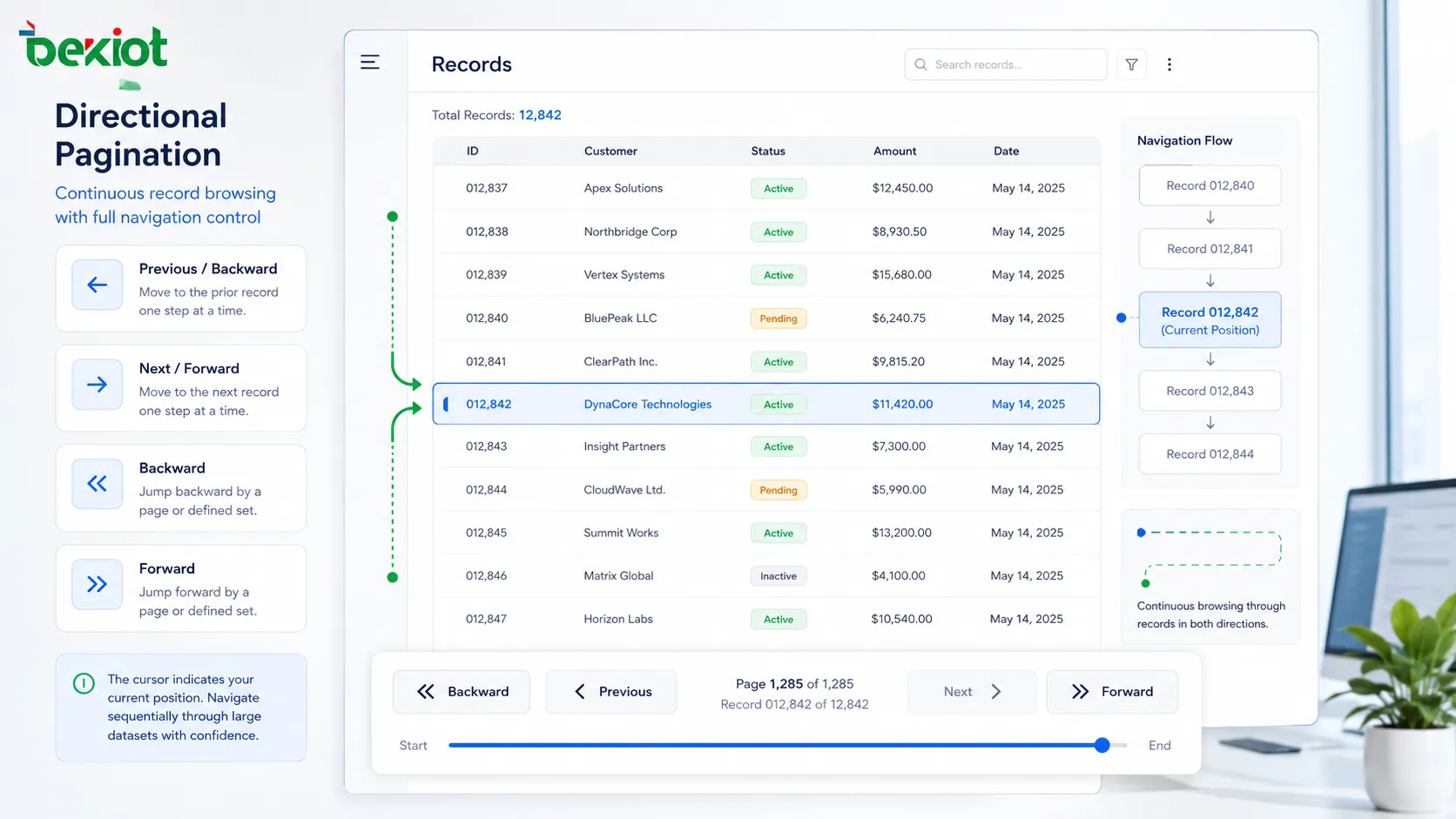
When a system contains thousands of records, alarms, contacts, messages, logs, devices, tasks, files, or monitoring events, showing everything at once is usually inefficient. The screen becomes crowded, the database query becomes heavy, the network response slows down, and users lose their position. Direction-based page control solves this by allowing users or applications to move through data step by step, usually through actions such as next, previous, forward, backward, up, down, older, newer, before, after, or cursor continuation.
This article analyzes the topic through three elements: function, value, and application. Instead of treating it as a simple user-interface button, it examines how movement-based pagination works in software architecture, why it improves performance and usability, and where it is applied in websites, mobile apps, enterprise systems, monitoring platforms, embedded terminals, data tables, APIs, search results, and control interfaces.
Why Movement-Based Page Control Appears
In early or small systems, page numbers are easy to understand. Users may click page 1, page 2, page 3, or jump directly to a specific page. This works well when data is limited and stable. However, modern systems often display data that changes continuously. New messages arrive, logs are generated, alarms appear, devices update status, and transaction records keep increasing.
When data changes quickly, page-number navigation can become unstable. A record that was on page 3 may move to page 4 after new records arrive. A user may click the next page and see duplicate data or miss records. The problem becomes more obvious in time-based lists, infinite scroll interfaces, real-time dashboards, and APIs that serve large datasets.
Directional navigation focuses less on absolute page numbers and more on relative movement. It asks: what comes after this record? What came before this point? What is the next batch? What is the previous batch? This is why it is widely used in modern data-heavy systems.
The Function Layer
Controlled Data Segmentation
The first function is dividing large data into manageable blocks. A system may load 20 records, 50 records, or 100 records at a time instead of returning the entire dataset. This reduces database pressure, network transmission size, browser memory use, and rendering workload.
The block size should match the use case. A customer list may use 20 rows per screen. A log viewer may load 100 events at a time. A mobile interface may load smaller groups because the screen is limited. An API may allow adjustable limits but still enforce a maximum size to protect the service.
Position-Based Movement
The second function is maintaining a position. Instead of only saying “show page 5,” the system may say “show records after this timestamp,” “show items before this ID,” or “continue from this cursor.” This makes browsing more stable when the dataset changes.
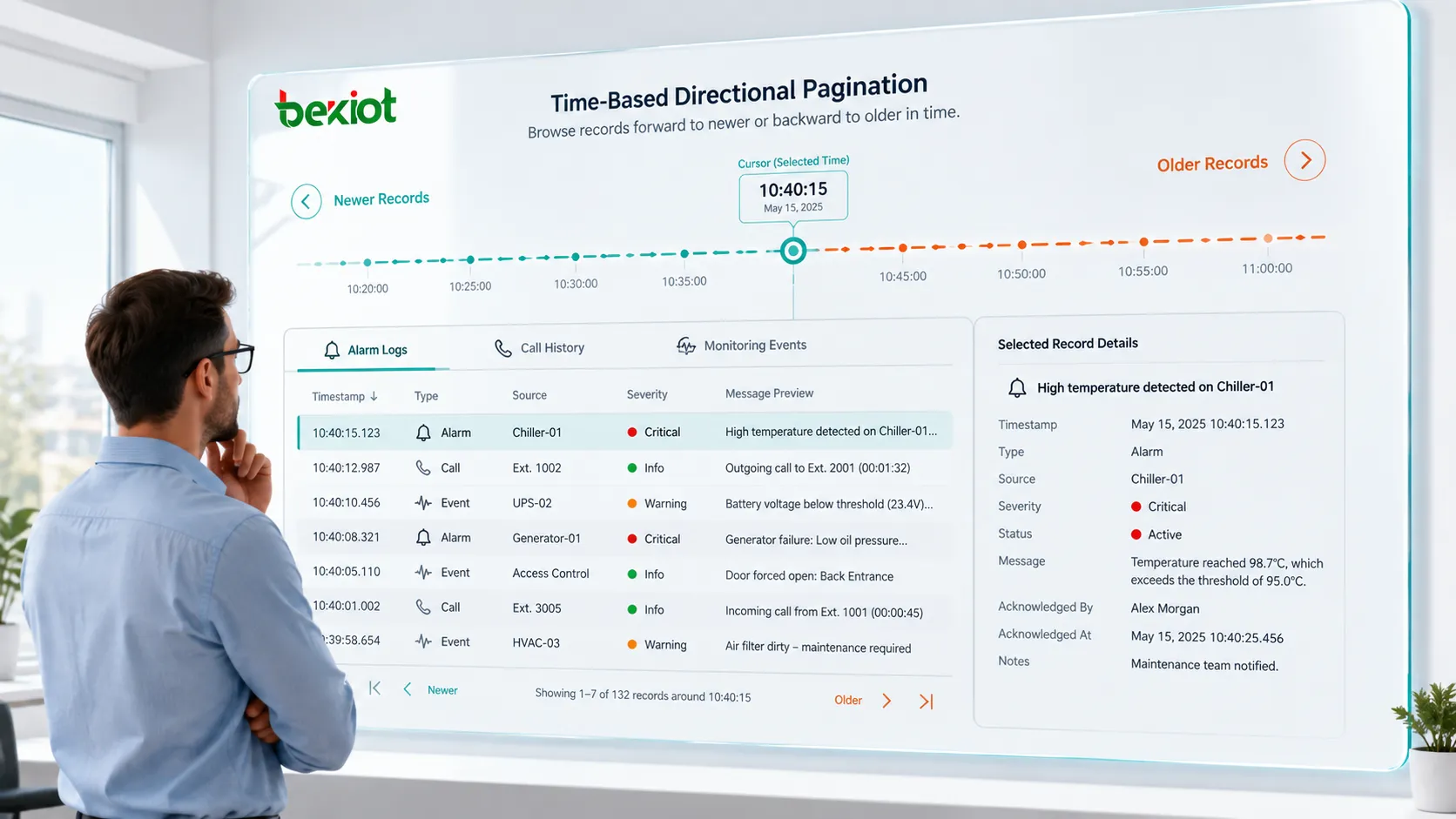
Position-based movement is especially useful in descending time lists such as messages, system logs, alarm history, call records, work orders, and activity feeds. The user can move toward older records or return toward newer records without relying on fragile page numbers.
Directional State Control
The third function is state control. The interface or API must know whether the user is moving forward, backward, upward, downward, to older items, or to newer items. Direction affects query conditions, sorting order, cursor values, cache behavior, and whether the interface should show a next or previous control.
For example, a log platform may sort records from newest to oldest. “Next” may mean moving to older events, while “Previous” may mean returning to newer events. If the interface does not define direction clearly, users may feel confused even if the data query is technically correct.
The Value Layer
The value of direction-based navigation can be seen in performance, usability, stability, and scalability. It prevents systems from overloading themselves with unnecessary data. It keeps users oriented in long lists. It improves API efficiency. It also supports real-time or frequently changing records more reliably than static page indexes.
From a user perspective, the main value is continuity. The user can keep moving through records without losing context. From a system perspective, the value is controlled load. The server only returns the necessary slice of data. From a product perspective, the value is better experience in search, browsing, monitoring, and review workflows.
This value becomes stronger when datasets are very large or continuously updated. A static page number model may be enough for a small product catalog, but it is often less suitable for fast-changing operational data.
Page Number, Offset, and Cursor Logic
Pagination methods can be implemented in different ways. The simplest method is page-number pagination. The system calculates an offset based on page size and page index. For example, page 3 with 20 records per page means skipping the first 40 records and returning the next 20.
Offset logic is easy to implement and easy to understand. It supports jumping to a specific page. However, it can become slow for deep pages because the database may need to skip many rows. It can also produce duplicates or missing records when new data is inserted or deleted while users are browsing.
Cursor logic uses a stable marker such as an ID, timestamp, sequence number, or encoded cursor. The query asks for records after or before that marker. This method is more suitable for large and changing datasets. It is common in APIs, feeds, chat systems, event logs, and cloud service lists.
Core Design Elements
| Design Element | Main Purpose | Practical Consideration |
|---|---|---|
| Direction | Defines next, previous, older, newer, up, or down movement | Must match user language and data order. |
| Position Marker | Defines where the next query should continue | Should be stable, unique, and hard to corrupt. |
| Page Size | Controls how many records are returned each time | Should balance readability and system load. |
| Sort Order | Controls the sequence of returned records | Should remain consistent across requests. |
| Boundary State | Shows whether more data exists in a direction | Prevents users from clicking unavailable controls. |
Forward and Backward Movement
Forward and backward movement is common in list browsing. In a document viewer, forward may mean moving to the next page. In a message history, forward may mean moving toward newer messages. In a log viewer, forward may mean moving toward older events depending on the sort order. Therefore, direction should be defined by user expectation, not only by database order.
Backward movement is more difficult than it appears. If the system only stores a next cursor, returning to the previous batch may require extra state. Some systems keep cursor history on the client side. Others generate both next and previous tokens. Some systems reverse the query direction and then restore display order.
Good implementation should prevent data jumping. When a user goes back, the visible records should feel consistent with the previous screen. If the dataset changed, the system should handle it gracefully rather than showing confusing duplicates.
Time-Based Browsing
Time-based browsing is widely used in logs, alarms, messages, call history, monitoring events, news feeds, and transaction records. A timestamp is often used as a direction marker. Users may browse older records or return to newer records.
However, timestamps alone may not be unique. Many records can share the same time value, especially in high-volume systems. To avoid missing records, the system may combine timestamp with a unique ID or sequence number. This creates a stable ordering rule.
Time zones also matter. The database may store UTC time, while users see local time. Pagination should be based on stable stored values rather than display formatting. Otherwise, daylight saving changes, time-zone conversion, or inconsistent client clocks can create confusion.
API Implementation Methods
In API design, directional pagination is often represented by parameters such as limit, before, after, cursor, next_cursor, previous_cursor, start_after, or ending_before. The response usually includes the returned items and metadata indicating whether more data exists.
A good API should make pagination predictable. The sort order should be documented. Cursor tokens should not expose sensitive internal details unless necessary. Invalid or expired cursors should return clear errors. The maximum page size should be limited to protect system performance.
APIs should also handle empty results gracefully. If there is no more data in a direction, the response should indicate that clearly instead of returning ambiguous errors.
Database Query Considerations
Database performance depends heavily on indexes. A cursor based on an indexed ID or timestamp can be efficient. An offset query on a very deep page can become expensive because the database may still need to scan or skip many rows.
For large tables, keyset pagination is often more efficient than offset pagination. Instead of skipping millions of records, the query starts from a known key and moves in a direction. This is especially useful for audit logs, telemetry records, message histories, and transaction lists.
Sorting must be deterministic. If records are sorted only by a non-unique field, the order may change between requests. Adding a secondary unique field helps keep results stable.
Interface Design Principles
Users should understand where they are and what will happen if they click a control. Labels such as next, previous, older, newer, load more, back to latest, and continue browsing should match the data context.
In some interfaces, arrow icons are enough. In others, text labels are necessary. For example, a monitoring console may be clearer with “Older events” and “Newer events” than with only arrow icons. Accessibility should also be considered because some users rely on screen readers or keyboard navigation.
The interface should also preserve position. If a user opens an item and returns to the list, the system should restore the previous scroll position and page state whenever possible.
Infinite Scroll and Manual Controls
Infinite scroll is a common form of directional loading. As the user moves down, the system loads more records. This is useful for feeds, social content, media browsing, and mobile apps.
However, infinite scroll is not always suitable. It can make it difficult to reach the footer, compare distant records, share a position, or know how much content remains. It may also increase memory usage if old items are not virtualized.
Manual controls such as “Load more,” “Older,” or “Next batch” give users more control. They are often better for logs, reports, search results, and operational systems where precise review matters.
Application in Search Results
Search systems often use pagination to present ranked results. Directional controls allow users to move through result batches. In simple search pages, numbered pagination may still be useful because users may want to jump across pages.
For large or dynamic search indexes, cursor-based continuation can be more stable. It prevents expensive deep offset queries and helps maintain consistent result order during browsing.
Search pagination should also consider filters. When a user changes a filter, the cursor should usually reset because the result set has changed. Keeping an old cursor after changing the query can produce incorrect results.
Application in Data Tables
Enterprise data tables often include records such as users, devices, orders, tickets, calls, tasks, alarms, assets, or inventory. Pagination keeps the interface readable and reduces rendering load.
Directional navigation is useful when users review records in sequence. For example, an operator may inspect alarm records from newest to oldest. A support agent may review recent tickets. A finance user may browse transactions by time.
Data tables should also support sorting and filtering carefully. If the user changes the sort order, the current direction may need to be recalculated.
Application in Logs and Monitoring
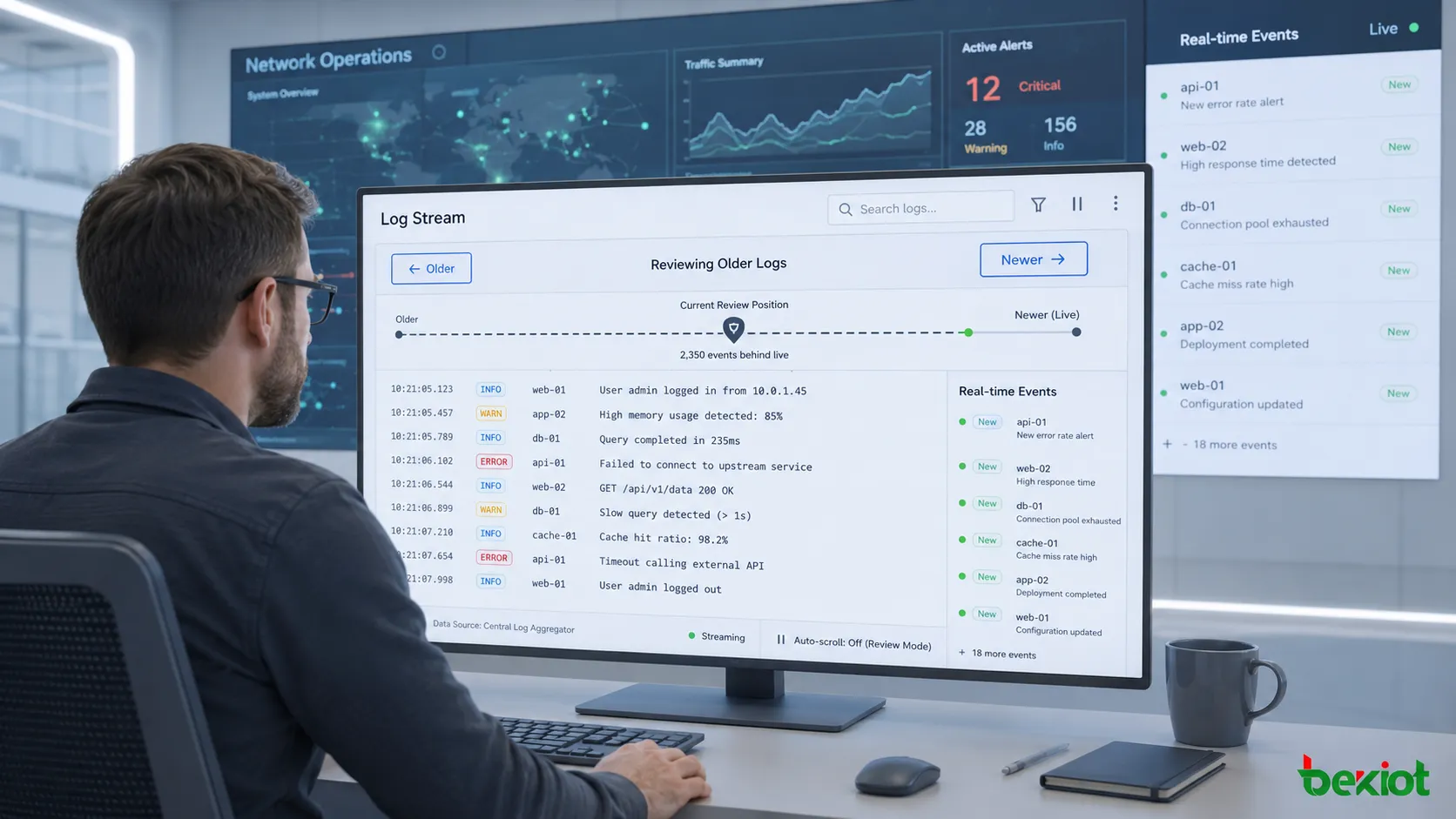
Monitoring platforms generate continuous data. System logs, access logs, security events, device status, network alerts, and application traces can grow quickly. Directional pagination helps users move through event streams without overloading the browser or server.
In log analysis, the ability to move before and after a specific event is important. An engineer may find an error and then inspect earlier and later records to understand the cause. This requires stable ordering and accurate time markers.
Real-time update behavior should be designed carefully. If new records keep arriving while the user is reading older records, the interface should not suddenly shift position. Some systems provide a “new events available” indicator instead of automatically moving the list.
Application in Messaging and Conversation History
Messaging systems usually show recent messages first and load older messages when the user scrolls upward. This is directional pagination based on conversation position. The system must preserve the user’s view so the screen does not jump when older messages are inserted above the current content.
Conversation history may also include deleted messages, edited messages, attachments, reactions, read receipts, and pinned content. The pagination logic should handle these states without breaking order.
For communication systems, message continuity is critical. Missing one message in the middle of a sequence can change the meaning of the conversation.
Application in Embedded and Touch-Screen Devices
Directional pagination is not only used in websites and APIs. Embedded devices, industrial terminals, dispatch panels, touch-screen consoles, access control interfaces, and handheld devices often use up, down, left, right, next, and previous controls to browse menus, contacts, channels, tasks, and settings.
These devices may have limited screen size and limited input options. A direction-based model is easier than requiring users to type page numbers. It also works well with physical keys, rotary controls, joystick navigation, or touch gestures.
For field devices, interface simplicity matters. Operators may use the device while wearing gloves, working in noise, standing outdoors, or responding to urgent tasks.
Boundary and Error Handling
Every directional system must handle boundaries. What happens when the user reaches the first record? What happens at the end? What if the cursor is expired? What if the item used as a marker was deleted? What if the filter changes?
Good design disables unavailable controls or clearly explains that no more records exist. It should not allow endless repeated requests that return the same empty response. API responses should include clear metadata such as has_more, next_cursor, or previous_cursor.
When a cursor becomes invalid, the system should provide a safe recovery path such as refreshing from the latest position or restarting the search.
Security and Access Control
Pagination may expose data if access control is not applied correctly. The system must check permissions for every request, not only for the first page. A user should not be able to change a cursor or direction parameter to access records outside their authority.
Cursor tokens should be protected from tampering. They may be signed, encrypted, or mapped to server-side state depending on the security requirement. Exposing raw database IDs may be acceptable in some internal systems but risky in public-facing APIs.
Rate limiting is also important. A user or bot should not be able to harvest large datasets rapidly by repeatedly requesting next pages.
Performance Optimization
Optimization starts with indexes, stable sorting, reasonable page size, and efficient query conditions. The system should avoid returning unnecessary fields. Large images, attachments, or heavy related objects should be loaded separately when needed.
Front-end optimization also matters. Virtualized lists can render only visible items while keeping the browsing experience smooth. Cache can help when users move back and forth. Prefetching may load the next batch in advance, but it should not waste bandwidth excessively.
Performance should be measured with realistic data volume. A design that works with a thousand records may fail with ten million records.
User Experience Value
The user experience value is not only faster loading. Directional pagination gives users a sense of control. They can continue, return, review, and compare without feeling lost in a large dataset.
It also reduces cognitive load. Instead of facing too much information at once, users see a manageable portion and decide whether to continue. This is especially useful in operational systems where users must make decisions quickly.
Clear direction labels and stable position restoration make the interface feel reliable. Users trust the system when records appear in expected order and navigation does not jump unexpectedly.
Implementation Checklist
Define the data order first. Decide whether records are sorted by time, ID, priority, relevance, name, status, or another field. Then define the direction language that users will see.
Choose the pagination method. Use offset pagination for small and stable datasets where page jumping matters. Use cursor or keyset pagination for large, frequently changing, or real-time datasets.
Set page size limits. Provide clear metadata. Handle empty results. Protect cursor integrity. Add permission checks. Test with inserted, deleted, and updated records while the user is browsing.
Finally, test the interface on real devices. A desktop table, mobile feed, embedded screen, and control-room display may require different navigation patterns.
Common Mistakes
One mistake is using offset pagination for very large dynamic tables. This may cause slow queries and unstable results.
Another mistake is using non-deterministic sorting. If two records have the same sort value and no secondary key, the order may change between requests.
A third mistake is unclear direction labels. Users may not know whether “next” means newer, older, forward in search ranking, or lower in a table.
A fourth mistake is ignoring deleted marker records. If the cursor depends on an item that no longer exists, the system needs a recovery method.
A fifth mistake is allowing unlimited page size. This can overload servers and create security risks.
Future Development Direction
Modern systems are moving toward smarter and more context-aware browsing. Instead of only loading the next block, interfaces may combine direction-based loading with search, filtering, AI summarization, event grouping, anomaly detection, and timeline navigation.
For observability platforms, pagination may be connected with trace correlation and time-window navigation. For messaging, it may support jump-to-date and unread markers. For enterprise tables, it may combine cursor browsing with saved views and user-specific filters.
The direction is clear: pagination is becoming less like a page-turning tool and more like a controlled navigation layer for complex, changing information.
Directional pagination is valuable because it gives users and systems a stable way to move through large or changing datasets while controlling performance, preserving context, and reducing interface complexity.
FAQ
Why does the same record sometimes appear on two pages?
This often happens when data changes during browsing or when offset pagination is used on a dynamic dataset. Cursor-based logic and stable sorting can reduce the problem.
Can users jump directly to a specific page with cursor pagination?
Usually not in the same way as numbered pagination. Cursor pagination is designed for continuation from a known position, not random page jumping.
What is a safe page size?
It depends on the data type and interface. The system should choose a size that is readable for users and safe for server performance, while enforcing a maximum limit.
Should the cursor be visible to users?
Usually no. It is often a technical token used by the application or API. Users should see simple navigation labels rather than internal cursor values.
How should new real-time records be handled while browsing older data?
A good approach is to show a “new records available” notice instead of forcing the list to jump. This preserves the user’s review position.







