


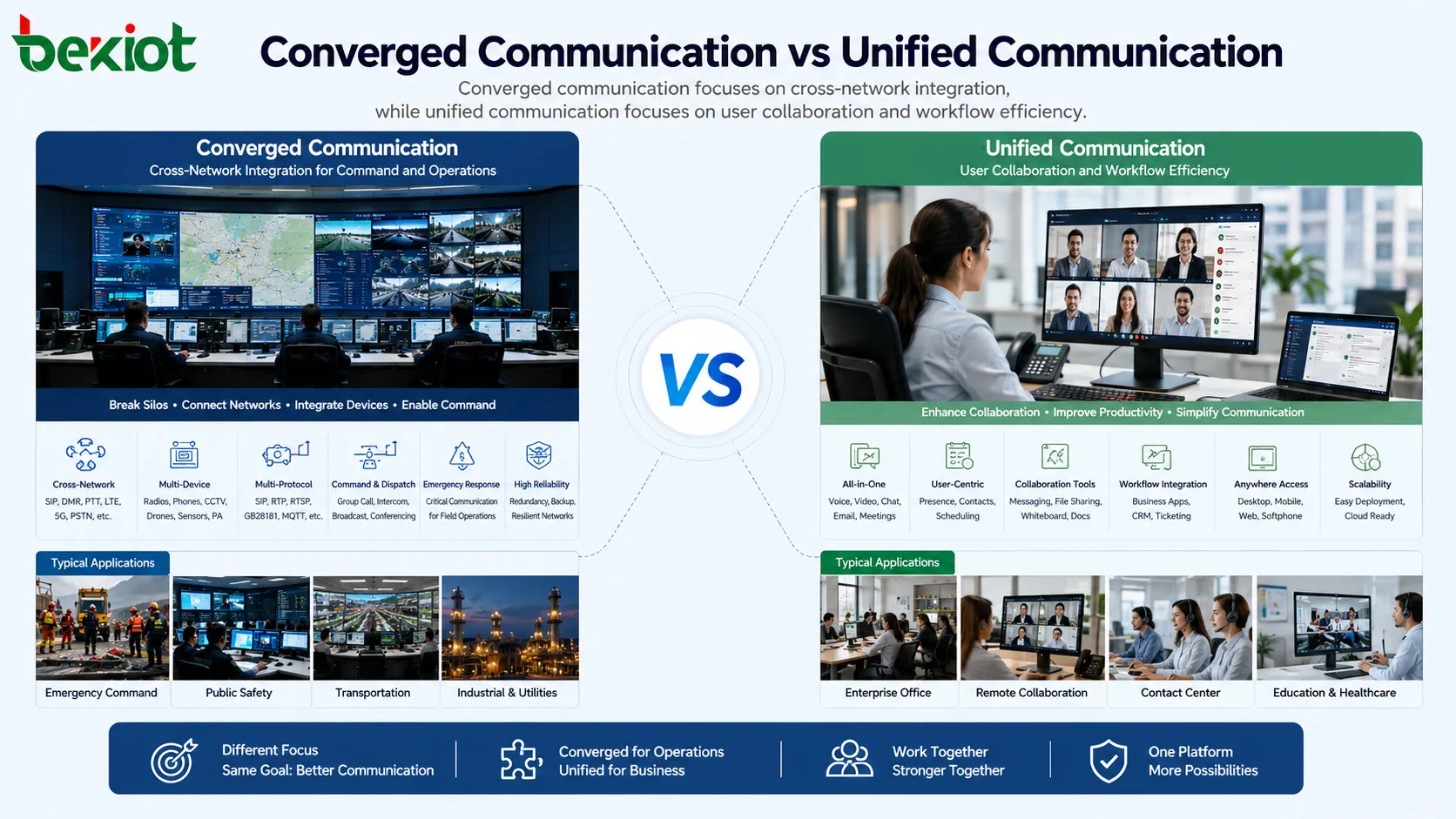
Converged communication and unified communication are often mentioned together, and in some early discussions they were even treated as different translations of the same UC concept. In real projects, however, they have developed into two different system directions. One focuses more on connecting different communication networks, devices, and protocols. The other focuses more on improving office collaboration, user experience, and business communication workflows.
This difference is important for project planning. A dispatch center, emergency command platform, industrial site, transportation hub, or public safety system usually needs cross-network communication between radios, SIP phones, video systems, mobile terminals, CCTV, drones, and broadcasting equipment. An office, customer service team, or enterprise collaboration environment usually needs calling, messaging, meetings, voicemail, email, and workflow tools in one software experience.
Two System Directions From a Shared UC Background
In early communication terminology, both converged communication and unified communication were sometimes connected with UC, or Unified Communication. This caused confusion because the two concepts may sound similar in translation. Some discussions also connect RCS, or Rich Communication Suite, with converged communication, but rich communication mainly refers to richer media capabilities such as text, images, video, and video calling.
Richer media does not automatically mean real system convergence. A personal communication service may evolve from voice to text, then to images and video, but that is mainly an expansion of media types. Converged communication is more concerned with whether different networks, protocols, devices, and communication methods can be interconnected and controlled together.
After years of development, the two terms now represent two different project logics. They differ in application scenarios, technical architecture, device types, implementation difficulty, and service goals. It is more useful to understand them by function and capability rather than only by literal translation.
Related System: Emergency Converged Communication System
Network Integration as the Core of Convergence
A converged system integrates multiple communication networks and communication methods into one coordinated platform. These may include voice, data, video, messaging, SIP telephony, digital trunking, mobile terminals, CCTV, drones, public address systems, and emergency communication devices.
The purpose is to break communication silos. In many industry projects, different systems use different protocols and serve different operational purposes. A radio network may be used by field teams. SIP phones may be used in control rooms. CCTV may be used by security teams. Drones may provide aerial video. Broadcasting systems may deliver emergency announcements. Without integration, these systems remain separated.
A converged platform allows these previously isolated resources to communicate or cooperate. It does not simply place many devices on the same screen. It creates interoperability between networks and makes them available to dispatchers, command operators, emergency teams, and field personnel through a unified operational workflow.
Cross-Protocol Connectivity in Real Projects
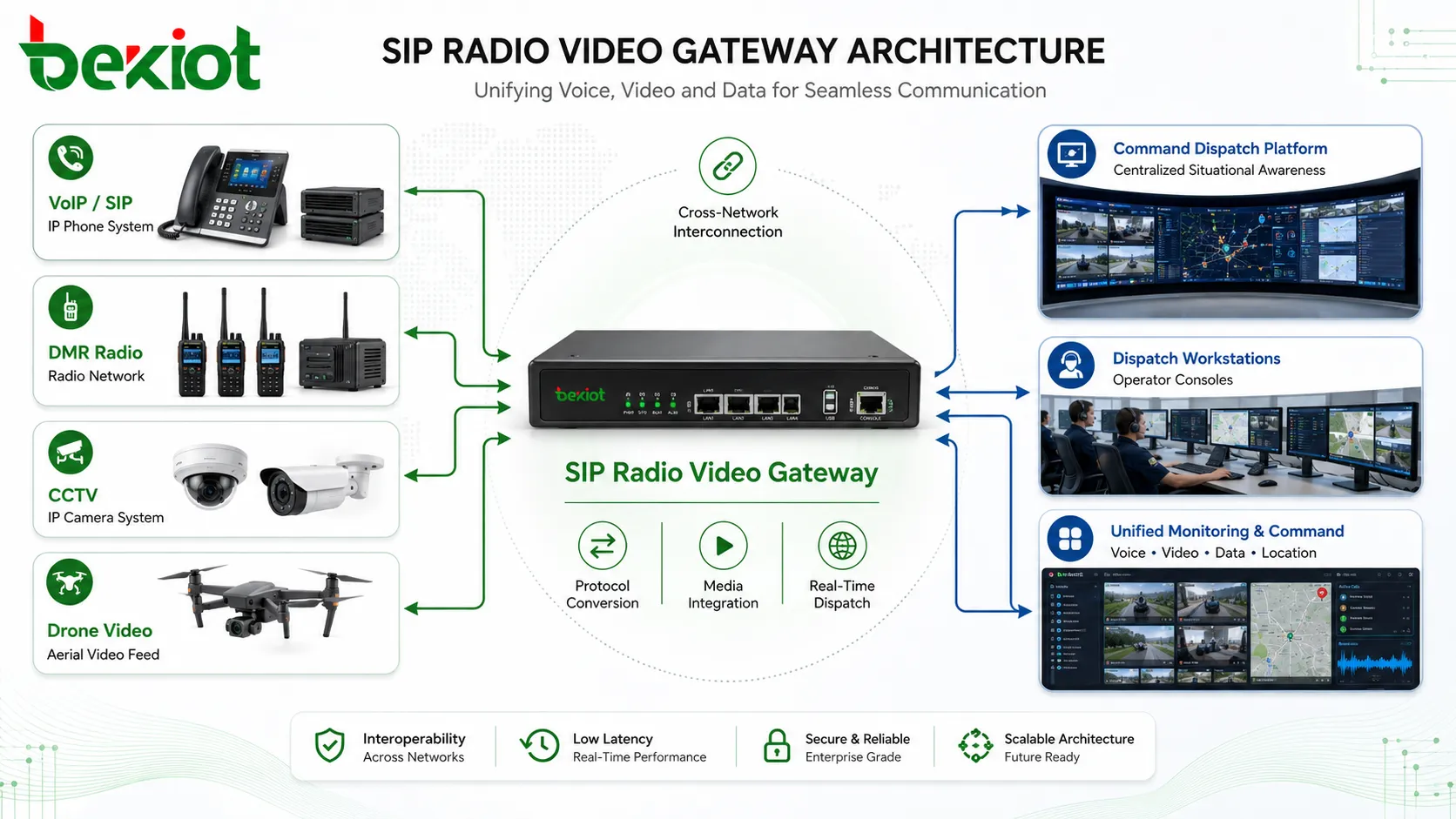
One typical architecture is the connection between SIP-based VoIP systems and professional radio networks. For example, a trunking radio gateway can connect SIP voice communication with private digital radio technologies such as DMR. After integration, a dispatcher or phone user can communicate with radio users from the communication platform.
This type of interconnection is valuable because radios and IP phones work very differently. Radios often support fast group communication and half-duplex push-to-talk operation, while SIP phones and VoIP platforms usually support full-duplex calling and account-based routing. The gateway converts and coordinates these differences so that both sides can communicate in one command environment.
Video integration follows the same logic. In a basic multimedia communication system, video may mean video calls or video conferencing. In a converged project, video requirements are often broader. The system may need to access CCTV, mobile video, drone video, video gateways, command vehicle feeds, and other visual resources for emergency response or dispatch decision-making.
Industry Scenarios With Dispatch and Emergency Needs
Converged systems are more commonly used in industry-specific environments. Typical scenarios include command dispatch, emergency command, industrial production, transportation, energy, mining, ports, airports, campuses, public safety, large events, utilities, and critical infrastructure.
These environments usually need more than convenient office communication. They need fast command execution, cross-department coordination, device interoperability, emergency notification, real-time monitoring, and reliable communication between fixed and mobile users. In many cases, the system must also connect old and new equipment to protect previous investment.
For example, an emergency command center may need to talk with radio teams, call SIP phones, receive drone video, view CCTV images, issue public address announcements, record communication, and coordinate field teams through GIS. These requirements show why converged communication is mainly about infrastructure-level integration and command capability.
Software Collaboration as the Center of Unified Communication
Unified communication is a broader software-driven communication and collaboration approach. It integrates real-time communication, such as phone calls, instant messaging, and video meetings, with non-real-time communication, such as email, voicemail, shared documents, and workflow notifications.
The goal is to give users a more consistent communication experience. In traditional office environments, a worker may need one device for phone calls, another platform for meetings, another application for email, and another tool for messages. Unified communication brings these capabilities into one software interface or one coordinated system.
This is why unified communication is widely used in enterprise offices, customer service centers, call centers, remote work, team collaboration, video conferencing, and business process communication. Tools such as Microsoft Teams, Zoom, and Cisco Webex are typical examples of software platforms that support communication and collaboration from a user-centered perspective.
Different Focus in Function and Value
The functional boundary between the two system types can be understood from their primary goals. Converged communication focuses on the integration of communication technologies and infrastructure. Unified communication focuses on the integration of communication tools and collaboration workflows.
A converged platform may care more about whether SIP, radio, video monitoring, drones, public address, mobile terminals, emergency phones, and command consoles can work together. A unified platform may care more about whether users can call, message, meet, share information, check voicemail, and collaborate efficiently from one interface.
In other words, convergence solves the problem of different communication networks not being interoperable. Unified communication solves the problem of scattered office communication tools and inefficient collaboration. Both improve communication, but they solve different problems.
Implementation Complexity in System Deployment
Project implementation is another major difference. Converged communication often has higher deployment complexity because it may cross multiple underlying communication technologies. It may require gateways, protocol conversion, customized interfaces, network planning, device adaptation, dispatch logic, permission control, and system-level integration.
For example, connecting SIP phones with digital radio networks, CCTV platforms, drone video, public address systems, and emergency terminals requires careful design. Each subsystem may have different protocols, media formats, control methods, latency behavior, and operational rules. The project team must make these systems communicate reliably in real operating conditions.
Unified communication usually relies more on existing IT infrastructure and software deployment. Its main work is often related to account management, application configuration, user training, workflow integration, meeting services, call routing, customer service tools, and business process optimization. It can still be complex, but its focus is usually closer to software adoption and organizational workflow.
Relationship Between Infrastructure and User Experience
The two concepts are not completely unrelated. In many cases, converged communication can be seen as a technical foundation, while unified communication builds a more efficient user experience on top of communication infrastructure. A company may first build an IP communication network and then use unified communication tools to improve employee collaboration.
However, this does not mean every unified communication project is a converged communication project. A team collaboration platform may provide calls, meetings, chat, email integration, and workflow tools without integrating radios, CCTV, drones, or industrial broadcasting. Similarly, a command dispatch system may integrate many networks without focusing on office collaboration features.
The practical question is not which concept sounds more advanced. The real question is what problem the project needs to solve. If the goal is to connect different networks and command resources, convergence is the key direction. If the goal is to improve office productivity and user collaboration, unified communication is usually the better description.
Selection Logic for Project Planning
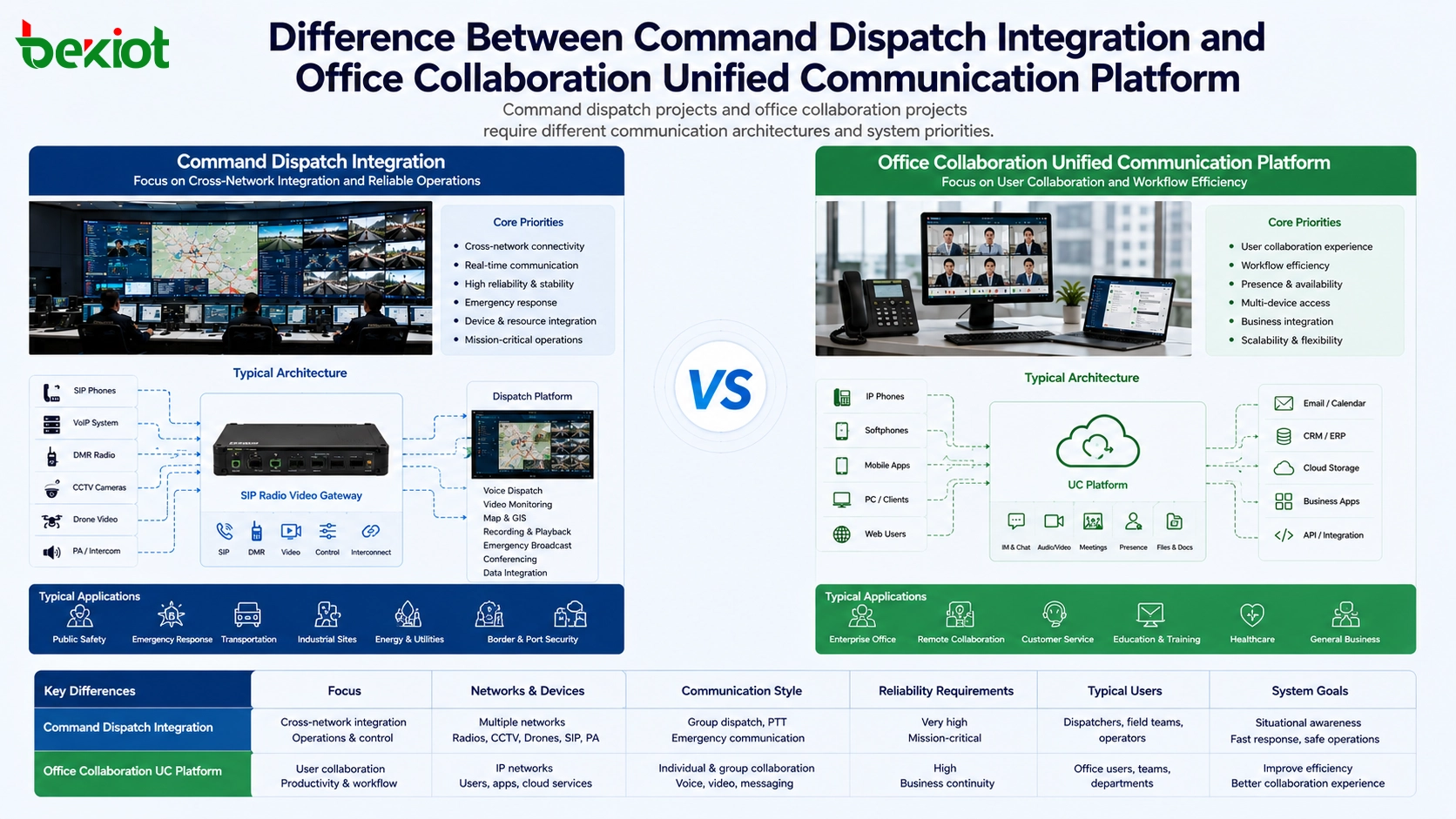
When planning a communication project, the first step is to define the operating scenario. If the project involves emergency response, industrial command, cross-network communication, radio interconnection, CCTV access, drone video, public address linkage, or dispatch center operation, it should be planned as a converged communication project.
If the project mainly involves office calling, instant messaging, video meetings, voicemail, email, customer communication, remote collaboration, or contact center productivity, it is closer to a unified communication project. In this case, user experience, software adoption, workflow integration, and device consistency are more important than gateway-level network convergence.
Some large organizations may need both. A transportation authority, energy company, or industrial group may use converged communication for command dispatch and emergency response, while also using unified communication for office collaboration, customer service, and internal business communication. The two systems can coexist if their roles are clearly defined.
System Components in a Converged Environment
Communication Platform
The communication platform provides SIP registration, call control, dispatch management, media routing, recording, user permissions, and system coordination. It acts as the central layer that organizes different communication resources into a manageable environment.
Gateway Equipment
Gateways connect systems that cannot communicate directly. Radio gateways, video gateways, paging gateways, analog gateways, and protocol conversion devices are commonly used to connect existing infrastructure with modern IP communication platforms.
Command and Dispatch Console
The dispatch console gives operators a visual interface for voice calls, group calls, radio interconnection, video access, broadcasting, emergency events, and operational coordination. It is especially important in control rooms and emergency command centers.
Field and Fixed Terminals
Terminals may include SIP phones, IP intercoms, rugged mobile devices, emergency phones, radios, video terminals, speaker endpoints, operator workstations, and mobile applications. The right terminal mix depends on environment, workflow, and safety requirements.
Business Value Across Different Environments
In industry and emergency environments, the main value is operational control. A converged system allows dispatchers to reach different teams, connect different devices, receive visual information, and issue instructions across networks. This improves response speed and reduces the risk caused by isolated communication tools.
In office and service environments, the main value is productivity. Unified communication reduces tool switching, supports remote collaboration, improves customer response, and helps teams communicate from one software environment. It makes daily business communication more efficient and easier to manage.
For decision makers, the key is to avoid using one term to describe all communication projects. A command center project should not be designed only as an office collaboration platform. An office collaboration project does not necessarily need radio gateways, CCTV access, or emergency broadcasting. Clear positioning leads to better architecture, better budget planning, and better project delivery.
FAQ
Can a unified communication platform replace a command dispatch system?
In most industry and emergency scenarios, it cannot fully replace a command dispatch system. Office collaboration tools are useful for calls, meetings, and messaging, but they usually do not provide the same level of radio integration, emergency linkage, dispatch control, public address access, or field command workflow.
Can one organization deploy both system types at the same time?
Yes. Many organizations need both. A headquarters office may use unified communication for daily collaboration, while an operation center uses a converged platform for field dispatch, emergency response, video access, and cross-network communication.
Which project type requires more gateway devices?
Converged projects usually require more gateways because they often connect different networks and devices, such as radios, analog systems, SIP platforms, video systems, paging equipment, and emergency terminals. Unified communication projects usually depend more on software platforms and cloud or enterprise IT services.
How should buyers describe their requirements to vendors?
Buyers should describe the actual workflow instead of only using broad terms. They should explain whether they need office collaboration, command dispatch, radio interconnection, CCTV access, public address linkage, mobile field terminals, recording, emergency calling, or customer service integration.
What is the most common mistake in early planning?
The most common mistake is treating all communication requirements as the same. A project may fail if it selects an office collaboration tool for a field command scenario, or if it builds a complex integration platform when the real need is only user collaboration and business communication.







