


Converged communication is no longer limited to voice dispatch, intercom calling, IP telephony, and basic video meetings. In modern command centers, industrial parks, emergency response platforms, transportation hubs, campuses, factories, and public safety projects, video resources have become a core part of real-time communication. Users may need to bring surveillance cameras, NVRs, monitoring platforms, drones, portable video units, body-worn cameras, smart helmets, and legacy video conferencing systems into the same operational workflow. The challenge is not only how to view video, but how to connect different video sources with voice, dispatch, SIP calling, collaboration, and event-driven response.
Early video integration in unified or converged communication systems was relatively simple. Most projects focused on SIP-based video phones or video conference terminals, so audio and video could be handled within a similar communication protocol environment. Today, the situation is more complex. Enterprises and industry users expect one platform to call, view, dispatch, interconnect, record, trigger, and coordinate many types of video resources. A practical solution therefore requires a gateway-based architecture, protocol conversion, stream adaptation, platform APIs, and careful project planning.
Related Product: Becke Converged Communication System
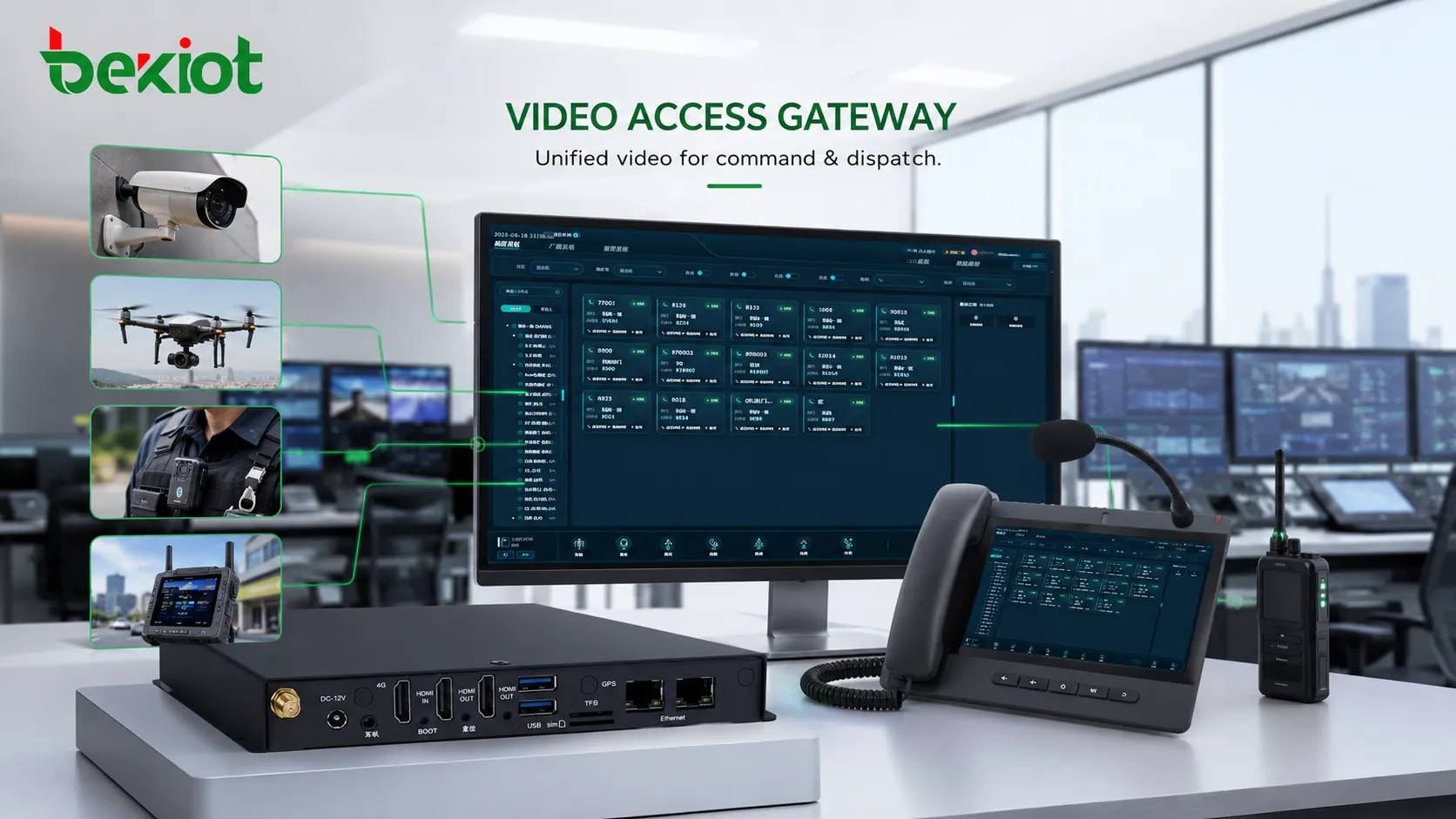
Why Visual Resources Are Becoming Part of Daily Operations
In many industries, video is now directly connected with decision-making. A dispatcher does not only need to hear a field worker; they may also need to see the site. A security operator does not only need an alarm notification; they may need to open the nearest camera automatically. A maintenance manager does not only need a phone call from a remote station; they may need real-time video from a smart helmet or portable recorder. This makes video integration an important extension of converged communication.
The demand is especially strong in environments where incidents develop quickly. Industrial production lines, tunnels, energy facilities, airports, ports, logistics parks, campuses, hospitals, emergency command vehicles, and urban management platforms all depend on rapid confirmation. Voice helps people communicate; video helps them verify the situation. When these two capabilities are separated, operators must switch between systems, manually search for camera channels, or rely on another team to provide video evidence. That delay can affect response speed and coordination quality.
A video-enabled communication platform reduces this fragmentation. It allows operators to combine calling, video viewing, dispatching, conferencing, recording, and event handling within a more coherent workflow. The goal is not to replace existing surveillance or video conference systems, but to make those resources available when communication and command decisions are being made.
The Main Difficulty Is Protocol Diversity
Most communication platforms are built around voice and signaling protocols such as SIP. Surveillance systems, video platforms, and field video devices often use different protocols and media formats. A single project may involve GB28181 cameras, NVRs, RTSP streams, RTMP streams, FLV distribution, RTP media, ONVIF discovery or control, WebRTC playback, HDMI output from video conference equipment, and vendor-specific interfaces. Without a conversion layer, direct integration can become expensive and unstable.
This is why video integration is more complicated than ordinary voice integration. Voice gateways usually convert PSTN lines, radio channels, analog audio, or SIP trunks into a unified communication network. Video integration must also handle resolution, frame rate, bit rate, encoding format, latency, stream pulling, stream pushing, user permission, device registration, and platform control. If these elements are not planned properly, the system may connect successfully but still fail in real operation because video delay, black screens, unstable playback, or incompatible encoding will affect usability.
A practical project should therefore avoid treating video as a simple display function. Video must be considered as a complete access, conversion, distribution, and control workflow. The more video types the project needs to support, the more important the gateway and platform architecture become.
A Gateway Layer Simplifies System Integration
A video access gateway is one of the most effective methods for implementing video convergence. Instead of rewriting every system interface or building deep custom development for each device type, the gateway acts as a middle layer. It receives different video sources, adapts them, and outputs a format that the converged communication platform can use. This reduces development pressure and makes the project easier to deploy.
For example, surveillance cameras, NVRs, and monitoring platforms may be connected through GB28181 or ONVIF. Field video sources such as drones, mobile cameras, body-worn recorders, and portable deployment cameras may provide RTSP, RTMP, FLV, RTP, or other stream formats. The gateway collects these streams, converts or packages them, and then sends them to the communication platform through SIP-based video calling, WebRTC playback, API-controlled stream access, or other supported methods.
This approach is valuable because converged communication platforms usually need video as part of a larger command scenario. The operator may need to start a voice call, pull live video, open a conference, dispatch a team, record the session, or share the stream with another department. A gateway layer allows different video sources to become usable communication resources instead of isolated surveillance assets.
From Surveillance Streams to SIP Workflows
SIP remains an important foundation in many converged communication environments. It is widely used for IP phones, intercom terminals, video phones, dispatch systems, audio gateways, and communication platforms. When video resources can be converted into SIP-compatible workflows, they can be used more naturally in existing communication scenarios.
For example, a dispatch operator may call a video intercom terminal, invite a video source into a conference, or open a live stream from a field device during an emergency meeting. In some cases, a camera or video gateway can appear as a SIP endpoint. This allows the platform to manage video resources through familiar call logic, such as dialing, answering, routing, transferring, conferencing, or recording.
SIP integration is especially useful when voice and video need to work together. A field worker may use voice communication while the operator views the related camera. A command center may establish a multi-party conference while pulling video from a site. A security event may trigger both a phone call and video pop-up. By converting video resources into SIP-compatible communication objects, the platform becomes easier to operate and easier to integrate with existing voice systems.
WebRTC Helps Browser-Based Access
While SIP is useful for communication workflows, WebRTC is valuable for browser-based video display and lightweight application access. Many modern dispatch platforms, web consoles, and management dashboards need to display video streams directly in a browser without installing heavy client software. WebRTC can help reduce access complexity and improve user convenience.
In a converged communication project, the video gateway or media service can pull streams from cameras, drones, monitoring systems, or recording devices, then provide WebRTC playback to the business platform. Operators can open video from a dispatch screen, map interface, alarm page, incident record, or conference page. This makes video easier to use in web-based command systems.
However, WebRTC integration still needs careful media handling. The system should consider latency, stream stability, browser compatibility, authentication, concurrent viewing, recording requirements, and network conditions. WebRTC is not a replacement for all video protocols; it is a practical method for delivering video to users and applications after the gateway has already handled access and conversion.
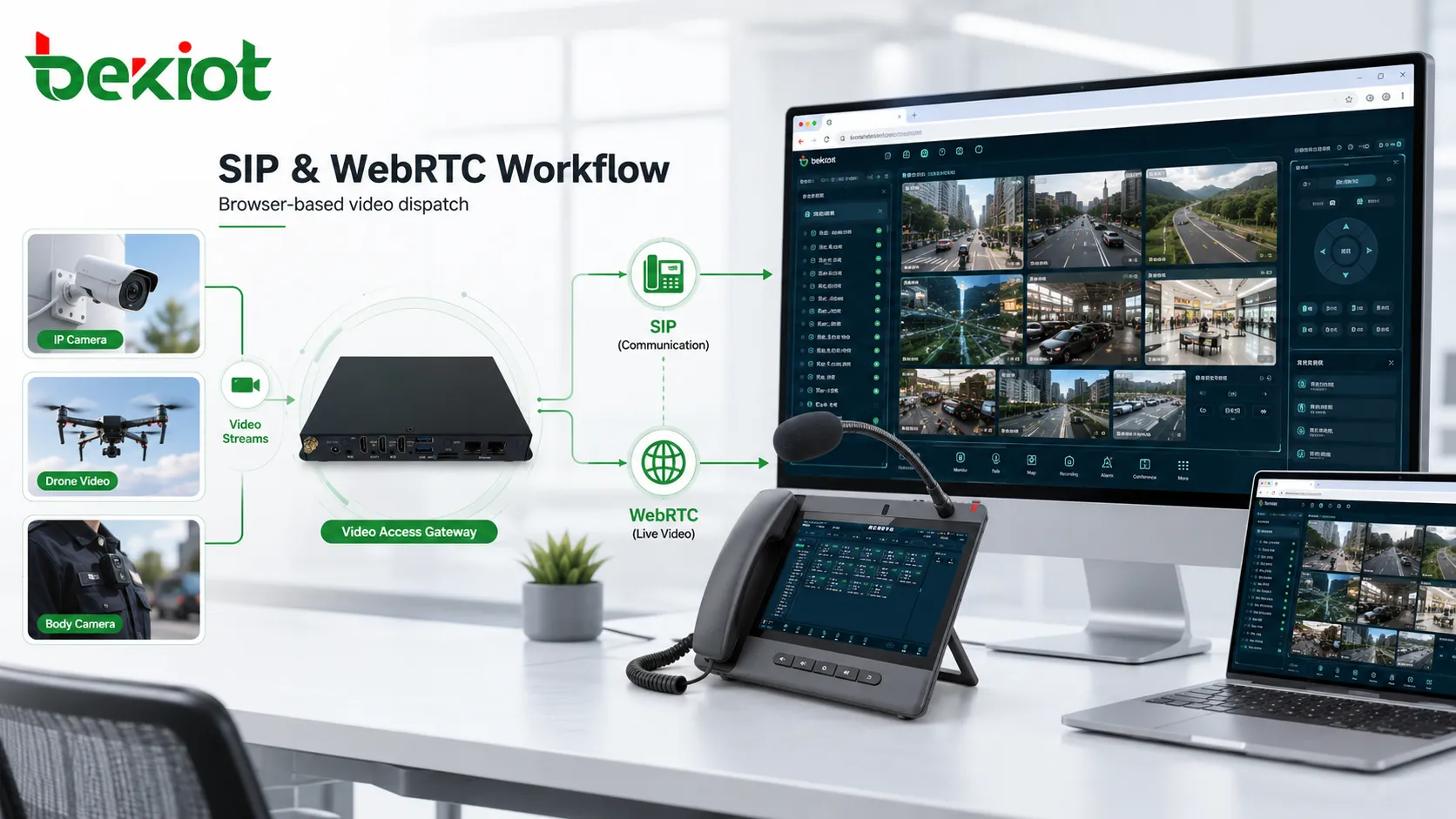
APIs Turn Video into a Business Function
Video integration becomes more powerful when the platform provides APIs. Without APIs, the system may only allow manual viewing. With APIs, video can be connected to alarms, maps, work orders, access control, emergency plans, customer service records, and command workflows. This is where video convergence becomes a real operational capability rather than a simple monitoring window.
For example, when an emergency call is triggered from a help point, the platform can automatically open the nearest camera. When a patrol device reports an incident, the system can pull the related body camera stream. When a drone is assigned to an emergency area, the command center can display the live feed in the dispatch interface. When a video conference begins, selected camera channels can be shared with remote participants.
API integration also helps with permission control and automation. Different roles can access different cameras. Certain video streams can be attached to incident records. Alarm events can trigger recording or snapshot capture. The communication platform can request video resources only when needed, reducing unnecessary traffic and improving system efficiency.
Legacy Conference Systems Need a Practical Bridge
Many enterprises and government projects already have video conference rooms, MCU platforms, HDMI-based equipment, or vendor-specific conference systems. These systems may still be useful, but they are not always easy to connect with a modern SIP-based converged communication platform. Protocol incompatibility is a common problem in real projects.
In these cases, a video conferencing gateway can provide a practical bridge. Instead of forcing full protocol-level redevelopment, the gateway can use physical or media interfaces such as HDMI to capture or output video conference signals, then convert them into a format that can be used by the communication platform. In some deployments, this supports two-way audio and video conversion, allowing different conference environments to interconnect more smoothly.
This method is useful when the existing system cannot be replaced immediately. A project may need to preserve old conference rooms, connect different vendor platforms, or bring a video meeting into a dispatch system. A gateway-based bridge can reduce risk, shorten deployment time, and protect previous investment while still improving cross-system collaboration.
Field Video Devices Require Flexible Access
Modern field operations often involve more than fixed cameras. Drones, portable deployment cameras, body-worn recorders, vehicle-mounted video devices, smart helmets, and mobile inspection terminals are increasingly common. These devices may be used in emergency response, inspection, construction, power maintenance, law enforcement support, transportation management, or industrial safety.
Unlike fixed surveillance cameras, field video devices may move across networks, change signal quality, use mobile links, or provide different stream formats. This means the platform must support flexible stream access and adaptive media handling. It should not rely on one fixed protocol or one fixed device type.
A good video integration design should allow these field sources to join the command workflow quickly. The operator should be able to view the live feed, communicate with the field team, share video with decision makers, and record key evidence when necessary. This is one of the main reasons why gateway-based video convergence is becoming more important in industry communication projects.
Media Processing Determines Real User Experience
Connecting a video stream does not automatically mean the project is successful. Real user experience depends on media processing quality. Resolution, frame rate, bit rate, codec compatibility, stream stability, delay, packet loss, and device performance all affect whether the video can be used in a command scenario.
For example, a high-resolution stream may look good in a local monitoring platform but become unstable when shared to multiple remote users. A low-bandwidth mobile stream may be viewable but too delayed for emergency dispatch. A camera may support RTSP, but its encoding profile may not be compatible with the target platform. A conference HDMI signal may be captured, but audio synchronization may need additional adjustment.
Therefore, project testing should include different network conditions, multiple concurrent viewers, long-duration playback, mobile access, cross-platform viewing, audio-video synchronization, recording quality, and abnormal device reconnection. Professional gateways and media services should be able to adjust encoding, frame rate, bit rate, and resolution according to project requirements.
Command Dispatch Is the Most Typical Scenario
Command dispatch platforms benefit greatly from video integration because operators need fast situational awareness. When a call, alarm, intercom request, sensor event, or emergency report arrives, the system can link related video resources to the same screen. This reduces manual switching and helps the operator understand what is happening.
In a transportation tunnel, an emergency phone call may open nearby cameras. In a factory, an equipment alarm may trigger video from the production area. In a campus, a help point call may display the entrance camera. In a power station, a field technician’s smart helmet video may be shared with remote experts. These scenarios show why video should be treated as part of communication rather than as a separate monitoring system.
When integrated correctly, voice, video, map location, alarm information, dispatch records, and conference collaboration can form a unified response process. This improves decision-making speed and reduces information gaps between the field and the command center.
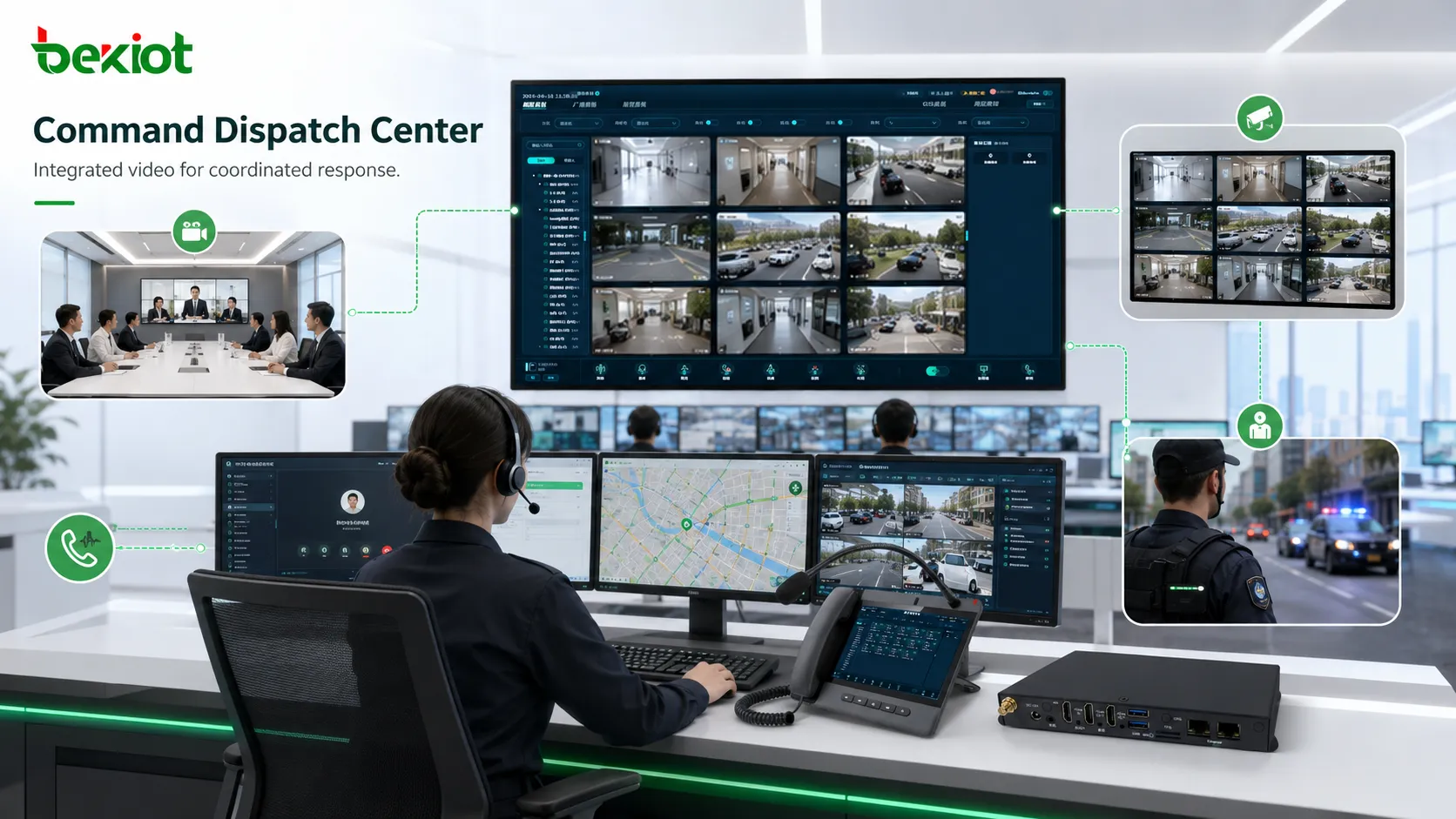
Recommended Architecture for Deployment
A practical video-enabled communication solution can be planned in several layers. The access layer connects cameras, NVRs, monitoring platforms, drones, body-worn cameras, smart helmets, video conference rooms, and other video sources. The gateway layer handles protocol adaptation, stream conversion, SIP output, WebRTC delivery, HDMI bridging, and media compatibility. The platform layer manages users, dispatch workflows, calling, conferencing, recording, permissions, alarms, and business applications.
The management layer should include monitoring, logs, stream status, device availability, permission control, and maintenance tools. The integration layer should provide APIs for third-party systems such as GIS, access control, emergency platforms, work order systems, customer service systems, production monitoring, and security management platforms.
This architecture allows the project to grow gradually. A customer may first connect surveillance cameras to a dispatch platform, then add drone video, mobile field devices, video conference rooms, alarm linkage, or cross-department sharing. Gateway-based deployment avoids rebuilding the whole system every time a new video source is added.
Planning Points Before Implementation
Confirm All Video Source Types
List all video resources that need to be connected, including fixed cameras, NVRs, existing monitoring platforms, drones, portable cameras, body recorders, smart helmets, conference systems, and vehicle-mounted devices. Different sources may require different protocols, network routes, and media handling methods.
Define the Target Workflow
Clarify how video will be used. Some projects only need manual viewing, while others require alarm pop-up, SIP video calling, conference sharing, map linkage, recording, or API-based automation. The workflow determines the integration depth.
Check Protocol and Media Compatibility
Verify support for GB28181, RTSP, RTMP, FLV, RTP, ONVIF, SIP, WebRTC, HDMI, and other required interfaces. Also test codec format, resolution, frame rate, bit rate, audio synchronization, and stream stability under real conditions.
Plan Network and Security Rules
Video traffic can consume more bandwidth than voice. The design should consider LAN, WAN, VPN, private network, mobile network, firewall traversal, user authentication, encrypted access, and role-based permission control.
Prepare for Expansion
Video integration needs may continue to grow. The selected architecture should allow additional devices, more concurrent streams, new protocols, more users, and deeper platform linkage without a complete redesign.
Common Mistakes to Avoid
One common mistake is assuming that a monitoring platform and a communication platform can be directly connected with little engineering work. In reality, surveillance systems are usually designed for monitoring and storage, while communication systems are designed for real-time interaction. Their workflows, protocols, permissions, and performance requirements are different.
Another mistake is ignoring legacy systems. Many organizations still rely on old video conference rooms, existing MCUs, or proprietary equipment. If these systems are not considered during planning, the project may later require additional gateways or custom development.
A third mistake is testing only one camera or one stream. Real projects should test multiple device types, multiple streams, remote access, concurrent users, long-running playback, alarm linkage, conference sharing, and reconnection after network interruption. A solution that works in a small demonstration may not be stable in daily operation.
Final Review
Video integration is becoming a natural direction for converged communication projects. As users demand more real-time awareness, communication platforms must move beyond voice calls and basic meetings. They need to connect surveillance systems, field video devices, drones, body-worn cameras, smart helmets, video conference rooms, and command dispatch applications into one coordinated workflow.
The most practical way to achieve this is not to develop every interface from scratch. A gateway-based architecture can reduce project complexity by supporting GB28181, RTSP, RTMP, FLV, RTP, ONVIF, SIP, WebRTC, HDMI, APIs, and media conversion requirements. It allows enterprises and industry users to reuse existing video resources while adding new communication and dispatch capabilities.
A successful deployment depends on more than protocol support. The project must also consider media processing, codec compatibility, frame rate, bit rate, resolution, latency, security, user permissions, API integration, and operational workflow. With proper planning, video resources can become active communication assets that improve command efficiency, emergency response, remote collaboration, and cross-system coordination.
FAQ
Can existing surveillance cameras be reused in a converged communication project?
Yes. In many cases, existing cameras, NVRs, and monitoring platforms can be reused if they support standard protocols or can be accessed through a video gateway. The key is to confirm stream format, permission control, network route, and platform compatibility before deployment.
Is WebRTC enough for all video integration requirements?
No. WebRTC is useful for browser-based viewing, but it usually works as part of a larger media architecture. Projects may still need GB28181, RTSP, RTMP, ONVIF, SIP, HDMI bridging, recording, stream conversion, and API control depending on the video source and business workflow.
How can different video conference systems be connected together?
When direct protocol integration is difficult, a video conferencing gateway can be used as a bridge. It may capture or output conference video through physical or media interfaces, then convert the signal for use in a SIP-based or platform-based communication environment.
What should be tested before final acceptance?
Testing should include multiple video sources, mixed protocols, concurrent streams, remote access, alarm linkage, browser playback, SIP video interaction, recording quality, long-duration operation, network interruption recovery, and user permission control.







