


Office telephone systems are still important in many enterprises, hotels, schools, factories, hospitals, parks, service centers, and command rooms. Even when mobile apps and online meetings are widely used, fixed phones remain useful for front desks, offices, customer service seats, dispatch positions, duty rooms, meeting rooms, and internal extension communication. In most projects, the key choice is whether to use analog phones or IP phones. Both can support voice communication, but their wiring method, distance limitation, feature capability, power model, management style, and expansion value are very different.
Analog phones are simple, low-cost, and familiar. IP phones are more flexible, easier to integrate with modern business systems, and more suitable for large-scale networking. A good solution is not about saying one is always better than the other. The right choice depends on existing cabling, user scale, network conditions, PBX type, office workflow, multimedia requirements, power reliability, and future upgrade plans.
Related Product: Becke IP Phones
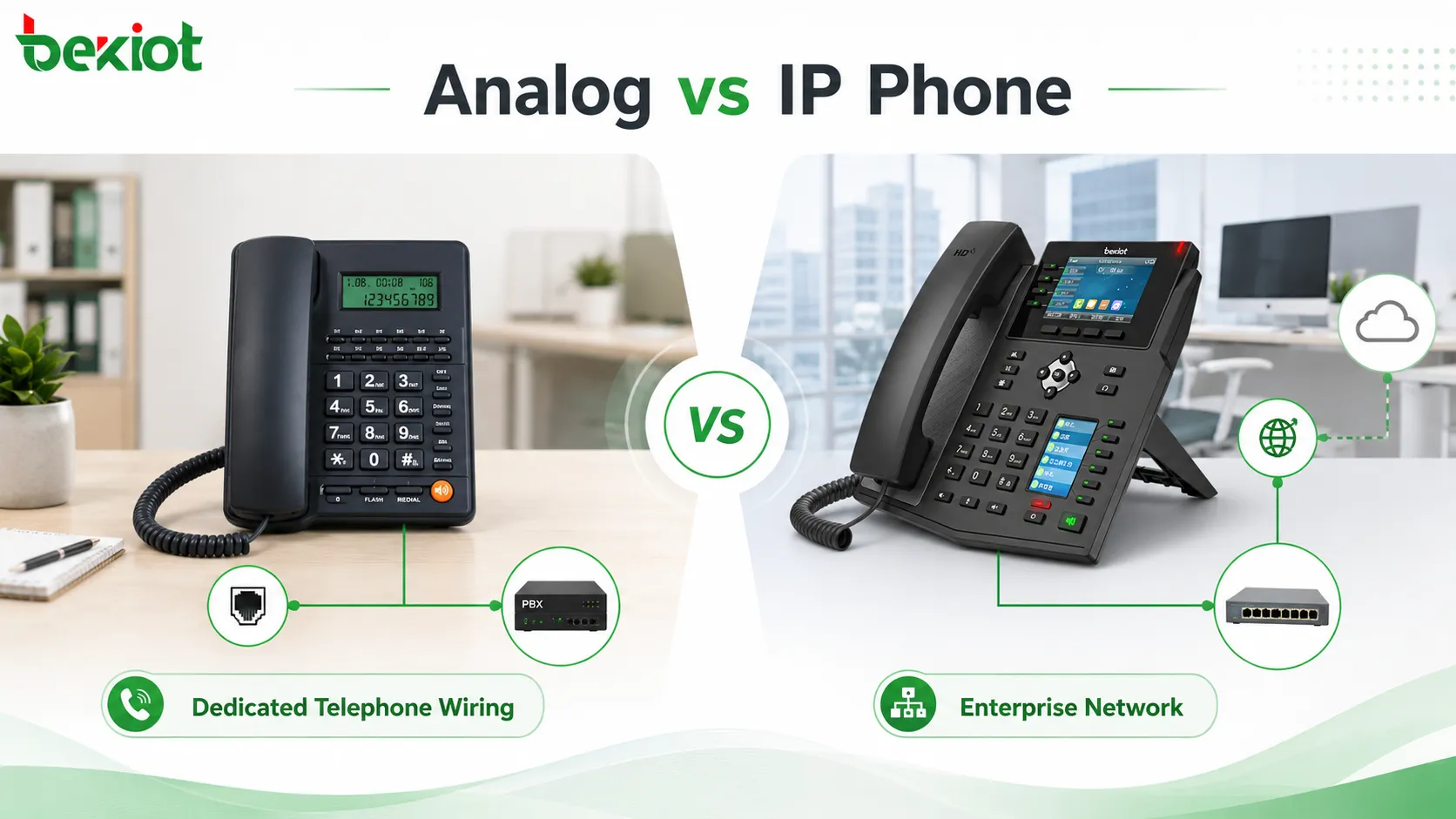
Two Different Ways to Carry Voice
The most basic difference is how voice is transmitted. An analog phone uses a traditional telephone line to carry voice signals. In an enterprise project, each desk or phone position normally needs a reserved telephone interface. A dedicated telephone cable is usually routed from the work area back to the equipment room, distribution frame, analog PBX, or voice gateway.
An IP phone works differently. It converts voice into digital packets and transmits them through an IP network. The phone connects to the LAN through Ethernet or, in some models, Wi-Fi. In many office environments, an IP phone can share the same network cabling system used by computers. Some deployments use the phone’s built-in network pass-through port so that the PC and phone can work from the same desk network outlet.
This difference directly affects project design. Analog deployment is more dependent on telephone cabling. IP deployment is more dependent on network availability, switch capacity, IP addressing, VLAN planning, QoS, and PBX or SIP platform registration. When planning a new office or upgrading an old building, cabling condition is often one of the first points to check.
Wiring Has a Direct Impact on Cost
Analog phones usually require a separate telephone line for each phone position. If the building already has stable telephone wiring, analog phones can be simple and economical. However, if a new site has no telephone cabling, adding dedicated phone lines for every desk may increase labor, materials, distribution frame work, and future maintenance complexity.
IP phones can use structured network cabling. In new office projects, network points are usually already planned for computers, printers, access points, cameras, and other IP devices. Adding IP phones to the same network architecture may reduce the need for separate voice wiring. This is especially useful in open offices, branch offices, service centers, hotels, and parks where desk locations may change over time.
The cost comparison should not only look at the phone unit price. Analog phones are often cheaper as single devices, but cabling and maintenance can become expensive when there are many endpoints. IP phones may require better switches, network planning, and platform configuration, but they usually offer stronger long-term flexibility.
Distance Is Handled in Very Different Ways
Analog telephone lines have practical transmission limits. In many general scenarios, analog telephone line transmission distance may range from about 1 to 5 kilometers, depending on cable quality, line condition, device interface, electrical environment, and PBX capability. In many enterprise PBX deployments, the practical analog extension distance is often around 1 kilometer.
IP phones are not limited by telephone line distance in the same way. As long as the IP network is reachable and voice traffic can be transmitted reliably, an IP phone can register to the communication platform from another floor, another building, another branch, or even a remote office through a secure network connection. This makes IP phones more suitable for multi-site organizations.
That does not mean distance no longer matters. IP voice depends on network quality. Latency, packet loss, jitter, bandwidth, firewall rules, NAT traversal, VPN design, and QoS still affect call quality. The difference is that IP deployment solves distance through networking rather than through the physical length of an analog telephone line.
Daily Operation Feels Different to Users
Analog phones are simple to use. For basic calling, users pick up the handset, dial the number, talk, and hang up. This simplicity is one of the reasons analog phones are still used in many offices, hotels, duty rooms, and basic service positions. For users who only need voice calls, analog phones can be reliable and easy to understand.
However, additional features on analog phones may not be as intuitive. Functions such as call transfer, call forwarding, three-party calling, or conference operation may require hook flash, feature codes, or special dialing sequences. For users who did not grow up using traditional fixed-line phones, these operations can be confusing.
IP phones usually provide dedicated function keys, soft keys, screen menus, programmable buttons, and visual status indicators. Users can often access call transfer, pickup, call park, call forwarding, redial, call history, contacts, voicemail, conference calling, and headset functions more directly. In reception, customer service, office, and dispatch environments, this can improve daily communication efficiency.
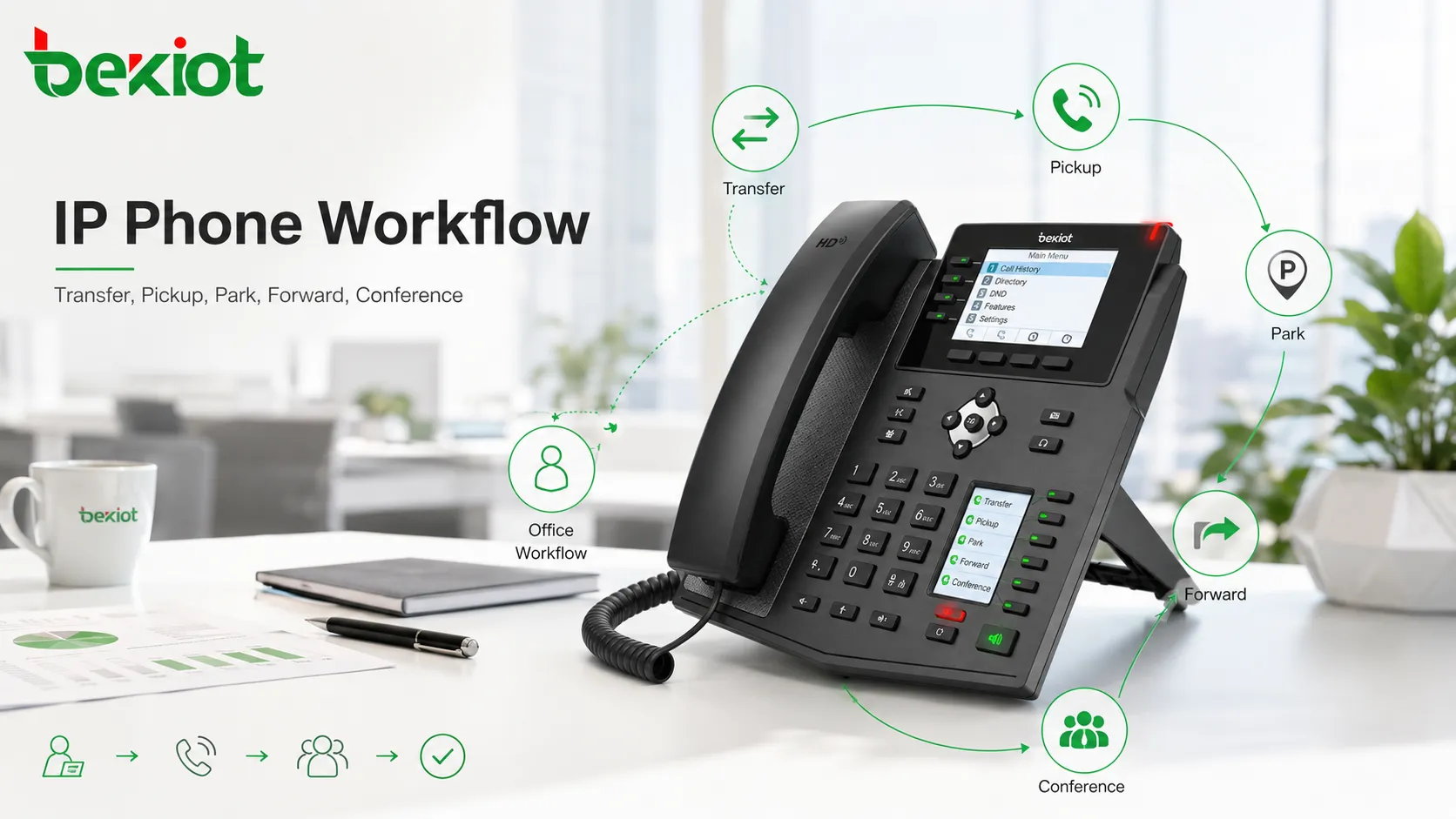
Feature Expansion Is Not the Same
Analog phones are mainly designed for voice calling. Some features can be provided by the PBX or analog exchange, but the phone itself usually has limited interaction capability. In basic office environments, this is acceptable. A warehouse desk phone, hotel room phone, simple office extension, or equipment room phone may only need voice access.
IP phones are closer to smart communication terminals. They can work with SIP platforms, IPPBX systems, unified communication servers, call center systems, dispatch platforms, directories, presence services, and management tools. Depending on the project, they may support multiple lines, contact synchronization, XML applications, screen menus, remote provisioning, centralized configuration, firmware upgrade, call logs, and system-level integration.
This makes IP phones more suitable for organizations that want the phone system to support actual business processes. For example, a front desk may need fast transfer keys. A customer service seat may need call history and headset operation. A manager may need multi-line handling. A dispatcher may need one-touch calling and group communication. These scenarios are difficult to achieve with only basic analog phones.
Multimedia Changes the Role of the Desk Phone
Analog phones are generally limited to voice. If the project only needs stable voice calling, this is not a weakness. In many simple scenarios, voice-only communication is enough. The phone does not need a large screen, application interface, video support, or business system linkage.
IP phones can extend beyond voice. Some IP phones support video calls, visual directories, service menus, and multimedia interaction. In a hotel environment, a screen-based IP phone may display service information, room service access, hotel introduction, or guest communication options. In a command and dispatch project, video-capable phones may participate in video calls, view selected surveillance feeds, or join video meetings depending on platform integration.
This multimedia capability changes how the phone is used. The device is no longer only a voice endpoint. It can become part of a broader communication and service workflow. This is one of the reasons IP phones are increasingly used in smart office, hotel, healthcare, campus, command center, and enterprise service applications.
Power Supply Should Be Planned Carefully
Analog phones often receive power from the telephone line. In some traditional systems, if the PBX, line, and central equipment are powered correctly, analog phones can continue to work during a local desk-side power outage. This is one of the practical advantages of analog phones in simple voice environments.
IP phones normally require network-side or local power. Many IP phones use Power over Ethernet, often called PoE, from the network switch. Some can also use external power adapters. PoE makes deployment cleaner because the network cable carries both data and power, but the switch and network room power system become important. If the switch loses power, the IP phones connected to it may also stop working.
For important positions such as reception, security, emergency duty rooms, control centers, and dispatch seats, power backup should be included in the design. UPS power for switches, PBX servers, gateways, routers, and network equipment can help maintain IP phone service during power events.
Management Becomes Easier at Scale
Analog phones are easy to understand when there are only a few extensions. But when the number of phones grows, moves and changes can become more difficult. Adding a new phone may require line tracing, distribution frame adjustment, extension port changes, and physical cable work. In older buildings, finding and maintaining analog lines can become time-consuming.
IP phones are usually easier to manage in large deployments. Administrators can configure extension numbers, SIP accounts, phone templates, firmware, feature keys, and network settings from a central platform. When a user moves to another desk or branch, the phone can often be re-registered or reprovisioned through the network instead of requiring a dedicated analog line change.
This centralized management value becomes more obvious in enterprises with many branches, hotels with many rooms, schools with multiple buildings, hospitals with many departments, and factories with changing office or production layouts. IP phones are better aligned with modern IT operation methods.
Network Quality Determines Voice Experience
Analog voice quality is closely related to line quality, cable distance, electrical interference, PBX interface quality, and handset condition. If the line is stable, analog voice can be clear and reliable. If the cable is aging, poorly terminated, or affected by interference, users may hear noise, low volume, or unstable audio.
IP voice quality depends on network conditions and codec handling. Good IP phone deployment should consider QoS, VLAN separation, switch performance, router capacity, SIP server stability, bandwidth, packet loss, jitter, latency, and firewall configuration. Without proper network planning, IP phones may experience delay, broken audio, one-way audio, registration failure, or unstable calls.
Therefore, IP phones should not be deployed as ordinary network devices without planning. Voice traffic is sensitive to real-time performance. A stable IP phone solution should include voice VLAN design, priority rules, reliable switches, proper gateway settings, and testing under real call load.
Integration with PBX and Business Platforms
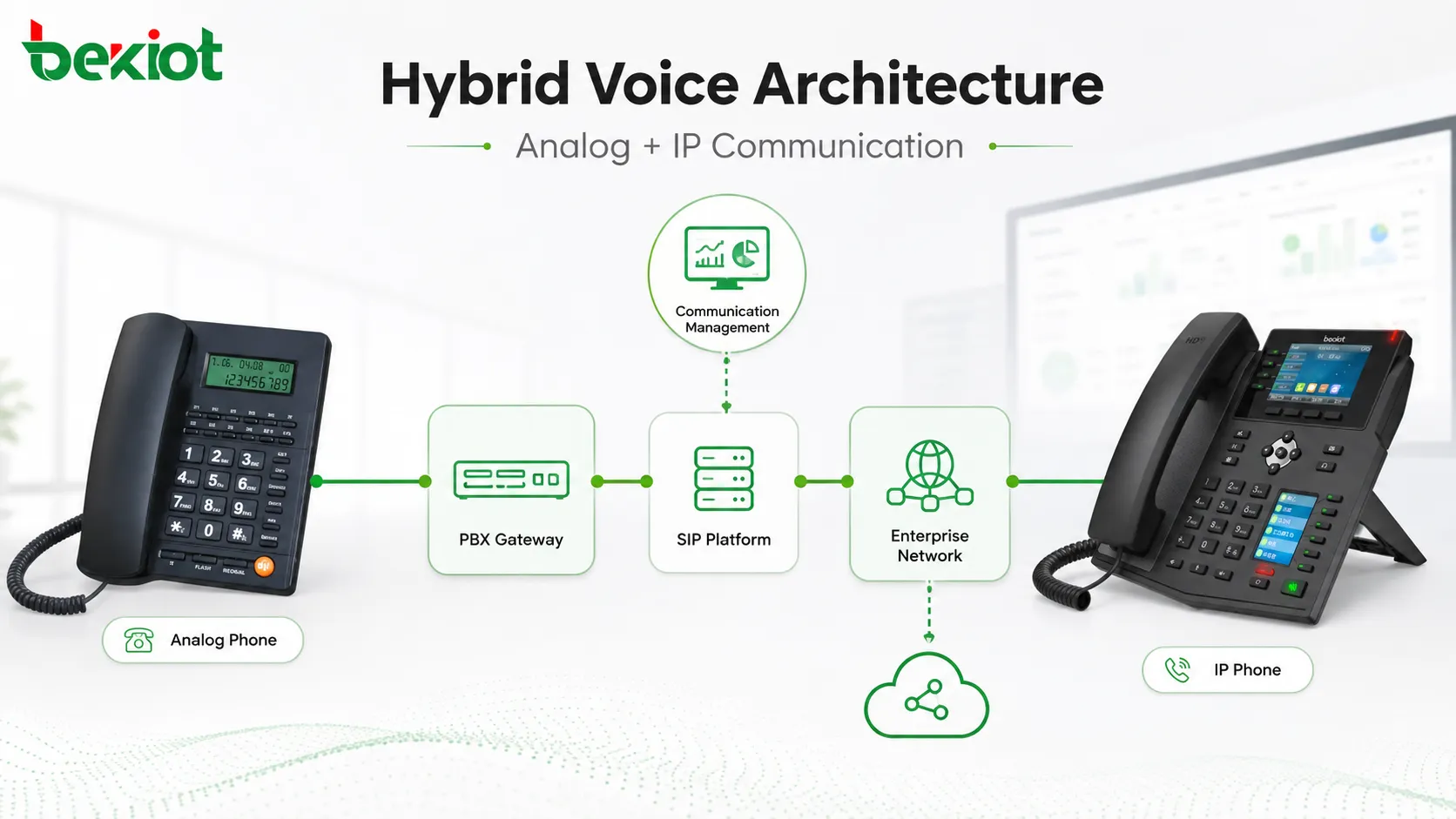
Analog phones usually connect to analog extension ports, analog gateways, or traditional PBX systems. They are suitable when the enterprise already has analog infrastructure or when only basic voice extensions are needed. Analog gateways can also connect analog phones to an IPPBX or SIP platform, allowing gradual migration from traditional telephony to IP communication.
IP phones connect directly to SIP-based systems such as IPPBX, hosted PBX, unified communication platforms, call center systems, or dispatch platforms. They can use extension accounts, SIP registration, network routing, and centralized management. This makes them easier to integrate with modern enterprise communication architecture.
For many projects, the best solution is not an immediate full replacement. A hybrid design can keep useful analog phones in simple positions while using IP phones for front desk, office, customer service, management, dispatch, meeting, and multi-site communication. This allows the enterprise to control investment while improving communication capability step by step.
Where Analog Phones Still Make Sense
Analog phones are still useful in several practical scenarios. They are suitable for basic voice-only positions, small offices with existing telephone wiring, hotel room extensions, simple public service phones, backup communication points, warehouse desks, equipment rooms, and locations where users only need to make or receive calls.
They are also attractive when budget is limited and advanced features are not required. The device cost is usually low, configuration is simple, and user training is minimal. In some cases, analog phones can also provide better continuity during local endpoint power issues because they may receive line power from the voice system.
However, analog phones are less suitable when the enterprise needs frequent moves, many extensions, branch networking, centralized provisioning, visual operation, video calling, system integration, or advanced call handling. In those cases, the limitations of analog deployment can become more obvious over time.
Where Network Phones Fit Better
IP phones are better suited for modern office communication, multi-site organizations, large-scale deployments, call centers, front desks, management offices, command centers, smart hotels, campuses, hospitals, and enterprises that need more than basic voice. They can support richer functions, easier moves and changes, centralized configuration, and stronger integration with communication platforms.
IP phones are also valuable when the enterprise wants to reduce long-term communication cost. Internal calls between branches, offices, departments, or remote users can often be routed through the IP network instead of traditional phone lines. When combined with SIP trunks, IPPBX systems, and unified communication platforms, the enterprise can build a more flexible voice architecture.
The main requirement is that the network must be designed properly. If the LAN and WAN are stable, IP phones can provide strong flexibility. If the network is poorly planned, the user experience may be worse than expected. This is why IP phone projects should be planned together with network and PBX design.
Recommended Migration Strategy
For existing enterprises, migration does not need to happen all at once. A phased approach is often safer. The first step is to survey existing analog lines, PBX capacity, extension usage, call volume, office network condition, switch PoE capability, and user groups. This helps determine which positions should remain analog and which should move to IP phones.
The second step is to build or upgrade the core voice platform. This may include IPPBX, SIP trunk access, analog gateways, voice VLANs, provisioning tools, and security rules. Once the core architecture is ready, IP phones can be deployed department by department or site by site.
The third step is to optimize user workflow. Programmable keys, transfer rules, pickup groups, ring groups, voicemail, call recording, call permissions, directory settings, and emergency numbers should be configured according to real business needs. The value of IP phones is not only the device itself, but how it improves daily communication.
Planning Checklist for Enterprise Selection
Check Existing Cabling
Confirm whether the site already has usable telephone lines, structured network cabling, enough network points, and proper equipment room distribution. Cabling condition may strongly influence the deployment cost.
Estimate User Scale
Small voice-only projects may use analog phones effectively. Larger organizations with many users, departments, branches, or frequent moves usually benefit more from IP phones and centralized management.
Define Required Functions
List whether users need transfer, pickup, call park, forwarding, conference calling, voicemail, contact directories, video calls, headset support, programmable keys, or platform integration.
Review Power and Backup
Analog and IP phones use different power models. For IP phones, check PoE switch capacity and UPS backup for switches, routers, PBX servers, and gateways.
Test Voice Quality
Do not rely only on specifications. Test real calls, long calls, internal and external calls, branch calls, headset use, speakerphone quality, network congestion conditions, and emergency call behavior.
Final Review
Analog phones and IP phones both have value, but they fit different communication needs. Analog phones are simple, inexpensive, voice-focused, and suitable for basic fixed positions. They connect through telephone lines, often require dedicated wiring, and in many enterprise PBX deployments the practical analog extension distance is around 1 kilometer, while general analog line transmission may reach about 1 to 5 kilometers depending on conditions.
IP phones connect through the network and are not limited by telephone line distance in the same way. As long as the IP network is reachable and stable, they can support office users, branch users, remote users, and multi-site communication. They also provide richer features, easier management, business integration, multimedia capability, and better scalability for modern enterprise communication.
The best solution should be selected according to actual project conditions. If the requirement is only basic voice and the existing analog wiring is good, analog phones may still be practical. If the enterprise needs flexible deployment, advanced call features, centralized management, video capability, branch networking, and integration with IPPBX or unified communication platforms, IP phones are usually the better long-term direction.
FAQ
Can analog phones and IP phones be used in the same enterprise system?
Yes. A hybrid system can use analog gateways or PBX interfaces to keep existing analog phones while adding IP phones for new offices, front desks, service seats, or branch locations.
Do IP phones always need PoE switches?
No. Many IP phones can use either PoE or external power adapters, depending on the device and deployment design. PoE is cleaner for large projects, but the switch and UPS design should be planned properly.
Is an IP phone the same as a softphone?
No. An IP phone is a physical desk terminal that registers to an IP voice system. A softphone is software installed on a computer or mobile device. Both may use SIP, but their user experience and deployment method are different.
What causes one-way audio on IP phones?
One-way audio is often related to NAT traversal, firewall rules, incorrect RTP settings, SIP ALG, routing problems, or network segmentation. It should be checked during system commissioning.
Should hotels choose analog phones or IP phones for guest rooms?
It depends on the hotel’s wiring, budget, service expectations, and management platform. Analog phones may be enough for basic room calling, while IP phones are more suitable when the hotel wants screen-based services, centralized management, or multimedia interaction.







