


Video conferencing is widely used for business communication, remote coordination, daily management, emergency response, and cross-location decision-making. However, a traditional video conference usually focuses on people-to-people communication. In many real projects, teams also need to view live surveillance cameras, drone footage, and other field video sources during the meeting.
When surveillance video and drone feeds can be pulled directly into a video conference, remote participants can see the field situation in real time instead of relying only on verbal reports. This is especially useful for emergency command, security management, industrial inspection, traffic response, construction supervision, utility repair, and large-site operations.
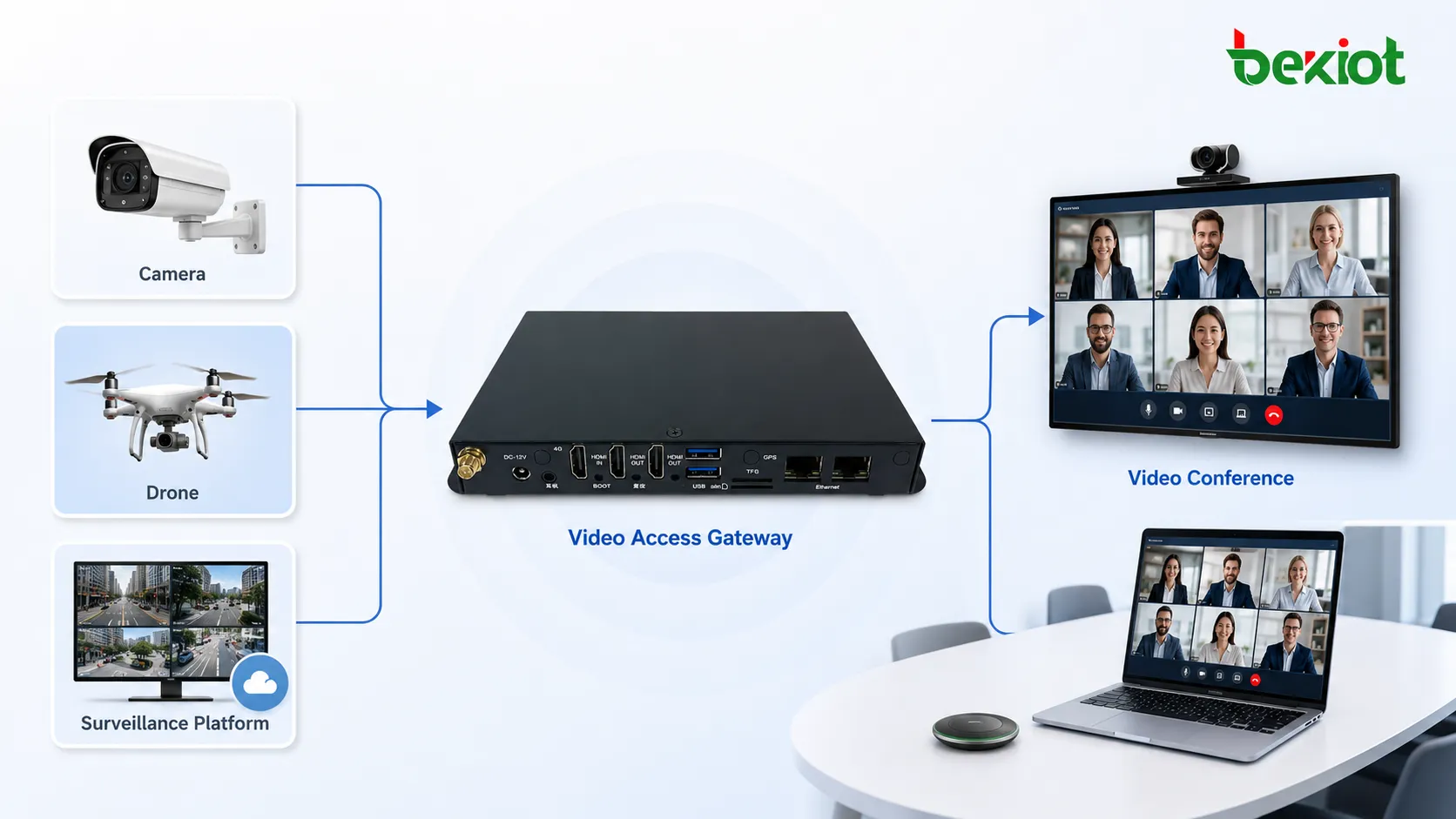
Why meeting rooms need live field video
A meeting can become much more effective when participants can see the real scene. In emergency rescue, a remote commander may need to check the road condition, crowd movement, fire area, flood level, equipment status, or rescue route. In enterprise management, supervisors may need to view factory lines, warehouse entrances, campus areas, project sites, or outdoor facilities while discussing an issue.
Without live video access, the meeting depends on manual descriptions, screenshots, or separate monitoring software. This can slow down decision-making and create information gaps between the field team and remote participants. By bringing surveillance cameras and drone video into the conference room, all participants can discuss the same visual information at the same time.
This turns a video conference from a simple communication tool into a real-time visual consultation platform.
Different video systems cannot always connect directly
Video conferencing, surveillance monitoring, and drone streaming are built on different technical systems. They may use different signaling methods, media protocols, encoding formats, stream structures, and device management rules. A video conference system usually communicates through SIP, H.323, WebRTC, or a dedicated meeting protocol, while surveillance systems often rely on GB/T28181, ONVIF, RTSP, or private platform interfaces.
Drone video is also different. Some drones or drone platforms may push video through RTMP, some may connect through GB/T28181, and some may output a streaming address that needs to be converted before it can enter a conference system. If these systems are connected directly without adaptation, compatibility problems are very likely to occur.
A video access gateway is used to solve this integration problem. It receives video from surveillance cameras, monitoring platforms, recorders, drone platforms, or streaming servers, then converts the stream into a format that the video conference system can call and display.
Surveillance access through standard protocols
For surveillance video, the gateway should support common access methods such as GB/T28181, ONVIF, and RTSP. These protocols make it possible to connect with surveillance platforms, network video recorders, IP cameras, and camera groups from different projects.
GB/T28181 is especially useful in large-scale monitoring networks. It can support platform cascading, camera directory acquisition, and unified access to many camera resources. When a video conferencing system needs to view a camera inside an existing surveillance system, the gateway can obtain the camera resource through GB/T28181 and convert it for meeting access.
ONVIF and RTSP are also common in IP camera environments. ONVIF can help with device discovery and control in many camera systems, while RTSP is widely used for pulling live camera streams. Supporting these methods makes the solution more adaptable to different surveillance deployments.
Mapping cameras into conference contacts
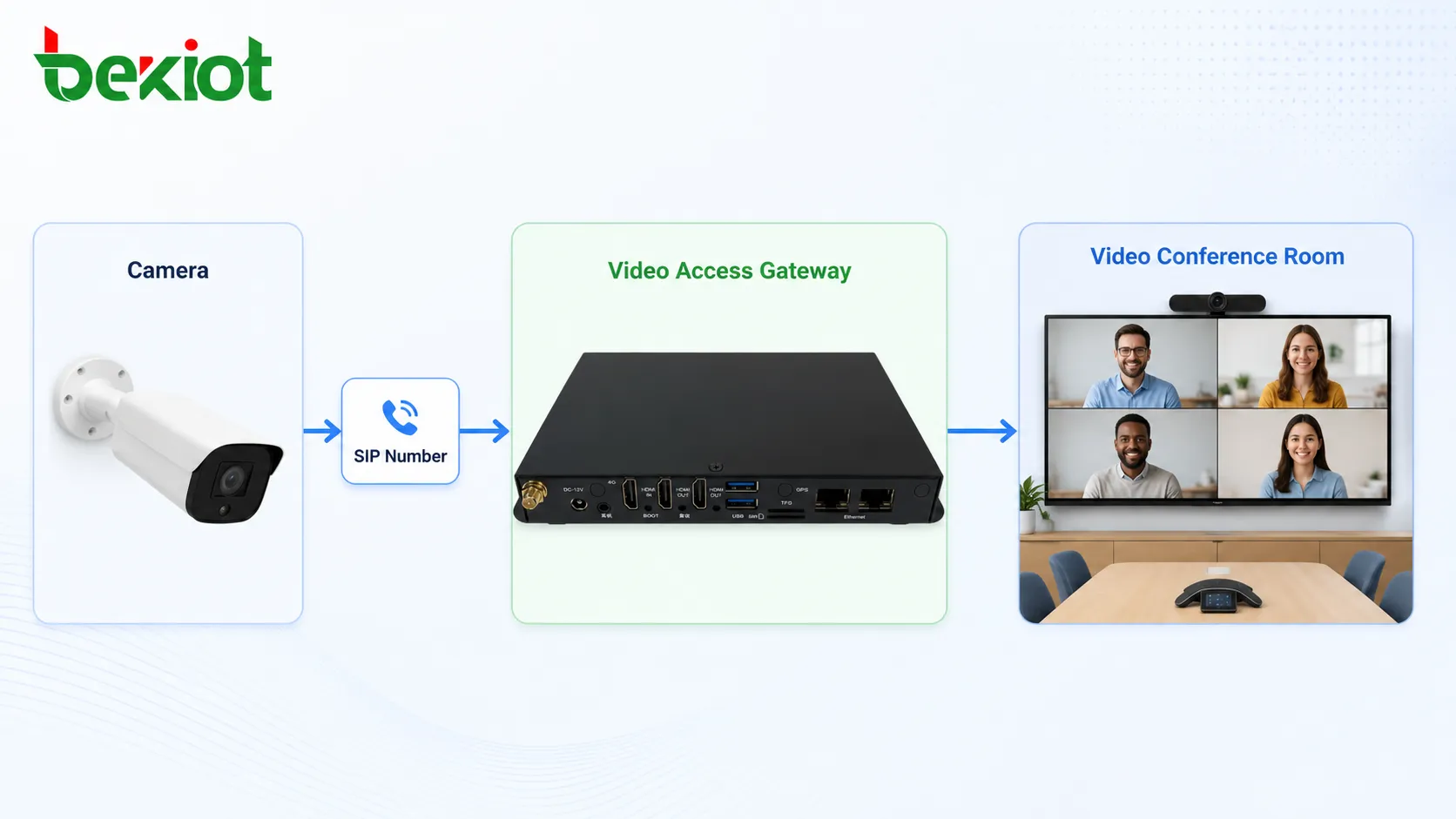
A practical method is to map each surveillance camera or video source into a standard SIP number. After the gateway converts the camera stream into a SIP-compatible video source, the video conference system can treat the camera like a conference participant or a callable video endpoint.
In this workflow, the administrator can add camera numbers into the meeting address book. When a conference is running, the host or participant only needs to call the corresponding SIP number. The system then pulls the camera stream into the meeting room through a standard SIP URL, allowing all participants to view the surveillance video inside the conference interface.
This approach keeps the user experience simple. Participants do not need to open another monitoring platform or remember complex stream addresses. They can call a camera in the same way they call another video terminal.
Drone footage can join the meeting in the same way
Drone video is valuable in emergency command, outdoor inspection, traffic control, disaster response, power line inspection, construction management, and large-area security. It provides a wider view than fixed cameras and can quickly show the overall field condition from the air.
To bring drone footage into a video conference, the gateway can receive drone streams through GB/T28181 or RTMP push. After receiving the stream, the gateway maps the drone video into a standard SIP number. During the conference, users call that SIP number, and the drone feed enters the meeting room as a video participant.
This method allows drone operators, remote commanders, technical experts, and meeting participants to share the same aerial view. The conference room becomes a visual command space where people can discuss routes, risks, progress, and next actions based on live drone footage.
Transcoding solves encoding incompatibility
Even when the stream can be accessed, encoding compatibility may still cause problems. Many surveillance systems and drone platforms use H.265 to reduce bandwidth, while some video conferencing systems or terminals may only support H.264 or may perform better with H.264 streams.
A video access gateway should therefore provide transcoding capability. It can convert H.265 video into H.264 video when needed, helping the stream become compatible with more conference platforms, video terminals, and meeting systems.
Transcoding is not limited to codec conversion. The gateway should also support adjustment of frame rate, bitrate, and resolution. These adjustments help match different network conditions, display requirements, and receiving terminal capabilities. For example, a high-resolution drone stream can be converted into a lighter stream for remote conference viewing, while a surveillance stream can be adjusted to reduce network load during a large meeting.
The meeting habit should remain unchanged
A good integration solution should not force users to change how they hold meetings. If users must switch between many platforms, manually copy stream URLs, or operate complicated monitoring software during every conference, the solution will be difficult to promote.
By converting cameras and drone feeds into callable conference resources, the video access gateway keeps the operation familiar. Users can start a meeting, open the address book, select the required camera or drone number, and pull the video into the conference. The workflow is close to inviting a normal video participant.
This is one of the main advantages of gateway-based integration. It expands the video conference system without replacing the existing meeting platform or changing the core meeting process.
Web configuration reduces deployment complexity
In project deployment, ease of configuration is important. A video access gateway should provide a clear web management interface for adding video sources, setting access protocols, mapping SIP numbers, adjusting stream parameters, and managing output rules.
Web-based configuration allows engineers to complete most settings without complex development work. For surveillance platforms, they can configure GB/T28181, ONVIF, or RTSP access. For drone video, they can configure RTMP or GB/T28181 stream reception. For the conference system, they can configure SIP registration, SIP numbers, and calling rules.
This makes the solution suitable for existing projects where the customer already has cameras, video conference systems, and field video devices. The gateway works as an integration layer rather than a complete replacement of the original system.
A practical architecture for visual consultation
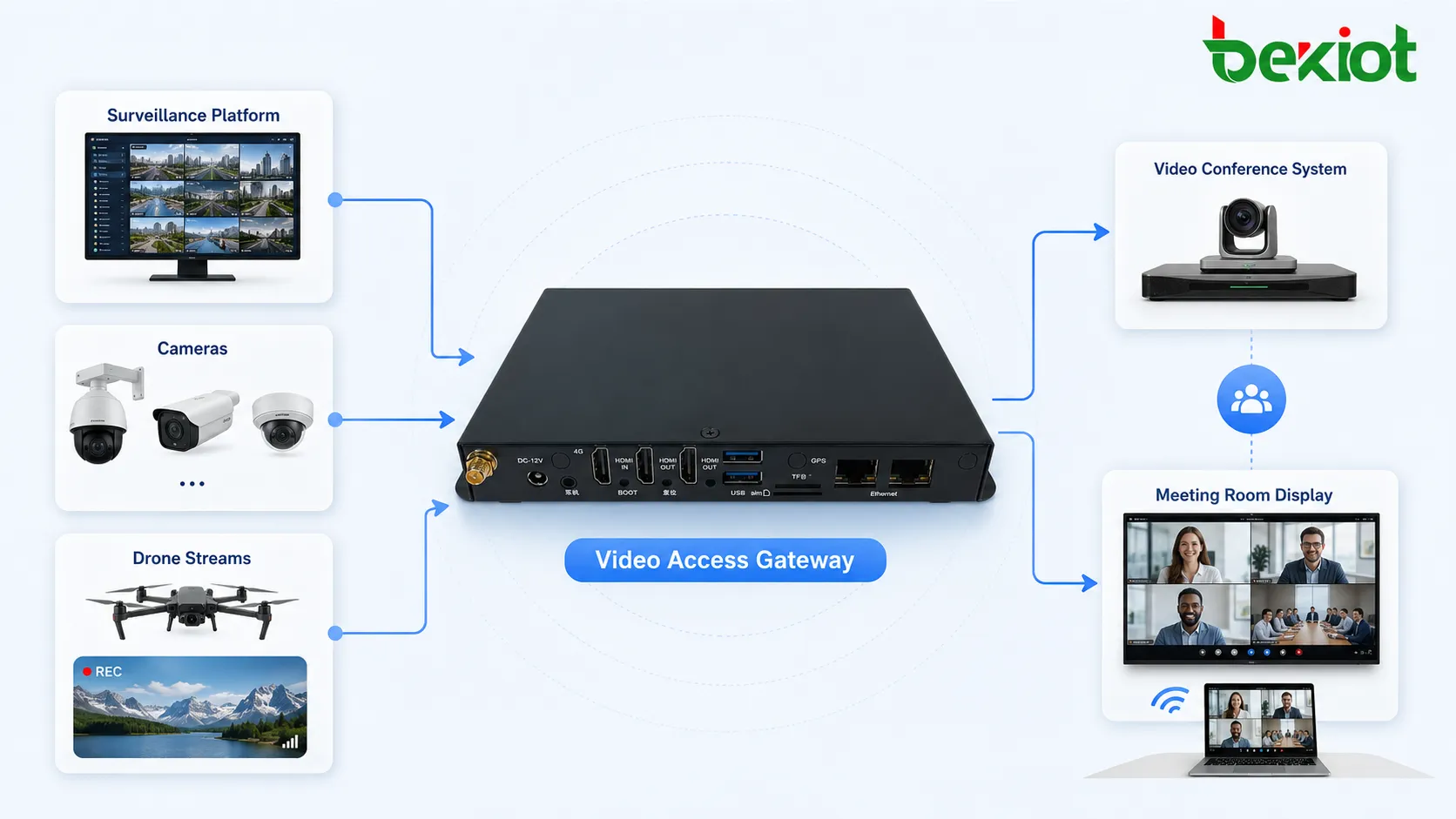
A typical solution can be divided into three layers. The first layer is the video source layer, including surveillance cameras, monitoring platforms, recorders, drone platforms, and mobile video devices. These sources may use GB/T28181, ONVIF, RTSP, RTMP, or other stream formats.
The second layer is the video access gateway. It handles protocol conversion, SIP mapping, stream pulling, stream receiving, codec conversion, frame rate adjustment, bitrate control, and resolution adaptation. This layer is responsible for turning different video sources into conference-accessible video resources.
The third layer is the video conference system. After conversion, the meeting platform can call cameras and drone feeds through SIP numbers or SIP URLs. The video then appears in the meeting room, allowing participants to watch, discuss, and make decisions together.
Where this solution is most useful
This type of integration is especially useful in emergency command centers, public safety dispatch, industrial parks, smart campuses, transportation management, mining safety, energy maintenance, construction sites, border and perimeter security, and large event operations.
In these scenarios, the video conference is not only a communication tool. It becomes a shared decision space. Fixed cameras provide continuous monitoring, drones provide flexible aerial observation, and remote participants can join the consultation without being physically present at the site.
The result is faster information sharing, fewer manual transfers, better coordination between departments, and more efficient remote decision-making.
What to check before deployment
Before deploying this kind of solution, project teams should confirm which video sources need to be connected, which protocols they support, and which conference system will receive the converted streams. Camera quantity, platform hierarchy, drone streaming method, SIP registration mode, network bandwidth, codec compatibility, and security policy should all be reviewed in advance.
It is also important to test real conference behavior. The system should verify whether cameras can be called from the address book, whether drone feeds can enter the meeting smoothly, whether H.265 to H.264 conversion is needed, and whether frame rate, bitrate, and resolution settings match the available network.
A stable solution should make the integration feel natural for users while giving engineers enough control over protocol access and media conversion.
Conclusion
Video conferencing can become much more powerful when it can access surveillance cameras and drone feeds. Through a video access gateway, different systems can be connected through GB/T28181, ONVIF, RTSP, SIP, and RTMP. Camera and drone streams can be mapped into SIP numbers, pulled into the meeting room, and displayed as conference video resources.
With protocol conversion, H.265 to H.264 transcoding, frame rate adjustment, bitrate control, and resolution adaptation, the solution can solve many compatibility problems between monitoring systems, drone platforms, and video conference systems. For emergency command, remote consultation, industrial management, and field coordination, this provides a low-complexity and highly practical way to bring real-time field video into collaborative decision-making.
FAQ
Can a surveillance camera appear as a participant in a video meeting?
Yes. After the camera stream is converted and mapped to a SIP number, the conference system can call it like a video endpoint, allowing the camera image to appear inside the meeting room.
Why is protocol conversion needed for this solution?
Surveillance platforms, drones, and meeting systems often use different protocols. Protocol conversion allows these systems to exchange video without requiring all devices to use the same native format.
Is RTMP mainly used for drone video access?
RTMP is commonly used for stream pushing, so it is suitable for many drone streaming workflows. However, some drone systems may also support GB/T28181 or other access methods depending on the platform.
What problem does H.265 to H.264 conversion solve?
It improves compatibility when a camera or drone outputs H.265 but the video conference platform or terminal works better with H.264. This helps avoid playback failure or unsupported video formats.
Does this method replace the existing video conference system?
No. The gateway-based method is usually an integration layer. It expands the existing conference system so that cameras and drone feeds can be called without changing the original meeting workflow.







