


Modern parks, industrial sites, campuses, logistics zones, and public facilities need more than separate radios, phones, cameras, and control room screens. When daily operations or emergencies happen, managers need one coordinated system that can connect people, devices, video sources, alarms, and command workflows in real time.
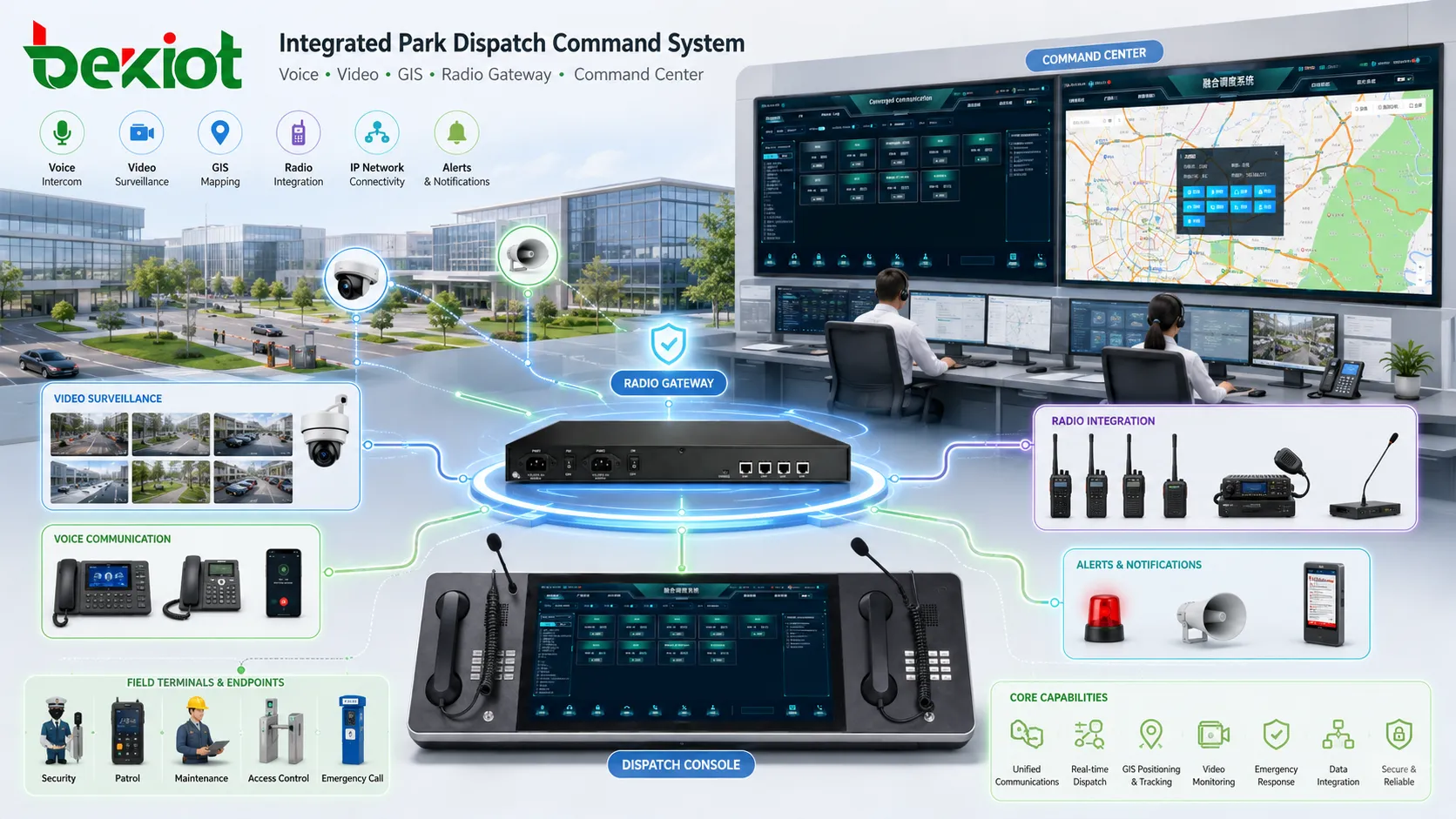
An integrated park dispatch command system helps turn scattered communication resources into a unified operation platform. It supports voice dispatch, video access, GIS positioning, radio interconnection, SIP communication, mobile terminals, emergency response, event recording, and multi-screen command operation. The purpose is not only to communicate, but to help the command center see the situation, reach the right team, issue instructions, and track the response process.
Why Park Operations Need Unified Command
Many park projects already have several independent systems. Security teams may use radios, office users may use IP phones, monitoring centers may manage cameras, and maintenance teams may depend on mobile devices. These systems can work separately, but they often become inefficient when an incident requires fast cross-department coordination.
For example, when an alarm is triggered, the command center may need to contact patrol staff, check nearby video, call the responsible department, notify maintenance teams, record the event, and follow an emergency plan. If each action depends on a different platform, the response process becomes slower and harder to trace.
The core value of an integrated dispatch system is not adding more equipment, but connecting existing communication resources into one practical command workflow.
Solution Positioning
The system is designed for sites that need centralized communication, visual command, emergency coordination, and multi-terminal access. It can be deployed in industrial parks, chemical zones, logistics parks, energy facilities, mines, transportation hubs, campuses, commercial complexes, municipal facilities, and emergency management centers.
The recommended architecture is based on an integrated communication platform. Through SIP communication, gateway conversion, video access, GIS linkage, mobile applications, and dispatch console software, the platform can connect different devices and systems into a unified control interface.
This solution is suitable for both daily operation and emergency response. During normal operation, it helps dispatch staff, manage calls, coordinate patrols, and communicate with field teams. During emergencies, it supports group calling, video linkage, command instructions, event recording, task tracking, and response review.
System Architecture
A complete park dispatch command system usually includes four layers: the communication platform, gateway access layer, terminal access layer, and dispatch operation layer. Each layer has a clear role, and the system can be expanded step by step according to project requirements.
| Layer | Main Function | Typical Components |
|---|---|---|
| Communication Platform | Call control, dispatch management, recording, permissions, event linkage, and system integration | Dispatch server, softswitch platform, recording module, management software |
| Gateway Access | Connect different networks, communication systems, and media sources | Telephone gateway, radio gateway, video gateway, conference gateway, SIP gateway |
| Terminal Access | Provide communication access for offices, field teams, patrol points, and emergency locations | IP phones, SIP terminals, rugged phones, POC devices, mobile apps, emergency stations |
| Dispatch Operation | Provide operators with visual command, calling, grouping, monitoring, and coordination tools | PC dispatch console, multi-screen workstation, handset console, GIS and video interface |
This layered design makes the system easier to deploy and maintain. A project can begin with voice dispatch and basic SIP terminals, then add radio interconnection, video access, GIS positioning, emergency broadcasting, or mobile command functions later.
Core Functions for Daily Operations
Voice Dispatch and Group Communication
Voice dispatch is the foundation of the system. Operators can initiate individual calls, group calls, emergency calls, call transfer, forced insertion, monitoring, and recording. This helps the command center communicate with internal extensions, field users, patrol teams, duty rooms, and external telephone users.
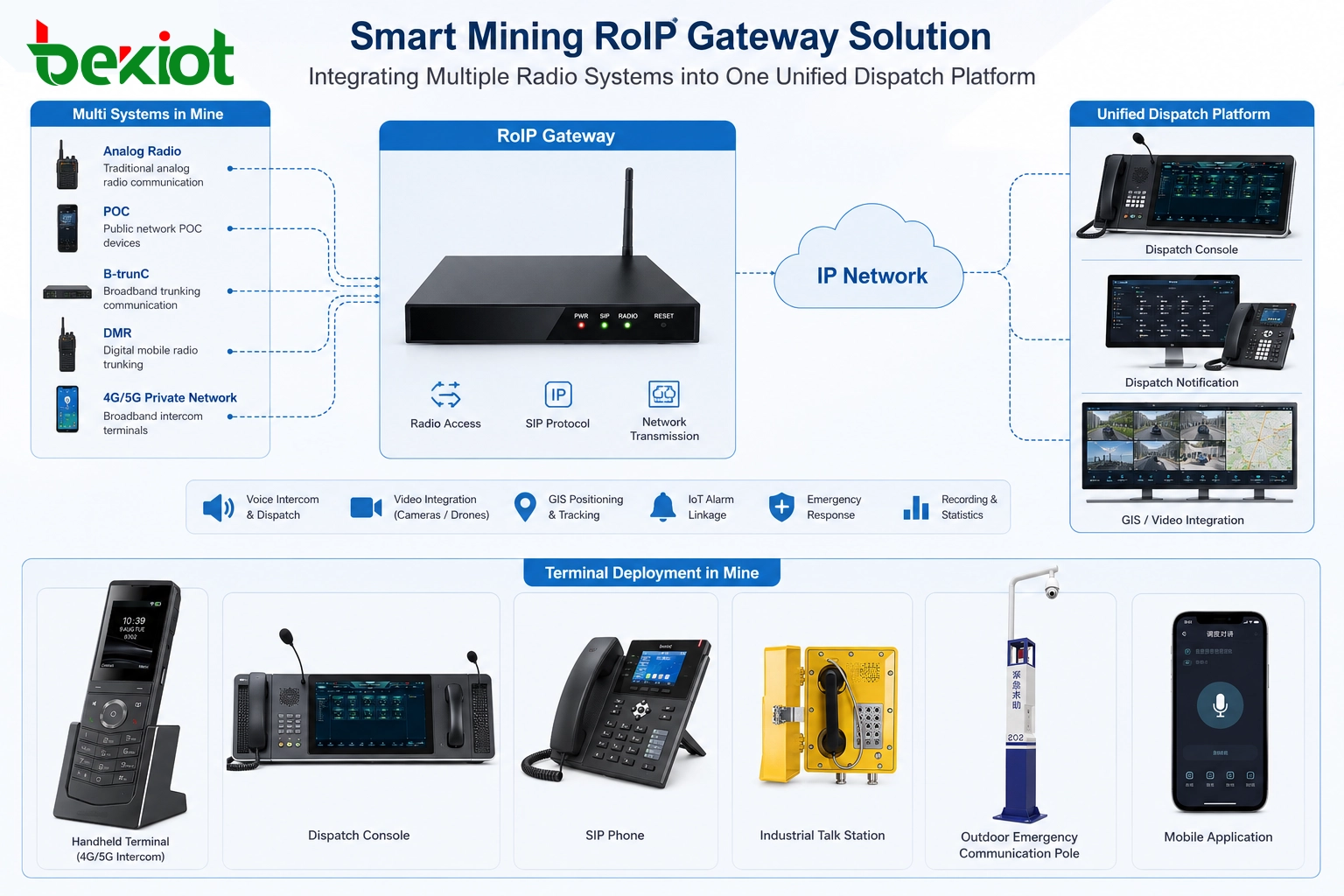
For teams that still depend on radio communication, radio gateway integration can connect traditional radio channels with IP communication networks. This allows the command center to coordinate radio users and SIP users from the same dispatch interface.
Video Access and Visual Verification
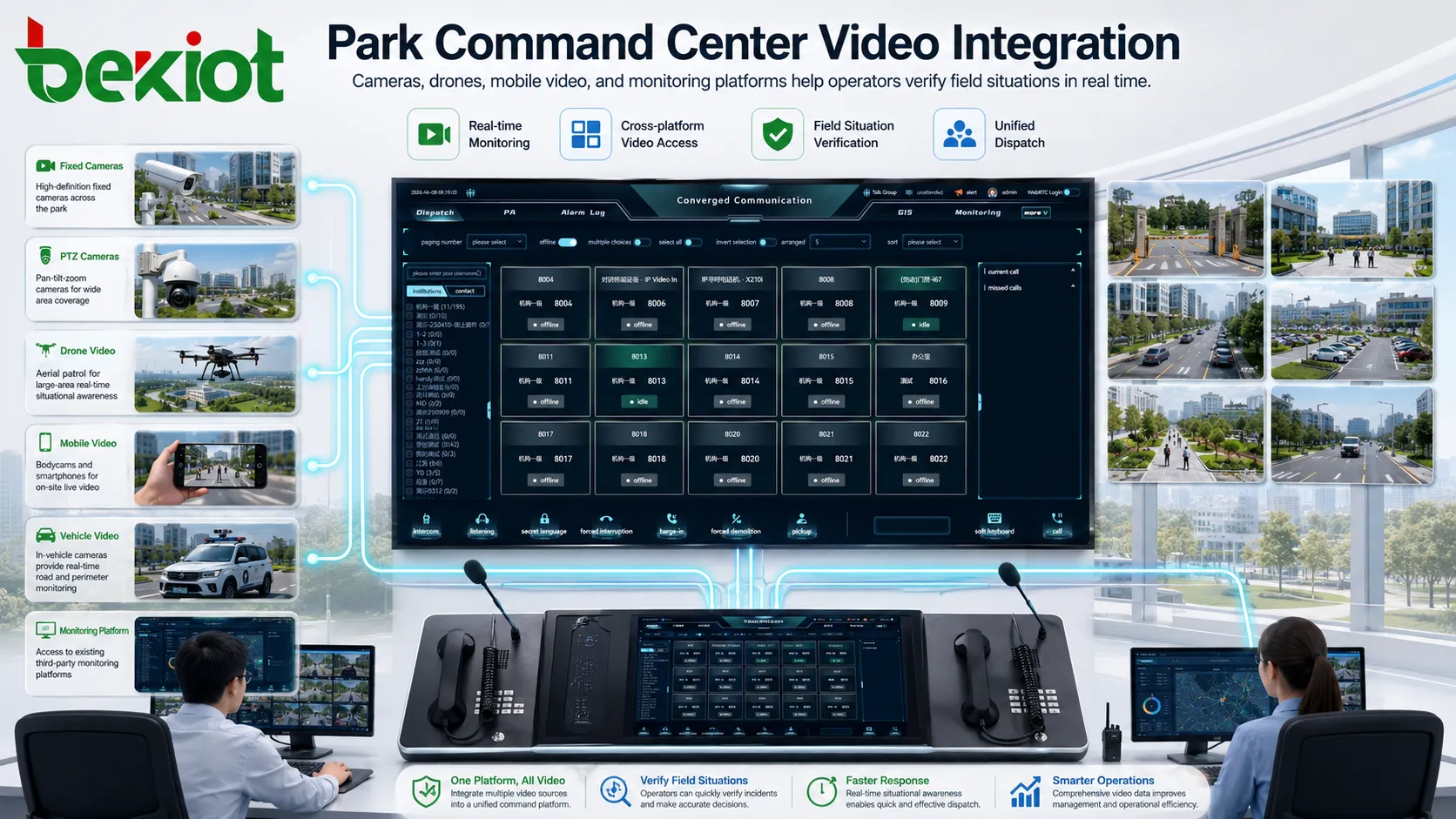
Video is important for situational awareness. The system can connect cameras, monitoring platforms, mobile video devices, body cameras, portable video terminals, and drone video sources through video access gateways. Operators can view related video resources during an incident and use visual information to support decision-making.
Common video access protocols may include GB28181, RTSP, RTMP, and RTP. Protocol compatibility is important because different projects often use different camera brands, video recorders, platforms, and streaming devices.
GIS Positioning and Resource Visibility
GIS-based dispatch helps the command center understand where people, vehicles, terminals, cameras, alarms, and key facilities are located. When an event occurs, operators can quickly identify nearby resources and contact the most suitable team.
This is especially useful for large parks, outdoor facilities, mines, logistics areas, and transportation sites. Instead of relying only on voice descriptions, the operator can make decisions based on map location, terminal status, video points, and event information.
Gateway Planning for System Integration
Gateways are essential when a project needs to connect different communication systems. They help convert voice, video, radio, telephone, or conference signals into formats that can be managed by the integrated dispatch platform.
Before selecting gateways, the project team should first confirm which systems need to be connected. These may include public telephone lines, IP phone systems, radio networks, video monitoring systems, video conference systems, emergency broadcasting systems, mobile terminals, and third-party management platforms.
If the command center needs to call external mobile phones or landlines, telephone gateway capacity should be planned according to the number of required lines. If radio users need to be included in the unified dispatch workflow, radio gateway channels should be planned according to radio system type, channel quantity, and dispatch requirements.
Terminal Deployment for Different Areas
Terminals are the communication endpoints of the system. They can be divided into mobile terminals and fixed terminals. Mobile terminals are suitable for patrol teams, maintenance teams, security staff, and field users. They can support POC intercom, voice communication, video reporting, positioning, and emergency notification.
Fixed terminals are usually deployed in offices, guard rooms, equipment rooms, duty stations, production areas, tunnel entrances, emergency points, and control rooms. Depending on the site environment, the project may use standard IP phones, video phones, rugged SIP terminals, industrial telephones, or emergency call stations.
Terminal planning should consider installation environment, network access, power supply, audio quality, waterproof and dustproof requirements, emergency priority, call frequency, and maintenance convenience. For outdoor or industrial environments, device protection level and long-term reliability should be considered from the beginning.
Command Console Design
The dispatch console is the main operating interface for the command center. A basic project can use a PC-based dispatch console, which is cost-effective, flexible, and easy to maintain. It can support calling, grouping, monitoring, recording, event management, video access, and GIS display through software.
For larger command centers, a multi-screen workstation is often more practical. One screen can display dispatch operation, another can display video resources, and a third screen can show GIS maps, event records, or system status. This layout helps operators process more information without constantly switching windows.
Some projects may also use handset-style dispatch consoles. This design is useful when operators frequently handle voice dispatch, channel switching, and emergency calling. It gives the operator a more direct communication experience while keeping software control available on the main screen.
Typical Application Scenarios
Industrial and Chemical Parks
Industrial and chemical parks often require strong emergency communication, clear command hierarchy, and reliable field coordination. The system can connect control rooms, production zones, patrol teams, maintenance users, emergency telephones, radio channels, video monitoring points, and public address systems.
When an abnormal event occurs, the command center can call the responsible team, check nearby video, locate field personnel, issue instructions, and record the response process. This helps improve safety management and post-event review.
Logistics Parks and Warehousing Areas
Logistics parks need efficient coordination between gate areas, warehouses, loading zones, vehicle routes, security teams, and maintenance staff. Mobile POC terminals and GIS positioning can help operators understand where field teams are working, while fixed SIP terminals support office and duty station communication.
Video access can also help verify vehicle movement, entrance status, loading area conditions, and abnormal events. This improves both daily management and emergency response efficiency.
Campuses, Public Facilities, and Commercial Complexes
Campuses, public facilities, and commercial complexes often need to coordinate security, maintenance, service teams, emergency points, access control, video monitoring, and public notification. A unified dispatch system helps reduce communication gaps between departments.
For large buildings or multi-zone facilities, the command center can use maps, video, voice calls, and event records to manage incidents such as equipment failure, crowd gathering, safety alarms, or emergency assistance requests.
Deployment Process
The first step is requirement analysis. The project team should confirm user roles, site size, existing systems, terminal quantity, network conditions, radio channels, video sources, emergency workflows, and future expansion requirements.
The second step is system design. This includes platform capacity, gateway type, channel quantity, terminal selection, console layout, recording requirements, video access method, GIS requirements, and permission structure. Accurate planning helps reduce unnecessary cost and avoids missing key functions.
The third step is installation and configuration. The system should be deployed according to network topology, terminal locations, gateway access methods, user groups, dispatch permissions, call rules, and emergency procedures.
The fourth step is testing and acceptance. Testing should cover voice calls, group dispatch, radio interconnection, video access, terminal registration, recording, emergency priority, GIS display, gateway stability, operator workflow, and event records.
Key Benefits for Park Management
The first benefit is unified coordination. Voice, video, radio, GIS, terminals, and command workflows can be managed in one platform, reducing the need to switch between multiple independent systems.
The second benefit is faster response. Operators can quickly contact relevant teams, view field video, locate nearby resources, and follow predefined emergency procedures.
The third benefit is better traceability. Call records, recordings, event logs, task records, and response processes can support management review, safety analysis, and operation optimization.
The fourth benefit is flexible expansion. The system can start with basic voice dispatch and expand later with video, radio gateway, GIS, mobile terminals, emergency broadcasting, or multi-site command features.
A good dispatch command solution should match real workflows, integrate existing systems, and leave enough room for future expansion.
Product Fit and Implementation Tips
For projects that require SIP communication, industrial terminals, voice gateways, emergency call points, public address integration, or dispatch console deployment, Becke Telcom can be considered as a suitable product and solution partner. The final configuration should be selected according to site environment, user quantity, gateway access requirements, and command workflow.
Instead of choosing devices only by specification sheets, project teams should focus on whether the platform, gateways, and terminals can work together in real scenarios. If the site includes outdoor areas, industrial zones, noisy environments, or emergency communication points, terminal reliability, audio quality, protection level, and maintenance convenience should be carefully evaluated.
For a park communication upgrade, a practical starting point is to review existing systems first, then define what needs to be connected, what needs to be dispatched, and which emergency workflows must be supported.
FAQ
How can a park decide which systems should be integrated first?
The first priority should be systems that affect safety, emergency response, and daily dispatch efficiency. These usually include voice communication, radio channels, video monitoring, emergency phones, duty stations, and field team terminals.
Is a multi-screen command console necessary for every project?
No. A small or medium-sized project can start with a PC-based dispatch console. Multi-screen workstations are more suitable when operators need to manage voice dispatch, video monitoring, GIS maps, event records, and system status at the same time.
What should be confirmed before connecting existing cameras?
The project team should confirm camera access protocol, video platform compatibility, network bandwidth, stream format, user permissions, and whether the video needs to be linked with alarms, maps, or dispatch events.
Can mobile POC terminals and fixed SIP phones work in the same system?
Yes. With the right platform and gateway design, mobile POC users, SIP phone users, dispatch operators, and other communication endpoints can be included in one coordinated workflow.
What is the most common mistake in this type of project?
The most common mistake is selecting products before defining workflows. A better approach is to define user roles, emergency scenarios, communication paths, system integration needs, and acceptance criteria before choosing the platform, gateways, and terminals.







