


Industrial automation is becoming a deeper combination of industrial production, information technology, connected devices, and intelligent software platforms. In many Industry 4.0 projects, automation is no longer limited to PLC control, equipment monitoring, or production data collection. It is also connected with the internet, artificial intelligence, big data analytics, cloud computing, robotics, IoT, edge computing, augmented reality, and virtual reality.
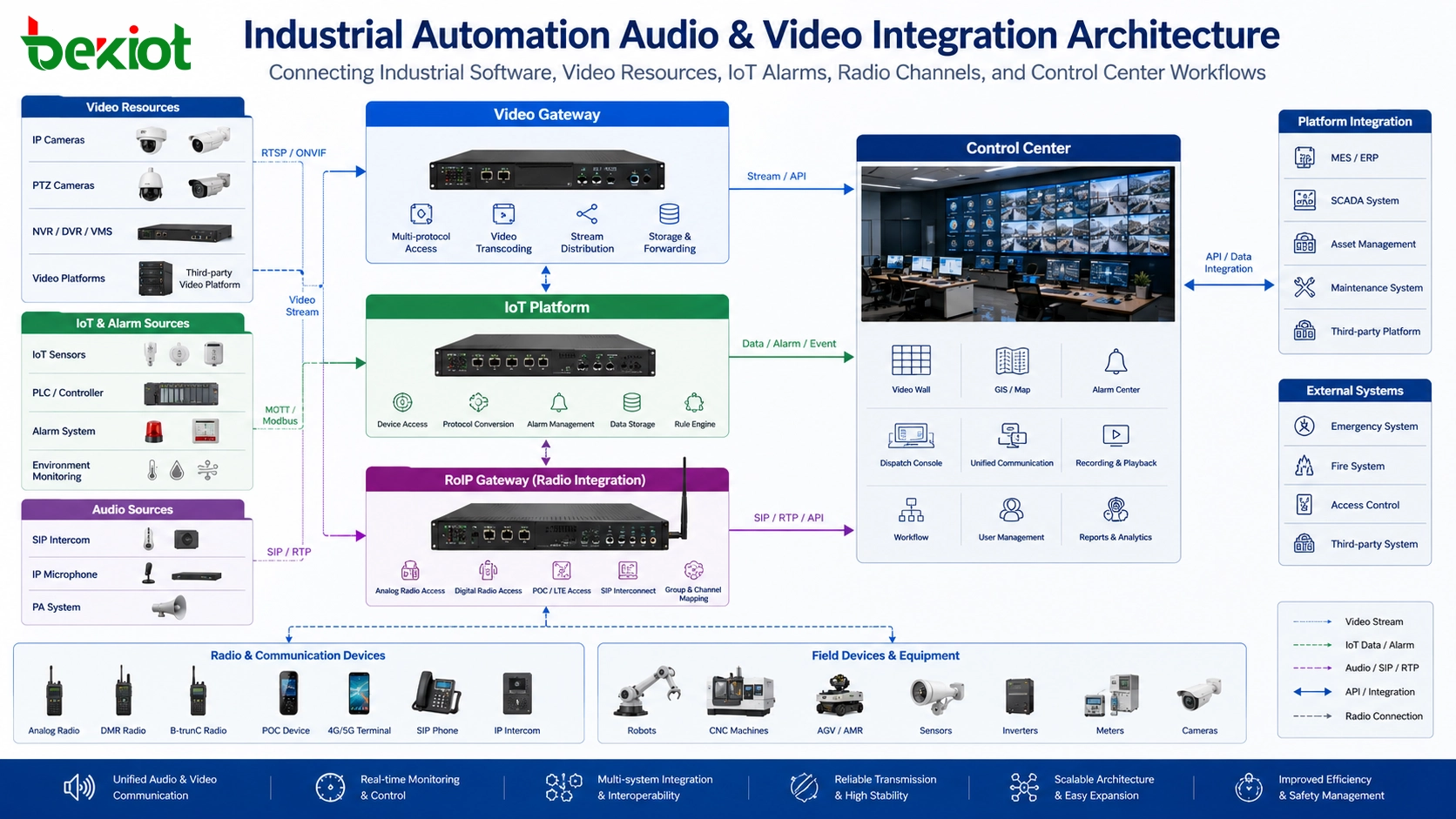
As industrial software platforms become more visual and event-driven, audio and video integration becomes a practical requirement. Operators need to see live video, review recordings, control cameras, receive alarm notifications, communicate with field workers, and display key production data on control desks, dispatch consoles, mobile terminals, and large screens. A well-designed gateway-based architecture can reduce development difficulty and make the whole automation platform easier to expand.
Why Visual Integration Matters in Automation Projects
Many industrial automation projects need to combine data monitoring with visual confirmation. A temperature warning, equipment fault, access event, or production abnormality becomes more useful when operators can immediately view the related camera image, check the surrounding environment, and verify the actual field situation.
Without video integration, the automation platform may only show numbers, charts, alarms, and status indicators. These data points are important, but they do not always explain what is happening on site. By connecting video monitoring systems and cameras to the automation platform, operators can build a more complete understanding of equipment status, safety risks, and production conditions.
This is especially important in industrial plants, energy facilities, logistics centers, mining sites, manufacturing workshops, chemical zones, and unmanned operation scenarios where remote visibility directly affects safety and response efficiency.
Connecting Existing Video Resources
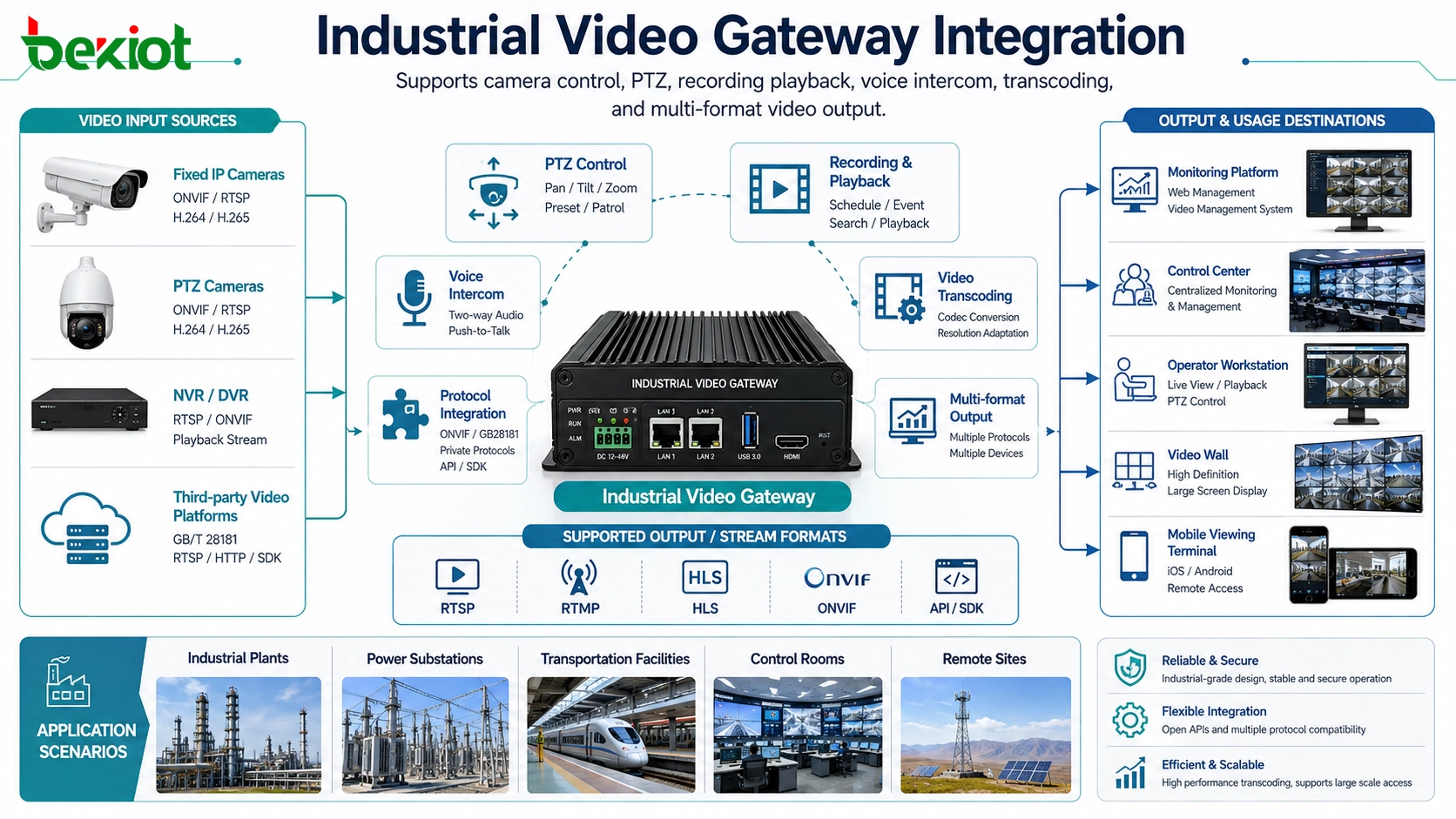
Most industrial sites already have video monitoring systems, network cameras, NVRs, video platforms, or security management systems. A video access gateway can connect these existing resources to the industrial automation platform, reducing the need for complex custom development.
The gateway can support common access methods such as GB/T28181, RTSP, and ONVIF. This allows the platform to connect with cameras, recorders, surveillance platforms, and video equipment from different environments. Instead of handling every camera protocol separately, developers can use a gateway to standardize video access and focus on business logic.
For industrial automation developers, this architecture is practical because it turns complicated video access work into a manageable integration task. The platform can obtain video resources through the gateway and present them inside the automation software interface.
Flexible Video Stream Output
After video resources are connected, the automation platform may need different streaming formats for different display scenarios. A control room screen, a web-based management platform, a mobile terminal, a large display wall, and a dispatch console may not use the same video format.
A video gateway can output multiple streaming formats such as RTSP, FLV, HLS(M3U8), and WebRTC. This makes it easier for the automation platform to display video in different interfaces and devices. For example, RTSP may be used for system-level access, HLS may be suitable for browser playback, and WebRTC can support low-latency viewing in interactive scenarios.
| Output Format | Typical Use | Project Value |
|---|---|---|
| RTSP | Video platform integration and professional video access | Suitable for system-to-system video streaming |
| FLV | Web video display and lightweight streaming | Useful for browser-based industrial dashboards |
| HLS(M3U8) | Stable web and mobile playback | Good for multi-terminal video presentation |
| WebRTC | Low-latency interactive video | Suitable for real-time dispatch and remote operation |
Beyond Simple Camera Pulling
In many projects, developers may try to pull camera streams directly through RTSP. This can solve basic video display, but it often cannot meet deeper industrial application requirements. Industrial automation platforms may need camera control, recording review, voice intercom, PTZ operation, and event-based video linkage.
Through API integration, the platform can call richer video functions. These may include focus adjustment, PTZ control, voice intercom, recording playback, stream switching, and video resource management. Compared with simple video pulling, gateway-based integration gives the automation platform stronger control capability.
For complex projects, the gateway can also provide transcoding capability. It can adjust resolution, frame rate, bitrate, and encoding format according to system requirements. This helps the platform adapt to different network conditions, terminal performance, and display requirements.
Combining Video with Industrial Data
Industrial automation projects are not only about showing video. The greater value comes from combining video images with IoT data, production data, equipment status, alarm information, and control system indicators.
For example, when a sensor reports abnormal vibration, the platform can display the related camera video and overlay equipment status data on the video screen. When a production line fault occurs, operators can view the live image, check fault records, and confirm whether field intervention is needed.
This kind of visual-data integration makes the system more intuitive. Operators do not need to switch between many isolated screens. They can view data, video, alarms, and operation context in one interface.
When Alarms Need a Stronger Notification Channel
After video access is solved, many industrial automation projects still face another problem: how to notify the right people when alarms occur. Relying only on duty staff to watch screens is not reliable. Phone calls, SMS, and emails are often too slow or inconvenient for fast industrial response.
In industrial sites, radios are still widely used because they are direct, familiar, and suitable for field communication. Maintenance teams, security staff, production workers, patrol teams, and emergency personnel often already use radio systems in their daily work.
By introducing radio-based voice notification into the automation project, alarms can reach frontline staff faster. This is where a RoIP gateway becomes valuable. It connects radio channels with the industrial automation system, allowing alarm events to trigger automatic voice announcements to specific radio channels.
Radio Voice Notification Through RoIP Gateway
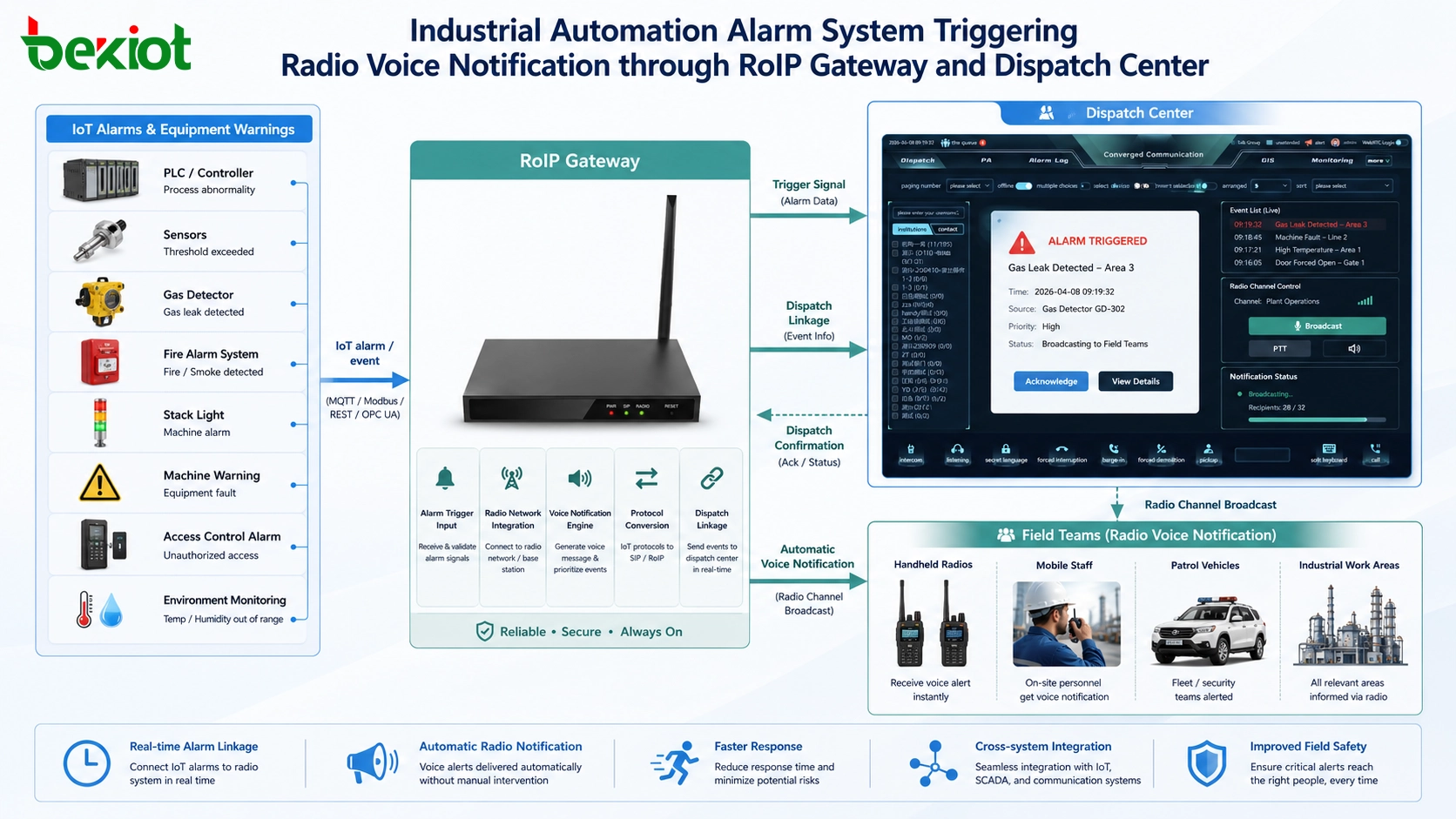
A RoIP gateway can connect industrial radio channels with the automation platform. When the automation system receives equipment alarms, IoT warnings, safety events, or abnormal operating data, it can automatically send a voice message to the corresponding radio channel.
The voice notification can be broadcast to the dispatch center and frontline response teams at the same time. This helps reduce manual relay steps and improves the speed of incident handling. For field workers who may not be near a screen, radio voice notification is often more practical than visual-only alerts.
In projects where radio linkage is required, a Becke Telcom RoIP gateway can be lightly integrated as a communication bridge between radio channels and the automation platform. It supports the idea of keeping existing radio communication resources while adding automated alarm notification and dispatch linkage.
API and IoT Protocol Integration
For developers, API capability is important. The automation platform should be able to call gateway functions, trigger voice playback, link alarm events, and control notification logic through software interfaces.
A practical RoIP gateway deployment may support API-based development, automatic voice broadcasting, and compatibility with IoT communication protocols such as MQTT. This allows alarm systems, IoT platforms, industrial control systems, and dispatch platforms to work together in a more flexible way.
For example, when an MQTT alarm message is received from an IoT platform, the automation system can identify the alarm type, select the correct radio channel, generate or call a preset voice message, and trigger radio broadcasting automatically.
Project Architecture for Audio and Video Convergence
A complete industrial automation integration architecture can include three major parts. The first part is video access, which connects cameras, NVRs, and video platforms through GB/T28181, RTSP, ONVIF, and other protocols. The second part is stream output, which provides RTSP, FLV, HLS(M3U8), WebRTC, and other formats to different software interfaces and terminals.
The third part is audio notification and dispatch linkage. Through the RoIP gateway, the automation platform can connect radio channels, dispatch centers, and frontline teams. When a system alarm occurs, the platform can trigger voice broadcasting instead of relying only on screen reminders.
This structure helps developers avoid repeated low-level protocol work. Video gateway devices handle complex video access and stream conversion. RoIP gateways handle radio channel access and voice notification. The automation platform can focus on process logic, alarm rules, interface design, and business workflows.
Typical Industrial Application Scenarios
Equipment Monitoring and Fault Response
When equipment generates abnormal data, the automation platform can display the related camera image and trigger a voice notification to maintenance personnel. This helps operators confirm the field situation and dispatch the right team faster.
The same workflow can be used for conveyor systems, production lines, power equipment, pumps, compressors, storage areas, and unmanned stations.
Safety Alarm and Emergency Handling
For safety events such as gas alarms, intrusion alerts, access violations, over-temperature warnings, or restricted-area entry, the system can link video display with radio broadcasting. The dispatch center can see the event, hear the alarm, notify field workers, and record the response process.
This creates a more complete safety loop than visual monitoring alone.
Remote Operation and Control Center Display
Industrial automation platforms often need to display video and data on fixed workstations, dispatch consoles, mobile devices, and large screens. Multi-format video output makes this easier, while audio notification ensures that important events are not missed by field teams.
For remote operation centers, this combination improves both situational awareness and response coordination.
Implementation Flow for Developers
The first step is to identify all video resources, including cameras, video platforms, NVRs, and existing surveillance systems. The project team should confirm access protocols such as GB/T28181, RTSP, and ONVIF.
The second step is to define output requirements. Developers should confirm where video will be displayed, which terminals need access, whether low latency is required, and which formats such as RTSP, FLV, HLS(M3U8), or WebRTC are needed.
The third step is to design alarm linkage. The platform should define which alarms require voice notification, which radio channels should receive messages, whether MQTT or API integration is required, and how dispatch center and frontline teams should be notified.
The fourth step is to test real workflows. Testing should include video access, stream output, PTZ control, recording playback, transcoding, IoT data overlay, radio voice notification, alarm triggering, audio clarity, and response timing.
Value for Industrial Automation Projects
Gateway-based integration reduces development risk. Instead of building every video protocol, stream format, and radio linkage function from scratch, developers can use professional gateway devices to handle complex access and conversion tasks.
It also improves project efficiency. Video resources can be integrated faster, alarm notifications can reach field teams more directly, and the automation platform can provide a more complete operating experience.
Most importantly, it makes industrial automation more practical. Operators can view video, understand data, hear alarms, communicate with field teams, and handle events through a more connected system. This is the real value of audio and video convergence in industrial automation.
For high-standard industrial automation projects, professional gateway integration can turn complex audio and video requirements into manageable platform functions.
FAQ
Can an automation platform connect old cameras without replacing them?
In many cases, yes. If the existing cameras, NVRs, or video platforms support standard protocols such as GB/T28181, RTSP, or ONVIF, they can often be connected through a video access gateway.
Why is WebRTC useful in industrial video applications?
WebRTC is useful when the project needs low-latency viewing, interactive control, or browser-based real-time video. It is especially suitable for dispatch consoles, remote operation, and fast-response monitoring interfaces.
How can radio voice notification improve alarm response?
Radio notification sends alarm messages directly to field teams through the communication tools they already use. This reduces dependence on screen monitoring and helps workers receive urgent information while moving or working on site.
Can IoT alarms trigger automatic voice broadcasting?
Yes. With API or MQTT integration, the automation platform can receive IoT alarm data and trigger preset voice messages to specific radio channels through a RoIP gateway.
What should be tested before project delivery?
Testing should cover video access stability, stream format compatibility, PTZ control, recording playback, transcoding performance, alarm linkage, radio voice broadcasting, audio quality, delay, and complete operator workflow.







