


In dispatch and emergency environments, a paging message is often more than a temporary voice announcement. It may contain an evacuation instruction, a security warning, a maintenance order, a rescue coordination message, a public guidance notice, or a command from the control room to field personnel. Once the message has been broadcast, the site may need to know who sent it, when it was sent, which zone received it, what was said, whether it matched the event procedure, and how the response developed afterward.
Paging recording is used to preserve this critical communication process. It allows live paging, emergency override broadcasts, scheduled announcements, operator instructions, alarm-triggered messages, and intercom-related paging actions to become traceable records. In dispatch and emergency systems, this capability supports incident review, operational accountability, procedure optimization, staff training, compliance management, and long-term communication quality control.
Why voice announcements need traceability
Dispatch and emergency systems are built around fast decisions. Operators may need to send instructions to a production area, station platform, hospital corridor, campus building, tunnel section, warehouse dock, power room, or public facility zone within seconds. In these moments, voice paging is valuable because it reaches people directly in the physical environment. However, fast communication also creates a management challenge: if the instruction is not recorded, the organization may later have no complete evidence of what was actually broadcast.
Traceability matters because emergency response is often reviewed after the event. Managers may ask whether the warning was sent on time, whether the correct wording was used, whether the right zone was selected, whether a second instruction contradicted the first one, whether the operator followed the response procedure, and whether the field team received enough guidance. A paging recording provides a factual basis for answering these questions.
Without recording, the review process depends heavily on memory. Operators, responders, supervisors, and witnesses may remember the same event differently, especially during stress. A recorded paging file with timestamp, operator identity, zone information, and event association reduces uncertainty. It does not replace investigation, but it gives investigators a reliable communication timeline.
Traceability also improves daily discipline. When operators know that important paging actions are recorded, they are more likely to use approved wording, select zones carefully, avoid unnecessary broadcast, and follow established communication rules. Recording is therefore not only a backward-looking tool; it also influences real-time behavior and system governance.
What the system should capture
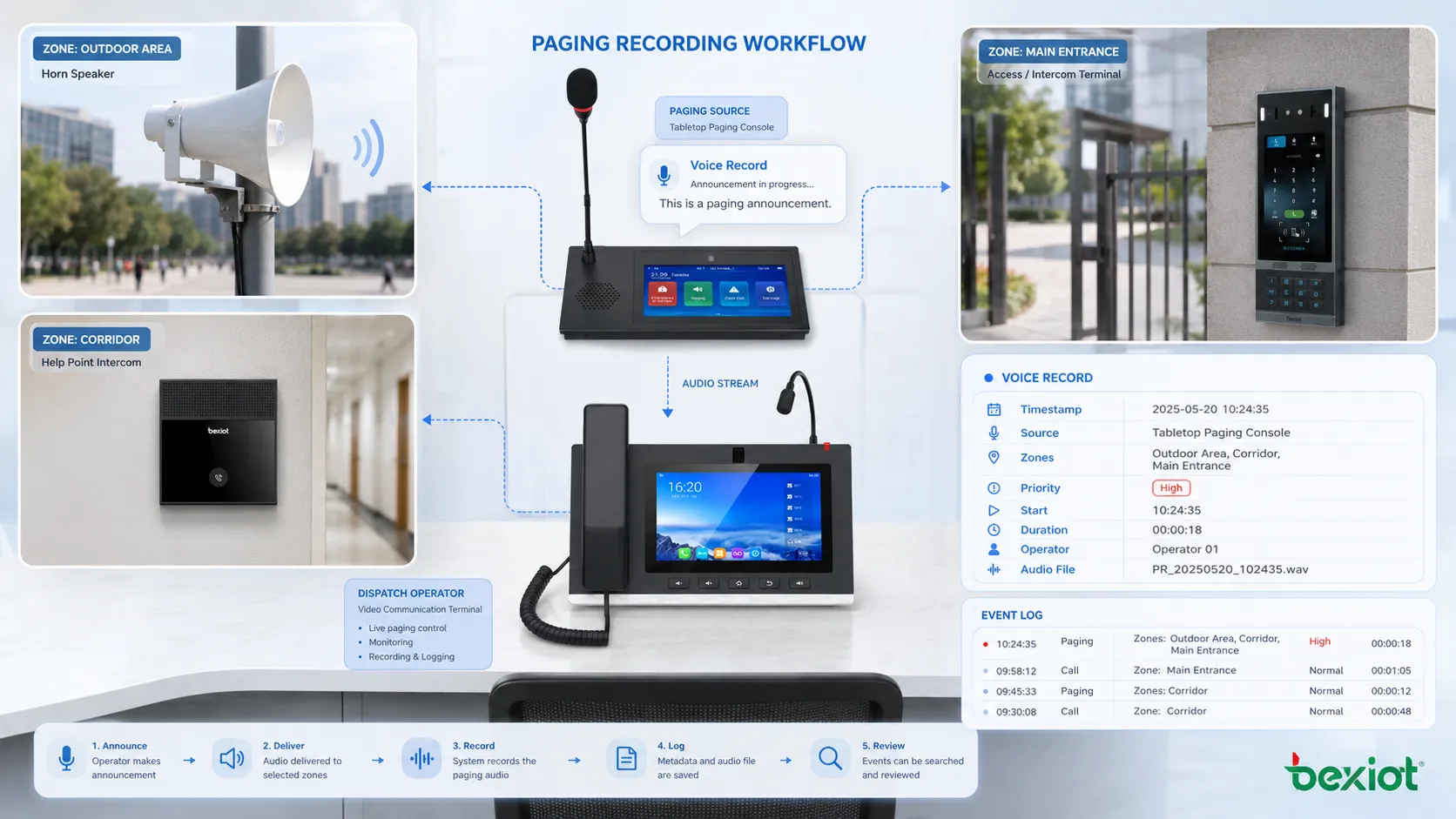
Paging recording should capture more than raw audio. Audio content is essential, but an effective dispatch and emergency record should also include context. A voice file without time, zone, source, operator, priority, trigger type, and event linkage may be difficult to interpret later. The goal is to record the communication event as a complete operational object.
The first element is the audio itself. This may be live operator speech, pre-recorded announcement playback, text-to-speech output, alarm-triggered evacuation audio, manual emergency paging, or a voice message sent from a dispatch console. The system should preserve enough audio quality for later understanding. A compressed or distorted file that cannot be understood has limited value.
The second element is time information. The record should include start time, end time, duration, and preferably the system time source. In emergency response, seconds may matter. A recording that shows the warning was issued before or after an alarm confirmation can be important for incident review. Time synchronization across dispatch, alarm, video, access control, and paging systems improves the value of the record.
The third element is source identity. The system should show who or what initiated the paging action. This may be an operator account, dispatch console, SIP terminal, microphone station, emergency button, alarm platform, schedule task, automation rule, or remote management interface. Source identity helps distinguish human instruction from automatic broadcast.
The fourth element is destination information. The record should show which zone, group, speaker circuit, IP speaker group, building, floor, tunnel section, platform, field terminal, or emergency area received the message. In multi-zone systems, each selected zone should be included. If a message was intended for all zones but only some zones were reachable, that status should also be recorded where the system supports it.
How recording fits into the communication workflow
In a dispatch system, paging recording usually begins when the operator activates a paging channel or when an automatic broadcast event is triggered. The system may start recording immediately when the microphone opens, when the pre-tone begins, when the audio stream reaches the paging server, or when playback starts in the selected zone. The chosen point affects what the recording contains.
If recording starts too early, it may capture silence, preparation noise, or irrelevant conversation before the announcement. If it starts too late, it may miss the first words of the instruction. The best behavior depends on operational needs, but emergency systems usually require complete capture from the moment the broadcast action is initiated.
For live paging, the system may record the operator’s microphone input, the encoded audio stream, or the final audio output sent to the destination. Recording the microphone input is simple, but it may not prove that the message was delivered to every zone. Recording the transmitted stream gives better system-level evidence. Some advanced designs may also log playback confirmation or endpoint status to show whether the destination was available.
For pre-recorded messages, the system should record which file was played, when it was played, who or what triggered it, and which zones were selected. It may not need to duplicate the audio file every time if the system can reference a protected original file and log the playback event. However, for high-risk environments, storing the actual playback record may simplify later review.
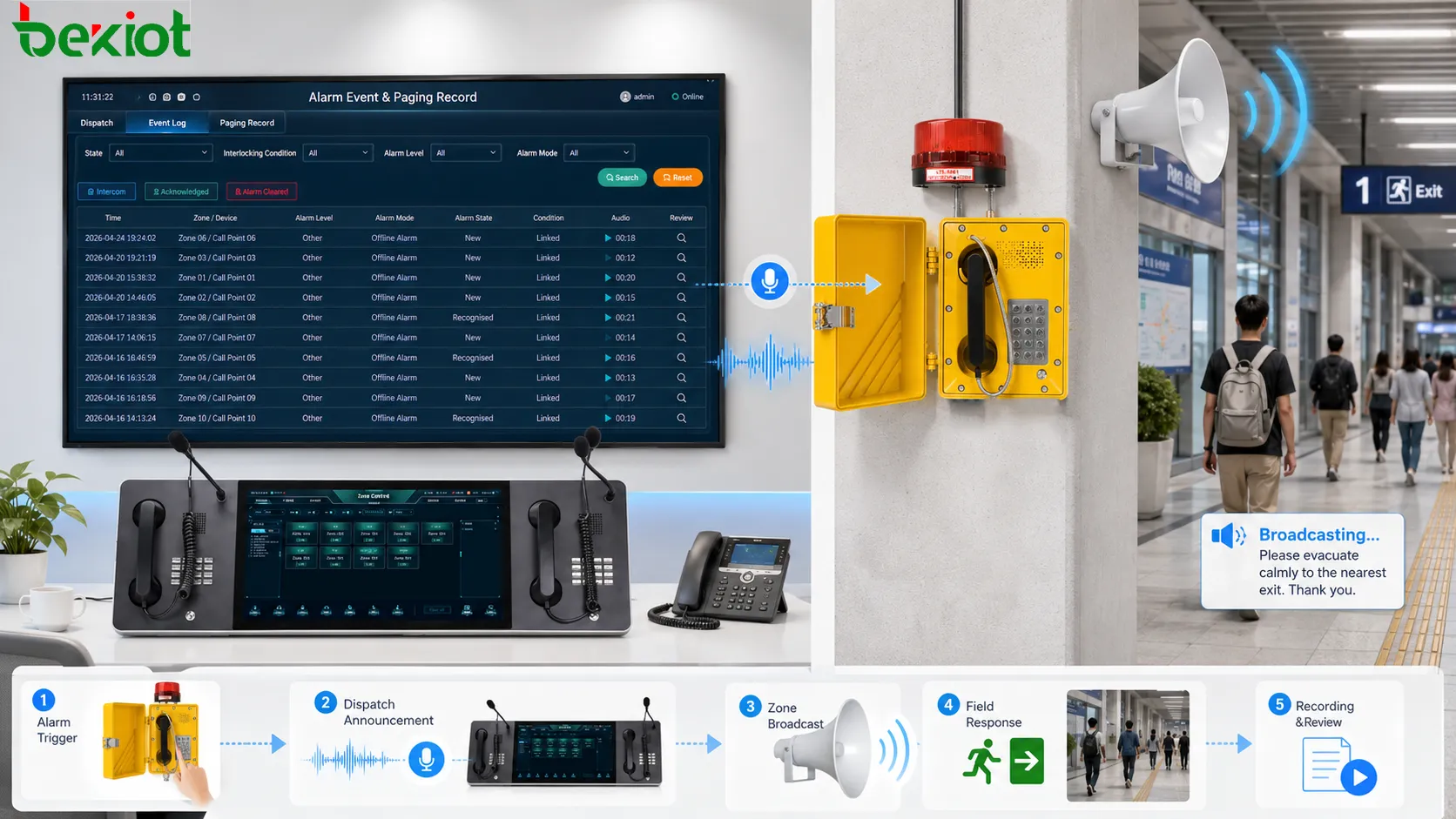
For alarm-linked paging, the recording should be associated with the alarm event. If a fire signal, gas detection event, emergency button, intrusion alarm, access control event, or safety sensor triggers a paging message, the recording should be connected to that event ID or event timeline. This allows reviewers to see the alarm, broadcast, operator action, and response sequence together.
The link between paging logs and incident timelines
Emergency management depends on timelines. A complete incident timeline may include alarm detection, operator acknowledgement, paging announcement, video verification, field response, access control action, escalation call, public instruction, event clearance, and post-incident review. Paging recording is one part of this timeline, but it often becomes a key part because it reflects what was communicated to people at the site.
A useful record should allow the reviewer to reconstruct the sequence. For example, a smoke alarm was triggered at 10:02:14, the operator viewed the alarm at 10:02:25, an emergency page was sent to Building A at 10:02:40, the evacuation message lasted 22 seconds, a follow-up live instruction was sent at 10:03:18, and the response team acknowledged arrival at 10:05:10. Without integrated records, these details may be scattered across different systems.
Paging recordings become more valuable when they can be correlated with other records. Video footage can show whether people moved after the announcement. Access control logs can show whether doors were opened. Intercom recordings can show whether field users responded. Alarm logs can show whether the condition escalated. Dispatch records can show who was assigned to respond.
This correlation supports accountability and improvement. If an announcement was delayed, the timeline may show whether the delay came from alarm verification, operator uncertainty, system access, unclear procedures, or technical failure. If people did not respond, the review may show whether the message was unclear, the wrong zone was selected, audio quality was poor, or the site training was insufficient.
Value in emergency command and response
Emergency command requires clear instruction. During fire, hazardous gas, equipment failure, public safety incident, extreme weather, medical emergency, traffic disruption, security threat, or evacuation, paging may be used to guide people quickly. Recording preserves the exact instruction given by the command or dispatch center.
This matters because emergency messages can influence human movement. A broadcast may tell people to evacuate, avoid a passage, report to an assembly point, stop equipment, leave a hazardous area, or wait for further instruction. If the message is later questioned, the recording provides a direct record of what was said.
Recording also helps verify whether emergency communication followed the plan. Many organizations prepare standard operating procedures for different events. These procedures may define which zone to broadcast to, which message to use, who can authorize the message, and when to issue follow-up instructions. Paging recordings allow reviewers to compare actual operation with the procedure.
In some emergencies, operators may need to issue live instructions because the situation changes. A pre-recorded message may not cover a blocked exit, a changed route, a secondary hazard, or a field report. Recording live instructions helps preserve the decision path and supports later evaluation of whether the operator adapted correctly.
For emergency drills, recording is also useful. A drill can be reviewed to check message timing, wording, zone selection, audio clarity, and staff response. Training can then be adjusted based on real evidence instead of general impressions.
Value in dispatch operation and field coordination
Dispatch systems use paging to coordinate people, equipment, and field work. Operators may call maintenance teams, inform security staff, guide traffic, dispatch emergency responders, notify production zones, or request field confirmation. Recording these paging actions creates a communication history for daily operation.
In maintenance dispatch, a record can show when a technician was called to a specific area and what instruction was given. If a repair was delayed, the record may help determine whether the request was broadcast on time, whether the correct team was notified, and whether follow-up messages were issued. This supports more accurate service management.
In security dispatch, paging records can show how the control desk responded to visitor issues, access events, perimeter alerts, parking incidents, or crowd guidance needs. If a security team is sent to an area, the recording can show the initial instruction and the urgency level. This helps supervisors evaluate response quality.
In production dispatch, recorded paging can document line stoppage notices, safety reminders, material requests, process adjustments, shift-change instructions, or quality alerts. This can be useful when investigating downtime, production errors, or coordination problems.
For large sites, dispatch communication may involve several operators and several zones. Recording helps avoid confusion between shifts. An incoming operator can review important broadcasts from the previous shift, understand unresolved incidents, and continue coordination with better context.
Role in public address and evacuation guidance
Public address systems often become part of emergency communication. Paging recording helps document public guidance messages sent to passengers, visitors, patients, students, tenants, employees, contractors, or the general public. In public facilities, what people hear during an emergency may affect crowd movement and safety.
Evacuation guidance is a typical application. The system may broadcast instructions to leave through specific exits, avoid elevators, move to assembly areas, follow staff guidance, or stay away from a dangerous zone. If the facility later reviews the evacuation process, recordings can show whether instructions were delivered clearly and at the correct time.
Public spaces may require repeated or multilingual announcements. Recording helps verify which language versions were played, whether the message sequence was correct, and whether follow-up instructions were sent. This is useful in airports, railway stations, metro systems, exhibition centers, hospitals, campuses, shopping centers, and transport hubs.
In non-emergency public guidance, paging recording may still support management. For example, a station may record platform change announcements, a campus may record safety drill notices, and a commercial facility may record closing reminders or lost-person announcements. These records help resolve complaints and improve message practices.
Public address recording should be managed with privacy awareness. While announcements are public, some messages may include names, locations, incident details, or sensitive operational information. Retention and access policies should be defined according to site requirements.
Recording live paging, scheduled messages, and automatic triggers
Different paging sources require different recording logic. Live paging captures what an operator says in real time. This is important because live messages can vary depending on the situation. The system should capture the actual spoken content, not only the fact that a live page occurred.
Scheduled messages are more predictable, but they should still be logged. A scheduled announcement may be used for shift changes, public reminders, routine safety notices, facility closing, school bells, station guidance, or daily operational prompts. The system should record whether the scheduled message played successfully, which zones received it, and whether it was interrupted by a higher-priority event.
Automatic triggers are especially important in emergency systems. A fire alarm may trigger an evacuation message. A gas detector may trigger a hazard warning. An emergency call point may trigger a help announcement. An access control event may trigger a security notice. The recording should capture the triggered audio and link it to the event that caused it.
Some systems may use text-to-speech for dynamic announcements. For example, the system may generate a message containing a location name, device ID, platform number, or alarm type. In such cases, the record should preserve both the generated text and the final audio where possible. This helps verify whether the system pronounced or assembled the message correctly.
Recording rules should account for priority interruption. If a scheduled message is interrupted by emergency paging, the record should show that interruption. If an emergency message overrides background audio, the record should show the higher-priority action. If two operators attempt to page the same zone, the record should show which one took control.
Metadata makes recordings searchable and useful
A large dispatch or emergency system may generate many recordings. Without metadata, recordings become difficult to find. Operators and investigators should not need to search manually through hundreds of audio files by listening one at a time. Metadata turns recordings into searchable operational records.
Useful metadata includes event time, operator account, source device, paging group, zone name, priority level, message type, trigger type, duration, related alarm ID, related dispatch ticket, playback result, device status, recording file path, and retention category. These fields allow the system to filter records quickly.
For example, an investigator may search all emergency pages sent to Zone B between 14:00 and 15:00. A supervisor may search all broadcasts initiated by one dispatch console during a shift. A maintenance manager may search all paging records linked to equipment room alarms. Metadata makes these searches practical.
Good naming also matters. Zone names, device names, and message labels should match the real site. If a record only says “Group 12,” it may not be useful to someone reviewing the event later. Clear naming such as “North Tunnel Section,” “Building C Evacuation Zone,” or “Warehouse Loading Dock” improves long-term value.
Metadata should be protected from tampering. If a user can edit timestamps, operator names, zone IDs, or event links after the fact without trace, the record loses credibility. Audit logs and access control should apply not only to audio files but also to the associated metadata.
Audio quality and intelligibility in recorded evidence
A recording is useful only if people can understand it. In dispatch and emergency systems, recorded audio may be reviewed during incident analysis, legal inquiry, internal training, complaint handling, or operational audit. Poor audio quality weakens the value of the record.
Audio quality depends on the microphone, input gain, codec, sampling rate, network condition, recording point, noise level, and storage format. If the operator microphone is too low, too noisy, or distorted, the recording will reflect that. If the system records only compressed audio with heavy artifacts, important words may become unclear.
Intelligibility is more important than high-fidelity sound. A paging recording does not need studio quality, but it must preserve speech clearly enough for review. The system should avoid clipping, excessive noise reduction, missing first words, abrupt cut-offs, or mixed overlapping audio that cannot be separated.
In emergency systems, the recording should capture the complete message. If a pre-tone or opening instruction is clipped, the record may not fully represent what listeners heard. If the recording ends before the message finishes, the review may become incomplete. Start and stop timing should be tested during commissioning.
Where multiple audio sources can overlap, the system should record them in a way that supports interpretation. If background music, scheduled broadcast, live paging, and emergency override interact, the record should show priority behavior clearly. In some systems, separate channel recording may be more useful than a single mixed recording.
Storage design and retention strategy
Paging recordings need storage planning. A system that records every broadcast may generate large amounts of audio over time, especially in busy dispatch centers, public facilities, campuses, transport stations, and industrial plants. Storage design should consider file size, recording frequency, audio format, retention period, redundancy, backup, and retrieval performance.
Not all recordings need the same retention period. Emergency broadcasts may need longer retention than routine daily announcements. Training messages may be kept briefly. Alarm-linked messages may be tied to incident records. Public address messages may follow site policy. The system should support retention categories rather than treating every recording the same way.
Storage integrity is important. Recordings may be used as evidence or official operational records. The system should protect files from accidental deletion, unauthorized modification, corruption, or loss. Access permissions, checksums, write-once storage, backup policies, audit logs, and secure export procedures may be required depending on risk level.
Search speed also matters. During an incident review, users may need to find a recording quickly. If archived files are difficult to retrieve, the system becomes less useful. Indexing, metadata search, date filtering, zone filtering, event association, and file lifecycle management improve practical usability.
Storage planning should also include disaster recovery. If the recording server fails during an emergency, will recordings be lost? If the main dispatch platform is unavailable, is there local recording? If the storage disk is full, does the system stop recording or alert administrators? These questions should be answered before deployment.
Security, access control, and privacy
Paging recordings may contain sensitive information. Emergency instructions, security incidents, staff names, patient movement, facility vulnerabilities, operational status, and public disturbance events may be included in audio records. Access should therefore be controlled carefully.
User roles should define who can search, listen, export, delete, lock, annotate, or archive recordings. A dispatcher may need to review recent messages. A supervisor may need broader access. An investigator may need incident-related files. A system administrator may manage storage but should not necessarily access every recording without authorization. Role-based control reduces misuse.
Exported recordings require special attention. Once a file is downloaded or shared outside the system, control becomes harder. Export should be logged, and files may need watermarking, encryption, approval workflow, or limited validity depending on the organization’s policy. For critical incident evidence, a clear chain of custody may be necessary.
Privacy rules vary by region, industry, and organization. Some environments may require user notification that communication is recorded. Some may restrict recording of certain areas or content. Some may require automatic deletion after a defined period. The system design should follow applicable internal policies and legal requirements rather than assuming that all audio can be stored indefinitely.
Security also includes system hardening. Recording servers, databases, file storage, web interfaces, API endpoints, and backup systems should be protected. Weak passwords, exposed management ports, unencrypted storage paths, or uncontrolled remote access can compromise the trustworthiness of the recording archive.
Integrity and anti-tampering requirements
For dispatch and emergency systems, recording integrity is essential. If a recording can be changed, deleted, renamed, or replaced without trace, it cannot be trusted as an operational record. Integrity protection helps ensure that the audio and metadata remain reliable after capture.
Integrity can be supported through access control, audit logs, file checksums, digital signatures, secure timestamps, restricted deletion rules, storage permissions, backup copies, and retention locks. The level of protection should match the importance of the recording. A routine announcement may not require the same protection as an emergency evacuation command.
Audit logs should record important actions. Who listened to the file? Who exported it? Who deleted or archived it? Was metadata changed? Was the retention period modified? These logs help protect the record and support accountability.
Time integrity is also important. If system clocks are not synchronized, recordings may appear out of sequence when compared with alarm logs, video records, access records, or dispatch tickets. Dispatch and emergency systems should use consistent time synchronization so that the timeline remains credible.
In high-risk environments, organizations may require evidence-grade recording management. This does not only mean storing audio. It means protecting the full lifecycle of the record from capture to retention, review, export, and deletion.
Integration with dispatch consoles and emergency platforms
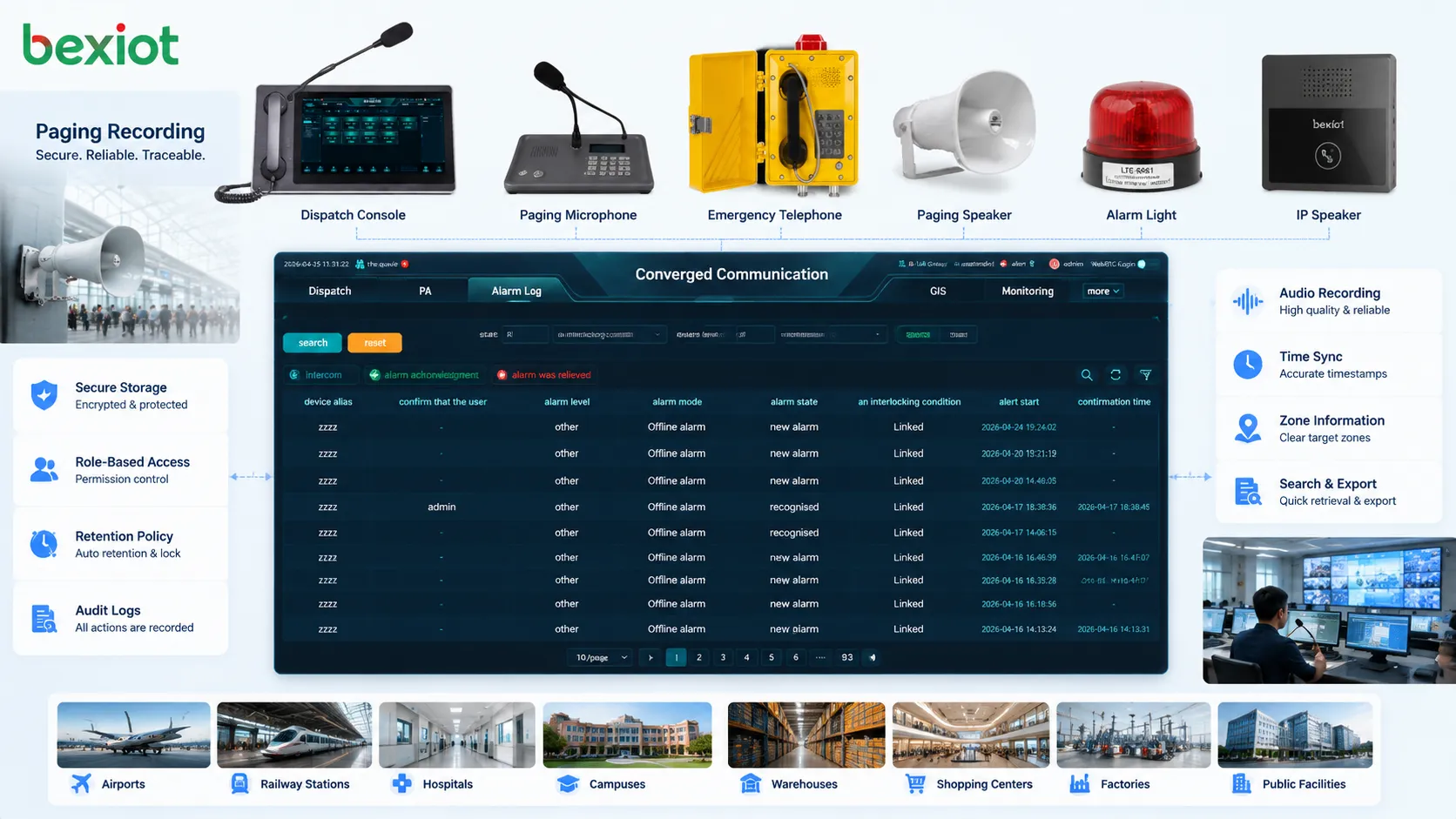
Paging recording is most useful when it is integrated with the dispatch console or emergency management platform. Operators should be able to review recent paging records, associate recordings with incidents, replay instructions, check zone selection, and export files when authorized. If recording is isolated in a separate system, its value is reduced.
Console integration can show recordings beside call logs, alarm records, video links, response tasks, and event notes. This allows the operator or supervisor to understand the complete communication process. A recording can be reviewed in context rather than as a detached audio file.
Emergency platforms may use recordings during post-event review. A supervisor can select an incident and see all related paging broadcasts, intercom calls, dispatch orders, operator notes, and alarm states. This helps identify whether the response procedure worked as intended.
Integration also supports faster correction. If an operator realizes that a message was sent to the wrong zone, the system can show the record immediately and support a follow-up broadcast. If a zone failed to play audio, the fault record can be linked to maintenance action.
For large facilities, integration may also support centralized management across multiple sites. A headquarters command center may review emergency broadcasts from several branches, compare response timing, and improve standard operating procedures based on real communication records.
Training and quality improvement
Paging recordings are useful for training because they show how operators communicate under real conditions. Training can review whether messages were clear, whether the operator selected the correct zone, whether the wording matched procedure, whether the announcement was too long, and whether follow-up messages were needed.
New operators can learn from actual examples. A good emergency broadcast can be used as a model. A confusing announcement can be analyzed without blaming individuals, focusing instead on improving procedures and interface design. This helps turn operational history into practical training material.
Recording also supports communication quality improvement. Supervisors may review routine announcements to reduce unnecessary broadcast, improve wording, standardize terminology, and prevent message fatigue. In sites where paging is frequent, message discipline is important. Too many unclear or irrelevant announcements can reduce attention.
Emergency drills benefit from recording review. After a drill, the team can check whether the first instruction was issued quickly, whether follow-up messages were clear, whether the correct zones were selected, and whether the audio was understandable. This makes drills more evidence-based.
Quality improvement should be constructive. The goal of recording review is not to punish operators for every imperfect sentence. It is to improve templates, workflows, permissions, zone naming, audio settings, and training so that future communication becomes clearer and faster.
Applications in industrial dispatch
Industrial sites use dispatch systems to coordinate production, maintenance, safety, logistics, and utilities. Paging recording helps preserve instructions sent to workshops, warehouses, power rooms, pump stations, machine areas, outdoor yards, and control points. These records support maintenance tracking, downtime analysis, and safety review.
For example, when an operator pages a maintenance team to a production line, the recording can show when the request was made and what information was provided. If the line remained stopped for a long time, the record can help determine whether the delay was caused by late dispatch, unclear instruction, unavailable staff, or another operational issue.
In safety-related industrial communication, recordings can show whether workers were warned before hazardous operations, whether an evacuation instruction was sent after an alarm, or whether a restricted area notice was broadcast during maintenance. These records can support internal safety management.
Industrial environments often have multiple shifts. Paging recordings help shift supervisors understand what was communicated earlier. If a problem continues across shifts, the incoming team can review important broadcasts rather than relying only on verbal handover.
Applications in emergency command centers
Emergency command centers need reliable records of instructions issued during incidents. Paging recording can preserve evacuation messages, hazard warnings, public guidance, team mobilization orders, and follow-up instructions. This supports incident review and future response planning.
During emergencies, instructions may change quickly. A first announcement may direct people to one exit, while a later field report may require a different route. Recording helps reconstruct these changes and determine whether they were reasonable based on the information available at the time.
Command centers may also use recordings to evaluate coordination between different teams. If paging was used to call fire wardens, security staff, medical responders, maintenance teams, or public guidance staff, recordings show when those instructions were issued and whether they matched the response plan.
After the incident, recordings help identify improvement points. Was the first broadcast too late? Was the message too technical? Was the wrong zone selected? Was the audio unclear? Did the operator use approved wording? These answers can improve emergency plans, message templates, and staff training.
Applications in transportation and public facilities
Transportation systems use paging for passenger guidance, platform changes, emergency notices, crowd control, security alerts, and service recovery. Recording these announcements helps operators review how information was delivered during disruptions, delays, evacuations, or public incidents.
In railway stations, metro systems, airports, bus terminals, ports, tunnels, and parking facilities, public announcements may affect large numbers of people. If passengers complain that information was unclear or late, recordings can help verify the actual messages and timing. This supports service quality management.
Public facilities such as campuses, hospitals, stadiums, commercial complexes, and government buildings may also rely on paging during drills, security incidents, visitor guidance, or facility emergencies. Recording provides evidence of communication actions and supports continuous improvement.
For public-facing announcements, clarity is especially important. Recording review can reveal whether messages were too long, too quiet, too frequent, or poorly timed. It can also show whether multilingual or repeated announcements were needed.
Applications in healthcare and campus safety
Hospitals and campuses use paging for staff coordination, safety alerts, visitor guidance, emergency response, and facility operation. Recording is useful because these environments involve many people, multiple zones, and sensitive response workflows.
In healthcare, paging may be used for emergency staff calls, facility alerts, evacuation guidance, security response, or service notices. Recordings can help verify whether critical messages reached the appropriate areas without unnecessarily disturbing patient zones. They can also support incident review when timing and wording matter.
Campuses may use paging for emergency drills, lockdown guidance, weather alerts, building notices, event coordination, and public safety announcements. Recordings help administrators review whether the correct buildings were addressed, whether messages were understandable, and whether procedures were followed.
Because healthcare and campus environments may involve privacy-sensitive information, recording access should be carefully controlled. Audio records should not be casually shared or stored longer than necessary without policy support.
Common design mistakes
One common mistake is recording only audio while ignoring metadata. A voice file without zone, time, operator, priority, trigger, or event association may be difficult to use. The system should record context together with the sound.
Another mistake is storing recordings without a retrieval plan. If users cannot search by time, zone, event, operator, or incident, the archive becomes difficult to use. Recording systems should be designed for review, not only for storage.
Poor audio capture is also common. If the recording misses the first words, records at low volume, captures distortion, or mixes several sources unclearly, it may not serve its purpose. Audio quality should be tested during commissioning.
Some systems ignore retention policy. Keeping everything forever may create privacy, storage, and management risks. Deleting too quickly may remove important incident evidence. Retention should be based on message type, event severity, legal requirements, and organizational policy.
Another mistake is allowing too many people to access recordings. Dispatch and emergency records may contain sensitive operational information. Access should be role-based, logged, and reviewed. Export should be controlled.
How to judge whether the recording function is effective
An effective paging recording function should capture the complete message, preserve useful metadata, support fast retrieval, protect integrity, and connect with the dispatch or emergency event timeline. If any of these elements is missing, the recording may be technically present but operationally weak.
The first judgment point is completeness. Does the recording capture the full message from beginning to end? Does it include live paging, scheduled playback, emergency override, and alarm-triggered messages? Are interrupted messages and priority changes recorded correctly?
The second point is context. Can the user see who initiated the broadcast, which zone was selected, what priority was used, what event triggered the message, and whether playback succeeded? Context turns audio into a usable operational record.
The third point is searchability. Can recordings be found quickly during investigation? Can they be filtered by time, zone, operator, event, or message type? If retrieval is slow, the system may fail during urgent review.
The fourth point is trustworthiness. Are files protected from tampering? Are access and export logged? Are timestamps synchronized? Are retention rules enforced? Trusted records require both technical and administrative control.
The fifth point is practical improvement. Do supervisors use recordings to improve procedures, training, message templates, zone design, and response timing? The best recording system is not only an archive. It becomes a feedback tool for safer and more disciplined communication.
Final Notes
Paging recording is important in dispatch and emergency systems because it preserves the voice instructions that guide people during routine coordination, abnormal events, and emergency response. It records not only what was said, but also when it was said, who initiated it, which areas received it, and how it related to alarms, dispatch tasks, and response actions.
Its application value includes incident review, accountability, evidence preservation, operator training, procedure improvement, public guidance verification, maintenance tracking, and compliance management. In industrial sites, command centers, transport facilities, hospitals, campuses, and public buildings, recorded paging provides a reliable communication history that supports better decision-making after the event.
The strongest paging recording design combines complete audio capture, accurate metadata, secure storage, role-based access, retention policy, time synchronization, search tools, audit logs, and integration with dispatch and emergency platforms. When these elements work together, paging recording becomes a practical foundation for traceable, reviewable, and safer emergency communication.
FAQ
What is paging recording used for in dispatch systems?
It is used to preserve live announcements, emergency broadcasts, scheduled messages, alarm-triggered instructions, and operator paging actions. These records support incident review, accountability, training, and operational improvement.
Should paging recording include metadata?
Yes. Audio alone is not enough. Useful metadata includes time, operator, source device, selected zone, priority level, trigger type, related alarm, duration, playback result, and storage reference.
Can paging recordings be used for emergency review?
Yes. They can help reconstruct the communication timeline, verify whether instructions were issued on time, compare actual operation with procedures, and identify improvement points after drills or real incidents.
How long should paging recordings be stored?
The retention period depends on message type, event severity, organizational policy, industry requirements, and privacy considerations. Emergency recordings usually require stricter retention than routine announcements.
What makes a paging recording system reliable?
Reliability depends on complete audio capture, accurate timestamps, searchable metadata, secure storage, access control, tamper protection, audit logs, integration with event records, and regular testing of the recording process.







