


Industrial automation is no longer limited to equipment control, production data collection, and process visualization. As Industry 4.0 continues to develop, automation projects increasingly combine internet technologies, artificial intelligence, big data analysis, cloud platforms, robotics, the Internet of Things, edge computing, augmented reality, and virtual reality. The goal is to make manufacturing systems more intelligent across design, supply chain management, production processes, safety supervision, and customer service.
In this environment, audio and video are becoming important parts of industrial automation software. Video provides visual evidence for production status, equipment operation, safety events, and remote inspection. Audio provides fast notification, voice interaction, alarm broadcasting, and field coordination. When video access, stream processing, voice communication, and alarm linkage are planned together, an automation platform can move from passive monitoring to active operational response.
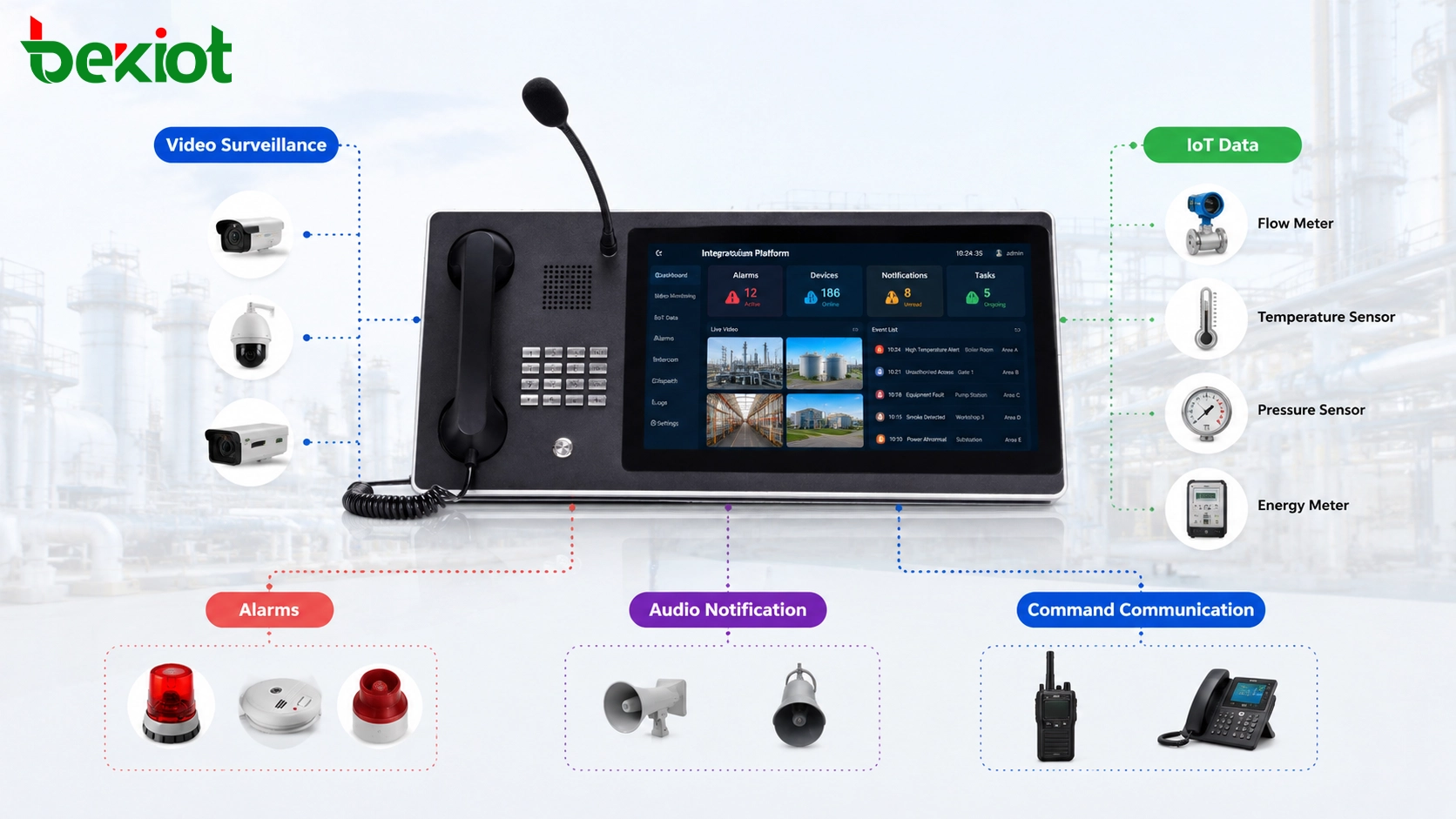
Why Visual Access Matters in Automation Projects
Industrial automation platforms usually display production data, device status, process values, fault alarms, and environmental information. These data points are essential, but numbers and charts cannot always explain what is happening on site. When a temperature warning, vibration alarm, abnormal pressure value, or access event appears, operators often need visual confirmation before making a decision.
This is why video surveillance integration has become an important requirement in many industrial automation projects. Cameras, recorders, existing video platforms, and site monitoring systems can provide real-time visual context. Instead of only seeing an alarm value on a screen, the operator can also view the related machine, production line, warehouse area, corridor, tank zone, utility room, or outdoor facility.
By combining data monitoring with video presentation, the system can provide a more complete operational picture. This helps reduce false judgment, shorten incident verification time, and improve the quality of remote decision-making.
Connecting Existing Video Resources
Many industrial sites already have video surveillance systems before automation software is upgraded. These systems may include IP cameras, NVRs, surveillance platforms, video management systems, and different brands of field devices. Replacing them is usually unnecessary and expensive. A better approach is to integrate the existing video resources into the automation platform through a video access gateway or media integration layer.
A practical video access layer should support common industrial and security protocols such as GB/T28181, RTSP, and ONVIF. With these access methods, the automation platform can connect to surveillance platforms, recorders, and cameras without rebuilding every video interface from the beginning.
The benefit is clear: automation developers do not need to spend excessive time solving camera access, stream compatibility, device discovery, or platform interconnection problems. The gateway handles video access, while the automation software focuses on business logic, process visualization, alarm handling, and user operation.
Output Formats for Different Terminals
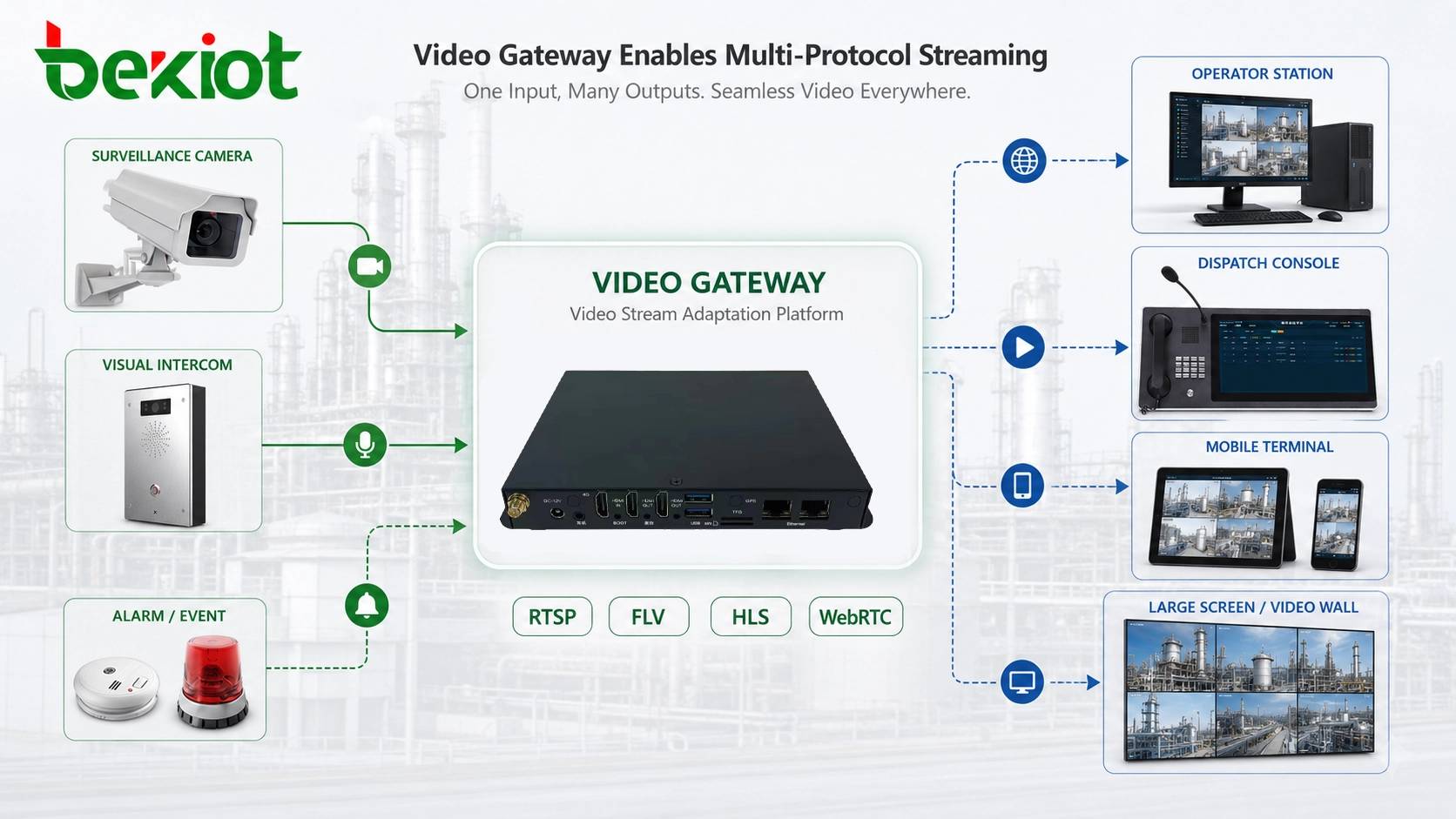
After video resources are connected, the next step is output adaptation. Industrial automation projects may need to display video on fixed operator stations, dispatch consoles, mobile terminals, browser-based pages, large screens, and command center displays. These terminals may not accept the same media format.
A video integration layer can output multiple stream formats according to system requirements. Common output formats include RTSP, FLV, HLS or M3U8, and WebRTC. RTSP is often used for system-to-system video access. FLV and HLS are useful for web display and streaming distribution. WebRTC is suitable for lower-latency browser-based interaction when real-time response is important.
This multi-format output capability allows one video source to serve different application scenarios. A control room can view a stable high-quality stream. A mobile terminal can receive a lighter stream. A browser page can display video without complex local software. A large screen can show selected key images for command and supervision.
API Control Brings More Than Simple Video Viewing
Basic RTSP pulling can display a camera image, but industrial automation projects often need more than passive viewing. Operators may need to adjust camera focus, control PTZ movement, start voice intercom, retrieve recordings, switch channels, or call related video when an alarm is triggered. These functions require API-based integration rather than only a raw video stream.
Through API interfaces, the automation platform can keep many original video system capabilities while adding them into industrial workflows. For example, when an equipment alarm appears, the platform can automatically open the related camera. When an operator checks a process area, the system can provide PTZ control. When an incident needs review, the platform can call recorded video from the corresponding time period.
This makes video integration more valuable than simple camera embedding. The automation platform can turn video into an interactive operational resource, not just a visual window.
Related Product: Becke Converged Communication System
Becke Converged Communication System for industrial audio, video, alarm linkage, and unified communication integration.
Transcoding Helps Different Systems Work Together
Industrial projects often include different networks, different terminals, and different display requirements. A camera may output a high-resolution stream, but a mobile terminal or web page may not need the original image quality. A legacy platform may support one codec, while a newer system may prefer another. This is where transcoding becomes important.
Video transcoding can adjust resolution, frame rate, bitrate, and encoding format in real time. For example, a high-resolution source can be converted to a lighter stream for remote access. A high-bitrate video can be reduced for weak-network transmission. A codec format can be changed to match the decoding capability of the target platform.
These adjustments improve compatibility and system stability. They also help reduce bandwidth pressure, especially in industrial parks, remote facilities, utility sites, construction areas, and wireless communication environments where network conditions may not always be ideal.
Overlaying Industrial Data on Video
One of the most useful applications of video integration is combining visual images with industrial data. A video image can be overlaid with IoT data, device status, process values, alarm levels, environmental readings, or control information. This makes the video screen more meaningful for operators.
For example, a camera view of a production line can show the current equipment status, running mode, temperature value, or alarm state. A storage area video can display access status or environmental data. A pump station video can show pressure, flow, and fault indicators. This creates a stronger link between the physical scene and the digital automation system.
Data-video overlay is especially useful for command centers, control rooms, and remote supervision platforms. It helps users understand not only what they are seeing, but also what the system data means in that specific scene.
Why Alarm Notification Cannot Rely Only on Screens
Many automation systems generate equipment alarms, IoT alarms, safety warnings, process exceptions, and environmental alerts. However, a common problem is that notification methods are not always practical. Some systems still rely heavily on operators watching screens. This creates risk when the operator is away from the workstation, handling another task, or working in a noisy environment.
Phone calls, SMS, and email can be used in some cases, but they are not always suitable for industrial sites. Calls may be missed. SMS may be delayed. Email is often too slow for urgent events. In many industrial environments, frontline personnel need instant and direct notification through tools they already use every day.
This is why audio notification should be considered together with video integration. When an alarm occurs, the system should not only show data and video; it should also notify the right people through the right audio channel.
Radio and Voice Notification for Field Teams
Two-way radios are still widely used in factories, plants, warehouses, energy sites, transportation facilities, and outdoor industrial areas. They are simple, direct, and suitable for mobile field teams. For this reason, integrating radio notification into industrial automation can significantly improve response efficiency.
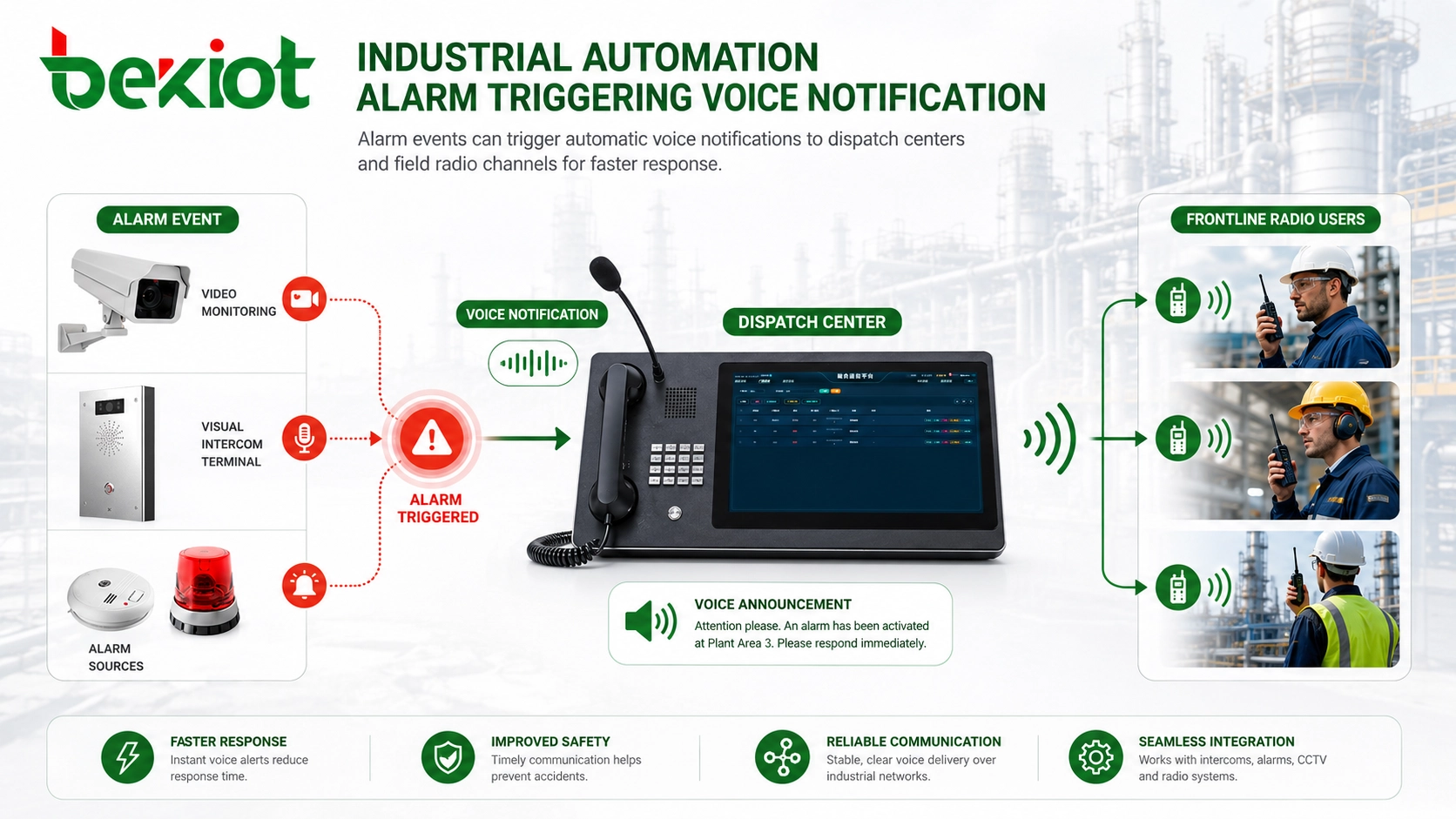
When the automation platform receives an equipment alarm or IoT event, it can automatically generate a voice message and broadcast it to the corresponding radio channel. The same notification can also be sent to the dispatch center and frontline response personnel. This allows the alarm to reach both supervisors and field teams at the same time.
Compared with relying only on screen prompts, radio-based notification is more active. It pushes the event to the people who need to act. For production safety, equipment maintenance, emergency response, and facility operation, this can reduce response delay and improve incident handling efficiency.
MQTT and IoT Event Linkage
Industrial automation projects increasingly rely on IoT data. Sensors, controllers, edge devices, monitoring systems, and production equipment may publish event information to the software platform. MQTT is commonly used in IoT scenarios because it is lightweight and suitable for event-driven communication.
When audio and video systems support API and IoT protocol linkage, automation software can build richer response logic. A sensor alarm can trigger camera pop-up, video recording, voice broadcast, radio notification, and event logging. A safety warning can activate both visual display and audio reminder. A remote maintenance event can open the relevant video channel and notify the assigned team.
This kind of linkage changes the role of audio and video. They are no longer independent systems. They become active response resources inside the automation workflow.
Typical System Architecture
A practical industrial audio-video integration architecture usually includes five layers. The first layer is the field device layer, including cameras, recorders, sensors, PLC-related data points, IoT devices, radios, intercom terminals, and alarm sources. The second layer is the network layer, including industrial Ethernet, VLANs, wireless links, private networks, VPNs, and edge access.
The third layer is the gateway and media processing layer. This layer handles video access, protocol conversion, stream output, transcoding, voice interconnection, radio access, and alarm-triggered audio playback. The fourth layer is the automation software layer, where SCADA, MES, IoT platforms, dispatch systems, or custom industrial applications manage business logic and visualization.
The fifth layer is the user application layer. Operators, dispatchers, maintenance teams, managers, and mobile users access video, receive alarms, communicate by voice, and coordinate actions through workstations, dispatch consoles, large screens, mobile terminals, or radio channels.
Where This Approach Brings Value
This solution is suitable for manufacturing plants, industrial parks, warehouses, logistics centers, energy stations, utility facilities, mines, ports, tunnels, water treatment plants, chemical sites, and transportation infrastructure. These environments usually have both data systems and field operation teams, so visual confirmation and fast voice notification are both important.
In manufacturing, video can help verify line status and safety conditions. In logistics, it can support warehouse monitoring and vehicle area supervision. In energy and utility sites, it can support remote inspection and incident verification. In industrial parks, it can connect security, maintenance, property management, and emergency response teams.
The common goal is to reduce system isolation. Video monitoring, automation data, alarms, voice communication, and radio notification should not run as separate islands. They should work together as part of one operational response chain.
Implementation Checklist for Developers
Before development, the project team should confirm all video sources, including camera protocols, recorder access methods, platform interfaces, required output formats, and display terminals. It should also confirm whether PTZ, focus adjustment, intercom, recording retrieval, and camera control functions are needed.
For audio integration, the team should define alarm categories, notification rules, voice templates, radio channels, dispatch center behavior, and escalation logic. Not every alarm needs to be broadcast. The system should distinguish between information prompts, maintenance warnings, safety alarms, and emergency events.
Network planning is also important. Video streams consume bandwidth, while audio notification requires reliability and low delay. Developers should test stream stability, latency, browser playback, terminal compatibility, API response, alarm trigger timing, and weak-network behavior before delivery.
Common Mistakes to Avoid
One common mistake is treating video integration as only a camera preview function. In industrial automation, video should be linked with alarm events, device status, process data, recording retrieval, and operator actions. Otherwise, it remains separate from the business workflow.
Another mistake is ignoring audio notification. A system may display alarms clearly on screen, but field teams may not see them in time. For industrial sites, voice broadcast, radio notification, and dispatch communication are often more practical than passive visual alerts.
A third mistake is developing every interface from scratch. Using dedicated gateway and media processing equipment can reduce development risk, shorten integration time, and make the system easier to maintain. Complex audio-video work should be handled by specialized system components whenever possible.
Final Review
Audio and video integration is becoming an important part of industrial automation development. Video access allows operators to verify site conditions. Stream output formats such as RTSP, FLV, HLS, and WebRTC allow different terminals to display video. API control keeps functions such as PTZ, focus adjustment, voice intercom, and recording retrieval available inside the automation platform.
At the same time, audio notification solves a practical field problem. When equipment alarms or IoT events occur, the system should actively notify dispatchers and frontline workers through voice broadcast, radio channels, or unified communication tools. MQTT and API linkage can connect these actions with the wider industrial software workflow.
For high-standard industrial automation projects, the best approach is not to force software developers to solve every audio-video problem manually. A well-planned gateway and converged communication architecture can reduce project risk, improve development efficiency, and turn video, audio, alarms, and IoT data into a coordinated operational response system.
FAQ
Can existing cameras be used in an industrial automation platform?
Yes. Existing cameras, recorders, and surveillance platforms can often be integrated if they support standard access methods such as GB/T28181, RTSP, or ONVIF.
Why is API integration better than only pulling an RTSP stream?
RTSP pulling mainly provides video viewing. API integration can also support PTZ control, focus adjustment, voice intercom, recording retrieval, channel switching, and alarm linkage.
Which video output format is best for browser display?
HLS, FLV, and WebRTC are commonly used for browser-based display. The best choice depends on latency requirements, browser compatibility, network conditions, and platform architecture.
How can alarms reach field workers faster?
Alarms can trigger automatic voice announcements, dispatch notifications, or radio-channel broadcasts. This is often more effective than relying only on screen prompts, SMS, or email.
Is MQTT useful for audio-video linkage?
Yes. MQTT can carry IoT event messages that trigger video pop-ups, voice broadcasts, recording actions, radio notifications, and alarm logs inside the automation workflow.







