


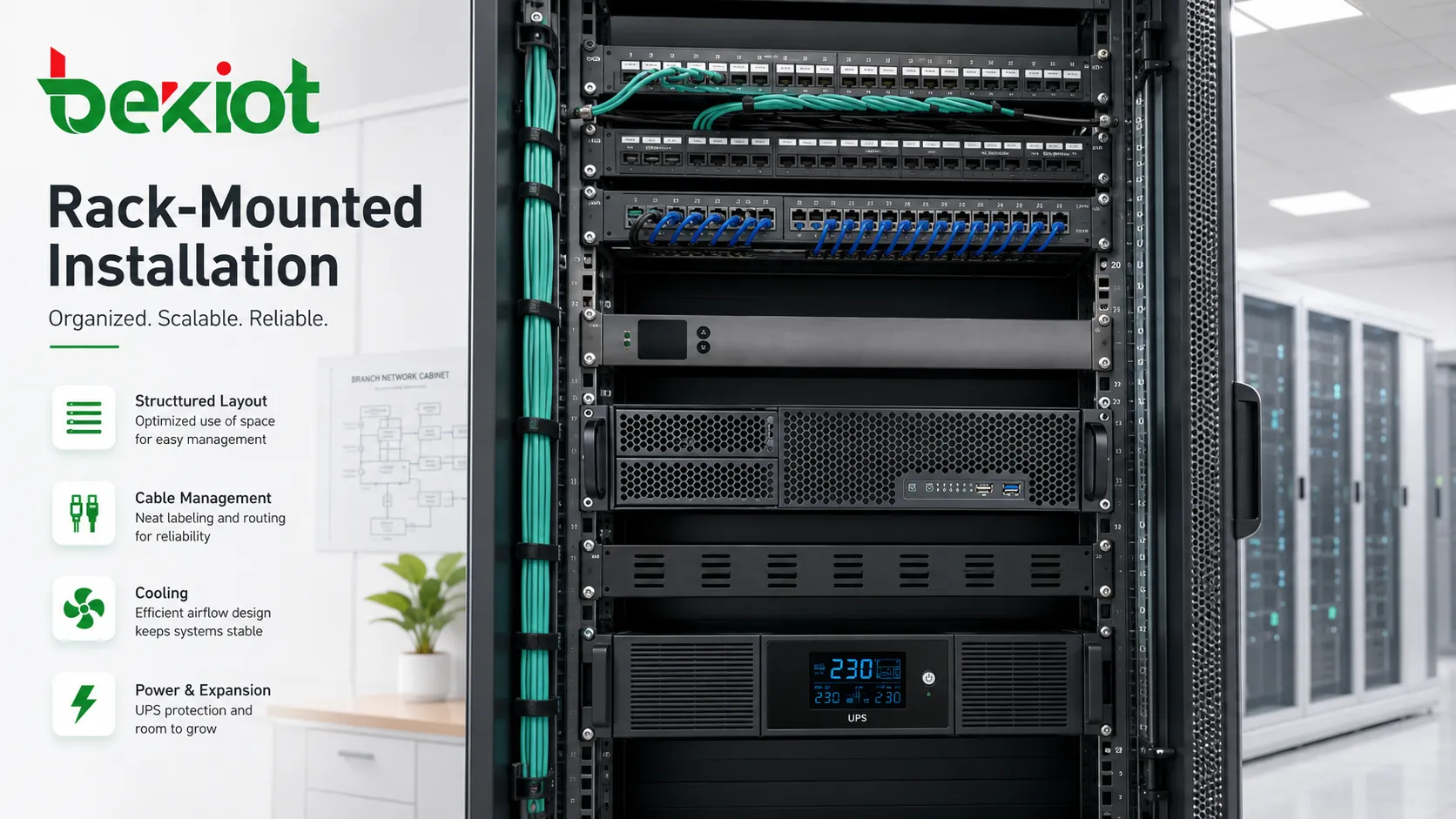
Rack-mounted installation is a standardized equipment deployment method that places devices inside server racks, network cabinets, telecom cabinets, control cabinets, AV racks, or industrial enclosures. The equipment is usually mounted according to standard rack unit dimensions, allowing multiple devices to be arranged vertically in a controlled, serviceable, and space-efficient structure.
This method is widely used wherever many electronic systems must be installed, powered, cooled, cabled, monitored, and maintained in one organized location. It is common in data centers, enterprise IT rooms, telecom exchanges, broadcast systems, security control rooms, industrial automation, smart buildings, transportation infrastructure, laboratories, and public service facilities.
Why Standardized Cabinet Deployment Became Common
As systems become more complex, placing equipment randomly on shelves, desks, or walls creates management problems. Cables become difficult to trace, airflow becomes uneven, equipment is harder to replace, and maintenance work becomes risky. A rack structure solves these issues by giving devices a predictable physical layout.
Standard rack deployment also helps technical teams plan space, power, cooling, cable routing, grounding, labeling, and future expansion. Instead of treating each device as a separate object, the rack becomes a managed infrastructure unit.
For organizations that operate many sites, this repeatability is valuable. A branch network cabinet, data room, surveillance rack, or telecom rack can follow a similar layout template, making installation and support easier across different locations.
Core Values Across Different Fields
Space Efficiency
Racks make vertical use of equipment room space. Instead of spreading devices across desks or shelves, systems can be stacked in a compact footprint. This is important in server rooms, telecom closets, control rooms, mobile shelters, broadcast rooms, and technical cabinets where floor space is limited.
Rack units also make capacity planning easier. Teams can estimate how many units are available, how much space is reserved for future devices, and whether heavier equipment should be placed at the bottom for stability.
Service Accessibility
Properly mounted equipment is easier to identify, remove, replace, and inspect. Front and rear access, sliding rails, cable labels, rack shelves, and patch panels help technicians perform maintenance without disturbing unrelated systems.
This matters in environments where downtime is expensive. A device that can be located and replaced quickly reduces troubleshooting time.
Thermal Management
Rack layout supports planned airflow. Many devices are designed for front-to-back cooling, while some require side-to-side or bottom-to-top airflow. Cabinet design, blanking panels, fan trays, perforated doors, and hot/cold aisle planning can all affect equipment temperature.
Poor thermal planning can reduce equipment life, cause unexpected shutdowns, and increase fan noise. Rack installation should therefore consider heat output and airflow path, not only physical fit.
Cable Organization
Structured cable routing is one of the most visible advantages. Patch panels, cable managers, fiber trays, horizontal and vertical organizers, Velcro ties, and labeling systems help prevent tangled wiring.
Good cable management improves troubleshooting, airflow, documentation, and long-term reliability. It also reduces accidental disconnection during maintenance.
Data Centers and Cloud Infrastructure
Data centers are one of the most obvious application areas. Servers, storage arrays, top-of-rack switches, firewalls, load balancers, backup appliances, PDUs, KVM devices, and monitoring sensors are commonly deployed in standardized racks.
In this environment, the rack is part of the larger data center architecture. Power density, cooling capacity, floor loading, airflow direction, redundancy, cable trays, grounding, and monitoring all need to be coordinated.
Cloud service providers, enterprise data centers, colocation facilities, and private server rooms use rack-mounted systems because they support scalability. New compute, storage, or network capacity can be added in a predictable physical format.
Enterprise Network Rooms
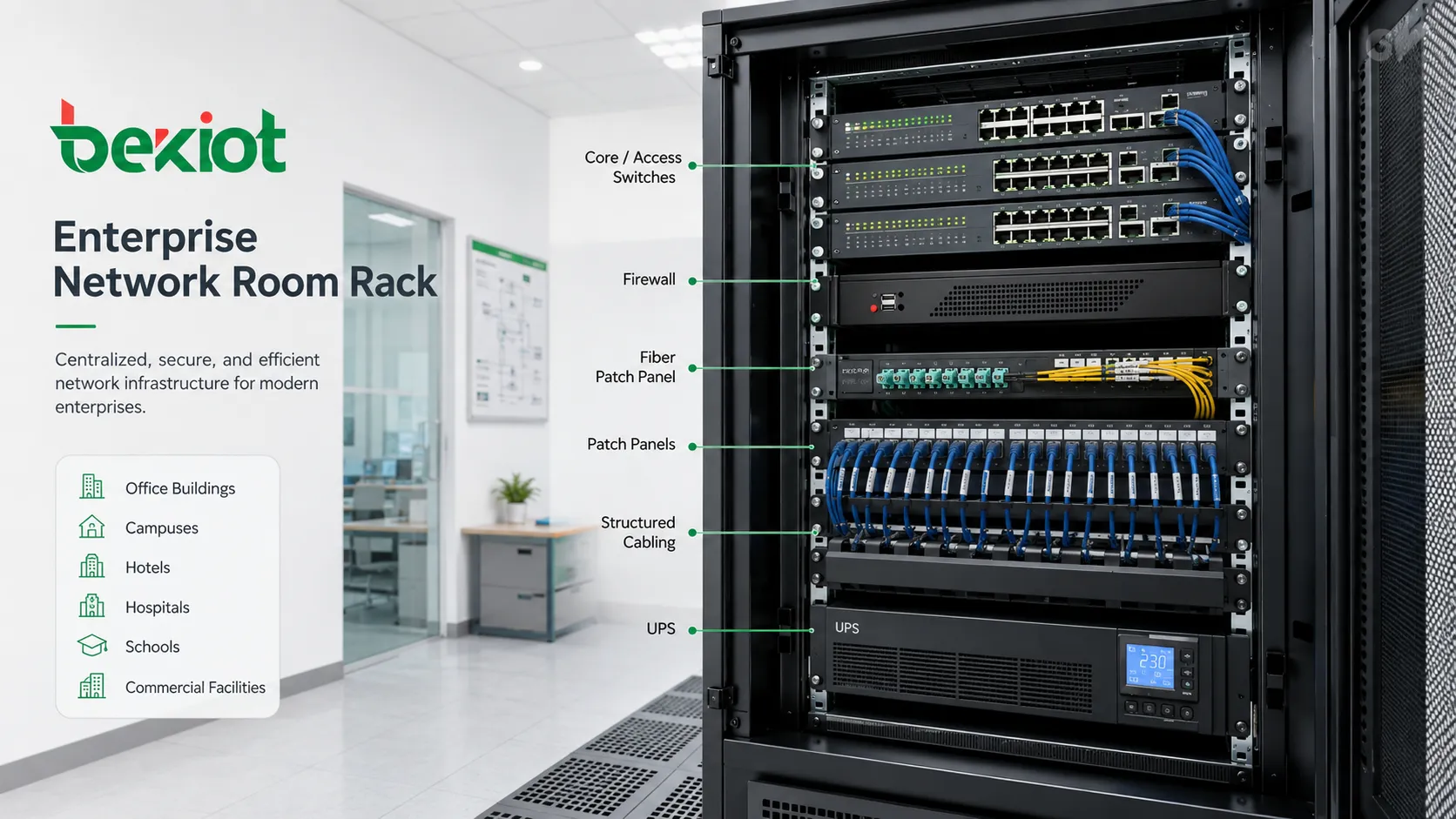
Office buildings, campuses, hotels, hospitals, schools, and commercial facilities often use rack cabinets for switches, routers, firewalls, wireless controllers, patch panels, optical distribution frames, UPS units, and structured cabling.
A well-designed network room rack connects workstations, access points, IP cameras, phones, printers, access control panels, and building systems. If the rack is poorly labeled or overcrowded, even a simple port change can become difficult.
For enterprise IT teams, rack layout should match the logical network design. Core switches, access switches, patch panels, uplinks, management ports, and power connections should be easy to identify.
Telecom and Communication Systems
Telecom environments use racks for voice platforms, transmission equipment, routers, optical transport devices, media gateways, session border controllers, radio equipment, power distribution, and cable termination systems. These installations may appear in central offices, base station rooms, enterprise telecom rooms, carrier hotels, and communication shelters.
Communication systems often require high availability. Racks may include redundant power feeds, battery-backed DC power, grounding bars, surge protection, fan systems, and alarm monitoring. Equipment layout must support quick replacement and clear cable tracing.
Because telecom sites often involve large numbers of copper, fiber, and coaxial connections, physical organization is critical. Poor cable management can affect signal quality, maintenance speed, and fault isolation.
Security and Surveillance Control Rooms
Security systems often rely on centralized equipment racks. Video recorders, video management servers, storage arrays, PoE switches, access control servers, alarm controllers, matrix systems, keyboard controllers, and monitoring network equipment may all be installed in racks.
In a control room, the rack is not only a storage cabinet. It supports continuous recording, alarm response, video distribution, and system supervision. Power backup and cooling are important because security devices may need 24/7 operation.
Rack organization also helps during incidents. Operators and technicians must quickly identify which recorder, switch, or controller relates to a specific camera, door, zone, or building.
Industrial Automation and Utility Facilities
Factories, substations, water treatment plants, oil and gas sites, transportation depots, mines, logistics centers, and power generation facilities may use rack-mounted systems for industrial PCs, PLC communication gateways, SCADA servers, network switches, serial device servers, data historians, protocol converters, and monitoring systems.
Industrial racks often face tougher conditions than office racks. Dust, vibration, heat, electrical noise, humidity, and restricted access may affect installation design. Enclosures may require stronger sealing, filtering, grounding, bonding, and surge protection.
In process environments, the rack may support control, monitoring, reporting, and safety-related communication. Maintenance procedures should therefore be planned carefully to avoid disrupting production or field devices.
Audio, Video, and Broadcast Systems
Broadcast stations, conference centers, studios, lecture halls, command centers, theaters, and AV control rooms use racks for video switchers, audio processors, amplifiers, matrix routers, encoders, decoders, recording systems, media servers, conferencing equipment, and signal converters.
AV racks require careful cable separation. Power cables, speaker cables, audio lines, video cables, network lines, and control wiring may need different routing to avoid noise, interference, and service confusion.
Cooling is also important because amplifiers, processors, and video equipment may generate significant heat inside enclosed furniture or control rooms.
Transportation and Public Infrastructure
Railway stations, metro systems, airports, ports, tunnels, highways, traffic control centers, and bus terminals often deploy rack-mounted systems for communication, surveillance, passenger information, public address, signaling support, network switching, and emergency control.
These environments require reliable operation across distributed sites. Equipment rooms may be located in station back rooms, roadside cabinets, tunnel technical rooms, platform equipment rooms, or central command centers.
Rack design should account for accessibility, environmental protection, backup power, cable entry, grounding, remote monitoring, and fast maintenance during limited service windows.
Healthcare, Laboratory, and Research Environments
Hospitals and laboratories use equipment racks for imaging servers, data storage, network equipment, laboratory information systems, monitoring servers, medical device gateways, research computing clusters, and secure data platforms.
These environments often require controlled access, clean cable routing, data protection, reliable backup power, and clear labeling. In healthcare, downtime may affect clinical workflow, patient records, imaging availability, or department coordination.
Research environments may use racks for high-performance computing, test equipment, instrumentation, RF systems, data acquisition, and measurement platforms. Flexibility is important because lab configurations may change frequently.
Smart Building and Facility Management
Modern buildings may include many connected systems, such as HVAC control, lighting control, energy management, access control, fire alarm interfaces, elevators, surveillance, parking systems, visitor systems, and building automation servers.
Rack cabinets help centralize these systems in equipment rooms. This improves maintenance because technicians can access network, control, server, and power components in one structured place.
Facility teams should keep building control racks documented. A poorly documented rack can slow down maintenance when a building system fault occurs.
Design Factors Before Installation
Rack Size and Depth
The selected cabinet must match device depth, rail type, cable bend radius, rear access needs, and future expansion. A rack that is physically too shallow may force cables to bend sharply or block rear doors.
Rack height should also include room for cable managers, blank panels, PDUs, shelves, and future equipment.
Weight and Floor Loading
Servers, UPS batteries, storage arrays, and power equipment can be heavy. Heavy devices should be mounted low to improve stability. The floor must support the total loaded weight.
In raised-floor data centers, seismic zones, mobile shelters, or upper-floor equipment rooms, structural requirements should be reviewed before installation.
Power Distribution
Racks require planned power distribution. PDUs, redundant feeds, circuit capacity, grounding, UPS support, and power cable routing should be defined before devices are installed.
Overloaded power strips and unmanaged extension cords are unsafe and should not be used as a substitute for proper rack power design.
Cooling Path
Airflow should match equipment design. Mixing devices with different airflow directions in the same cabinet can create hot spots. Blanking panels help prevent hot air recirculation.
Temperature monitoring is useful in racks that support critical systems or high-density loads.
Labeling and Documentation
Each device, cable, port, power feed, and patch connection should be labeled. Documentation should include rack elevation diagrams, IP addresses, port maps, cable IDs, circuit information, and maintenance contacts.
Good documentation turns a rack from a confusing hardware pile into a manageable infrastructure asset.
Common Problems in Poorly Planned Installations
One common issue is overcrowding. When too many devices are added without planning, airflow, cable access, and service space disappear. Technicians may need to remove unrelated equipment just to reach one cable.
Another problem is mixed power quality. Sensitive servers, network switches, AV devices, and industrial controllers may share power with unsuitable loads. This can increase risk of voltage drops, noise, or unexpected shutdowns.
Cable congestion is also frequent. Overly tight cable bundles, unlabeled patch cords, and sharp bends can cause difficult troubleshooting and signal problems, especially for fiber and high-speed copper links.
Finally, many racks lack lifecycle planning. Devices are added over years, but old cables, retired equipment, unused patch panels, and forgotten power adapters remain in place. Regular audits are necessary.
A rack-mounted installation is successful when physical layout, power, cooling, cabling, labeling, and maintenance access are planned together instead of treated separately.
Operation and Maintenance Practices
Routine inspection should check temperature, fan status, dust buildup, cable strain, loose screws, unused cables, power load, UPS alarms, link lights, and device status indicators. These small checks can prevent larger failures.
Access control should be considered. Equipment racks may contain critical systems, credentials, storage media, and network access points. Doors, locks, monitoring, and visitor control may be necessary depending on the environment.
Change management is important. Every new cable, device, patch change, or power modification should be recorded. Undocumented changes are one of the main causes of future troubleshooting delays.
Spare rack space should be preserved where possible. A completely full rack leaves no room for emergency replacement, expansion, temporary test devices, or cable rework.
FAQ
What does 1U mean in rack installation?
1U is a rack unit measurement equal to 1.75 inches of vertical rack space. Devices may be described as 1U, 2U, 4U, or other sizes depending on height.
Can ordinary desktop equipment be installed in a rack?
Yes, but it usually requires rack shelves or special mounting kits. Devices not designed for rack airflow may need extra attention to cooling and cable access.
Why are blanking panels used in racks?
Blanking panels close unused front spaces and help prevent hot air from recirculating into equipment intake areas, improving cooling efficiency.
Should heavy devices be mounted at the top or bottom?
Heavy equipment should generally be mounted lower in the rack to improve stability and reduce tipping risk during installation or maintenance.
What should be checked before adding new equipment to an existing rack?
Check available rack space, depth, weight capacity, power capacity, cooling, cable paths, grounding, network ports, UPS load, and whether documentation needs updating.







