


A terminal assistance system is a field communication and help-request solution that allows users to contact a control room, service desk, security center, dispatch platform, or emergency response team from a fixed terminal. It is commonly deployed in public areas, industrial sites, transport facilities, campuses, parking areas, hospitals, tunnels, parks, office buildings, and unattended service points.
Unlike ordinary phones or software-based service channels, this type of system is designed for location-based assistance. The user does not need to search for a number, install an app, scan a code, or understand the internal organization structure. Pressing a button, lifting a handset, or triggering an emergency input can start a direct communication path to the responsible team.
From Passive Facility to Active Service Point
Many sites have physical spaces where people may need help but may not know how to ask for it. A visitor may be lost in a campus. A driver may have trouble in a parking lot. A worker may need support in a remote production area. A passenger may require assistance in a station. A person may face a safety issue in an isolated outdoor space.
A terminal installed at the right location turns that space into an active service point. It gives the site operator a visible, fixed, and predictable channel for receiving help requests. Instead of relying only on mobile phones or manual patrols, the system creates a controlled communication entrance tied to a known physical position.
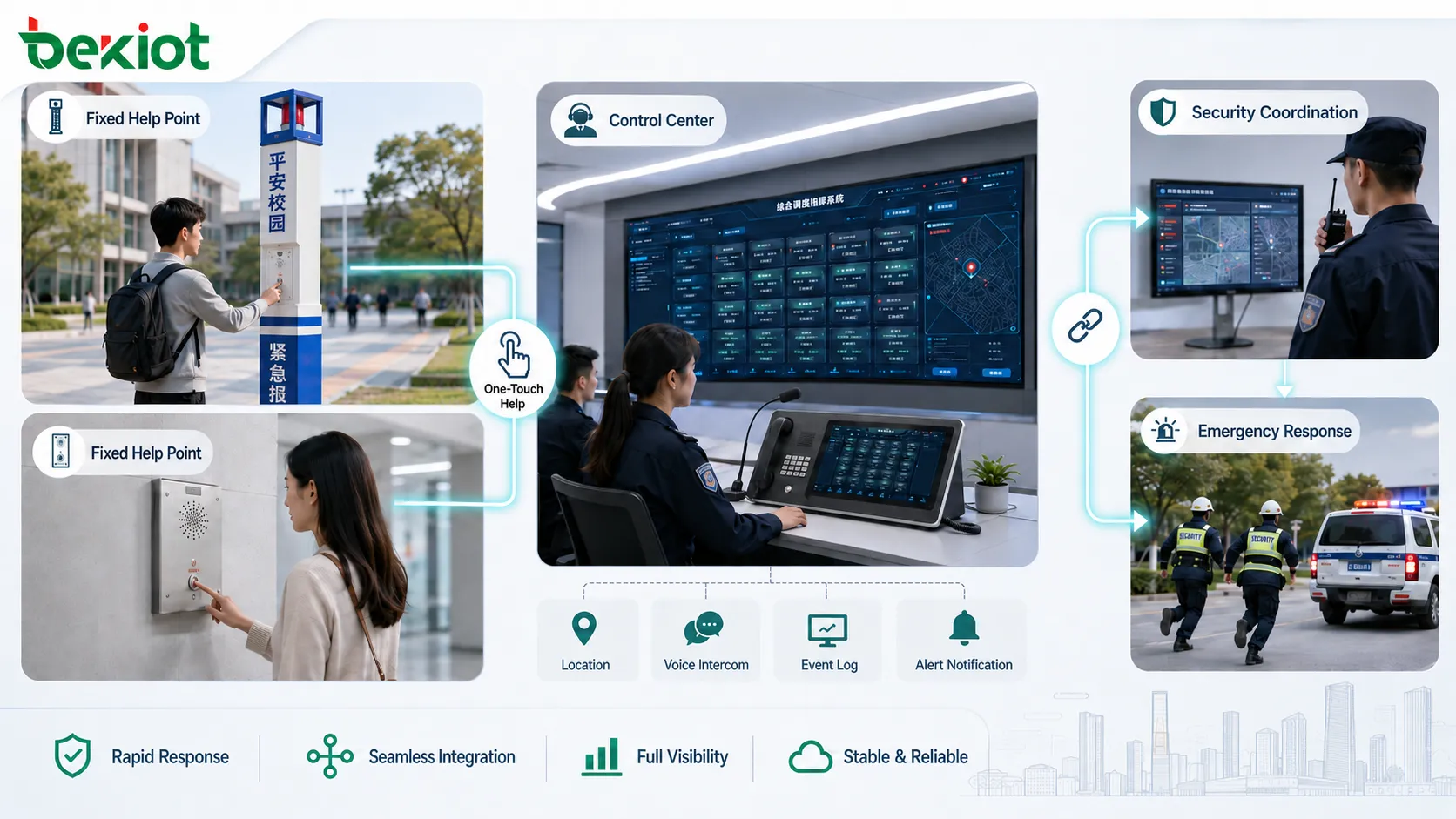
This is the first system value: it connects location, person, event, and response team in one simple action. The terminal is not only a device; it becomes part of the site’s service and safety infrastructure.
Core Value in Daily Operation
Reducing Help-Seeking Friction
The user experience should be simple. In stressful or unfamiliar situations, people may not remember service numbers or know which department to contact. A dedicated terminal removes that uncertainty by providing a direct call path.
This is especially useful for elderly users, visitors, patients, passengers, temporary workers, and people without local phone access. A clearly labeled terminal can provide immediate guidance even when the user has no prior knowledge of the site.
Improving Response Accuracy
A mobile phone call may tell the operator who is calling, but not always where the caller is. A fixed help terminal can be associated with a precise location, such as “Parking Area B2,” “Tunnel Exit 3,” “Platform 4,” “North Gate,” or “Workshop Zone A.”
Location identity helps response teams act faster. Operators can dispatch guards, maintenance staff, medical personnel, or rescue teams to the correct place without spending extra time asking the caller to describe the environment.
Extending Service Coverage
Not every important area has full-time staff. Remote corridors, outdoor paths, stairwells, elevators, loading zones, machine rooms, public squares, substations, and utility areas may still require assistance coverage.
Terminals allow organizations to extend communication access into these spaces. The operator can remain centralized, while users across the site can still reach help quickly.
Communication Functions That Matter
One-Touch Calling
One-touch calling is the most recognizable function. The user presses a button, and the terminal automatically calls a preset destination. The destination may be a control room, security desk, service center, dispatch console, reception extension, or emergency number.
For safety-related use, the call should not depend on complicated menus. A fast and predictable route is more important than offering many choices.
Hands-Free Audio
Many terminals use hands-free speaker and microphone design. This allows users to speak without holding a handset, which is helpful in public areas, emergency scenes, elevators, industrial sites, or accessibility-sensitive environments.
Audio performance should be considered during deployment. Loud background noise, wind, machinery, traffic, echo, or long mounting distance can affect communication quality.
Call Status Indication
Visual and audible feedback can show whether the call has started, whether it is ringing, whether it has been answered, or whether the terminal is in an alarm state. This reduces user confusion and improves confidence.
Status lights, button illumination, voice prompts, display messages, or tone feedback can all be used depending on device type and installation environment.
Remote Monitoring
For large deployments, the system should support health monitoring. Operators or administrators need to know whether terminals are online, registered, powered, reachable, or reporting faults.
A terminal that fails silently may not be noticed until someone needs it. Remote monitoring helps maintenance teams detect problems before a real incident occurs.
Event Linkage and Platform Integration
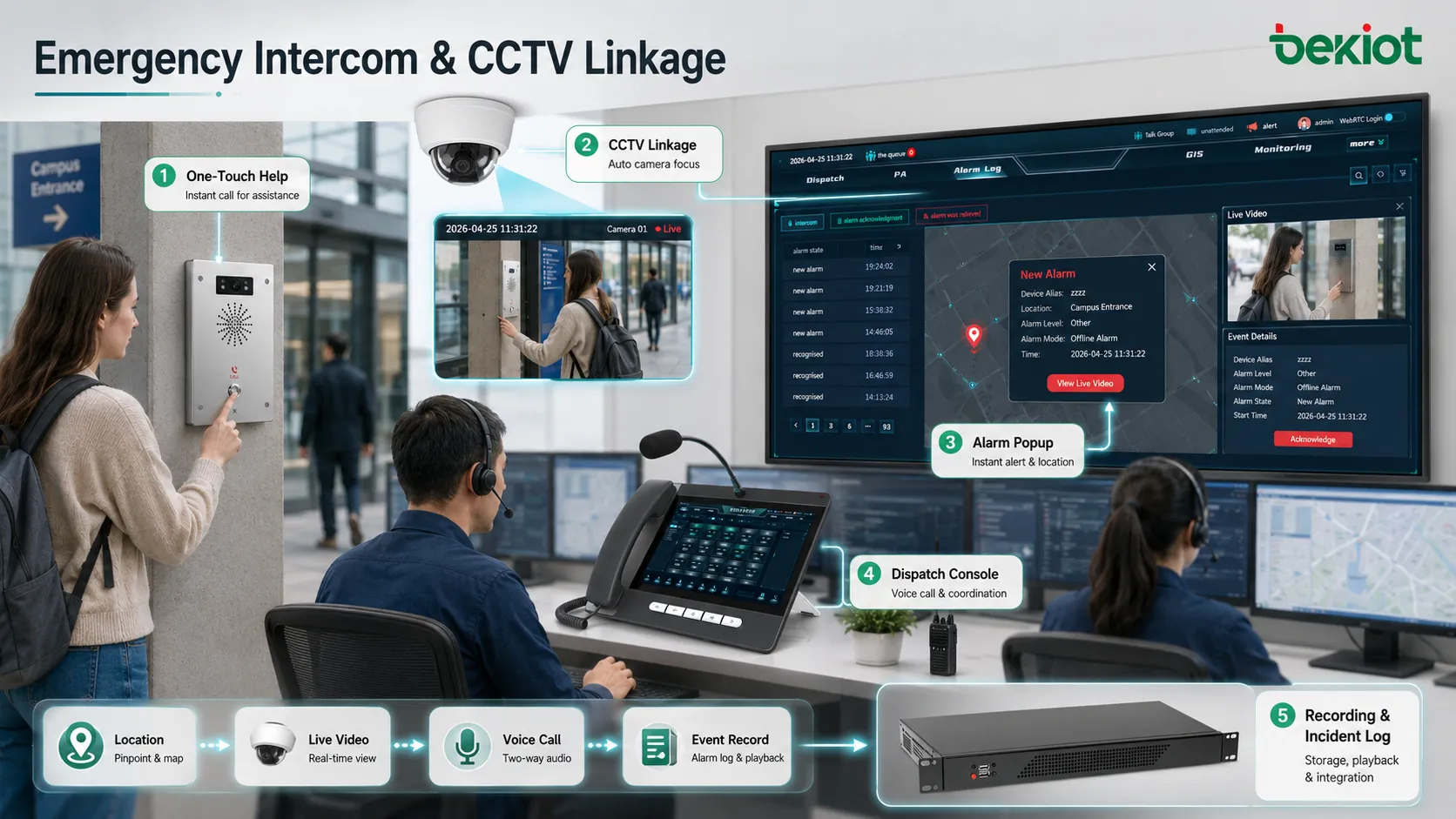
A modern assistance system is often connected to more than voice. When a terminal is activated, the platform may open a call record, display the terminal location, show nearby camera feeds, trigger an alarm popup, notify mobile staff, start recording, or create an incident ticket.
This linkage is important because operators need context. A voice call tells what the user says. A camera view, location map, device ID, call log, and event timeline help the operator understand what is happening and what action should be taken.
For emergency and public-service projects, Becke Telcom’s BHP-SOS series emergency intercom terminals can be used as fixed help points in a broader communication system, supporting one-button assistance, site-based communication, and integration-oriented emergency response planning.
Practical Application Scenarios
Transportation Hubs
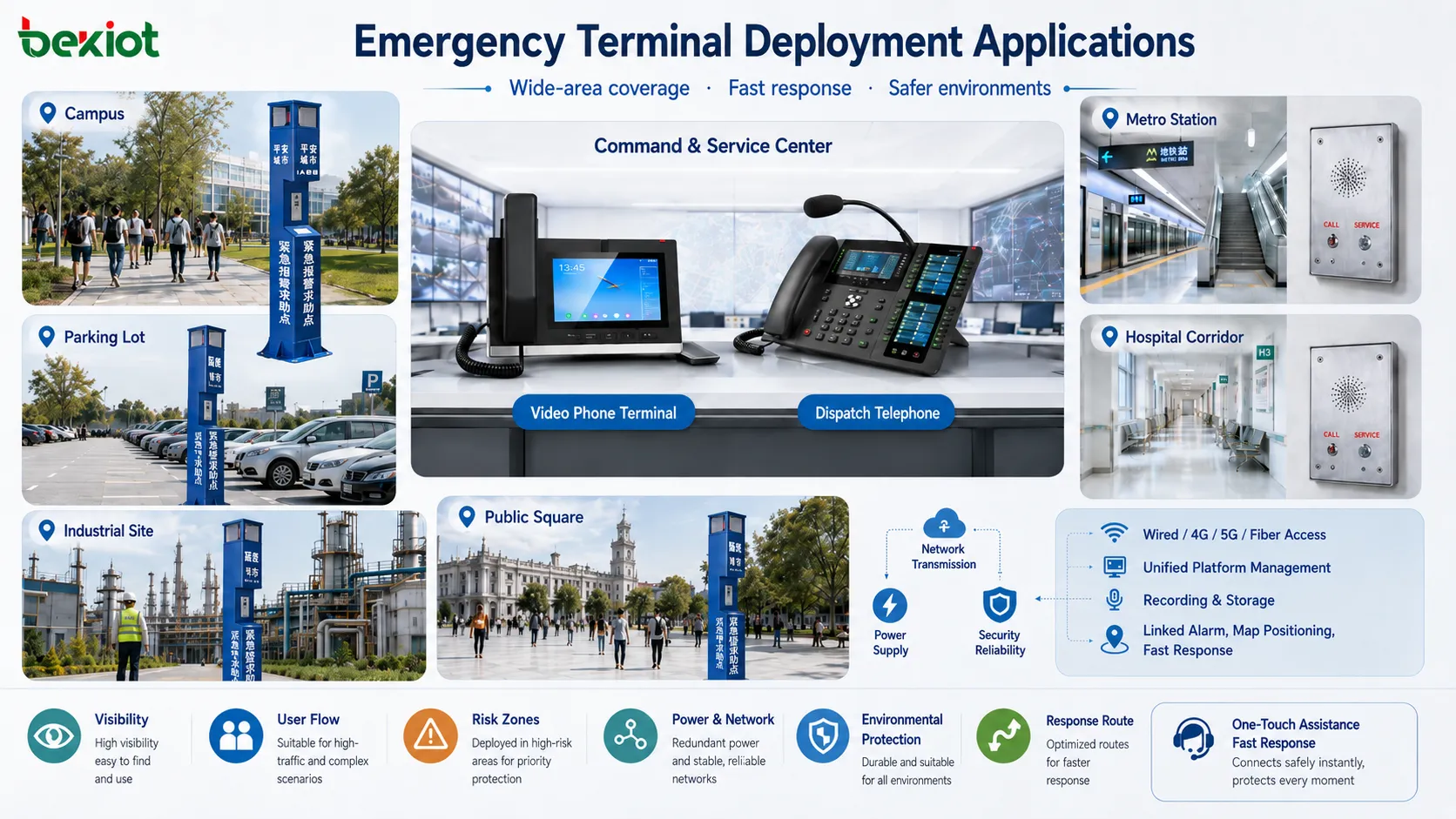
Railway stations, metro platforms, bus terminals, airports, parking transfer areas, and passenger corridors often require visible help access. Passengers may need guidance, emergency support, accessibility assistance, lost-item help, or security response.
Terminals can be installed near platforms, entrances, ticketing areas, elevators, transfer channels, parking exits, and isolated waiting zones. Operators can identify the terminal location and coordinate with station staff.
Campuses and Public Institutions
Schools, universities, government facilities, libraries, hospitals, and public service centers use fixed help points to support visitors, students, staff, and patients. The system can provide emergency assistance, wayfinding help, security contact, and facility support.
Outdoor campus routes, dormitory areas, sports fields, laboratory buildings, parking lots, and public entrances are typical deployment positions.
Parking Lots and Garages
Parking areas often include payment problems, vehicle issues, personal safety concerns, gate failures, lost tickets, elevator access problems, and after-hours incidents. A terminal allows drivers and pedestrians to contact staff without leaving the area.
For underground garages, location identification is especially important because users may find it difficult to describe their exact position.
Industrial and Utility Sites
Factories, power plants, water treatment facilities, ports, warehouses, mines, substations, tunnels, and logistics areas may use assistance terminals for maintenance calls, emergency reporting, control room communication, and field coordination.
Industrial deployments should consider rugged enclosure design, loud audio, environmental protection, cable routing, power backup, and compatibility with site communication systems.
Healthcare and Care Facilities
Hospitals, clinics, nursing homes, rehabilitation centers, and assisted living facilities may use terminals in public corridors, wards, entrances, waiting areas, and service points. Users can request help when staff are not immediately nearby.
Clear call routing is important. A general service request and an urgent medical assistance request may need different destinations and response procedures.
Operational Benefits for Management Teams
Faster Incident Awareness
When users have a direct help point, incidents are reported earlier. This can reduce the time between problem occurrence and operator awareness. Faster awareness is valuable for safety, maintenance, passenger service, and public order.
In some environments, a few minutes can determine whether an issue remains minor or escalates into a larger event.
More Structured Response
The system can standardize how calls are received, recorded, escalated, and closed. Operators can follow predefined response procedures instead of handling each case informally.
This improves consistency across shifts, sites, and departments. It also supports later review and training.
Lower Dependence on Manual Patrols
Manual patrols remain important, but they cannot be everywhere at all times. Fixed terminals provide additional contact points between patrol cycles.
This does not replace staff. Instead, it helps staff receive targeted requests and respond where they are actually needed.
Better Accountability
Call records, timestamps, recordings, terminal IDs, operator actions, and incident notes can provide a traceable record. This supports service quality management, safety review, maintenance tracking, and dispute handling.
Traceability is particularly useful in transportation, campuses, public facilities, industrial safety, and property management.
Deployment Design Considerations
Terminal placement should be based on risk, visibility, user flow, accessibility, and response route. A terminal hidden behind obstacles or installed too far from likely incident points may have limited value.
Signage should be clear. Users should understand what the terminal does, whom it calls, and whether it is for emergency, service, security, or general assistance.
Power and network reliability matter. Depending on the site, terminals may require PoE, local power, backup power, fiber, copper network, wireless bridge, or integration with existing communication infrastructure.
Environmental conditions should also be reviewed. Outdoor terminals may need weather protection. Public terminals may need vandal resistance. Industrial areas may need corrosion resistance, noise handling, and suitable mounting height.
System Architecture in Real Projects
Field Terminal Layer
The field layer includes the physical terminals installed at help points. Each terminal should have a clear identity, defined location, communication path, and responsible receiving destination.
Depending on the design, terminals may support SIP calling, analog calling, emergency button input, speakerphone audio, status indicators, relay output, camera linkage, or remote management.
Network and Access Layer
The access layer connects terminals to the communication platform. This may involve Ethernet, PoE switches, fiber, VPN, cellular router, analog line, gateway, or private network.
Good network design ensures that calls remain available during ordinary congestion, power events, or local equipment faults. Critical terminals may need redundant paths or backup power.
Control and Dispatch Layer
The platform or control room receives calls and events. Operators may use desk phones, dispatch consoles, soft clients, monitoring software, video walls, or alarm management systems.
This layer is responsible for call answering, event classification, escalation, recording, and coordination with field teams.
Management and Maintenance Layer
Administrators need configuration tools, device status views, log records, firmware management, fault alarms, and periodic test procedures. Maintenance should not rely only on manual inspection.
For multi-site deployments, centralized management helps keep terminal names, routes, schedules, and response policies consistent.
Common Design Mistakes
Only Considering the Device
A help terminal alone does not create an effective system. The call destination, operator workflow, response team, network path, recording policy, and maintenance responsibility must also be defined.
Projects fail when the hardware is installed but the operating process is unclear.
Weak Location Naming
If terminal names are vague, operators may struggle to identify where the caller is located. Names should match real site maps, building labels, floor numbers, zone codes, or maintenance records.
Good examples include “Garage B1 East Exit,” “Campus South Gate,” or “Platform 2 Middle Section.”
No Fallback Route
If the primary operator does not answer, the system should have a backup destination. Without fallback, a help request may ring unanswered.
Fallback may route to another control room, security phone, mobile staff, emergency center, or after-hours service team.
Ignoring Audio Environment
Terminals installed near traffic, machinery, fans, public crowds, or echo-heavy spaces may require better microphone placement, speaker volume, noise control, or acoustic testing.
Audio should be tested in the real installation position, not only in a quiet office.
No Routine Testing
Many terminals are rarely used, especially emergency-focused units. Without routine testing, faults may remain hidden for months.
Scheduled call tests, network checks, button tests, and remote status monitoring should be part of the maintenance plan.
The system value comes from the complete response chain: visible terminal, reliable call path, accurate location, trained operator, clear escalation, and ongoing maintenance.
How to Evaluate Project Success
A successful deployment should be measured by more than the number of installed devices. Useful indicators include call answer time, failed call rate, false alarm rate, response arrival time, terminal online rate, user satisfaction, maintenance closure time, and incident resolution records.
Management teams should also review whether the terminal positions still match actual site usage. Changes in building layout, traffic flow, parking patterns, campus expansion, or industrial process areas may require terminal relocation or additional coverage.
Long-term success depends on whether the system remains visible, usable, connected, monitored, and aligned with real response procedures.
FAQ
Can the same terminal handle both emergency and non-emergency requests?
Yes, but the design should make the purpose clear. Some sites use separate buttons, different labels, or different routing rules to avoid mixing urgent and routine service calls.
How often should installed terminals be tested?
Testing frequency depends on risk level and local operation policy. Public safety, transport, healthcare, and industrial sites usually require more frequent functional checks than ordinary service points.
What happens if the control room is not staffed at night?
The system should use time-based routing or fallback destinations. Calls can be transferred to security staff, an external monitoring center, mobile personnel, or another active control room.
Can video be linked to an assistance call?
Yes. Many projects link nearby CCTV cameras or built-in video functions to the call event, allowing operators to confirm the scene and coordinate response more accurately.
What information should be recorded for each terminal?
Useful records include terminal ID, location name, installation position, network address, call destination, fallback route, maintenance owner, last test date, firmware version, and response procedure.







