


Zero-Touch Provisioning, commonly abbreviated as ZTP, is an automated deployment method that allows devices to receive configuration, firmware, certificates, network parameters, and service settings with little or no manual setup at the installation site. It is widely used for IP phones, routers, switches, firewalls, wireless access points, IoT devices, security cameras, intercom terminals, industrial gateways, cloud-managed appliances, and distributed enterprise equipment.
The core idea is simple: a device should be able to connect to the network, identify itself, contact the correct provisioning service, download approved configuration, and become operational without a technician manually entering every setting. For organizations that deploy hundreds or thousands of devices, ZTP can reduce installation time, configuration errors, travel cost, and maintenance complexity.
Zero-Touch Provisioning turns device installation from a manual configuration task into a controlled onboarding workflow.
A Device Deployment Method Built for Scale
Traditional device deployment often requires a technician to open a web interface, enter network settings, configure accounts, upload firmware, set passwords, adjust service parameters, and test each device manually. This process may work for a few devices, but it becomes slow and risky when many endpoints must be installed across different offices, campuses, factories, hotels, retail branches, transport sites, or remote facilities.
ZTP solves this problem by shifting configuration work from the field to a central system. Devices can be pre-registered by serial number, MAC address, model, customer account, site, or service profile. Once connected, they automatically retrieve the right settings and apply them.
What “Zero-Touch” Really Means
Zero-touch does not always mean absolutely no human involvement. Someone may still need to mount the device, connect cables, scan a barcode, assign it to a site, or confirm that the installation is complete. The “zero-touch” part mainly refers to avoiding manual configuration on the device itself.
In a practical deployment, ZTP reduces local setup work. A technician can install the device physically, while the network and service configuration are handled automatically through the provisioning platform.
Why Bulk Deployment Needs Automation
Bulk deployment creates repeated tasks. If every device must be configured by hand, small mistakes can multiply across the whole project. Wrong SIP account, wrong VLAN, outdated firmware, incorrect password, mismatched time zone, or missing security setting can affect many devices.
ZTP makes deployment more consistent. Instead of relying on each technician to configure every device perfectly, administrators prepare templates and rules in advance. The device then receives the approved configuration during onboarding.
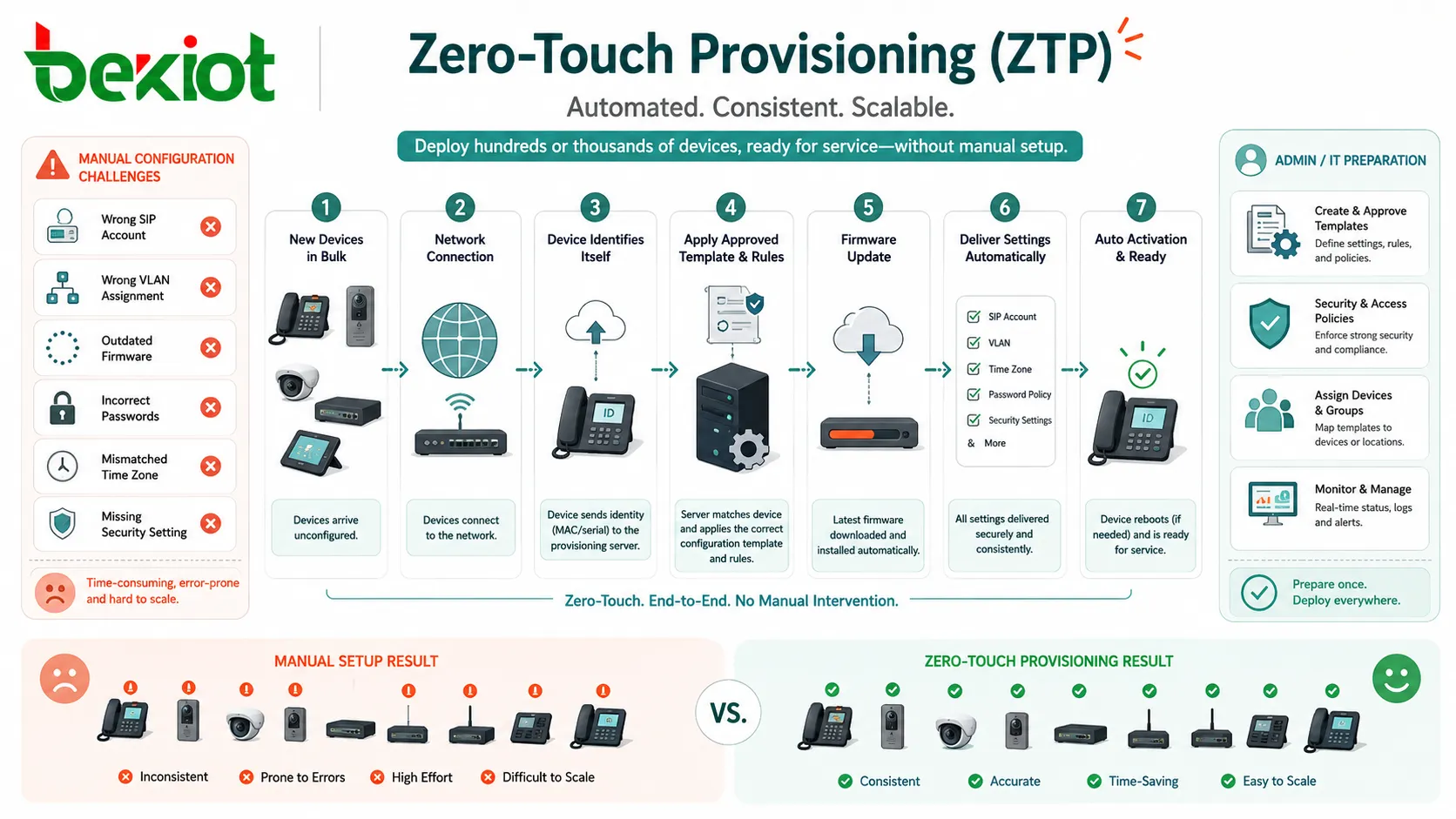
Basic Meaning of Zero-Touch Provisioning
Zero-Touch Provisioning is a process that automatically prepares a device for use after it connects to a network or cloud service. The process may include device discovery, authentication, configuration download, firmware upgrade, license activation, account registration, certificate installation, and service testing.
ZTP is especially useful for devices that are deployed in large numbers or across many locations. It helps central teams manage equipment without sending skilled engineers to every site.
Provisioning vs Configuration
Configuration means setting parameters on a device. Provisioning is broader. It may include configuration, firmware, credentials, service activation, user assignment, network policy, monitoring registration, and lifecycle management.
For example, configuring an IP phone may mean entering SIP server and extension information. Provisioning the same phone may also include firmware version, language, time zone, ringtone, security certificate, emergency number rule, directory, and device management profile.
Central Templates
A provisioning template contains standard settings for a device type, site, user group, service role, or customer environment. Templates help administrators apply the same policy to many devices without repeating manual work.
Templates may include network settings, server addresses, feature options, security policies, firmware paths, button layouts, account rules, and monitoring parameters. Good templates make ZTP predictable and easier to maintain.
Device Identity
For ZTP to work, the system must know which device is connecting. Device identity may be based on serial number, MAC address, certificate, model number, activation code, QR code, cloud account, or manufacturer registration record.
Identity is important because the provisioning server must send the correct configuration to the correct device. If the identity is wrong, the device may receive the wrong profile or fail to activate.
How ZTP Works
A typical ZTP workflow begins before the device is installed. Administrators prepare configuration templates, register devices, define sites, assign users or roles, and configure the provisioning server. When the device is powered on, it discovers where to get its settings and begins the automatic onboarding process.
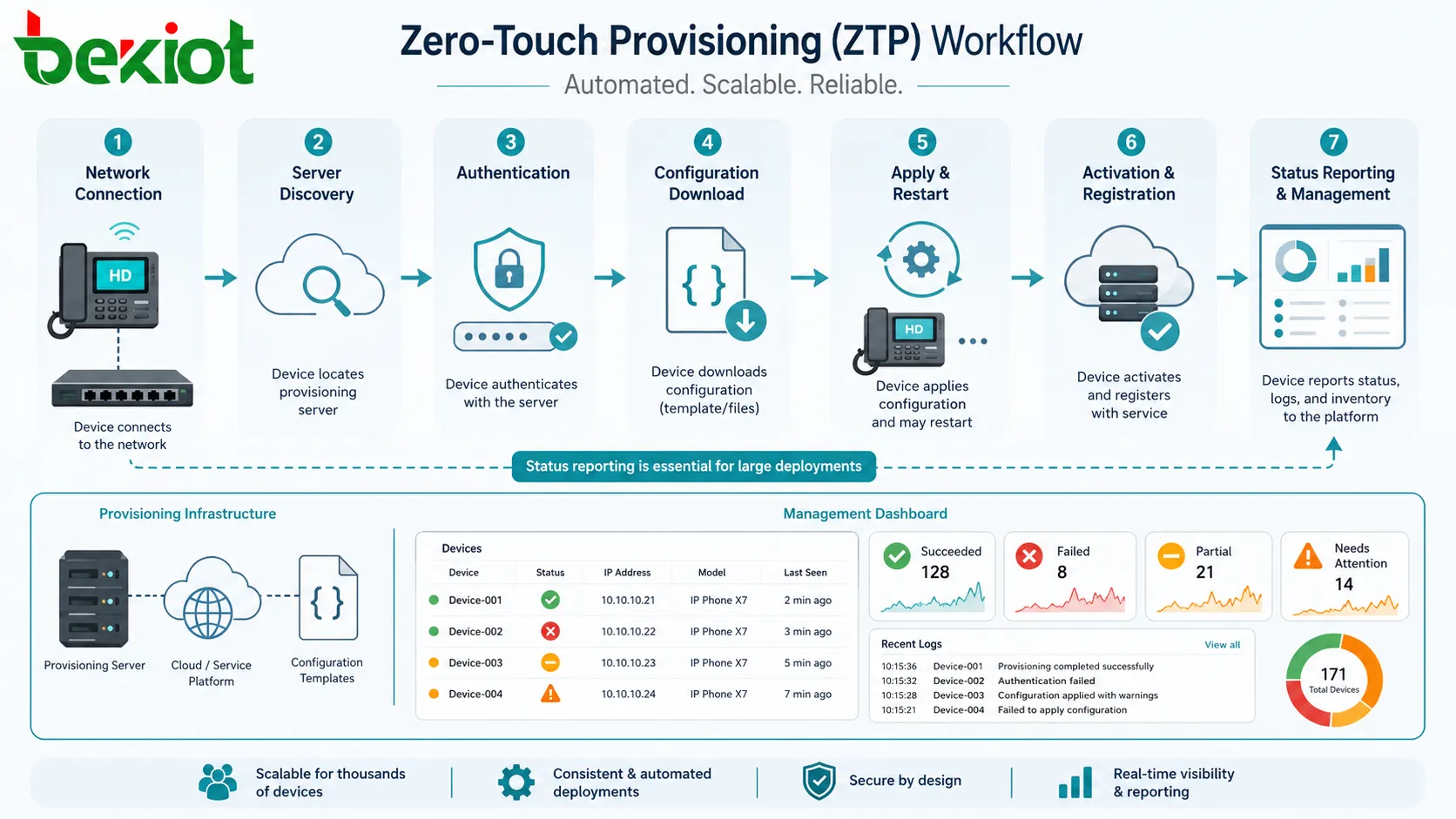
The exact workflow depends on the vendor and device category, but most ZTP systems follow a similar sequence: connect, discover, authenticate, download, apply, restart if needed, register, and report status.
Step One: Device Preparation
Before deployment, the administrator prepares the device record. This may include serial number, MAC address, model, site name, assigned user, extension number, VLAN, device group, or service plan.
This preparation is usually done in a provisioning portal, device management platform, PBX system, cloud dashboard, or configuration server. The more accurate the preparation, the smoother the installation will be.
Step Two: Network Connection
The installer connects the device to power and network. For many devices, the network may provide DHCP, DNS, gateway, NTP, VLAN information, and internet or private network access.
If the device cannot reach the provisioning service, the ZTP process stops. This is why network readiness is a major part of successful bulk deployment.
Step Three: Server Discovery
The device must discover where its configuration is stored. Discovery may happen through DHCP options, DNS records, vendor cloud redirection, preloaded server addresses, QR activation, USB bootstrap file, or a local discovery mechanism.
Cloud redirection is common in modern systems. The device contacts a vendor or management cloud, identifies itself, and is redirected to the customer’s provisioning service or assigned profile.
Step Four: Authentication
The provisioning server should verify that the device is allowed to receive configuration. Authentication may use serial numbers, MAC addresses, certificates, secure tokens, account binding, or pre-approved device lists.
This step is important for security. Without proper authentication, an unauthorized device could attempt to download configuration or impersonate an approved endpoint.
Step Five: Configuration Download
After authentication, the device downloads its configuration file, firmware package, certificate, license, or service profile. The file may be unique to the device or generated from a shared template with device-specific variables.
For example, all phones at one branch may share the same SIP server and VLAN settings, but each phone receives a unique extension number, password, display name, and button layout.
Step Six: Activation and Reporting
The device applies the configuration and may restart. After activation, it registers to the service platform, reports online status, sends logs, or appears in the management dashboard.
A complete ZTP system should show whether the device succeeded, failed, partially completed, or needs attention. Status reporting is essential for large deployments because administrators cannot manually inspect every endpoint immediately.
Main Features of a ZTP System
A useful ZTP system should do more than push a file to a device. It should support device identity, secure onboarding, configuration templates, firmware control, error reporting, rollback planning, and lifecycle management.
Automatic Discovery
Automatic discovery allows the device to find the correct provisioning source without a technician typing a server address. This reduces installation mistakes and speeds up deployment.
Discovery can be local or cloud-based. Local discovery is common in private networks, while cloud redirection is useful for distributed sites where devices are shipped directly to branches or customers.
Template-Based Configuration
Templates make configuration scalable. Administrators can create a standard profile for a branch, department, device model, or service type, then apply it to many devices.
Templates should support variables so that each device can still receive unique values. This avoids creating hundreds of separate full configuration files.
Firmware Management
ZTP can ensure that devices run the approved firmware version before they enter service. This helps reduce compatibility issues, security vulnerabilities, and feature differences between devices.
Firmware upgrades should be controlled carefully. Large-scale upgrades may consume bandwidth and should be scheduled to avoid service disruption.
Security Policy Delivery
ZTP can deploy security settings such as strong passwords, certificates, trusted server lists, HTTPS access, SSH restrictions, encryption options, user permissions, and management access rules.
This is important because factory default devices are often not secure enough for production. ZTP helps apply security settings early in the device lifecycle.
Remote Status Tracking
Bulk deployment requires visibility. Administrators need to know which devices are online, which have completed provisioning, which failed, which firmware version is active, and which site each device belongs to.
Without remote status tracking, teams may not discover deployment failures until users report that a device is not working.
Bulk Deployment Use Cases
ZTP is most valuable when many devices must be installed quickly and consistently. It reduces repetitive field work and gives central administrators better control over distributed equipment.
IP Phones and Unified Communication Endpoints
IP phones are one of the most common ZTP use cases. A phone can receive SIP account settings, extension number, server address, codec settings, language, time zone, directory, function keys, ringtone, firmware, and security policy automatically.
This is useful for offices, hotels, schools, hospitals, call centers, warehouses, and multi-site enterprises. Instead of configuring every phone manually, administrators can assign the phone to a user or location before it is powered on.
Routers, Switches, and Network Appliances
Network devices often use ZTP to receive management IP, routing policy, VLAN settings, SNMP configuration, access credentials, firmware, security rules, and controller information.
This is especially useful for branch networks. A router or switch can be shipped to a remote site, connected by local staff, and configured automatically by the central IT team.
Wireless Access Points
Wireless access points can use ZTP to join a controller or cloud platform, download SSID settings, security keys, radio parameters, VLAN rules, and site profiles.
This helps organizations deploy Wi-Fi across campuses, retail chains, hotels, offices, warehouses, and public facilities without manually configuring every access point on site.
Security Cameras and Access Devices
Security cameras, access controllers, intercoms, and alarm devices may use ZTP to receive IP settings, recording server address, stream profile, time settings, device name, location label, and user credentials.
For large security projects, this reduces installation time and helps each device appear correctly in the video management or access control platform.
IoT and Industrial Gateways
IoT sensors, industrial gateways, remote terminals, and monitoring devices can use ZTP to receive cloud connection settings, MQTT or API credentials, sampling rules, local network parameters, and device identity certificates.
This is valuable in remote monitoring, utilities, manufacturing, energy, logistics, smart buildings, and environmental systems where devices may be installed across many locations.
Retail and Branch Office Equipment
Retail chains and branch offices often deploy the same device types across many stores. ZTP helps configure POS network devices, digital signage players, access points, security devices, phones, routers, and local controllers.
Centralized provisioning reduces the need for skilled IT staff at every branch. Local personnel can connect hardware while the central team manages configuration.
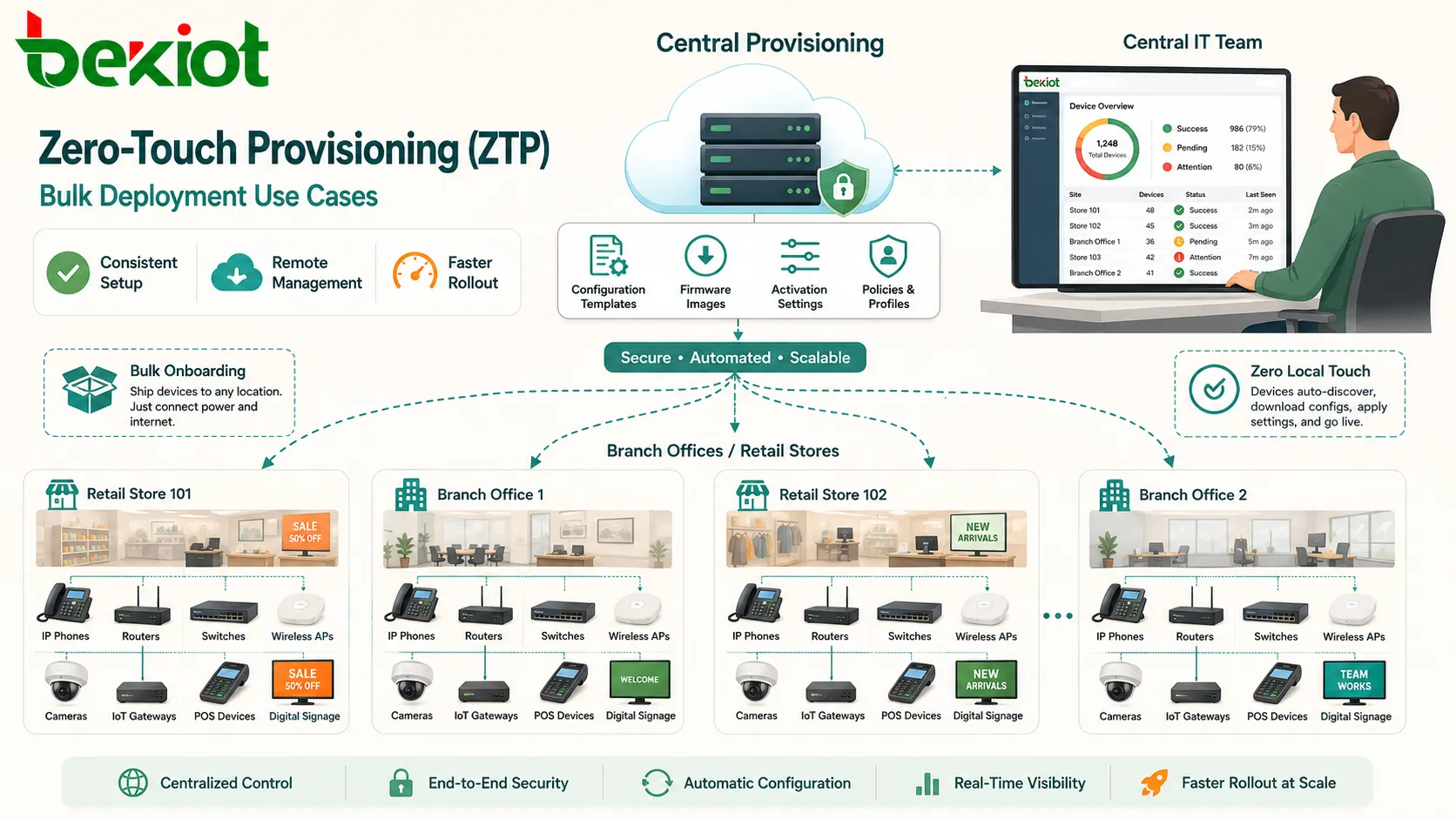
Benefits for Deployment and Operations
ZTP provides value throughout the device lifecycle. It helps not only during first installation, but also during replacement, migration, firmware updates, security policy changes, and multi-site expansion.
Reduced Manual Work
The most direct benefit is reduced manual setup. Technicians do not need to enter the same settings repeatedly. Central teams prepare templates once and apply them at scale.
This saves time during large installations and reduces the chance of human error. It also allows less specialized on-site staff to perform basic hardware installation.
Faster Rollout
Devices can be shipped directly to sites and activated quickly after connection. This accelerates branch openings, phone system upgrades, network refreshes, security deployments, and IoT projects.
Faster rollout is especially useful when many locations must be deployed within a short project window.
Consistent Configuration
ZTP applies standardized settings across devices. This helps keep firmware, security policy, server addresses, device names, and operational parameters consistent.
Consistency improves troubleshooting. When devices follow the same configuration logic, support teams can diagnose issues more efficiently.
Lower Deployment Cost
Manual configuration requires skilled labor and time. ZTP reduces both. It can also reduce travel cost because devices can be installed by local staff while configuration is handled remotely.
For multi-site organizations, these savings can be significant over repeated deployments and device replacements.
Better Lifecycle Control
ZTP can be part of a wider device management strategy. The same platform that provisions devices can also monitor status, push updates, rotate credentials, change policies, and retire devices.
This creates a more controlled lifecycle from first power-on to replacement or decommissioning.
Planning a ZTP Deployment
A successful ZTP project depends on preparation. Automation only works when device records, templates, network access, security rules, and support processes are ready before devices arrive on site.
Define Device Groups
Group devices by model, site, department, function, region, user role, or service type. Grouping makes templates easier to manage and reduces configuration complexity.
For example, phones in a hotel lobby, guest rooms, back office, and security room may all need different profiles even though they are the same hardware model.
Prepare Templates Carefully
Templates should include required settings but avoid unnecessary complexity. They should be reviewed, tested, and version-controlled before bulk deployment begins.
A template error can affect many devices quickly. For this reason, test with a small pilot group before applying a template to hundreds of devices.
Check Network Readiness
The device must reach the provisioning service. Network readiness may include DHCP options, DNS records, VLAN access, firewall rules, internet connectivity, NTP, routing, and PoE power.
If the network blocks provisioning traffic, devices may fail before receiving their configuration. Pre-installation checks are important for remote sites.
Plan Device Identity Mapping
Each device should be mapped to the right site, user, role, or service profile. This may involve serial numbers, MAC addresses, labels, QR codes, shipping lists, or asset records.
Poor identity mapping can cause devices to receive wrong settings. In bulk projects, accurate labeling and inventory control are essential.
Prepare Support Workflow
Even with ZTP, some devices may fail to provision. The support team should know how to identify the failure stage, check logs, verify network reachability, reset the device, and reassign profiles.
A clear support workflow prevents delays during large rollouts.
Security Considerations
ZTP must be designed securely because provisioning files may contain sensitive information such as passwords, certificates, server addresses, network details, and service credentials.
Secure Provisioning Channel
Configuration should be downloaded through secure channels where possible. HTTPS, certificate validation, encrypted tunnels, and trusted server verification help reduce the risk of interception or tampering.
Unprotected provisioning can expose credentials or allow attackers to modify device behavior.
Device Authentication
The provisioning server should verify device identity before sending configuration. Approved device lists, certificates, activation tokens, or serial number validation can help prevent unauthorized provisioning.
Authentication is especially important when devices are shipped directly to remote sites or connect over the public internet.
Credential Protection
Provisioning files should avoid exposing reusable passwords in plain text. When credentials must be delivered, they should be protected, unique where possible, and rotated when needed.
Default passwords should be changed automatically during provisioning. Devices should not remain in factory-default security state after onboarding.
Access Control
Only authorized administrators should be able to create templates, assign devices, edit provisioning profiles, or approve firmware versions.
Changes should be logged. A provisioning platform can affect many devices at once, so administrative access must be controlled carefully.
Common Problems and How to Avoid Them
ZTP failures usually come from preparation gaps rather than the automation concept itself. The most common issues include wrong device records, blocked network paths, invalid certificates, outdated firmware, and template errors.
Device Cannot Find the Server
If the device cannot discover the provisioning server, check DHCP options, DNS records, cloud redirection status, firewall rules, gateway settings, and internet access.
For remote sites, confirm that the device can reach the required domain or server before shipping many devices.
Wrong Profile Applied
A wrong profile may be caused by incorrect serial number mapping, MAC address error, reused device record, wrong site assignment, or template rule conflict.
Use clear labeling, scan-based inventory, and approval checks to reduce profile assignment mistakes.
Firmware Upgrade Failure
Firmware upgrade may fail because of unstable network, insufficient storage, wrong file version, power interruption, or incompatible model selection.
Firmware should be tested on a small group first. Critical devices should not be upgraded blindly during peak operating hours.
Provisioning Loop
A provisioning loop happens when a device repeatedly downloads configuration, restarts, and returns to the same process. This may be caused by incompatible settings, wrong firmware, conflicting server instructions, or a configuration error.
Logs are important for identifying the stage where the loop begins. A rollback profile may be needed to recover devices quickly.
Partial Configuration
A device may receive some settings but fail to activate fully. For example, network settings may apply, but service registration may fail because credentials, server address, certificate, or time synchronization is wrong.
Status reporting should separate provisioning completion from service readiness. A device is not truly deployed until its main function works.
Best Practices for ZTP
ZTP works best when it is treated as an operational process rather than a one-time technical feature. Good planning, testing, documentation, and monitoring make automation reliable.
Start with a Pilot Deployment
Before deploying hundreds of devices, test the workflow with a small group. Use real network conditions, real device models, real templates, and real user assignments.
The pilot should confirm discovery, authentication, configuration download, firmware update, service registration, monitoring, and rollback behavior.
Use Clear Naming and Asset Records
Device names should include useful information such as site, floor, room, role, or user. Asset records should include serial number, MAC address, model, location, assigned profile, and deployment status.
Clear records are essential for support, replacement, warranty, and lifecycle management.
Version-Control Templates
Templates should have version history. Administrators should know which template was applied to which device and when changes were made.
If a new template causes problems, version control makes rollback easier.
Monitor Deployment Status
During bulk deployment, monitor which devices are pending, online, configured, failed, offline, or ready for service. A dashboard helps project teams identify problem sites quickly.
Deployment status should be reviewed regularly until all devices are confirmed operational.
Protect the Provisioning Platform
The provisioning platform is a high-value system because it controls many devices. It should be secured with strong authentication, role-based access, audit logs, backups, and network restrictions.
If the platform is compromised or misconfigured, many endpoints may be affected at once.
FAQ
Can ZTP work without internet access?
Yes, if the organization uses a local provisioning server or private management network. The device still needs a way to discover and reach the local provisioning source.
What happens if a device is shipped to the wrong site?
If device identity is mapped correctly, the platform may still apply the assigned profile, which could be wrong for that physical location. This is why shipping lists, labels, scanning, and site assignment checks are important.
Is ZTP the same as bulk provisioning?
They are related but not identical. Bulk provisioning means configuring many devices efficiently. ZTP is one method that automates onboarding so devices can provision themselves after connection.
Can ZTP update firmware automatically?
Yes, many ZTP systems can push or require a firmware version during onboarding. The firmware package must match the device model and should be tested before large-scale deployment.
How can administrators recover from a bad provisioning template?
They should stop further deployment, identify affected devices, restore a previous template version, push a corrected profile, or factory reset and reprovision devices if necessary. Template version control makes this easier.
What logs are useful when ZTP fails?
Useful logs include DHCP assignment, DNS lookup, server discovery, authentication result, configuration download, firmware update, certificate validation, device reboot history, service registration, and provisioning platform event records.







