


One Control Point for Many Moving Parts
Centralized management is a management approach that allows organizations to control multiple devices, users, services, applications, security policies, configurations, updates, logs, and operational workflows from one main platform or administrative console. It is widely used in IT networks, cloud systems, communication platforms, security devices, industrial equipment, building systems, access control, endpoint management, and multi-site enterprise operations.
When systems grow, manual management becomes difficult. A company may have many branches, hundreds of endpoints, different user groups, remote devices, mixed software versions, and scattered configuration records. Centralized management helps bring these resources into a structured environment where administrators can monitor status, apply rules, update settings, and respond to faults more efficiently.
Centralized management is not only about putting everything on one screen. It is about making control, visibility, policy, maintenance, and response more consistent across the whole system.
Basic Meaning of Centralized Management
Centralized management means that administration tasks are performed from a central location instead of being handled separately on each device or site. The central system may be a software platform, web dashboard, cloud portal, network controller, server application, device management system, or integrated operations console.
Through this platform, administrators can view system status, configure devices, assign permissions, push updates, review logs, manage alerts, create reports, and apply policies. The managed objects may include computers, servers, routers, switches, IP phones, cameras, intercoms, access controllers, sensors, user accounts, applications, databases, or cloud resources.
Central Control
Central control means administrators do not need to log in to every device one by one for routine management. They can apply a setting, policy, or update from the central platform and distribute it to selected devices or groups.
This saves time and reduces inconsistency. For example, if every device must use the same security rule, time zone, firmware version, or naming convention, a central platform can apply the rule more reliably than manual configuration.
Central Visibility
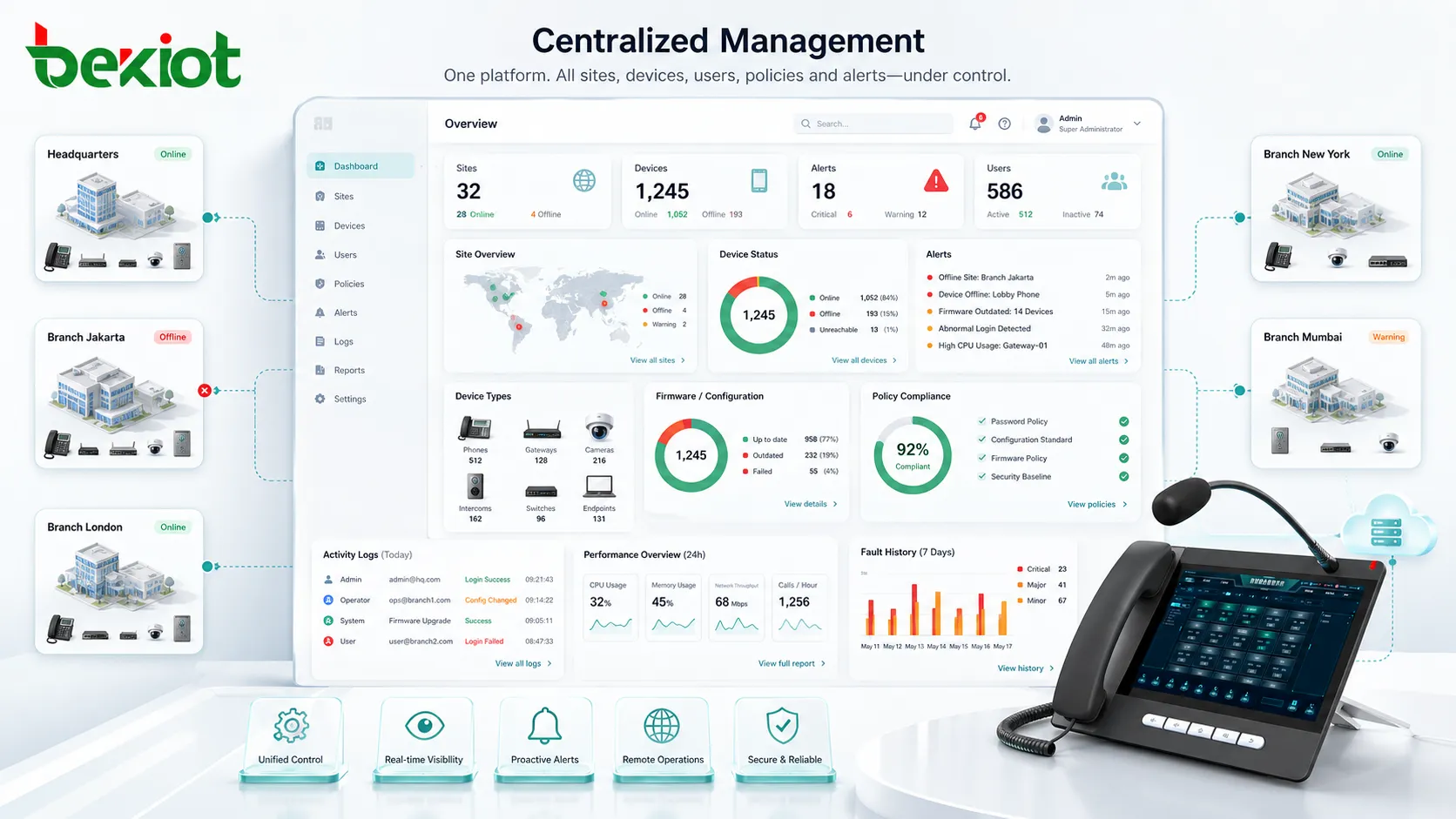
Central visibility means the organization can see system status from one place. Instead of checking separate dashboards for each site or device type, administrators can review online status, alarms, usage, performance, configuration, and fault history in a unified view.
This is useful for operations teams because they can identify problems faster. A failed device, offline site, outdated firmware version, abnormal login, or recurring alarm becomes easier to detect when data is collected centrally.
How Centralized Management Works
A centralized management system usually works by connecting managed devices or services to a central platform. The platform collects status data, stores configuration records, applies policies, and sends commands or updates back to the managed resources.
The connection may use agents, APIs, device protocols, management ports, cloud registration, SNMP, MQTT, HTTPS, SSH, SIP management interfaces, directory services, or vendor-specific control channels. The technical method varies by system type, but the management logic is similar: collect, analyze, control, report, and improve.
Device Registration
Before a device can be managed centrally, it usually needs to be registered. Registration may use serial number, MAC address, IP address, certificate, activation code, account binding, or manual enrollment.
Good registration connects the device to its identity, location, owner, function, and management group. A device named only by a random number is hard to manage, while a device named by site and role is much easier to identify during faults.
Data Collection
The central platform collects data from managed systems. This may include online status, firmware version, CPU load, memory usage, alarm state, network quality, call status, user login, configuration changes, event logs, and performance metrics.
Data collection helps administrators understand what is happening without visiting every site. It also provides evidence for troubleshooting, capacity planning, maintenance, and security review.
Policy Distribution
Centralized management allows policies to be created once and applied to many devices or users. These policies may include passwords, access permissions, network settings, update schedules, security rules, alert thresholds, user roles, backup rules, or device templates.
Policy distribution improves consistency. If different sites use different settings without control, operations become harder and security risk increases.
Remote Action
Administrators can often perform remote actions from the central platform. These actions may include rebooting a device, changing configuration, enabling a feature, disabling a user, pushing firmware, collecting logs, running diagnostics, or restoring a backup.
Remote action is especially valuable for distributed sites. It reduces travel, shortens repair time, and helps support teams respond faster when equipment is installed far away.
Main Features of Centralized Management
A mature centralized management system should provide more than remote access. It should support grouping, templates, permissions, monitoring, alerts, logs, reporting, automation, and secure administration.
Unified Dashboard
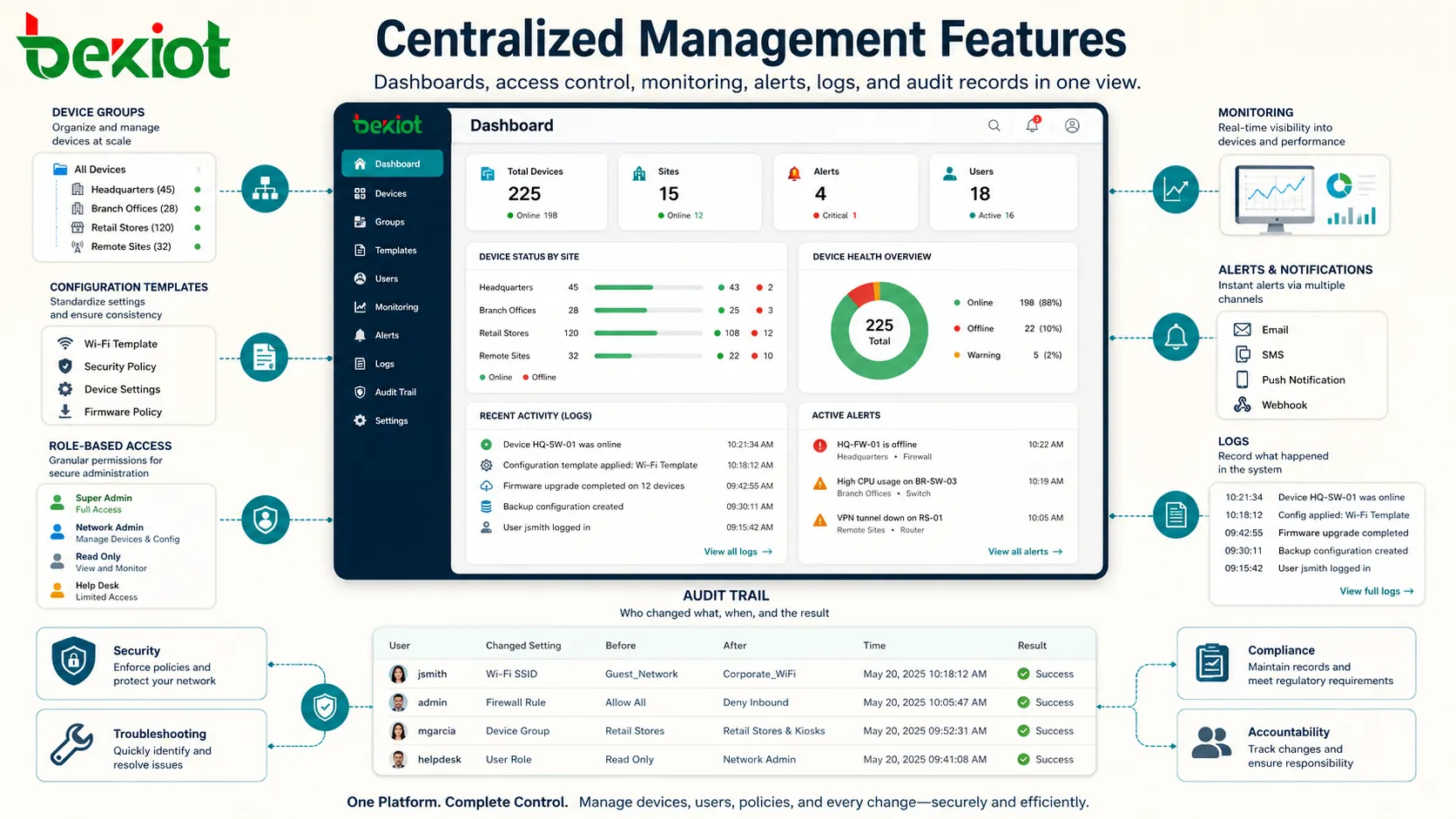
A unified dashboard gives administrators a quick view of the whole system. It may show device status, site health, active alarms, user activity, system capacity, update status, and recent events.
The dashboard should highlight what needs attention. If every message looks equally important, operators may miss critical problems. Good dashboards separate normal status, warning, fault, and urgent events clearly.
Device Grouping
Device grouping allows administrators to manage resources by site, department, device type, function, region, customer, floor, building, or risk level. Grouping makes large systems easier to operate.
For example, administrators may update all warehouse devices, change the policy for one branch, or check the status of all access control panels in one building. Without grouping, large deployments become difficult to navigate.
Configuration Templates
Templates help apply standard settings to similar devices or services. A template may define network parameters, user roles, audio settings, security policy, alarm rules, device names, or service addresses.
Templates reduce manual work and improve consistency. They are especially useful when many devices share the same basic configuration but need small location-specific or user-specific changes.
Role-Based Access
Role-based access control defines what each administrator, operator, technician, supervisor, or auditor can do. Not every user should have full system control.
For example, a local operator may view alarms and acknowledge events, while a senior administrator may change global policies. This reduces accidental changes and improves security.
Monitoring and Alerts
Monitoring tracks system health. Alerts notify the right people when something needs attention, such as device offline, high CPU load, failed login, storage warning, communication failure, expired certificate, or configuration mismatch.
Alert rules should be practical. Too many low-value alerts create noise, while too few alerts allow important problems to remain hidden.
Logs and Audit Trail
Logs record what happened in the system. Audit trails show who changed what, when the change happened, and what result occurred.
This is important for security, troubleshooting, compliance, and accountability. If a configuration change causes a problem, an audit trail helps teams find the cause quickly.
Benefits for Operations and Maintenance
Centralized management provides value by reducing scattered administration, improving visibility, lowering maintenance workload, and making system behavior more predictable.
Less Manual Work
Manual device-by-device management takes time and increases the chance of mistakes. Centralized management reduces repeated work by allowing administrators to apply changes to many devices or users at once.
This is useful during new deployments, policy updates, firmware upgrades, password changes, feature adjustments, and emergency configuration changes.
Faster Troubleshooting
When data is centralized, support teams can identify problems more quickly. They can check whether a device is online, whether a service is registered, whether a log shows errors, or whether a recent change caused the issue.
This reduces guesswork. Instead of asking local staff to inspect every device, administrators can often narrow the problem before dispatching a technician.
Better Standardization
Standardization improves reliability. Devices with the same role should normally follow the same configuration logic, firmware policy, naming rule, and security baseline.
Centralized management helps enforce those standards. It reduces configuration drift, where devices slowly become different over time because of manual changes.
Improved Security Control
Security policies are easier to manage from one platform. Administrators can enforce strong passwords, disable unused accounts, restrict access, monitor suspicious activity, update firmware, and review audit logs.
Central control also helps when urgent action is needed. If a vulnerability is found, the organization can identify affected devices and update them more efficiently.
Lower Long-Term Cost
Centralized management can reduce long-term operational cost by lowering travel needs, reducing repeated manual configuration, shortening downtime, and improving maintenance planning.
The cost saving becomes more visible as the number of sites and devices grows. Small systems may not need advanced management, but larger systems usually benefit from central control.
Applications in Different Systems
Centralized management is used across many industries because most organizations now rely on distributed devices, software platforms, network services, and user accounts. The management target may change, but the need for visibility and control remains similar.
IT Networks
IT teams use centralized management for switches, routers, firewalls, servers, wireless access points, endpoints, user accounts, storage systems, and cloud services. The platform may handle monitoring, patching, configuration, access control, and reporting.
This helps maintain consistency across offices, data centers, branches, and remote sites. It also improves response when network or security incidents occur.
Communication Platforms
Communication systems may use centralized management for IP phones, SIP devices, PBX servers, intercoms, gateways, paging devices, call recording, dispatch terminals, and user extensions.
Administrators can manage accounts, firmware, call routing, device status, logs, and service settings from one platform. This is helpful for organizations with many endpoints across several buildings or sites.
Security and Access Control
Security systems use centralized management for cameras, access controllers, card readers, alarm panels, door stations, intrusion sensors, video recorders, and monitoring workstations.
A central platform allows security teams to manage permissions, review events, monitor device status, investigate alarms, and coordinate response. This is important when many doors, cameras, and zones are involved.
Building and Facility Systems
Building management platforms may centrally control HVAC, lighting, elevators, energy meters, pumps, sensors, alarms, and environmental systems. This helps facility teams monitor comfort, energy use, faults, and maintenance needs.
Centralized control is especially useful in large buildings, campuses, hospitals, hotels, commercial complexes, and industrial facilities.
Industrial Operations
Industrial sites use centralized management for PLCs, HMIs, gateways, sensors, production equipment, SCADA systems, historians, and remote monitoring devices. The goal is to improve visibility, reduce downtime, and support maintenance.
Industrial management must also consider safety, network segmentation, access control, and change approval. A central platform should not allow uncontrolled changes to critical processes.
Cloud and SaaS Platforms
Cloud environments use centralized management for virtual machines, containers, databases, storage, identity, permissions, logs, billing, and security posture. Administrators can manage distributed resources from a cloud console.
This helps teams control resources that may exist across regions, accounts, applications, and development environments.
Centralized vs Distributed Management
Centralized management and distributed management are different approaches. Centralized management concentrates control in one main platform or team. Distributed management gives more control to local sites, departments, or device owners.
Neither approach is perfect for every situation. The best design may combine central policy with local operational flexibility.
| Management Style | Main Characteristic | Best Fit |
|---|---|---|
| Centralized management | Policies, visibility, and control are handled through one main platform | Multi-site systems, large device fleets, standardized operations, security-sensitive environments |
| Distributed management | Local teams or systems manage their own resources independently | Small sites, independent departments, specialized local workflows, limited shared infrastructure |
| Hybrid management | Central rules combine with local permissions and site-level control | Enterprises that need standard policy but also local flexibility |
When Central Control Works Best
Central control works best when consistency, compliance, visibility, and scale matter. It is useful when many devices must follow the same policy or when administrators need fast access to system-wide status.
Examples include security updates, account policy, firmware control, network monitoring, alert review, and multi-site configuration standards.
When Local Control Still Matters
Local control remains important in many real environments. A local facility team may know the site layout better than the central team. A local operator may need immediate control during an incident.
A good centralized system should support controlled local roles rather than removing all local decision-making. Central policy and local response should work together.
Planning a Centralized Management Strategy
Centralized management should be planned carefully. If the platform is poorly designed, it can become a single point of confusion instead of a source of control.
Define What Should Be Managed
The first step is deciding what belongs in the central platform. Not every device or system needs the same level of control. Critical devices, security systems, infrastructure equipment, and service platforms usually need stronger central visibility.
Low-risk or temporary devices may only need basic inventory tracking. Clear scope prevents unnecessary complexity.
Organize by Sites and Roles
The platform should reflect the organization’s real structure. Devices may be grouped by site, building, floor, department, system type, function, or risk level.
User roles should also match real responsibilities. Administrators, operators, technicians, auditors, and supervisors usually need different permissions.
Create Standard Templates
Templates should be created for common device types, service roles, or site profiles. This makes deployment and maintenance easier.
Templates should be tested before large-scale use. A wrong template can spread a mistake to many devices quickly.
Plan Alert Rules
Alert rules should separate urgent issues from routine events. A device offline at a critical gate may need immediate action, while a low-priority test device may not.
Good alert design reduces noise and helps teams focus on real problems.
Prepare Backup Access
If the central platform becomes unavailable, teams may still need emergency access to critical systems. Backup access methods should be planned and secured.
This is especially important for safety, security, industrial, and communication systems where complete dependency on one management platform may create risk.
Security Considerations
A centralized management platform is powerful. If it is misconfigured or compromised, many systems can be affected at once. Security must therefore be part of the design from the beginning.
Strong Administrator Authentication
Administrative access should use strong authentication. Password policy, multi-factor authentication, account lockout, IP restrictions, and secure login methods can reduce unauthorized access risk.
Shared administrator accounts should be avoided where possible. Individual accounts improve accountability.
Least Privilege Permissions
Users should only receive the permissions needed for their role. A technician who only needs to view device status should not have permission to change global policy.
Least privilege reduces the risk of accidental or malicious changes.
Encrypted Management Channels
Management traffic should be protected. Secure protocols, certificates, VPNs, encrypted APIs, and trusted access paths help prevent interception or tampering.
Unencrypted management interfaces can expose passwords, configuration data, and sensitive operational information.
Audit Logs
Audit logs should record logins, configuration changes, policy updates, firmware pushes, user changes, device deletions, and critical actions.
Logs help investigate incidents and verify that management activity follows policy.
Platform Backup
The management platform itself should be backed up. Configuration data, templates, device records, user roles, and logs may be important for recovery.
If the platform fails, a backup can reduce downtime and prevent loss of management history.
Common Challenges
Centralized management can improve operations, but it also creates challenges. The most common problems include poor data quality, excessive alerts, unclear permissions, platform dependency, and integration gaps.
Outdated Inventory
If device inventory is outdated, the platform becomes unreliable. Old devices may remain listed, new devices may be missing, and locations may be wrong.
Inventory should be updated during installation, replacement, relocation, and decommissioning. A central platform is only useful when its records reflect reality.
Alert Overload
Too many alerts can reduce attention. Operators may ignore warnings if the platform constantly reports low-value events.
Alert rules should be tuned over time. Repeated non-actionable alerts should be corrected, grouped, suppressed, or reclassified.
Configuration Drift
Configuration drift happens when devices slowly become different from the intended standard. This may occur because of local changes, emergency fixes, incomplete updates, or unmanaged devices.
Centralized management should compare current settings with approved templates and highlight differences where needed.
Integration Complexity
Some environments include equipment from many vendors. Integrating all systems into one platform may be difficult because of different protocols, APIs, data models, and permission structures.
Integration should be planned by priority. Critical systems should be connected first, while low-value integrations can wait.
Single Point of Management Failure
If all control depends on one platform, platform failure can affect operations. This does not mean central management is bad, but resilience must be considered.
Backup access, platform redundancy, data backup, and emergency procedures help reduce this risk.
Best Practices for Implementation
Centralized management works best when it is introduced with clear scope, clean data, secure permissions, and realistic workflows. It should simplify operations rather than adding another layer of confusion.
Start with Critical Systems
Begin with the systems that benefit most from central visibility, such as network infrastructure, security devices, communication endpoints, servers, or safety-related systems.
This helps the organization see value early and avoid trying to manage everything at once.
Use Clear Naming Rules
Device names should include useful information such as site, floor, room, function, or device type. Clear names make dashboards and alerts easier to understand.
A name like “Building-A-Floor2-EastDoor-Intercom” is more useful than “Device-1039” during troubleshooting.
Keep Templates Under Control
Templates should be reviewed, tested, approved, and version-controlled. A template change can affect many devices, so it should not be edited casually.
For large deployments, test changes on a small group before applying them widely.
Review Permissions Regularly
User roles should be reviewed when staff change jobs, leave the company, or no longer need access. Old permissions are a common security risk.
Regular permission review helps keep the platform secure and manageable.
Measure Operational Results
Track whether centralized management is improving operations. Useful indicators include fewer manual changes, faster fault response, lower downtime, better update completion, reduced configuration errors, and improved audit readiness.
Measurement helps justify the platform and guide future improvements.
FAQ
Can centralized management work for small organizations?
Yes, but the platform should match the organization’s size. A small company may only need a simple cloud dashboard, router controller, endpoint manager, or device inventory tool rather than a complex enterprise system.
Does centralized management require cloud deployment?
No. It can be cloud-based, on-premises, or hybrid. The best choice depends on security policy, network design, data control, remote access needs, and system scale.
What happens if the central platform goes offline?
Managed devices may continue operating with their existing configuration, but administrators may lose visibility or remote control. Critical systems should have backup access, redundancy, and recovery procedures.
How can configuration mistakes be prevented?
Use templates, approval workflows, change logs, testing groups, backups, and rollback plans. Large-scale changes should be tested before being applied to all devices.
Can different brands be managed from one platform?
Sometimes. It depends on whether the devices support open APIs, standard protocols, compatible management agents, or integration gateways. Mixed-brand environments may require middleware or multiple connected platforms.
What should be included in a centralized management audit?
An audit should review user permissions, login history, configuration changes, device inventory, offline devices, firmware versions, alert rules, backup status, and unresolved faults.







