


A static IP is an IP address that remains fixed for a device, server, network interface, or online service. Unlike a dynamic IP address that may change automatically, a static IP keeps the same address until an administrator or service provider changes it manually. It is widely used for servers, routers, cameras, access control systems, VoIP devices, industrial controllers, remote monitoring platforms, VPN gateways, and business network services.
In real network planning, static IP addressing is not only about convenience. It helps systems find the same device reliably, supports stable remote access, simplifies firewall rules, improves service mapping, and makes network troubleshooting more predictable. However, it also requires careful management because address conflicts, wrong subnet settings, exposed public IPs, and poor security policies can create service problems.
Static IP is valuable when a device must be easy to find, easy to manage, and stable in the network. It turns a changing network location into a predictable one.
Basic Meaning of Static IP
A static IP address is a fixed network address assigned to a device or service. The address does not change each time the device restarts, reconnects, or requests network access. This makes the device consistently reachable by other systems that need to communicate with it.
For example, a network camera may use a fixed private IP address inside a building network. A website server may use a fixed public IP address on the internet. A VoIP server may use a static address so SIP phones, gateways, and remote clients can register to the same destination every time.
Private Static IP
A private static IP is used inside a local network, such as an office LAN, factory network, school campus, hotel, warehouse, or building system. Private addresses are not directly reachable from the public internet unless network address translation, port forwarding, VPN, or other routing methods are configured.
This type of static address is common for printers, servers, switches, access points, IP cameras, intercom terminals, door controllers, PBX systems, NAS storage, PLCs, and monitoring devices. It helps local administrators manage equipment more easily.
Public Static IP
A public static IP is assigned by an internet service provider or cloud platform and can be reached from outside the local network when firewall and routing policies allow it. It is often used for websites, mail servers, VPN services, remote access gateways, cloud platforms, and business applications.
Public static IP addresses must be protected carefully. A stable public address is convenient for users and systems, but it can also be targeted by scanners, bots, or attackers if exposed services are poorly secured.
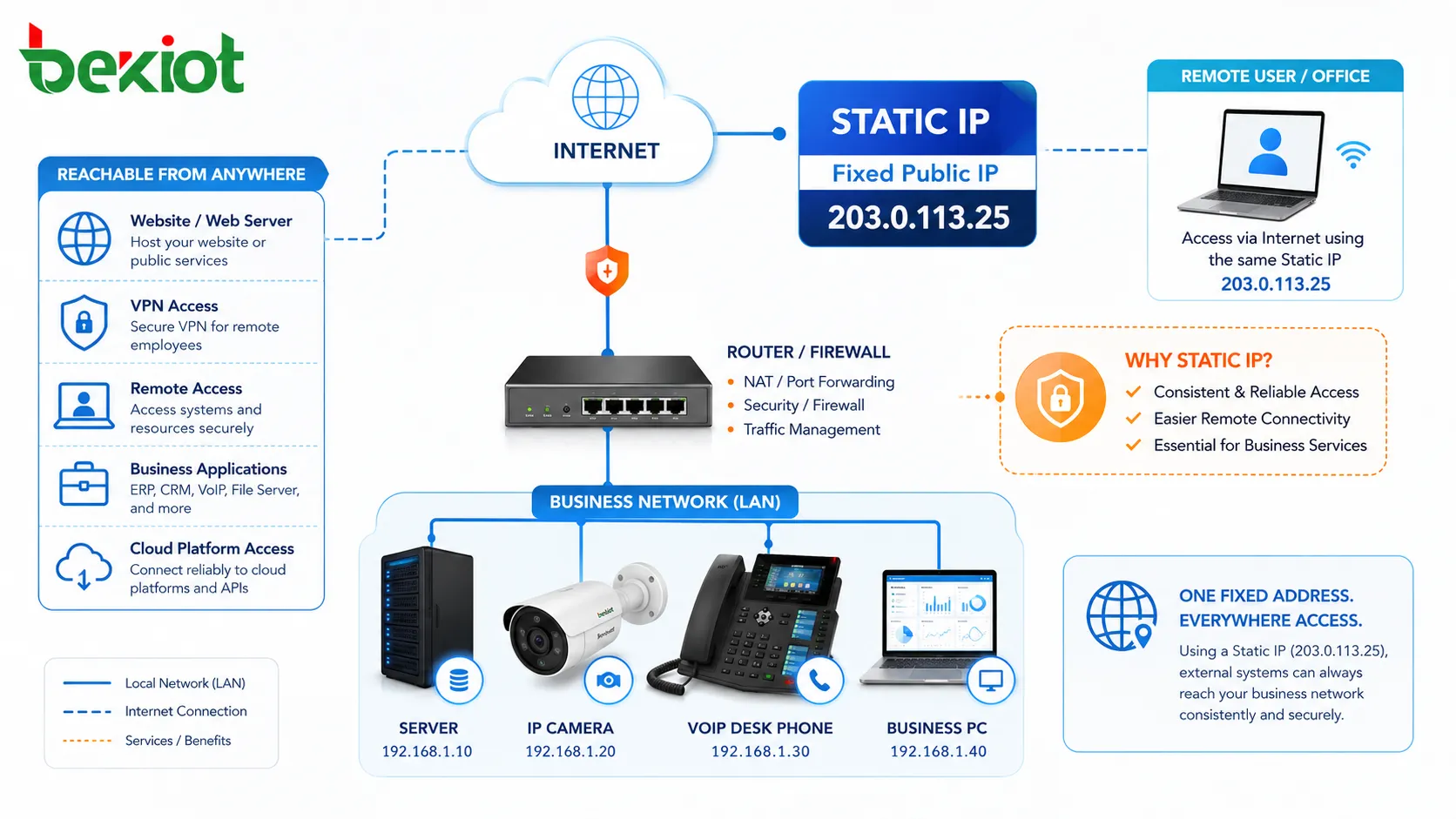
How Static IP Works
Static IP addressing works by assigning a specific IP address to a device or service and keeping that assignment stable. The address may be configured manually on the device, reserved by a DHCP server, assigned by a router, or provided by an internet service provider.
For the device to communicate correctly, the static IP must match the network design. It should use the correct subnet mask, gateway, DNS server, VLAN, routing path, and firewall policy. A fixed IP address alone is not enough if the surrounding network settings are wrong.
Manual Address Configuration
In manual configuration, an administrator enters the IP address, subnet mask, default gateway, and DNS information directly into the device. This method is simple and common for servers, network appliances, industrial devices, and embedded systems.
The risk is human error. If two devices are given the same address, an IP conflict may occur. If the gateway or subnet mask is wrong, the device may work locally but fail to reach other networks.
DHCP Reservation
DHCP reservation is another common method. The device still receives its network settings from the DHCP server, but the server always gives that device the same IP address based on its MAC address or client identifier.
This approach combines stability with centralized management. Administrators can control addresses from the router or DHCP server without manually editing every device. It is often easier to maintain in larger networks.
ISP-Assigned Static Address
For public internet access, a business may request a static IP from its internet service provider. The ISP assigns a fixed address to the router, firewall, or service connection.
This is useful when external users, branch offices, VPN clients, cloud services, or remote systems need to connect to the same public address reliably. DNS records can also point to the static IP to make services easier to access by domain name.
Static IP vs Dynamic IP
Static and dynamic IP addresses serve different needs. A dynamic IP is assigned automatically and may change over time. A static IP is fixed and remains consistent. Neither one is always better; the right choice depends on the application.
Dynamic Addressing for General Devices
Dynamic IP addressing is convenient for ordinary user devices such as laptops, mobile phones, tablets, guest devices, and temporary endpoints. The network automatically assigns available addresses, reducing manual work.
For daily internet access, dynamic addressing is usually enough. A user does not need to know the exact address of a laptop or phone if no other system needs to find it permanently.
Fixed Addressing for Important Services
Static IP is better when a device provides a service or must be managed predictably. Servers, cameras, PBX systems, printers, gateways, access control panels, and industrial controllers often need stable addresses.
If the address changes unexpectedly, users may lose access, integrations may fail, firewall rules may stop working, and monitoring systems may report the device as offline.
Operational Difference
The biggest difference is management behavior. Dynamic addressing reduces manual configuration, while static addressing improves predictability. Dynamic addressing is easier for large numbers of ordinary clients, while static addressing is better for infrastructure and critical equipment.
Many networks use both. Ordinary user devices receive dynamic addresses, while important devices receive static addresses or DHCP reservations.
Key Benefits of Static IP
Static IP addressing provides practical value when systems need stable communication paths. It improves service discovery, remote access, device management, network control, and troubleshooting.
Stable Remote Access
Static IP makes remote access easier because the destination address stays the same. Administrators, remote workers, branch offices, or monitoring platforms can connect to the same address without checking whether it has changed.
This is useful for VPN gateways, remote desktop services, security systems, cloud integrations, surveillance platforms, and industrial monitoring sites. Stable addressing reduces the need for constant reconfiguration.
Reliable Server Hosting
Servers often need static IP addresses because clients, DNS records, firewall rules, and external systems must know where to connect. Web servers, mail servers, SIP servers, FTP services, and database gateways may all depend on stable addressing.
When DNS points to a static IP, users can access the service through a domain name while the underlying address remains predictable.
Easier Network Management
Static IP makes it easier for administrators to map devices, document networks, create firewall rules, monitor uptime, and troubleshoot faults. A known address can be linked to a known device and location.
For example, if a monitoring platform reports that 192.168.10.50 is offline, the team can identify exactly which device or system is affected, assuming the address plan is documented well.
Consistent Firewall and Routing Rules
Firewalls, routers, VLANs, VPNs, and access control lists often use IP addresses to define which traffic is allowed or blocked. Static IP addresses make these rules more stable.
If a device uses dynamic addressing and its IP changes, a firewall rule may no longer apply correctly. Static addressing reduces this risk for important systems.
Better Integration with Monitoring Systems
Monitoring platforms often check devices by IP address. If the address changes, the monitoring system may lose contact even though the device is still online.
Static IP addressing helps monitoring tools track equipment status, response time, uptime, service availability, and fault events more reliably.
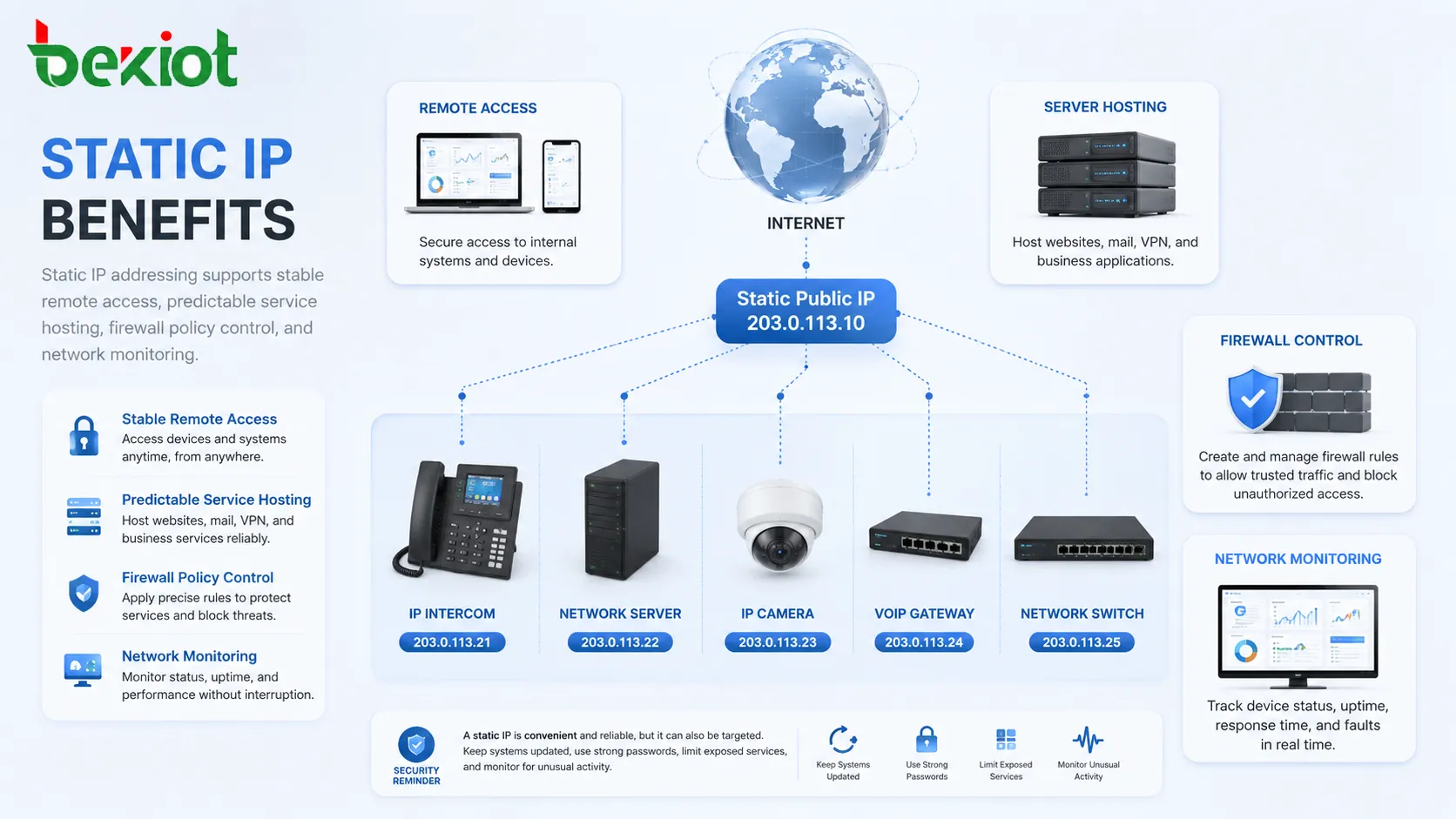
Common Applications
Static IP is used in many environments where devices must remain reachable. The application may be simple, such as a printer, or critical, such as a server, VPN gateway, emergency device, or industrial controller.
Servers and Web Services
Servers often need fixed addresses because users and systems must connect to them repeatedly. A web server, database server, file server, mail server, or application server becomes easier to manage when its address is stable.
In public-facing services, DNS records usually point to a fixed public IP. In private networks, internal DNS or system configuration may point to fixed private addresses.
IP Cameras and Surveillance Systems
IP cameras, NVRs, and video management systems often use static IP addresses. This helps the recording platform find each camera reliably and prevents video loss caused by address changes.
Static addressing also helps technicians identify camera location, configure streams, set firewall rules, and troubleshoot offline devices.
VoIP, SIP, and Intercom Devices
VoIP and SIP systems may use static IP addresses for PBX servers, SIP trunks, gateways, paging controllers, intercom stations, and dispatch endpoints. Stable addressing supports registration, routing, monitoring, and device management.
In help-point and emergency communication projects, Becke Telcom BHP-SOS intercom series can be configured within a planned static IP or reserved IP addressing scheme so that each station remains easy to identify, monitor, and route to the correct response point.
Access Control and Building Systems
Access control panels, door controllers, elevator controllers, visitor systems, and building management devices often need predictable addresses. This allows central platforms to communicate with them reliably.
Static IP addressing is also helpful when different systems need to integrate, such as access control with video surveillance, alarms, intercoms, and facility monitoring.
Industrial Automation
Industrial networks may use static IP addresses for PLCs, HMIs, remote I/O modules, gateways, sensors, controllers, SCADA servers, and maintenance terminals. Predictable addressing supports control logic, diagnostics, and engineering access.
Because industrial systems may be sensitive to interruption, address planning should be controlled carefully. Unplanned IP conflicts or subnet changes can disrupt production or monitoring.
VPN and Remote Management
Static public IP addresses are often used for VPN gateways. A fixed address allows remote users and branch offices to connect without relying on changing ISP-assigned addresses.
For managed service providers and enterprise IT teams, static addressing also supports remote administration, secure access, and monitoring of distributed sites.
Static IP in Network Design
Static IP should be part of a clear address plan. Randomly assigning fixed addresses can create confusion and conflicts. A structured plan helps the network remain understandable as it grows.
Address Planning
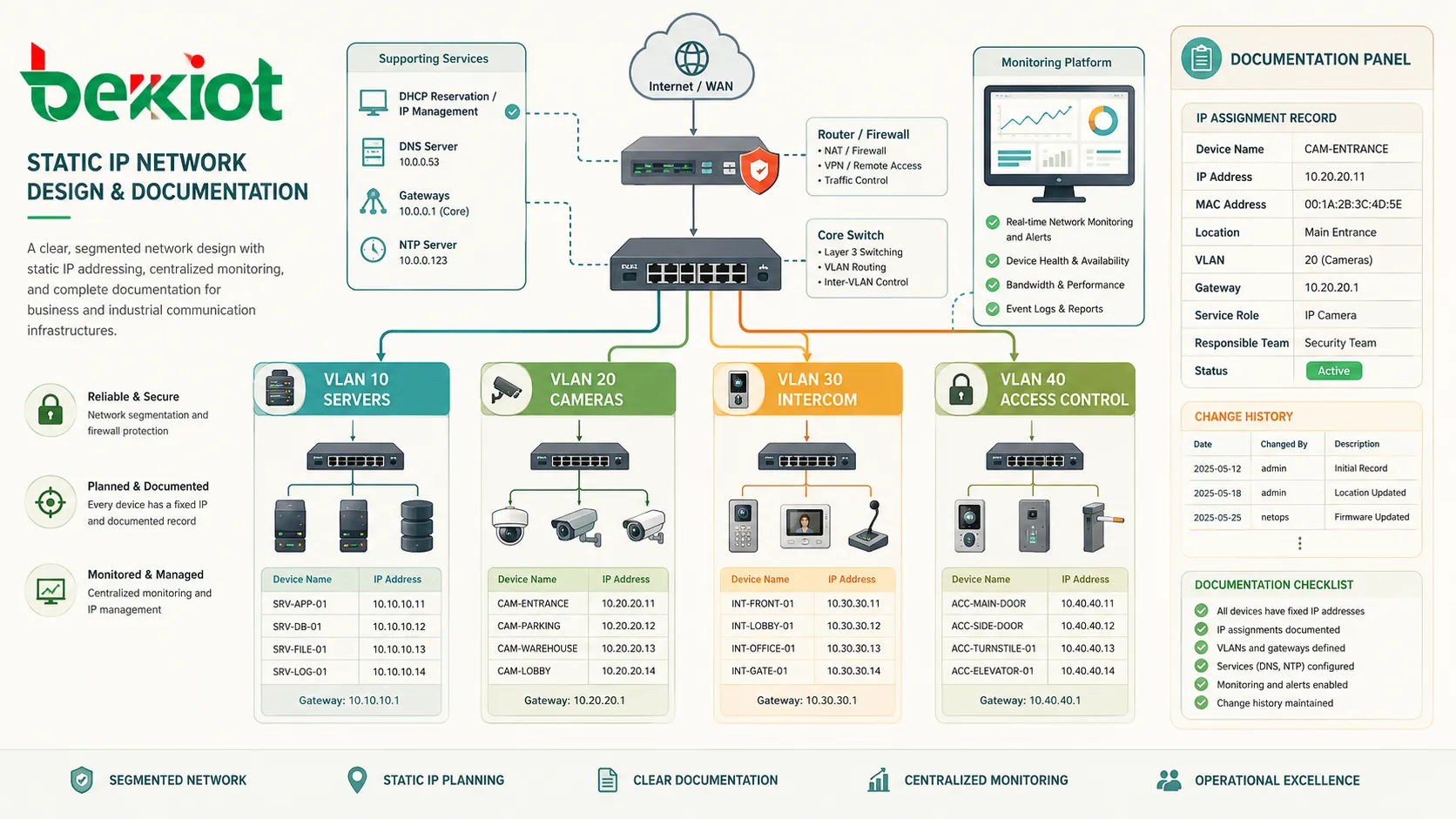
An address plan divides the network into logical ranges. For example, one range may be used for servers, another for cameras, another for access control, another for VoIP devices, and another for user clients.
This makes the network easier to manage. If all cameras are in one range and all servers are in another, firewall rules, monitoring, and troubleshooting become more organized.
Subnet and Gateway Settings
Every static IP device needs correct subnet and gateway settings. The subnet mask defines which addresses are local. The default gateway defines where traffic should go when the destination is outside the local network.
Incorrect subnet settings can cause partial communication problems. A device may be reachable from nearby devices but fail to communicate with other networks or remote platforms.
DNS Configuration
DNS settings help devices resolve domain names into IP addresses. Servers, cloud services, firmware update platforms, SIP trunks, NTP servers, and external APIs may all require DNS resolution.
A device with a static IP can still fail to access external services if DNS is missing or incorrect. Network configuration should include both addressing and name resolution.
Documentation
Static IP addresses should be documented. Documentation should include device name, IP address, MAC address, location, VLAN, gateway, service role, responsible team, and change history.
Without documentation, static addressing becomes harder to maintain over time. Teams may accidentally reuse addresses, forget device locations, or lose track of old configurations.
Configuration Methods
Static IP can be configured in different ways depending on the network and device type. The best method depends on scale, management style, and operational requirements.
Device-Side Manual Setting
Manual setting is direct. The administrator logs into the device and enters the fixed IP address and related network parameters. This is common for embedded devices, servers, network appliances, and industrial equipment.
The advantage is independence from the DHCP server. The disadvantage is that changes must be made device by device, which can be time-consuming in large deployments.
Router or DHCP Reservation
With DHCP reservation, the DHCP server always assigns the same address to the same device. The device can remain in automatic IP mode, while the administrator manages address allocation centrally.
This is often easier for networks with many devices. It also reduces the chance that someone manually enters the wrong subnet, gateway, or DNS value on each device.
Static Public IP from ISP
A static public IP is usually requested from the internet service provider. The ISP may assign it to the customer router, firewall, modem, or business connection.
After assignment, the network team may configure NAT, firewall rules, VPN services, DNS records, or remote access policies according to the business requirement.
Security Considerations
A static IP can improve management, but it can also increase exposure if services are open to the internet. Security planning is essential, especially for public static IP addresses and remote access systems.
Do Not Expose Unnecessary Services
Only required services should be reachable from outside the network. Unused ports, outdated management interfaces, weak login pages, and default credentials create unnecessary risk.
Firewalls should limit access by source, destination, protocol, and port. Remote management should use secure methods such as VPN or trusted access controls where possible.
Use Strong Authentication
Any service reachable through a static IP should use strong authentication. This includes routers, VPN gateways, servers, cameras, PBX systems, web portals, and remote management platforms.
Default passwords should be changed. Multi-factor authentication, certificate-based VPN access, account lockout policies, and logging can strengthen protection.
Keep Systems Updated
A static IP makes a service easier to find. If the service contains old vulnerabilities, attackers may repeatedly target it. Firmware and software updates are important for exposed systems.
Patch management should include routers, firewalls, servers, network devices, cameras, communication platforms, and other internet-facing systems.
Monitor Access Logs
Logs help identify suspicious activity. Failed logins, unusual traffic, port scans, repeated connection attempts, and unknown source addresses should be reviewed.
Monitoring is especially important for public static IP services because the address remains constant and may receive repeated automated probes.
Potential Problems and How to Avoid Them
Static IP addressing is useful, but mistakes can cause outages. Many problems come from duplicate addresses, wrong gateway settings, undocumented changes, and poor coordination between DHCP and manual addressing.
IP Address Conflict
An IP conflict happens when two devices use the same address. This can cause intermittent connection loss, unstable communication, wrong device response, or complete network failure for the affected devices.
To avoid conflicts, maintain an address plan, reserve static ranges, use DHCP reservations where possible, and document every assigned address.
Wrong Subnet or Gateway
A device may appear online locally but fail to reach remote systems if the subnet mask or gateway is wrong. This is common after network redesign, VLAN changes, or manual configuration errors.
Always verify IP address, subnet mask, gateway, DNS, and VLAN together. A correct IP address with wrong supporting settings can still fail.
Changing Network Without Updating Devices
If the network range changes, manually configured devices may not update automatically. Servers, cameras, intercoms, printers, controllers, and old devices may remain on the previous subnet.
Before changing network addressing, prepare an inventory and update plan. After the change, test critical devices and integrations.
Poor Documentation
Poor documentation makes static IP networks difficult to maintain. New technicians may not know which address belongs to which device, and old addresses may be reused by mistake.
A live IP inventory should be treated as part of the network’s operational documentation.
Best Practices for Static IP Deployment
A good static IP strategy should make the network more reliable, not more confusing. The goal is predictable addressing with controlled management.
Use Static IP Only Where Needed
Not every device needs a static IP. Ordinary laptops, phones, tablets, and guest devices are usually better handled by DHCP. Static IP should be reserved for infrastructure, servers, and devices that must be found reliably.
This keeps the address plan cleaner and reduces manual work.
Separate Device Groups
Group devices by type, location, function, or VLAN. Servers, cameras, VoIP devices, access control panels, and management interfaces can use different address ranges.
Structured grouping makes firewall rules, monitoring, and troubleshooting easier.
Prefer DHCP Reservation for Large Deployments
For many devices, DHCP reservation can reduce manual configuration errors while still providing fixed addresses. It also allows administrators to update gateway or DNS settings centrally.
This method is especially helpful in schools, hotels, campuses, warehouses, office buildings, and multi-site networks.
Document Every Assignment
Record each static IP address and keep the record updated. Include the device role, physical location, MAC address, owner, login method, and related service.
Documentation is what makes static IP manageable over years, staff changes, and system expansions.
Test After Configuration
After assigning a static IP, test local access, gateway reachability, DNS resolution, remote access, monitoring status, and the actual application function.
A simple ping test is helpful, but it does not prove that the service itself works. Test the real workflow the device is supposed to support.
FAQ
Can a static IP improve internet speed?
No. A static IP does not normally make internet speed faster. Speed depends on bandwidth, routing, ISP service quality, hardware performance, Wi-Fi conditions, and network congestion.
Do home users need a static IP?
Most home users do not need one. A static IP may be useful for home servers, remote access, VPN, self-hosted services, or security systems, but ordinary browsing and streaming work well with dynamic addressing.
Is DHCP reservation the same as static IP?
It provides a similar fixed-address result, but the method is different. Manual static IP is configured on the device, while DHCP reservation is configured on the DHCP server or router.
Can a static IP cause security risks?
The address itself is not unsafe, but a stable public IP can make exposed services easier to find repeatedly. Strong firewall rules, secure authentication, updates, and monitoring are important.
What should be checked when a static IP device goes offline?
Check power, network cable, switch port, VLAN, IP conflict, subnet mask, gateway, DNS, firewall rules, device service status, and whether the address was changed or duplicated.
Should static IP addresses be outside the DHCP pool?
Yes, if addresses are configured manually. Keeping manual static addresses outside the DHCP pool helps prevent the DHCP server from assigning the same address to another device.







