


Whisper monitoring, often shortened to Whisper, is a call supervision feature that allows a supervisor, trainer, or team leader to listen to an active call and speak privately to the agent without the customer hearing the supervisor’s voice. It is commonly used in contact centers, customer service teams, sales departments, technical support desks, dispatch centers, and enterprise communication platforms.
Unlike ordinary call monitoring, where the supervisor only listens silently, Whisper gives the supervisor a controlled way to guide the agent during the live conversation. The customer continues speaking with the agent normally, while the agent receives real-time coaching, reminders, or instructions from the supervisor in the background.
This feature is especially useful when agents are handling complex cases, new employees are still being trained, or a supervisor needs to intervene without taking over the call. It creates a middle ground between silent monitoring and full call takeover.
A Practical View of Live Call Coaching
In a busy service environment, supervisors cannot always wait until a call ends to provide feedback. Some situations require immediate guidance. An agent may need help explaining a policy, calming an upset customer, checking a technical detail, or choosing the right escalation path.
Whisper monitoring makes live coaching possible without creating an awkward customer experience. The supervisor can give short, focused instructions such as “verify the account first,” “offer the replacement option,” “ask for the order number,” or “transfer to technical support after this step.”
The feature is not designed for constant interruption. It works best when used carefully and only when the agent genuinely benefits from real-time support. Good supervisors use Whisper to help agents stay confident, not to distract them during every call.
How the Feature Works Behind the Call
Supervisor Joins the Session
The process usually begins when a supervisor selects an active call from a monitoring dashboard, call center panel, PBX console, or unified communications platform. Depending on permissions, the supervisor may choose silent monitoring, whisper coaching, or barge-in mode.
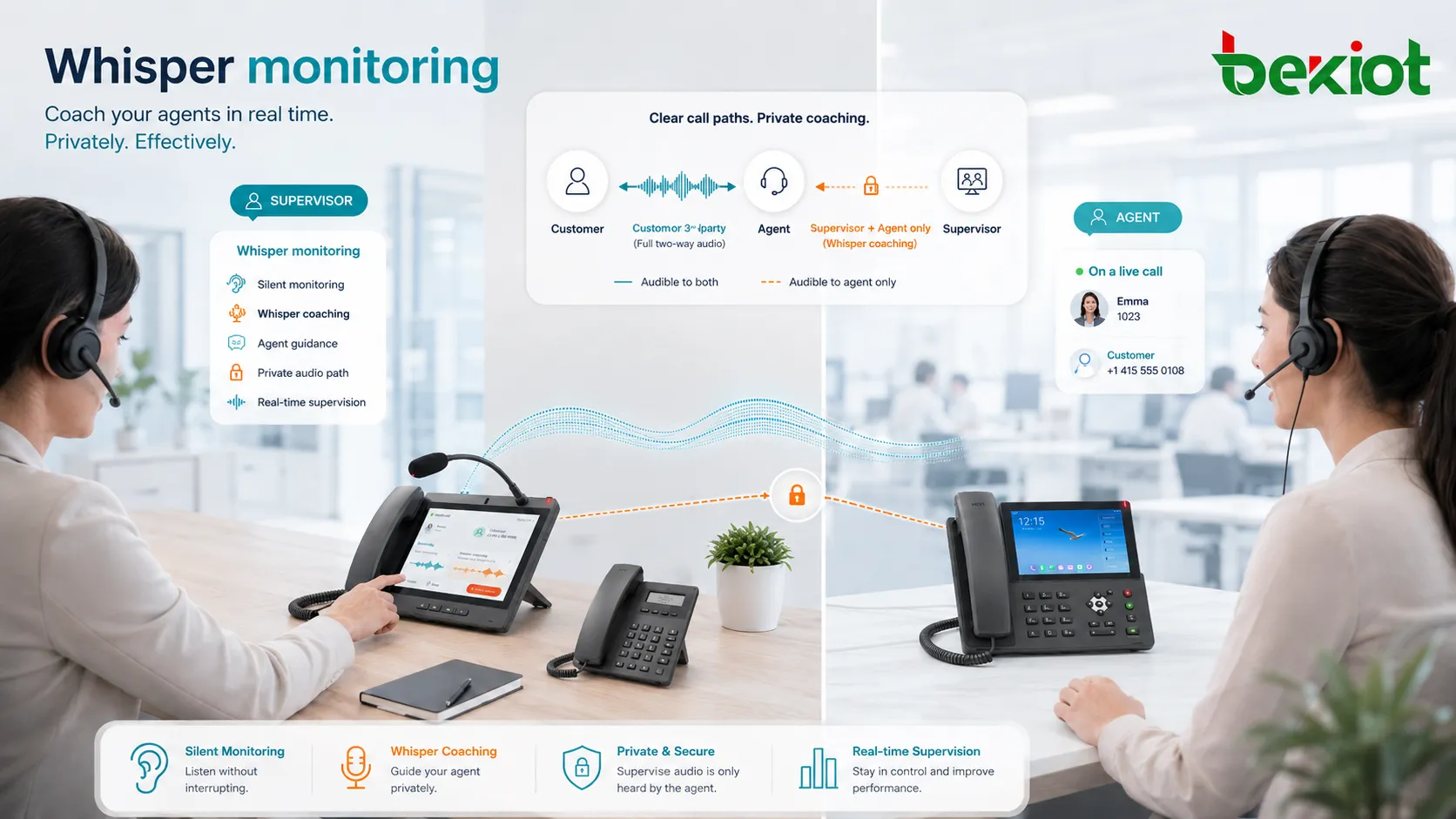
When Whisper is selected, the supervisor is connected to the call in a special supervision mode. The supervisor can hear the conversation between the agent and the customer, but only the agent can hear the supervisor.
Audio Is Split by Role
The communication system separates audio paths based on participant roles. The customer hears the agent. The agent hears the customer and the supervisor’s private guidance. The supervisor hears the live conversation and can speak only to the agent.
This selective audio routing is what makes Whisper different from a three-way call. In a normal conference call, all participants can hear one another. In Whisper mode, the customer is intentionally excluded from the supervisor’s voice path.
Permissions Control Access
Whisper monitoring should be controlled by user permissions. Not every employee should be able to join live calls or coach agents. Access is usually limited to supervisors, trainers, quality managers, compliance reviewers, or authorized team leaders.
Permission control helps protect customer privacy, agent trust, and operational discipline. It also prevents misuse of live call supervision functions.
Logs and Call Records
Many systems can log when a supervisor joins a call, which mode was used, how long the monitoring session lasted, and which user performed the action. Some platforms may also link Whisper sessions to call recordings, agent evaluations, or quality assurance reports.
These records are useful for management transparency, compliance review, training analysis, and troubleshooting disputes about live coaching actions.
Core Functions in Call Supervision
Silent Listen
Silent listen allows the supervisor to hear the call without speaking to the agent or the customer. It is often used for quality monitoring, compliance checks, agent evaluation, and live observation.
This mode is usually the first step before using Whisper. The supervisor listens to understand the situation, then decides whether private coaching is needed.
Private Agent Guidance
Private guidance is the main function of Whisper. The supervisor can speak directly to the agent while remaining unheard by the customer. This allows the supervisor to provide real-time suggestions without changing the customer-facing conversation.
The guidance should be short and clear. Long explanations may distract the agent and make the call harder to manage.
Barge-In Escalation
Barge-in is a stronger supervision mode where the supervisor joins the conversation and becomes audible to both the agent and the customer. It is used when the supervisor needs to directly assist, correct misinformation, handle a complaint, or take control of a sensitive call.
Whisper and barge-in are often part of the same supervision toolkit. Whisper supports behind-the-scenes coaching, while barge-in supports direct intervention.
Call Takeover
Some systems allow a supervisor to fully take over a call from the agent. This may be used when the case is highly sensitive, legally complex, technically difficult, or emotionally escalated.
Takeover should be used carefully because it changes the customer experience and may affect agent confidence. In many cases, Whisper is preferred first because it helps the agent handle the issue while staying in control of the conversation.
Where It Fits in a Contact Center Workflow
Whisper monitoring works best when it is part of a broader quality and training process. A supervisor may use silent monitoring to observe, Whisper to guide, barge-in to intervene, and post-call review to provide structured feedback after the call ends.
This creates a complete coaching loop. The agent receives immediate help during the call, then receives deeper feedback later. Over time, this improves both live performance and long-term skill development.
In mature contact centers, Whisper may connect with agent status, queue priority, CRM records, call recording, quality scoring, speech analytics, and customer satisfaction data.
Whisper monitoring is most effective when it supports agent confidence and customer outcomes, not when it becomes constant background control.
Benefits for Service Teams
Faster Agent Support
Agents often need help while the customer is still on the line. Waiting until the call ends may be too late. Whisper allows supervisors to provide quick support during the moment when it matters most.
This is useful for new agents, complex policies, high-value customers, technical support cases, complaint handling, and situations where the agent is unsure about the next step.
Better Customer Experience
When used well, Whisper improves customer experience without making the customer aware of the coaching process. The agent can respond more accurately, avoid long holds, and handle the conversation with greater confidence.
Customers may experience faster answers and smoother service, while the support team avoids unnecessary transfers or repeated explanations.
Improved Training Efficiency
Traditional training often happens before or after real calls. Whisper adds a live training layer. New agents can handle real conversations while still receiving quiet support from experienced supervisors.
This helps bridge the gap between classroom learning and real customer interaction. It also allows trainers to correct small mistakes before they become habits.
Reduced Escalation Pressure
Without Whisper, agents may transfer difficult calls too quickly because they feel uncertain. With real-time support, they can keep ownership of the conversation while still receiving guidance.
This can reduce unnecessary escalations and help agents build confidence in handling more complex situations.
Higher Quality Consistency
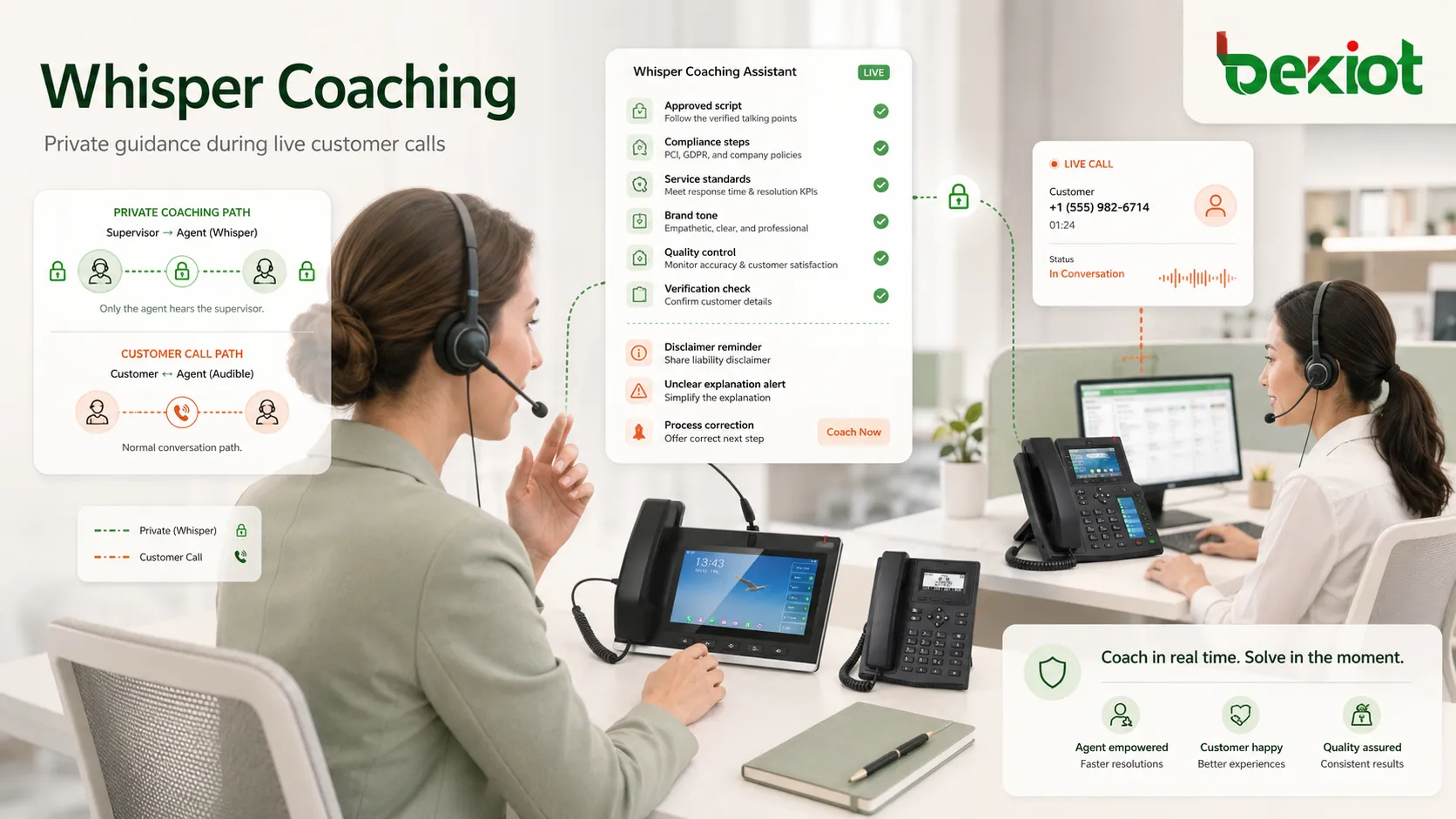
Whisper helps supervisors guide agents toward approved scripts, compliance steps, service standards, and brand tone. This is valuable when organizations need consistent answers across large teams.
It can also help supervisors correct issues immediately when they notice incomplete verification, unclear explanations, missing disclaimers, or incorrect process steps.
Use Cases Across Business Environments
New Agent Training
New employees often understand the product or process in theory but feel pressure during live customer calls. Whisper monitoring allows trainers to support them discreetly during real conversations.
This helps new agents learn how to respond under pressure while still keeping the customer interaction professional.
Sales Call Guidance
Sales supervisors may use Whisper to guide representatives during important calls. They may remind the agent to ask a qualifying question, introduce a suitable offer, handle an objection, or clarify a pricing point.
This is especially useful for high-value opportunities where the supervisor wants to support the agent without taking over the relationship.
Technical Support
Technical support calls often involve troubleshooting steps, product details, account checks, or configuration guidance. A supervisor or specialist can quietly guide the agent through complex steps while the agent continues speaking with the customer.
This reduces hold time and helps the agent learn technical handling through live practice.
Complaint and Retention Teams
When a customer is frustrated, the agent may need help choosing the right tone, compensation option, escalation path, or retention approach. Whisper allows a supervisor to guide the agent without making the customer feel that the call is being controlled from behind the scenes.
This can help de-escalate tension while preserving the agent’s role as the main customer contact.
Dispatch and Operations Centers
In dispatch or operations environments, supervisors may need to guide operators during live communication with field teams, drivers, maintenance staff, or service personnel. Whisper can help operators follow procedure while staying focused on the active call.
For operational communication, instructions should be brief and unambiguous because the agent may already be handling time-sensitive information.
Common Modes Compared
| Mode | Who Hears the Supervisor? | Best Used For |
|---|---|---|
| Silent Monitoring | No one on the call hears the supervisor. | Quality review, live observation, compliance checks, and training assessment. |
| Whisper Coaching | Only the agent hears the supervisor. | Real-time coaching, process reminders, new agent support, and complex case guidance. |
| Barge-In | Both the agent and customer hear the supervisor. | Direct intervention, complaint handling, urgent correction, and supervisor assistance. |
| Call Takeover | The supervisor becomes the main speaker with the customer. | Escalated disputes, high-risk cases, sensitive accounts, and expert handling. |
Technical Features to Consider
Role-Based Access
Role-based access ensures that only authorized users can monitor, whisper, barge in, or take over calls. This prevents misuse and supports internal governance.
Administrators should define permissions by role, team, queue, campaign, department, or location. Supervisors should only access calls relevant to their responsibility.
Real-Time Audio Routing
Whisper depends on accurate audio routing. The system must send the supervisor’s voice only to the agent, while keeping it away from the customer audio path.
This requires proper media handling by the PBX, contact center platform, session controller, or communication server. Poor routing can create privacy problems or customer confusion.
Low Latency
Coaching must be timely. If supervisor audio arrives too late, the instruction may no longer match the conversation. Low latency is important for natural and useful guidance.
Voice quality, network design, endpoint performance, and media server capacity all affect real-time coaching quality.
Call Recording Awareness
Organizations should decide whether Whisper audio is included in call recordings. Some systems record only the customer-agent conversation, while others can also record supervisor coaching channels.
The right approach depends on internal policy, training goals, compliance requirements, and privacy expectations. The behavior should be clearly documented.
Audit and Reporting
Audit logs help show when a supervisor joined a call, which mode was used, and how long the session lasted. This creates accountability and supports quality management.
Reports may also show how often supervisors use Whisper, which agents receive live coaching, and whether coached calls lead to better outcomes.
Risks of Poor Implementation
Whisper monitoring can create problems if it is used without clear rules. Agents may feel distracted or pressured if supervisors speak too often during calls.
Privacy is another concern. Organizations should be transparent with internal policies and ensure that monitoring practices follow applicable laws, industry requirements, and customer communication rules.
There is also a training risk. If supervisors constantly tell agents what to say, agents may become dependent instead of improving their own judgment.
The best use of Whisper is selective, short, and helpful. It should guide the agent at critical moments rather than turn every call into a supervisor-led conversation.
Best Practices for Real-Time Coaching
Supervisors should listen first before speaking. Silent monitoring helps the supervisor understand the situation before offering guidance.
Whisper messages should be brief. A short phrase such as “confirm the address,” “offer callback,” or “check warranty status” is usually more useful than a long explanation during an active call.
Teams should define when Whisper is appropriate, such as training, high-value customers, policy-sensitive calls, complex troubleshooting, or escalated complaints.
Agents should also be trained on how to handle Whisper input naturally without revealing that a supervisor is coaching them.
Operational Metrics Worth Tracking
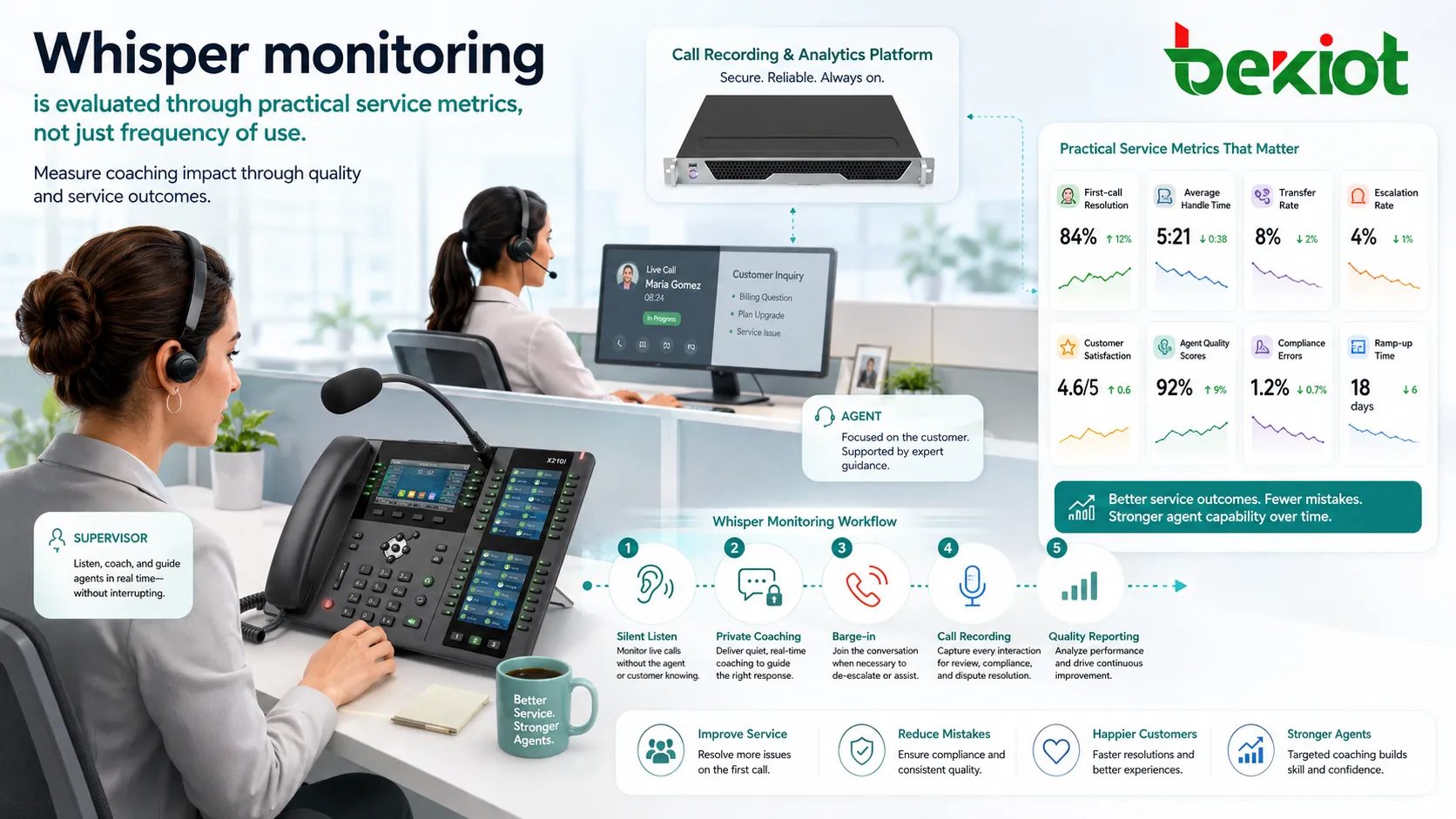
Whisper monitoring can be evaluated through practical metrics such as first-call resolution, average handle time, transfer rate, escalation rate, customer satisfaction, quality scores, compliance errors, and ramp-up time.
The goal is not simply to measure how often supervisors use the feature. The key question is whether live coaching improves outcomes, reduces mistakes, and builds agent capability.
If Whisper is used frequently but quality does not improve, the organization may need better training materials, clearer scripts, improved knowledge bases, or more structured coaching.
Deployment Checklist
Before enabling Whisper monitoring, organizations should confirm platform support across phones, softphones, headsets, web clients, queues, and SIP trunks.
Permissions should be reviewed carefully. Supervisors should only access calls they are authorized to support, and monitoring actions should be logged.
Audio quality should also be tested so the agent can hear both the customer and supervisor clearly without delay, distortion, or distracting volume changes.
Choosing the Right Setup
The right setup depends on team size, call type, training needs, compliance environment, and communication platform.
For sensitive industries, legal and privacy requirements should be reviewed before deployment, and internal policies should explain how live monitoring is used.
Organizations should treat Whisper as part of a coaching culture. When agents see it as support rather than surveillance, the feature is more likely to improve performance and confidence.
FAQ
Should customers be informed that calls may be monitored?
In many regions and industries, organizations provide call monitoring or recording notices at the beginning of customer calls. Requirements depend on local law, industry rules, and company policy.
Can agents reject a Whisper session?
This depends on the platform and company policy. Some systems allow only supervisors to control monitoring modes, while others provide agent notifications or internal rules.
Does Whisper work during transferred calls?
It can, but behavior depends on the communication platform. Some systems maintain supervision during transfer, while others require the supervisor to rejoin the new call leg.
Can this function be used with remote agents?
Yes, if the contact center or PBX platform supports real-time supervision for remote endpoints. Network quality, VPN configuration, headset performance, and media routing should be tested.
What is the biggest mistake when using live coaching?
The biggest mistake is over-coaching. If supervisors speak too often, agents may lose focus and confidence; short guidance is best when it improves the call outcome.







