


Voicemail is a voice messaging function that allows callers to leave recorded messages when the recipient is unavailable, busy, offline, or unable to answer a call. It is widely used in business phone systems, mobile networks, contact centers, healthcare facilities, schools, industrial sites, and public service organizations where missed calls may still contain important information.
Although voicemail may look simple from the user side, it plays an important role in communication continuity. It helps organizations capture caller intent, reduce missed opportunities, support after-hours communication, and give employees a structured way to manage voice messages across phones, extensions, mobile devices, and unified communication platforms.
How Voicemail Works in a Communication System
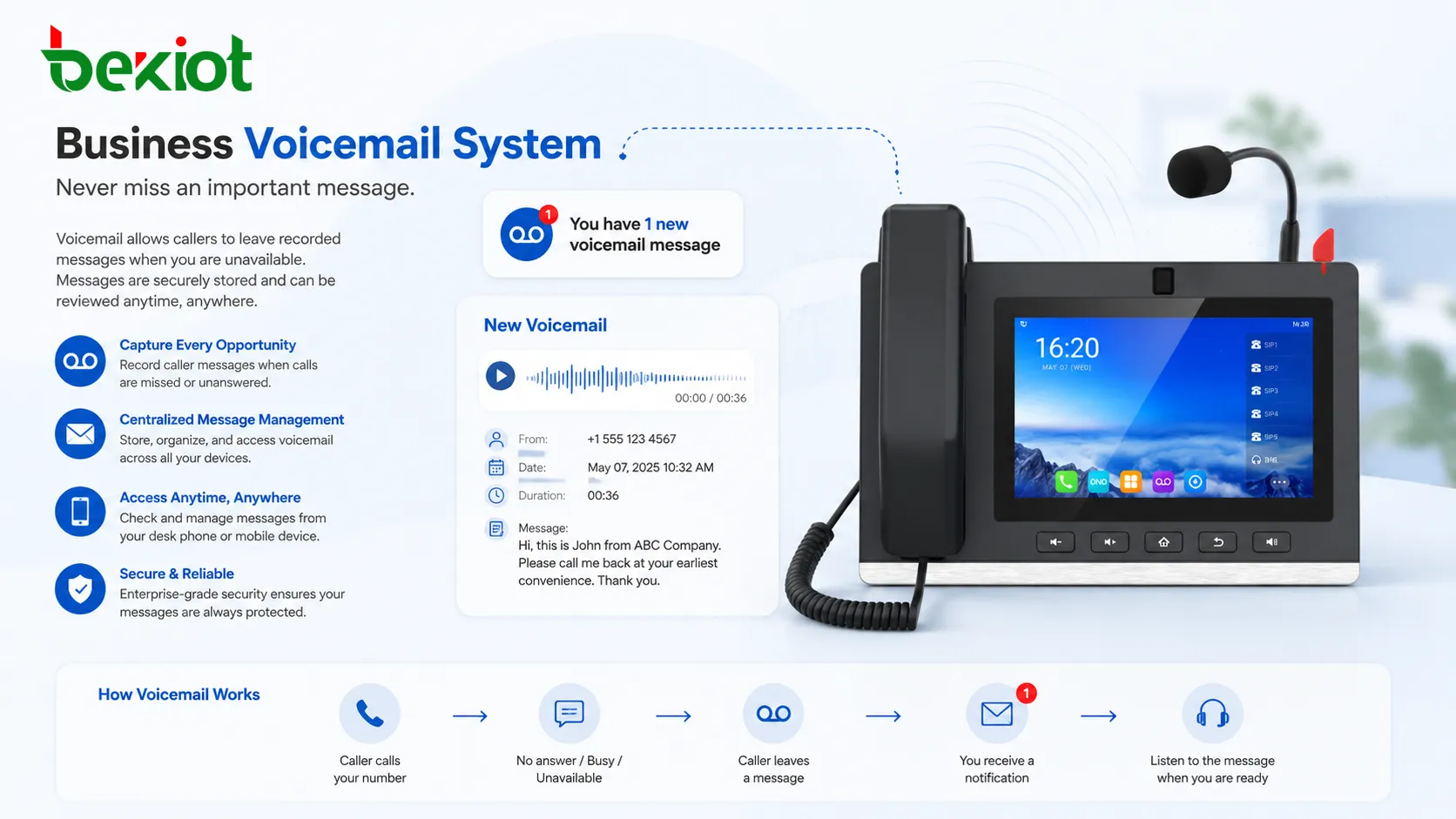
Voicemail works by redirecting an unanswered or rejected call to a voice mailbox. This mailbox may belong to an individual user, a department, a shared extension, or a service queue. Once the caller reaches the mailbox, the system plays a greeting and then records the caller’s message.
In a traditional PBX environment, voicemail may be hosted on a local server or appliance. In a VoIP or cloud communication system, voicemail is often managed through software services connected to SIP extensions, IP phones, mobile apps, or web portals. The recorded message is then stored as an audio file and linked to the user’s mailbox.
After the message is recorded, the system can notify the user through message waiting indicators, email alerts, mobile push notifications, SMS, desktop apps, or dashboard reminders. Some systems also attach the audio file to an email or provide a transcription so that users can quickly read the message without listening to the entire recording.
Core Features of Voicemail
Personalized Voice Greetings
A voicemail greeting introduces the mailbox and tells callers what to do next. It may include the user’s name, department, business hours, emergency contact options, or expected response time. A clear greeting helps reduce caller confusion and improves the professionalism of the communication experience.
Businesses often use different greetings for working hours, after-hours periods, holidays, or special service conditions. For example, a support department may guide callers to leave a ticket number, while a sales team may ask callers to provide company name, contact details, and inquiry type.
Message Recording and Storage
The main function of voicemail is to record voice messages and store them for later access. The recording length, audio quality, storage time, and mailbox capacity depend on the phone system or service platform. In business environments, these settings should be planned carefully to avoid full mailboxes and lost messages.
Modern systems usually store voicemail as digital audio files. This makes it easier to forward, archive, back up, search, or attach messages to customer records. For organizations with compliance requirements, retention policies may also be applied to voicemail storage.
Message Waiting Indicator
A message waiting indicator, often called MWI, tells the user that a new voicemail has arrived. On IP phones, this may appear as a flashing light, screen icon, or notification message. In softphone applications, it may appear as a badge, pop-up, or inbox alert.
MWI is especially useful in office and dispatch environments where users may not check email continuously. A visible indicator makes missed communication easier to notice and helps users respond faster.
Voicemail is most valuable when it is not treated as a passive inbox, but as part of a structured response workflow for missed calls, customer requests, and internal coordination.
Remote Access and Multi-Device Playback
Traditional voicemail usually required users to dial into a mailbox from a desk phone. Modern systems provide more flexible access through mobile apps, web portals, email attachments, desktop clients, and unified communication dashboards.
This is important for remote work, field service, healthcare staff, sales teams, and managers who may not always be near their office phone. Multi-device access ensures that messages can be reviewed from the most convenient endpoint.
Voicemail-to-Email
Voicemail-to-email sends a notification to the user’s email inbox when a new voice message is received. In many systems, the audio file is attached as a WAV or MP3 file. Some platforms also include caller ID, timestamp, mailbox number, and message duration in the email body.
This feature reduces the need to manually dial into a mailbox. It also helps users archive important voice records together with other business communication, especially when working across multiple locations or devices.
Voicemail Transcription
Voicemail transcription converts recorded speech into text. This allows users to scan messages quickly, identify urgent topics, and decide whether they need to call back immediately. It is especially useful when users are in meetings, traveling, or working in noisy environments.
Transcription accuracy depends on audio quality, speaker clarity, language support, background noise, and the speech recognition engine used by the system. For critical communication, the original audio message should still be available for verification.
Why Voicemail Still Matters
With the rise of instant messaging, email, and collaboration platforms, some people assume voicemail is outdated. In practice, voicemail remains important because voice calls are still used for urgent requests, service issues, customer follow-up, medical communication, facility management, and field coordination.
Voicemail also supports communication when real-time conversation is not possible. A caller may not know the best person to contact by email, may need to explain a situation quickly, or may be calling outside office hours. Without voicemail, the call may simply be lost.
For businesses, every missed call can represent a customer inquiry, service request, supplier update, complaint, emergency notice, or internal coordination task. Voicemail provides a fallback path that captures information instead of forcing the caller to try again later.
Common Applications
Business Office Communication
In office phone systems, voicemail supports individual employees, departments, reception desks, and shared extensions. It helps staff manage calls during meetings, lunch breaks, travel, or off-duty hours. It also reduces pressure on reception teams because callers can leave messages instead of repeatedly calling back.
For small and medium businesses, voicemail can make communication appear more professional. A structured greeting, clear message instructions, and timely callback process help improve customer confidence.
Customer Service and Support Teams
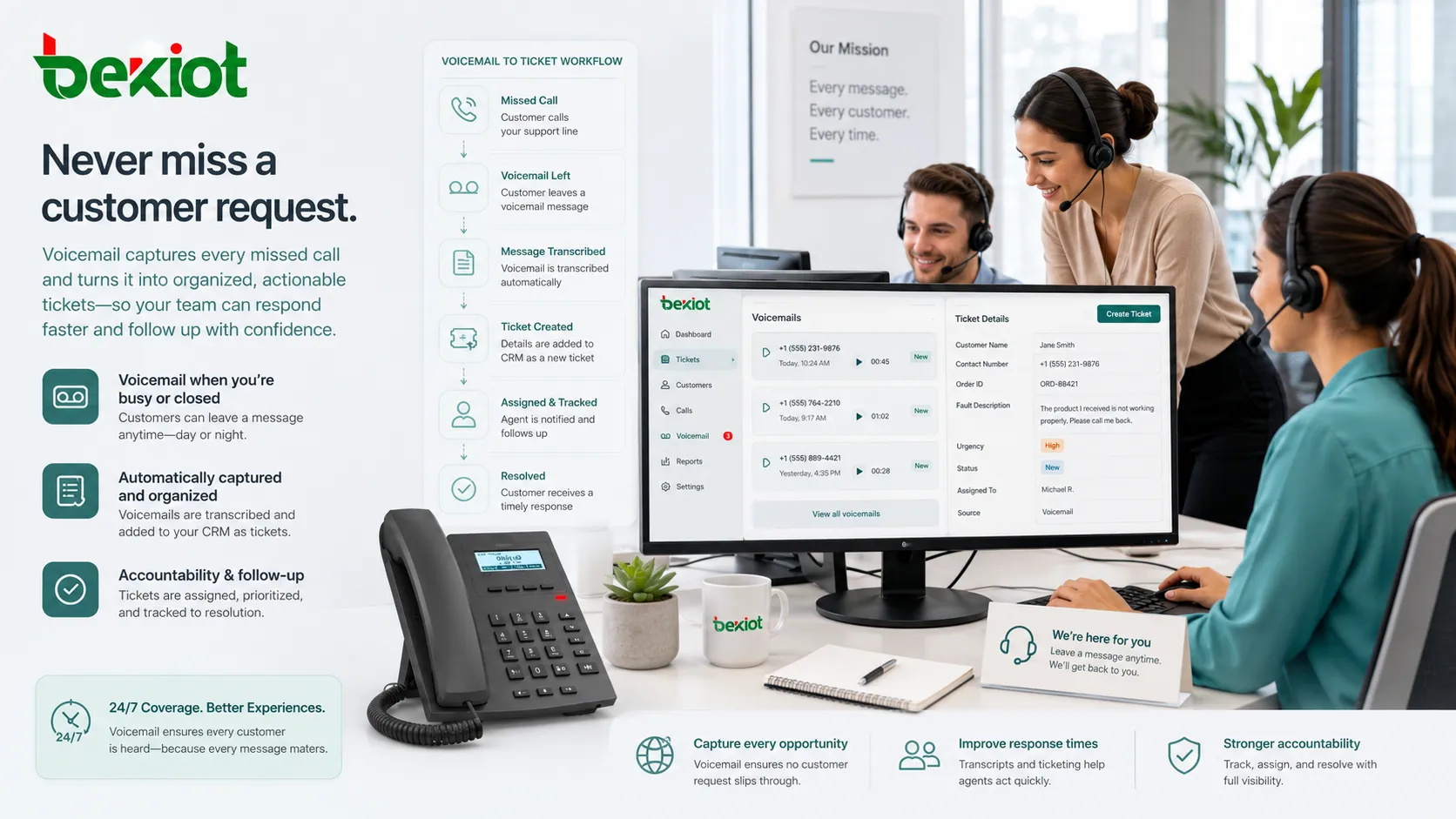
Customer service teams use voicemail to collect requests when agents are busy or when the support center is closed. A voicemail message may include customer name, contact number, order ID, fault description, or service urgency.
When voicemail is connected to a ticketing or CRM system, messages can become part of a traceable support process. This improves accountability and reduces the chance of missed follow-up.
Healthcare and Medical Offices
Healthcare clinics, dental offices, laboratories, and care facilities often use voicemail to manage appointment requests, prescription questions, after-hours messages, and non-emergency communication. Clear voicemail greetings are especially important because callers may need guidance on what information to leave and when to seek urgent help.
In healthcare settings, voicemail policies should consider privacy, retention, access control, and message routing. Sensitive patient information should be handled according to applicable regulations and internal procedures.
Education and Campus Communication
Schools, universities, and training centers use voicemail for administrative offices, teachers, security desks, dormitory services, and facility teams. Parents, students, suppliers, and staff can leave messages when offices are busy or closed.
Voicemail can also support departments that operate at different schedules, such as admissions, student affairs, maintenance, transport services, and campus security.
Industrial and Field Operations
In industrial environments, employees may not always be able to answer calls due to noise, safety procedures, shift work, or restricted access areas. Voicemail helps capture non-real-time communication for supervisors, maintenance teams, control rooms, and field service groups.
For these environments, voicemail should be planned alongside call routing, emergency communication, paging, radio integration, and escalation procedures. Urgent alarms should not rely only on voicemail, but routine operational messages can benefit from a mailbox-based workflow.
Voicemail in VoIP and Unified Communications
In VoIP systems, voicemail is usually integrated with SIP extensions, IP PBX platforms, cloud calling services, and unified communication applications. This allows voicemail to work across desk phones, softphones, mobile clients, and web interfaces.
Unified communication platforms often combine voicemail with presence status, call forwarding, call queues, email, chat, and collaboration tools. For example, a user may receive a missed call alert, voicemail transcription, and callback option within the same application.
This integration changes voicemail from a standalone mailbox into part of a broader communication workflow. Messages can be forwarded to team members, attached to service cases, tagged for follow-up, or reviewed from a central user portal.
Key Benefits
Reduces Missed Communication
Voicemail gives callers a place to leave information when no one answers. This is especially useful outside business hours, during peak call periods, or when staff are unavailable. Instead of losing the caller entirely, the organization receives a message that can be reviewed later.
Improves Caller Experience
A clear voicemail greeting helps callers understand why their call was not answered and what they should do next. It also reassures them that their message has been received. This can be better than endless ringing, busy tones, or disconnected calls.
Supports Flexible Work
Remote teams, mobile employees, and hybrid offices need communication tools that are not tied to one physical phone. Voicemail with email delivery, mobile access, and transcription allows users to manage voice messages from different locations.
Creates a Record of Caller Intent
Voicemail captures the caller’s own words, tone, and context. This can be useful when reviewing service requests, confirming details, understanding urgency, or resolving misunderstandings. In some business workflows, voicemail records can support follow-up documentation.
Helps Prioritize Callbacks
Not every missed call has the same urgency. Voicemail allows users to listen, review caller details, and prioritize callbacks based on message content. When transcription is available, this process becomes even faster.
Important Deployment Considerations
Mailbox Capacity and Retention
Administrators should define how long voicemail messages are stored, how much space each mailbox can use, and what happens when a mailbox becomes full. Without clear limits, users may miss new messages because old recordings occupy storage capacity.
Retention rules should match business needs. A sales team may only need short-term storage, while a service organization may require longer retention for quality review or customer dispute handling.
Security and Access Control
Voicemail may contain sensitive personal, financial, medical, or operational information. Users should protect mailbox access with secure PINs, strong passwords, or platform authentication. Default passwords should be changed before the system goes live.
Administrators should also control who can access shared mailboxes, export recordings, delete messages, or forward voicemail files. In cloud systems, encryption and account security settings should be reviewed carefully.
Greeting Quality and Message Instructions
A poor voicemail greeting can create confusion. The greeting should be short, clear, and relevant. It should tell callers what information to leave, when they can expect a response, and whether another channel should be used for urgent matters.
For departments, voicemail greetings should be updated when business hours, service policies, or holiday schedules change. Outdated greetings can damage trust and increase repeated calls.
Integration with Call Routing
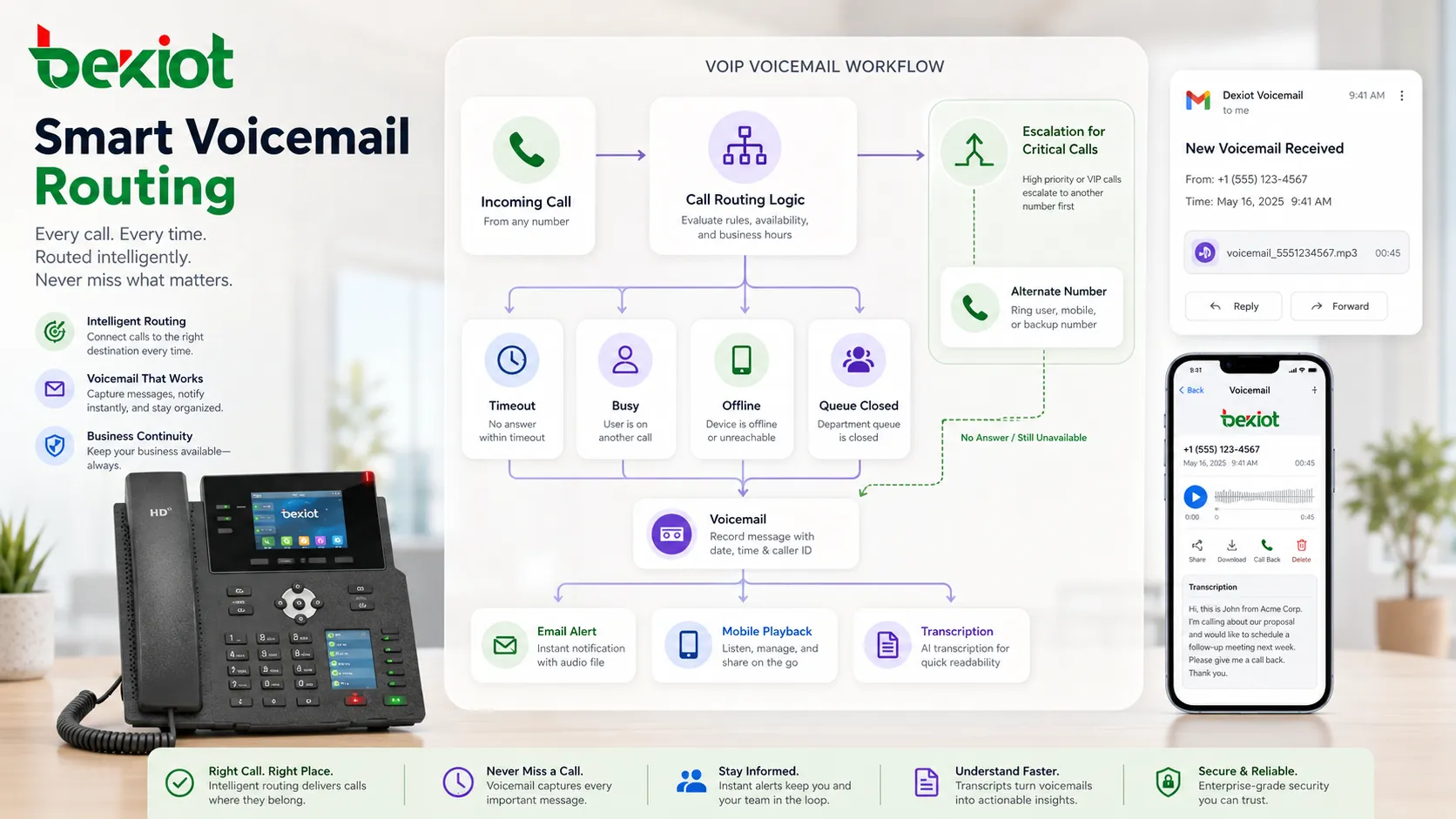
Voicemail should be connected to the right call routing logic. Calls may go to voicemail after a timeout, when the user is busy, when the device is offline, or when a department queue is closed. Each rule should match the organization’s response process.
For example, a sales extension may go directly to voicemail after working hours, while a security desk may need escalation to another number before voicemail is offered. Critical communication flows should always be tested before deployment.
Voicemail Best Practices
Organizations should keep greetings professional, review mailbox usage regularly, and train users to check messages consistently. A voicemail system only works well when users treat it as part of their daily communication process.
For shared mailboxes, responsibility should be clearly assigned. If several employees can access the same mailbox, the organization should define who reviews new messages, who returns calls, and how completed messages are marked or archived.
It is also useful to combine voicemail with other communication tools. For example, voicemail-to-email can notify mobile workers quickly, while transcription can help managers scan messages during busy periods. In customer-facing teams, voicemail review can be connected to CRM or ticketing workflows.
Limitations of Voicemail
Voicemail is not ideal for every communication scenario. Urgent alerts, safety alarms, emergency response, and real-time coordination should not depend only on voicemail. These situations often require live calling, paging, SMS alerts, push notifications, radio communication, or automated escalation.
Another limitation is user behavior. If employees rarely check voicemail, messages may be delayed or ignored. To avoid this, organizations should create simple operating rules and use notifications that fit the user’s workflow.
Audio quality can also affect message usefulness. Background noise, weak mobile signals, unclear speech, and low-quality microphones may make messages hard to understand. Transcription may also fail when recordings are unclear or contain mixed languages.
How to Choose a Voicemail Solution
When selecting a voicemail solution, organizations should consider how many users need mailboxes, whether remote access is required, how messages should be stored, and whether voicemail-to-email or transcription is necessary. The right choice depends on the size of the communication system and the importance of missed call handling.
For a simple office, basic voicemail with personal greetings and message indicators may be enough. For a multi-site business, contact center, healthcare office, or service organization, more advanced features such as shared mailboxes, centralized administration, message retention, audit control, and integration with other systems may be more valuable.
Compatibility is also important. The voicemail system should work smoothly with existing phones, PBX platforms, SIP services, mobile clients, and user directories. Administrators should test message delivery, notification timing, audio format, mailbox permissions, and recovery procedures before full deployment.
FAQ
Is voicemail the same as call recording?
No. Voicemail records a message left by a caller when the recipient is unavailable. Call recording captures an active conversation between two or more parties. They serve different purposes and usually follow different privacy and retention rules.
How long should a voicemail greeting be?
A business voicemail greeting should usually be short enough for callers to understand quickly. It should identify the mailbox, explain that the call cannot be answered, and tell the caller what information to leave. Long greetings may cause callers to hang up before recording a message.
Can voicemail be used for emergency communication?
Voicemail can receive non-urgent messages, but it should not be the only method for emergency communication. Emergency workflows should use real-time alerting, live calling, escalation rules, paging, or other immediate notification methods.
Why do some users prefer voicemail transcription?
Voicemail transcription allows users to read the message first, which saves time when they are in meetings, traveling, or working in a noisy place. It also helps them identify important messages faster before listening to the full recording.
What causes voicemail messages to be missed?
Common causes include full mailboxes, disabled notifications, outdated greetings, users not checking messages, incorrect call routing, or mailbox permissions that are not configured properly. Regular testing and mailbox management can reduce these problems.







