


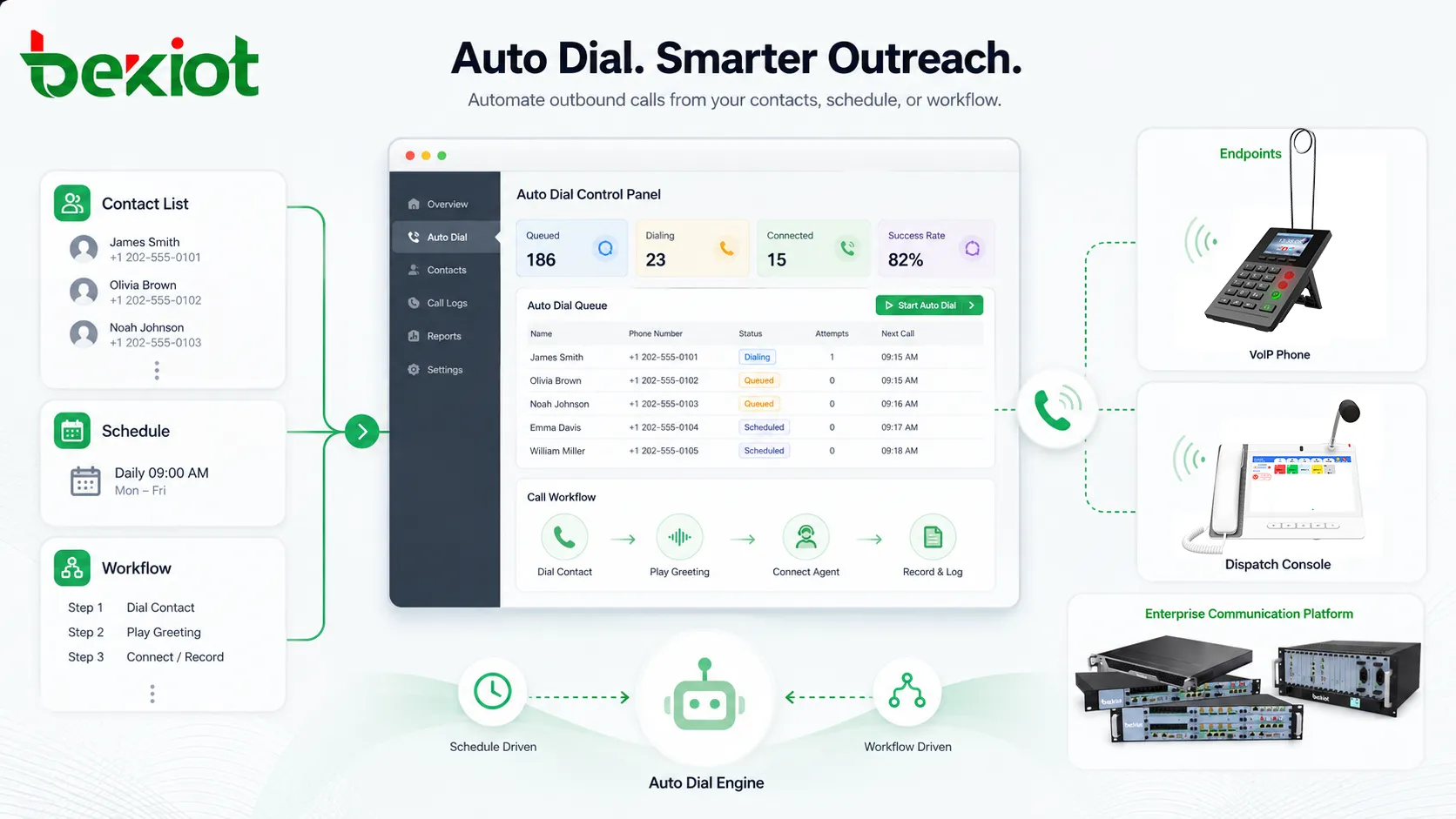
Auto dial is a calling function that automatically dials phone numbers from a predefined list, database, contact record, schedule, or application workflow. Instead of requiring a user to manually enter each number, the system starts the call process automatically according to rules set by an administrator, agent, application, or communication platform.
Auto dial is widely used in business phone systems, contact centers, appointment reminder platforms, emergency notification systems, customer service workflows, sales follow-up, field service coordination, healthcare communication, school announcements, and enterprise unified communications. Its value is not simply “calling faster.” A well-designed auto dial workflow can reduce repetitive manual work, improve response speed, standardize outbound communication, and help teams manage large numbers of calls more efficiently.
What Auto Dial Means
Auto dial means that a communication system can initiate a call without the user manually pressing every digit. The system may dial one number at a time, call multiple contacts in sequence, trigger calls from a CRM record, start calls from a campaign list, or place calls based on a scheduled event.
In a simple office environment, auto dial may appear as click-to-call from a contact directory. In a contact center, it may be part of a structured outbound calling campaign. In an emergency notification system, it may call a list of staff, residents, or responders when an urgent event occurs. In a healthcare or service environment, it may deliver appointment reminders, payment notices, or maintenance updates.
Auto dial should not be understood only as mass calling. It can also be used in highly controlled workflows where accuracy, timing, logging, and integration matter more than call volume. For example, a service platform may automatically call the right technician after an equipment alarm, or a school system may dial parents when attendance confirmation is required.
How Auto Dial Works
Contact Source Preparation
The process usually begins with a contact source. This may be a phonebook, spreadsheet, CRM database, service ticket system, emergency contact list, appointment system, customer account record, or manually created call list.
A clean contact source is important. Incorrect numbers, duplicate contacts, outdated records, missing country codes, and poorly formatted fields can reduce dialing success. Many auto dial workflows include validation rules to check number format, remove duplicates, and separate contacts by region, department, priority, or purpose.
Dialing Rule Configuration
After the contact list is prepared, the system follows dialing rules. These rules may define when calls can be placed, how many attempts are allowed, how long the system should wait for an answer, what happens when the line is busy, and whether calls should be retried later.
Dialing rules may also define whether a call is connected to a live agent, played as a recorded message, routed to an IVR menu, or logged as a missed attempt. In enterprise environments, these rules help keep calling behavior consistent across teams and systems.
Call Initiation
When the workflow begins, the auto dial system sends dialing commands through a PBX, VoIP platform, SIP trunk, mobile network, cloud calling service, contact center platform, or communication gateway. The system may dial one contact at a time or handle multiple calls depending on the deployment model.
For live-agent workflows, the system may connect the answered call to an available agent. For notification workflows, it may play a recorded voice prompt and ask the recipient to press a key for confirmation. For service workflows, it may connect the call to an operator, dispatcher, or responsible team.
Result Detection and Logging
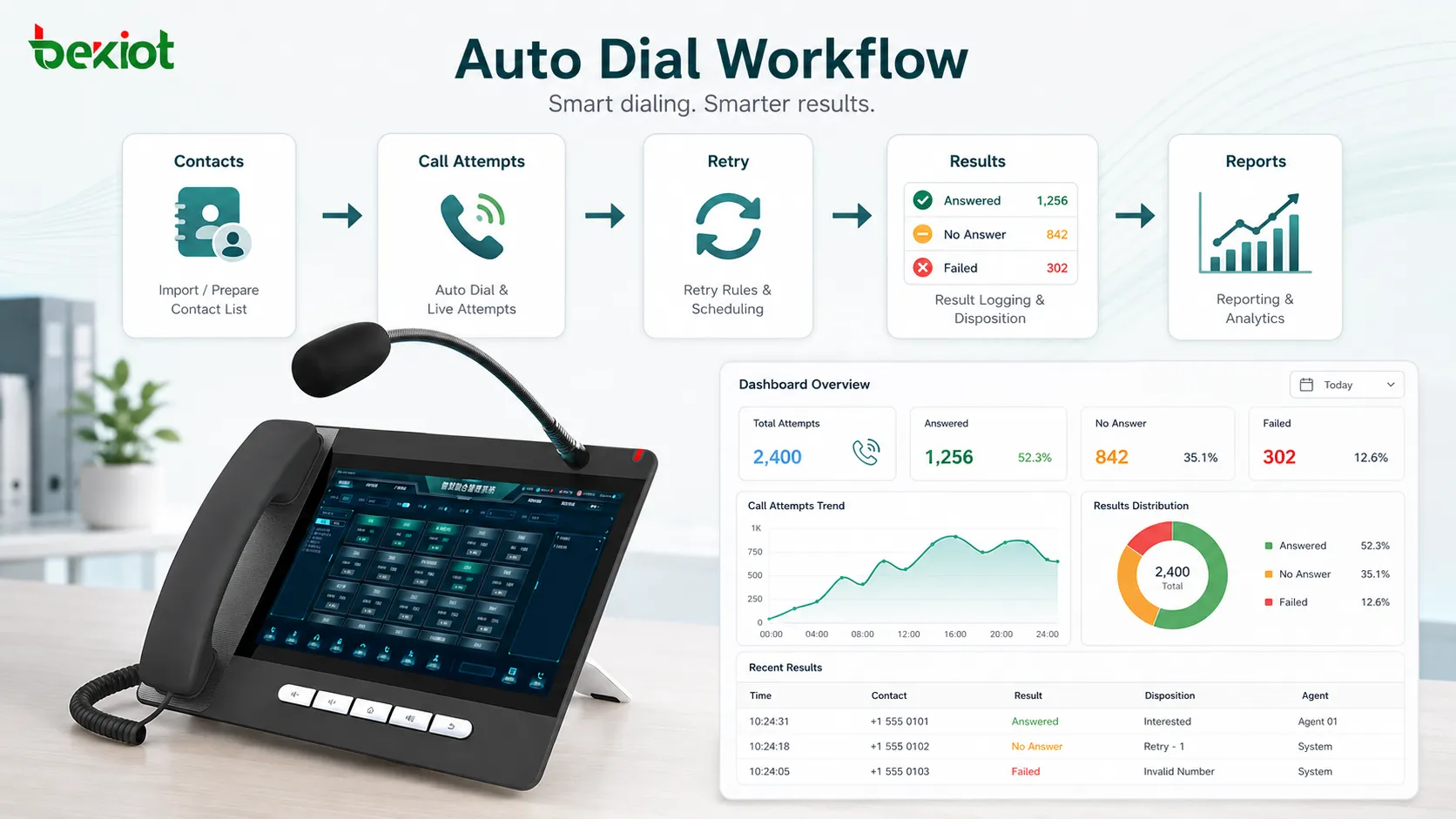
After each call attempt, the system records the result. Common results include answered, busy, no answer, failed, voicemail, rejected, invalid number, abandoned, confirmed, or transferred. These results become part of the call record.
Logging is one of the most important parts of auto dial. Without result tracking, teams may not know who was reached, who needs a retry, which numbers failed, or whether the workflow achieved its purpose.
Core Features of Auto Dial
List-Based Calling
List-based calling allows the system to dial contacts from a prepared list. The list may be uploaded manually, imported from a business system, or synchronized from a CRM, directory, or scheduling platform.
This feature is useful when teams need to contact many people for the same purpose, such as customer follow-up, service reminders, appointment confirmation, staff notification, or public information updates.
Click-to-Call
Click-to-call is a lightweight form of auto dial. A user clicks a phone number inside a CRM, helpdesk system, browser page, customer profile, or softphone directory, and the system automatically places the call.
This reduces manual dialing errors and saves time. It is especially useful for sales teams, support teams, dispatchers, receptionists, and account managers who make frequent calls from digital records.
Progressive Dialing
Progressive dialing places the next call only when an agent is available. This avoids overwhelming users with too many connected calls at once and helps maintain a controlled customer experience.
This model is often used when call quality and conversation context matter. The agent has time to review customer information before the call is connected, which makes it suitable for service follow-up, account management, and professional outreach.
Preview Dialing
Preview dialing shows the contact information before the call starts. The user can review the record, decide whether to call, and prepare for the conversation. This is not the fastest dialing mode, but it provides more control.
Preview dialing is helpful when calls require judgment, such as high-value customer contact, complex support cases, healthcare coordination, financial communication, or technical service follow-up.
Retry and Failover Rules
Auto dial systems often include retry logic. If a call is not answered, the system may try again later, call a secondary number, send the contact to another queue, or mark the record for manual review.
Retry rules should be designed carefully. Too few attempts may miss important contacts, while too many attempts may create annoyance or compliance risk. The right retry strategy depends on call purpose, urgency, and recipient expectations.
Auto dial is most useful when it is connected to a clear workflow: who should be called, why they are called, what happens after answer, and how the result is recorded.
Auto Dial Compared with Related Calling Functions
Auto dial is sometimes used as a broad term, but several related functions have different purposes. Understanding these differences helps organizations choose the right workflow.
| Function | Main Purpose | Typical Use |
|---|---|---|
| Auto Dial | Automatically places calls from a list, record, schedule, or workflow. | General outbound calling, reminders, alerts, service follow-up, internal communication. |
| Click-to-Call | Lets a user start a call by clicking a number in software. | CRM calling, helpdesk support, receptionist tools, business directories. |
| Preview Dialing | Shows contact information before the call begins. | High-context sales, healthcare coordination, account management, complex cases. |
| Progressive Dialing | Dials the next contact when an agent is ready. | Contact centers, service teams, controlled outbound campaigns. |
| Predictive Dialing | Uses algorithms to dial ahead based on agent availability and answer rates. | High-volume contact centers where strict compliance and careful tuning are required. |
Auto dial can therefore be simple or advanced depending on the system. A small business may only need click-to-call and scheduled reminders, while a large contact center may require campaign controls, agent assignment, retry rules, reporting, and integration with compliance workflows.
Business Benefits of Auto Dial
Reduces Manual Work
Manual dialing consumes time and creates errors. Users may enter the wrong number, skip records, repeat contacts, or forget to update call status. Auto dial reduces these repetitive tasks by letting the system handle number dialing and basic result tracking.
This allows staff to spend more time on the conversation itself instead of the mechanical process of placing calls.
Improves Contact Efficiency
When teams need to reach many people, auto dial helps organize the calling process. Calls can be placed in a planned sequence, results can be logged automatically, and unreachable contacts can be retried according to rules.
This improves efficiency for customer service, appointment reminders, delivery confirmation, emergency response, maintenance scheduling, and staff coordination.
Reduces Dialing Errors
Typing numbers manually can lead to wrong calls, missed digits, duplicate attempts, or incorrect international formatting. Auto dial reduces these errors by using stored contact data and standardized dialing rules.
For organizations that handle sensitive communication, fewer dialing errors can also reduce privacy risks and customer complaints.
Supports Faster Response
In time-sensitive situations, auto dial can contact the right people quickly. For example, a facility alarm can trigger calls to maintenance staff, a school notice can reach parents, or a service system can call customers about urgent schedule changes.
Speed is especially valuable when a delay may affect safety, service quality, or operational continuity.
Improves Reporting and Follow-Up
Because auto dial systems can record call attempts and outcomes, managers gain better visibility into communication progress. They can see which contacts were reached, which calls failed, and which records still need attention.
This reporting helps teams avoid missed follow-up and makes outbound communication more accountable.
Applications of Auto Dial
Contact Centers
Contact centers use auto dial to manage outbound campaigns, customer callbacks, service follow-up, surveys, collections, appointment confirmations, and renewal reminders. The system helps agents spend less time dialing and more time handling conversations.
Different dialing modes may be used depending on the goal. Preview dialing is better for complex cases, while progressive dialing is useful when agents need a steady but controlled call flow.
Customer Service Follow-Up
Service teams use auto dial to contact customers after support requests, repairs, deliveries, installations, or complaints. This helps confirm satisfaction, collect missing information, schedule next steps, or close service tickets.
When connected with a CRM or ticketing platform, the call result can be stored with the customer record. This creates a more complete service history.
Appointment Reminders
Healthcare offices, salons, repair centers, public service offices, training centers, and professional service firms may use auto dial for appointment reminders. The system can call customers before a scheduled appointment and ask them to confirm, cancel, or reschedule.
This reduces missed appointments and helps organizations manage staff time more efficiently. It can also be combined with SMS, email, or app notifications.
Emergency and Staff Notification
Auto dial can be used to reach employees, responders, residents, parents, or facility teams during urgent events. The system may call a predefined list and request confirmation through keypad input or voice response.
For emergency use, auto dial should be part of a broader notification plan. It should not depend on only one communication channel because some recipients may be unavailable, phones may be busy, or networks may be congested.
Field Service and Dispatch
Field service organizations may use auto dial to contact technicians, drivers, supervisors, or customers. A work order system can trigger calls when a job is assigned, delayed, escalated, or completed.
This improves coordination between dispatchers, field workers, and customers. It also reduces the need for dispatch teams to manually dial every update.
Sales and Account Management
Sales teams may use auto dial for lead follow-up, renewal reminders, customer check-ins, event invitations, or account reviews. When used responsibly, it helps organize outreach and reduce missed opportunities.
However, sales-related auto dialing should be managed carefully. Organizations should respect consent, opt-out requests, local calling rules, time-zone limits, and recipient expectations.
Important System Components
Dialing Engine
The dialing engine controls how calls are placed. It manages call attempts, pacing, retries, answer detection, timeout rules, and connection behavior. The quality of the dialing engine affects both efficiency and user experience.
A reliable dialing engine should avoid uncontrolled call bursts, repeated failed attempts, and poor handling of busy or unreachable numbers.
Contact Database
The contact database stores phone numbers and related information. It may include names, departments, regions, customer IDs, priority levels, appointment times, preferred language, consent status, or call history.
Accurate contact data is essential. Auto dial performance depends heavily on clean, current, and properly segmented records.
Call Routing Platform
Auto dial requires a system to place and route calls. This may be an IP PBX, cloud phone system, SIP trunk, contact center platform, communication API, mobile gateway, or enterprise telephony server.
The routing platform should have enough capacity to handle call volume and should provide clear reporting on failed calls, trunk usage, and call quality.
Message or Agent Connection
After a call is answered, the system must decide what happens next. It may connect the recipient to an agent, play a recorded message, present an IVR menu, transfer to a department, or request keypad confirmation.
This step should match the purpose of the call. A reminder call may only need a short message, while a service case may require a live conversation.
Reporting Module
Reporting shows whether the auto dial workflow is working. Useful reports may include total attempts, answer rate, failed numbers, retry results, confirmation rate, average call duration, agent connection rate, and completed follow-up.
Without reporting, auto dial becomes difficult to manage because teams cannot clearly see performance or identify problems.
Deployment Considerations
Call Purpose and Recipient Expectations
Before deploying auto dial, organizations should define why calls are being made and what recipients expect. A reminder, emergency alert, internal dispatch call, and sales outreach call all require different tone, timing, frequency, and response logic.
Clear purpose helps prevent overuse. Auto dial should improve communication, not create unwanted interruption.
Time Windows
Calling time matters. Calls placed too early, too late, or during inappropriate periods can create complaints and reduce response rates. Time-zone handling is especially important for multi-region organizations.
Administrators should define allowed calling windows, holiday rules, retry timing, and emergency exceptions.
Capacity Planning
Auto dial can generate many outbound calls quickly. The phone system, SIP trunks, gateways, agent teams, and reporting platform must be able to handle the expected call volume.
Poor capacity planning can cause failed calls, congested trunks, delayed connections, overloaded agents, or poor audio quality.
Compliance and Consent
Auto dial should be used with respect for applicable communication rules, consent requirements, opt-out preferences, and privacy expectations. Requirements vary by country, industry, call type, and recipient category.
Organizations should keep contact lists updated, honor do-not-call requests where applicable, and avoid using auto dial for communication that recipients did not agree to receive.
A responsible auto dial strategy balances speed with relevance, consent, timing, and clear call outcomes.
Common Problems and How to Avoid Them
Poor Contact Data
Bad contact data leads to failed calls, wrong numbers, duplicate attempts, and low answer rates. Organizations should clean contact records regularly and validate phone number formats before large calling workflows.
Data quality is especially important when contact records come from multiple systems, imported files, or old customer databases.
Excessive Retry Attempts
Retry logic can improve reachability, but too many attempts may irritate recipients. The system should limit retries and avoid repeatedly calling the same person within a short period unless the situation is urgent.
Retry rules should be matched to the call purpose. A medical appointment reminder and an emergency evacuation notice should not use the same retry behavior.
Agent Overload
If auto dial connects too many answered calls to too few agents, customers may experience silence, long waits, or dropped calls. This damages trust and can create compliance concerns in some environments.
Progressive or preview dialing can reduce this risk because calls are placed only when agent capacity is available.
Unclear Messages
Recorded messages should be short, clear, and relevant. If the message does not explain who is calling, why the call matters, and what action is required, recipients may hang up or ignore future calls.
For important notifications, the message should provide confirmation options or alternative contact channels.
Best Practices for Auto Dial
Start with a well-defined workflow. Decide who should be called, what message or conversation should happen, how many attempts are allowed, when calls should occur, and how results should be handled.
Keep contact data clean and segmented. Different groups may need different scripts, calling windows, languages, priority levels, or retry rules.
Use reporting to improve the process. Low answer rates may indicate poor timing, outdated numbers, unclear caller ID, or message fatigue. High failed-call rates may indicate data quality or trunk routing problems.
Test before large-scale use. A small pilot group can reveal message issues, routing problems, agent capacity limits, caller ID concerns, or inaccurate call result detection.
Respect recipients. Auto dial should be used as a communication tool, not as a way to force unwanted contact. Clear purpose, proper timing, and opt-out handling are important for long-term trust.
How to Choose an Auto Dial Solution
The right auto dial solution depends on call volume, use case, integration requirements, reporting needs, compliance controls, and whether calls require live agents or recorded messages. A simple office may only need click-to-call, while a service organization may need scheduled calling, retry rules, and CRM integration.
For contact centers, agent workflow matters. The solution should support the right dialing mode, call pacing, call recording integration, campaign management, and supervisor visibility. For emergency or operational notification, reliability, confirmation tracking, redundancy, and multi-channel support may be more important than high call volume.
Organizations should also consider integration with existing communication systems. The auto dial platform may need to connect with PBX systems, SIP trunks, CRM software, ticketing systems, appointment tools, customer databases, or emergency management platforms.
Limitations of Auto Dial
Auto dial can improve efficiency, but it cannot guarantee that every recipient will answer. Some calls may go to voicemail, be rejected, fail because of wrong numbers, or be blocked by carrier systems or user settings.
Auto dial also cannot replace good message design. A call may connect successfully but still fail if the message is unclear, the timing is poor, or the recipient does not trust the caller ID.
For high-value or sensitive communication, auto dial should support human review, manual follow-up, and alternative channels such as SMS, email, app notification, or direct operator calling.
FAQ
Is auto dial only used by contact centers?
No. Contact centers are a common use case, but auto dial is also used for appointment reminders, emergency alerts, staff notification, service updates, field dispatch, school announcements, healthcare communication, and internal enterprise workflows.
What is the difference between auto dial and predictive dialing?
Auto dial is a broad term for automatically placing calls. Predictive dialing is a more advanced method that dials ahead based on expected answer rates and agent availability. Predictive dialing requires careful control to avoid abandoned or poorly timed calls.
Can auto dial connect calls to live agents?
Yes. Some systems connect answered calls to available agents, while others play recorded messages or route recipients to an IVR menu. The connection method depends on the workflow design.
Why do auto dial calls sometimes fail?
Calls may fail because of invalid numbers, busy lines, carrier rejection, blocked caller ID, trunk congestion, network problems, wrong dialing format, or recipient-side filtering. Reporting helps identify the main cause.
What should be checked before launching an auto dial campaign?
Teams should check contact accuracy, calling purpose, message clarity, caller ID, calling time windows, retry rules, agent capacity, reporting settings, consent records, and any applicable communication requirements.







