


Automated deployment is the practice of using tools, scripts, platforms, and predefined workflows to release software, configurations, devices, services, or system updates with minimal manual intervention. Instead of relying on engineers to repeat every installation, configuration, testing, and release step by hand, automated deployment turns these steps into a repeatable process that can be executed consistently across environments.
What Automated Deployment Means
Automated deployment is commonly associated with software delivery, but its meaning is broader. It can apply to cloud services, websites, mobile apps, enterprise applications, network devices, IoT endpoints, VoIP systems, server configurations, security policies, firmware updates, and infrastructure changes.
The central idea is simple: if a deployment process must be repeated many times, it should be defined, tested, and automated. This helps organizations reduce human error, speed up releases, improve traceability, and make rollback easier when something goes wrong.
In a manual deployment process, each environment may be configured slightly differently. One engineer may forget a setting, another may use an outdated package, and another may apply changes in the wrong order. Automated deployment reduces these inconsistencies by following the same workflow every time.
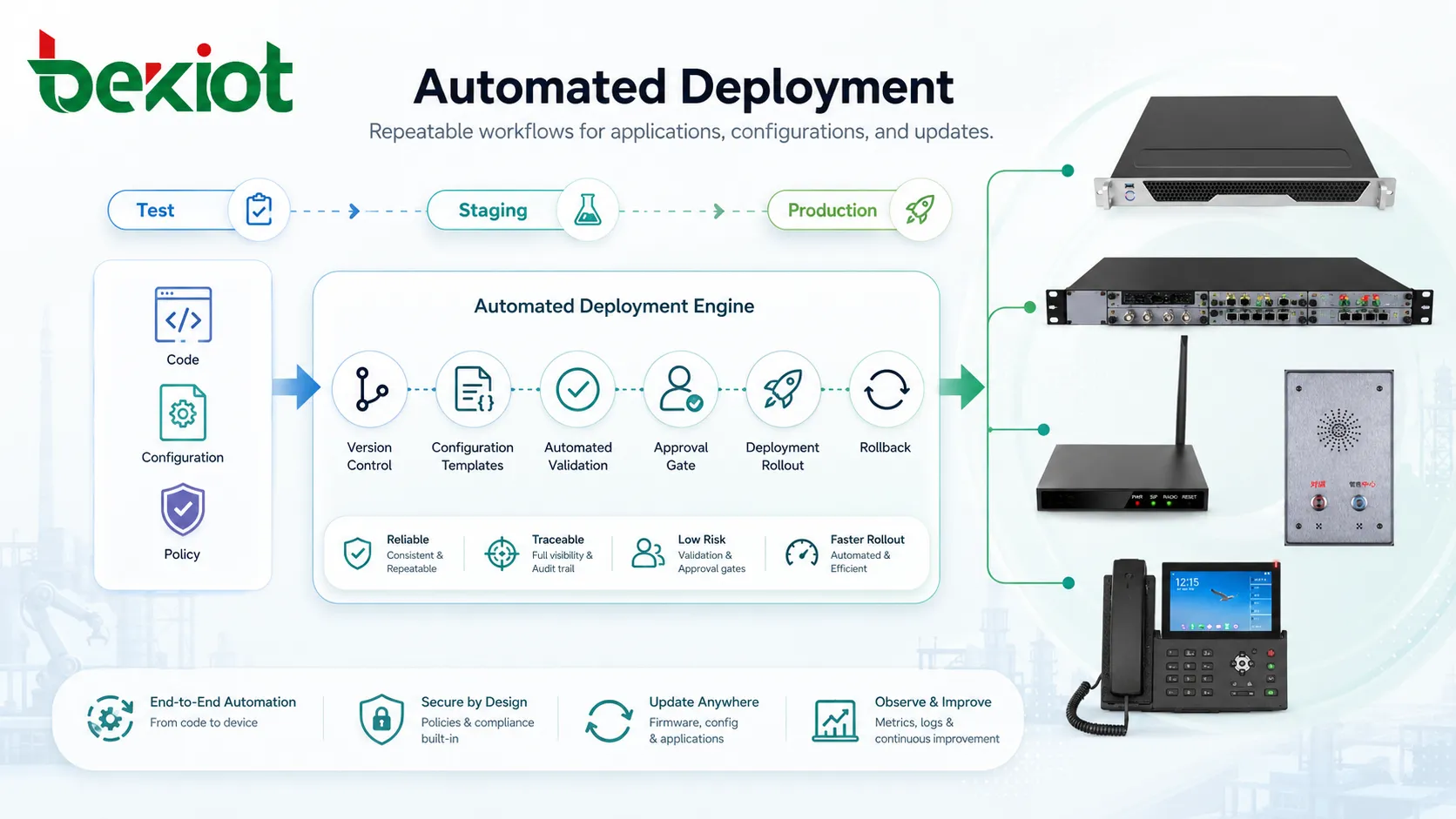
How Automated Deployment Works
Source Preparation
The process usually begins with a source package. This may be application code, a container image, a firmware file, a configuration template, an infrastructure definition, or a system update package. The source should be version-controlled so teams can track what changed, who changed it, and when it was approved.
Version control is important because automated deployment depends on reliable inputs. If the source package is unclear, untested, or poorly documented, automation may only make the wrong change faster.
Build and Packaging
In software environments, the source code may be compiled, packaged, tested, and prepared for release. In infrastructure or device environments, the deployment package may include configuration files, scripts, certificates, dependency lists, firmware versions, or policy definitions.
A good build process produces a predictable output. This output should be easy to identify, store, verify, and deploy. For example, each release package may include a version number, checksum, release notes, and dependency information.
Testing and Validation
Before deployment reaches production, automated checks can verify whether the package is safe to release. These checks may include unit tests, integration tests, security scans, configuration validation, compatibility checks, dependency checks, or simulated deployment tests.
Validation reduces risk because it catches problems earlier. It also helps teams avoid deploying broken packages to live users, devices, or business systems.
Release Execution
Once the package is approved, the deployment system applies it to the target environment. This may involve copying files, pulling container images, updating services, changing configuration, restarting applications, applying database migrations, provisioning cloud resources, or sending firmware to remote devices.
The deployment system should record what happened during execution. Logs, status reports, timestamps, success rates, failed targets, and user approvals are useful for troubleshooting and audit review.
Post-Deployment Monitoring
Deployment does not end when the package is installed. After release, the system should monitor service health, error rates, user access, device status, performance metrics, logs, and rollback conditions.
Post-deployment monitoring helps teams confirm whether the release is working as expected. If problems appear, the team can pause the rollout, roll back the change, or apply a controlled fix.
Common Automated Deployment Models
Continuous Deployment
Continuous deployment automatically releases approved changes to production after they pass testing and policy checks. It is common in software-as-a-service platforms, web applications, cloud-native systems, and teams that release frequently.
This model requires strong testing, reliable monitoring, and mature rollback capability. Without these controls, continuous deployment can push problems into production too quickly.
Scheduled Deployment
Scheduled deployment releases updates during planned windows. This model is common for enterprise systems, regulated environments, industrial operations, hospitals, schools, government systems, and infrastructure that cannot change at any time.
Scheduled deployment balances automation with operational control. The process is still automated, but the timing is selected to reduce user impact.
Staged Deployment
Staged deployment releases changes in phases. A small test group may receive the update first, followed by a department, branch, region, or larger percentage of users. If no issues appear, the rollout continues.
This approach reduces risk because a problem affects only a limited group at first. It is useful for software releases, device firmware updates, mobile apps, endpoint management, and network configuration changes.
Blue-Green Deployment
Blue-green deployment uses two similar environments. One environment runs the current production version, while the other receives the new version. After validation, traffic is switched to the new environment.
This model can reduce downtime and make rollback faster. If the new version fails, traffic can be redirected back to the previous environment.
Canary Deployment
Canary deployment sends a small portion of traffic or users to the new version before expanding the release. Teams observe real behavior under limited exposure and then decide whether to continue.
This is useful when production behavior cannot be fully predicted in test environments. It helps detect performance issues, user experience problems, or compatibility errors before a full rollout.
Core Features of Automated Deployment
Repeatable Workflows
Repeatability is the foundation of automated deployment. A deployment workflow should produce the same result when given the same input and target conditions. This reduces uncertainty and makes troubleshooting easier.
Repeatable workflows also help teams onboard new engineers faster. Instead of relying on undocumented personal knowledge, the deployment process is defined in tools, scripts, templates, and approval rules.
Version Control Integration
Deployment workflows often connect with version control systems. This allows each release to be linked to specific code changes, configuration updates, issue tickets, or approval records.
Version control helps organizations answer important questions after deployment: what changed, who approved it, which version is running, and how to return to a previous state.
Environment Configuration
Automated deployment should manage differences between development, testing, staging, and production environments. These differences may include database addresses, credentials, API endpoints, feature flags, network settings, resource limits, or regional requirements.
Environment configuration should be handled carefully. Hard-coded values, shared passwords, and manual edits can create security and reliability problems.
Rollback Support
Rollback allows teams to return to a previous working state if the new deployment fails. A good rollback process should be tested before it is needed.
Rollback may involve restoring a previous application version, reverting configuration, switching traffic to an older environment, restoring a database snapshot, or disabling a feature flag. The right method depends on the system architecture.
Logging and Audit Trails
Automated deployment should record deployment actions. Logs may include release version, target environment, start time, finish time, operator, approval status, test results, failed steps, and affected systems.
Audit trails are useful for compliance, security review, incident investigation, and internal change management. They also help teams understand whether a problem started after a specific release.
Automated deployment is not only about faster release speed. Its deeper value is making change predictable, traceable, and recoverable.
Deployment Benefits
Faster Release Cycles
Automation reduces the time required to move changes from development or preparation to live operation. Teams can release bug fixes, feature updates, configuration changes, and security patches more quickly.
Faster deployment is especially useful when organizations need to respond to customer feedback, security vulnerabilities, business changes, or operational incidents.
Reduced Human Error
Manual deployment often involves repeated commands, file transfers, checklist steps, configuration edits, and service restarts. Each manual step creates a chance for mistakes.
Automated deployment reduces these mistakes by executing predefined steps in the correct order. It also reduces dependence on one person’s memory or experience.
Consistent Environments
Automated deployment helps keep environments consistent. If the same package and configuration rules are used across multiple servers, devices, branches, or cloud regions, there is less chance of hidden differences.
Consistency improves reliability because problems can be reproduced and fixed more easily. It also reduces the common issue where something works in testing but fails in production because the environments are different.
Improved Security Response
When a security patch or configuration correction is needed, automated deployment can help apply it quickly across many systems. This reduces the time that vulnerable systems remain exposed.
Security teams can also use automated deployment to enforce baseline configurations, update certificates, rotate secrets, remove insecure settings, or disable risky features.
Better Collaboration
Automated deployment connects development, operations, security, QA, and business teams through a shared release process. Instead of passing unclear instructions between teams, the workflow defines how changes are built, tested, approved, released, and monitored.
This improves communication because everyone can see the release status, deployment history, and failure points.
Automated Deployment Across Different Environments
| Environment | Typical Deployment Target | Automation Value |
|---|---|---|
| Cloud Platforms | Applications, containers, databases, load balancers, storage, and network policies. | Supports repeatable infrastructure changes and scalable service releases. |
| Enterprise IT | Servers, desktops, applications, endpoint policies, and security patches. | Reduces manual support work and improves configuration consistency. |
| Network Systems | Routers, switches, firewalls, gateways, VPN policies, and access rules. | Helps control configuration drift and reduce change errors. |
| IoT and Devices | Firmware, device profiles, certificates, telemetry settings, and remote updates. | Enables large-scale maintenance without visiting every device manually. |
| Software Products | Web apps, mobile apps, APIs, microservices, and backend services. | Accelerates release cycles while improving testing and rollback control. |
Maintenance Tips for Automated Deployment
Keep Deployment Scripts Simple
Automation should make deployment easier to understand, not harder. Scripts and pipelines that become too complex can create hidden risk. Teams should keep workflows modular, documented, and easy to review.
When a deployment step becomes difficult to explain, it may need to be split into smaller tasks. Simpler automation is easier to test, maintain, and troubleshoot.
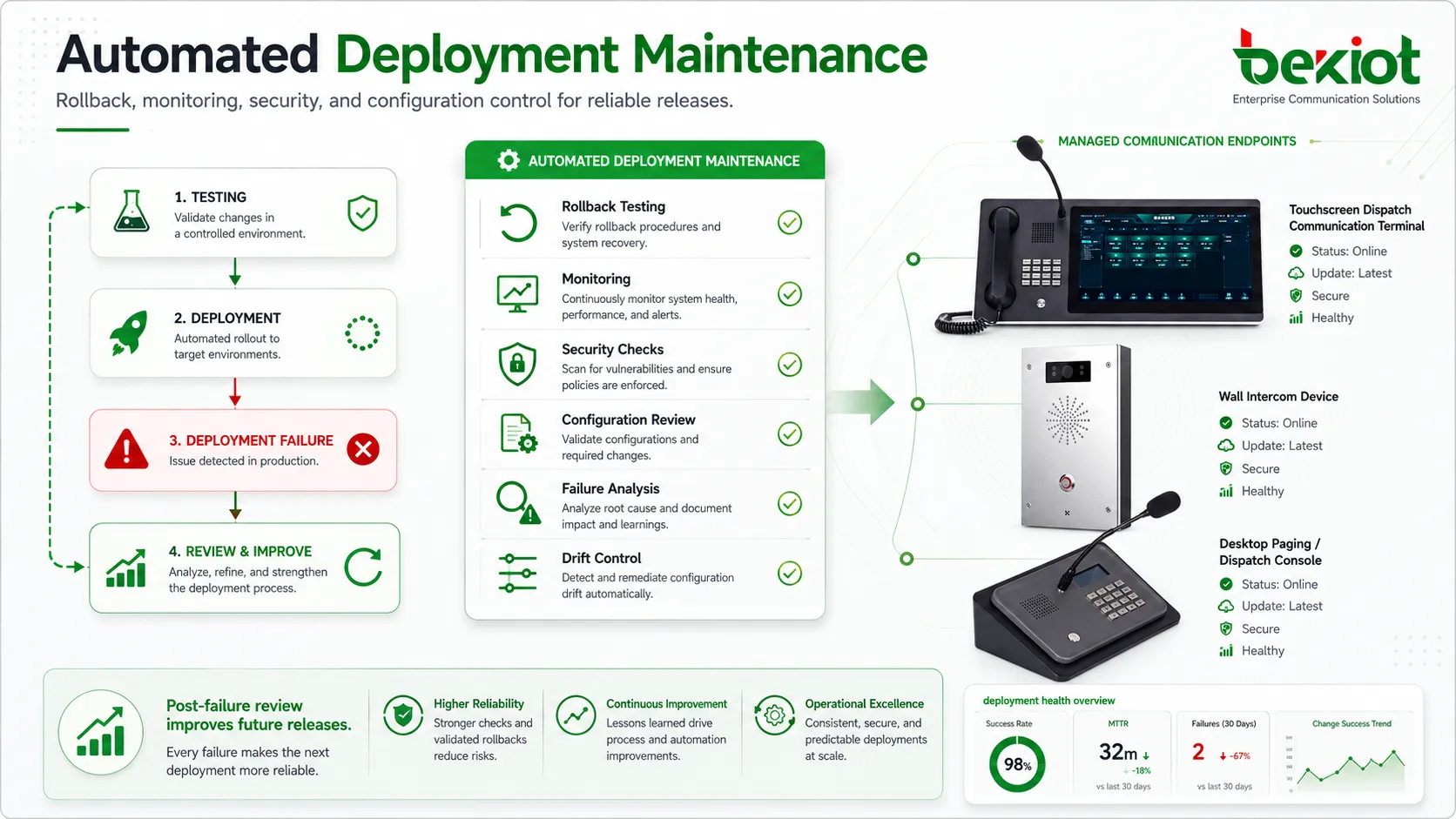
Test Rollback Regularly
Many teams design rollback plans but rarely test them. This is risky because rollback may fail during a real incident if database changes, dependencies, configuration updates, or external integrations are not handled correctly.
Rollback testing should be part of maintenance. Teams should confirm that older versions can be restored, traffic can be redirected, and critical data remains safe.
Monitor Configuration Drift
Configuration drift happens when environments gradually change outside the approved deployment process. Someone may manually edit a server, update a device, change a firewall rule, or modify a package without recording it.
Drift weakens automation because the next deployment may behave unpredictably. Regular configuration checks help detect and correct differences between the expected state and the actual state.
Protect Secrets and Credentials
Deployment systems often require access to servers, cloud accounts, repositories, APIs, certificates, and databases. These credentials must be protected carefully.
Secrets should not be stored directly in scripts or public repositories. Teams should use secure secret managers, role-based access, short-lived credentials, and audit logs where possible.
Review Failed Deployments
A failed deployment should not only be fixed quickly; it should also be reviewed. Teams should identify whether the failure was caused by missing tests, unclear dependencies, environment differences, weak rollback design, or insufficient monitoring.
Post-failure review improves future releases. Over time, this makes the deployment process more reliable.
Applications of Automated Deployment
Software Release Management
Software teams use automated deployment to release new versions of web applications, APIs, mobile backends, desktop software, and SaaS platforms. The process may include building packages, running tests, scanning dependencies, deploying to staging, and then releasing to production.
This helps teams deliver changes faster while maintaining control. It also makes release history easier to review when customers report issues after an update.
Cloud Infrastructure Provisioning
Cloud environments can be deployed through infrastructure-as-code templates. Instead of manually creating servers, networks, databases, storage, and access policies, teams define them in configuration files and deploy them automatically.
This approach improves repeatability. A test environment, disaster recovery environment, or regional deployment can be created more consistently because the infrastructure definition is reusable.
Enterprise Application Updates
Organizations use automated deployment to update internal business systems such as CRM, ERP, helpdesk platforms, collaboration tools, communication systems, and reporting dashboards. Automation helps reduce downtime and ensures that required components are updated in the correct order.
For enterprise applications, deployment planning should consider user schedules, database changes, integration dependencies, and rollback requirements.
Device and Firmware Management
Automated deployment is useful for updating firmware, profiles, certificates, and settings on distributed devices. This may include network equipment, IoT devices, IP phones, cameras, access points, gateways, industrial terminals, or field devices.
Remote deployment reduces the need for manual site visits. It also helps ensure that devices remain updated and aligned with security policies.
Security Patch Deployment
Security teams rely on automated deployment to apply operating system patches, application updates, firewall rules, endpoint policies, and vulnerability fixes. Faster patch deployment reduces exposure after a vulnerability is discovered.
Patch automation should still include testing and staged rollout. Applying patches too quickly without validation may break important services, while delaying too long may increase security risk.
Multi-Site Operations
Organizations with branches, campuses, warehouses, factories, retail locations, or remote offices benefit from automated deployment because the same update can be applied across many locations with controlled timing.
This is useful when standardizing configurations, updating communication systems, applying new security policies, or preparing devices for a new business process.
Common Challenges
Poorly Defined Processes
Automation cannot fix a process that is unclear. If the manual deployment process is inconsistent, undocumented, or unstable, automating it may reproduce the same problems at larger scale.
Before automation, teams should map the deployment flow, identify dependencies, remove unnecessary steps, and define success criteria.
Insufficient Testing
If automated deployment is not supported by proper testing, bad changes can move quickly through the pipeline. Tests should cover functionality, configuration, security, performance, compatibility, and rollback conditions where possible.
Testing does not need to be perfect before automation begins, but it should improve over time as the deployment process becomes more mature.
Over-Automation
Not every step should be fully automatic. Some high-risk changes may require manual approval, maintenance windows, business confirmation, or additional review.
A good deployment strategy uses automation where repeatability and speed matter, while keeping human control where judgment is necessary.
Tool Fragmentation
Large organizations may use many deployment tools across different teams. One team may use a CI/CD platform, another may use scripts, another may use device management software, and another may use cloud-native tools.
Tool fragmentation can make governance difficult. Standard templates, shared policies, integration guidelines, and common reporting can reduce this problem.
Security Considerations
Automated deployment systems often have powerful access. If compromised, they may be used to change production systems, distribute malicious code, expose secrets, or disable security controls. For this reason, deployment platforms must be protected as critical infrastructure.
Access should be limited by role. Developers, operators, security teams, and external contractors should not all have the same deployment privileges. Approval workflows, code review, signed packages, protected branches, and environment restrictions can help reduce risk.
Deployment logs should be monitored for unusual behavior, such as unexpected releases, changes outside approved windows, repeated failures, or access from unusual locations. Security should be built into the deployment process rather than added after release.
The deployment pipeline is a production system. If it can change live services, it must be secured, monitored, and maintained with the same seriousness as the services it deploys.
Best Practices for Automated Deployment
Start with a stable process before adding complex automation. A clear manual process is easier to automate than a chaotic one. Teams should define each step, required input, approval point, success condition, and rollback action.
Use version control for code, configuration, scripts, and infrastructure definitions. This makes deployment changes traceable and allows teams to review differences before release.
Build automated testing into the workflow. Tests should catch common errors before deployment reaches production. Over time, test coverage should expand to include real failure scenarios and integration points.
Use staged rollout for important systems. Deploy first to a small group, then expand after monitoring confirms normal behavior. This reduces the impact of unexpected problems.
Keep humans informed. Automation should not hide what is happening. Dashboards, notifications, release notes, approval records, and status reports help teams stay aligned.
How to Choose an Automated Deployment Approach
The right approach depends on system type, risk level, release frequency, team maturity, and operational environment. A SaaS platform may need continuous deployment, while a hospital system, factory application, or government platform may need scheduled and carefully approved deployment windows.
Small teams may begin with simple scripts and version control hooks. Larger organizations may need full CI/CD platforms, infrastructure-as-code, artifact repositories, environment management, security scanning, and change approval workflows.
Organizations should also consider maintainability. A deployment system that only one engineer understands becomes a risk. The chosen approach should be documented, shared, reviewed, and designed so the team can support it long term.
Limitations of Automated Deployment
Automated deployment improves speed and consistency, but it does not guarantee good releases. Bad requirements, weak testing, poor architecture, hidden dependencies, or unclear rollback plans can still cause problems.
Automation can also increase the scale of mistakes. A manual error might affect one server, while an automated error may affect hundreds of systems if safeguards are missing.
For this reason, automated deployment should be combined with governance, monitoring, approval controls, testing, backup planning, and clear operational ownership.
FAQ
Is automated deployment the same as continuous deployment?
No. Automated deployment means the release process is executed by tools or scripts. Continuous deployment is one specific model where approved changes are automatically released to production after passing checks.
Can automated deployment be used for hardware devices?
Yes. Automated deployment can be used for firmware updates, configuration profiles, certificates, security policies, and device settings across managed hardware devices such as network equipment, IoT endpoints, IP phones, and field terminals.
What should be automated first?
Teams should start with repetitive, low-risk, well-understood steps such as package copying, environment setup, configuration validation, or test execution. High-risk production changes should be automated only after the process is stable and recoverable.
Why do automated deployments fail?
Common reasons include missing dependencies, environment differences, failed tests, incorrect credentials, network problems, bad configuration, database migration errors, or changes made manually outside the deployment process.
Does automation remove the need for maintenance?
No. Automated deployment systems still need maintenance. Scripts, credentials, tools, test cases, dependencies, templates, and rollback procedures must be reviewed and updated regularly.







