


A Virtual Private Network, commonly known as a VPN, is a secure communication technology that creates an encrypted connection between a user, device, branch office, application, or network and another trusted network. It allows data to travel through a protected tunnel, even when the underlying connection uses the public internet or an untrusted network.
VPNs are widely used for remote work, enterprise network access, branch connectivity, cloud access, mobile security, privacy protection, and secure communication between distributed systems. For businesses, a VPN is not only a privacy tool. It is often part of the core network security architecture that controls how users and sites connect to internal applications.
What a VPN Means
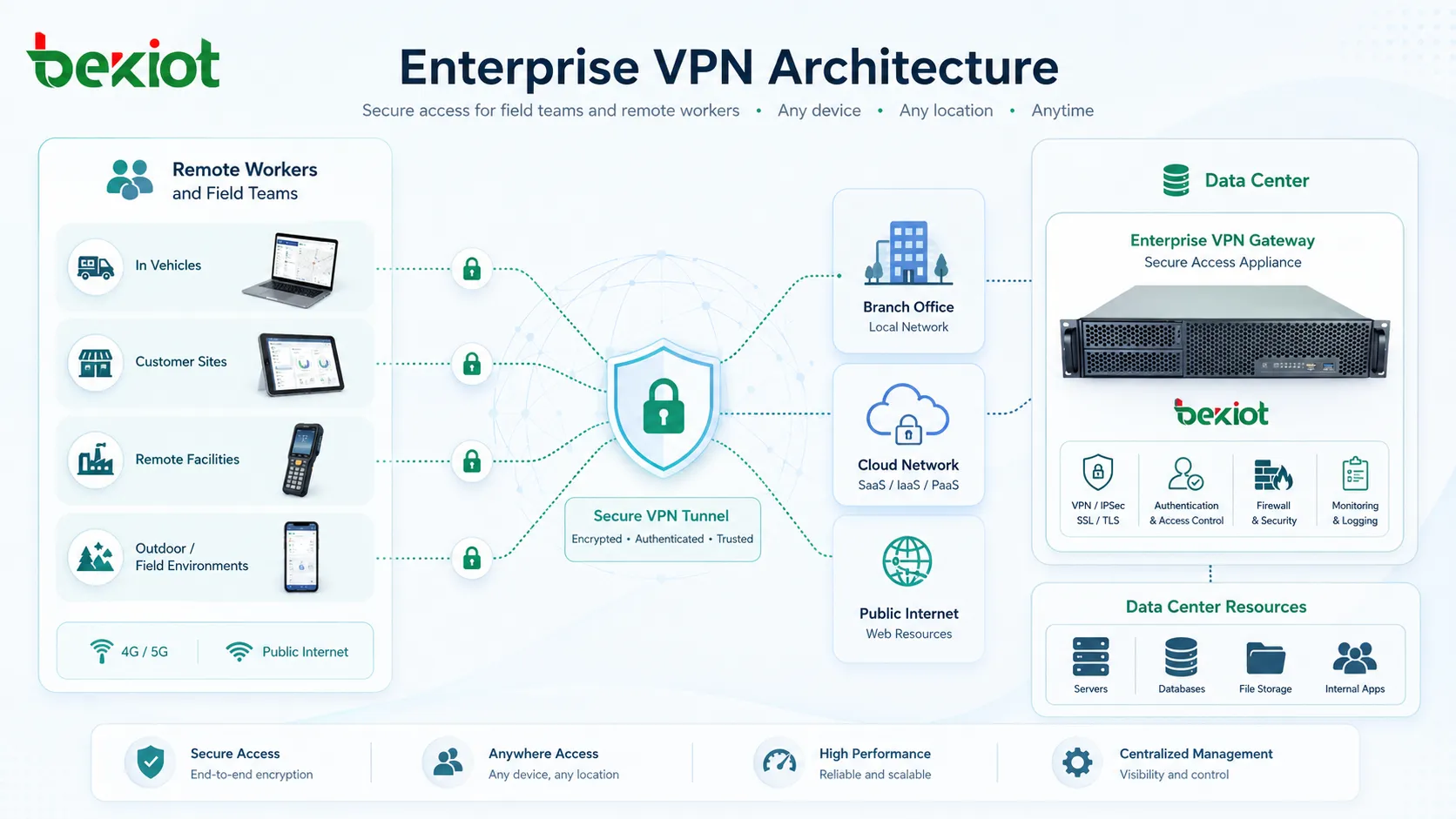
A VPN extends private network access across another network by using encryption, authentication, and tunneling. When a user connects to a VPN, their device creates a secure session with a VPN server or gateway. Traffic sent through that session is encrypted before it leaves the device and decrypted only after it reaches the trusted endpoint.
This protected path is commonly called a VPN tunnel. The tunnel helps prevent unauthorized parties from reading or modifying data while it moves across public Wi-Fi, broadband connections, mobile networks, or carrier networks. It also allows remote users to access internal resources as if they were connected to a trusted network segment.
In enterprise environments, VPN access is usually controlled by user identity, certificates, passwords, multi-factor authentication, device posture, routing policies, and firewall rules. This helps ensure that only approved users and devices can reach sensitive business systems.
How a VPN Works
Authentication
Before a VPN connection is established, the system must verify the identity of the user, device, or network. Authentication may use usernames and passwords, digital certificates, one-time passwords, security keys, or multi-factor authentication.
Strong authentication is important because encryption alone is not enough. A VPN should not only protect the traffic; it must also confirm that the person or device requesting access is allowed to connect.
Tunneling
Tunneling is the process of wrapping original network traffic inside another secure communication layer. The VPN client or gateway encapsulates the traffic, sends it through the tunnel, and then restores it at the destination side.
This allows private traffic to cross public or shared networks while remaining logically separated. Tunneling is especially useful for remote access, site-to-site communication, and secure transport across networks that the organization does not directly control.
Encryption
Encryption converts readable data into protected data that cannot be easily understood by unauthorized parties. When traffic passes through a VPN tunnel, encryption helps protect login information, business documents, internal application traffic, file transfers, and management sessions.
The strength of VPN encryption depends on the protocol, cipher suite, key exchange method, configuration, and endpoint security. Weak or outdated settings can reduce the protection that a VPN is supposed to provide.
Routing and Access Control
After a VPN connection is established, the system decides which traffic should pass through the VPN. In a full-tunnel VPN, most or all user traffic is routed through the VPN. In a split-tunnel VPN, only selected traffic, such as internal application traffic, is routed through the VPN while other internet traffic uses the user’s local connection.
Access control determines what the user can reach after connecting. A well-designed VPN does not automatically give every user access to the entire internal network. Instead, access should be limited based on role, department, device status, location, application need, and security policy.
Common Types of VPN
Remote Access VPN
A remote access VPN allows individual users to connect securely to a business network from outside the office. It is commonly used by remote employees, traveling staff, contractors, IT administrators, and mobile workers.
Users typically install a VPN client on a laptop, tablet, or mobile phone. After authentication, they can access approved internal applications, file servers, management systems, or business platforms. Remote access VPNs became especially important as hybrid work and distributed teams became more common.
Site-to-Site VPN
A site-to-site VPN connects two or more networks together, such as a headquarters network and branch office networks. Instead of requiring each user to start a VPN client, the connection is usually handled by routers, firewalls, or VPN gateways at each site.
This model is useful when offices, factories, retail stores, warehouses, or data centers need stable communication with each other. Site-to-site VPNs can reduce the need for private leased lines while still providing encrypted connectivity across public networks.
Clientless VPN
A clientless VPN allows users to access selected applications through a web browser without installing a full VPN client. This approach is often used for limited access to web applications, portals, email systems, or internal dashboards.
Clientless VPNs can be convenient for contractors, temporary users, or unmanaged devices, but they are usually more limited than full VPN clients. They should be configured carefully to avoid exposing more resources than necessary.
Mobile VPN
A mobile VPN is designed for users or devices that move between networks, such as cellular, Wi-Fi, and private wireless environments. It can maintain a session even when the device changes its network connection.
This is useful for field service teams, public safety users, logistics workers, healthcare mobility, and transportation operations where stable access is needed while users move across coverage areas.
Popular VPN Protocols
VPN protocols define how the secure tunnel is built, authenticated, encrypted, and maintained. Different protocols offer different advantages in compatibility, speed, security, and deployment complexity.
| VPN Protocol | Main Use | Typical Advantage |
|---|---|---|
| IPsec | Remote access and site-to-site VPNs | Widely supported by firewalls, routers, and enterprise gateways. |
| SSL/TLS VPN | Remote user access and clientless access | Works well for application access and browser-based connectivity. |
| WireGuard | Modern VPN deployments | Lightweight design, efficient performance, and simpler configuration model. |
| OpenVPN | Flexible remote access | Open-source ecosystem, strong configurability, and broad platform support. |
| L2TP with IPsec | Legacy or compatibility scenarios | Supported by many older systems, though often replaced by newer options. |
The best protocol depends on the organization’s security requirements, endpoint support, firewall environment, performance needs, and management capabilities. For enterprise use, protocol selection should be combined with strong authentication, logging, access control, and regular security review.
Benefits of Using a VPN
Secures Data in Transit
A VPN protects data while it travels between the user and the trusted network. This is especially important when employees connect from hotels, airports, coffee shops, home networks, mobile hotspots, or other environments outside corporate control.
Encrypted VPN traffic helps reduce the risk of eavesdropping, session theft, credential exposure, and unauthorized interception. This makes VPNs useful for business communication, administrative access, and sensitive application use.
Supports Remote Work
Remote employees often need access to internal tools that are not directly exposed to the internet. A VPN provides a controlled way to reach these systems without making every internal application publicly accessible.
This helps organizations support hybrid work while keeping internal applications behind security gateways. It also gives IT teams more control over who connects, from where, and under what conditions.
Connects Branch Locations
Site-to-site VPNs allow distributed offices and facilities to communicate securely. A company can connect headquarters, branch offices, warehouses, clinics, schools, factories, or data centers through encrypted network paths.
This can be more flexible and cost-effective than traditional private circuits, especially when organizations need to connect many locations or support temporary sites.
Improves Network Privacy
A VPN can hide traffic content from local network observers by encrypting communication between the user and the VPN endpoint. This is useful on shared networks where the user does not fully trust the access environment.
However, privacy depends on the VPN provider or enterprise gateway. Traffic becomes visible at the VPN exit point, so organizations should choose trusted services and apply proper logging and governance policies.
Enables Secure Administration
IT teams often use VPNs to access servers, network devices, security systems, cloud management interfaces, and internal tools. A VPN can restrict administrative access to authenticated users instead of exposing management ports directly to the internet.
For high-risk administration, VPN access should be combined with multi-factor authentication, privileged access management, logging, and limited network permissions.
Business Applications of VPN
Enterprise Remote Access
Remote access remains one of the most common VPN applications. Employees use VPN clients to connect to internal resources such as file servers, intranet portals, ERP systems, development environments, databases, or support tools.
The design should match user roles. A finance employee may need accounting systems, while an engineer may need development servers. Giving every remote user broad network access creates unnecessary risk.
Secure Access for Contractors and Partners
Organizations often need to give temporary access to vendors, consultants, service providers, or business partners. A VPN can create a controlled connection path with limited permissions and defined expiration rules.
Partner access should be isolated from core internal networks whenever possible. It should also be monitored, logged, and removed when the project or service contract ends.
Multi-Site Business Connectivity
VPNs help connect offices and facilities that need shared access to applications, voice systems, databases, security platforms, or operational systems. Site-to-site VPNs can make these locations behave like parts of one extended private network.
For larger environments, VPNs may be combined with SD-WAN, routing policies, cloud connectivity, and traffic prioritization to improve reliability and application performance.
Cloud and Hybrid Infrastructure
Many organizations use VPNs to connect on-premises networks with cloud environments. A cloud VPN can secure communication between corporate data centers, cloud virtual networks, hosted applications, and administrative services.
This is useful during cloud migration, hybrid application deployment, disaster recovery planning, and secure access to private cloud resources.
Mobile and Field Operations
Field teams may use tablets, laptops, handheld terminals, or mobile phones to access enterprise systems from vehicles, customer sites, remote facilities, or outdoor environments. A VPN helps protect these connections when using mobile networks or public internet access.
Mobile VPN design should consider unstable connectivity, battery usage, roaming, device security, and application timeout behavior. In some cases, always-on VPN policies may be used to reduce user mistakes.
VPN Security Considerations
Authentication Must Be Strong
A VPN can become a major security risk if attackers obtain valid credentials. For this reason, organizations should use multi-factor authentication, certificate-based authentication, strong password policies, and account lockout controls.
Inactive accounts should be disabled, contractor access should expire automatically, and administrative VPN access should be separated from general user access.
Access Should Be Limited
Connecting to a VPN should not mean unlimited access to the entire network. Users should only reach the applications, servers, and segments required for their work. This follows the principle of least privilege.
Network segmentation, firewall policies, identity-aware access, and application-level controls can reduce the impact if a VPN account or endpoint is compromised.
Endpoints Need Protection
A secure tunnel does not guarantee that the user’s device is secure. If the endpoint has malware, outdated software, weak local security, or stolen credentials, the VPN may provide a path into sensitive systems.
Enterprises should combine VPN access with endpoint protection, patch management, disk encryption, device compliance checks, and monitoring. Some organizations block VPN access from unmanaged or non-compliant devices.
Logging and Monitoring Are Essential
VPN systems should log connection time, user identity, device information, source location, assigned IP address, session duration, and unusual access behavior. These logs help detect suspicious activity and support incident investigation.
Monitoring can also reveal operational problems such as failed logins, overloaded gateways, repeated disconnections, unusual traffic volumes, or access attempts from unexpected regions.
VPN Limitations
A VPN improves secure connectivity, but it is not a complete cybersecurity solution. It does not automatically protect against phishing, malware, weak passwords, unsafe downloads, compromised endpoints, or poor application security.
Performance can also be affected. Encryption, routing distance, gateway capacity, network congestion, and full-tunnel policies may add latency or reduce throughput. For voice, video, and real-time applications, VPN design should consider quality of service and routing efficiency.
Another limitation is over-trust. Traditional VPNs may place users inside a broad trusted network once connected. Modern security architectures often reduce this risk by using zero trust principles, application-level access, continuous verification, and tighter segmentation.
A VPN protects the path between endpoints, but the endpoints, identities, applications, and access policies still need to be secured.
VPN Compared with Zero Trust Access
VPN and zero trust network access are often discussed together, but they are not identical. A VPN usually creates a secure network tunnel. Zero trust access focuses on granting access to specific applications after verifying identity, device status, context, and policy.
Traditional VPNs are useful for network-level connectivity, legacy systems, site-to-site links, and administrative access. Zero trust access may be better for reducing broad network exposure, especially when users need only a few business applications.
Many organizations use both approaches. A VPN may remain important for infrastructure connectivity, while zero trust access is used for SaaS, internal web applications, and role-based application access.
Best Practices for VPN Deployment
Organizations should begin by defining why the VPN is needed. Remote employee access, branch connectivity, cloud access, vendor support, and administrative access may require different VPN designs. A single broad VPN profile for everyone is rarely the best approach.
Strong authentication should be mandatory. Multi-factor authentication, certificates, device checks, and user role validation can reduce unauthorized access risk. Default accounts and shared VPN credentials should be avoided.
VPN access should be segmented. Users should only reach the systems required for their tasks. Sensitive areas such as finance systems, production servers, security management tools, and industrial control networks should have stricter access rules.
Performance should also be tested. Administrators should review bandwidth, latency, gateway capacity, DNS behavior, split-tunnel rules, and application compatibility. A secure VPN that performs poorly may encourage users to bypass approved access methods.
How to Choose a VPN Solution
When choosing a VPN solution, organizations should consider user scale, authentication options, supported protocols, endpoint compatibility, logging features, management interface, cloud integration, high availability, and policy control.
For a small business, simple remote access and centralized user management may be enough. For a larger enterprise, the VPN solution may need redundant gateways, role-based access, certificate integration, device compliance checks, SIEM integration, and detailed reporting.
Organizations should also evaluate long-term security strategy. If the goal is to protect many remote users and specific applications, VPN may need to be combined with zero trust access, endpoint management, identity governance, and cloud security controls.
FAQ
Does a VPN make internet activity completely anonymous?
No. A VPN can hide traffic content from local networks and change the visible exit point, but it does not make a user completely anonymous. Websites, accounts, cookies, device fingerprints, payment records, and VPN provider logs may still identify activity.
Is split tunneling safe?
Split tunneling can be safe when it is carefully controlled. It reduces unnecessary traffic through the VPN and may improve performance, but it must be configured so that sensitive business traffic still uses the protected tunnel.
Can a VPN protect against malware?
A VPN does not directly remove or block malware. It protects network traffic in transit, but endpoint security tools, patching, safe browsing practices, email protection, and application controls are still needed to reduce malware risk.
Why does a VPN sometimes slow down the network?
A VPN may add encryption overhead and route traffic through a gateway that is farther away or overloaded. Network congestion, full-tunnel routing, weak hardware, poor Wi-Fi, or limited upload bandwidth can also reduce performance.
Should every remote worker use a VPN?
Not always. Remote workers should use a VPN when they need secure access to private internal resources. For cloud applications with strong identity protection and zero trust controls, a VPN may not be necessary for every workflow.







