


Self-diagnostics is the ability of a device, machine, software platform, communication system, vehicle, medical instrument, industrial controller, or electronic product to check its own operating condition and report problems before or after a failure occurs. Instead of waiting for users to notice that something is wrong, a self-diagnostic system continuously or periodically evaluates key functions, sensors, components, settings, and performance indicators.
In modern connected environments, self-diagnostics is becoming more important because many systems are distributed, remote, automated, or mission-critical. A device may be installed on a rooftop, inside a factory, in a remote cabinet, inside a vehicle, across a campus, or in a cloud-connected network. If it can detect problems by itself and report them clearly, maintenance teams can respond faster and avoid unnecessary downtime.
What Self-Diagnostics Means
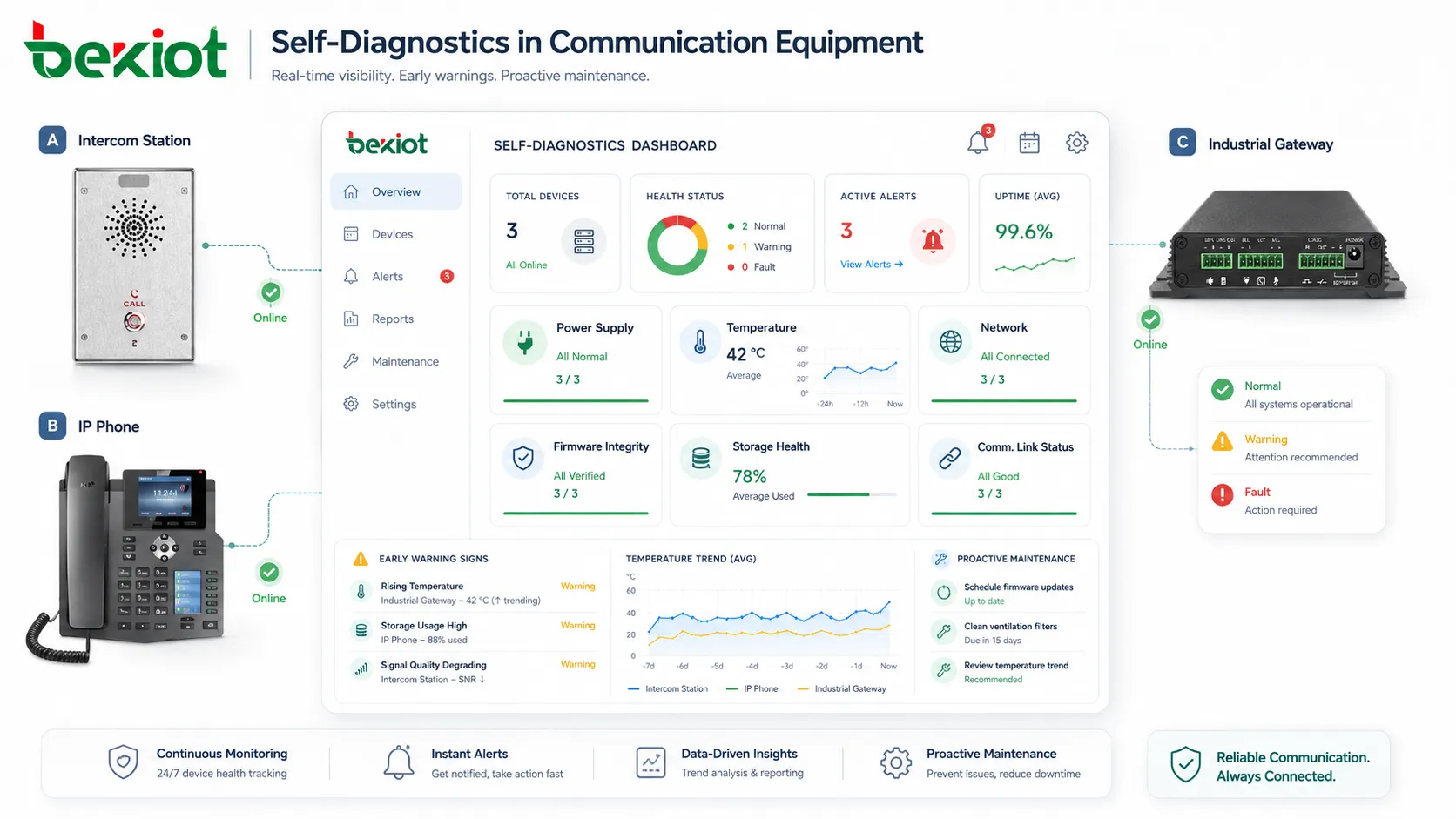
Self-diagnostics means that a system has built-in mechanisms to observe its own health. These mechanisms may check hardware status, software services, power supply, sensor accuracy, network connectivity, memory usage, temperature, battery condition, firmware integrity, storage health, communication links, or security state.
The purpose is not only to show an error after a system fails. Good self-diagnostics can also identify early warning signs, such as rising temperature, unstable voltage, repeated connection drops, abnormal sensor readings, memory pressure, or configuration mismatch. These signals help teams fix small issues before they turn into serious failures.
Self-diagnostics may appear as a local warning light, device display message, alarm code, web dashboard, mobile notification, SNMP trap, system log, maintenance report, or cloud platform alert. The format depends on the type of equipment and the operating environment.
How Self-Diagnostics Works
Internal Monitoring
A self-diagnostic system starts by monitoring internal conditions. It may read data from built-in sensors, operating system counters, service status, hardware controllers, communication modules, firmware checks, or application logs.
For example, a network device may check link status, CPU usage, packet errors, temperature, and power supply condition. A medical device may check sensor calibration, battery status, probe connection, and internal software state. An industrial machine may check motor current, vibration, temperature, safety input, and controller response.
Baseline Comparison
After collecting data, the system compares current values with expected operating ranges. These ranges may be predefined by the manufacturer, configured by administrators, or adjusted through historical learning.
If a value remains within the normal range, the device may continue operating without warning. If a value approaches a risk threshold, the system may generate a warning. If a value exceeds a critical limit, the system may trigger an alarm, enter a safe mode, stop a function, or request immediate maintenance.
Error Detection and Classification
Self-diagnostics should not only say that something is wrong. It should help classify the problem. A useful system can distinguish between a power fault, communication failure, sensor error, firmware issue, overheating condition, storage problem, unauthorized configuration change, or mechanical abnormality.
Clear classification helps technicians avoid guesswork. Instead of checking every possible cause, they can start with the most likely fault area and reduce repair time.
Reporting and Notification
Once a problem is detected, the system reports it through the appropriate channel. Simple devices may show an LED status or error code. More advanced systems may send alerts to monitoring platforms, maintenance dashboards, email, SMS, mobile apps, or centralized management software.
Good reporting should include the fault type, device identity, location, timestamp, severity level, current status, possible cause, and suggested action. This information helps teams decide whether the issue requires immediate response or routine maintenance.
Core Features of Self-Diagnostics
Health Status Monitoring
Health monitoring gives users and administrators a quick understanding of whether a system is operating normally. It may use status indicators such as normal, warning, degraded, fault, offline, maintenance required, or critical alarm.
This feature is useful because users do not always need raw technical data. In many cases, they need a clear answer: is the device healthy, does it need attention, or should it be removed from service?
Fault Code Generation
Fault codes provide structured information about detected problems. A code may represent low voltage, communication timeout, fan failure, memory error, sensor disconnection, calibration failure, temperature alarm, or software exception.
Fault codes are valuable for maintenance because they can be documented, searched, translated into repair instructions, and used in service tickets. They also help support teams communicate more accurately with field technicians.
Automatic Testing
Many systems perform automatic tests during startup, scheduled intervals, or specific operating conditions. A power-on self-test may check memory, processor, storage, display, input modules, communication ports, and basic firmware integrity before the device begins normal operation.
Scheduled tests can verify backup batteries, redundant links, sensors, relays, speakers, alarms, ports, or application services. This helps confirm that standby functions are ready before they are needed.
Predictive Warning
Advanced self-diagnostics can identify trends instead of only detecting hard failures. For example, a battery may still work but show declining capacity. A fan may still rotate but run slower than expected. A device may stay online but show repeated network reconnects.
Predictive warnings help maintenance teams plan replacement or repair during a controlled maintenance window instead of reacting to sudden failure during operation.
Event Logging
Self-diagnostic systems often store event logs. These logs may include warnings, alarms, test results, resets, configuration changes, communication errors, temperature history, and user actions.
Event logs are important for troubleshooting. They help technicians understand whether a fault happened once, repeated over time, appeared after a software update, or occurred together with other system changes.
The real value of self-diagnostics is not only detecting failure, but reducing uncertainty when people need to maintain, repair, or trust a system.
Technical Features in Modern Systems
Remote Health Reporting
Remote reporting allows devices to send diagnostic status to a central platform. This is especially useful when equipment is distributed across multiple buildings, cities, vehicles, sites, or customer locations.
With remote reporting, support teams do not need to visit every device to check basic status. They can review online state, fault history, firmware version, configuration status, and performance data from a central dashboard.
Threshold-Based Alerts
Threshold-based alerts are triggered when a measured value reaches a predefined level. Examples include high temperature, low battery, high memory usage, weak signal, unstable voltage, excessive packet loss, or full storage.
Thresholds should be configured carefully. If thresholds are too sensitive, the system may produce too many false alarms. If they are too relaxed, real problems may be detected too late.
Built-In Test Functions
Built-in test functions allow users or administrators to run diagnostic checks manually. A technician may run a speaker test, network test, sensor test, relay test, storage test, camera test, battery test, or connectivity test during installation or maintenance.
Manual test functions are useful after repair, replacement, firmware update, configuration change, or site commissioning. They provide confidence that the device is ready for service.
Safe Mode and Fault Isolation
Some systems can isolate a faulty function while keeping other functions active. For example, a device may disable a failed module, restart a service, switch to backup power, use a redundant network path, or enter a safe operating mode.
This is important for systems where complete shutdown would create additional risk. Fault isolation helps maintain partial operation while preventing the fault from spreading or causing unsafe behavior.
Diagnostic Data Export
Exporting diagnostic data helps maintenance teams, engineers, vendors, or support centers analyze problems in more detail. Export files may include logs, status snapshots, configuration data, performance history, error codes, and firmware information.
Diagnostic exports should be handled securely because they may contain network information, device identity, user data, or operational details.
Benefits of Self-Diagnostics
Reduces Downtime
Self-diagnostics helps detect problems earlier and identify causes faster. When a system reports the fault clearly, maintenance teams can respond with the right tools, spare parts, or configuration changes.
This reduces downtime because technicians spend less time searching for the problem. In many cases, they can prepare before arriving on site.
Improves Maintenance Efficiency
Traditional maintenance often depends on routine inspection or user complaints. Self-diagnostics adds real system feedback to the process. Teams can prioritize work based on actual device condition instead of only fixed schedules.
This helps reduce unnecessary site visits while still supporting preventive maintenance. Devices that are healthy can remain in service, while devices showing warning signs can be checked sooner.
Supports Safer Operation
In safety-related systems, self-diagnostics can detect failures that might otherwise remain hidden. For example, a backup battery, alarm output, sensor, relay, communication link, or emergency function may not be used every day, but it must work when needed.
Regular diagnostic checks help confirm that these functions remain available. This is especially important in industrial safety, healthcare, transportation, building systems, and emergency communication environments.
Improves User Confidence
Users trust systems more when they can see clear status information. A device that shows healthy status, test results, and meaningful alerts feels more reliable than a device that gives no feedback until it fails.
For customer-facing or operator-facing systems, self-diagnostics also reduces confusion. Users can understand whether a problem is caused by the device, the network, power, configuration, or another part of the system.
Enables Data-Driven Lifecycle Planning
Diagnostic records help organizations plan replacement, upgrades, and spare parts more accurately. If a model shows frequent power failures, if batteries degrade after a certain period, or if firmware errors appear across many devices, the organization can adjust lifecycle planning.
This turns maintenance data into long-term operational intelligence.
Applications of Self-Diagnostics
Enterprise IT and Network Devices
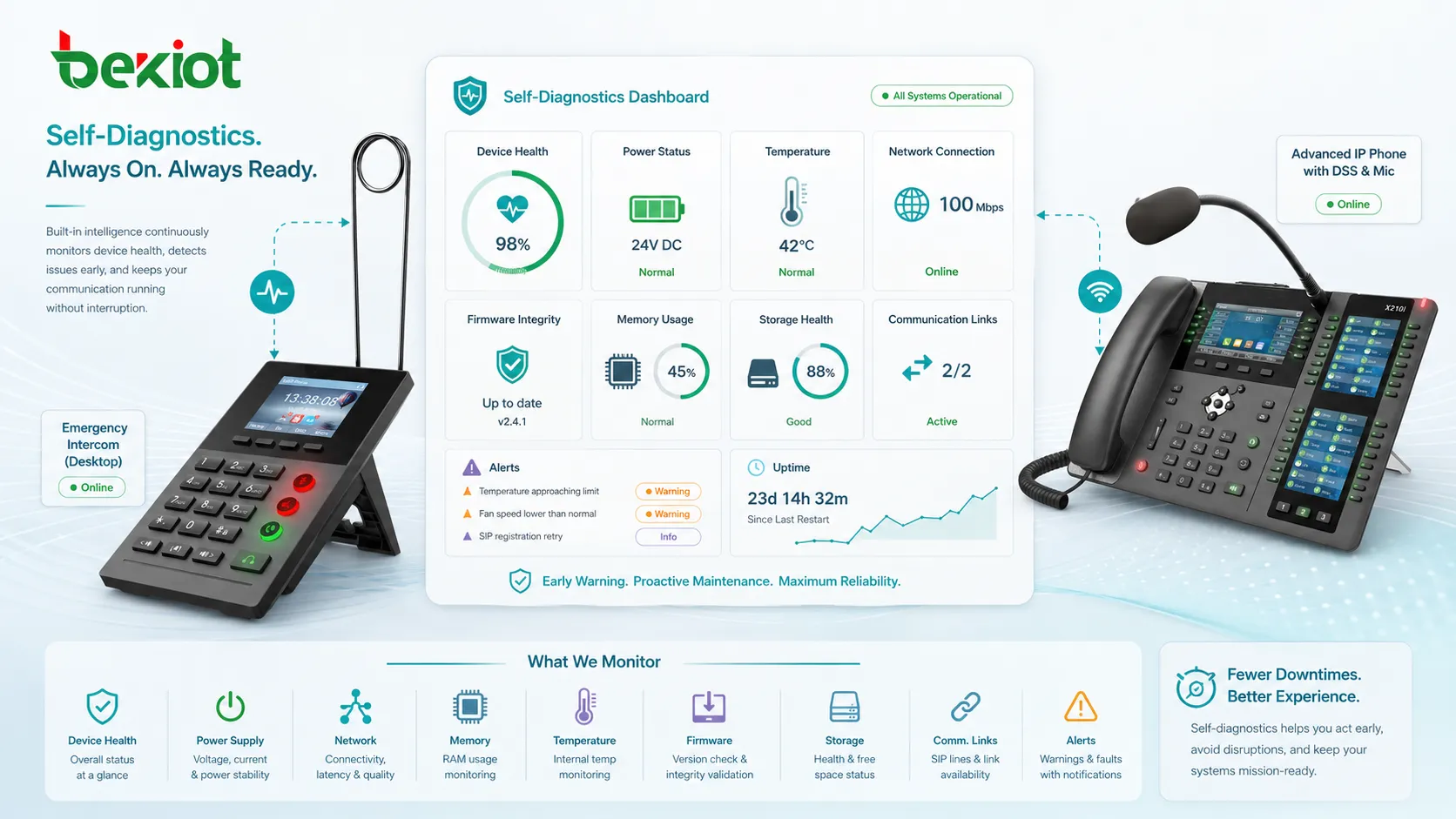
Servers, routers, switches, firewalls, wireless access points, storage systems, and communication platforms use self-diagnostics to monitor uptime, temperature, CPU usage, memory, storage, fan status, link state, and service health.
For IT teams, diagnostic data helps identify failing hardware, overloaded resources, unstable links, firmware problems, and configuration errors before they affect large numbers of users.
Industrial Equipment
Factories, utilities, mines, logistics centers, and process plants use self-diagnostics in controllers, sensors, drives, motors, robots, safety systems, meters, and monitoring equipment. These systems may check vibration, pressure, current, temperature, signal quality, and control response.
In industrial environments, early fault detection is valuable because downtime can stop production, affect safety, or cause expensive delays. Diagnostic functions help maintenance teams schedule repairs more intelligently.
Healthcare Devices
Medical equipment may use self-diagnostics to check sensor connections, calibration status, battery condition, internal software, alarm functions, display output, and communication links. Reliable diagnostic feedback is important because healthcare devices must operate safely and consistently.
Clinical teams and biomedical engineers can use diagnostic information to decide whether equipment is ready for patient use, requires maintenance, or should be removed from service.
Vehicles and Transportation Systems
Vehicles use onboard diagnostics to monitor engine behavior, emissions systems, battery condition, sensors, braking systems, electronic control units, and communication networks. Transportation infrastructure may also use self-diagnostics in signaling, ticketing, communication, surveillance, and safety systems.
Diagnostic data helps maintenance teams identify faults earlier, reduce service interruptions, and improve fleet reliability.
Smart Buildings and Facility Systems
Building systems such as HVAC, elevators, access control, fire alarms, lighting control, energy meters, surveillance systems, and emergency equipment can use self-diagnostics to monitor operating state and detect failures.
Facility teams benefit from centralized health information because problems can be found before occupants complain or before critical functions fail.
Consumer Electronics and Connected Devices
Smartphones, laptops, printers, smart appliances, cameras, and IoT devices often include diagnostic tools that check battery health, storage, connectivity, sensors, firmware, and application status.
For users, these tools make support easier. Instead of guessing what is wrong, they can run a diagnostic check, receive guidance, or share a report with technical support.
Common Problems Self-Diagnostics Can Detect
Self-diagnostics can detect hardware failures such as power supply faults, overheating, fan failure, sensor disconnection, memory errors, storage wear, battery degradation, and port failure. It can also detect software issues such as service crashes, firmware mismatch, corrupted configuration, failed updates, or repeated restarts.
In networked systems, diagnostic functions can detect link failure, IP conflict, packet loss, DNS problems, weak wireless signal, registration failure, certificate expiration, or unreachable servers. In mechanical systems, they may detect vibration abnormalities, pressure changes, motor overload, lubrication problems, or abnormal operating cycles.
The best diagnostic systems explain not only what failed, but also what the operator should check next.
Implementation Considerations
Clear Fault Messages
Fault messages should be understandable. A code alone may be useful for engineers, but operators often need plain-language guidance. A good diagnostic message should describe the problem, severity, affected function, and recommended action.
For example, “Error 42” is less useful than “Backup battery voltage is low. Replace battery within the next maintenance cycle.”
False Alarm Control
If a system reports too many false alarms, users may begin to ignore alerts. Diagnostic thresholds should be tuned to the real environment. Some warnings may require filtering, confirmation, or delay before escalation.
False alarm control is especially important in large deployments where hundreds or thousands of devices report status to a central platform.
Security of Diagnostic Access
Diagnostic interfaces can expose sensitive information. They may show network addresses, firmware versions, configuration details, user activity, system logs, or fault history. Access should be protected with authentication and role-based permissions.
Remote diagnostic functions should also be secured. Unauthorized access to diagnostic tools may allow attackers to gather intelligence, change settings, disable functions, or trigger unnecessary maintenance actions.
Integration with Maintenance Workflows
Diagnostic alerts are more useful when they connect to maintenance workflows. An alert may create a service ticket, notify the responsible team, attach logs, identify spare parts, and track resolution status.
Without workflow integration, alerts may be seen but not acted on. A strong process connects detection with responsibility and follow-up.
Best Practices for Using Self-Diagnostics
Organizations should define which diagnostic events are informational, which are warnings, and which are critical alarms. Not every event requires immediate action. Clear severity levels prevent alert fatigue and help teams prioritize response.
Devices should be tested during installation and after major changes. A diagnostic function that is not verified may create a false sense of security. Commissioning tests should confirm that sensors, alerts, logs, and remote reporting work as expected.
Diagnostic logs should be reviewed regularly, not only after failure. Trend analysis can reveal repeated warnings, unstable devices, environmental problems, or maintenance gaps that are easy to miss in daily operations.
Teams should also keep firmware, diagnostic rules, and monitoring templates updated. As equipment ages or operating conditions change, diagnostic thresholds may need adjustment.
Self-diagnostics should not replace maintenance teams; it should give them better information, earlier warnings, and clearer direction.
Limitations of Self-Diagnostics
Self-diagnostics cannot detect every possible problem. Some failures happen suddenly, some sensors may fail silently, and some issues involve external conditions that the device cannot fully measure. Human inspection, preventive maintenance, and system-level monitoring are still important.
A diagnostic system may also be wrong if sensors are inaccurate, thresholds are poorly configured, firmware has bugs, or the device cannot see the real cause of the problem. For example, a network device may report connection failure, but the real cause may be a damaged cable, upstream switch issue, firewall rule, or service outage.
Self-diagnostics should therefore be treated as a decision-support tool, not as the only source of truth. The best results come from combining diagnostic data with logs, user feedback, environmental checks, and maintenance experience.
How to Evaluate a Self-Diagnostic System
When evaluating self-diagnostics, organizations should look at detection accuracy, alert clarity, remote reporting ability, event history, integration options, test functions, and ease of maintenance. A system that detects problems but reports them in a confusing way may still slow down troubleshooting.
It is also important to test how the system behaves during real fault conditions. Disconnect a sensor, simulate network loss, remove backup power, or trigger a controlled alarm if safe to do so. This confirms whether the diagnostic function reports the expected fault.
For large deployments, central visibility matters. A device-level diagnostic function is useful, but a management platform that shows many devices together provides stronger operational value.
FAQ
Is self-diagnostics the same as monitoring?
No. Monitoring usually observes system status from outside or from a central platform. Self-diagnostics is built into the device or system itself and checks internal conditions. In many environments, both are used together.
Can self-diagnostics repair problems automatically?
Sometimes. Some systems can restart services, switch to backup components, clear temporary errors, or enter safe mode. However, many faults still require human maintenance, part replacement, configuration correction, or deeper troubleshooting.
Why are diagnostic logs important?
Diagnostic logs show what happened before, during, and after a problem. They help technicians identify patterns, confirm fault timing, compare repeated events, and understand whether a problem is isolated or recurring.
Can self-diagnostics prevent all downtime?
No. It can reduce downtime by detecting problems earlier and guiding maintenance, but it cannot prevent every sudden failure, external outage, human error, or environmental incident.
What makes a self-diagnostic alert useful?
A useful alert should identify the affected device, describe the problem clearly, show severity, include time and location, and suggest the next action. Alerts that are vague or too frequent are less helpful.







